
AI assistants are no longer just about answering questions. With its latest update, Claude makes a clear statement about where it believes the future of AI is headed. Not towards knowing more about you, but towards doing more with you.
Anthropic’s newest update introduces interactive tools inside Claude, allowing users to work directly with apps like Slack, Figma, Canva, Notion, Asana and Jira without leaving the chat interface. Instead of telling the AI what to do and then switching apps to execute it, users can now plan, edit, design and update real work artefacts inside Claude itself.
At a glance, it may sound similar to Google’s Personal Intelligence, which also promises more personalised AI experiences. But dig a little deeper, and the differences become clear.
What Claude’s new interactive tools actually do
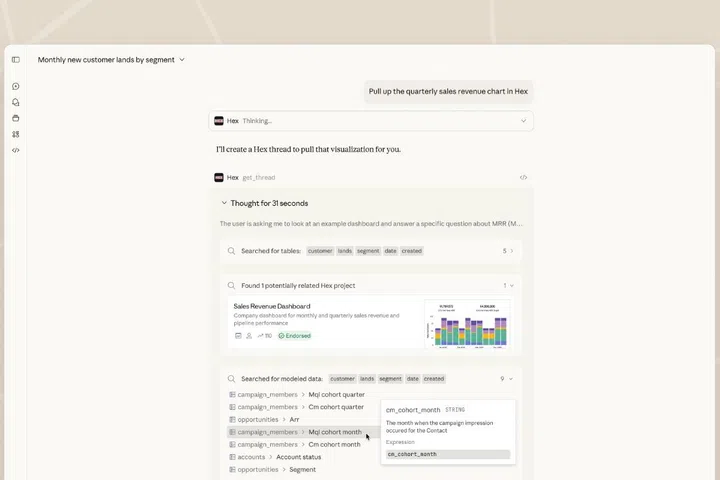
How it looks when working within Claude
Claude’s update transforms the chatbot into something closer to a live workspace. When a user connects supported tools, Claude can read, create and modify content directly in those apps.
That means you can ask Claude to rewrite a Slack announcement and see it appear in context, update a project timeline in Asana, tweak a Figma frame, or generate a Canva slide deck without exporting drafts back and forth. The AI is not just suggesting what to do. It is acting inside the workflow.
Technically, this relies on secure app integrations and permission-based access, rather than scraping personal data. Claude only interacts with tools the user explicitly connects, and actions remain visible and reversible. Anthropic positions this as a way to reduce context switching, which is a major productivity drain for knowledge workers.

The underlying idea is simple. If work already lives in tools, the AI should live there too. Here is some of what you can now do directly in Claude:
- Amplitude: Build analytics charts, then explore trends and adjust parameters interactively to uncover hidden insights.
- Asana: Turn chats into projects, tasks, and timelines your team can see and execute in Asana.
- Box: Search for files, preview documents inline, then extract insights and ask questions about your content.
- Canva: Create presentation outlines, then customise branding and design in real-time to produce client-ready decks.
- Figma: Prompt to turn text and images into flow charts, Gantt charts, or other visual diagrams in FigJam.
- monday.com: Manage your work, run projects, update boards, smartly assign tasks, and visualise progress with insights.
- Slack (from Salesforce): Search and retrieve Slack conversations for context, generate message drafts, format them your way, and review before you post.
How this approach differs from Google’s Personal Intelligence

Google’s Personal Intelligence, introduced through its new AI Mode in Search, takes a very different approach. Rather than focusing on execution, Google focuses on contextual understanding. Both approaches share a common goal. They want AI to feel less generic and more useful. But they answer that challenge in different ways. Google believes usefulness comes from deep personalisation. Claude believes it comes from direct action.
Personal Intelligence pulls signals from services like Gmail, Google Photos and Search history to tailor responses. Ask about a holiday, and it might reference your flight confirmation. Ask for gift ideas, and it might recall past purchases or photos. The AI aims to feel more like it knows you.
Claude, by contrast, does not try to infer personal context automatically. It does not scan emails or photos unless they are explicitly provided. Instead, it focuses on functional integration, helping users complete tasks inside tools they already use.
This difference also affects how users experience trust and control. Google emphasises opt-in controls and transparency around personal data usage. Claude emphasises visibility and intent, where every action is explicitly requested and happens in front of the user. Neither approach is objectively better. They simply serve different needs.
Claude’s interactive tools clearly target knowledge workers, designers, product managers, developers and operations teams. Anyone whose day involves jumping between chat, documents, project boards and design tools will see the appeal immediately.
It is especially compelling for teams that already collaborate heavily in tools like Slack and Notion. Instead of pasting instructions into chat and hoping someone executes them correctly, Claude can help draft, update and refine content directly.
Google’s Personal Intelligence, meanwhile, speaks more to everyday consumers. It improves search, planning and recommendations by making AI more aware of personal context, rather than turning it into a work engine.
Taken together, these updates reveal something important about where AI is heading.
AI is no longer just about better answers. It is about better alignment with how people live and work. Some companies are betting that knowing the user deeply is the key. Others believe the breakthrough comes from embedding AI into the tools that already define daily workflows.