
Dropbox 2.0 Brings Drop-down Menus
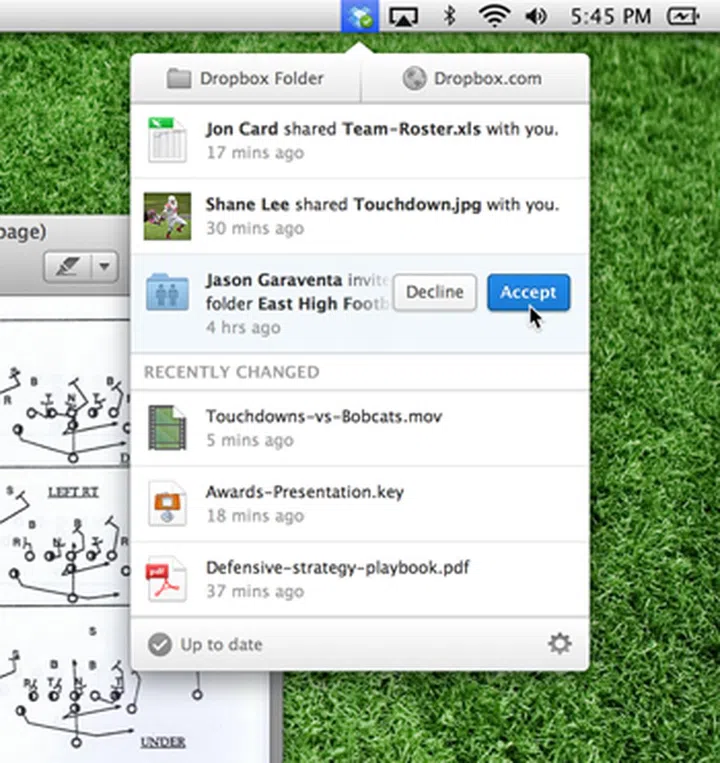
With the new Dropbox 2.0 version that has been made available to users, a number of new UI features are available for the desktop application version. One of the most significant changes is the addition of drop-down menus allowing you to accept or reject sharing requests from the app itself.

Source: Dropbox
With the introduction of Dropbox version 2.0, the UI for the desktop application has been given a makeover. The most noticeable of changes is the addition of a drop-down menu. This drop-down menu now allows users to accept or reject sharing requests instantly. Previously users would have to navigate over to the Dropbox website to perform the same function.
In addition, the interface also displays a list of recently updated files across all your Dropbox enabled devices. Syncing of settings is also possible now from the desktop application. You can also choose to share files or folders form the desktop application, but clicking the relevant option will still take you to the Dropbox website where you will have to conclude your sharing business. Still, it saves the few steps of having to open up your browser and navigating to the site on your own.
Dropbox version 2.0 is available for both the Mac and the Windows.
Source: Dropbox Blog via Arstechnica
Our articles may contain affiliate links. If you buy through these links, we may earn a small commission.