
Intel Santa Rosa - The Future of Notebooks Unveiled
The curtain has been drawn back on Santa Rosa, Intel's fourth generation Centrino mobile platform. Between its new 800MHz FSB, notebook overclocking technologies, HD acceleration, HDMI support and even more power savings, you'll find out all you need to know about Santa Rosa right here. Plus we even have early benchmark numbers and tests.
Generation Four
In the second half of 2006, Intel launched their long awaited processor platform overhaul in the form of the Core microarchitecture, replacing all three server, desktop and mobile markets with Core 2 based products. Combined with a corporate re-branding exercise, Intel created quite a buzz in the industry and managed to regain ground lost to rivals AMD. With the slew of the new processors in the market, updated core logic platforms were also released as well. In the server market, this was the 5000 series chipsets (Blackford) and the desktop side saw the introduction of the P965 family of chipsets (Broadwater). On the mobile front however, the Napa platform, which was launched early 2006 in conjunction with the Core Duo (Yonah) mobile processor remained as the sole platform to support the new Core 2 Duo (Merom) processors as well.
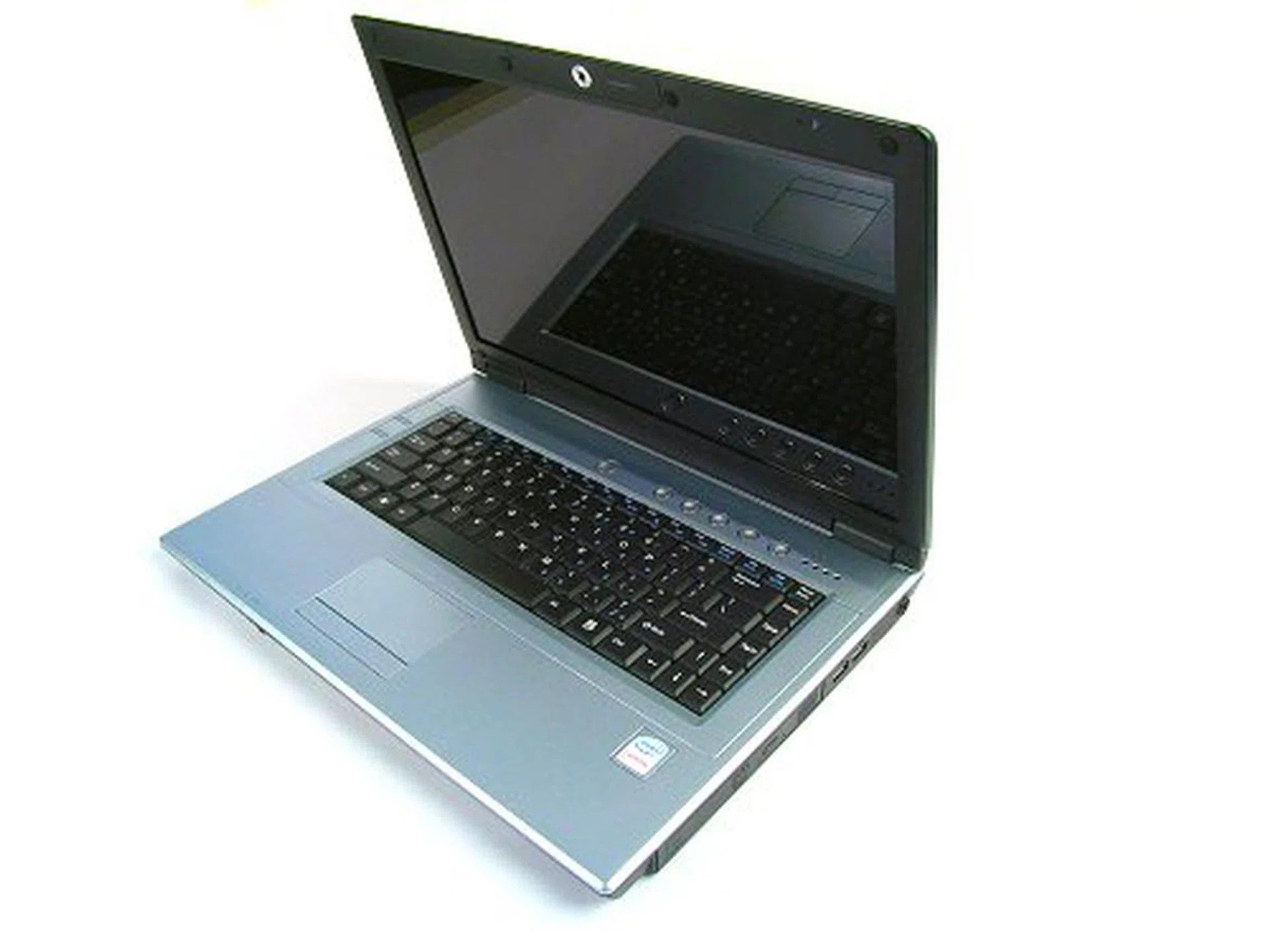
Santa Rosa, Santa Rosa, is that you?
While the notebook market gained an exciting new processor technology, Napa, Intel's third generation Centrino platform wasn't exactly new anymore. Besides being based on the older 945 Express chipset technologies, one of its largest restrictions was the maximum FSB support of 667MHz, which many deemed as greatly limiting the potential of the new mobile Core 2 Duo processors. Compared to the desktop variants which saw an overall FSB boost to 1066MHz, mobile Core 2 Duos had to be content with an almost 40% bandwidth reduction. In the first quarter of 2007, Intel helped prolong the lifespan of the Napa platform by introducing their new IEEE 802.11n Wireless WiFi Link 4965AGN wireless chipset as an upgrade a few months ahead of its scheduled launch. However, the real money was on Santa Rosa, Intel's fourth generation Centrino platform and what is perceived to be the true successor to fully take advantage of what the Core 2 Duo could offer to the notebook world.
Intel unveiled details and plans for Santa Rosa in the course of the Intel Developer Forums through 2006, which included very juicy tidbits such as an enhanced 800MHz FSB, Intel mobile 965 chipset deployment, HD video decoding, HDMI, EFI BIOS, Robson cache technology, inbuilt HSDPA support and WiMAX. Of course, if you've been following the gossip vines, you'd know that some of these technologies did not make it into Santa Rosa. However, Santa Rosa isn't just another platform bump to introduce the mobile 965 chipset. There are some real innovations inside the shell that have made the cut.
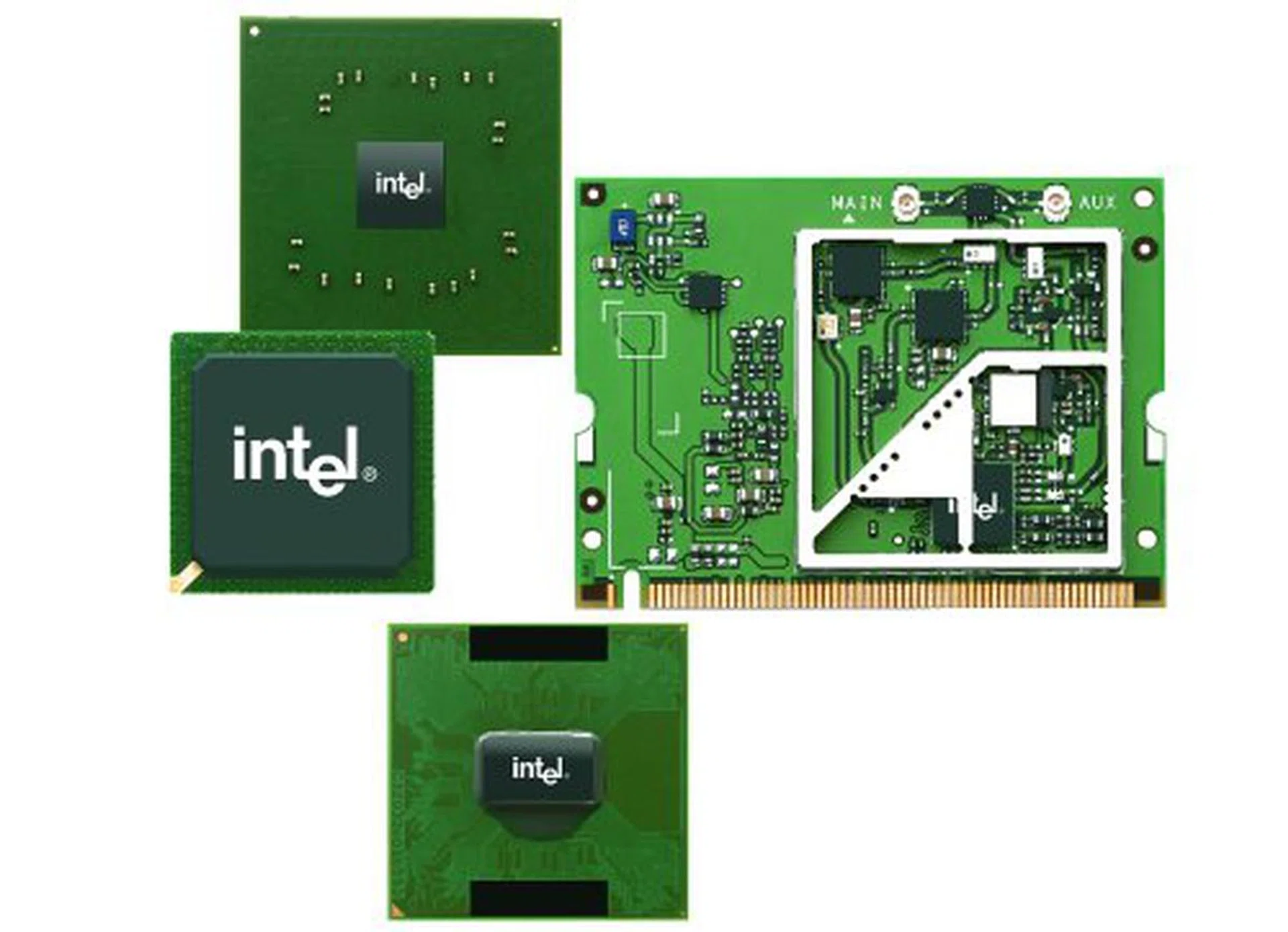
Components that make up the Intel Centrino platform.
As you should know by now, Intel's Centrino is not just a notebook or its individual components. It is a collective platform as a whole comprising of the processor, chipset and wireless components and Santa Rosa offers updates in all these areas (except maybe for the wireless part, which was launched earlier, but more on that further on). In this article, we take a close look at these individual components, their improvements, updates and we even have some early performance numbers for you to digest.
Santa Rosa: A Brand New Centrino
The Intel Centrino branding has undergone a series of face lifts over the past years that reflect its evolution and direction in the notebook space. More importantly, the marketing guys over at Intel have tried to make Centrino The household name when it comes to notebooks and they can boast that the Centrino program has been one of Intel's biggest successes. Due to the significance of the technologies that the Santa Rosa platform brings to the table, Intel has decided again to push for a new branding.
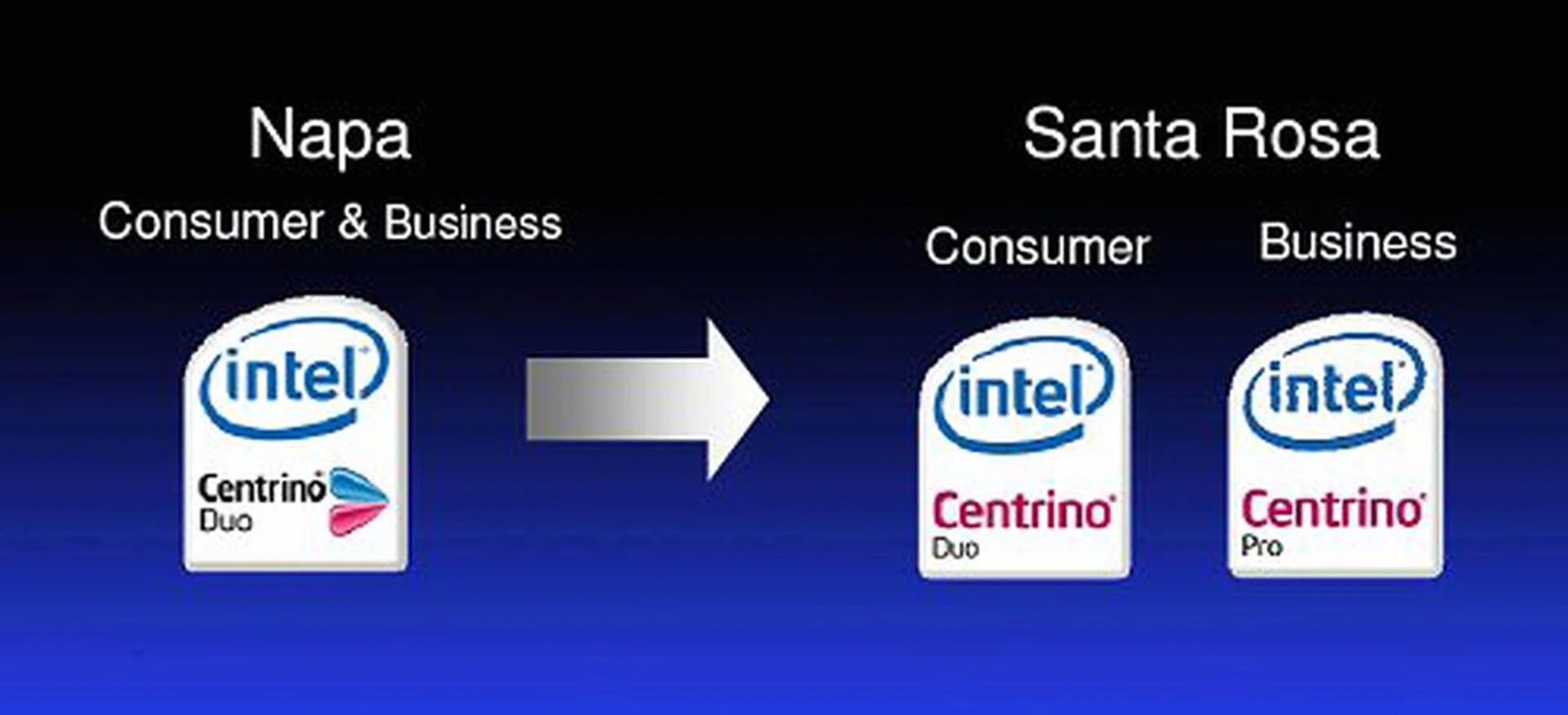
Centrino Duo, meet Centrino Duo and Centrino Pro.
Besides the minor change in the Centrino logo to remove the classic butterfly design, Intel split the platform into two distinctive groups: Centrino Duo and Centrino Pro. There is no need to be alarmed though, the Duo and Pro suffixes do not denote performance segmentation. Santa Rosa notebooks branded Centrino Duo are the standard consumer variants which we know and love today, while Centrino Pro is the business oriented version that includes the various vPro technologies introduced in the desktop 965 chipset series such as Active Management Technology.
Santa Rosa: Core 2 Duo and More
With Santa Rosa, Intel will be moving on to an updated Core 2 Duo processor that supports the new 800MHz FSB design and will actually be switching to a new socket tentatively called Socket P. Socket P is a 478-pin mPGA socket with a different pin layout. The main significance of this is that Santa Rosa will no longer be backward compatible with the Napa designs or with the previous generation Core Duo and Core 2 Duo processors, and Socket P will move forward to support the upcoming 45nm Penryn processors.
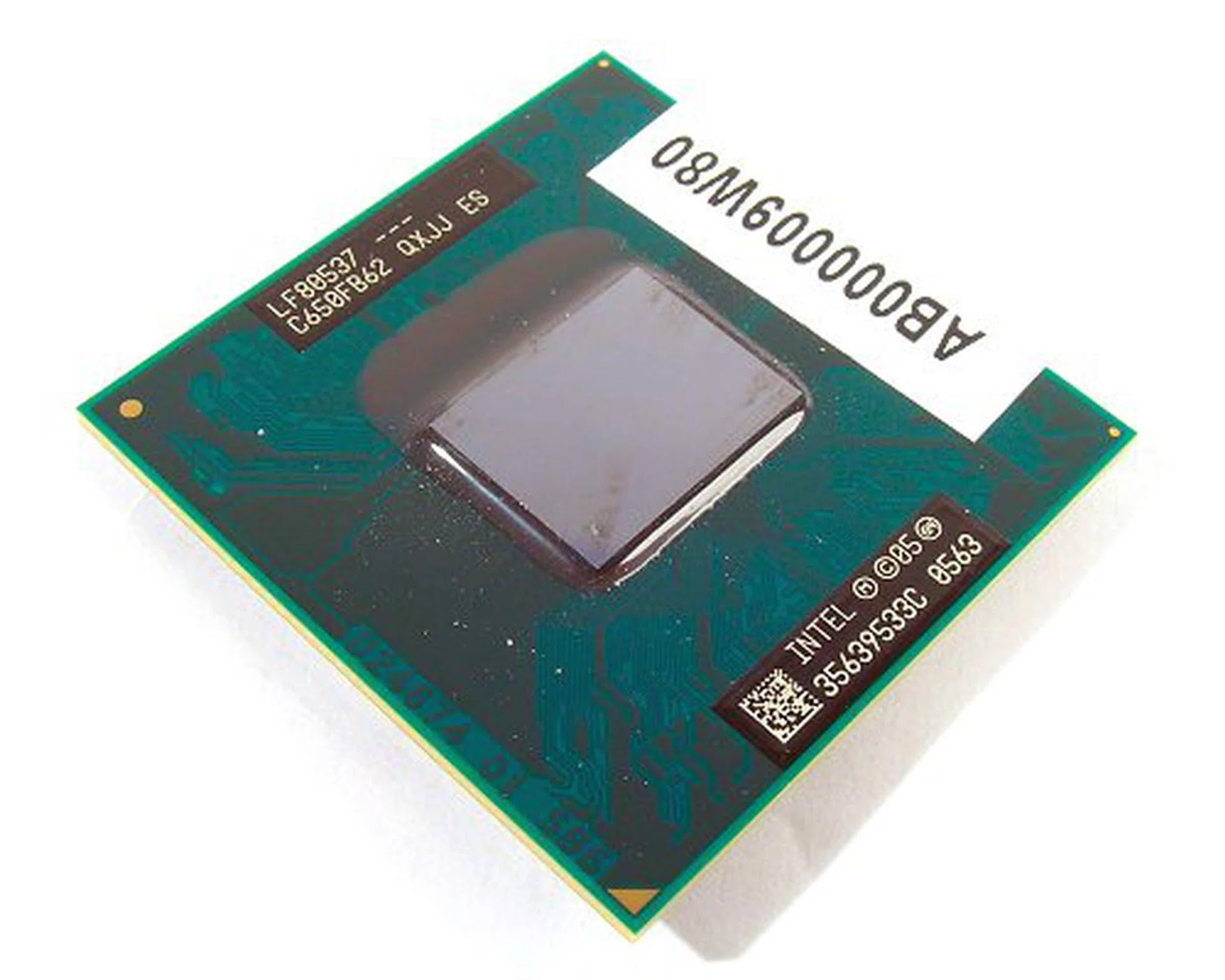
This is the newly released Intel Core 2 Duo T7700, 2.4GHz, 4MB L2 and a big boost to 800MHz FSB.
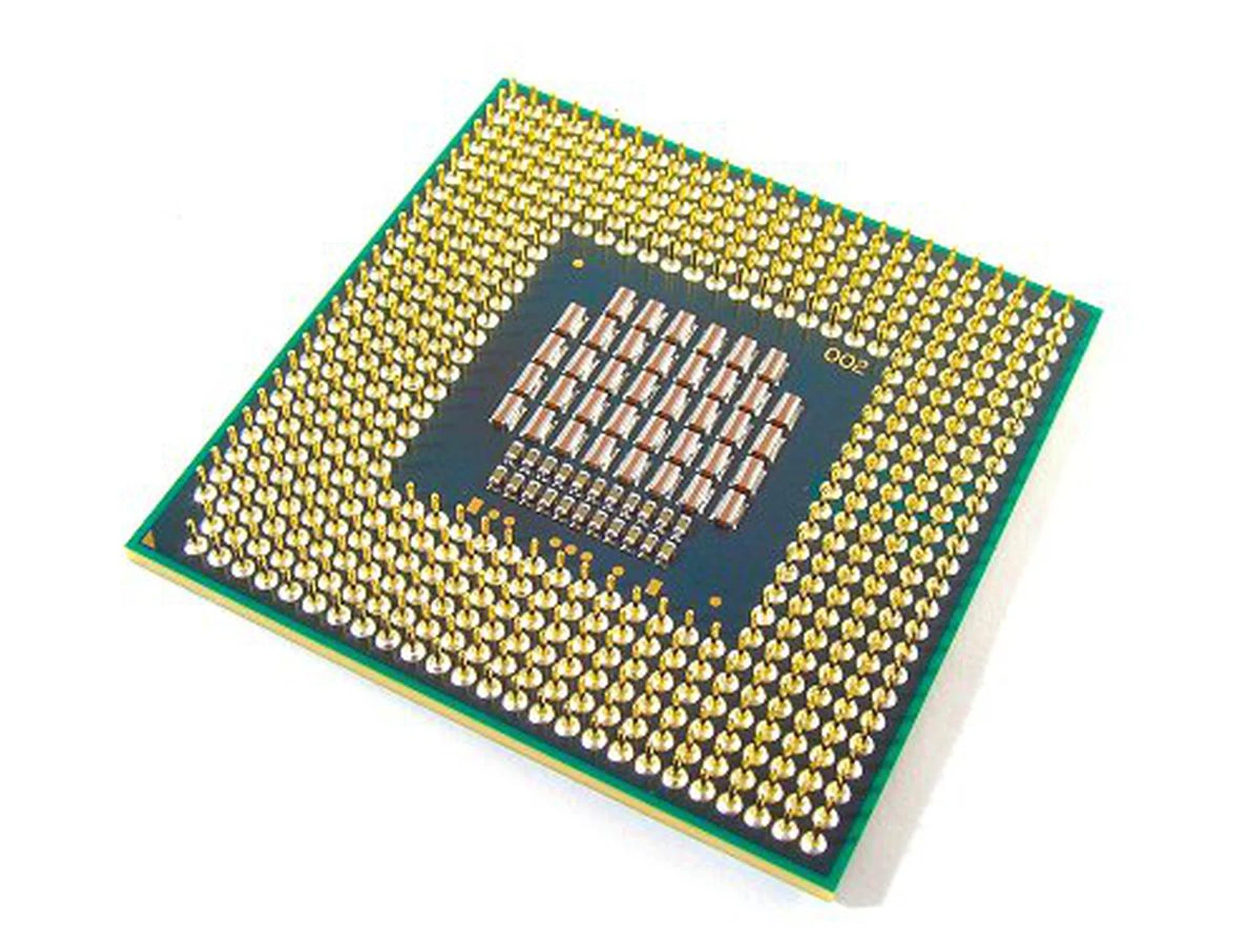
Back shot of the Intel Core 2 Duo T7700 processor.
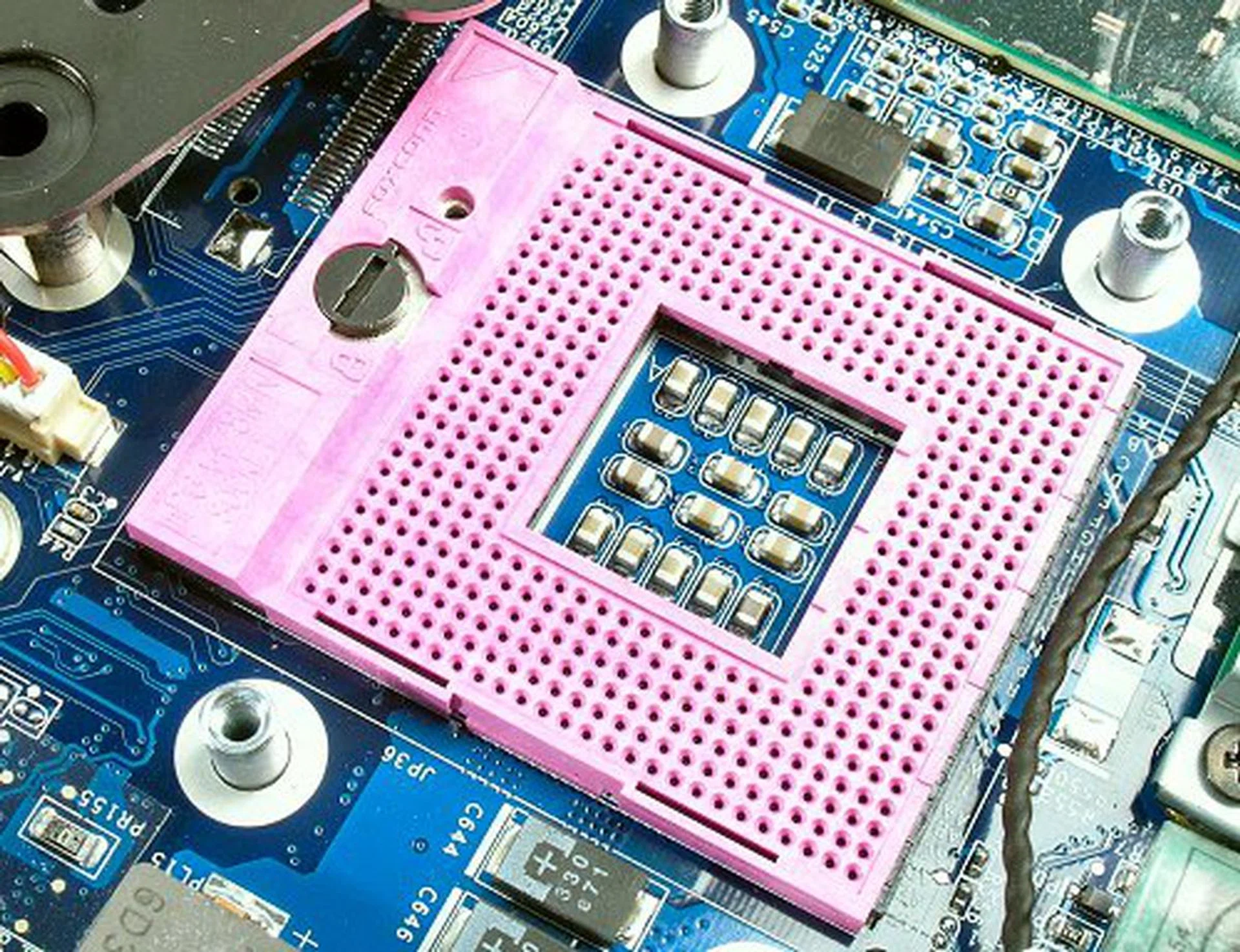
Looks the same, but the new Socket P will only work with Santa Rosa Core 2 Duos and above.
Things get a little more complicated from here onwards. Firstly, the Santa Rosa Core 2 Duo will still carry the Merom codename, which to us, reflects that the processor isn't fundamentally different from first generation Core 2 Duos. Indeed, the technical specifications of the Core 2 Duo on Santa Rosa is identical to that of the original Merom, and comes with 4MB L2 cache. However, from what Intel has shown us, the new Santa Rosa Core 2 Duo CPUs have some very clever engineering built-in that are not available on the original Core 2 Duo processors. Without making changes to the processor architecture itself, Intel adds four new 'features' to the Santa Rosa Core 2 Duo chip. These include an 800MHz FSB support, dynamic FSB switching, a more efficient Enhanced Intel Deeper Sleep mode and Intel Dynamic Acceleration.
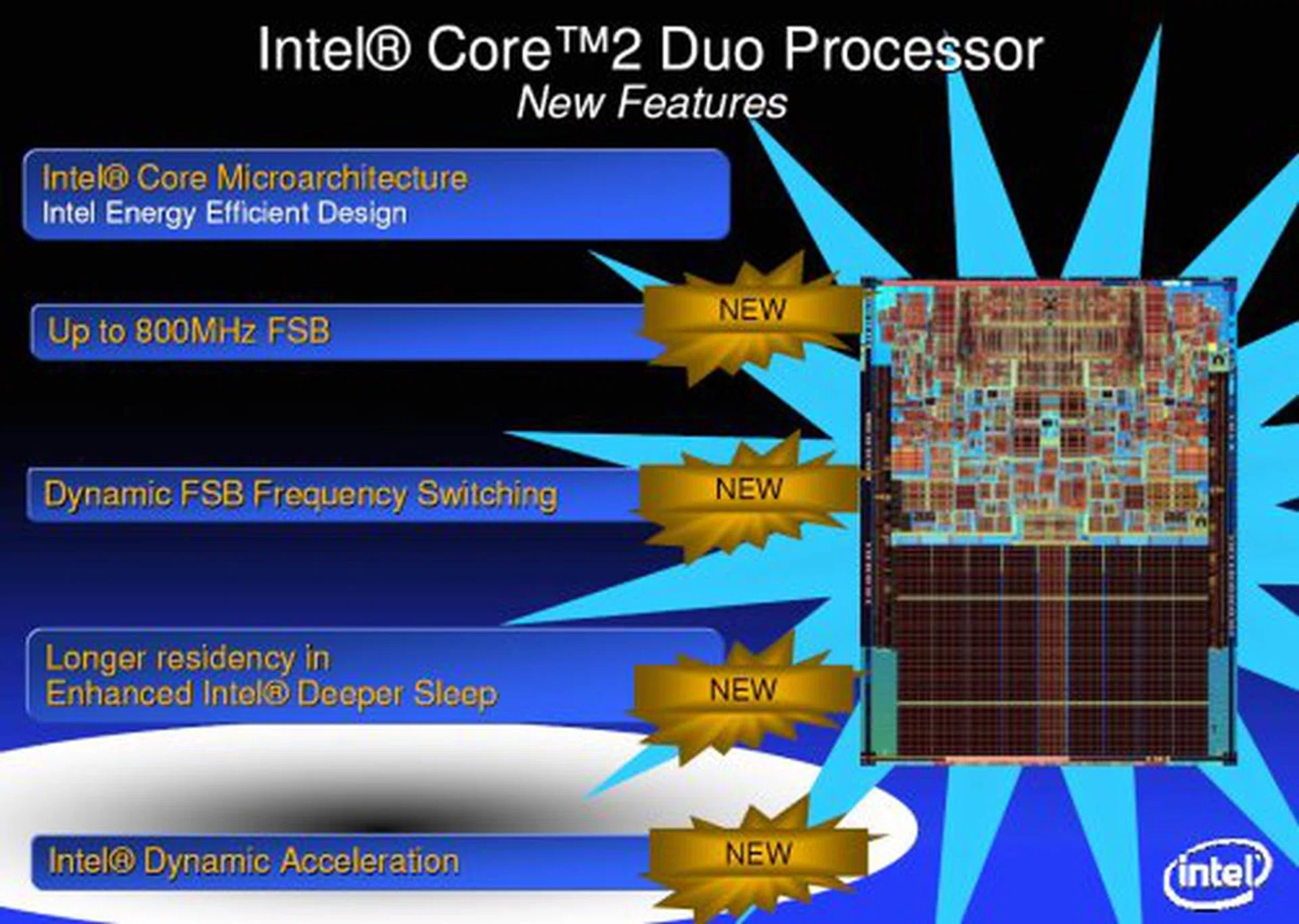
Merom it still is called, but now with four added fun filled features.
Dynamic FSB Switching
One of the more anticipated features of Santa Rosa was its FSB boost to 800MHz, thus increasing the overall CPU to system bandwidth by giving the Core 2 Duo much more 'room to stretch'. However, while we consumers are clamoring for more speed and performance, the good folks at Intel are trying their best to save whatever power they can. Dynamic FSB Switching is perhaps the most straight forward feature found in Santa Rosa. Just like how the Core 2 Duo can dynamically scale processor frequency according to load by tweaking its multiplier ratio, Santa Rosa additionally throttles back the FSB to 400MHz as well as reduce CPU/chipset voltages in less active states (such as DVD playback) in order to further save power consumption. At the moment though, there is only one speed setting for Dynamic FSB Switching. Santa Rosa will only switch between 800MHz and 400MHz. Initial tests on a prototype Santa Rosa notebook using CPU-Z did not show Dynamic FSB Switching at work though, so we might revisit this feature when the retail units hit the market.
Longer Residency in Enhanced Intel Deeper Sleep
Now, that is a very long sentence to digest, but what it really means is that Intel has found a way to keep the Santa Rosa Core 2 Duo CPU in its Enhanced C4 state longer than before, thus squeezing out every last bit of power they can save by having the processor in a constant shut down mode. Basically, when the CPU goes into the Enhanced C4 state, it is more or less completely turned off, and all data from its cache is flushed to the system main memory. However, in the past, whenever there are any data/cache hits or requests, the chipset will still snoop the CPU cache for verification, even when it is already cleared. This action wakes up the CPU (however briefly, but it still consumes power). With Santa Rosa, the chipset no longer wakes up or snoops into the CPU cache when it is in Enhanced C4 state and there is no real activity, thus achieving a 'Longer Residency in Enhanced Intel Deeper Sleep' (that's right, we said it again) and saving more power.
Intel Dynamic Acceleration
This is perhaps the most exciting processor feature of Santa Rosa that will directly impact performance for many users. Here's the preamble. Multi-core (dual, quad and beyond) computing has been hailed as the way forward for microprocessor performance and dual-core processors have indeed proliferated the market space. However, on the software front, there are still many applications that are not able to properly take advantage of multi-core processors, utilizing only a single core at any one time. In this scenario, the unused core is usually shut down to conserve power.
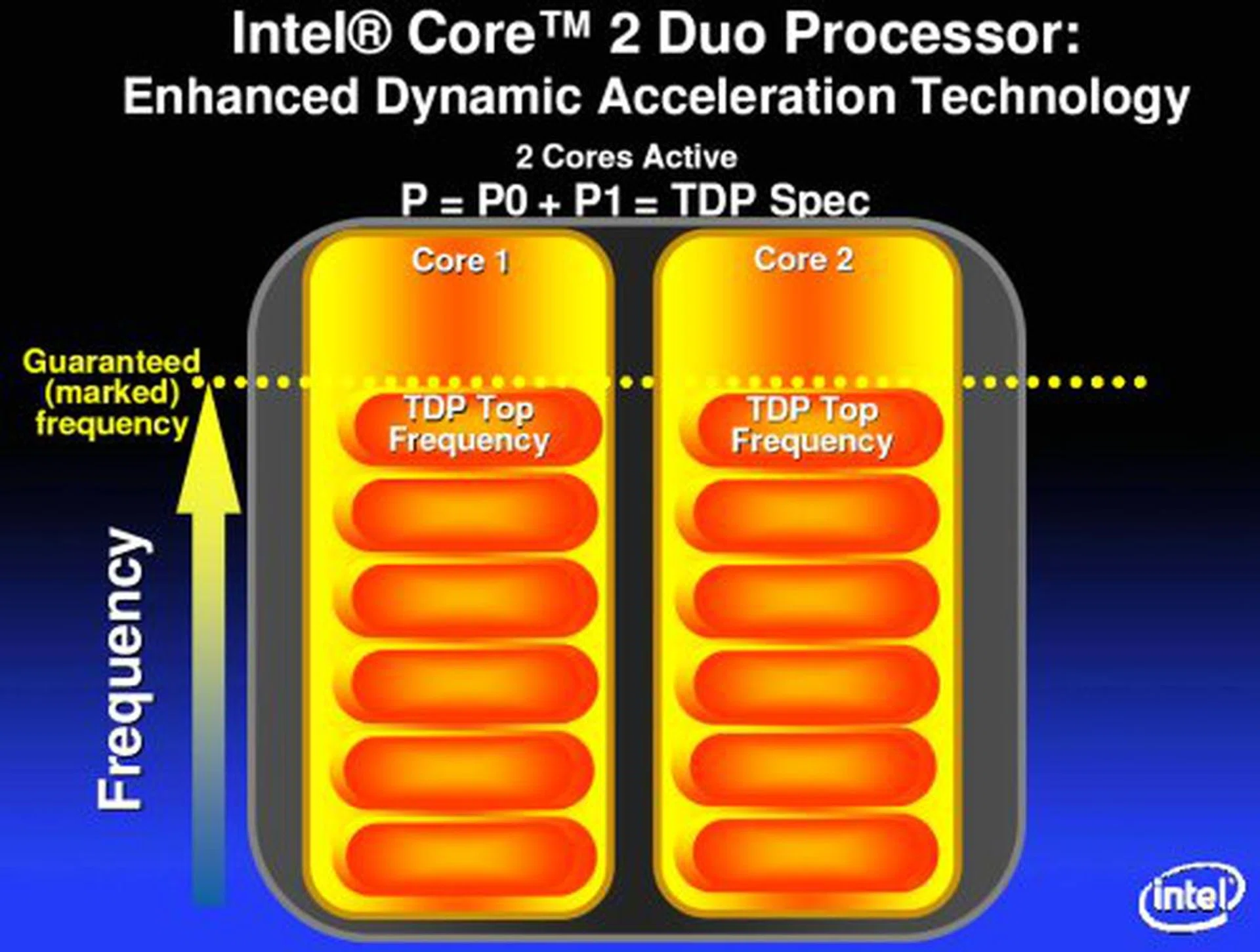
This is the ideal TDP situation in the dual core processor, when both cores are active and in use.
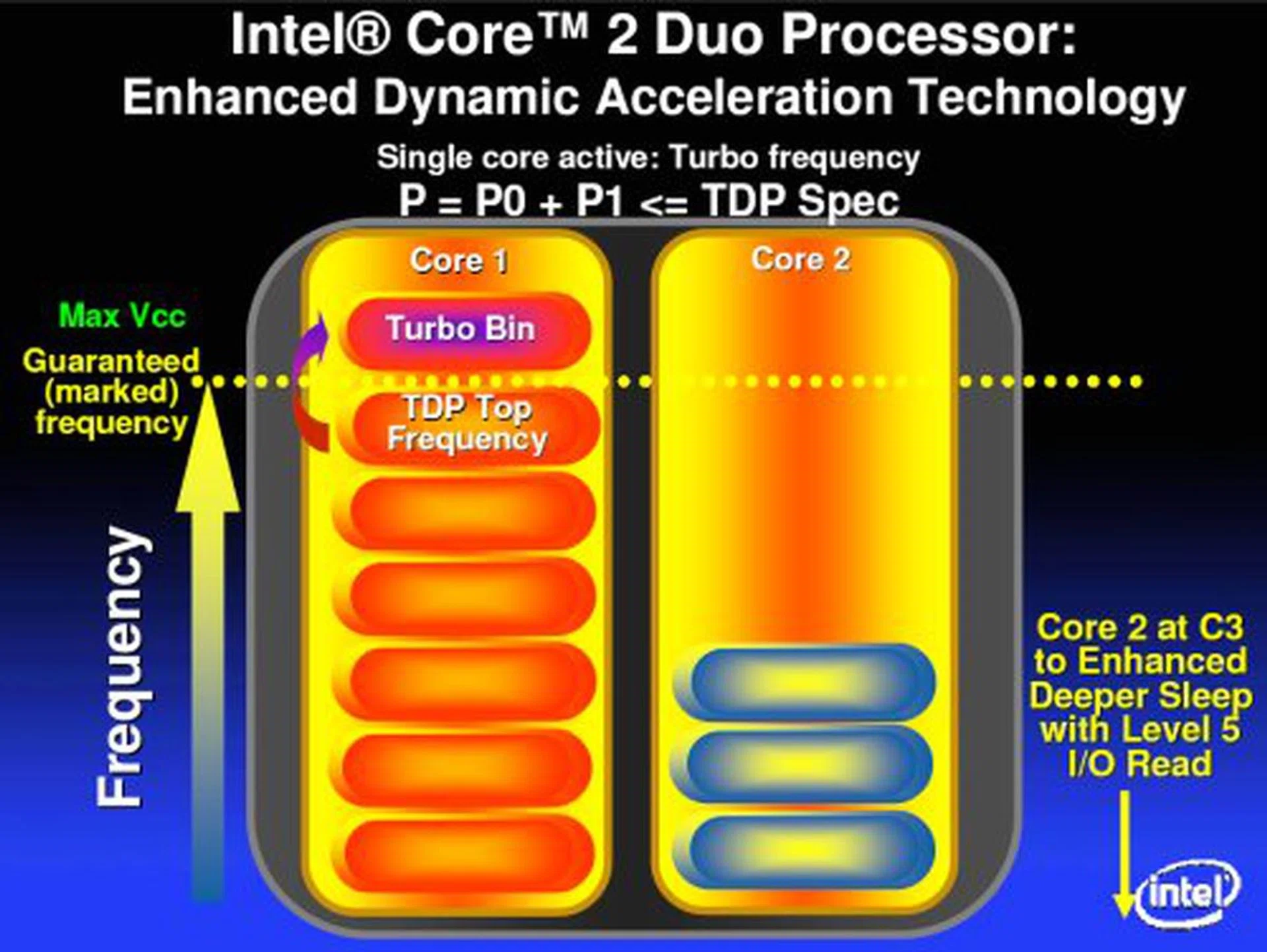
When the second core drops down to C3 and lower sleep states, Dynamic Acceleration kicks in to overclock the active core.
What's this got to do with Dynamic Acceleration you say? The clever people at Intel decided to take advantage of this situation to boost the performance of single threaded applications while not exceeding the TDP or power envelop of the specific processor. When Santa Rosa detects that only a single core is being taxed, and the second core drops to a sleep state of C3 and below, it will activate a special Turbo Bin, which is essentially an additional multiplier level above the processor's official rated limit to boost that particular core performance in that application. In short, Santa Rosa overclocks one core, while it downclocks the other in order to achieve better performance in single threaded applications while staying within official rated TDPs. We've field tested this technology by simulating a single core environment and sure enough, we saw the magic Turbo Bin implemented.
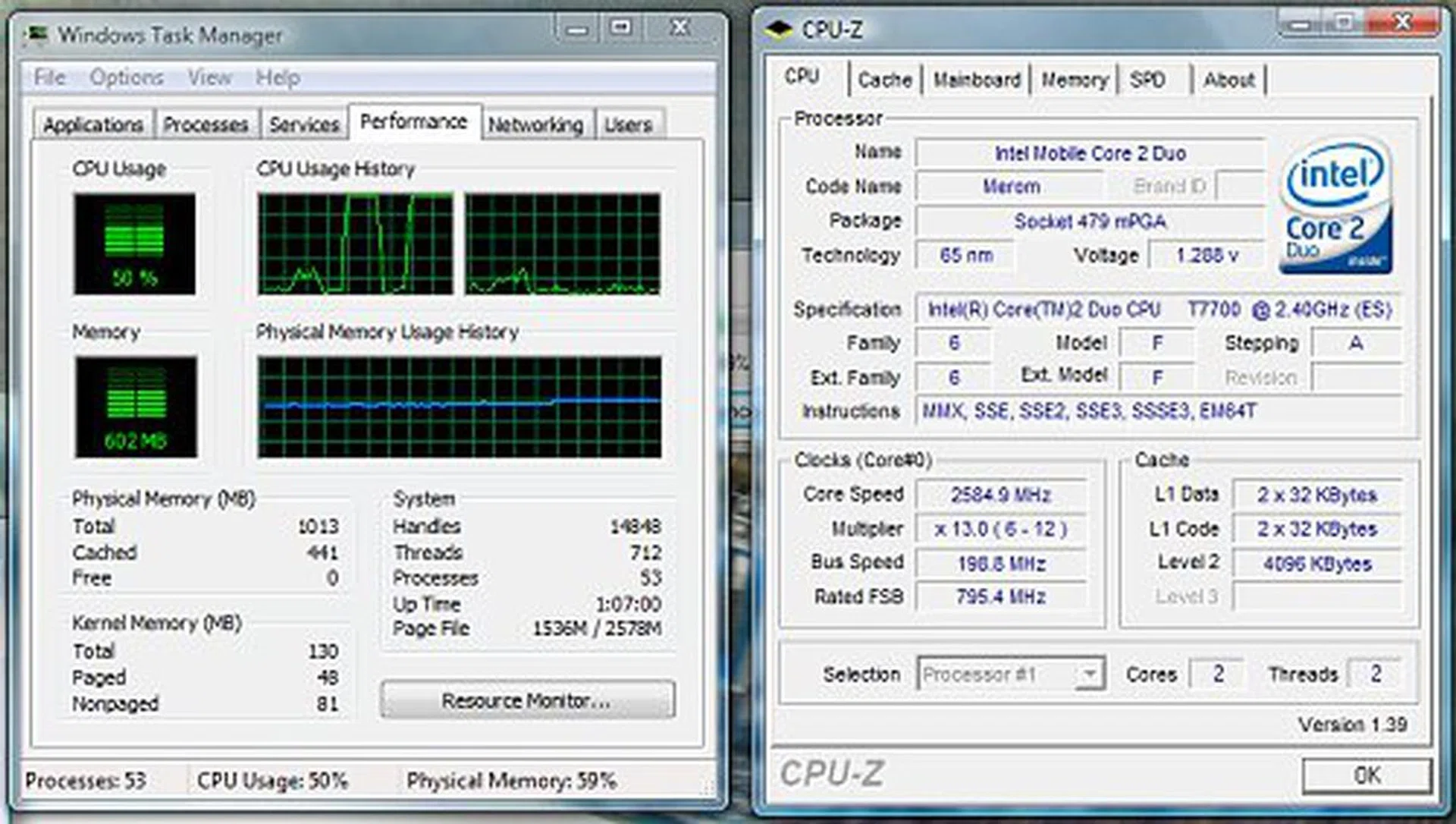
A successful simulation to see how Dynamic Acceleration works. In this image, you can see one core being heavily loaded and to the right, our CPU-Z screenshot shows that the processor is now running at a 13x multiplier. In a normal situation, the multiplier will never go above its processor limit of 12x.
Extreme Notebooks
Here's a sneak peek at what Intel has up its sleeves for the enthusiasts. Confident that the new power saving features enabled in Santa Rosa will fulfill the desires of even the most jaded battery life activist, Intel is giving special focus to the niche group of people who believe that performance is everything. With the blurring of the line between notebook and desktop performance, Intel has hinted that they will be releasing an unlocked Core 2 Duo lineup into the notebook market. You heard right. Intel is telling us that notebook overclocking will become a very real reality in the very near future.
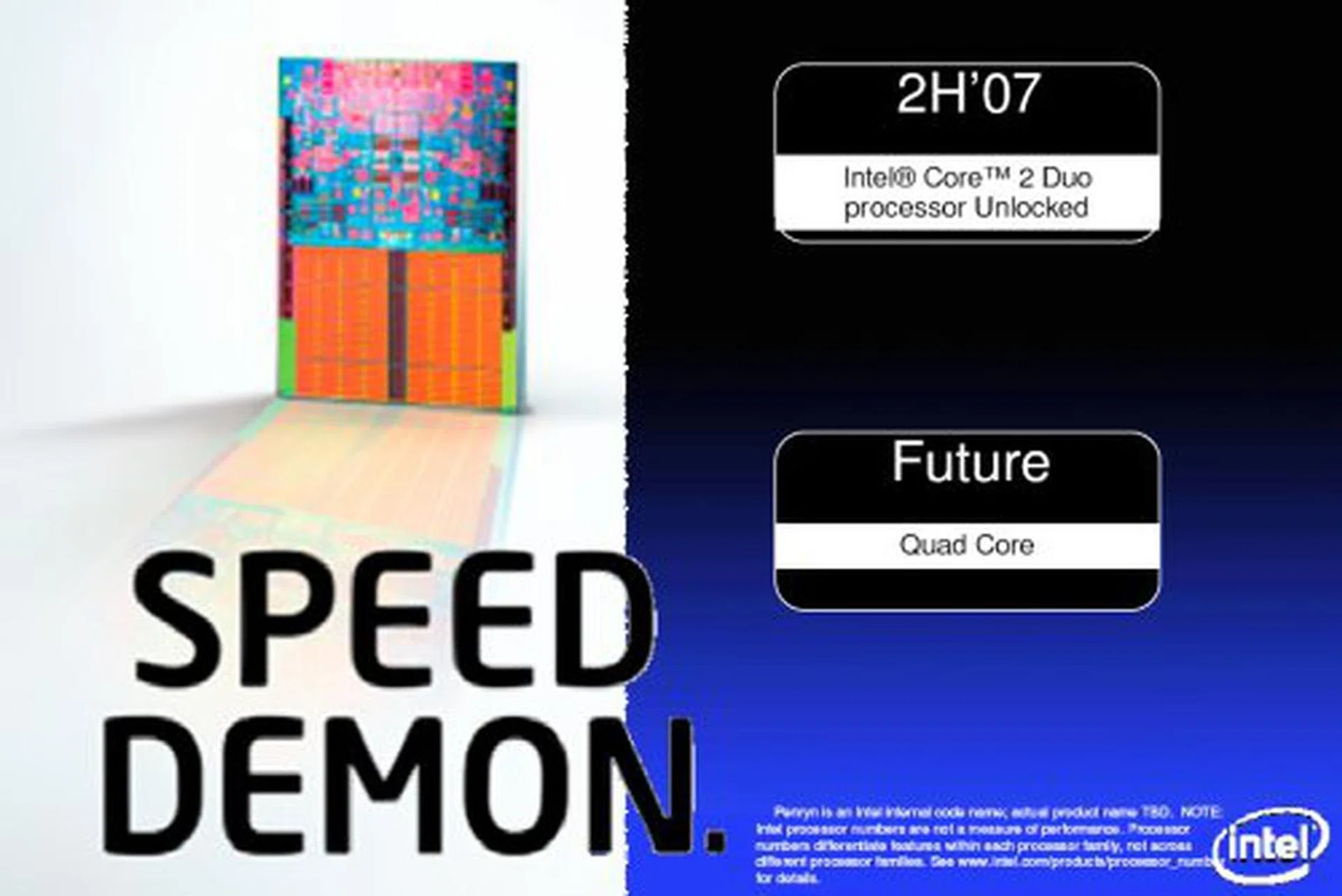
A bold move by Intel to release unlocked notebook processors and enable notebook overclocking.
Intel may be able to control power and performance, but anyone will be able to see that heat will become the biggest issue in any attempt to overclock such an integrated system as a notebook. So, if Intel does go ahead as planned with their unlocked Core 2 Duos, what we're most excited to see is if it will spark off a mainstream notebook modding scene and the acceleration of custom notebook cooling products.
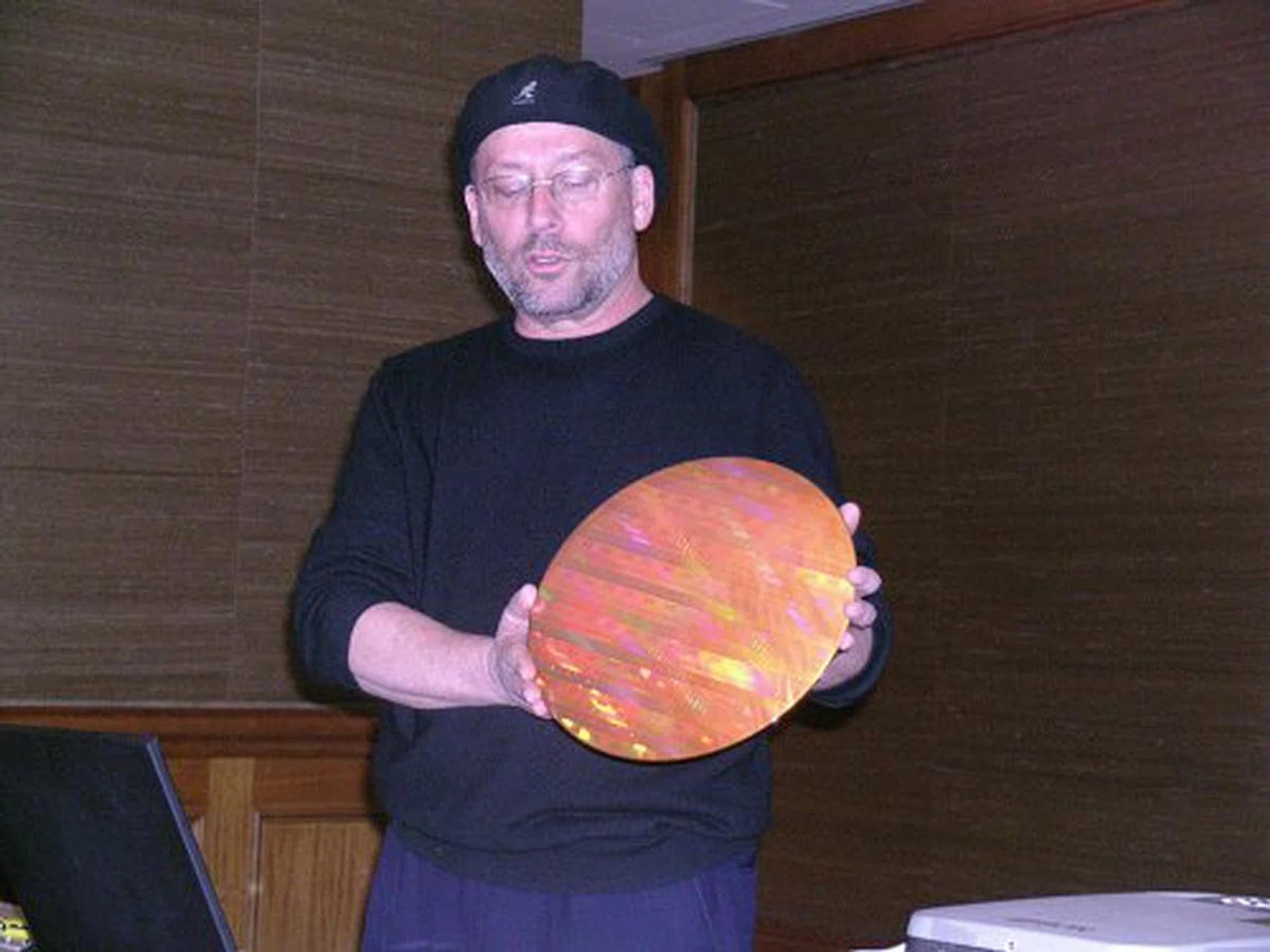
Mooley Eden, Intel's Corporate Vice President/General Manager of the Mobile Platforms Group showing off a 45nm Peryn wafer. Santa Rosa will be compatible with 45nm processors when they come.
Santa Rosa: Crestline – The Mobile Intel 965 Chipset
MCH – The Northbridge
On the chipset front, Santa Rosa will receive an update in the form of Crestline, the codename for the Mobile Intel 965 Express chipset family. There will be three variations of the chipset, mainly the discreet PM965 and the onboard GMA enabled GM965 and GL965. The main difference between Crestline and the previous generation Calistoga (Mobile Intel 945 Express chipset) is its 800MHz FSB support, up from 667MHz.
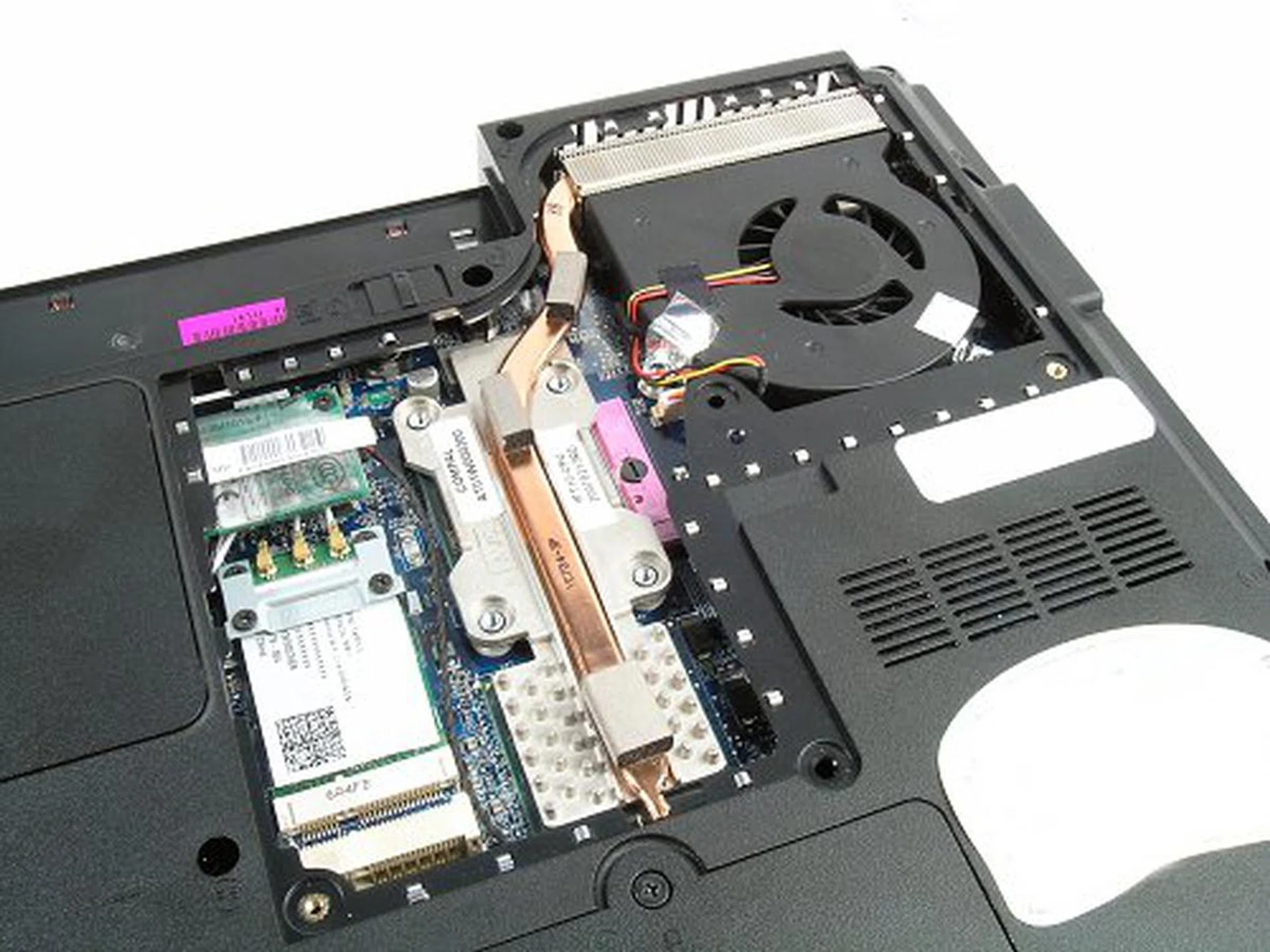
Chipsets are meant to be seen. Can you guess which component is which?
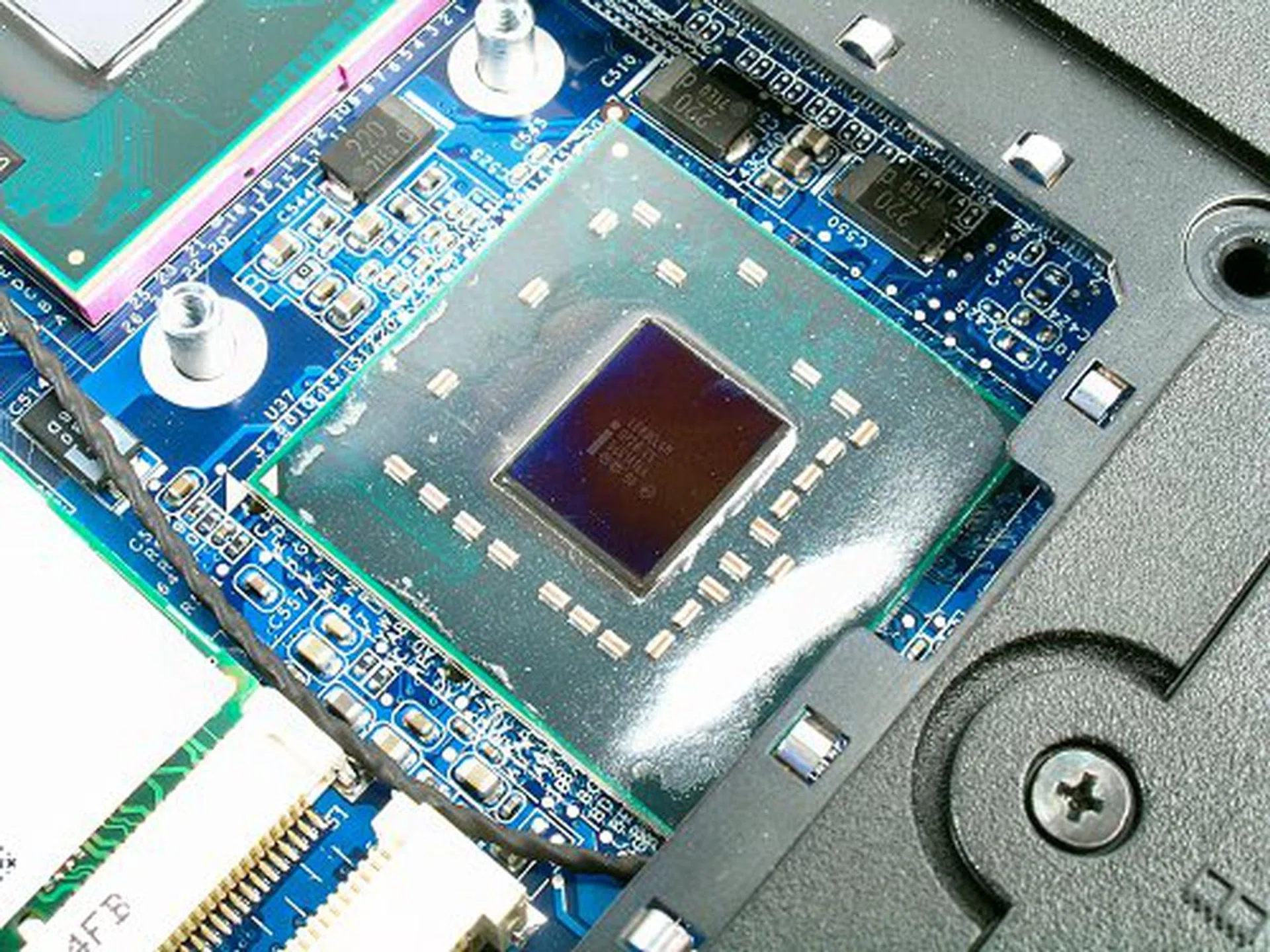
The Mobile Intel GM965 Express up close.
Besides this, the 965 MCH will feature a new power saving feature called Intel Display Refresh Rate Switching (DRRS). Much like the platform's Dynamic FSB Switching feature we talked about before, DRRS will dynamically reduce the LCD panel's refresh rate when the system detects that the user is running applications that do not benefit from a high refresh rate, like typing a text document for example. While LCDs do not really have a refresh rate to speak of, Intel explains that the LCD crystals are still constantly twisting to adjust to changes. In an application that does not require fast switching, there is no need for the LCD to be operating at such a speed, thus DRRS kicks in and turns the refresh rate down.
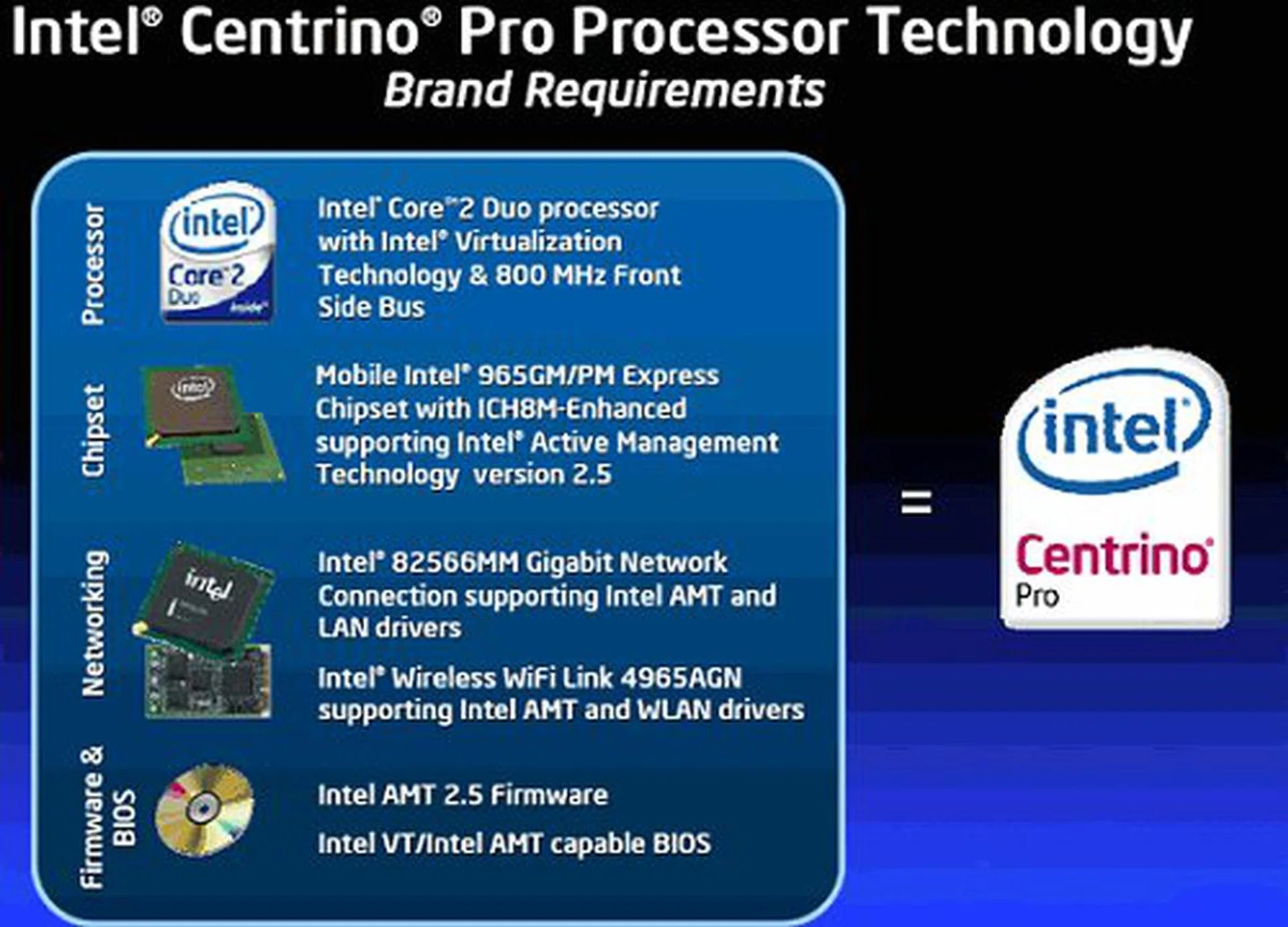
The Centrino Pro is basically the Centrino Duo with AMT 2.5 support and VT.
On the business side of things, Centrino Pro branded Santa Rosa notebooks will also include Intel Active Management Technology 2.5. Otherwise, its features are identical to the Centrino Duo.
ICH – The Southbridge
Santa Rosa will feature the ICH8M Southbridge component, which offers some major enhancements compared to the ICH7M family found on the older Napa designs. We say major enhancements because the ICH8M will finally feature a SATA 3.0Gbps interface that supports up to three HDDs, compared to the two SATA 1.5Gbps the ICH7M features. Other I/O improvements include ten USB 2.0 ports, up from eight ports and six PCIe x1 ports compared to four ports on the ICH7M.
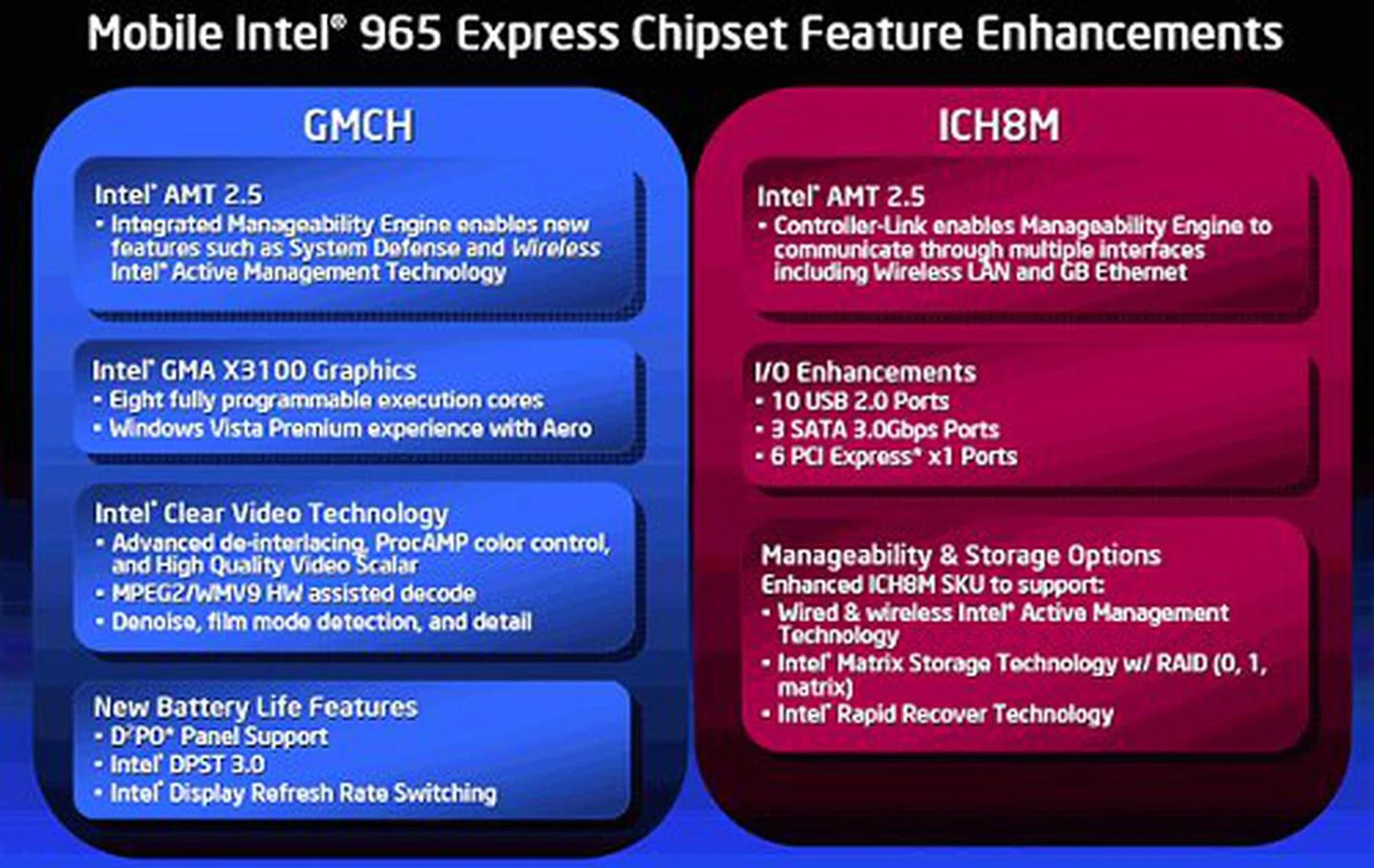
Details of the Crestline chipset and its features.
Video and Graphics
The onboard GMA core on Santa Rosa will now utilize the Intel GMA X3000 series technology, similar to what is available on the desktop G965 chipset. The GMA core on Santa Rosa will be named GMA X3100 however, as to differentiate it from its desktop brethren. Like the GMA X3000, the GMA X3100 will have eight programmable function execution pipelines, but the GMA X3100 will run at a reduced clock speed of 500MHz (the desktop GMA X3000 runs at 667MHz). The GMA X3100 will have Shader Model 3.0 support and is fully certified for Windows Vista Premium. Initial reports stated that Santa Rosa will have DirectX 10 support, but the GMA X3100 will only feature DirectX 9.0c. However, this will still be a big boost up from the older GMA 950, which had a 400MHz clock speed, only four fixed pipelines and SM 2.0 support only.
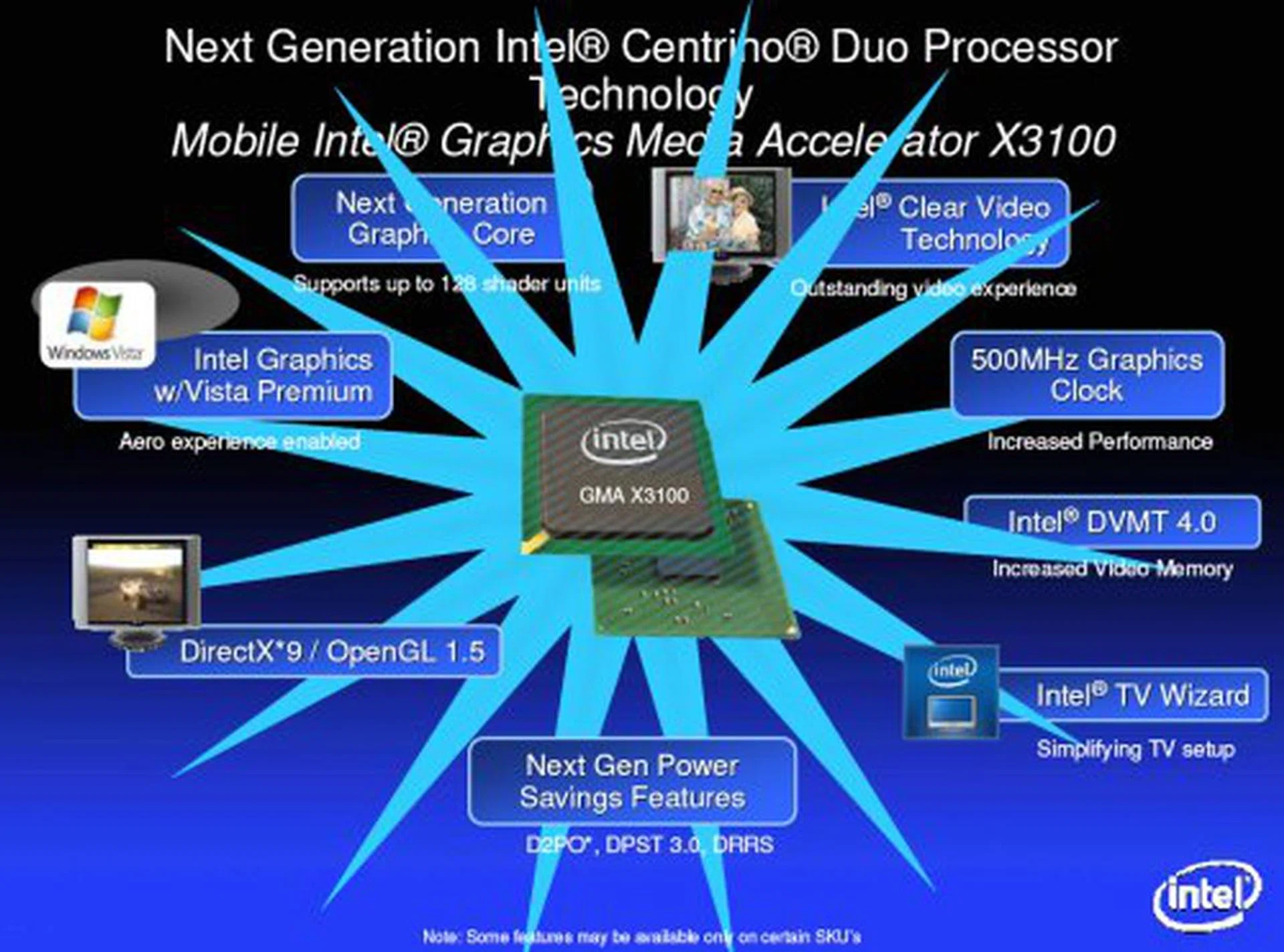
The GMA X3100 may not really offer anything new that NVIDIA or ATI hasn't done before, but it provides an evolutionary step for Intel GMA graphics on the notebook.
More importantly, the real reason to be excited about GMA X3100 is its inclusion of the Intel Clear Video Technology. The GMA X3100 comes with hardware HD acceleration, advanced de-interlacing/cadence detection and an automatic, intelligent color control function called ProcAMP, which brings the quality of GMA X3100 video in contention with the 'Big Two'. What's more, Santa Rosa will feature proper HDMI/HDCP support on the GMA X3100 for greater connectivity and equipment support. This means that notebook manufacturer can actually develop Blu-ray and HD DVD notebooks natively using Santa Rosa GMA, without going for discreet graphics options.
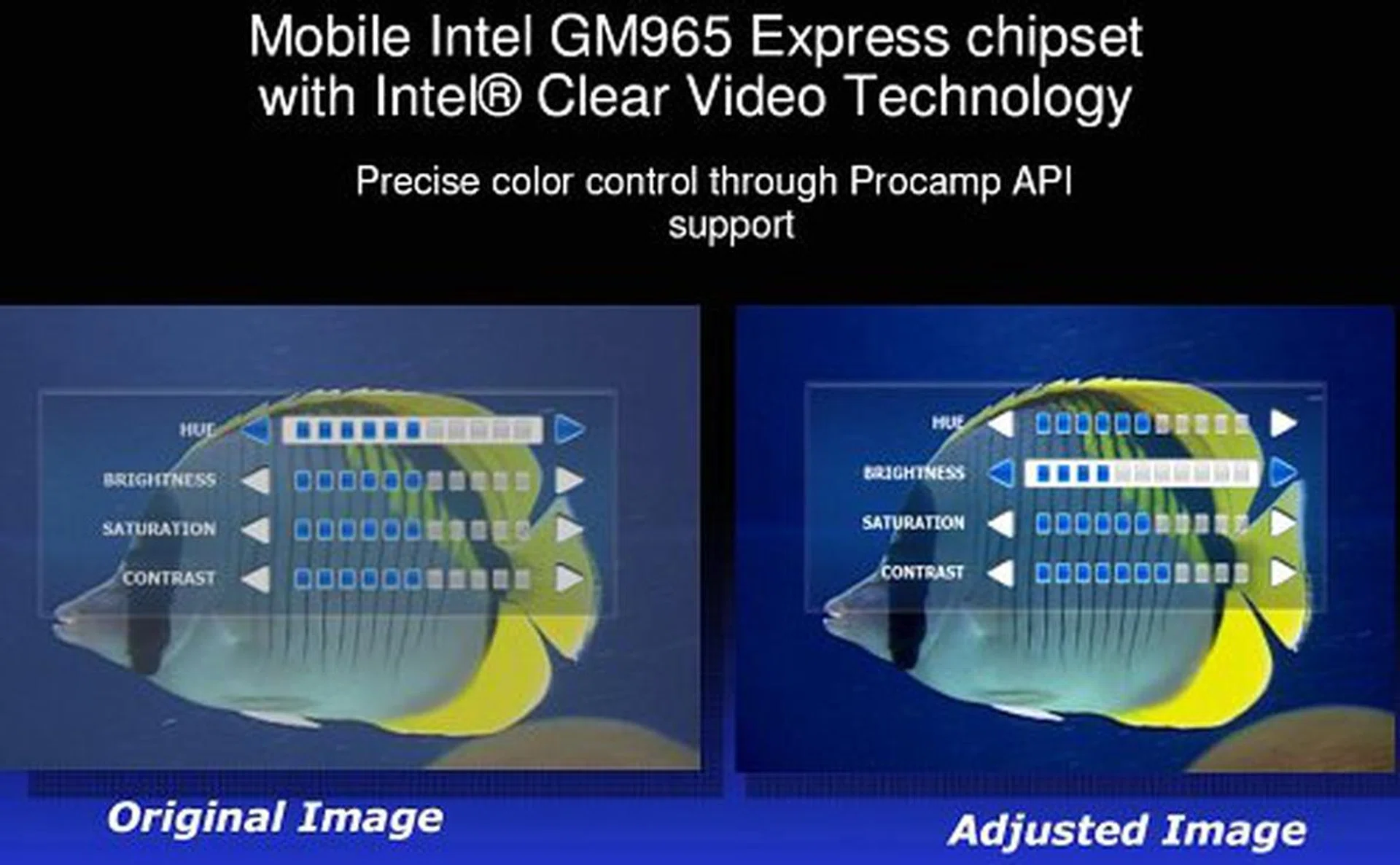
Intel ProcAMP is supposed to intelligently adjust image color and brightness, but we've not had a chance to test this out yet.
However, we'd like to point out that the HD acceleration on the GMA X3100 is limited to MPEG-2 and WMV9 (VC-1) only. This isn't all that surprising however, as its features are well in line with onboard graphics products from giants such as ATI and NVIDIA. Without H.264 acceleration though, Santa Rosa is still not going to be a complete entertainment platform. If you have an MPEG-2 or VC-1 encoded Blu-ray/HD DVD (luckily, most first generation content are only found in these two formats), you should be able to enjoy your movies on a Santa Rosa platform using the GMA X3100.
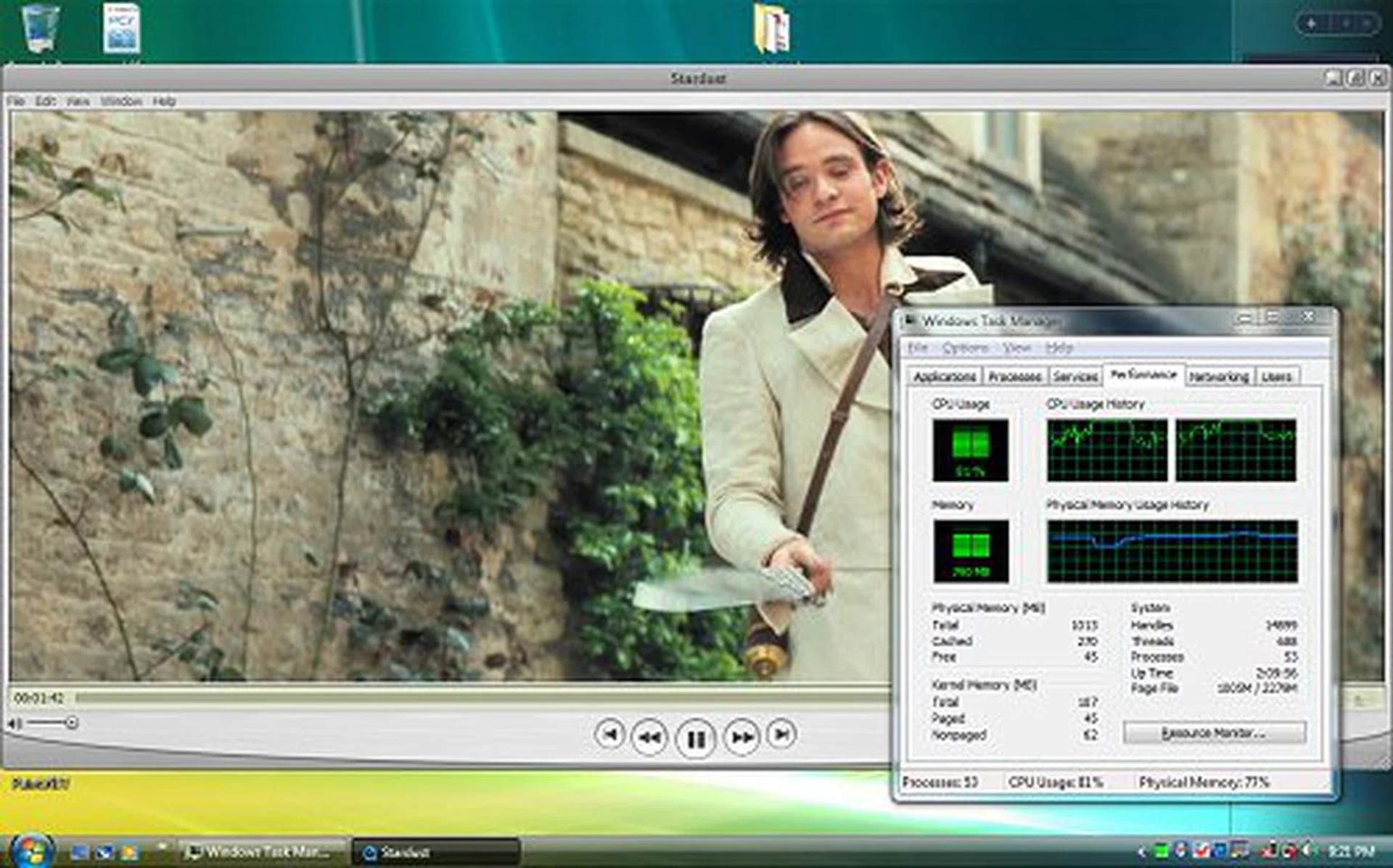
Sample 1080p H.264 Quicktime clip that we ran to test the notebook's performance. Average CPU usage hovered within the 80% threshold.
In our limitless curiosity, we tried running a 1080p H.264 encoded Quicktime HD movie trailer (Stardust), just to see how Santa Rosa would hold up. In our tests, the clip played reasonably smoothly, but CPU usage shot to 80% on average. Now, while Quicktime HD movies are encoded in H.264, they are prepared for network download with low overall data rates of around 10-12Mbps. An average Blu-ray movie on the other hand is around 25Mbps and the format itself supports a maximum data rate of 54Mbps (audio and video combined). In short, you will be able to enjoy HD content using the GMA X3100 on Santa Rosa, providing that it is MPGE-2 or WMV9 encoded, or very low bit rate H.264 where the processor can still handle the brunt of the decoding tasks.
Intel Turbo Memory – Robson Comes Alive
When Intel talked about their secret flash memory project, codenamed Robson, it was the tip of the iceberg of flash memory related technologies to come into the market. Today, Robson, now christened Intel Turbo Memory will be launched into a world where hybrid HDDs are already a reality and the use of NAND flash memory as temporary paging or cache is nothing new anymore thanks to Vista's ReadyBoost, ReadyDrive and SuperFetch features.
If you're familiar with Vista's ReadyBoost feature and how it uses portable USB flash memory devices as additional cache, the application of Intel's Turbo Memory is the same. Turbo Memory is essentially a combination of an embedded NAND flash module and software to boost file access, boot time and overall performance. If all this somehow sounds like deja vu to you, it might be because of the recent launch of ASUS Vista Edition motherboards, where ASUS included a component called ASAP (ASUS Accelerated Propeller) onto their motherboards to take advantage of Vista ReadyBoost.
The implementation of Intel's Turbo Memory is similar to what ASUS intended with ASAP, though Intel goes about it with a different approach. While we understand that comparing Intel Turbo Memory to ASUS ASAP is like comparing apples to oranges, but in the larger scheme of things, apples and oranges are still classified as fruit.
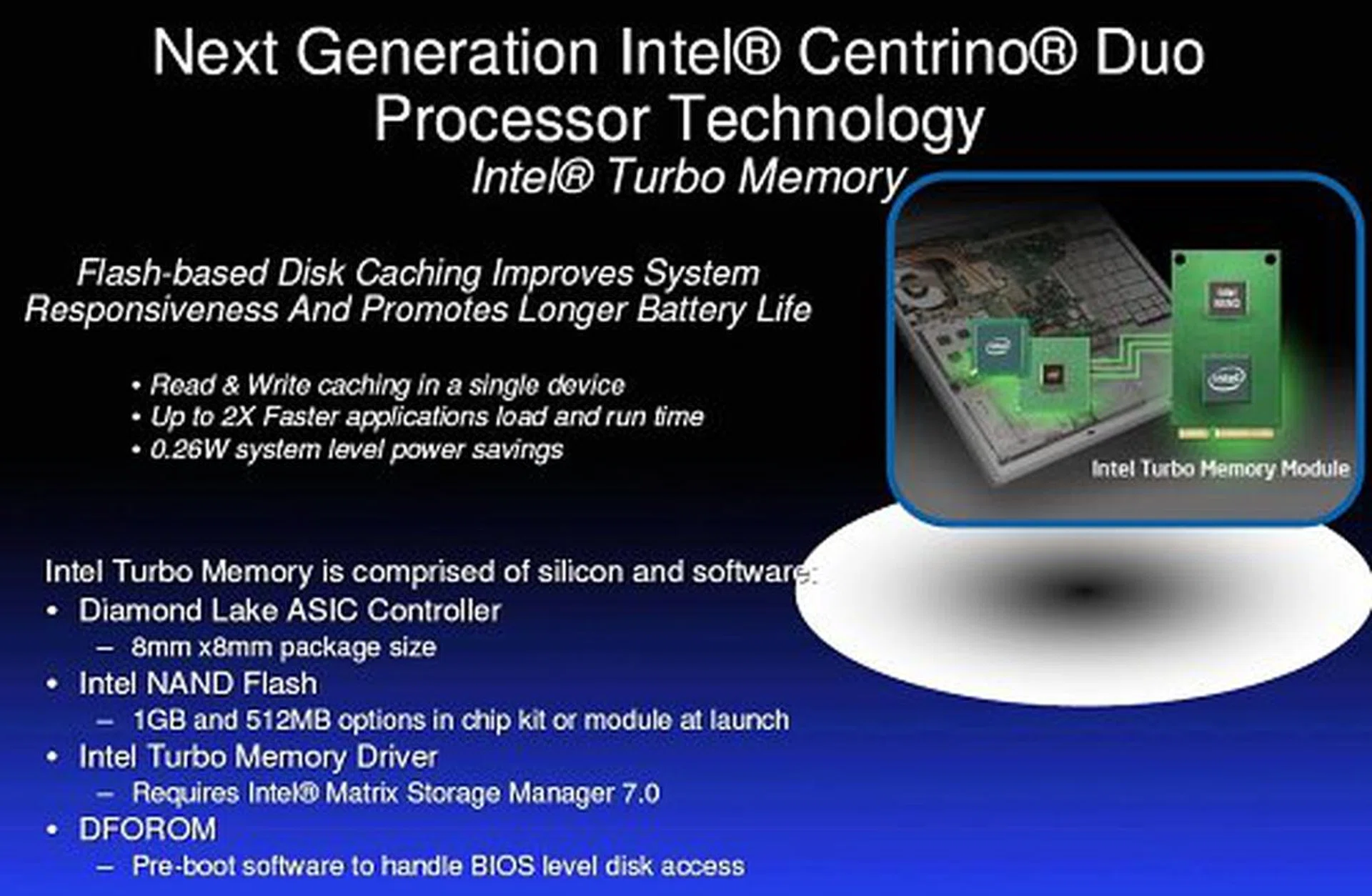
Intel Turbo Memory features.
For ASAP, ASUS merely took advantage of Vista's new ReadyBoost feature and simply included a NAND flash module on their motherboard using a freely available USB interface. Intel's Turbo Memory however is a highly integrated flash module controlled by proprietary software to take over control of Vista ReadyBoost and ReadyDrive. This means that you cannot see or access the Turbo Memory cache, nor can you use it as an additional storage in the event that it is not used for ReadyBoost/ReadyDrive. Intel's Turbo Memory also connects through the PCI Express interface instead of regular USB to ensure (in theory at least) higher bandwidth availability and better performance than traditional USB. Intel will initially make available 512MB and 1GB Turbo Memory modules for integration, and we anticipate 2GB modules to be on their way soon enough.
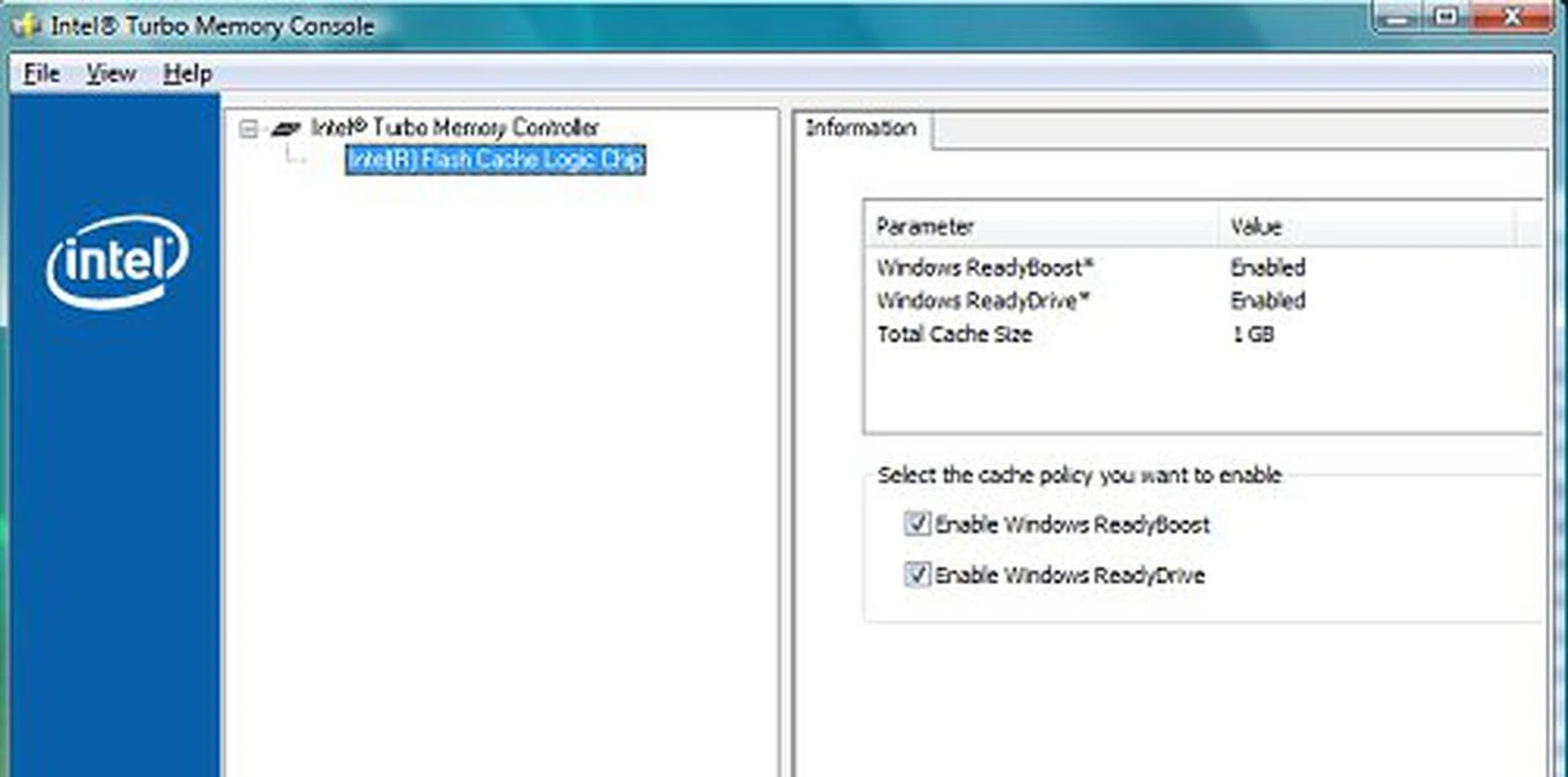
Turbo Memory console is really simple. You either enable or disable control of Windows ReadyBoost or ReadyDrive.
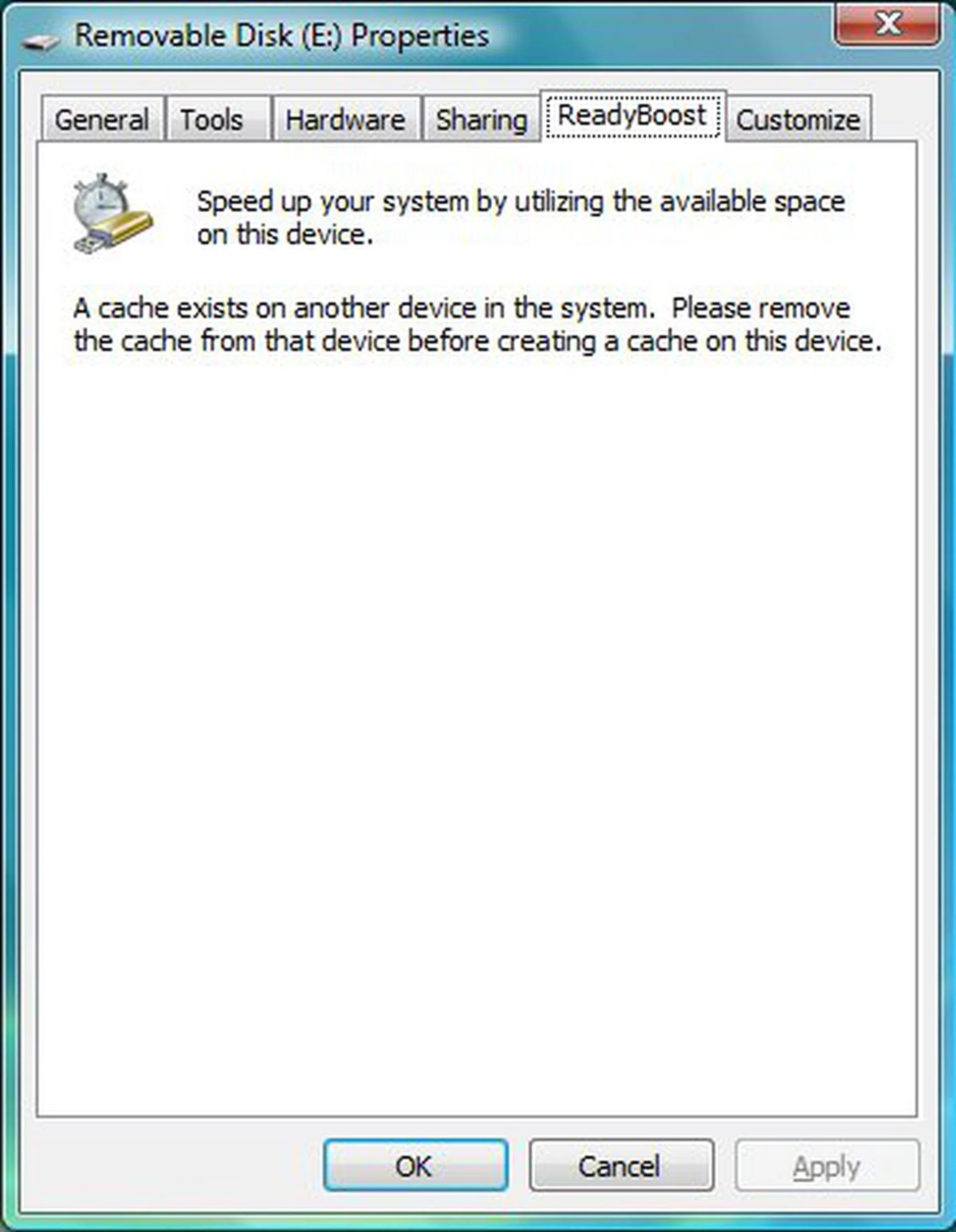
If you use Turbo Memory for ReadyBoost, you will notice that Vista will not allow you to use other devices.
Here's more theory craft for you. Intel believes that Turbo Memory will offer a much more transparent technology to users to benefit from ReadyBoost, since there is no need to manage or connect external drives. Intel also expects Turbo Memory to use only around 1/3 the power it would have taken to use a USB drive for ReadyBoost. Best of all, Turbo Memory also works to boost OS boot time, as it contains pre-boot, BIOS level caching as well. All this certainly looks promising in theory doesn't it? But does it work? Check out our benchmark section to see our initial observations of Turbo Memory in action.
Now, we know that Turbo Memory offers a very unique hardware NAND flash caching mechanism to improve notebook platform performance. However, there are some hefty limitations to it as well. Turbo Memory was designed to work exclusively with Windows Vista, ReadyBoost, ReadyDrive and SuperFetch technologies. It will not work with any other OS, not even Windows XP. Then there are the Mac fans. As far as we know, the Mac OSX does not have a similar caching technology such as ReadyBoost and Turbo Memory has not been modified to work in this platform as well.
So, we are left wondering, will only Vista loaded Santa Rosa notebooks have Turbo Memory installed? Will Santa Rosa based MacBook Pro's come sans Turbo Memory? If all Santa Rosa notebooks are equipped with Turbo Memory, you may end up paying extra for what can be considered a situational piece of hardware that cannot be used on your OS of choice. If it is not installed, you will be left out of a performance option if you intend to someday install Vista or dual boot. A sticky situation in every way we look about it.
Santa Rosa: Expanding Wireless Possibilities
We were initially very excited about the arrival of Santa Rosa because of the many wireless technologies that it originally promised to bring to the mobile platform. Come launch however, the initial luster of Santa Rosa's wireless capabilities have somewhat dulled. Firstly, Kedron, Intel's next generation 802.11n module has already been launched in January this year as an update to Napa. As such, Santa Rosa itself doesn't bring anything new to the table since it features the same Kedron module - the Intel Wireless WiFi Link 4965AGN – as the one launched in January (for further information regarding the 4965AGN chipset and Intel's Connect With Centrino program, read our coverage ).
Secondly, two highly anticipated technologies did not make it into Santa Rosa. HSDPA, which was originally co-developed with Nokia, was canned seemingly because Intel believed that WiMAX was the better way forward. Compared to any 3G network, Intel claims that WiMAX will offer a more seamless coverage and will ultimately be cheaper-per-bit to use. Although the mobile 3G/3.5G market is growing, Intel is not worried about the growth of WiMAX as well. According to Intel's numbers, the use of WiFi networks surged from a dismal 15% in 2003 to the 90% penetration we see today and Intel believes that there will be a boom for WiMAX and it will enjoy the same success as WiFi had.
Speaking of WiMAX, it was also rumored to be a component of Santa Rosa, but has now been pushed back towards Santa Rosa's successor, codenamed Montevina. In any case, Intel assured us that WiMAX development is going full swing and while it is not included in Santa Rosa as a native component, we will begin to see WiMAX adapters in the market within the fourth quarter of 2007.
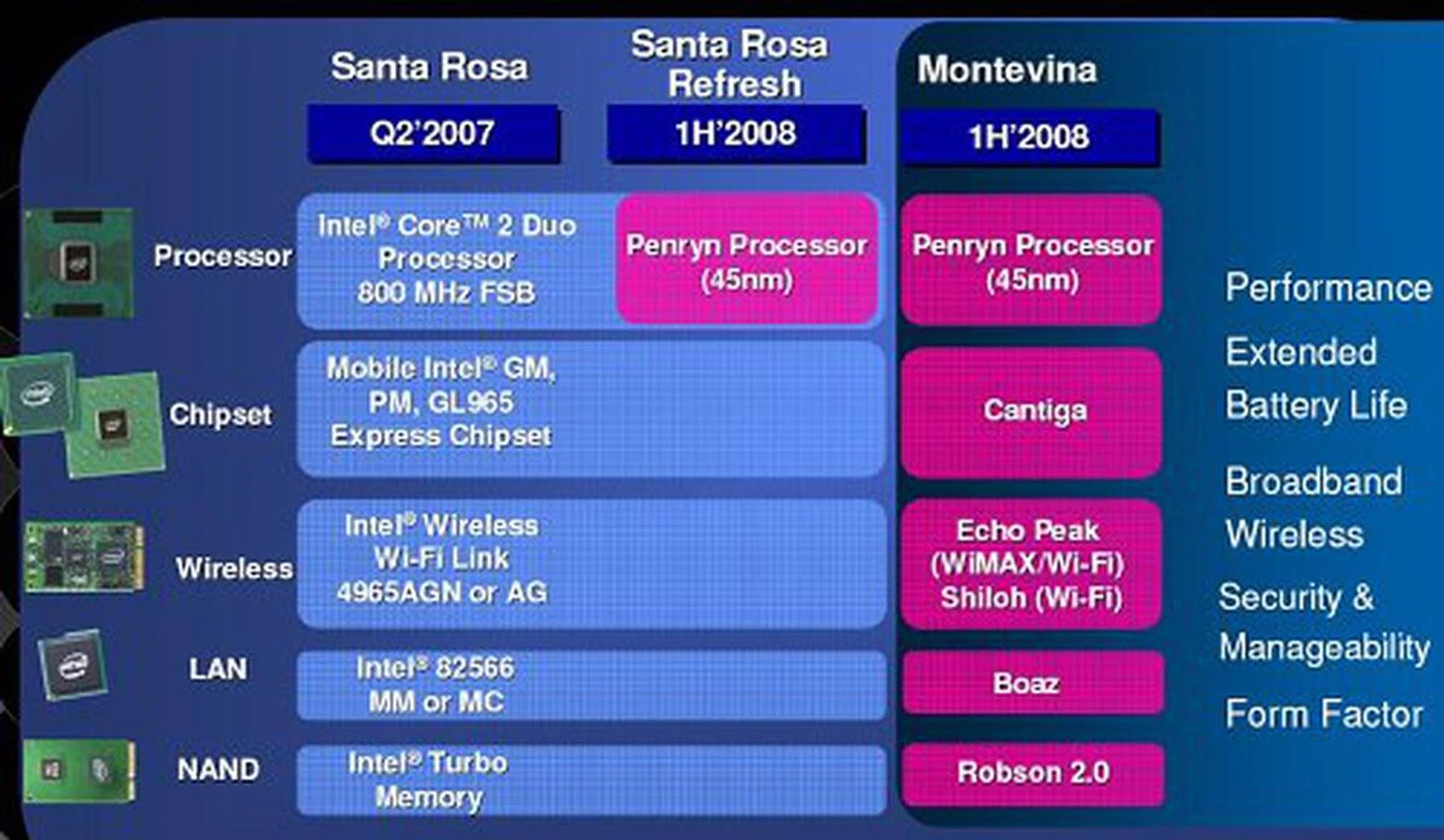
The shape of things to come after Santa Rosa.
Santa Rosa: Playing the Numbers Game
Now that we're done talking about Santa Rosa, we've got some preliminary performance numbers for you. Intel generously loaned us one of the prototype engineering samples of a Santa Rosa notebook to play around for a few days just to get a feel of the system and we were able to run some benchmarks and tests before we had to return the unit to Intel.
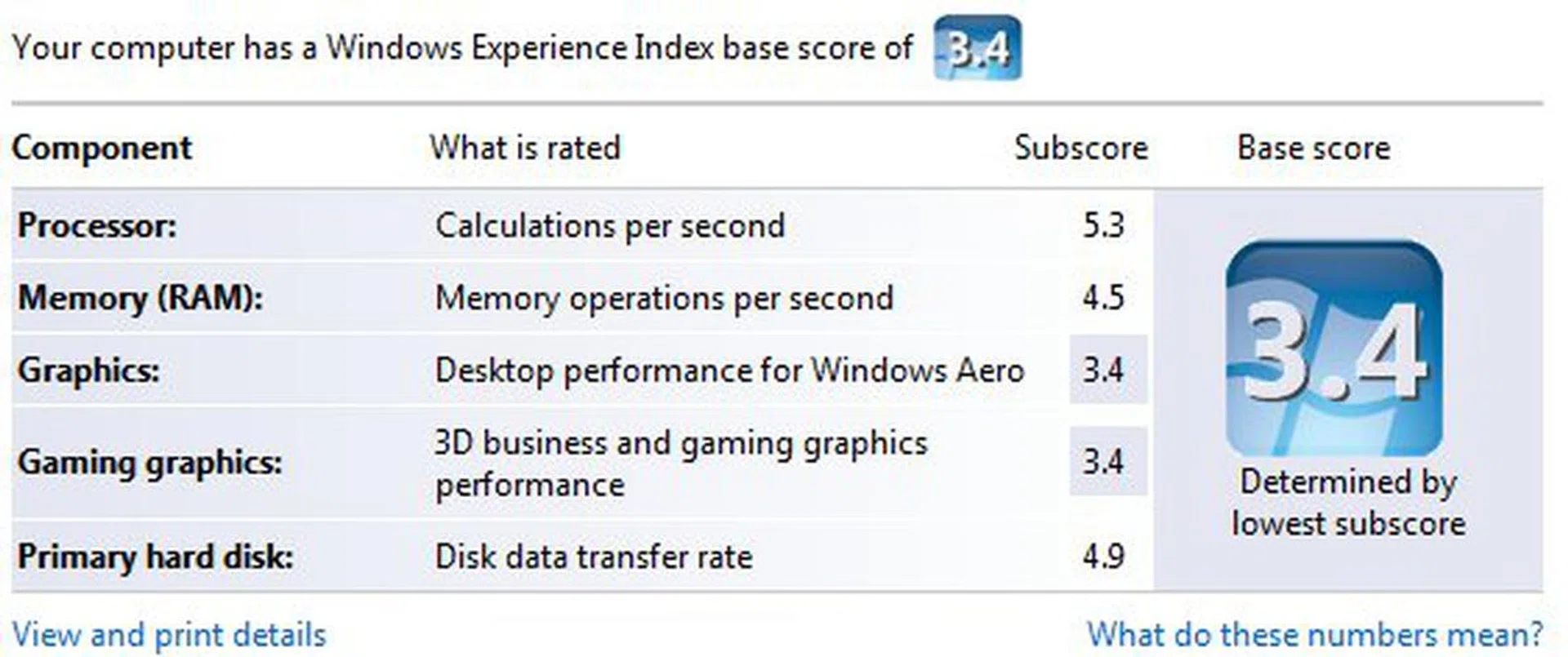
This is what Vista had to say about our Santa Rosa sample.
The decision to use the HP Compaq 6515b as a comparison is two fold. Firstly, it is one of the few high-end notebooks we had around the office running Vista at the time Intel sent us their Santa Rosa prototype. Secondly, we would be able to see how AMD's latest 2.2GHz Turion 64 X2 TL-64 in the brand new M690T chipset and Radeon X1270 IGP matches up against the 2.4GHz Intel Core 2 Duo T7700 and Santa Rosa.
Specifications/ Notebook | Intel Santa Rosa Prototype | HP Compaq 6515b |
Processor | Intel Core 2 Duo Processor T7700 (2.4GHz, 4MB L2 Cache) | AMD Turion 64 X2 TL-64 (2.2GHz, 512KB L2 cache/core) |
Chipset | Northbridge: Intel GM965 | Northbridge: AMD M690T |
FSB | 800MHz | 800MHz HyperTransport (1600MT/s) |
Memory | 2 x 512MB DDR2-667 | 2 x 1GB DDR2-667 |
Video | Intel GMA X3100 | ATI Radeon X1270 |
Performance Benchmarks
As usual for any prototype hardware, we advise our readers to take these results with a grain of salt, considering that they may not reflect the actual operation and/or performance of a retail Santa Rosa notebook. We also know that the HP Compaq 6515b may not be the best comparison, but considering the Core 2 Duo on the Santa Rosa isn't even available yet, it is hard to find something truly compatible, harder still to bench them under Vista on equal ground due to the vast difference in driver support, maturity and lack of variety of benchmark tools that can work under Vista. Thus, these results are best used as a rough gauge only at what Santa Rosa brings to the table.
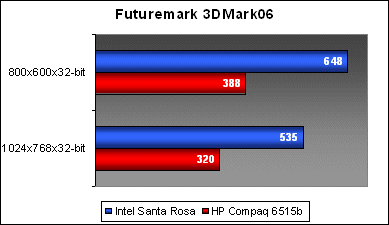
In 3DMark06, we see the Santa Rosa system, with its GMA X3100 actually pushing some very compelling results against the onboard Radeon X1270.
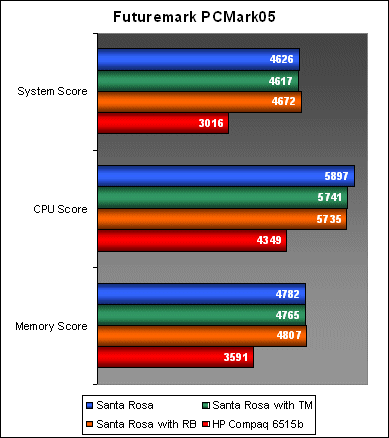
For PCMark05, we decided not only to compare Santa Rosa against the HP notebook, but also to find out if Turbo Memory and ReadyBoost each have any effect on PCMark's individual subsystem performance scores. In this benchmark, we ran the Santa Rosa benchmarks with three different configurations. First is without any additional cache, second with Intel Turbo Memory enabled and third with Turbo Memory disabled, but using a 4GB USB thumb drive for ReadyBoost.
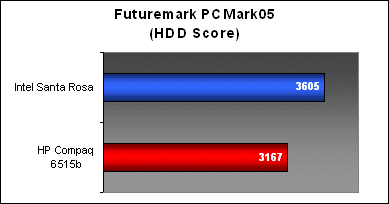
Considering the new features of the ICH8M Southbridge and enhanced SATA capabilities, we decided to perform a quick HDD benchmark as well using PCMark05's HDD subsystem tests. Just like its desktop counterpart, the AMD M690T chipset doesn't seem to benefit from its enhanced SATA controller with AHCI/NCQ features while the Intel ICH8M certainly paints a decent picture for notebook storage performance at this time.
Power Saving and Battery Life
For our battery life tests, we ran three different scenarios to stress the Santa Rosa system. The first is a standard run of the mill DVD playback test. For this test, we switched to Vista's Balanced power profile and left the notebook's background tasks running, including the Wireless and Bluetooth transmitter. The notebook managed to run for approximately three and a half hours off a single charge, enough to actually last through the entire Return of the King movie (not the extended version though).
Secondly, we decided to perform a stress test to see how the Santa Rosa system could last if its CPU was constantly loaded. For this test, we looped an 1080p Quicktime HD movie trailer (Stardust) that was run off the HDD as well. We also tested the effects of running in Vista's High Performance and Balanced power profile. Using the Balanced profile, the notebook could last around 2 hours and 45 minutes, but this was cut short to around 2 hours and 10 minutes when running with the High Performance profile. In terms of video playback, we did not really notice any difference in speed and quality, so there is really no reason to not want a longer battery lifespan on a Balanced profile.
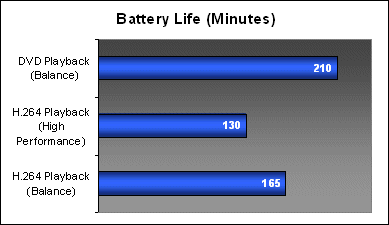
*Take note that the Santa Rosa prototype sent to our office was using a 7200mAH Li-ion battery pack.
Our articles may contain affiliate links. If you buy through these links, we may earn a small commission.