

Intel Core 2 (Conroe): Thermal & Power Analyzed
We've shown you the processor's monstrous performance, but that's just one highlight of the Core microarchitecture. Join us as we reveal to you more mind-boggling figures as we investigate the Core 2 processor's power consumption and heat output.
Introduction
Following our , we ended with a note to stay tuned to our follow-up articles and here's the first of a few in the lineup. In this article, we'll be investigating the heat output and power consumption of the highly hyped Intel Core 2 processors. Although we've already talked about the characteristics of these processors, lets make a very quick recap to bring forth some pointers to mind.
The Core 2 Duo and Extreme processors are based on the new Core microarchitecture that Intel has been baiting the press for the past half-year, but has only been officially launched today. Its design borrows several key elements that have made the Pentium M and the Core Duo processors such a hit on the mobile market. These mobile processors deliver good performance at low power and have had Intel thinking a long while to give up their prized Netburst architecture used on all Intel desktop processors since the first Pentium 4 (sans the Core 2 of course).
Intel thus based their next-generation desktop processor design on the existing Core Duo, but made several enhancements to differentiate and gear it towards the desktop user environment. With the Core architecture's lean and mean execution pipeline, vastly greater instruction processing throughput, better and intelligent data prefetch capability along with a large shared cache design for both processing cores, the Core 2 Duo and Extreme processors could crunch far more instructions per clock cycle and do it efficiently as well. Also borrowing the clock-gating mechanisms and other power management techniques off their mobile processors, the Core 2 Duo is able to keep power envelopes and heat output that's almost approaching that of the mobile department. In all, the Core 2 Duo seems quite the desktop processor that most could have only dreamed about just months ago. We've shown you the processor's monstrous performance, but to prove and convince you of its other aspects, we have concrete evidence gathered from our lab for your reading pleasure.
Test Setup
We enrolled all the Core 2 (Conroe-based) processors, which consist of the Core 2 Extreme X6800, Core 2 Duo E6700 and Core 2 Duo E6600. Apart from the Core 2 family, we've also got two other excellent comparison CPUs and they are none other than the Pentium Extreme Edition 965 processor and the AMD Athlon 64 FX-62. These are the same bunch of processors that we've compared in the performance review where we saw the Core 2 Duo and Extreme processors firmly planting their flag in every test we threw at it. Thus the system configuration remained the same as before, but just for the record, here they are:-
Intel Core 2 Configuration
- Intel Desktop Board D975XBX (Intel 975X Express chipset)
- Intel Core 2 Extreme X6800, Core 2 Duo E6700 and E6600
- Thermaltake Mini Typhoon CPU cooler
- 2 x 512MB Corsair XMS DDR2-800 non-ECC memory modules (CAS 4. 4-4-12)
- Seagate Barracuda 7200.7 80GB SATA hard disk drive (one single NTFS partition)
- MSI GeForce 7900 GT 256MB - with NVIDIA Detonator XP 84.21
- Microsoft Windows XP Professional with Service Pack 2
- AcBel 500W LCD Power Supply
Intel Pentium XE Configuration
- ASUS P5WD2-E Premium (Intel 975X Express chipset)
- Intel Pentium Extreme Edition 965 (with Hyper-Threading)
- Thermaltake Mini Typhoon CPU cooler
- 2 x 512MB Kingston HyperX DDR2-667 non-ECC memory modules (CAS 4. 4-4-10)
- Seagate Barracuda 7200.7 80GB SATA hard disk drive (one single NTFS partition)
- MSI GeForce 7900 GT 256MB - with NVIDIA Detonator XP 84.21
- Microsoft Windows XP Professional with Service Pack 2
- AcBel 500W LCD Power Supply
AMD Athlon 64 FX Configuration
- ASUS M2N32-SLI Deluxe (nForce 590 SLI chipset)
- AMD Athlon 64 FX-62
- Thermaltake Mini Typhoon CPU cooler
- 2 x 512MB Corsair XMS DDR2-800 non-ECC memory modules (CAS 4, 4-4-12)
- Seagate Barracuda 7200.7 80GB SATA hard disk drive (one single NTFS partition)
- MSI GeForce 7900 GT 256MB - with NVIDIA Detonator XP 84.21
- Microsoft Windows XP Professional with Service Pack 2
- AcBel 500W LCD Power Supply
In addition to these components used on the three platforms, they were also attached to an old secondary 5400RPM Western Digital data hard drive, a Ricoh DVD Rewriter optical drive and most importantly, an AcBel 500W LCD power supply unit. This PSU comes with a front panel bay device, which reports several crucial aspects such as power consumption among many others. In this article, we've made full use of it to relay our platform power consumption findings in three scenarios. Temperatures were measured off our thermal probe, but we also used third-party programs to obtain feedback of each processor's on-die thermal temperature.
Before we spill the beans, take note of the below CPU-Z screenshot for the Core 2 Extreme X6800 whose idle clock speed drops to a mere 1.6GHz. The same applies for all other Core 2 processors as well since they fall back to the lowest 6x multiplier supported on these CPUs.
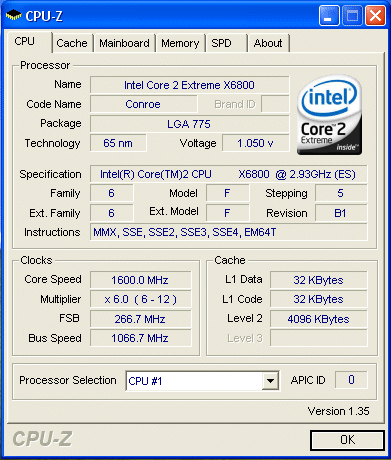
Core 2 Duo and Extreme processors fall back to the lowest supported multiplier of 6x when they are at idle.
Power Consumption
** Updated on 17th July 2006 **
Due to discrepancies in the initial reported power consumption of the Core 2 Duo processor platforms, notably the idle power consumption, we've since setup and rerun the systems to ensure that the results obtained are repeatable. Thanks to our community, we've now updated the Power Consumption section of the article and the below are our updated findings.
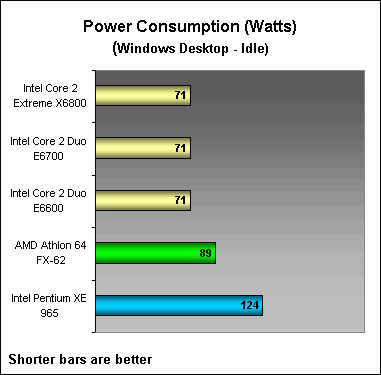
Idling on Windows Desktop
Right from the start, the Core 2 Duo processor based platforms took the lead with over 40% power savings when compared to the Intel Pentium XE 965 system and about 20% when contrasted with the Athlon 64 FX-62 system. Since all of the Core 2 processors throttle down to 1.6GHz at idle, their power consumption ranked similarly.
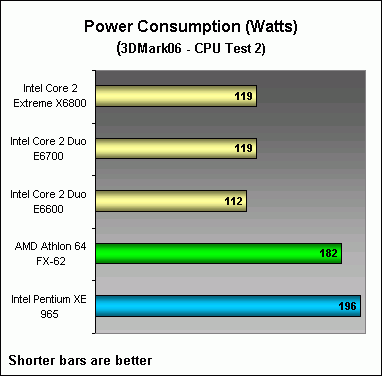
3DMark06 CPU Test 2
We spent much time trying out various programs from Prime95 to the highly acclaimed SPECCPU industry benchmark, but after a lengthy trial and error affair, we found that Futuremark's 3DMark06 CPU test happens to tax the CPU more than any other benchmarks with the highest temperatures recorded as well as the highest power draw among CPU related tests. Now that we laid the groundwork, feast on the power draw results graphed below. Once again the Core 2 processor family have the upper hand with up to 40% less power draw.
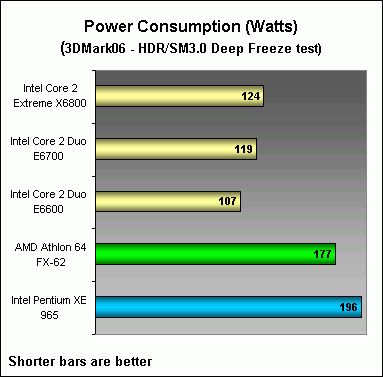
3DMark06 HDR/SM3.0 Deep Freeze Test
What about power consumption during gaming? Well, we have that covered with 3DMark06 too. This was again our choice after trying several games like F.E.A.R., Quake 4 and others which seemed to tax the system on a similar level as the 3DMark06 game tests (both in terms of power and CPU temperatures). The brand new Deep Freeze test seemed to have more impact and thus we stuck with it. Again the Core 2 processors had a similar power savings advantage as before, but note that power consumption actually increased here whereas the Athlon 64 FX-62 and Pentium XE 965 system platforms drew similar or less power than the previous test scenario. Our reasoning for this is because the Core 2 processors were actually a whole lot faster in processing such that they were able to load the graphics subsystem more and that subsequently added to the difference in power consumption numbers in both the test scenarios. In any case, the Core 2 Duo and Extreme processors still have a distinct advantage.
Temperature
Idling on Windows Desktop
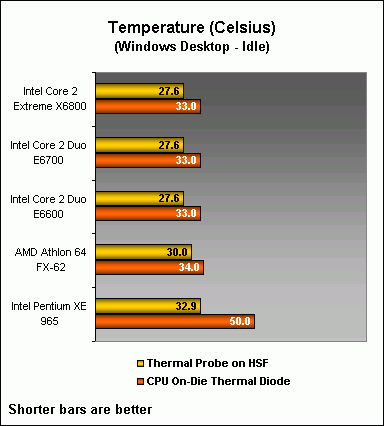
In this temperature test segment, we have measured the temperatures via two methods. The first was using our thermal probe inserted to the CPU cooler such that it was as close as possible to the processor's integrated heat spreader. The second was with the aid of third-party utilities to monitor the processor's on-die thermal diode that's present on all modern processors. Note that the on-die thermal diodes are not the most accurate to measure CPU temperatures as they vary from processor to processor and aren't well calibrated, but since they are used to safeguard processors in case they should exceed their operational limits, we feel that it is still reasonable to rely upon them to a certain degree. All temperatures are taken in our air-conditioned lab that's kept constant at 22 degrees Celsisus.
As for the results, it seems that the Athlon 64 FX-62 maintains a rather decent idle operating temperature, but the Core 2 Duo and Extreme processors still best AMD's efforts. Again remember that the Core 2 bunch have the same idle characteristics and thus similar temperatures. Needless to say, Intel's Pentium XE 965 was the warmest and it was worst at its core, which the on-die thermal diode reported. If you recall the marketing lingo of Netburst architecture, a feature called the Rapid Execution Engine might ring a bell to you. This allows that the processor's arithmetic logical units (ALUs) to operate at twice the clock speed internally from the rest of the chip. Thus we have reasons to believe that the old architecture might have had hot spots and this may be what the on-die thermal diode picked up on the Pentium XE 965 processor.
3DMark06 CPU Test 2
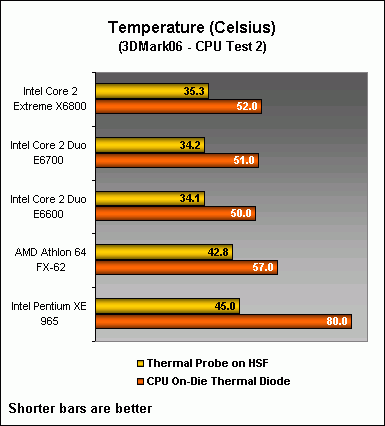
The CPU test of 3DMark06 was where all the processors were most taxed and recorded the highest operational temperatures in our lab environment with the Thermaltake Mini Typhoon cooler. Once again the standings are similar to the idle scenario and the Pentium XE 965 is the hottest while Intel's latest creation operates the coolest.
3DMark06 HDR/SM3.0 Deep Freeze Test
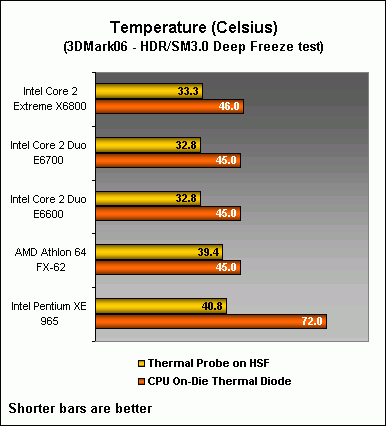
For a game test the results are quite expected. The CPU isn't as taxed as it was in the previous scenario and thus the temperatures noted here are a tad lower.
Concluding Remarks
Well, there you have it. Intel's latest Core 2 processors completely tested on all grounds of performance, thermal and power and they have come out triumphant on all accounts. With the rising costs of electricity in current times, this processor has proven that it's worth the investment (especially those running machines 24x7) and it also advances the performance capabilities a great deal over existing and previous CPUs in the market. The lower thermal output is also another pull factor for the processor as a simple cooler would suffice. Costly aftermarket coolers might be a thing of the past for all except those looking to push the limits of the processor. Unfortunately in our article, we had to resort using an expensive aftermarket cooler for we had to standardize the cooling aspect of all systems to make this comparative piece possible. For HTPC builders, one could even integrate a simple system with a passive CPU cooler and we have proven this feasible in our Computex 2006 showcase. Furthermore, depending on their system configuration needs, they could even opt for much smaller, cost-effective power supply units as the Core 2 processors don't demand much.
Overall, Intel is so confident about the Core architecture that it will eventually make its way into both the mobile and server environments as well, albeit those will have additional tweaked elements to suit their purposes. Known by the codenames of Merom and Woodcrest respectively, you can expect these to show up later this year, so watch for those announcements too as they stir the respective industries then. Meanwhile, stay tuned to more developments on the desktop side and more follow-up articles right here at www.hardwarezone.com.
Our articles may contain affiliate links. If you buy through these links, we may earn a small commission.