
Evolution of Memory Performance: A DDR3 Story
DDR3 memory arrived with the launch of Intel P35 chipset, but do you need to upgrade your system for DDR3 compliance? Overclockers have been waiting for DDR3 for higher bandwidth and faster speeds, but it is worth the trade off from current low latency DDR2 memory? Answers inside.
Playing the Memory Game
And so the cycle begins anew...
The evolution of Random Access Memory (RAM) is just like any other silicon chip progression in the PC industry; trying to attain faster speeds and higher bandwidths with lower power consumption and more cost savings. When it was obvious that DDR memory technology peaked, Intel took the lead to usher in DDR2 memory technology along with the NetBurst microarchitecture and 915P chipset family. This was almost four years ago, though many may not even remember DDR2's entrance at the time because of latency and performance issues. AMD was also at their peak at the time with their Athlon 64 and the successful introduction of the Socket 939 platform, which proved that DDR was far from dead, matching and outperforming most DDR2 platforms at the time.
It wasn't until mid-2006 where DDR2 memory finally took off with two very significant events in the PC industry. AMD launched their AM2 platform to synchronize the industry towards DDR2 and thus obsolescing DDR. Intel unveiled their Core 2 Duo processors and a new chipset, the P965, which brought about higher FSB across the board and natively supporting high-speed DDR2-800 (400MHz) memory. These events sparked the true growth spurt of DDR2 memory, going from the lackluster bandwidths of DDR2-533 and CL5 latencies to high performance DDR2-800 memory and ultra low CL3 latency timings. These of course still correspond to the official JEDEC specifications for DDR2 memory.
Unofficially, vendors began to truly advocate overclocking with extreme enthusiast products that were way beyond JEDEC specifications. As it stands, the highest performing DDR2 memory today have reached DDR2-1266 (633MHz) and even DDR2-1300 (650MHz). NVIDIA, with their launch of their nForce5 series of chipsets introduced a new memory standard called EPP (Enhanced Performance Profiles or otherwise marketed as SLI Memory), which made use of un-utilized SPD ROM space to set extreme memory timings when used in conjunction with the chipset.
However, even the mighty DDR2 beast reached its zenith in 2006 with crashing prices and the hint of newer things to come. We began to see prototype DDR3 memory in major technology trade shows like CeBIT and Computex in 2006 promising extreme speeds twice of DDR2-800 and in 2007, Intel proved again to be the catalyst for bringing DDR3 into the mainstream through their new 3-series chipsets, mainly, the P35 which was released into the wild in May.
With Intel now back in the lead of the CPU race, DDR3 is getting a lot more hype than DDR2 did when it was launched. Also, the burgeoning overclocking industry also means DDR3 will be well anticipated for its higher bandwidth capabilities. However, as what we mentioned right at the beginning, this is just another cycle resembling the DDR2 situation. With DDR3's high bandwidths come high latencies. AMD, while knocked off their throne, will only embrace DDR3 late 2008 if their schedule for Socket AM3 is realized. Their reasoning is the same. DDR2 still has plenty of life in them today and by the time they are ready for DDR3, the technology would have matured to truly see its benefits. Will DDR3 really suffer the same slow evolutionary phase as DDR2? In this article, we try to take a look at some of the aspects that would dictate its fate, and that's its performance and the chipset.
DDR3 - A Summary
The major difference between DDR2 and DDR was the doubling of its bus speeds to the memory clock, thus allowing higher data transfer per memory clock cycle. DDR2 also increased its internal memory buffers from two to four bits. Official JEDEC data rates for DDR were 200-400Mbps and for DDR2, it was 400-800Mbps (DDR/DDR2 memory outside this range are all considered overclocked memory with no official specifications on its standards).
With DDR3, these parameters have been doubled yet again. Current JEDEC specifications for DDR3 set data rates between 800-1600Mbps and memory banks have increased to eight bits deep as well. As DRAM modules get larger, the deeper prefetch buffers will help reduce or mask the effects of latency. However, in order to sustain memory signal integrity at such high speeds, several new technologies have been integrated into DDR3 SDRAM modules such as a fly-by bus with On-DIMM termination. What the fly-by bus does is daisy chain address and control lines through a single path across each DRAM (and this has some similarities to how an FBDIMM module operates). In comparison, DDR2 memory splits the signal path between all DRAM chips through T-Branching.
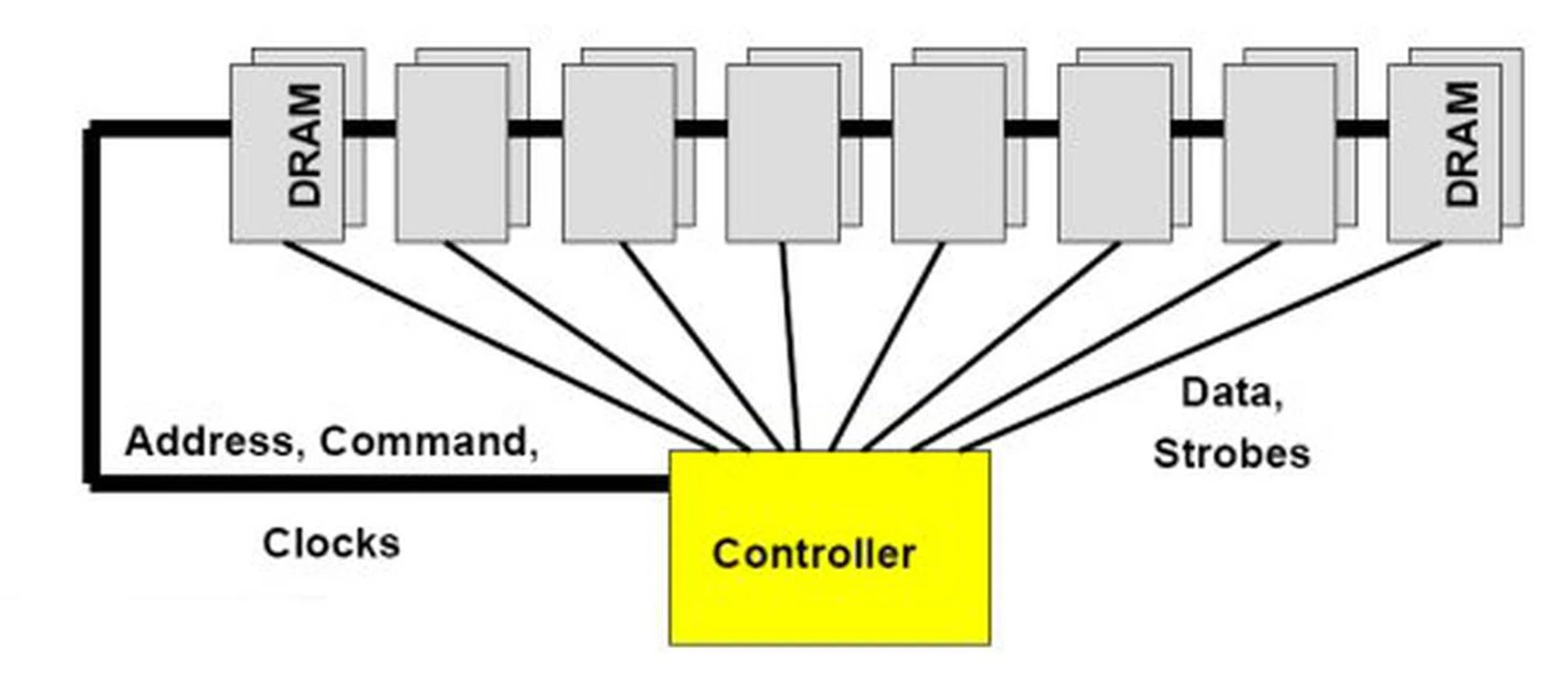
DDR3 fly-by bus topology cross diagram.
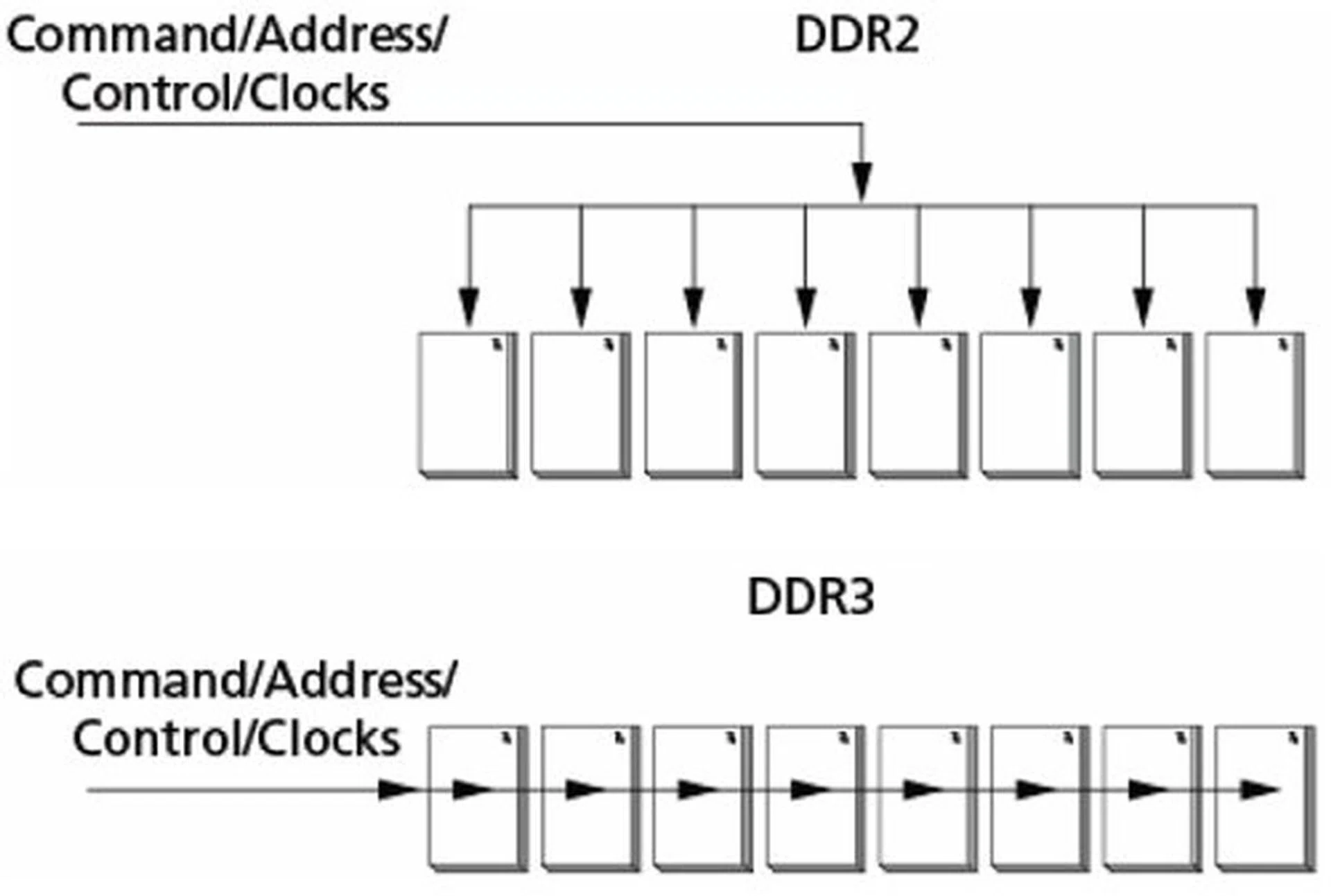
Difference between DDR2 T-branch topology and DDR3 Fly-by.
Power consumption will go down with DDR3 memory, from the reference 1.8V of DDR2 to 1.5V with DDR3. At present, most DDR3 chipset are manufactured using 90nm technology, but there have been several vendors sampling 80-70nm chips as well. While this will unlikely further reduce the 1.5V standard that has been set, it will allow for better qualification of high-speed DDR3 memory in the future. Physically, DDR3 memory isn't all that different from DDR2, and DIMM modules come with the same 240-pin BGA package. However, they are not compatible with each other and will be notched differently so you cannot insert a DDR3 DIMM into a DDR2 slot and vice versa.
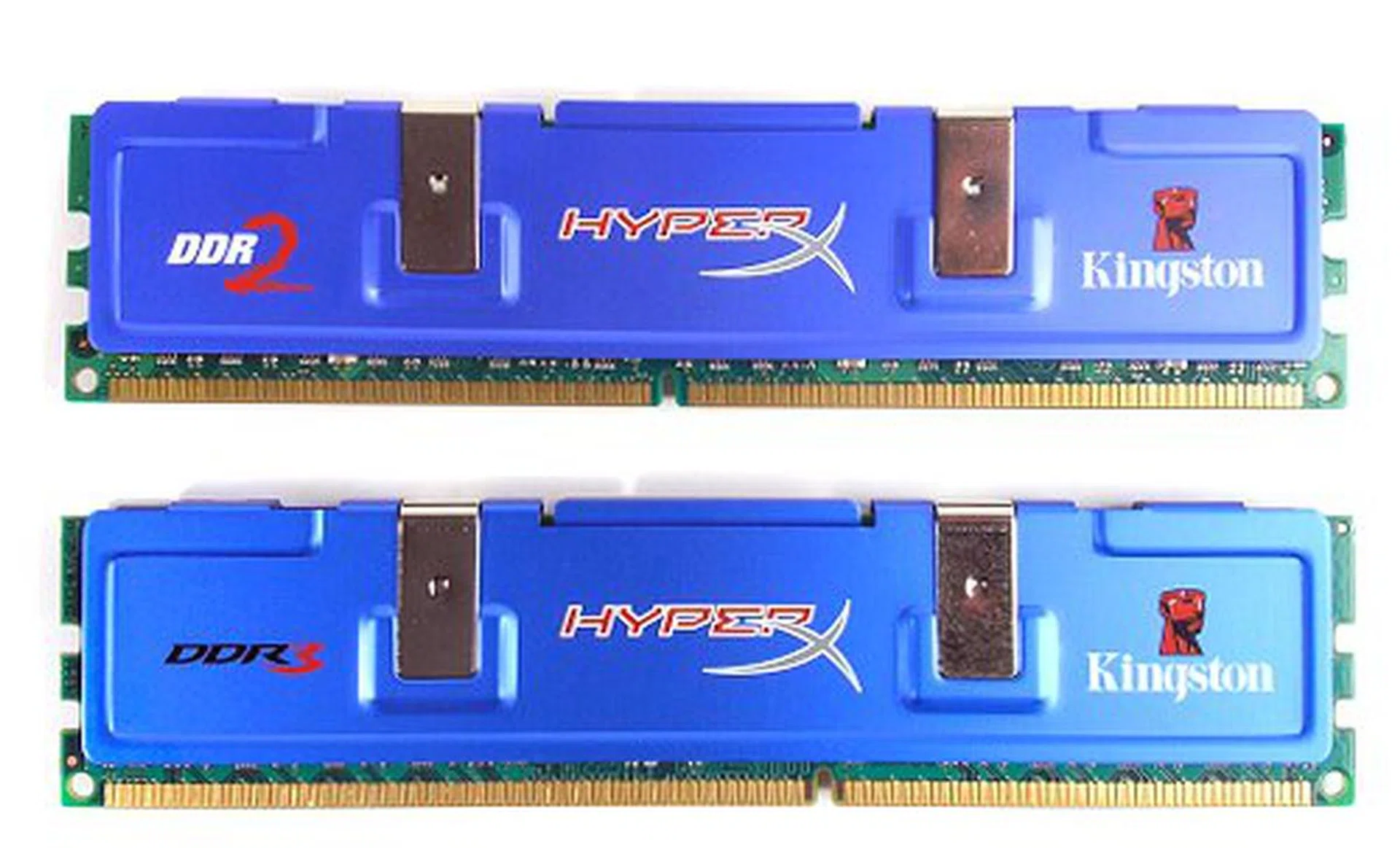
Pin layout differences between DDR2 and DDR3 memory.
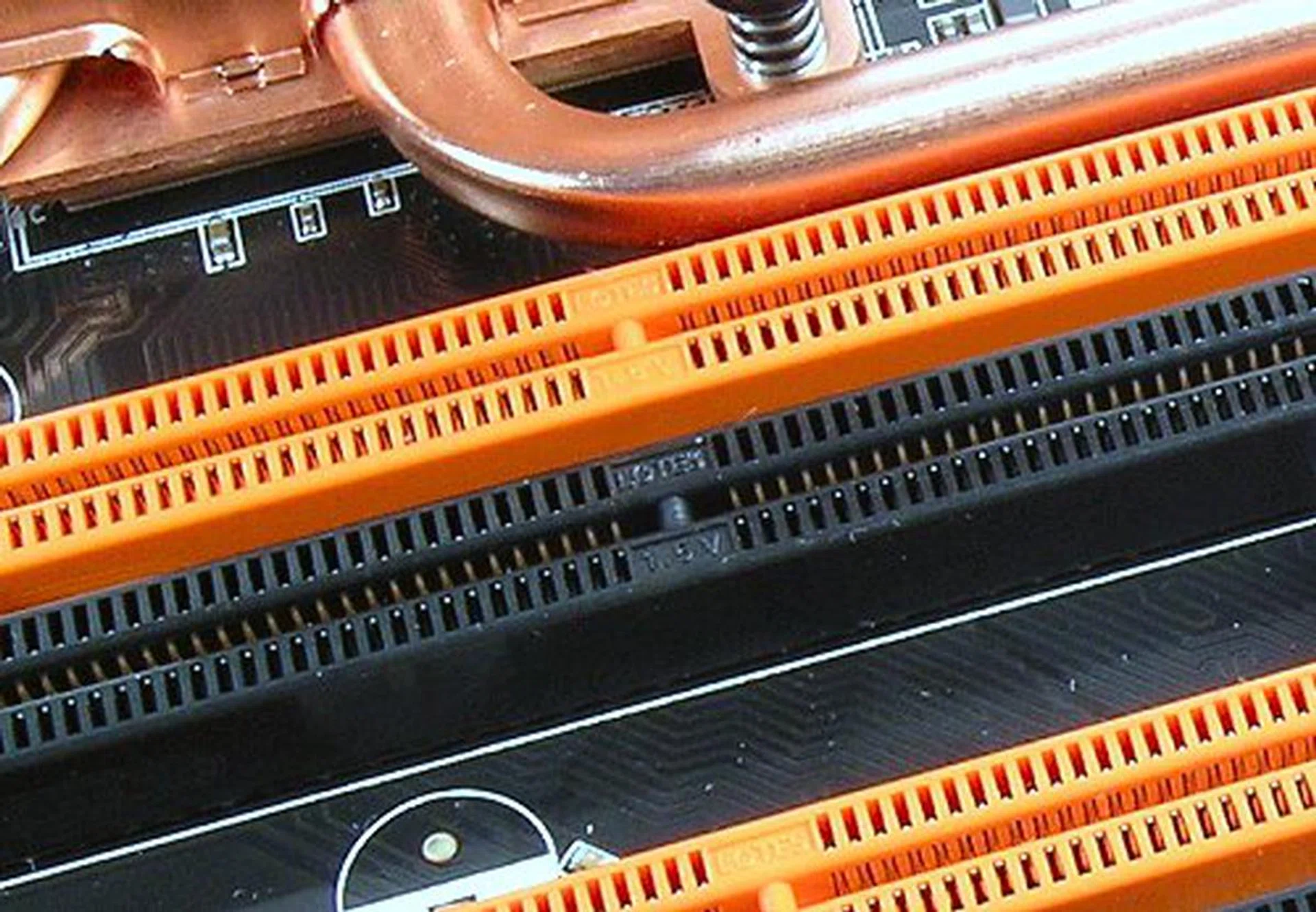
DDR3 DIMM slots not only have different notches, but you will also be able to see the 1.5V marker on the slots as well, compared to 1.8V for DDR2.
There is quite a bit more to DDR3, but these are the main features and improvements that would concern most users. As this article is about performance measurement and viability of DDR3 instead of a white paper dissection of the new technology, we won't bore you with details of every new feature and instead go straight to what is best understood - raw numbers.
DDR | DDR2 | DDR3 | |
Data Rate | 200-400Mbps | 400-800Mbps | 800-1600Mbps |
Voltage | 2.5V +/- 0.2V | 1.8V +/- 0.1V | 1.5V +/- 0.075V |
Packaging |
|
|
|
Source Sync. | Bi-Directional DQS (Single ended Default) | Bi-Directional DQS (Single/Differential Option) | Bi-Directional DQS (Differential Default) |
Burst Length | 2, 4, 8 (2-bit prefetch) | 4, 8 (4-bit prefetch) | 4, 8 (8-bit prefetch) |
Asynchronous RESET | No | No | Yes |
On-Die Termination (ODT) | No | Yes | Yes, Dynamic |
Auto Self-Refresh (ASR) | No | No | Yes |
Driver Calibration | No | Off-Chip driver calibratrion | Self Calibration with ZQ Pin |
Write Leveling | No | No | Yes |
DDR3 vs. DDR2
DDR2 has gone a long way beyond JEDEC specifications not only with bandwidth and latency improvements, but also on the chipset level where new technologies have surfaced specifically to take advantage of these high-speed memory modules. For this article, DDR3 memory performance will be compared to DDR2 running on the three most prominent Intel LGA775 memory controllers today. These are the new Intel P35, its predecessor, the Intel P965 Express and the competitor, NVIDIA's nForce 680i SLI. The Intel P35 and P965 comparisons are to highlight chipset generation improvements, but the main feature to look out for is the nForce 680i SLI, which is widely known to have the better memory controller.
For DDR3, we will be running DDR3-1066 to match current processor technologies with the standard 1066MHz (266MHz base) FSB. DDR3-1333 will also be tested, but since 1333MHz FSB processors have yet to be released, the only way to set the ASUS P5K3 Deluxe to a DDR3-1333 divider is to overclock the board to run at 1333MHz (333MHz base). To compensate for the higher FSB, CPU multipliers have to be reduced. However, do note that processor speeds will not match 1:1 for all test systems. The Core 2 Extreme X6800 operates by default at 2.93MHz (266x11). When overclocked for DDR3-1333 testing, the processor would be operating at 3GHz (333x9). It is important to note that for all DDR3 tests above DDR3-1066, performance improvements are contributed by the overall system bus increase and not only the memory.
A little confusing to explain we know, but to shorten it, we will test both DDR2-1066 timings at FSB 1066 for current processors as well DDR3-1333 at DDR3-1333 (which can be used as a gauge for the future scenario when Intel officially launches their 1333MHz FSB processors).
Test Setup
The motherboard used in this article to benchmark DDR3 memory is the ASUS P5K3 Deluxe. The P5K3 Deluxe is the DDR3 variant of the DDR2-only P5K Deluxe. Since we've already done a preview as well as a full review of the P5K Deluxe before (which you can ), there is no need to go further into the board details. For comparisons, we will use the P5K Deluxe as the basis for the Intel P35 DDR2 performance. Because of this, there is a two-fold purpose to this article, the evaluation of DDR3 technology improvements over DDR2 as well as the performance review of the ASUS P5K3 Deluxe compared to the P5K Deluxe.
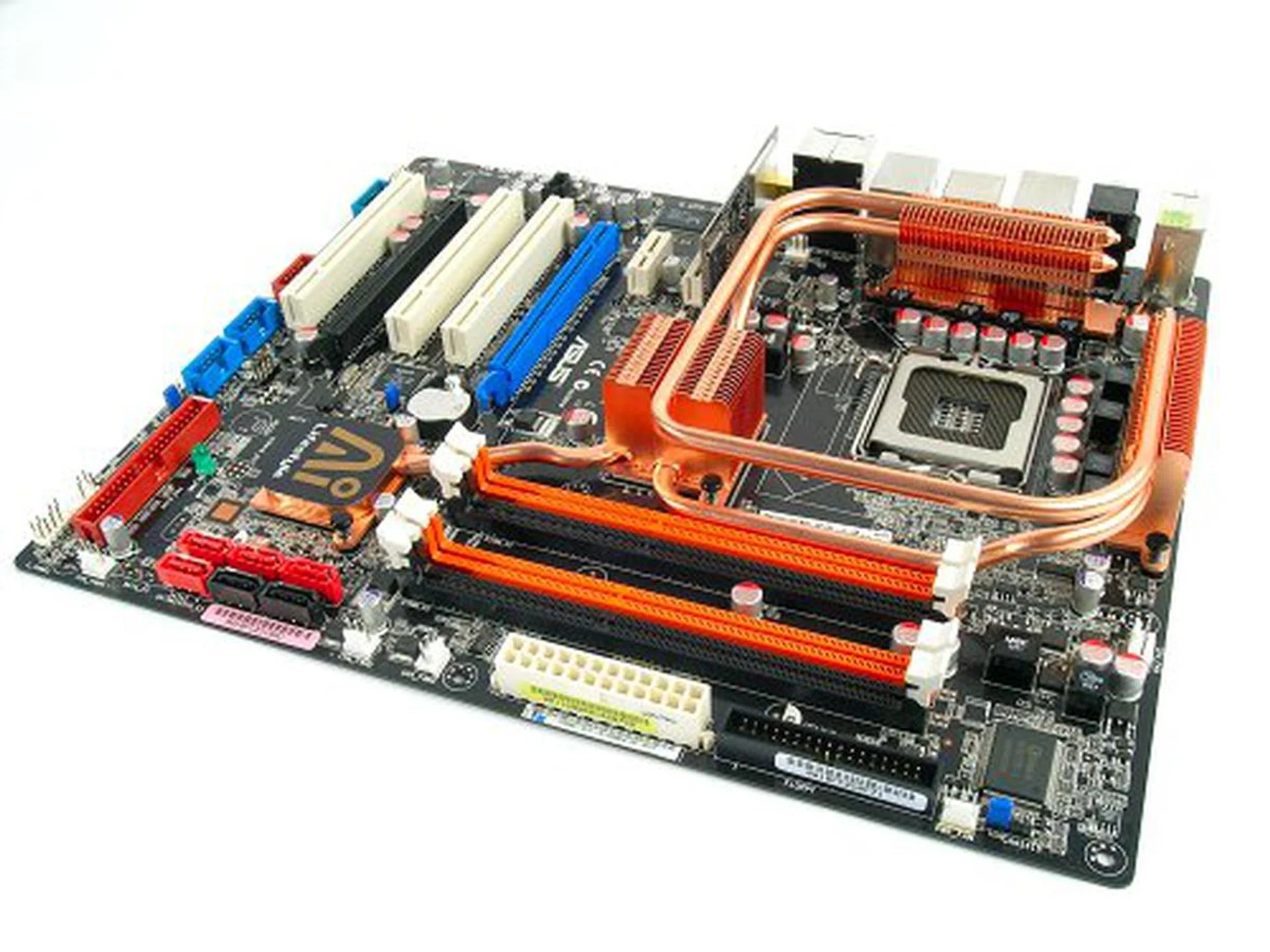
The ASUS P5K3 Deluxe motherboard.
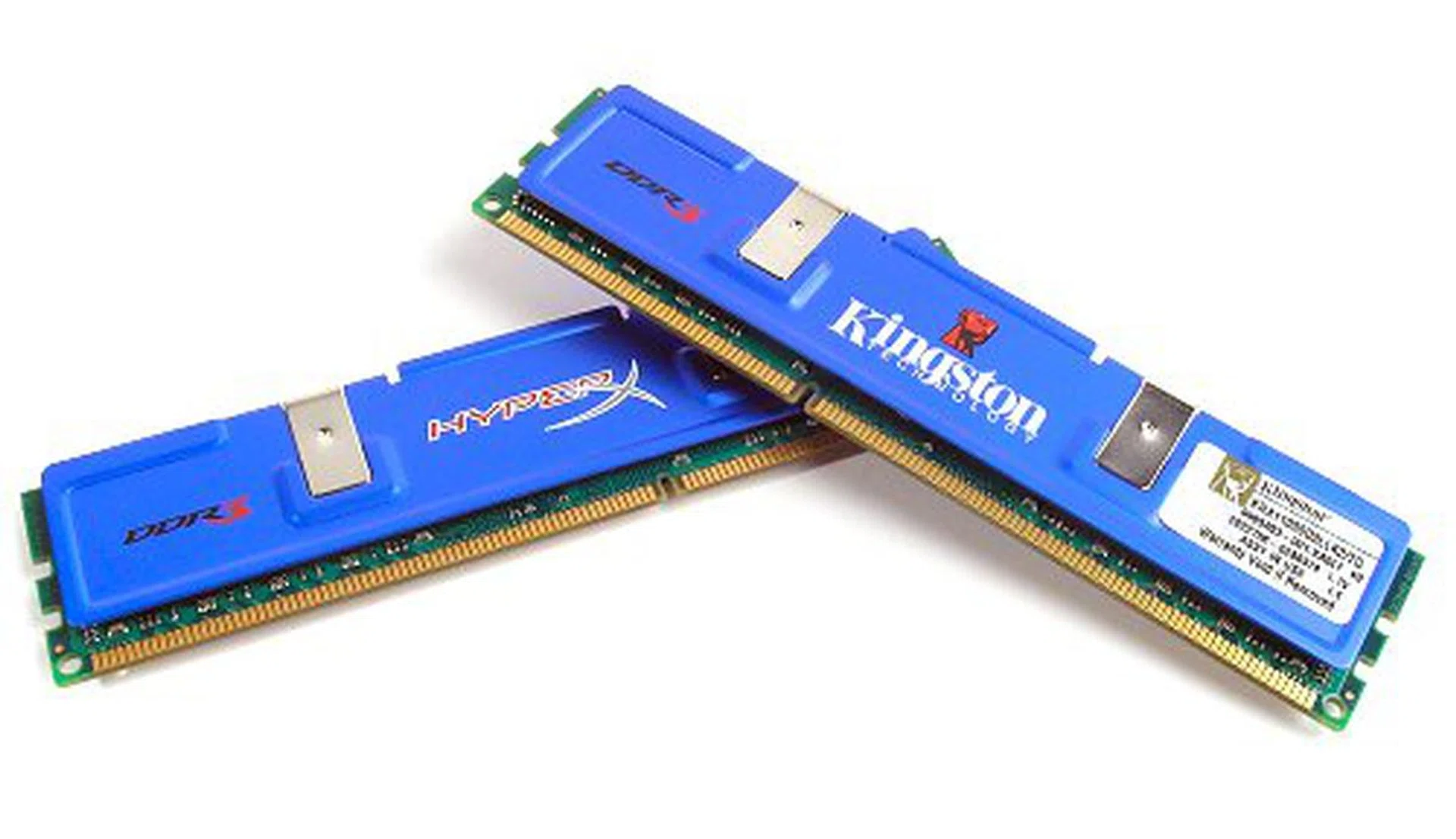
Kingston DDR3-1333 KHX11000D3LLK2/2G paired modules.
Performance of DDR2 on the Intel P965 and NVIDIA nForce 680i SLI chipsets will be derived from reference boards. All test bed configuration options are listed below and used for all tests unless otherwise noted:-
- Intel Core 2 Extreme X6800 processor (2.93GHz)
- 2 x 1GB Kingston HyperX DDR2-800 @ 4-4-12 CAS 4.0
- 2 x 1GB Kingston HyperX DDR3-1066 @ 1066MHz FSB, 7-7-20 CAS 7.0
- 2 x 1GB Kingston HyperX DDR3-1333 @ 1333MHz FSB, 9-9-25 CAS 9.0
- Seagate Barracuda 7200.10 200GB SATA hard disk drive (one single NTFS partition)
- MSI GeForce 8600 GTS 256MB - with ForceWare 158.22 drivers
- Intel INF 8.3.1.1013 and AHCI 7.5.0.1017 driver set (Intel P965 and P35 only)
- NVIDIA nForce 9.53 driver set (NVIDIA nForce 680i SLI only)
- Microsoft Windows XP Professional with Service Pack 2 (and DirectX 9.0c)
Benchmarks
The following benchmarks are used in this article for memory and platform performance comparisons:-
- BAPco SYSmark 2004
- Futuremark PCMark05
- SPECviewperf 9.0
- Futuremark 3DMark06
- AquaMark3
Results - BAPco SYSmark 2004
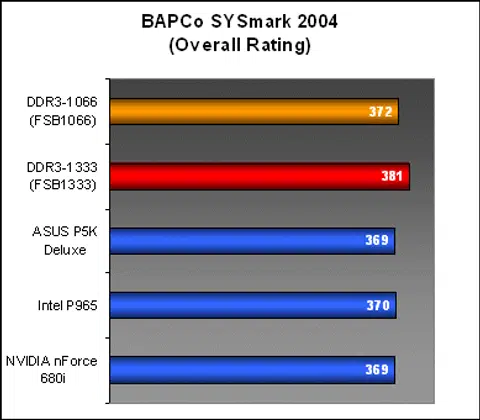
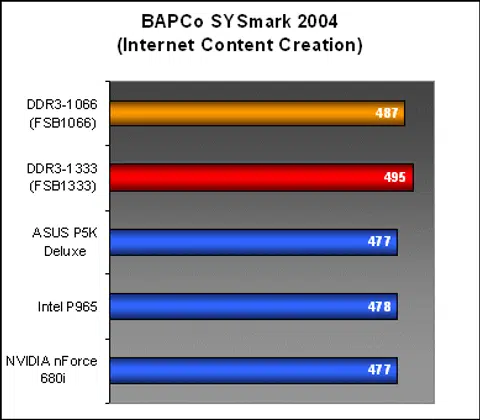
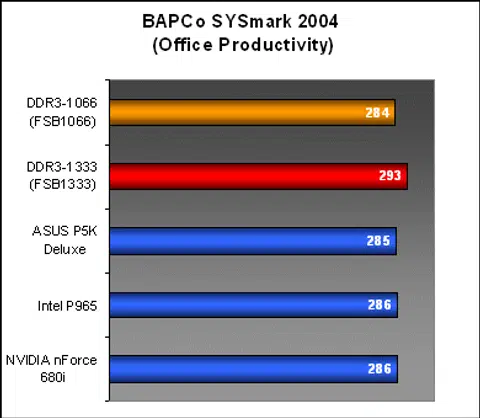
DDR3 at 1066MHz and 1333MHz both showed decent improved performance over DDR2-800 in the overall results of SYSmark 2004. However, when you look at the scores, DDR3-1066 only improved Internet Content Creation workloads and not Office Productivity. At DDR3-1333, both workloads gained nearly 20 points in the benchmark, but remember that the FSB has also been overclocked to 1333MHz and the CPU is running a tad faster as well.
Results - Futuremark PCMark05
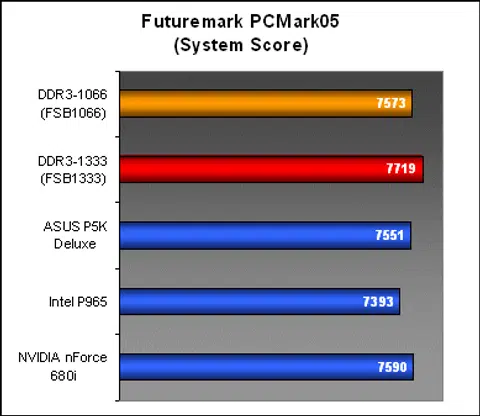
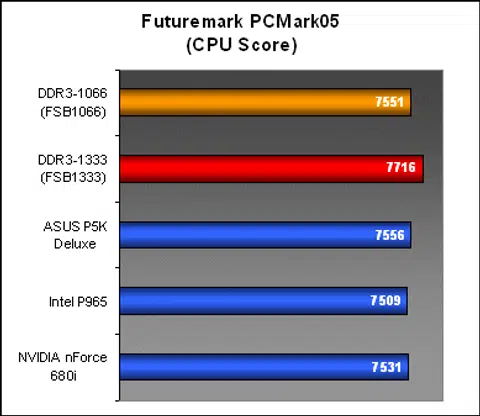
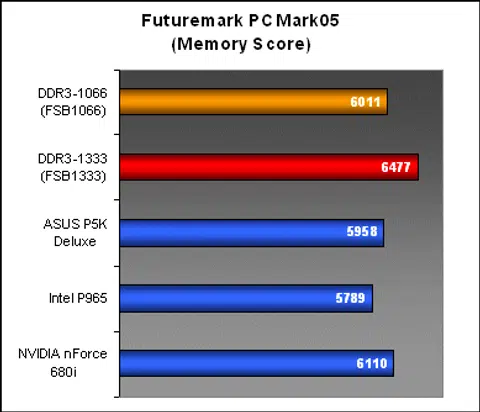
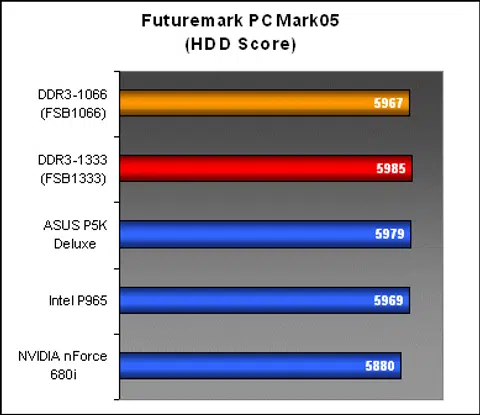
For PCMark05, DDR3-1066 did not show any real advantage over DDR2-800 at all. In fact, the nForce 680i SLI even outperformed the P5K3 Deluxe here in the Memory workloads. Only at DDR3-1333 did we notice a jump in performance, but that again could solely be due to the faster clocked processor as seen in the CPU score and the improved 1333MHz FSB.
Results - SPECviewperf 9.0
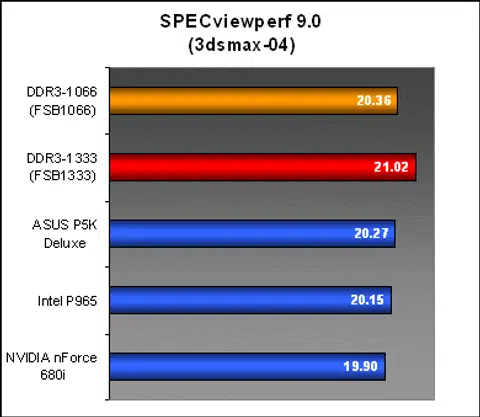
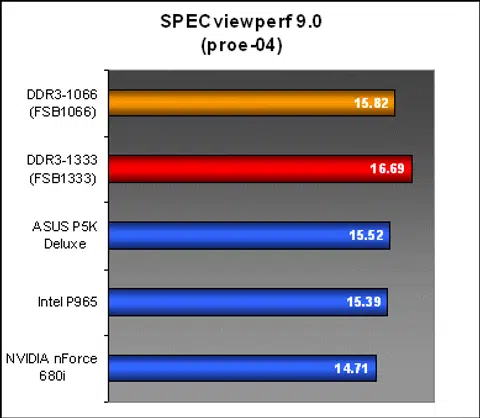
The situation for SPECviewperf 9.0 suited the Intel based systems more and you can actually see a gradual improvement in memory performance from the P965 to P35 and going from DDR2-800 to DDR3-1066. However, look closely at the numbers and you'd see that the increase from DDR2-800 on the P5K Deluxe to DDR3-1066 P5K3 Deluxe is similar to that from the P965 to P35. A minor fraction of an improvement that can be expected from tweaking your system, not with next generation memory.
As with previous benchmarks, we began to see the real benefits only when the system was running under DDR3-1333.
Results - Futuremark 3DMark06
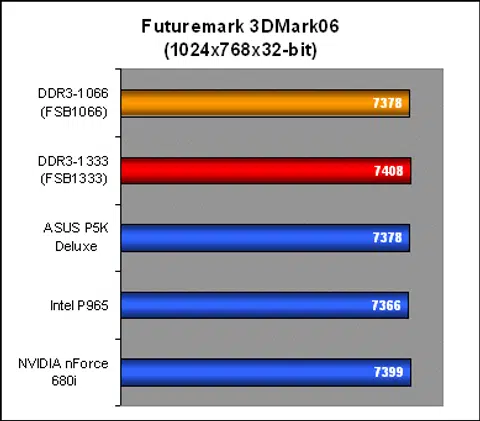
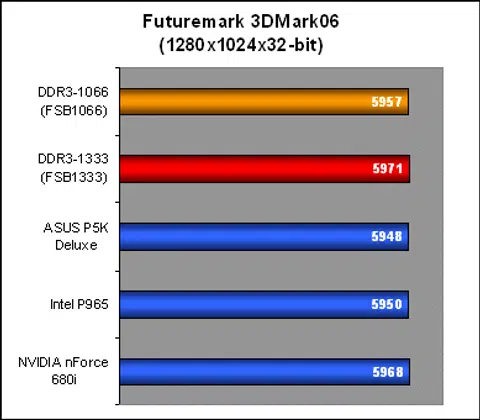
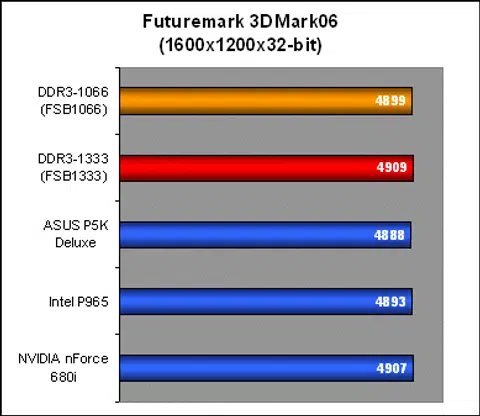
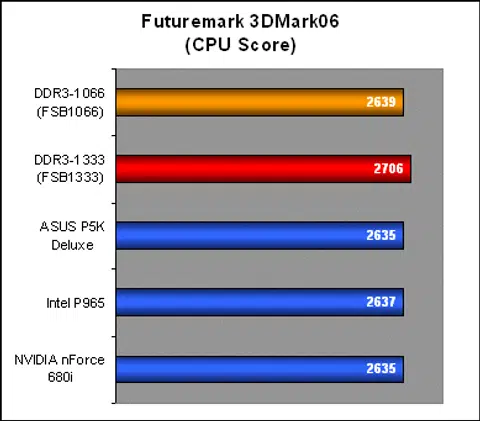
3DMark06 remained extremely consistent in our benchmarking run, even with DDR3 memory installed. In all resolutions, DDR3 did not make the slightest difference in overall performance at all. If we really wanted to be picky, we could have mentioned the small increase with DDR3-1333, but we all know that 30 3DMarks isn't something that is worth talking about.
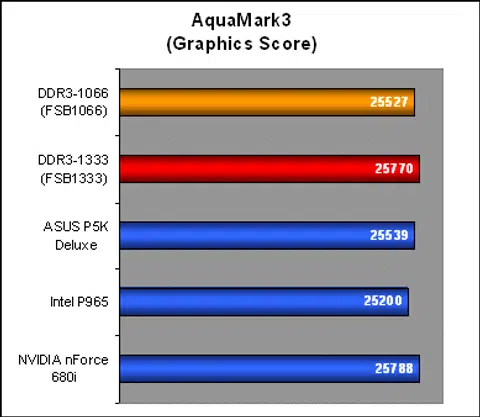
Results - AquaMark3
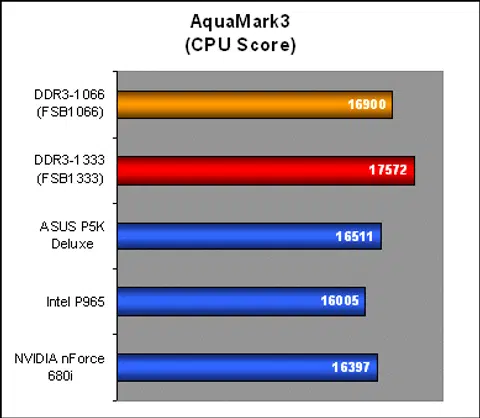
AquaMark3 was one of the few benchmarks that displayed any real variation in results directly related to system and memory changes. Here, you can see that the Intel P35 offers superior CPU performance over the other chipsets and the P35 with DDR3-1066 runs even better. At DDR3-1333, the numbers jump up another 4% over DDR3-1066. GPU results however, were not affected so much. At the end of the day, the 'Frames-per-second' (fps) breakdown is such: DDR3-1066 offered an average 1fps improvement over the DDR2-800 system from 144fps to 145fps while DDR3-1333 benched 148fps.
Overclocking DDR3
We will also be running a few overclocking tests to ascertain the benefits of both improved bandwidth and improved latency towards DDR3 performance. Bandwidth overclocking is a pretty straightforward affair to see how well DDR3 performance scale with speed increase. We initially wanted to benchmark at DDR3-1600 timed at 9-9-9-25. However, our HyperX modules could not be overclocked that high. In the end, we had to settle for DDR3-1500 at 9-9-9-25. At these speeds, motherboard FSB will have to be boosted to 1500MHz (375MHz base) and the processor running at 3GHz (375x8).
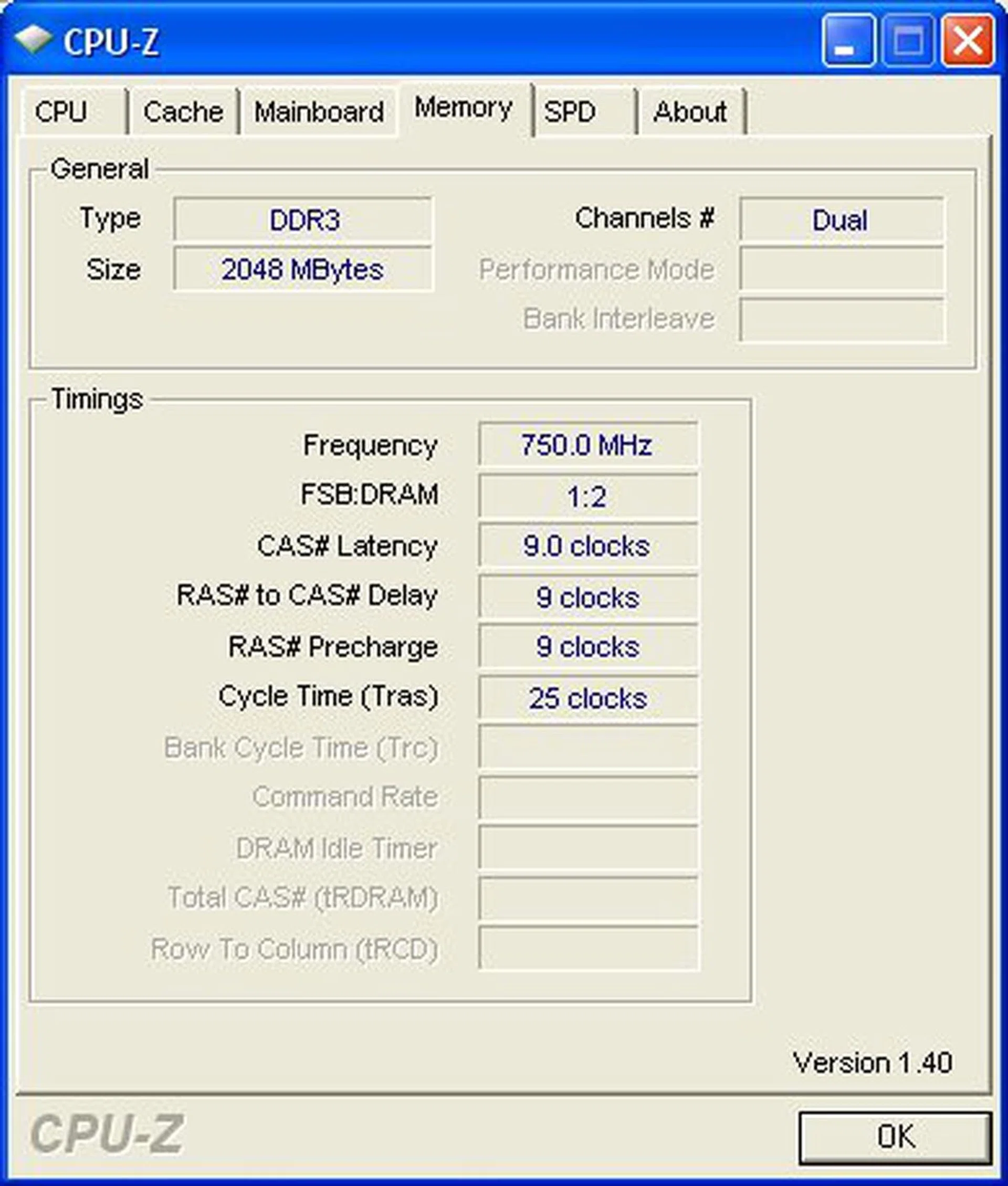
DDR3-1333 memory overclocked to DDR3-1500.
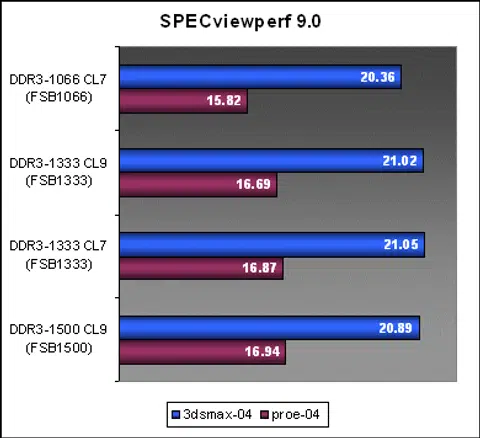
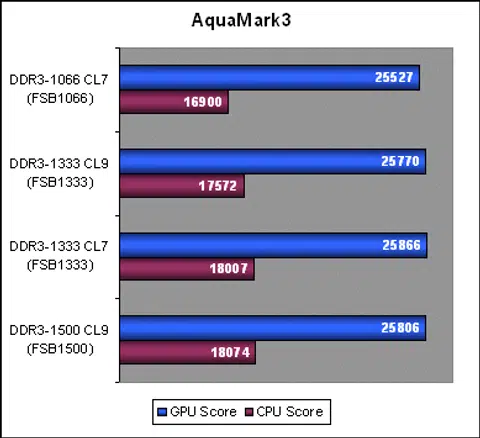
For latency tests, we reduce DDR3-1333 timings from 9-9-9-25 to 7-7-7-20, similar to the DDR3-1066 SPD latencies. From our benchmarks before, you can tell that DDR3-1066 doesn't really provide much improvement over DDR2. Once we move towards 1333MHz processors and higher speed DDR3-1333, memory latencies will increase even further, which counters potential performance improvements from the speed bump. So, how will DDR3-1333 perform if it could operate with the same latencies as DDR3-1066? Check out the results below and see for yourself.
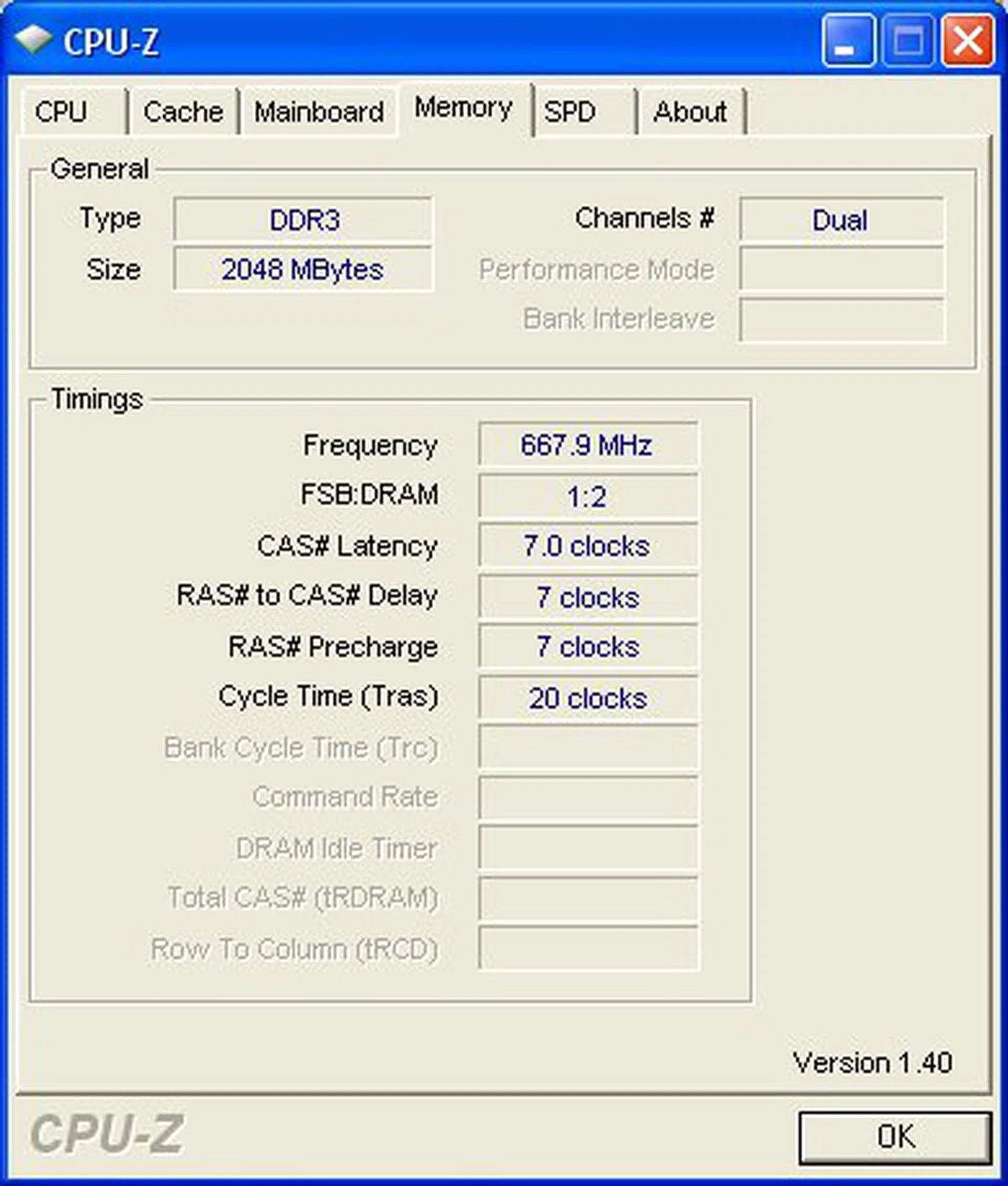
DDR3-1333 memory running at a lower CL7 timing than its usual SPD of CL9.
Under normal situations, our pair of Kingston HyperX DDR3 memory could run at 1.5V up to DDR3-1066. At DDR3-1333, we found that the memory worked fine at 1.7V (Kingston's recommended voltage for this speed). Then at DDR3-1500, we had to jack up the voltage again to 1.95V. Heat was not much of an issue till you pass the 1.8V mark where the memory stick becomes apparently hotter even when idling. As we had to overclock the whole system in order to benchmark different memory timings, the following table is a quick cross reference of actual frequencies and timings used in the benchmarks below.
DDR3-1066 | DDR3-1333 | DDR3-1500 | |
FSB | 1066MHz | 1333MHz | 1500MHz |
CPU | 2.93GHz (266x11) | 2.997GHz (333x9) | 3.0GHz (375x8) |
Timing | 7-7-7-20 | 9-9-9-25 (normal) / 7-7-7-20 (OC) | 9-9-9-25 |
Voltage | 1.55V | 1.70V | 1.95V |
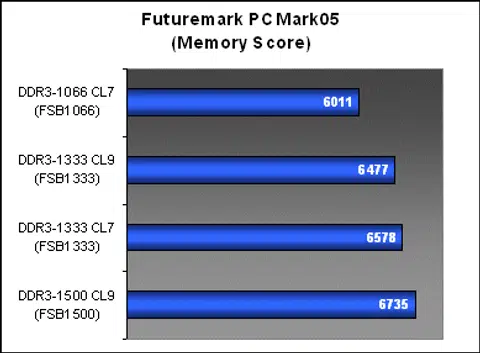
Under a synthetic benchmark, there was a visible performance improvement when overclocked up to 1500MHz. DDR3-1333 at CL7 also showed a marked improvement over CL9, putting it almost on par with DDR3-1500 as well. In real world application benchmarks though, we were able to see improvements from DDR3-1066, but there wasn't much of a significant increase even after overclocking.
Conclusion
When Intel launched their previous generation P965 chipsets, they introduced a technology called Intel Smart Memory Access into the memory controller. Its purpose was to hide memory latency performance issues with more intelligent pre-fetching and predictive buffering. The memory controller on the new P35 is supposed to have been updated and optimized as well. You can see this in our DDR2 results as the P35 almost always outperforms the P965 in memory intensive tests. Now, this is important to take note of as in theory, the P35 and Smart Memory Access should have helped boost DDR3 performance further, but since this is a chipset level technology that will work just as well on DDR2 and DDR3 memory, real performance differences can only be described as slim.
As with DDR2 when it was launched, DDR3 performance was largely affected by its high latency timings. With starting latencies around 7-9 bus cycles, the improved bandwidth offered by DDR3 could hardly be seen. No matter how intelligent the chipset may be in memory access and buffering, there is no substitute for a true improvement to latency timings. Running DDR3-1333 with CAS 7 timings was a clear indicator of this. Overclocked to 1500MHz (CL9), DDR3 offered a glimpse or better performance, but even then, we weren't really impressed at the gains.
On a side note, NVIDIA's nForce 680i SLI is still a strong memory controller for DDR2 and was able to match DDR3-1066 performance in PCMark05. Things should get interesting if and when NVIDIA releases a chipset supporting DDR3, more so if they actually expand and gain better support for the SLI-Memory (EPP) concept from DDR3 vendors.
Remember that all our benchmarks in this article have been performed on standard DDR2-800 memory modules timed at 4-4-4-12. We did not include any performance DDR2 memory into the equation, so you can make your own conclusions on where the current crop of high-end CAS 3 and DDR2-1000+ memory will stand.
There is no doubt that DDR3 will offer higher performance and lower energy consumption in the long run, just as how DDR2 was to DDR, but whether you are an avid overclocker or the average Joe next door, it currently does not make sense to spend the amount of money needed to upgrade your system to DDR3 for the little benefits it provides in current 1066MHz and lower FSB systems. DDR3 may have entered the scene with more fanfare than DDR2, but the situation hasn't changed. Until 1333MHz FSB processors and platforms become mainstream and latencies drop a couple of cycles, DDR3 can safely be left in the K.I.V. folder for a while longer yet.
Many memory vendors realize this situation and have conveyed to us that they would focus efforts on cranking out speedier DDR3 memory modules to drive interest rather than debut DDR3 memory at similar speeds as current high speed DDR2 modules. After all, DDR3 is supposed to extend and offer memory bandwidth and speeds not attainable by the current DDR2 technology. So stay tuned for more developments later in the year as 2008 looks to be the year when enthusiasts might take a bite at DDR3 for good.
Our articles may contain affiliate links. If you buy through these links, we may earn a small commission.