
ASUS ROG Mothership GZ700GX review: Is this a Surface convertible for gaming?
At nearly S$10,000, who's going to buy one?

ASUS made this simply because they can
The ASUS ROG Mothership turned quite a few heads when it was first announced at CES 2019. It defied categorisation – was it a giant convertible laptop or an all-in-one machine? But wait, it doesn't even have a touchscreen, so it's not actually a giant Surface Pro, despite looking every bit like one, down to the kickstand and detachable keyboard.
Either way, the Mothership looks more like a concept device than an actual product. It's made up of various incongruities, trumpeting its credentials as a desktop replacement and portable gaming machine in the same breath. It doesn't make a lot of sense to me, and I'm not sure what need it fulfills. At S$9,998, it's also insanely expensive. But if you had that kind of money, you could also build two super powerful gaming desktops with top-end hardware.
Here's an overview of its specifications:
- 17.3-inch 3,840 x 2,160-pixel IPS-type 60Hz G-Sync display (100 per cent Adobe RGB coverage)
- Intel Core i9-9980HK processor (2.40GHz, 16MB L3 cache)
- 64GB DDR4-2666 RAM
- NVIDIA GeForce RTX 2080 8GB GDDR6
- 3x 512GB PCIe NVMe M.2 SSD in RAID 0
- 90Wh Li-ion battery
- 410 x 320 x 29mm
- 4.8kg
Who is the Mothership for? Is it even for anybody? Follow us as we take a closer look at it.
What's up with the design?
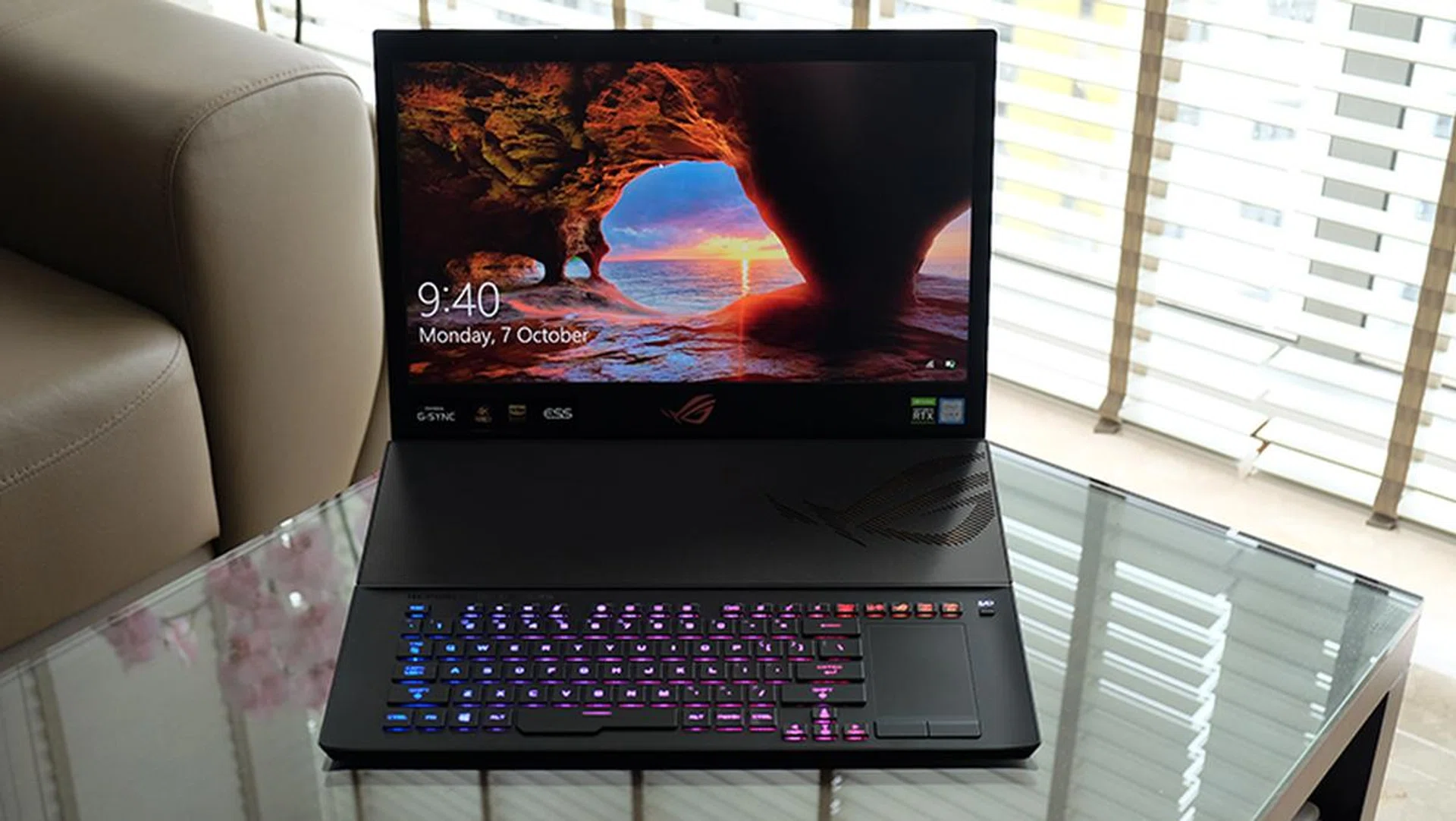
It looks almost like a normal laptop with the keyboard attached.
The ROG Mothership's name says most of what you need to know about it. It's big, it's ponderous, and it holds a bristling arsenal of features. But despite ASUS calling this a "portable powerhouse", I'm just going to call it as I see it – this is a desktop replacement. Trust me, you don't want to carry this thing out with you.
Sure, the form factor is pretty cool and somewhat portable. It looks like a giant convertible notebook, complete with a nifty kickstand that pops out when you activate the two pressure-sensitive buttons on its bottom edge. The keyboard is also detachable, which makes you wonder if you could actually use it as a tablet, until you remember that it doesn't in fact have a touchscreen.
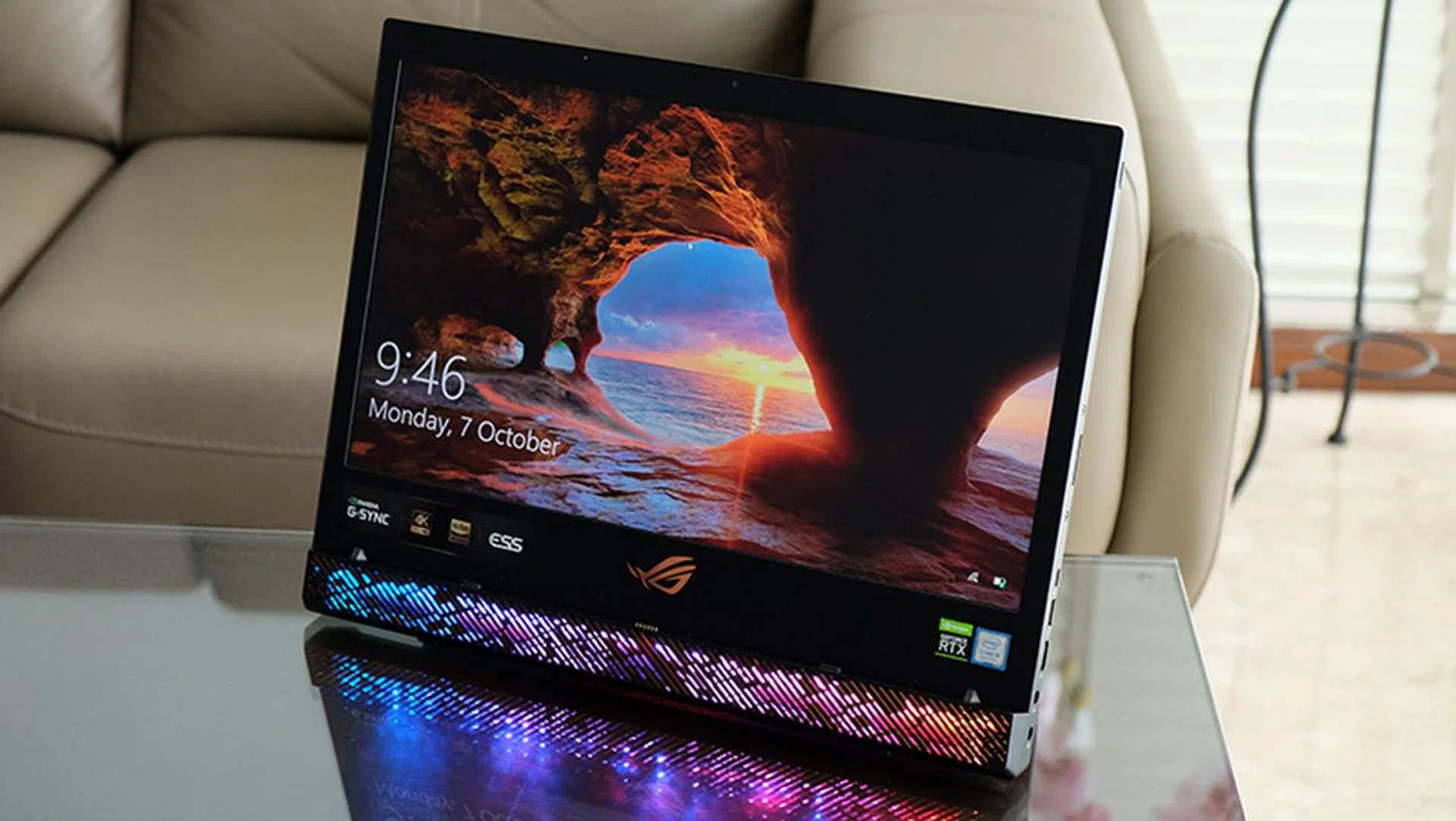
The display looks pretty cool by itself, but it's actually useless without a keyboard.
More importantly, the Mothership is really, really heavy. It weighs a good 4.8kg, so even though it's actually reasonably slim at 29mm considering the hardware it holds, it still feels like lugging a sack of bricks around. That's not even the worst of it, as the laptop actually requires two 280W power adapters. If you want to set up anywhere else, you'll have the unenviable task of packing two large adapters along with you.
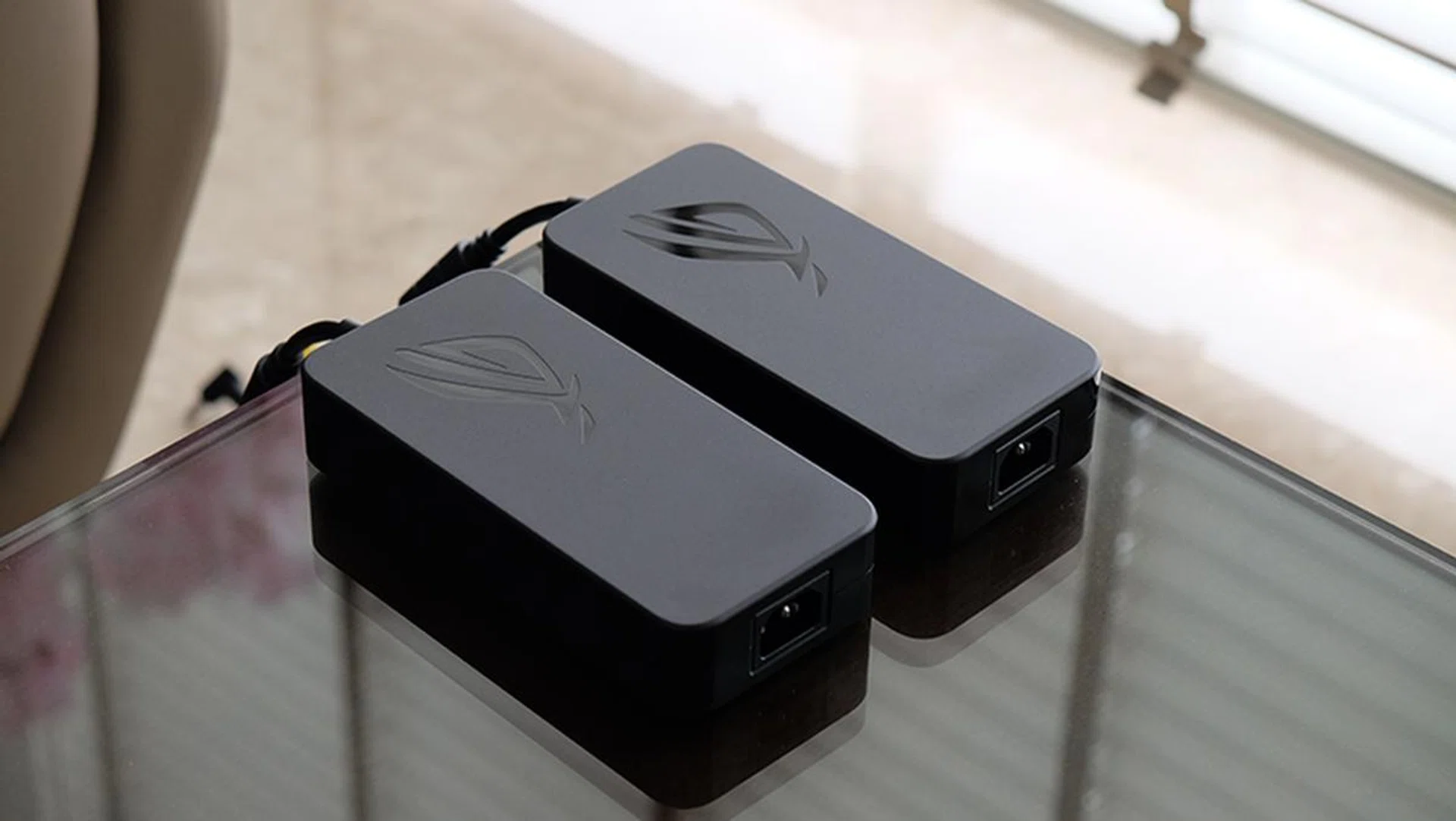
This is what you'll be lugging around with you.
This really raises the question as to what the ROG Mothership is really for. Why make a laptop look like a 2-in-1 system if you can't actually use it that way? I think a big part of the answer lies in the cooling design. For starters, the keyboard remains super cool at all times, because all the key components are housed behind the display. Furthermore, the chassis sits upright, which means that the intake vents have access to better air flow and aren't blocked by the table as they normally would be.

You can see here one of the copper-coloured heatsinks.
On top of that, ASUS is using Thermal Grizzly's Conductonaut liquid metal on its CPU, which further helps improve heat dissipation. That's really important, since the CPU is a hexa-core Core i9-9980HK that supports overclocking. There's also an internal fence around the CPU that prevents the liquid metal from leaking out over time, since it's electrically conductive.
All that heat needs somewhere to go though, and the Mothership features no fewer than eight heat pipes that transfer heat to four heat sinks located at the edges. ASUS says the heatsinks are comprised of 375 ultra-thin 0.1mm copper fins, which gives a total surface area of almost 200,000mm². The heat pipes also cover the CPU, GPU, VRM, and graphics memory, which takes care of all the crucial heat-generating components.
There are other benefits to the standing design too. The air intakes are exposed to less dust this way, but ASUS has also included anti-dust tunnels that catch particles entering the cooling system and blow them back out.
This is what S$10,000 looks like
For what it's worth, ASUS did the best it could with an impractical design. It wanted to show that it had the engineering chops to switch up the idea of what a gaming notebook could be, and it's done that quite well. Whether or not it should have is a question for another day.
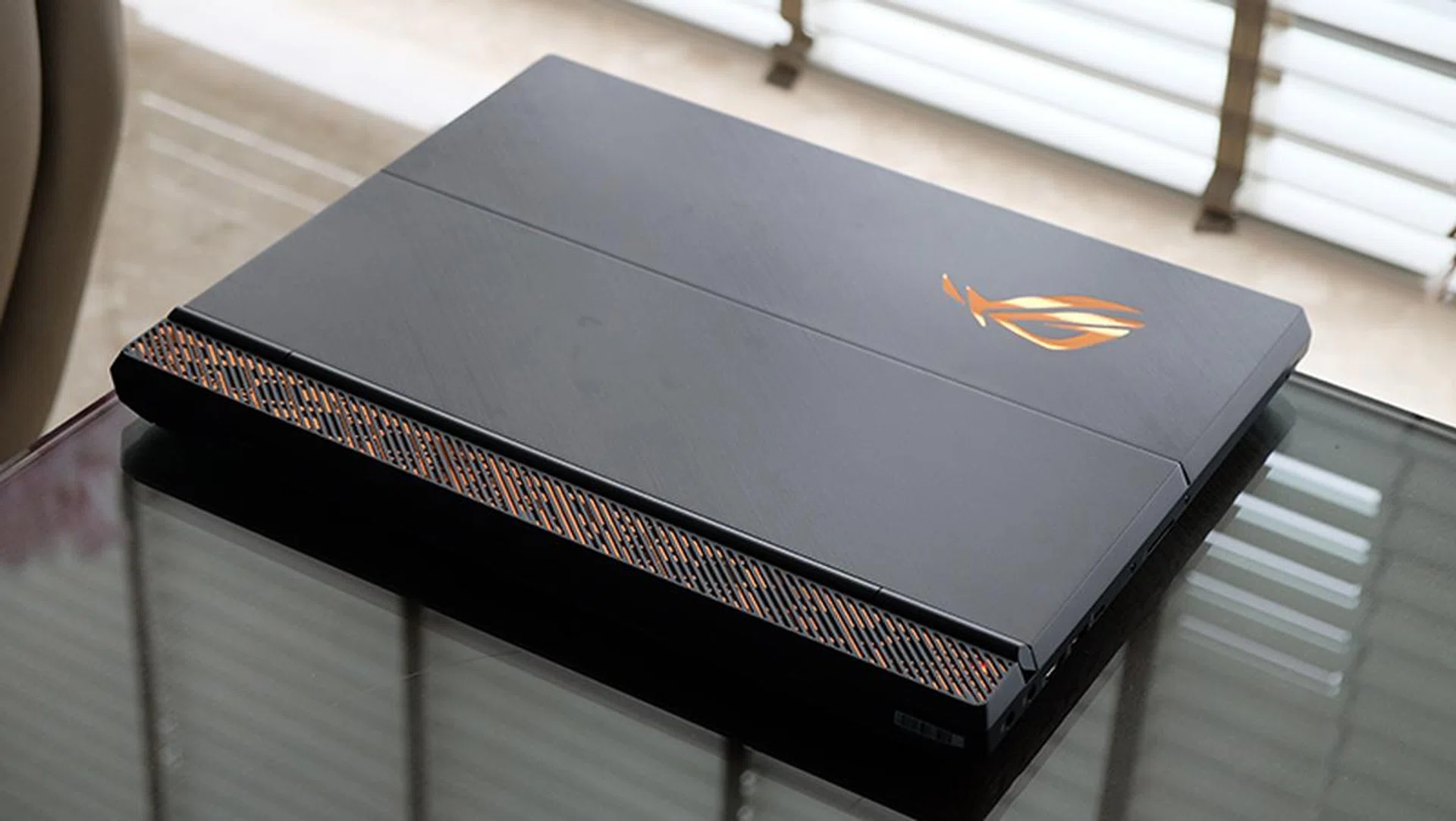
The keyboard doubles as a cover for the laptop.
Build quality is great, and everything feels really solid, down to the kickstand and keyboard. The Mothership's machined aluminum chassis is impeccable, and there's virtually no give anywhere. The same applies to the keyboard, which interfaces with the display via magnetic anchors and pogo pins. It can even be detached and folded over to work as a 2.4GHz wireless keyboard. The keyboard is made of aluminum too and there's no flex to it either. The hinge could be smoother, but there's a reassuring resistance to it that ensures it never feels flimsy. It snaps onto and off the display without much hassle, so it's a breeze to switch to wireless mode and back again. Alternatively, the keyboard has a USB-C connector too that will let you use it in wired mode away from the display.

The keyboard can work wireless too.
The keyboard is pretty nice to type on too. ASUS says the keys have a 2.5mm travel distance, and that's quite obvious once you lay hands on it. There's good key travel and feedback, and it also has a trackpad that doubles as a digital number pad on the right. Of course, there's support for per-key RGB customisations too from within ASUS' Armoury Crate software. The LEDs are bright enough and visible under direct overhead lighting, but they do suffer from clearly uneven lighting, particularly on the keys with secondary legends.
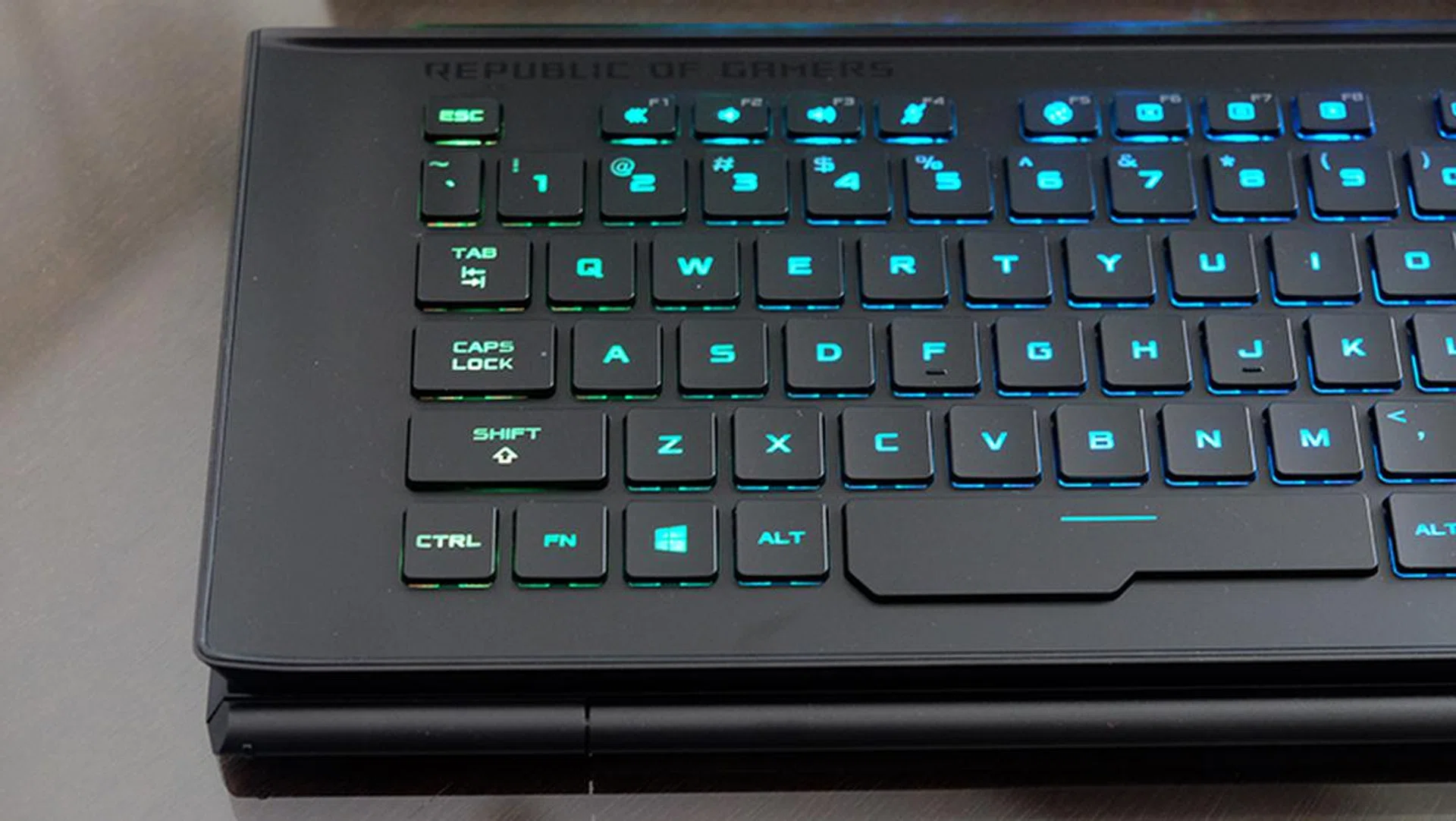
The keyboard supports per-key RGB customisations.
With such a large and heavy 17.3-inch screen though, it's probably not the best idea to have a kickstand you can fiddle with, so ASUS made this part very simple. The kickstand has a stepless hinge – press the bottom edge of the screen on your desk and it pops right out with no adjustments required. Alternatively, you can flip the kickstand out too. The kickstand can be pushed slightly further back as well, in case you want the screen to sit at a gentler angle. No need to worry about the display sliding around and getting scratched, or possibly scratching your table, either since there's a nice rubber strip at the base that makes sure it stays in place.
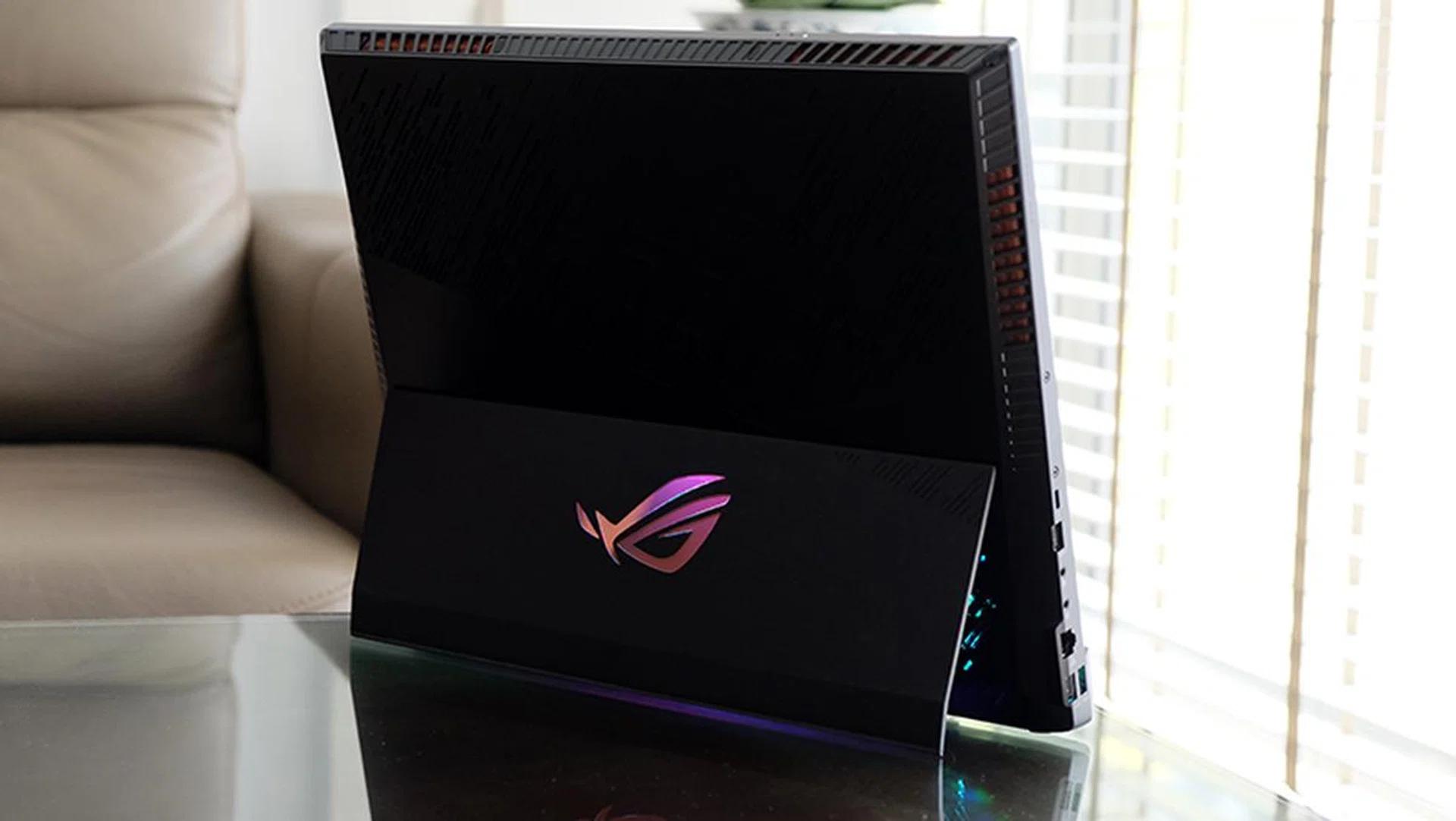
The stepless hinge pops out once you set the base on a flat surface and you can vary the kickstand angle further by hand if needed.
On the hardware front, the Mothership has just about everything you could want on a laptop. It is packed with the most powerful components you can squeeze into a laptop today, comprising an overclockable Intel Core i9-9980HK processor, 64GB of DDR4-2666 memory, an NVIDIA GeForce RTX 2080, and three 512GB PCIe M.2 SSDs in RAID 0.
It also has a large 90Wh battery, which delivers surprisingly alright battery life – for a machine of the Mothership's size and power that is – when paired with NVIDIA's Optimus technology.
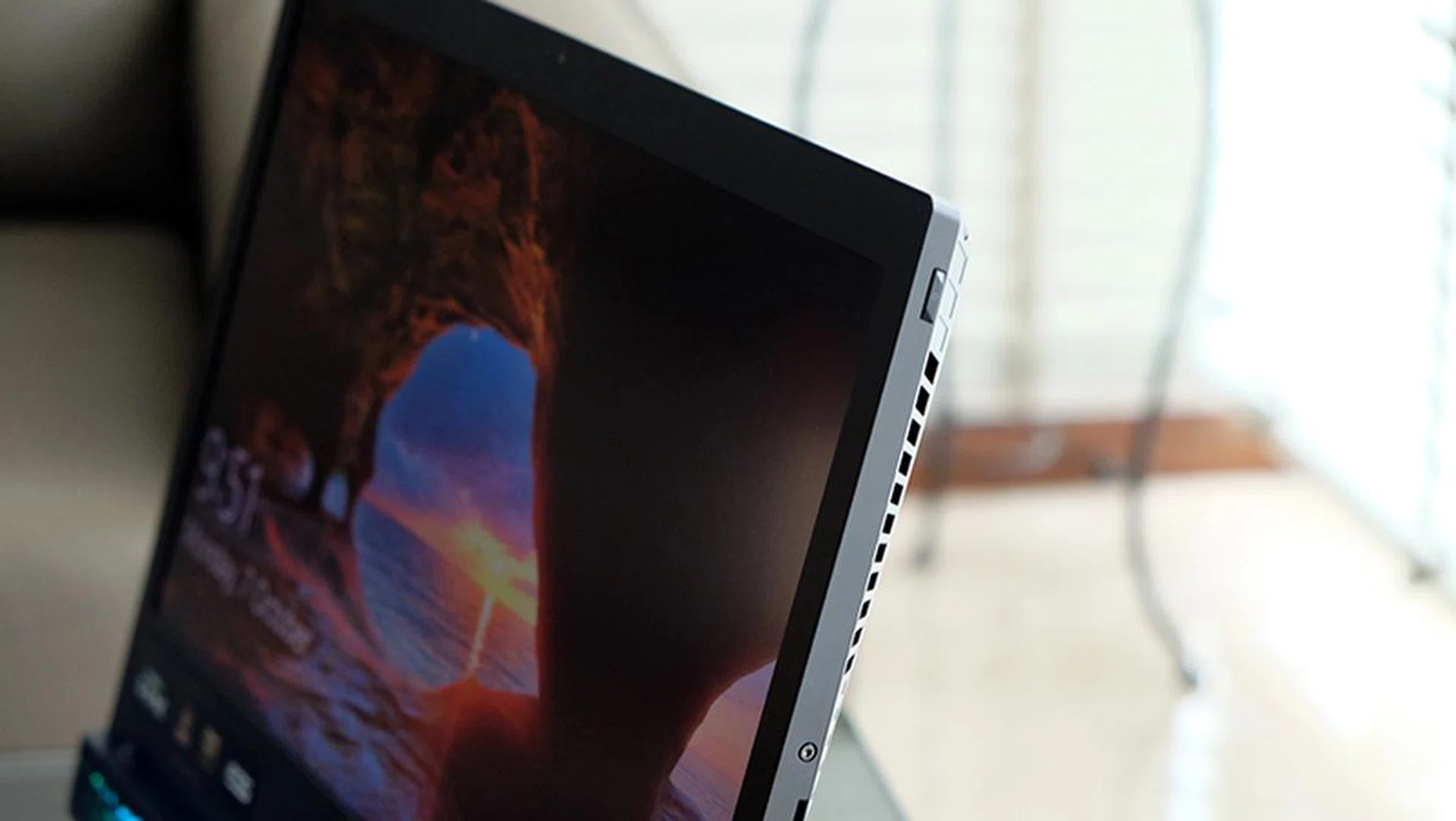
The power button is tucked into the top right corner.
The 17.3-inch 4K IPS display has a 3,840 x 2,160-pixel resolution and supports NVIDIA G-Sync, which should mean a smooth and tear-free gaming experience. However, the refresh rate is capped at 60Hz, a pity for such a powerful resolution. I'd have gladly traded the 4K resolution for a more modest 1080p screen and a higher refresh rate. Furthermore, the Mothership is factory-set to Optimus mode, which means G-Sync is disabled at first. You'll have to enter the Armoury Crate software and switch the GPU Mode to Discrete Graphics to have access to G-Sync. This also requires a restart of the entire machine.
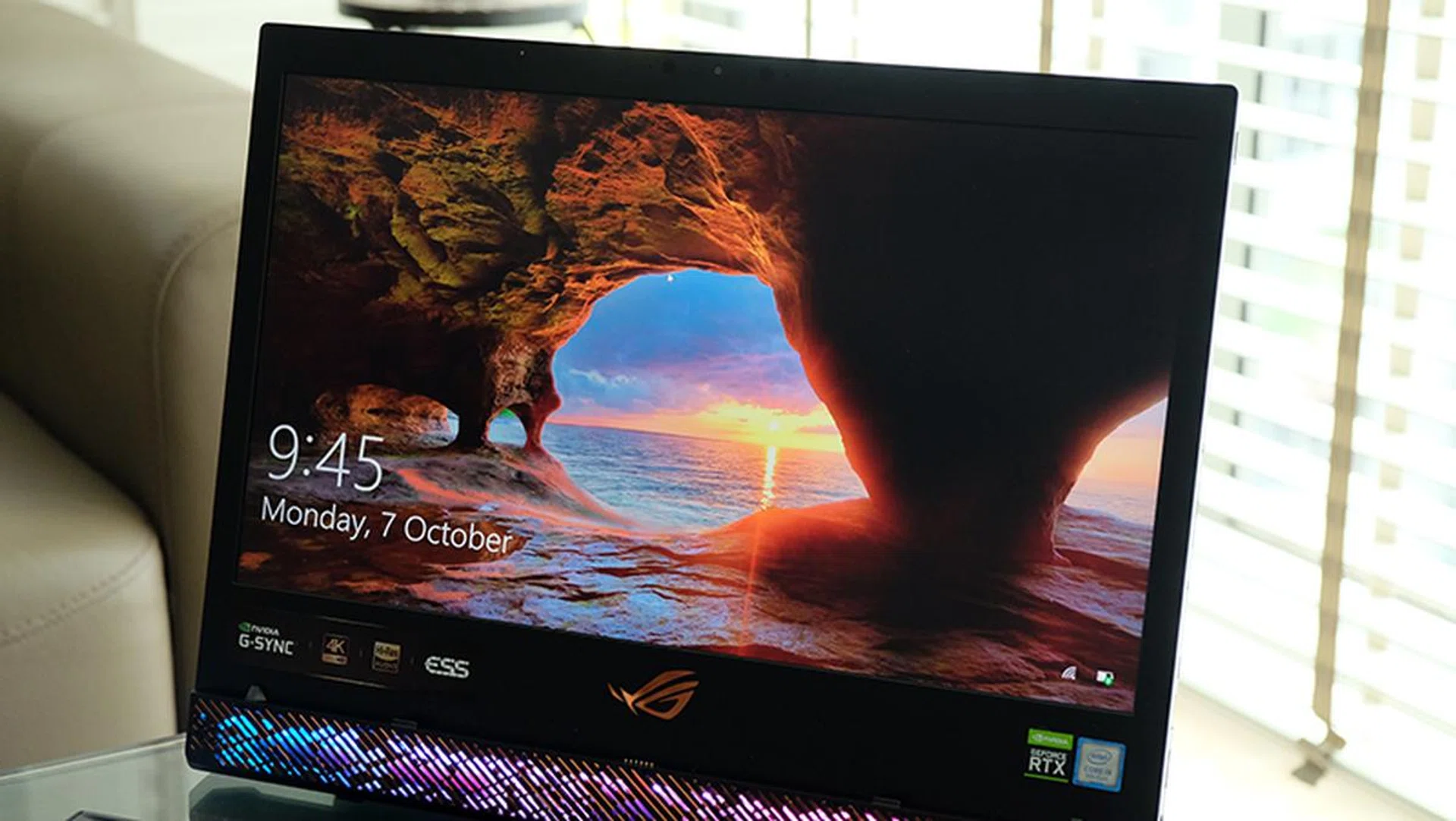
The display could use a boost in brightness.
ASUS is also claiming 100 per cent coverage of the Adobe RGB colour space, which seems like good news for photographers and video editors. I didn't test this out for myself, but the display appears rather lacklustre, perhaps due to its middling brightness. It just seems a little too dim, especially for such a high-end machine. That said, viewing angles are good and colours appear accurate with no obvious bias toward either end of the colour spectrum.
Finally, there are the speakers, which is a 4W four-speaker array at the bottom of the display. The speakers are visible through the lighted grilles at the bottom, and they're capable of pumping out fairly loud tunes. However, they're not particularly impressive and end up sounding slightly hollow. They're powered by a Sabre ESS DAC and support 7.1-channel virtual surround sound, but you're probably better off sticking with just regular stereo.
There's one big flaw in this design though. When the keyboard is attached to the display, it sits over the speakers, which ends up muffling the sound a fair bit. If you want the best possible sound, you should use the system with the keyboard detached.
Ports galore
The Mothership also comes stuffed full of ports and connectors. Here's a list of everything it's got:
- 1x USB-C Thunderbolt 3
- 1x USB 3.1 (Gen 2) USB-C with DisplayPort 1.4
- 3x USB 3.1 (Gen 2) USB-A
- 1x USB 3.1 (Gen 1) USB-A
- 1x HDMI 2.0
- 1x 3.5mm headphone/micro combo jack
- 1x 3.5mm microphone jack
- 1x 2.5G Ethernet port
- 1x SD card reader
The two power connectors sit on the right, making for an almost laughable look when they're both plugged in.
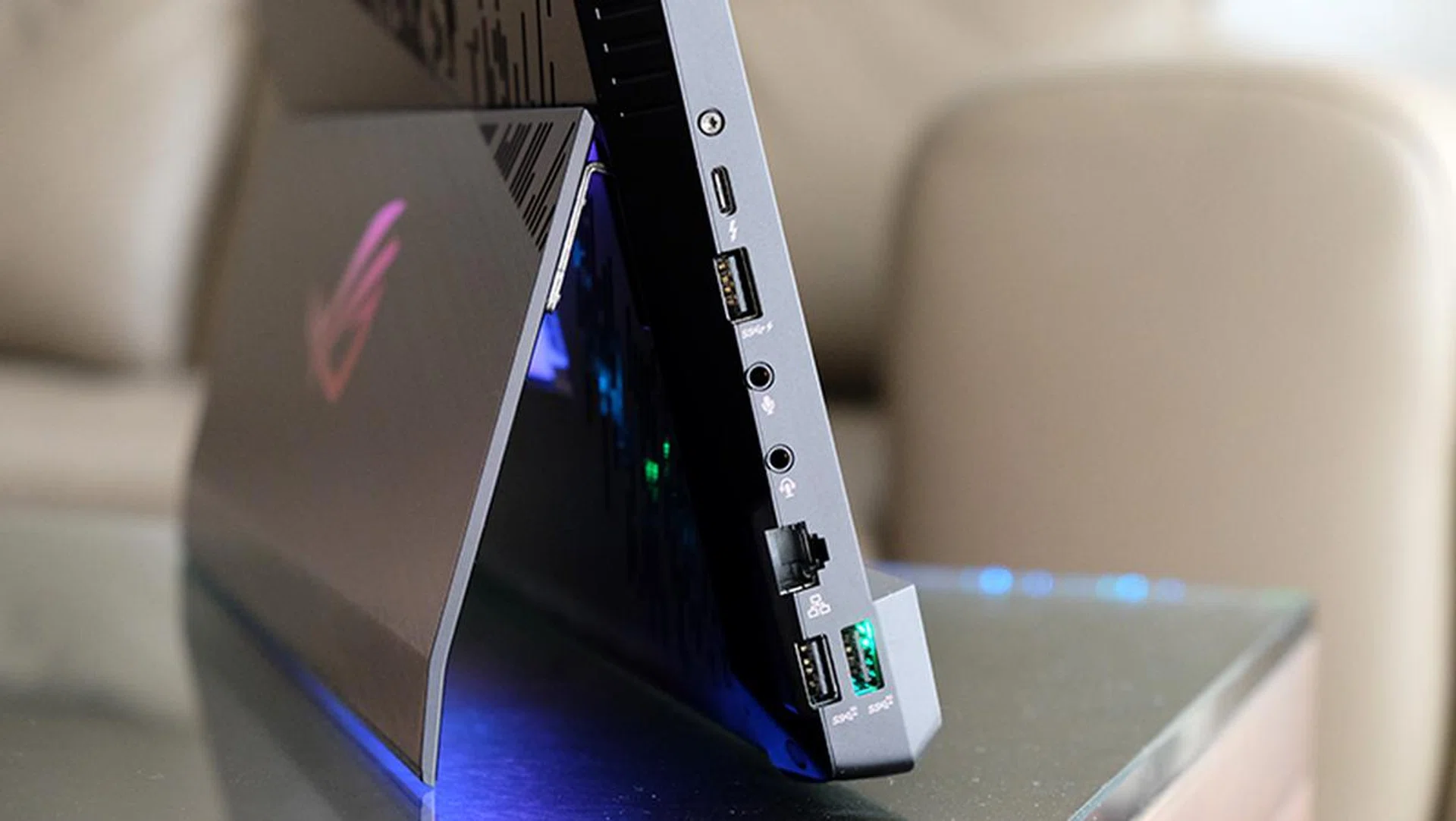
Here's a look at the ports on the left.
The Thunderbolt 3, HDMI, and DisplayPort outputs will support a total of three external monitors between them, so you could make the Mothership the heart of your next workstation.
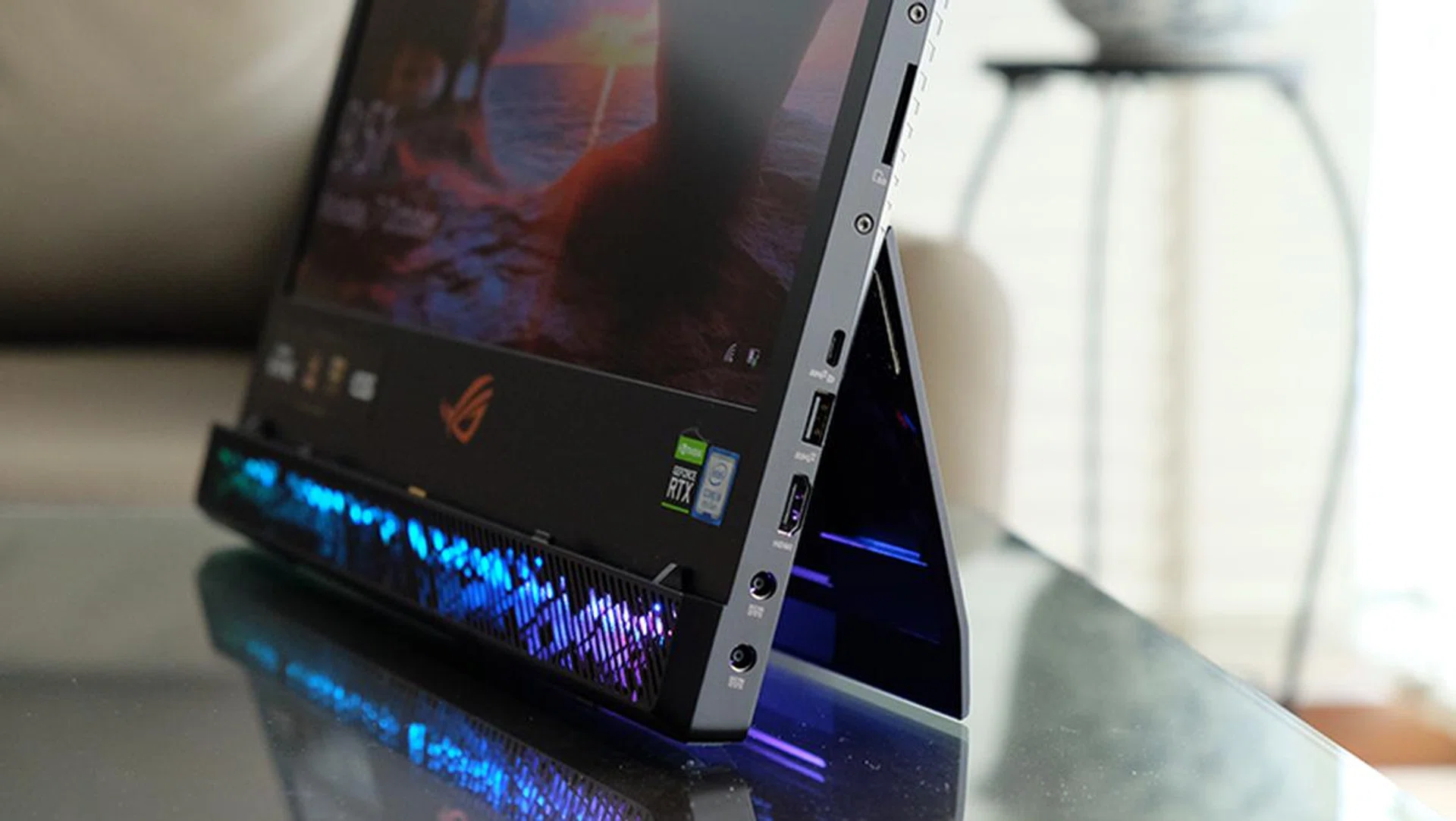
You can see the two power connectors for the dual power bricks here.
On the networking front, the Mothership is equipped with an Intel Wi-Fi 6 AX200 module and a Realtek Gaming 2.5GbE Family Controller, which means support for the latest Wi-Fi standard and faster-than Gigabit Ethernet speeds.
Test setup and performance
Here's a full list of the notebooks we're looking at:
- ASUS ROG Mothership GZ700GX
- Aftershock Vapor 15 Pro
- Lenovo Legion Y740
- Razer Blade 15
I don't have the numbers from many GeForce RTX 2080 laptops at the moment, so the GeForce RTX 2070 Max-Q models will have to serve as a baseline for performance here.
[hwzcompare]
[products=675227,674352,672308,673300]
[width=200]
[caption=Test notebooks compared]
[showprices=1]
[/hwzcompare]
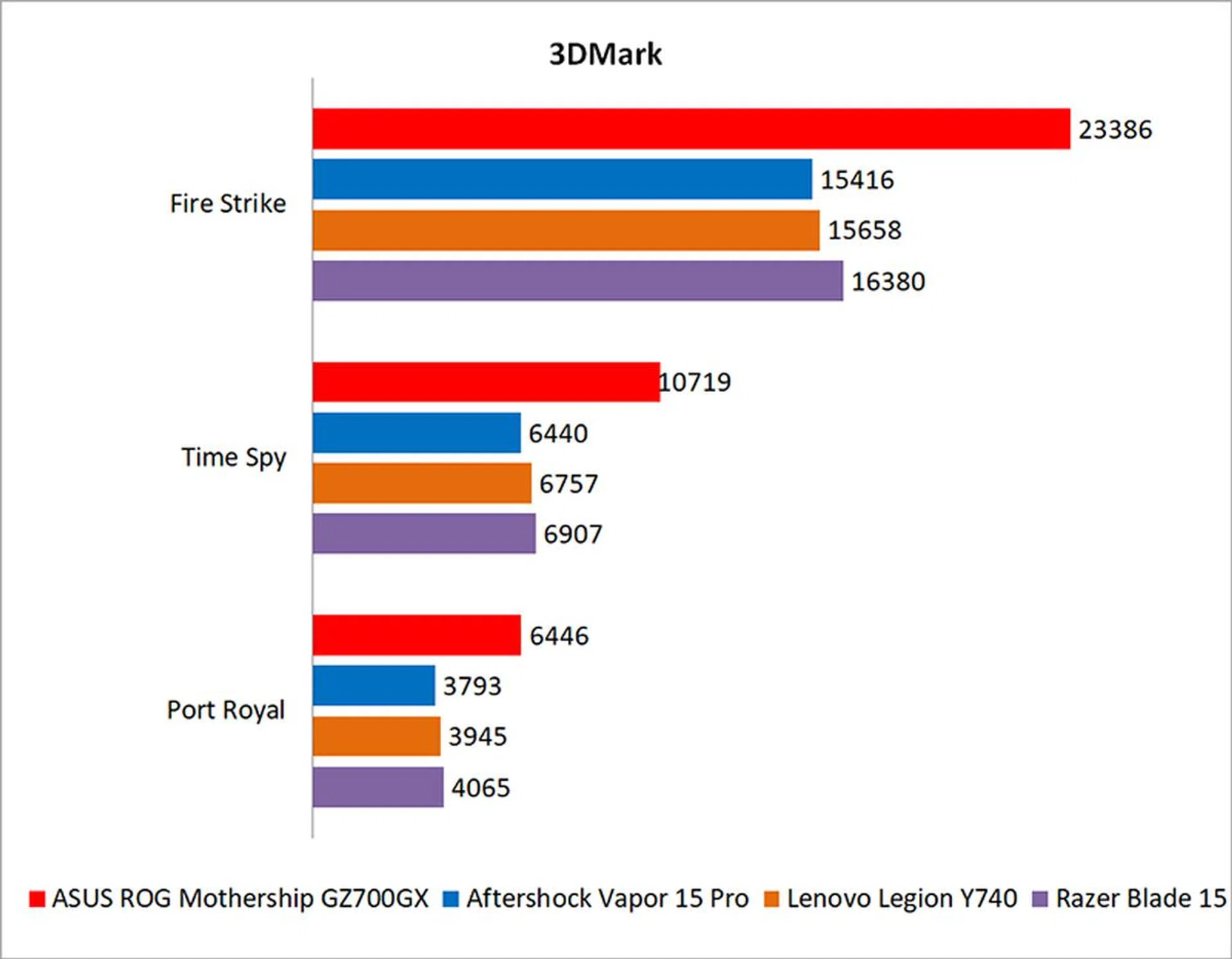
I ran the notebooks through the following benchmarks:
- PCMark 10
- AS SSD
- 3DMark
- Deus Ex: Mankind Divided
- Far Cry 5
- Metro Exodus
- Shadow of the Tomb Raider
- Tom Clancy's The Division 2
How good is it for work?
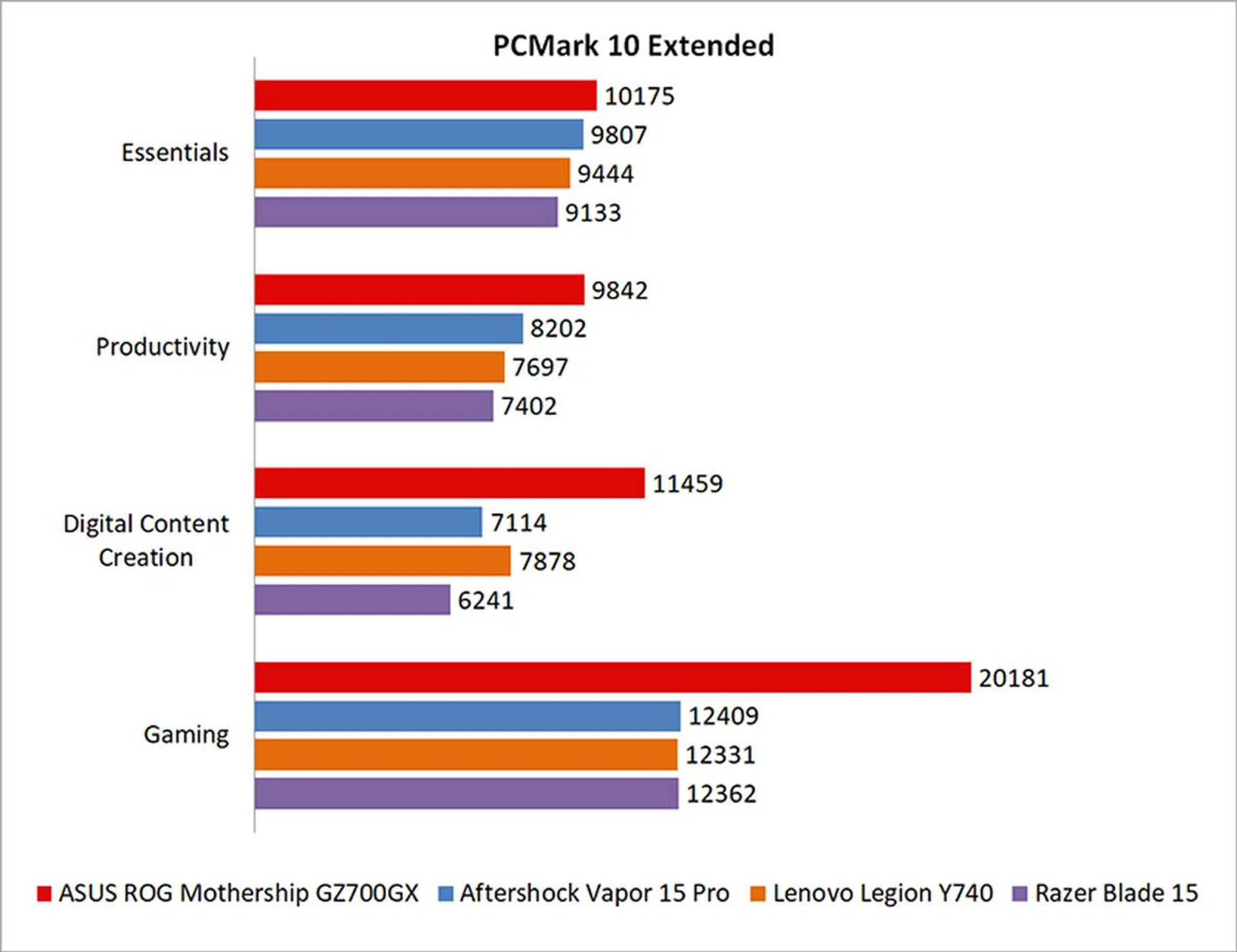
PCMark 10 Extended evaluates systems based on workloads that can be categorized into four distinct groups, comprising Essentials, Productivity, Digital Content Creation, and Gaming. This includes tests such as app start-up times, web browsing, word processing and spreadsheets, photo and video editing, and rendering and visualization tasks. Finally, gaming performance is evaluated using the Fire Strike benchmark.
Overall, the ROG Mothership had a 29 per cent lead over the next best performer, the Aftershock Vapor 15 Pro. I doubt you'll notice much of a difference in basic word processing and web browsing tasks, but the more powerful Core i9-9980HK on the Mothership could help it in more demanding content creation workloads, as evinced by the score breakdown.

What's the storage performance like?
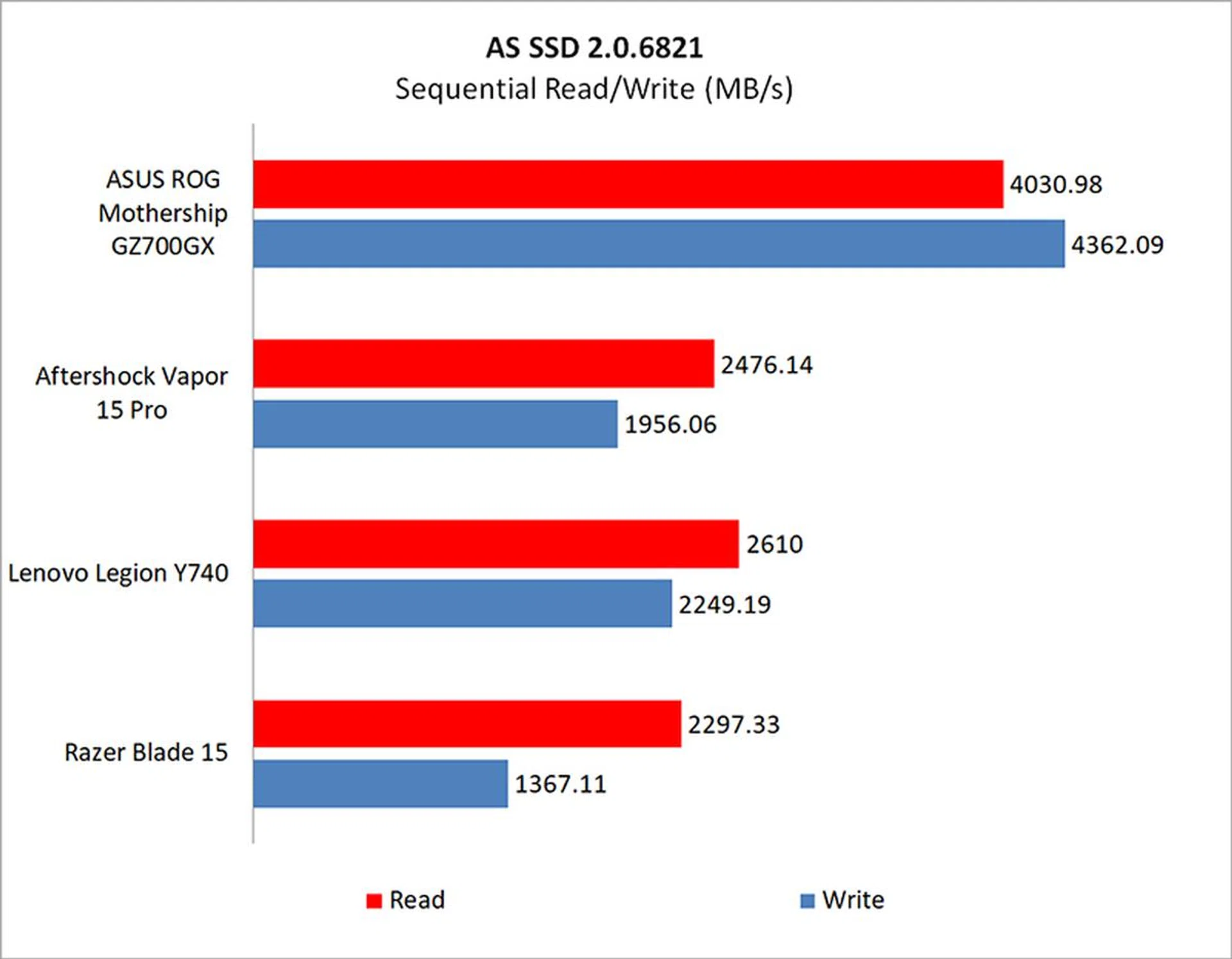
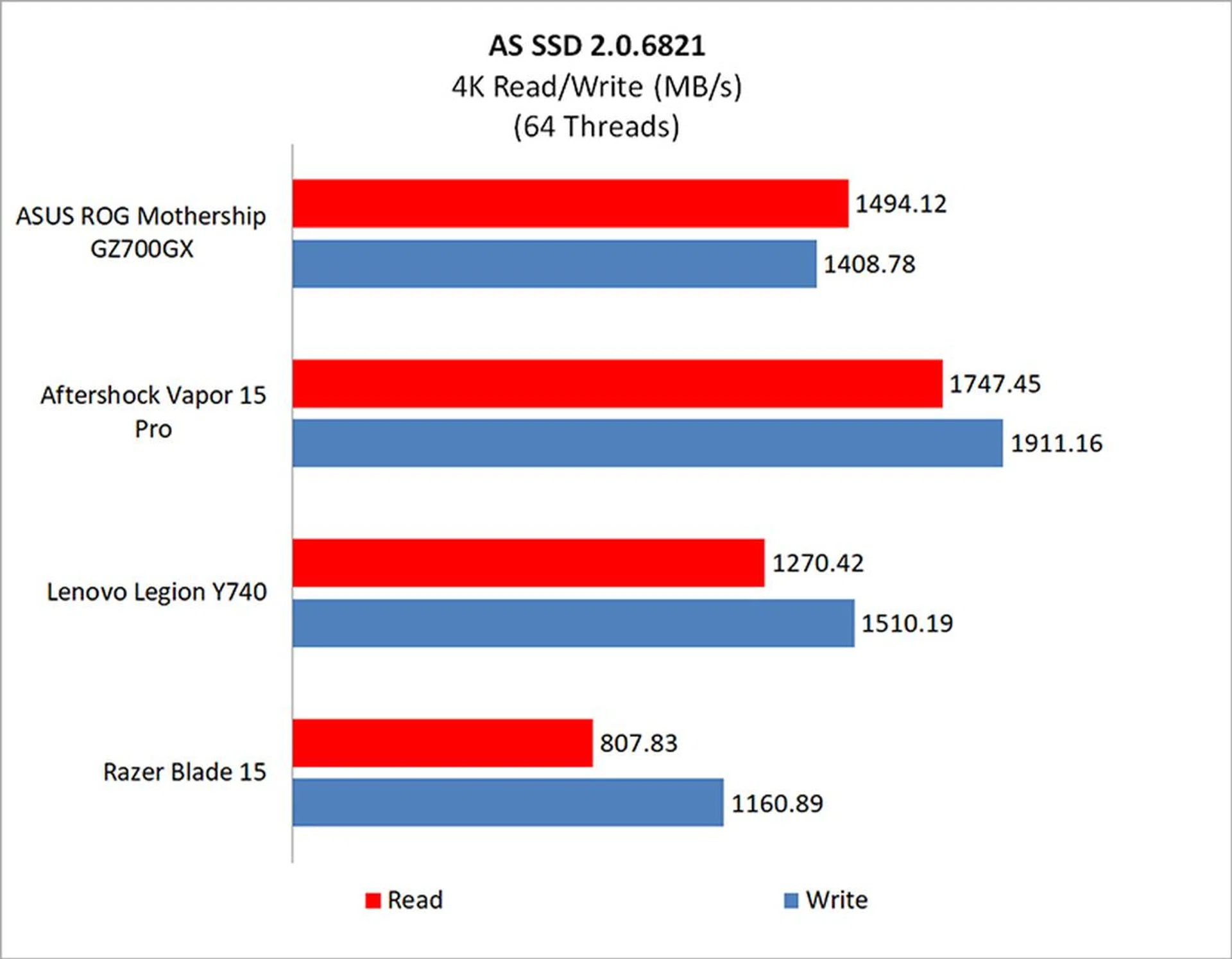
The ROG Mothership features three 512GB SSDs in RAID 0. This spreads data across multiple storage devices for faster reads and writes, because you now have three times the bandwidth of a single drive.
The benefit of this is particularly clear when looking at the sequential read and write speeds, which blows past the other notebooks which use just a single drive. However, that advantage falls away when it comes to reading small blocks of data and higher queue depths.

How fast is it in games?
The Armoury Crate software comes with several different performance modes – Windows, Silent, Performance, and Turbo – but most people will probably run the laptop in Turbo mode most of the time. That mode offers the best performance, boosting the GPU to 1,880MHz and overclocking the CPU to 4.9GHz.
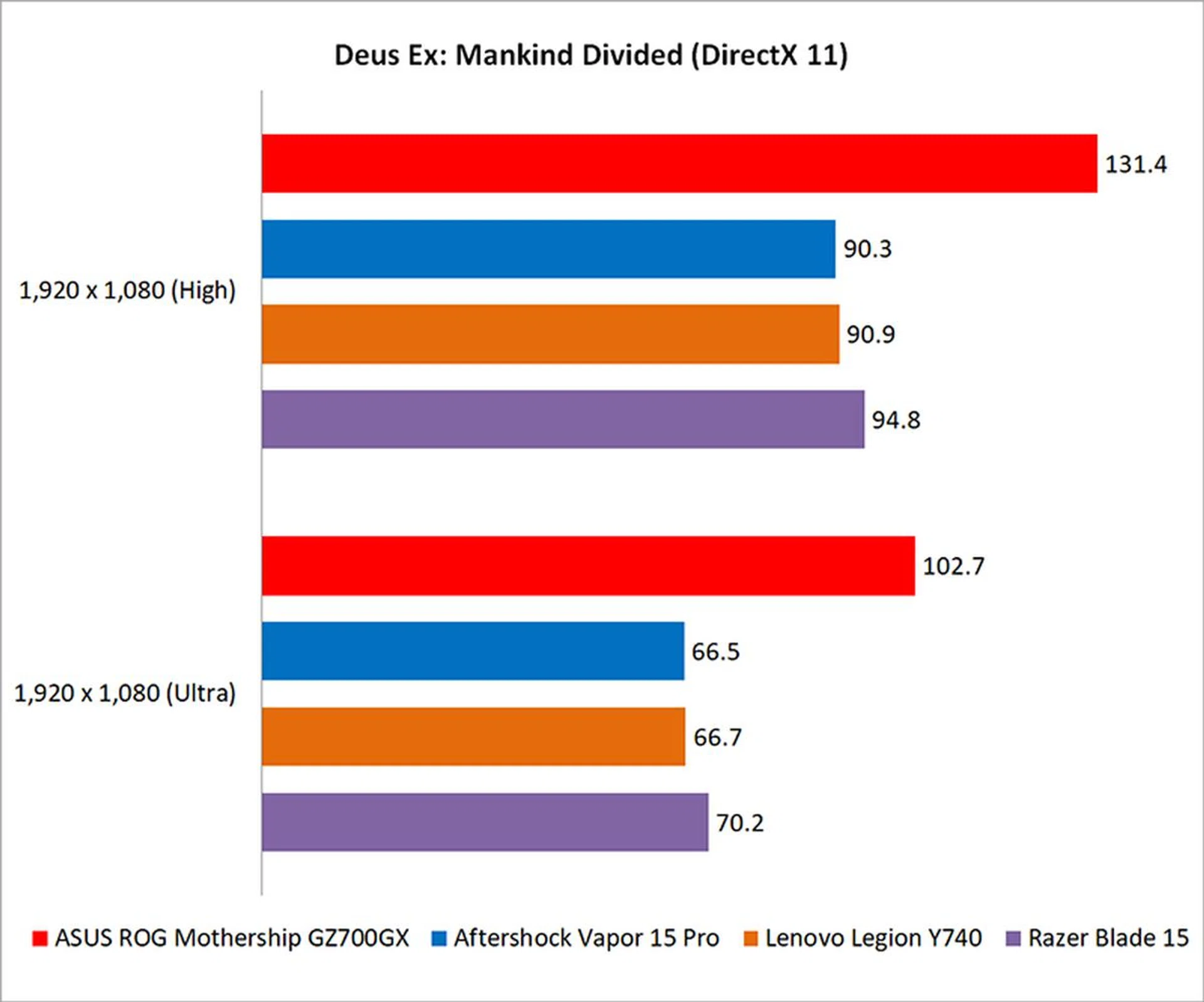
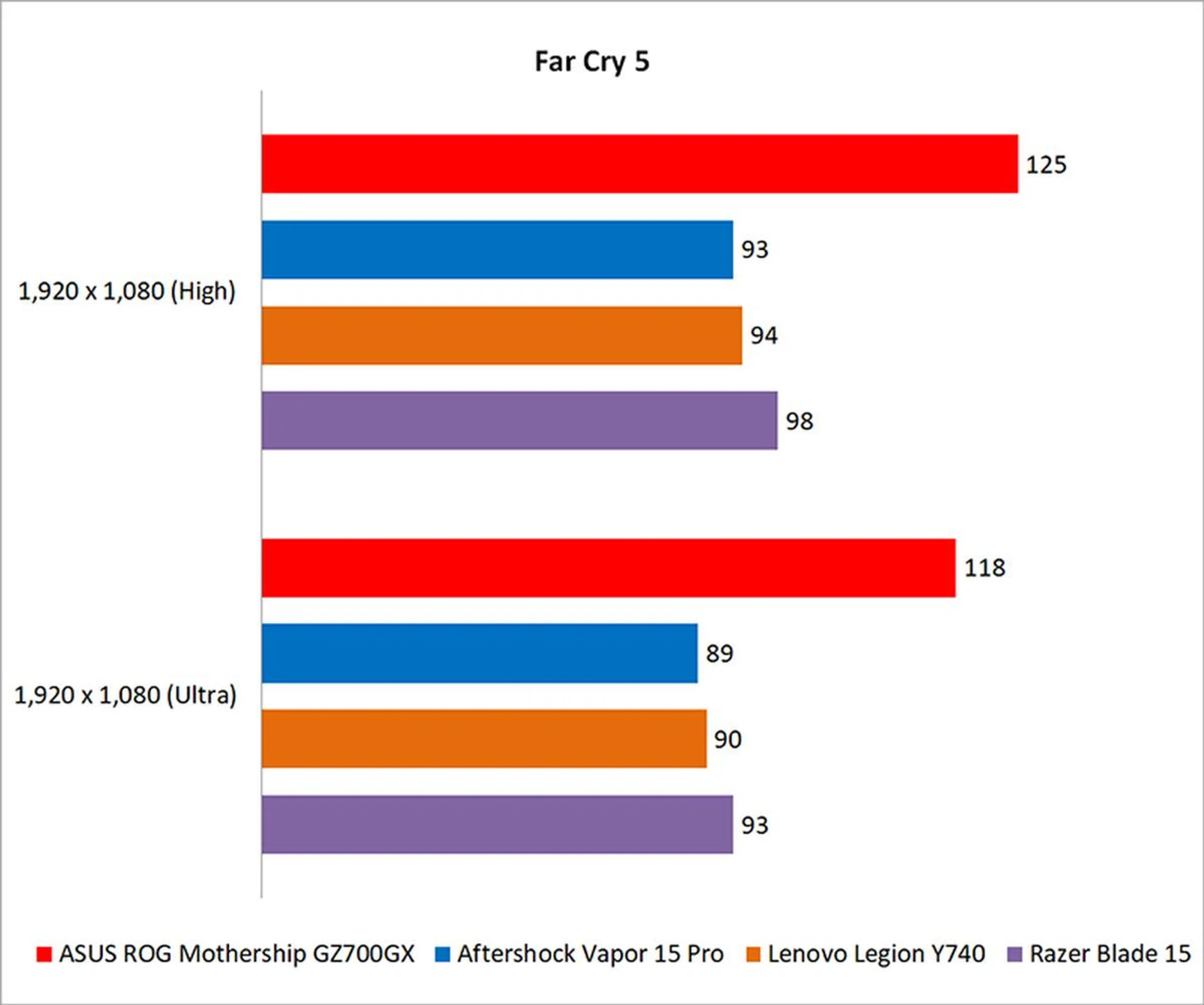
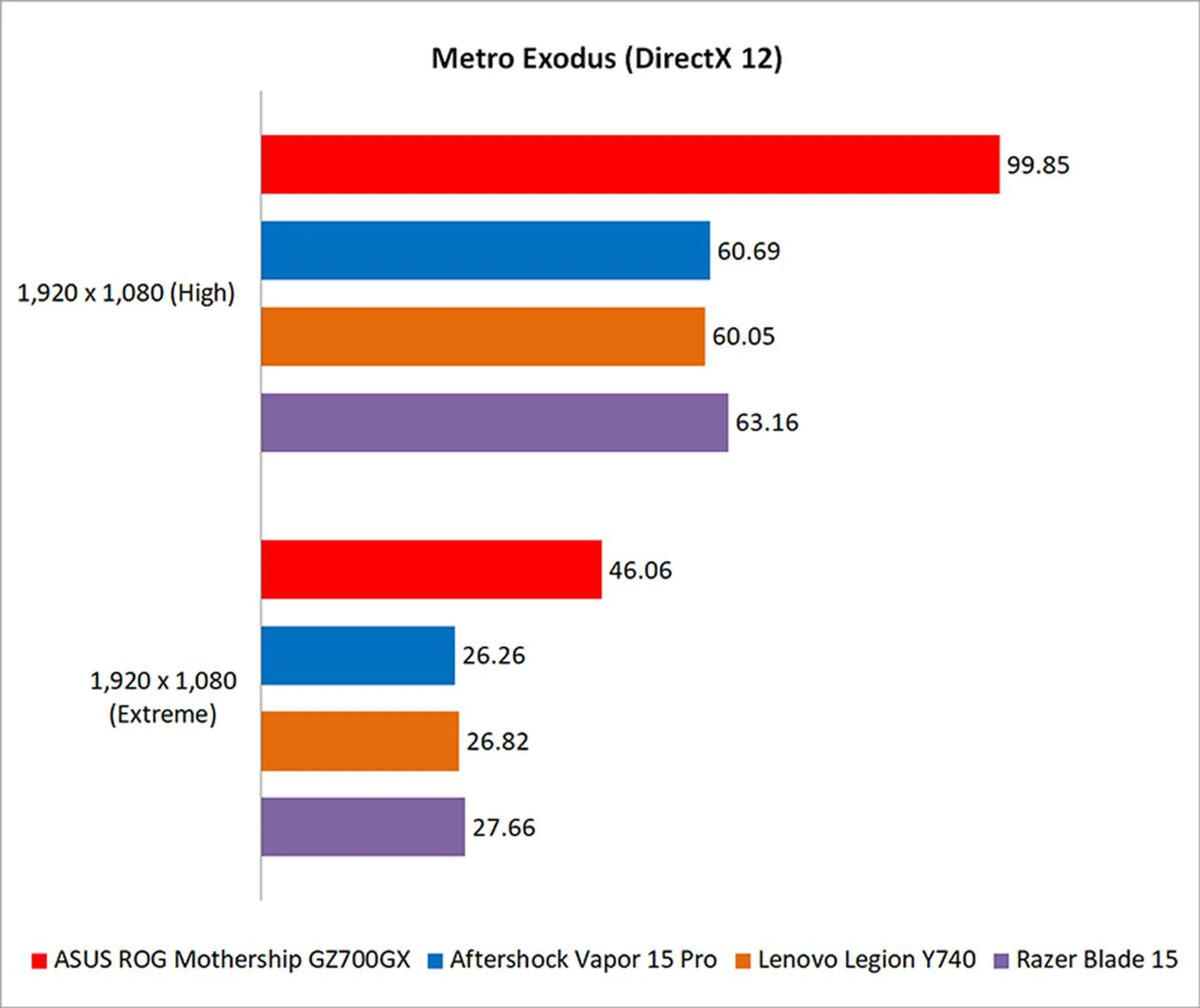
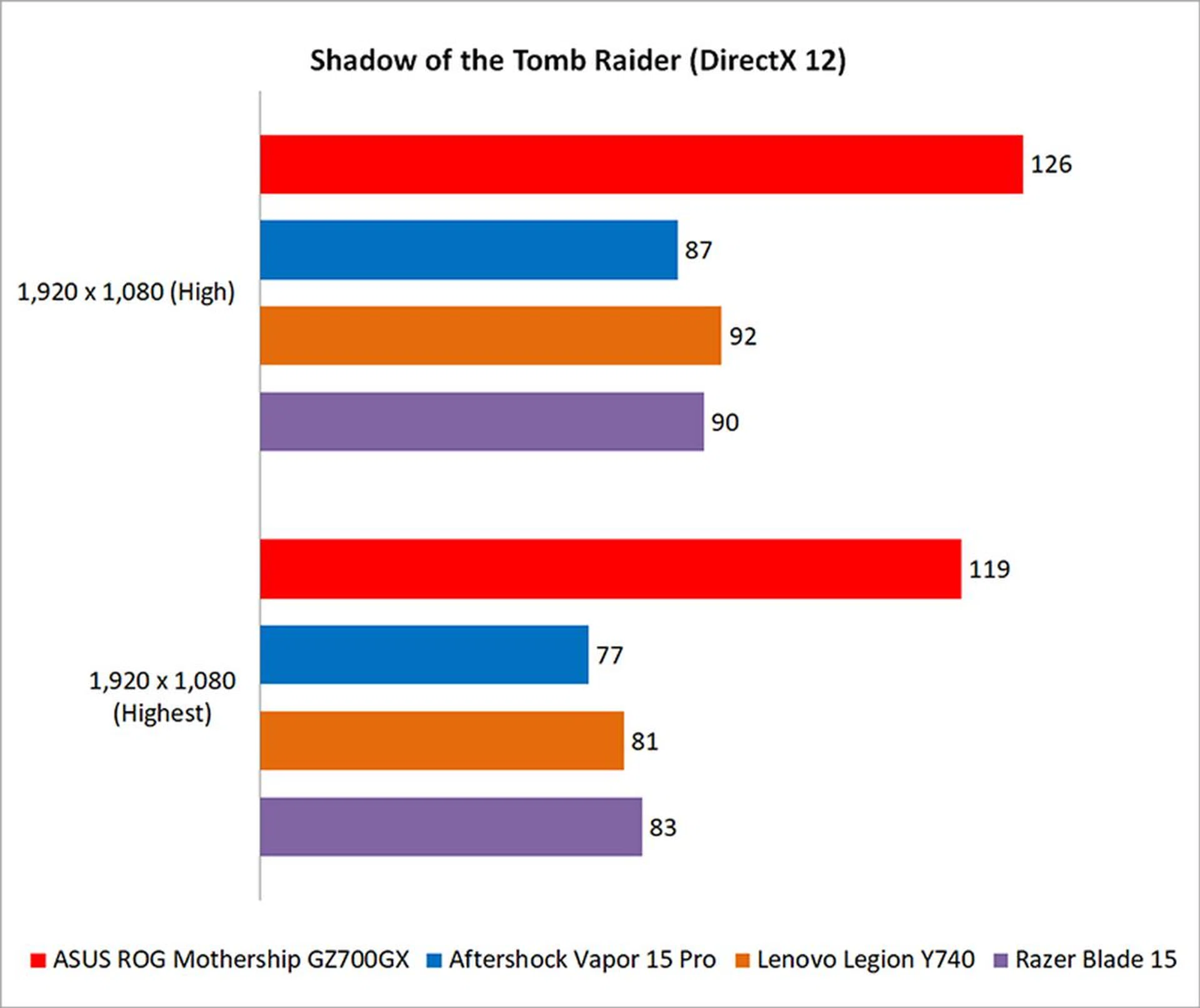
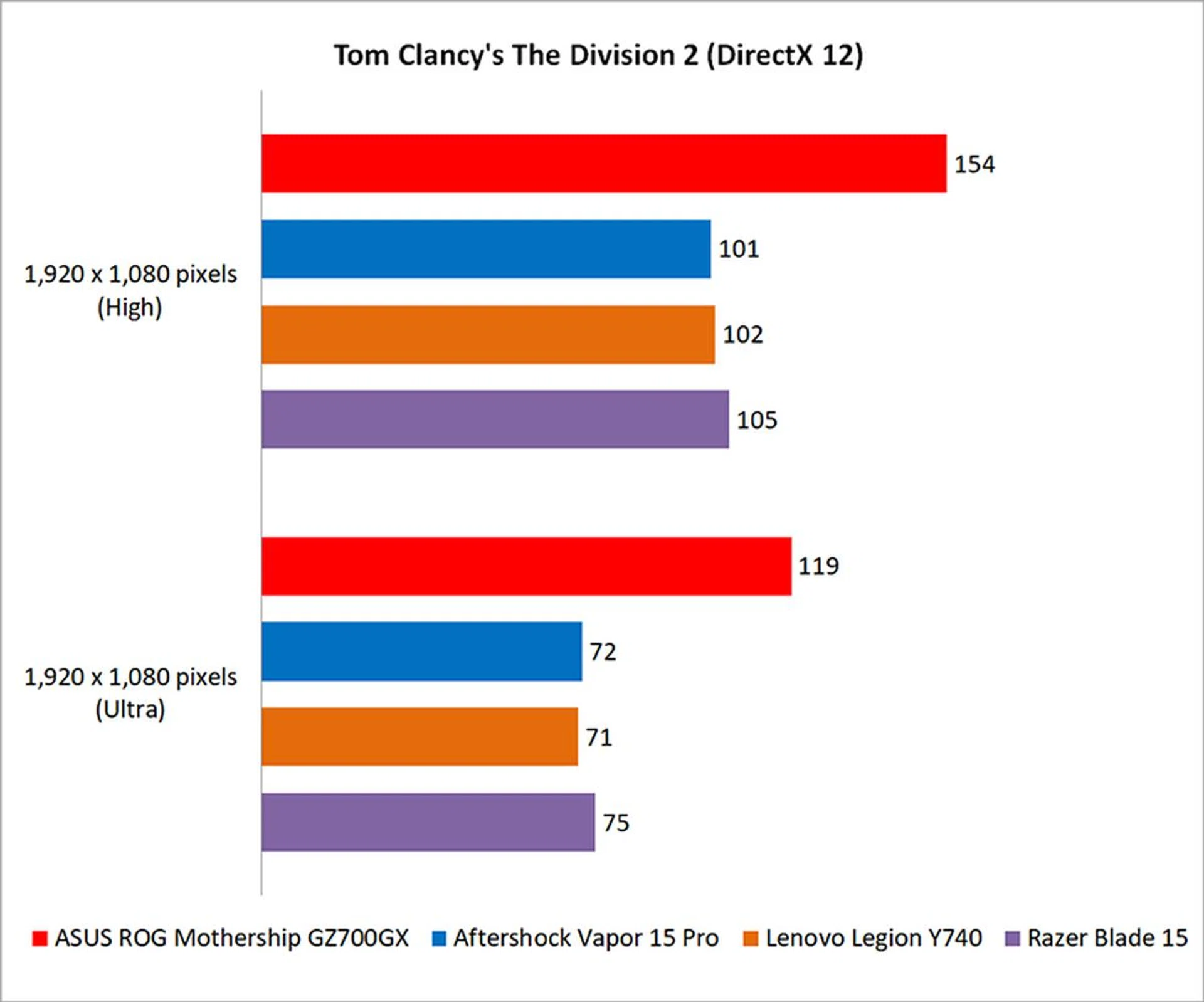
As expected, the ROG Mothership is blazing fast in games. Although it has a 4K screen, I tested it at 1080p so that it could still be compared with my existing numbers. It was a good 37 per cent faster than the Razer Blade in Deus Ex: Mankind Divided, and 45 per cent ahead in Metro Exodus.
That said, I also ran the games at 4K resolution and the highest settings so you can get an idea of how the Mothership performs at its native resolution:
Deus Ex: Mankind Divided | Far Cry 5 | Metro Exodus | Shadow of the Tomb Raider | Tom Clancy's The Division 2 | |
Average FPS | 41 | 56 | 19.91 | 47 | 43 |
It's clear that while the ROG Mothership makes short work of games at 1080p, it still struggles at 4K - a fact that we're all too aware of the limitations with even a GeForce RTX 2080 GPU. In fact, it's unable to maintain a solid 60FPS in any game. To be fair, the games were all run at their highest presets, but why would you drop nearly S$10,000 on a laptop and not run it at the highest possible settings?
Separately, the Mothership also supports CPU overclocking, and you can increase the multiplier on each core up to 50. However, that doesn't seem to have resulted in any performance increase at all, and I saw a decrease in certain cases as well. All things considered, I don't think there's much more utility to be squeezed out of overclocking the CPU, especially since games are mostly GPU-limiting anyway.
How good is the battery life?
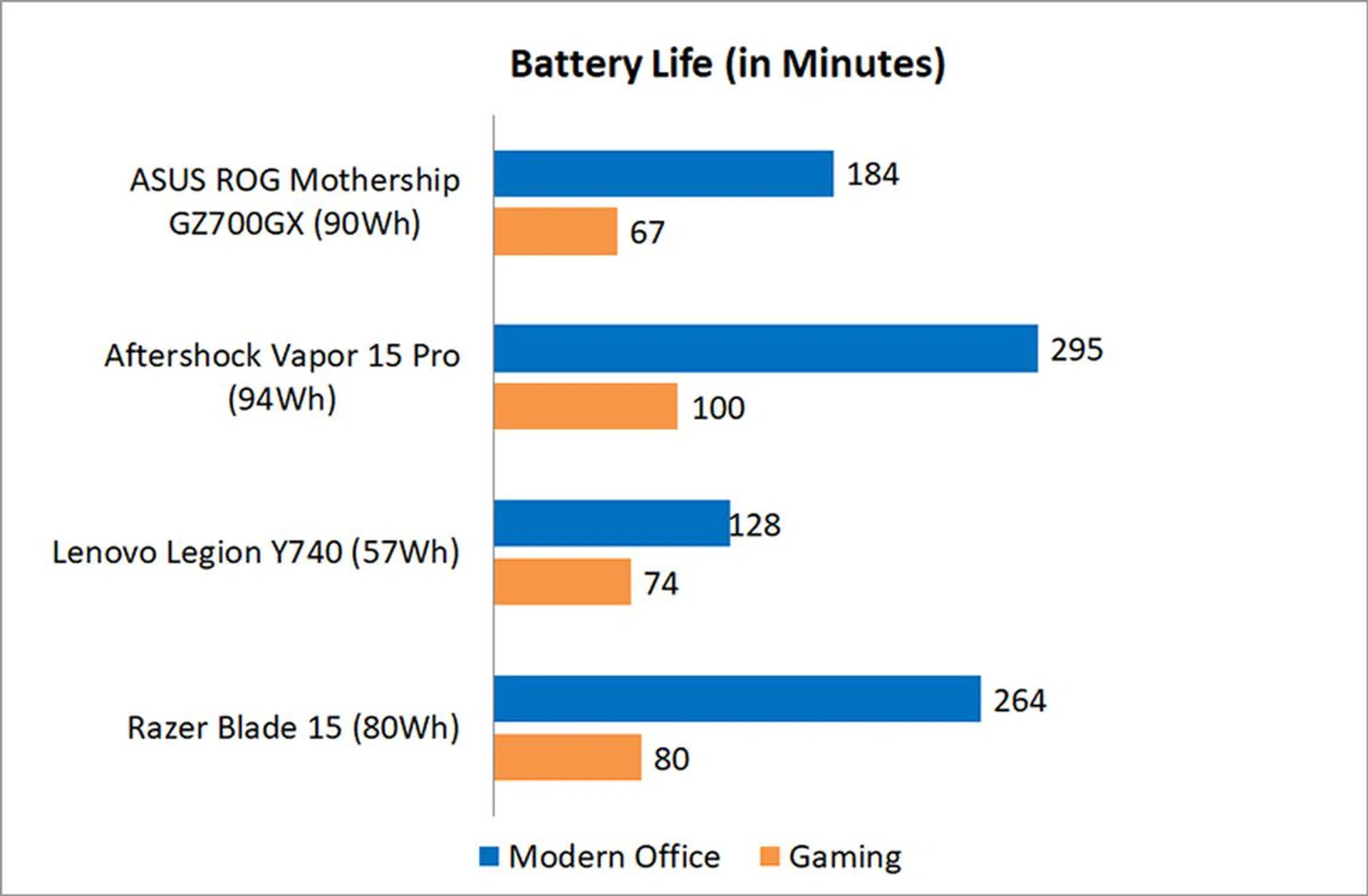
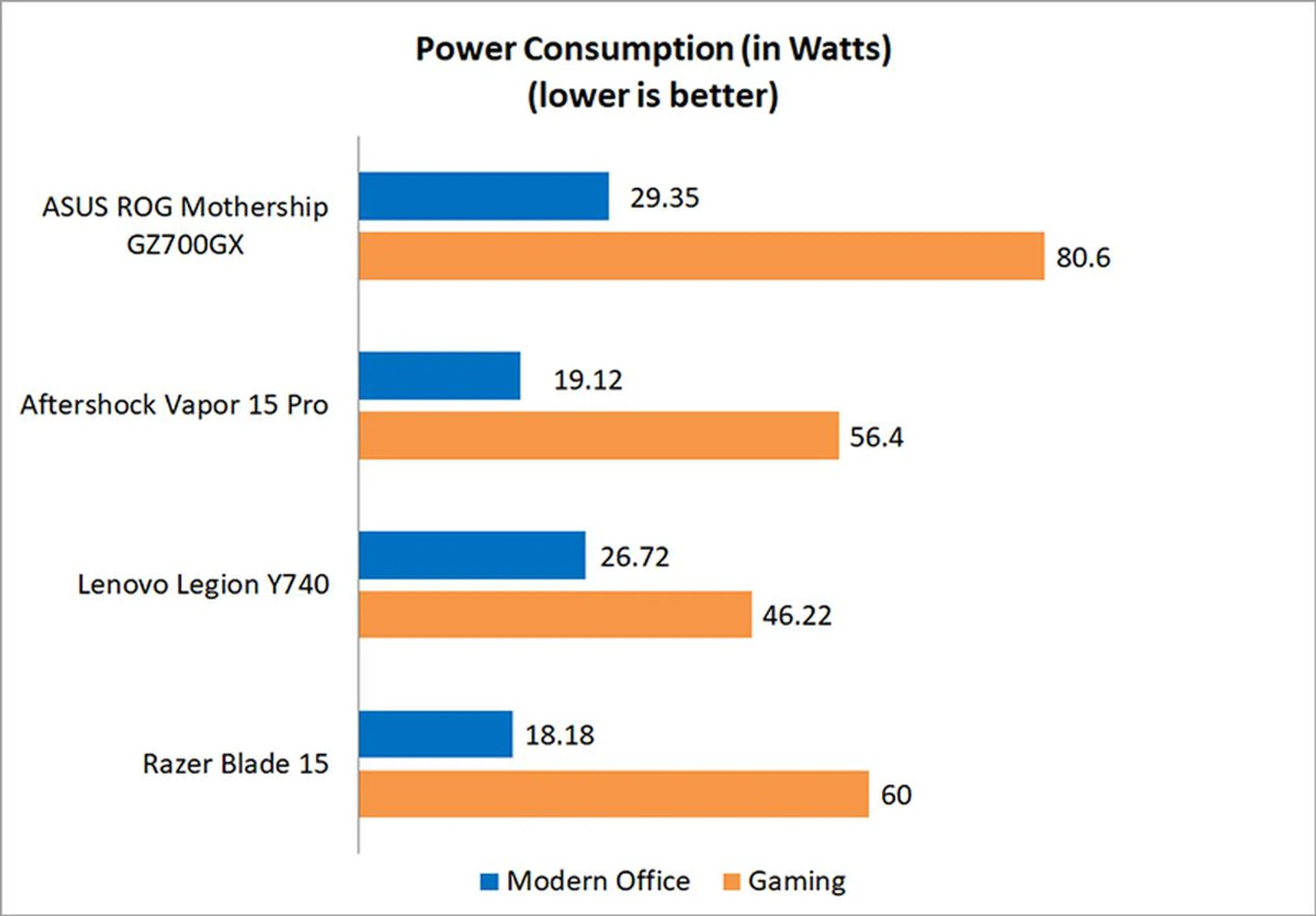
Unsurprisingly, battery life isn't great, but the large 90Wh battery does still help. In fact, it managed to edge out the Lenovo Legion Y740 in PCMark 10 Modern Office, albeit with NVIDIA Optimus enabled, which means that it was probably running off the integrated GPU at some points.
The Gaming numbers were obtained in Discrete Graphics mode though, and the laptop lasted barely over an hour.
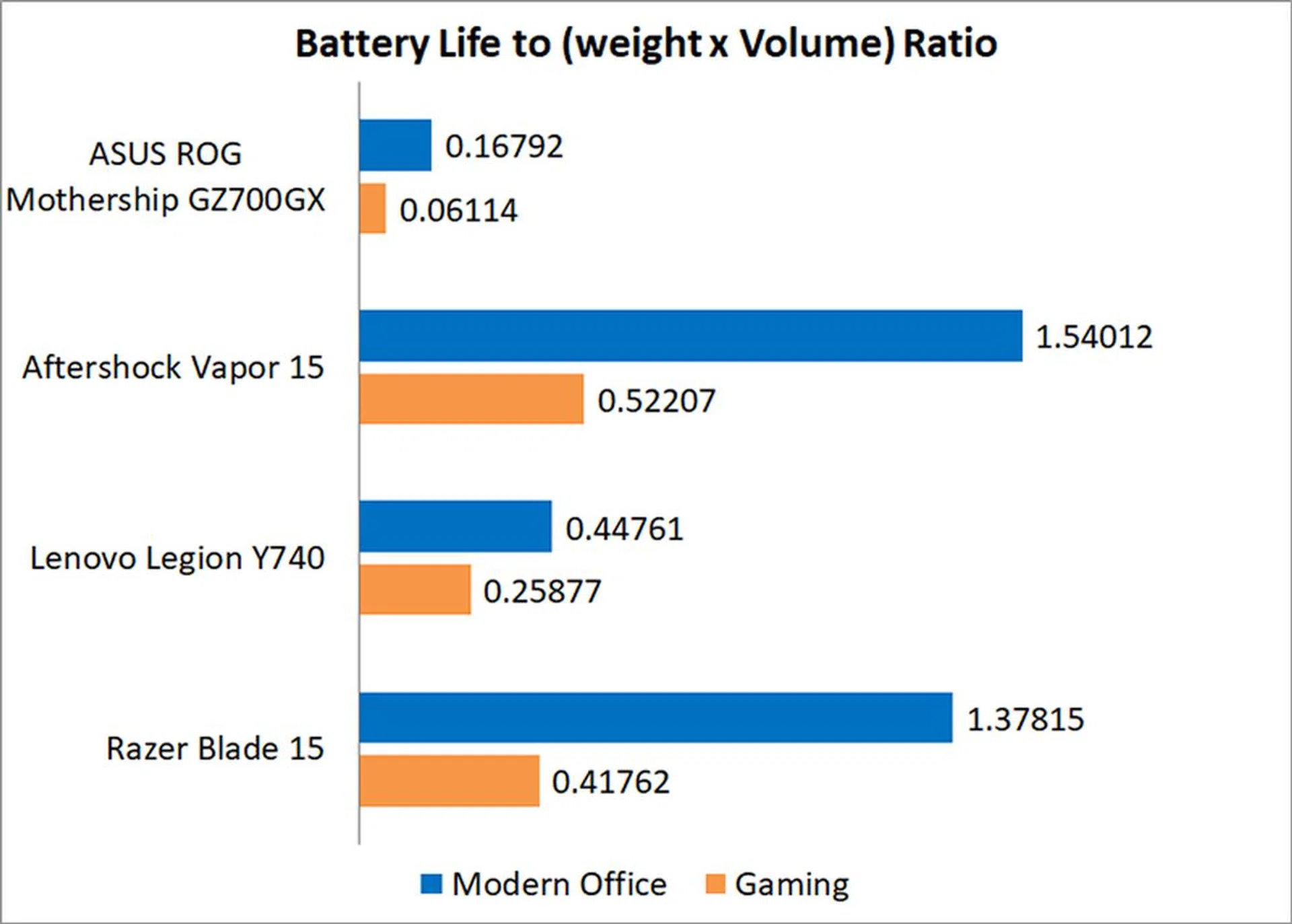
The Mothership didn't fare well in our portability index either, which takes into account things like weight, dimensions, and battery life. Given how large and unwieldy it is, it ended up right at the bottom of the chart. Suffice to say, the Mothership isn't very portable at all, despite adopting a form factor traditionally associated with mobility.
Is the cooling performance good?
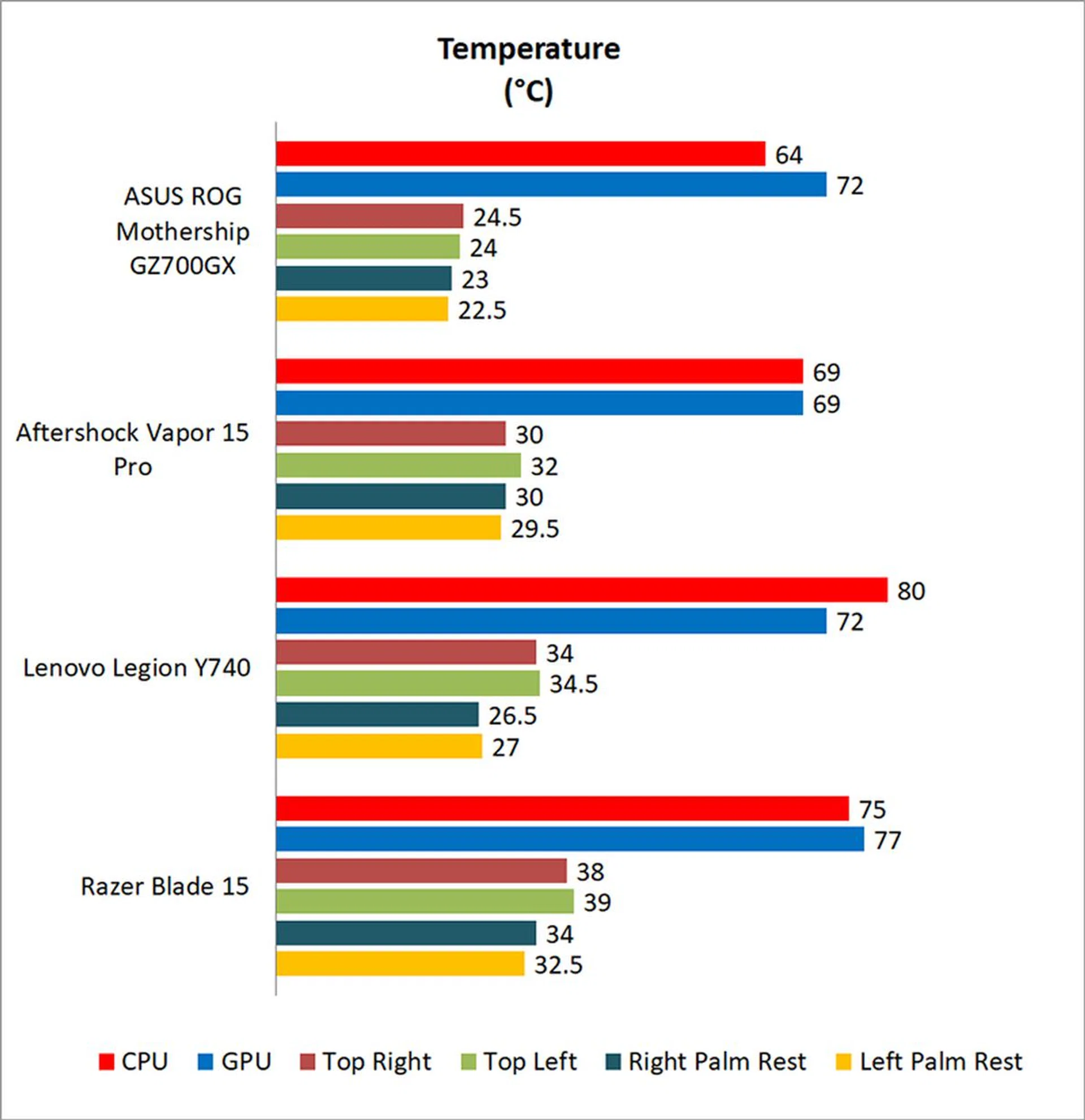
Cooling is another area where the Mothership shines. The entire keyboard remains cool to touch while gaming, thanks to the fact that the CPU and GPU are no longer located beneath the keys. I measured the surface temperatures after running 40 loops of 3DMark Fire Strike Extreme, and as you can see, they're significantly lower than most of the other laptops. CPU and GPU temperatures are pretty good as well, so ASUS' unconventional design has at least paid off in this area.
The Mothership does get noisy under load, but it's still in line with most of the other gaming laptops today.
So who would buy this?
Well, I'm pretty sure the answer is nobody, unless you've got a ton of cash and enjoy collecting interesting gadgets. At S$9,998, ASUS has priced the Mothership out of the hands of the average consumer. Furthermore, gamers hankering after performance will find that they can build an even more powerful compact gaming desktop for half the price. Even pre-built ASUS systems like the ROG G703 and ROG Strix GL12 with similar specifications are half the price of the ROG Mothership.
The Mothership is also a rather incongruous device. It adopts the form factor of a convertible, but it's not actually one since it doesn't have a touchscreen. Perhaps it's an all-in-one PC, but without a stand? Then again, you're not meant to move an AIO around, but ASUS also wants you to believe that the Mothership is actually portable (no, it's really not).
I think the machine is best thought of as a desktop replacement. It's not without its merits, and it comes with a pretty good cooling system. The idea of it makes sense actually – prop the laptop up so the vents can take in more air and then move the CPU and GPU behind the display so the keyboard remains cool. Furthermore, ASUS executed it quite well, and the Mothership boasts a great detachable keyboard and sensible kickstand.
What doesn't make sense, however, is the way the form factor and its hardware specifications come together. The 2-in-1 design obviously lends itself to portability, so it'd have been cooler if ASUS went in the other direction and tried to make a convertible gaming laptop that you could actually take out with you. Even better, it could have thrown in a touchscreen while it was at it.
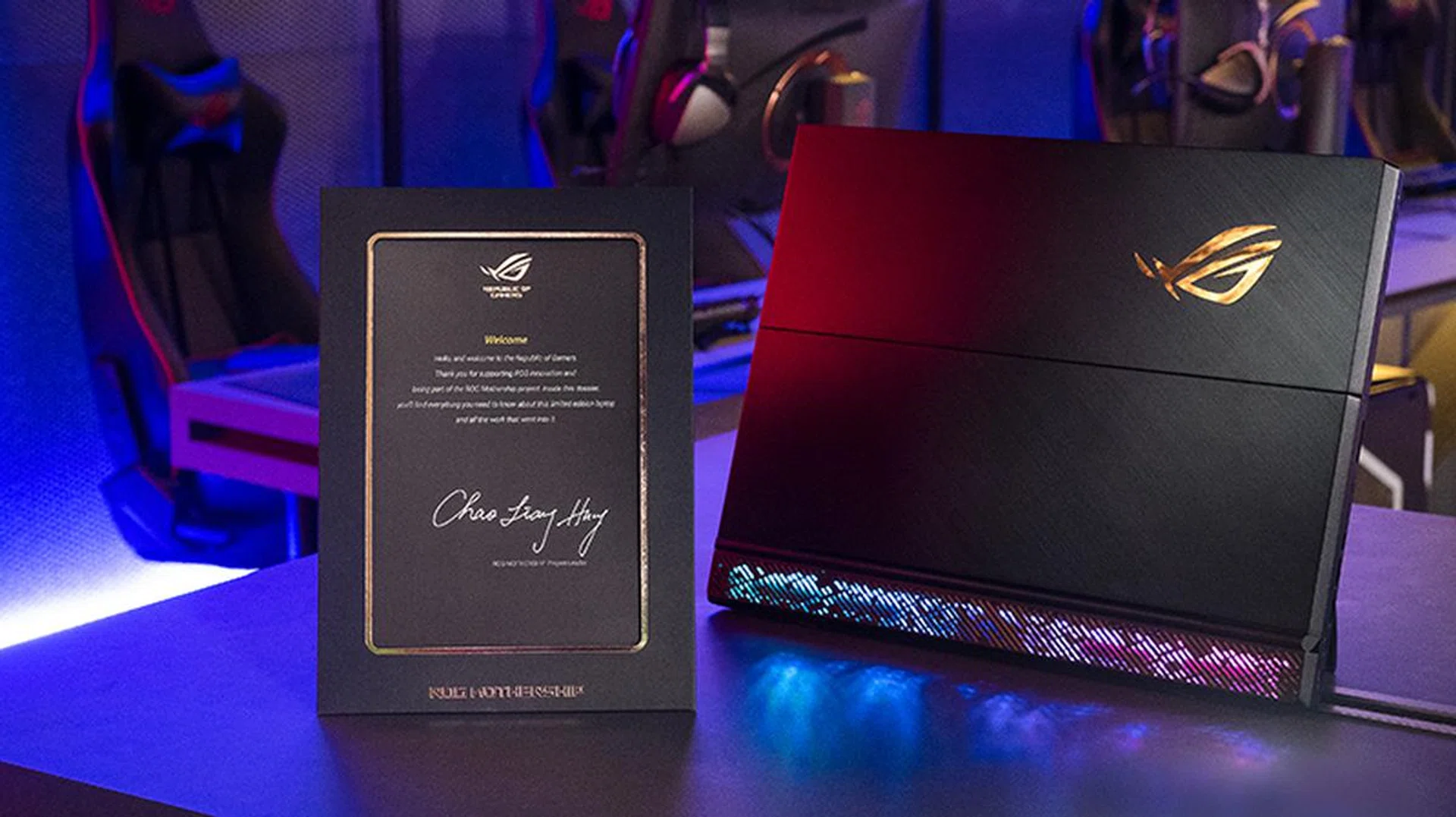
That same cardboard plaque is in the retail box too.
Instead, it decided to make this super expensive machine that requires two power bricks and which few people can afford. What's more, while the Mothership has a 4K resolution, you can't even run games at 60FPS at 4K and max settings on it. If I'm dropping S$9,998 on this thing, I want to be able to run any game at the highest resolution and all the eye candy turned up! Of course, the hardware simply doesn't exist for that to be possible on a laptop today, so maybe ASUS is simply ahead of the times?
That said, I don't think we should dismiss the Mothership altogether. ASUS clearly doesn't expect to move the Mothership in volume. Perhaps we should view it more as an exploration of what can be done with the traditional clamshell gaming laptop than as a misguided foray on the part of ASUS. And there may even be something in the idea – after all, if there was a 2-in-1 gaming convertible that was slim, light, and could work as a tablet, I'd be pretty interested to see it. Of course, I'm hoping it doesn't cost ten grand too.
Our articles may contain affiliate links. If you buy through these links, we may earn a small commission.