
Samsung Galaxy Note II (LTE) - The Big Just Got Bigger
If you thought the Samsung Galaxy Note was huge, just wait till you experience the all new Galaxy Note II. How can Samsung make a big phone any bigger? Is it still usable? Well, hit the link to find out more from our review experience.

Overview
Samsung created a niche market last year with its introduction of the Galaxy Note, an Android smartphone with a 5.3-inch display that blurs the line between a phone and a tablet (which recently has been drawing attention from consumers who've unofficially coined it a 'phablet'). While we concluded that the Galaxy Note is a device that either you love or hate, the reality is far from it. In August this year, Samsung announced that it has sold a whopping 10 million Galaxy Note devices worldwide.
The successor to the Galaxy Note was unveiled at IFA 2012 in Berlin where we had a hands-on and a quick look at its new features. We also got wind of its launch date in Singapore, which turned out to be true. Judging from the large turn outs at the launch events of the respective telcos, it seems that Samsung might have another winner on its hands.
So what does the Samsung Galaxy Note II possess to garner so much media hype and consumer demand for it? Well, we've spent several days with the final retail model so find out what we've to say in this review. Here's a run down of its key specs, and its comparison with the Galaxy Note: -
 | Key highlights of the Samsung Galaxy Note II LTE
|
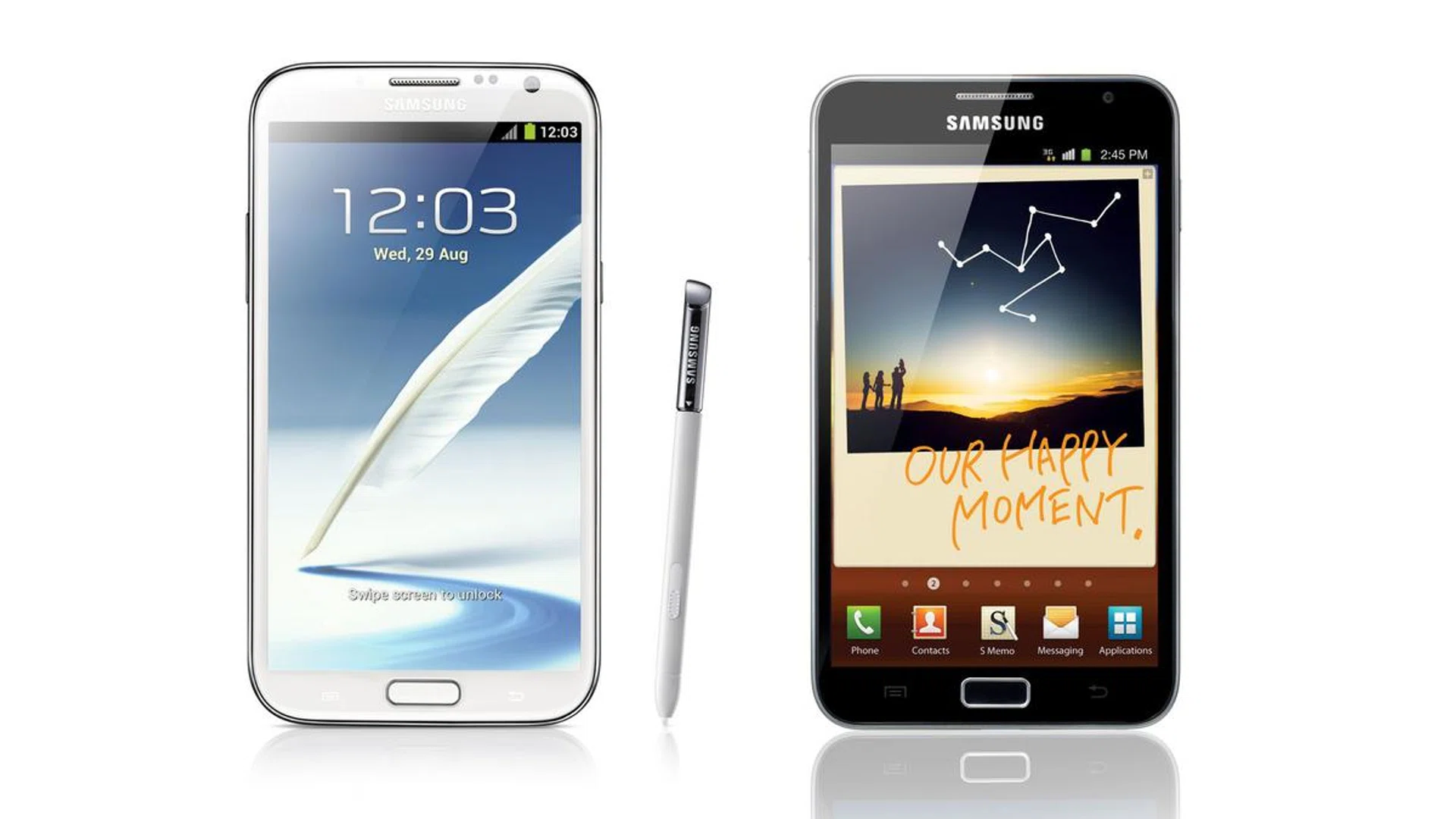
Samsung Galaxy Note II LTE | Samsung GalaxyNote | |
Networks | GSM 850 / 900 / 1800 / 1900 / HSPA+ 850 / 900 / 1900 / 2100
LTE 1800 / 2600 | GSM 850 / 900 / 1800 / 1900 / HSPA 850 / 900 / 1900 / 2100 |
Display | 5.5-inch HD Super AMOLED | 5.3-inch HD Super AMOLED |
Resolution | 1280 x 720 pixels | 1280 x 800 pixels |
OS | Google Android 4.1 (Jelly Bean)
with TouchWizUI | Google Android 4.0 (Ice Cream Sandwich)
with TouchWizUI |
Processor | Exynos 4212 Quad quad-core 1.6GHz | Exynos dual-core 1.4GHz |
RAM | 2GB | 1GB |
Storage | 16/32/64GB internal storage options + microSD slot (up to 64GB) | 16/32GB internal storage options + microSD slot (up to 32GB) |
Front Camera | 1.9-megapixel | 2.0-megapixel |
Rear Camera | 8-megapixel with auto focus camera,
LED flash & BSI | 8-megapixel with auto focus camera & LED flash |
Battery | 3,100mAh | 2,500mAh |
Dimensions | 151 x 81 x 9.4mm | 146.85 x 82.95 x 9.65mm |
Weight | 180g | 178g |
Design
If you have seen the Samsung Galaxy S III, the design of the Galaxy Note II will hardly blow you away. The same 'hyperglaze' finish can be found on the Galaxy Note II, which some may lambaste Samsung for not putting much efforts in improving the build quality of its high-end phones.
You may question why Samsung still insists on outfitting its flagship devices with plastic, but the market sentiment proves otherwise. The Galaxy S III, which has some design influence over the Galaxy Note II, managed to land into the hands of more than 20 million consumers worldwide in 100 days.
While we cannot deny the fact that a better built would enhance the overall appeal, Samsung simply does not need that (for now). The Galaxy Note II looks and feels good in its own way.

The design of the Samsung Galaxy Note II is clearly inspired by its smaller sibling, the Galaxy S III.
For those who are unfamiliar with what hyperglaze means, it is basically a patented coating to help create a "seamless" and "organic" look while providing a more secure grip of the phone. When compared to its predecessor, the Galaxy Note II does indeed looks more elegantly-designed even though it is taller and has a larger display.
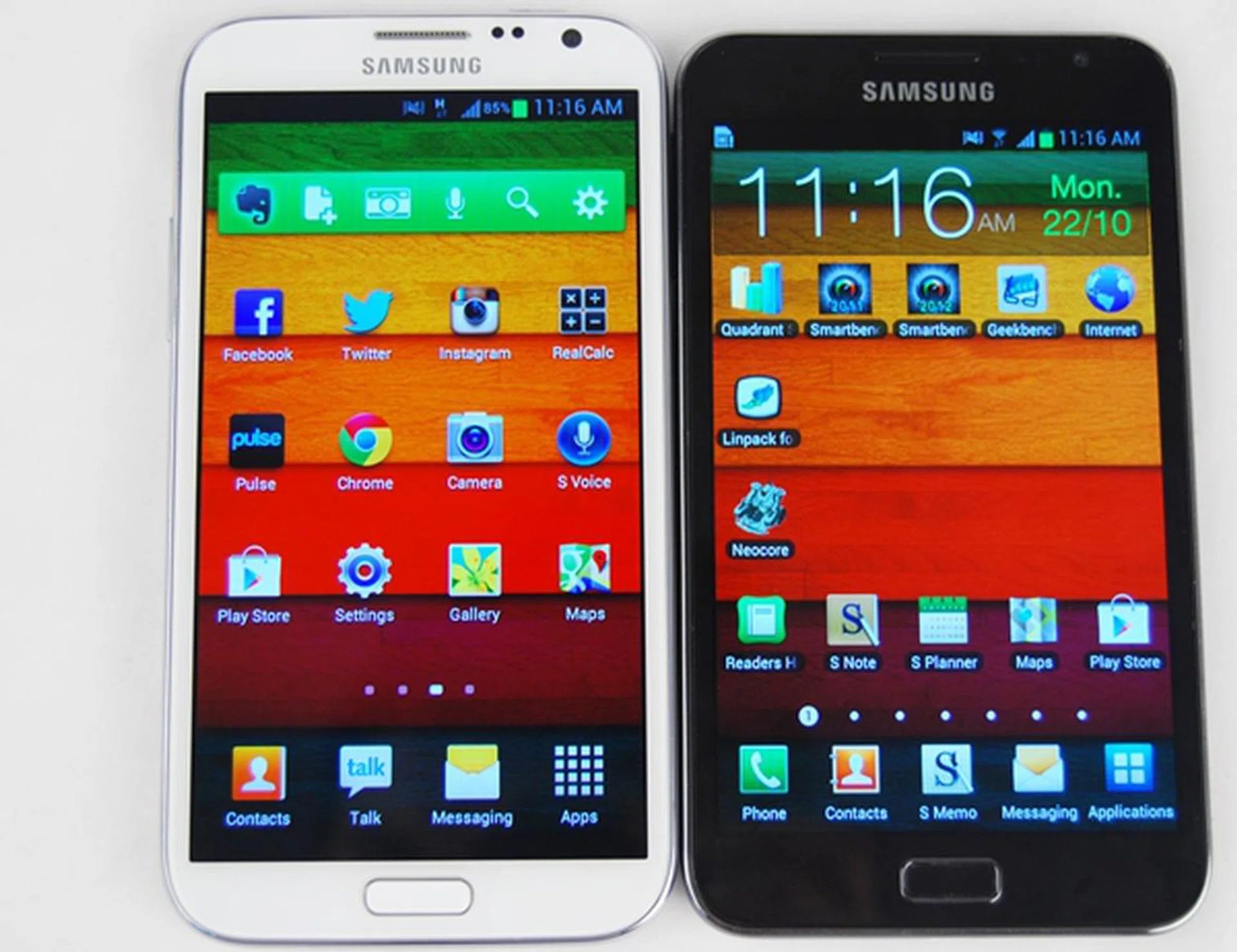
You will be surprised to know that the Samsung Galaxy Note II (left) is actually about 5mm taller, 1mm narrower and 0.25mm thinner than its predecessor (right).
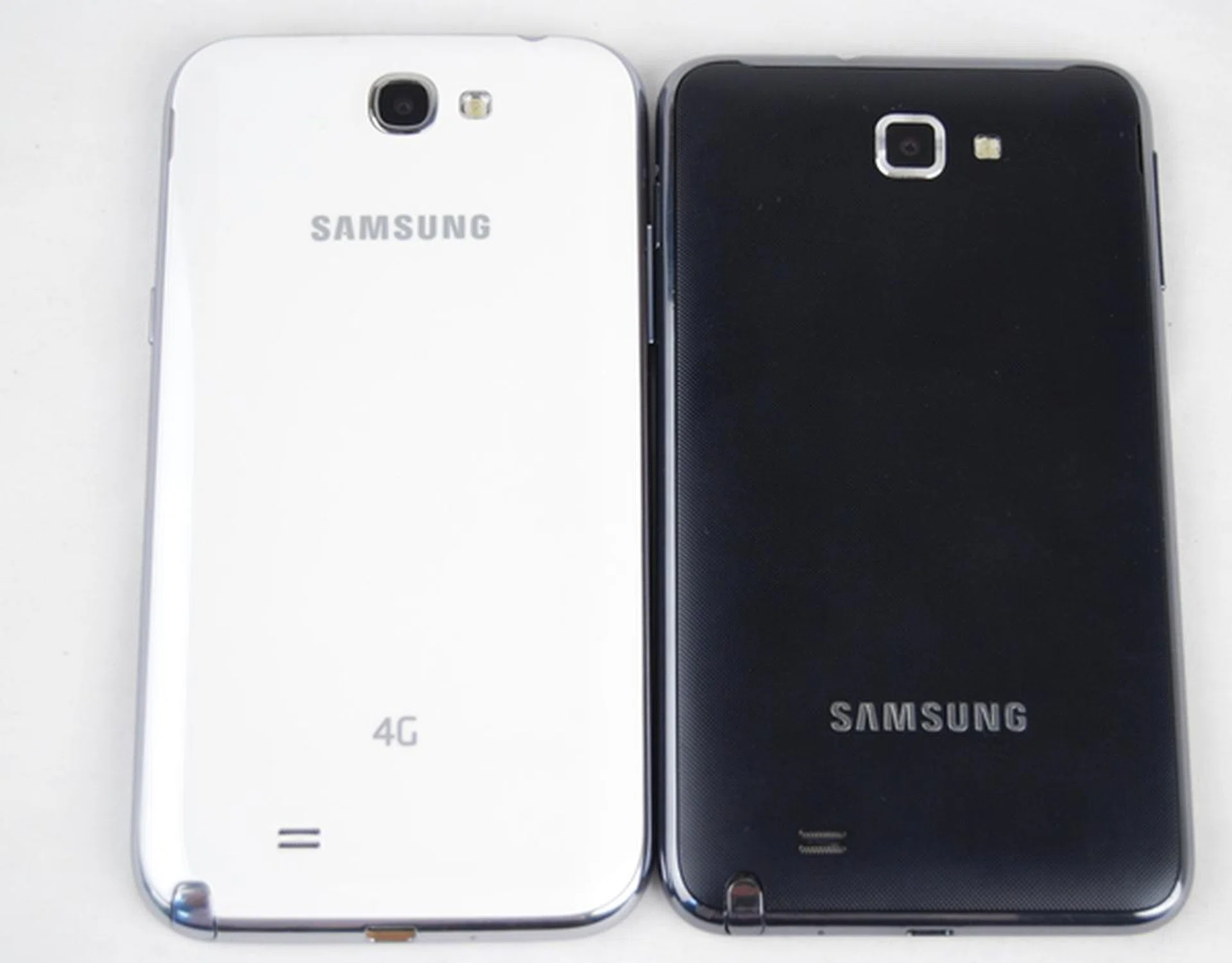
The Samsung Galaxy Note II (left) loses the textured back cover and opts for a 'hyperglaze' finish.
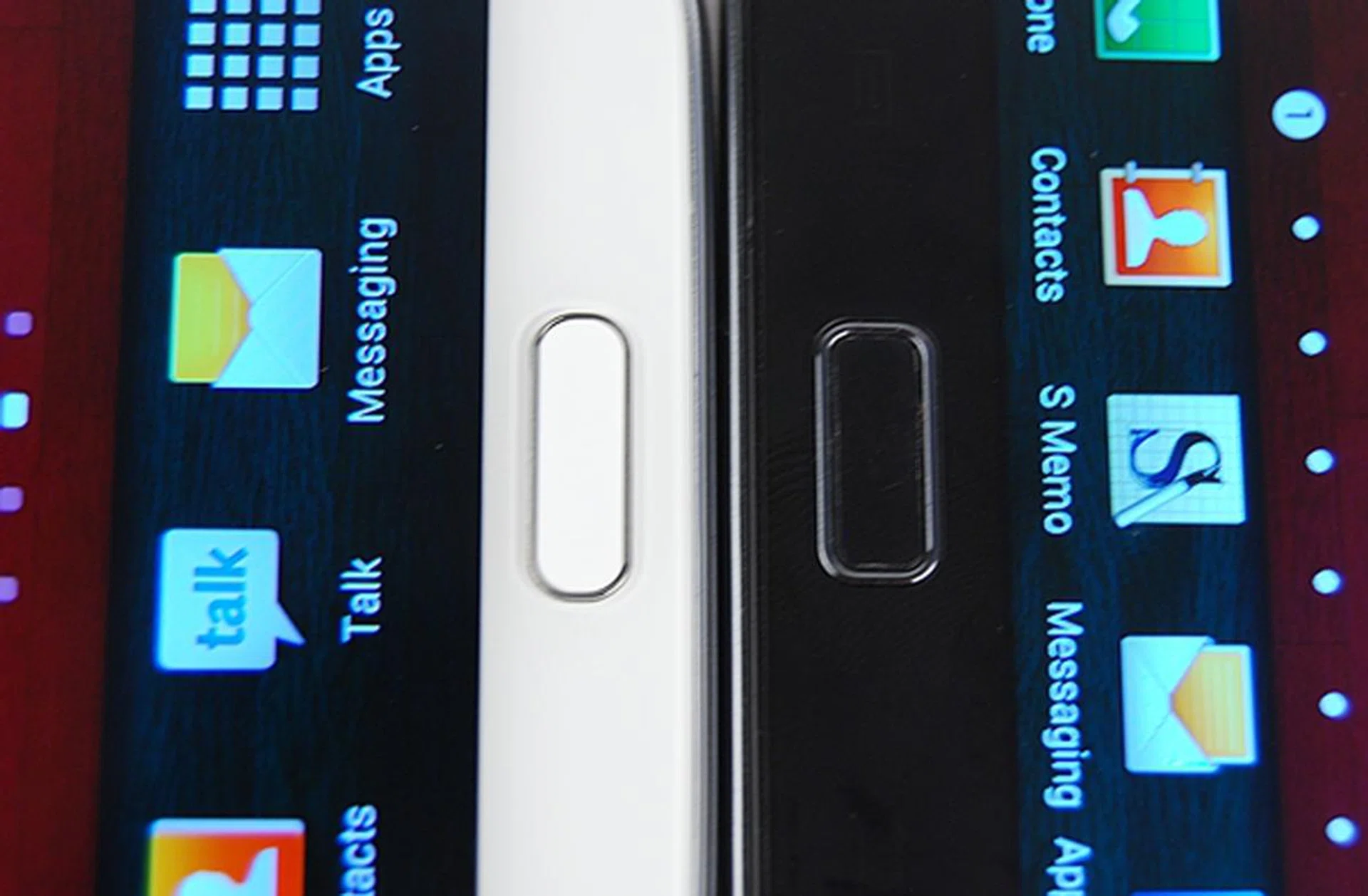
Notice the slight difference in the design of the home button. The Samsung Galaxy Note II (left) sports a thinner but longer home button, which still provides a good tactile feedback.
The placement of ports and buttons hardly deviate from the original. The Power button is still located on the right side of the Galaxy Note II, although it is slightly shorter now. This means that you may need to spend a little more time finding the button. On the left, you will find the volume controls, which are also shortened. We had no problems accessing these buttons as they are raised above the body.
Samsung has shifted the 3.5mm audio output jack from the left (on the Galaxy Note) to the right (on the Galaxy Note II). Right at the bottom center of the device is the micro-USB port, where it is used to charge and transfer files. The S Pen slot still resides at the bottom left corner of the back of the Galaxy Note.
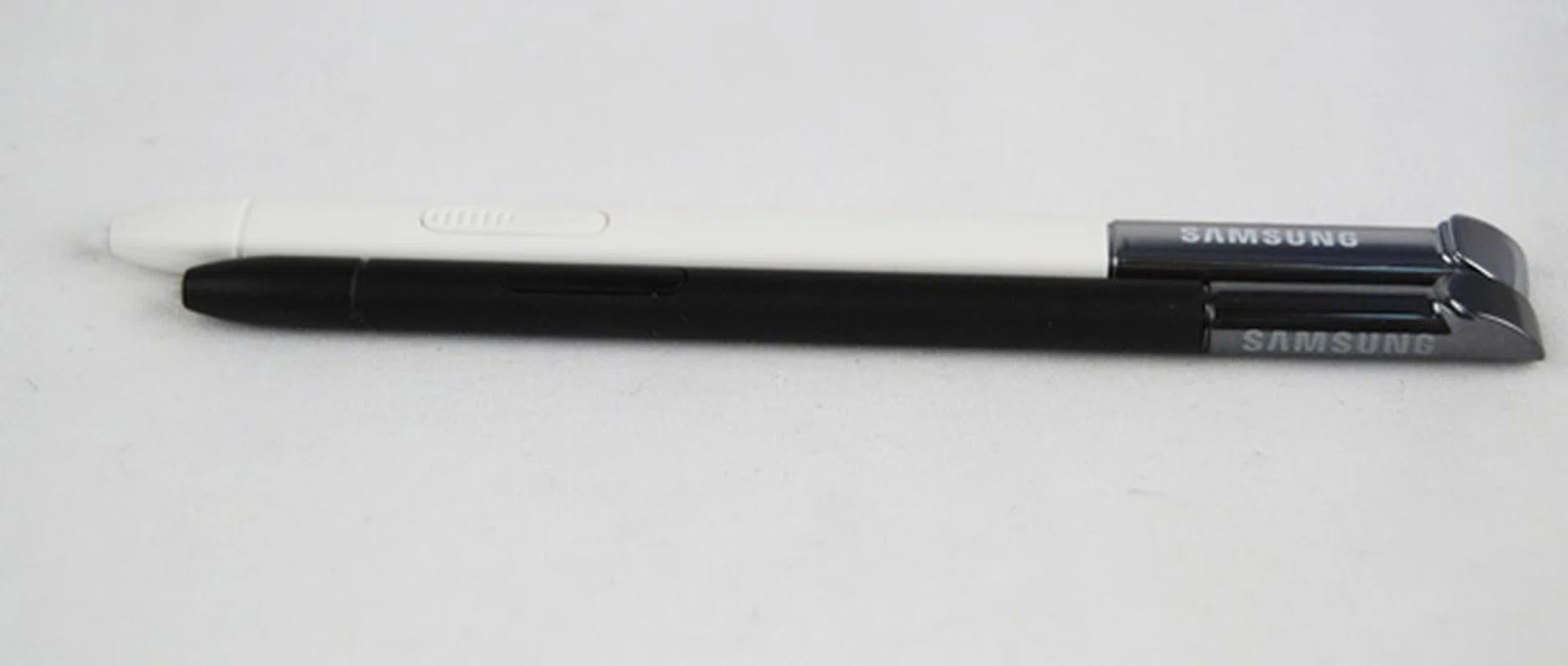
Due to the longer and thicker S Pen (white) of the Samsung Galaxy Note II, the S Pen slot is also slightly bigger to accommodate it.
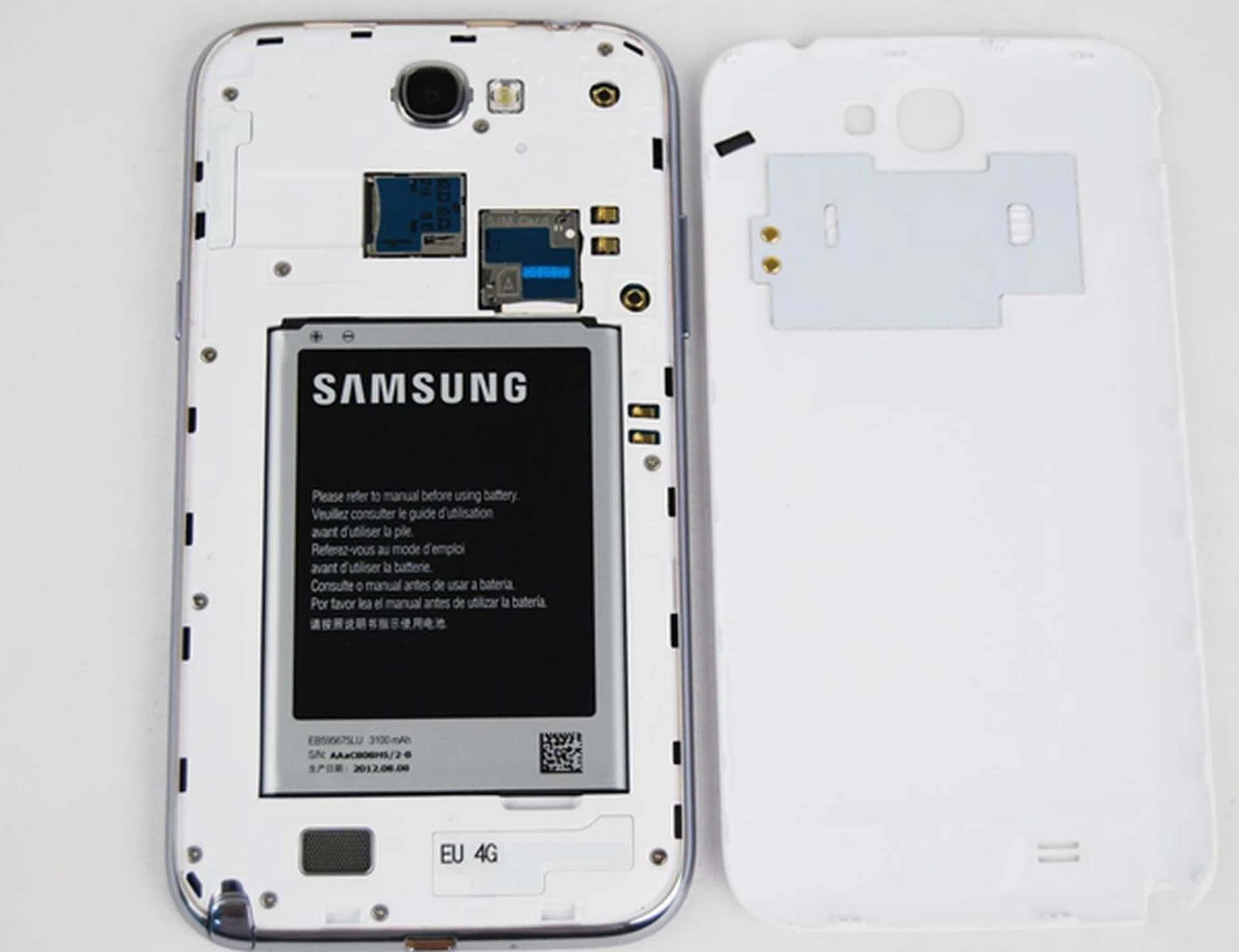
We find the back cover of the Samsung Galaxy Note II to be as filmsy and thin as its predecessor. Removing the back cover is easy and you will see the 3,100mAh battery along with the microSIM and microSD card slots.The underside of the back cover has two NFC related components.
When it comes to the handling of the Samsung Galaxy Note II, it is a very tricky affair. Even though it is slimmer and narrower than the Galaxy Note, the Galaxy Note II still feels a little overwhelming in our hands. The larger display and longer dimensions mean that we have to stretch our finger further. After using the device for the first few hours, our fingers started to ache. If you're wondering if this reviewer's hands are small, we've to disclaim that they are pretty average for the local demographics.
Similar to its predecessor, the Galaxy Note II is best used with two hands unless you don't mind sore fingers or you have a pair of really huge hands (or long thumbs) to navigate across the screen. While we awarded the Galaxy Note demerit points for the usability aspect, the Galaxy Note II appears to avoid a similar fate this time with several notable software modifications (more on these in our next section).
Slipping the Galaxy Note II into our jeans pocket is fairly easy although the heft of the device is immediately felt. The bulge caused by the Galaxy Note II is noticeable especially when you are sitting down, and this will not be a pleasant sight or experience for consumers who like to wear skinny or slim fit jeans.
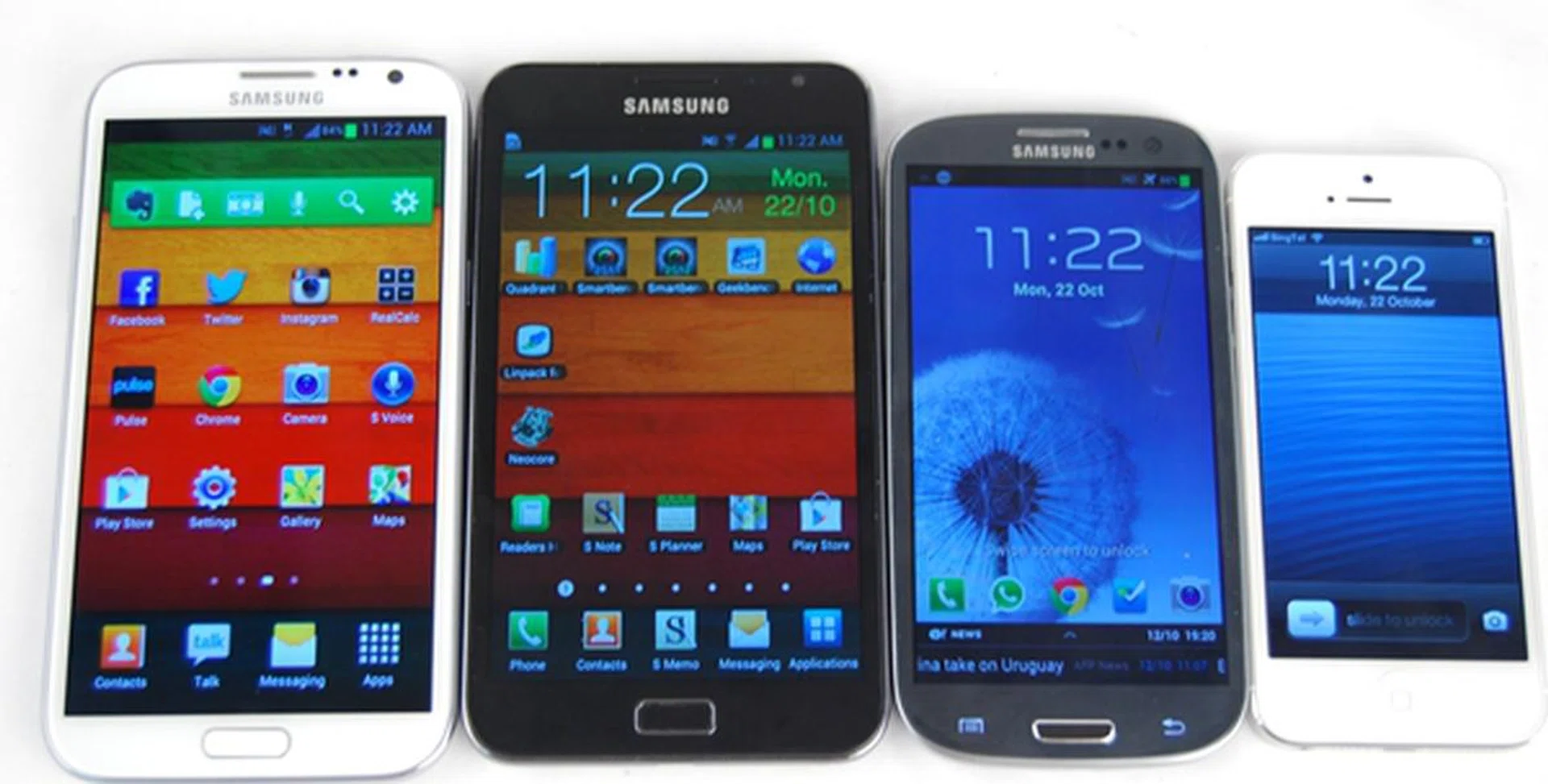
In terms of usability and handling aspects, a smaller phone such as the Apple iPhone 5 (far right) will definitely feel better than supersized phones such as the Galaxy Notes (first two from the left). It seems that the Samsung Galaxy S III (grey) strike the perfect balance between handling and optimal viewing experience.
Jelly Bean with Samsung TouchWiz
The Galaxy Note II is the first Samsung smartphone to ship with Android 4.1 Jelly Bean update out of the box, followed closely behind by the Samsung Galaxy S III LTE towards the end of September. While we are quite familiar with what Android 4.1 brings to the table from our review of the Google Nexus 7, we weren't sure how Samsung integrates Jelly Bean with its TouchWiz user interface until now. Here's a run down of the major features spotted on the Samsung Galaxy Note II: -
Quick Glance
Quick Glance is a new feature that utilizes the proximity sensor on the front of the Galaxy Note II. When the device is locked, hover your hand over the top of the Galaxy Note II to trigger the sensor. Once activated, the screen will light up and show you key information such as missed calls, unread messages and battery level.
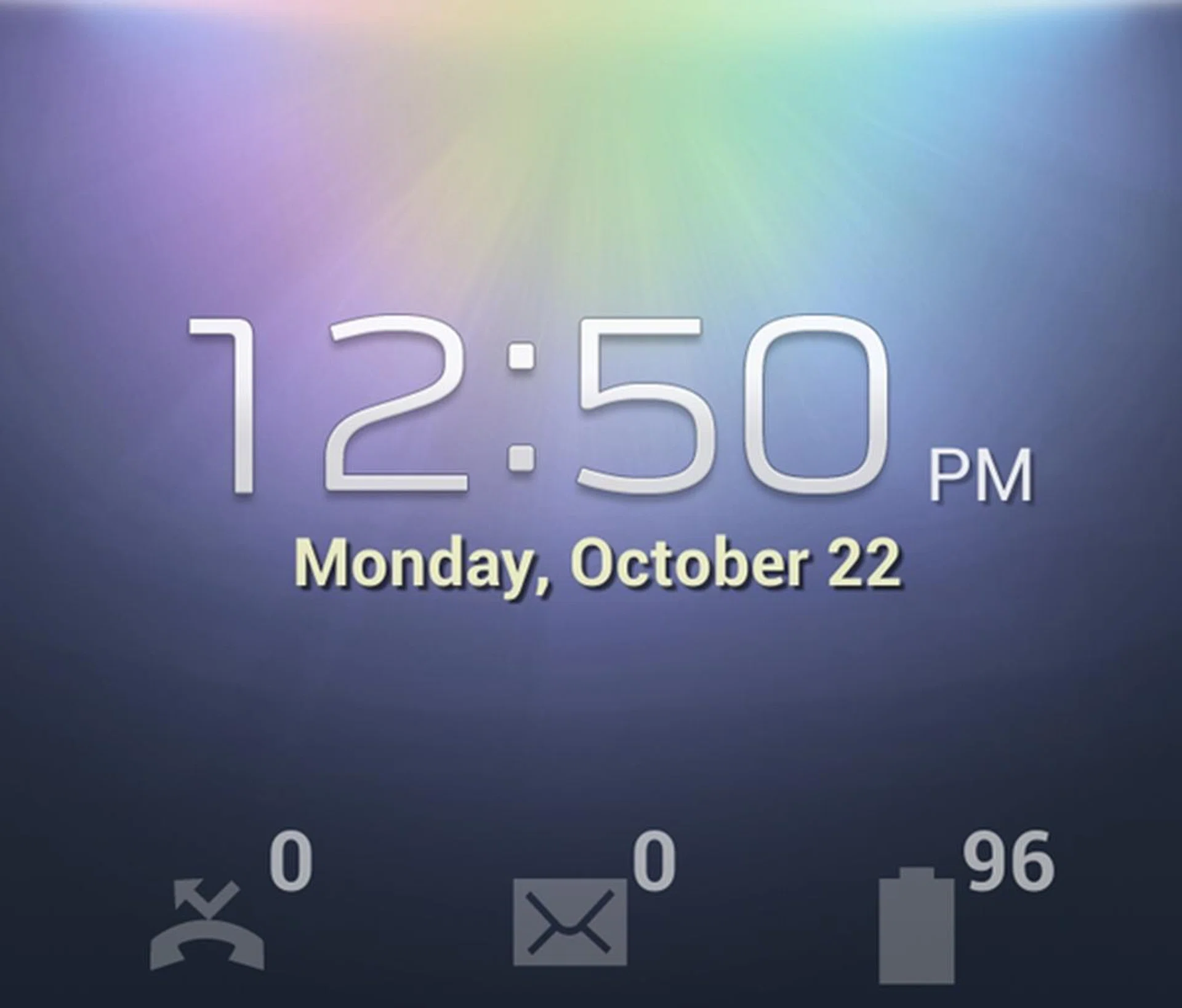
It takes some time to master the technique of activating Quick Glance. Having said that, it is a hit and miss affair at times which makes this feature more gimmicky than practical.
Air View
Adding yet another functionality to the S Pen, the Air View features allows you to hover the S Pen over certain apps ( Samsung's email client, Gallery, Videos, Messaging and S Planner) and preview the content without opening the app. To activate Air View, go to Settings > S Pen > Swipe right. Air View also enables you to scroll up or down lists by holding the pen over the edge of the screen.
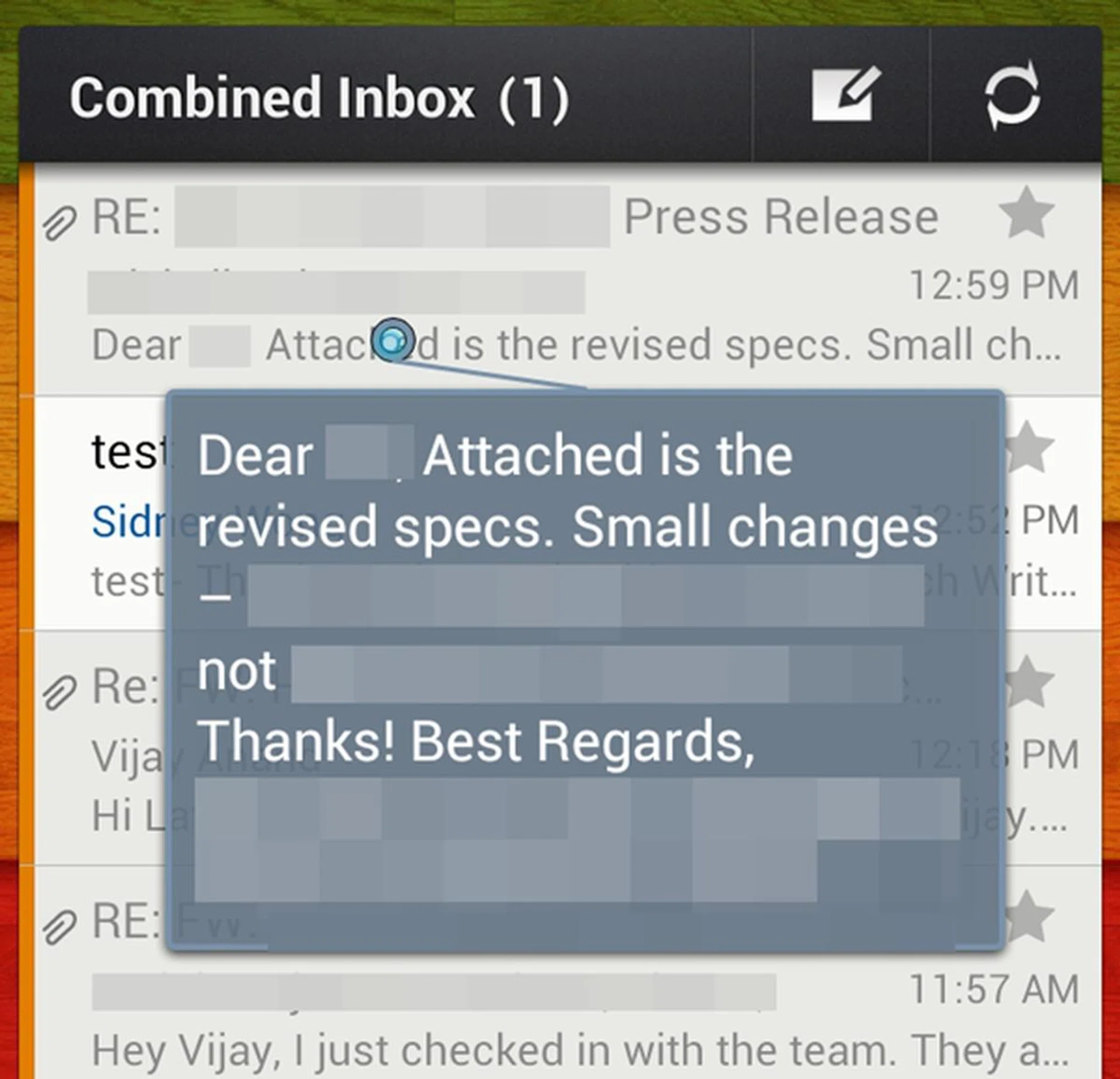
Using Samsung's email client, you can use Air View to preview the title of the emai or find out more about the contents of the email by hovering the S Pen close to the screen. A blue laser pointer will appear and expands upon the targeted section.
Useful as it may seem, we hope the Air View feature could be expanded to more apps such as Gmail and Google's native calendar app. Moreover, you need the S Pen for the Air View to work. Considering the time and effort taken to take out the S Pen, we felt that it could have been faster if we just use our fingers to access what we wanted to see (where data connection speed is good) unless the situation does allow you ample time to sit back, whip out the Pen and slowly preview several items.
Multiple Windows + Popup Video + Popup Note
On a large screen like the Galaxy Note II, it would have been a real waste if Samsung did not maximize the real screen estate. Fortunately, the company put the 5.5-inch display to full use by introducing Multiple Windows, a multi-tasking enhancement that allows you to open and run two apps side by side. This is very similar to the Multi-Screen feature on the Galaxy Note 10.1.

We tried to overwhelm the Samsung Galaxy Note II by running four apps at one go: multi-window for Chrome browser and the Gallery, Pop-up Video and Popup Note.
As seen above, the Samsung Galaxy Note II is more than capable of running four apps simultaneously on the same screen although there is no real practical use since the Popup Video and Popup Note block out the Chrome browser and Gallery.
We feel that two app windows should suffice for most users. While the Multi Screen feature on the Galaxy Note 10.1 enables you to choose two out six apps, the Galaxy Note II ups the game play by giving you 13 apps. Appearing on a scroll bar on the left, the 13 apps are:
- ChatOn
- Chrome
- Gmail
- Gallery
- Messaging
- S Note
- Internet
- Google Talk
- Video Player
- YouTube
We appreciated Samsung's decision to add more apps to the list, however we could not help but wonder why some of the apps are redundant. For example, there are two email clients in the list, which are Email and Gmail. There are also two browsers in the list, Chrome and Internet.
Facebook, Twitter and Chrome are by default not in the shortcut bar. They only appear in the bar after we had downloaded and installed them on the phone. We tried with several other social networking apps (Path, LinkedIn, Pinterest, Tumblr) and popular apps (WhatsApp, Angry Birds, Temple Run, FireFox, Opera Mobile) to see if any of them would appear in the shortcut bar but none did.
Samsung might have its reason to only include Facebook, Twitter and Chrome into the shortcut bar, but we felt it should give users the flexibility to add in their most frequently used apps such as WhatsApp or Instagram, so as to maximize the Multiple Windows feature.
One-Handed Operation
In our previous page, we mentioned that the Galaxy Note II will not suffer the same fate as its predecessor in the aspect of usability. It seems that Samsung is aware that some consumers may be turned off by the large display as it makes it hard for them to accomplish basic tasks such as text messaging and making phone calls easily.
Specially created for the Galaxy Note II, Samsung introduces a new Setting label, "One-handed operation. To put it simply, this setting enable you to customize four basic tasks of the phone - keypad and in-call buttons, the virtual keyboard, calculator and screen unlock.
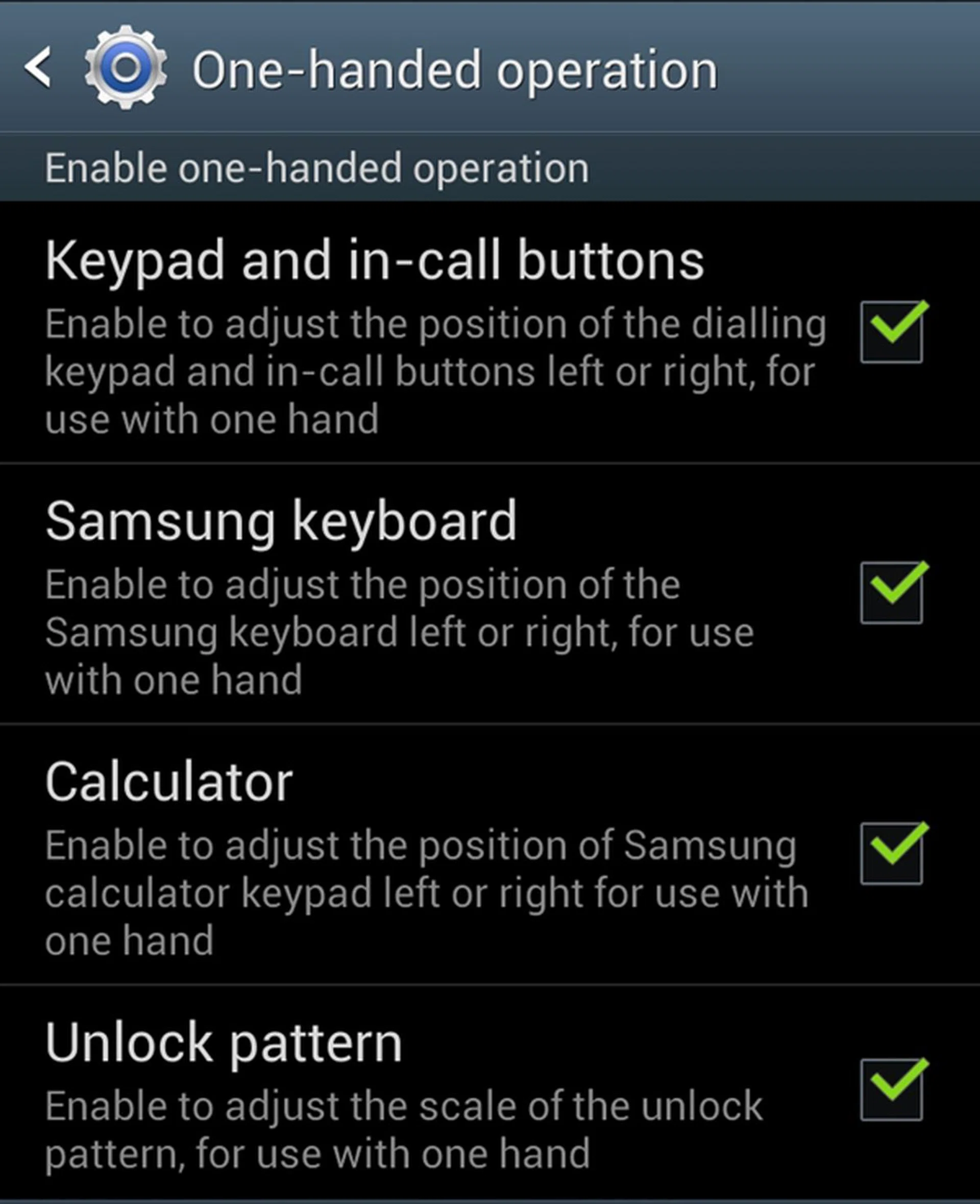
You can choose which to activate according to your preferences. Based on our time with the Galaxy Note II, we found the Samsung keyboard option to be the most practical among the four.

From left to right: Calculator, Keyboard and Keypad in right-handed mode.
Due to the extra screen estate, Samsung is able to fit in the row of numbers above the standard QWERTY keyboard which we found to be extremely useful. With one-handed operation mode turned on, it really makes one-handed typing easier (but at the expense of it being less accurate since the keys are smaller).
Notification Panel
This is nothing new as we've seen it in the Google Nexus 7, but it's worth mentioning in the review of the Samsung Galaxy Note II. Instead of showing just a new message, the notification panel displays more information such as the content of a message.

For short emails, you are able to view the entire thread without accessing the email app.
S Pen
The design and software of the Galaxy Note II are not the only areas that received upgrades; the S Pen is also revamped. When you take the S Pen out of its slot, the Galaxy Note II senses it and will bring up a home screen panel specially catered for it. Another set of shortcuts will also appear in the notification panel.

Removing the S Pen from its slot will prompt the Samsung Galaxy Note II to present its contextual home page up front.
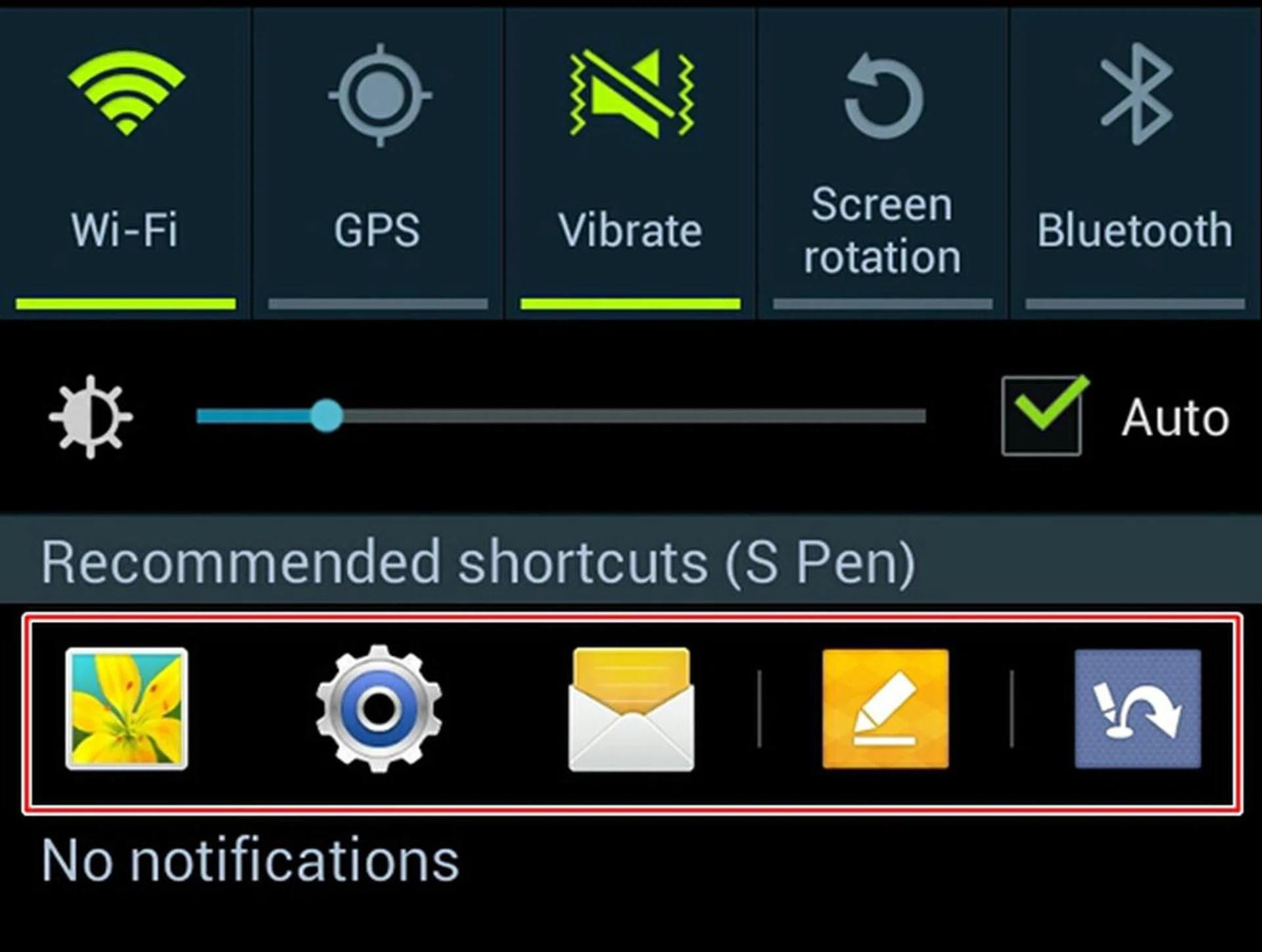
Swiping down the notification panel will reveal a row of recommended shortcuts for the S Pen.
Samsung also incorporated an "innovative way" of launching apps, known as Quick Commands via the S Pen. Pressing the S Pen button and swipe from the bottom of the screen in an upwards direction to activate Quick Command.
Once activated, you can draw a series of signs to launch their respective apps. For example, using the S Pen to draw a "@" sign will enable you to launch the Email app while drawing a "?" will bring you to Google Search.

Quick Command is more of a gimmick than of any practical use. You are better off opening the email app than taking out the S Pen, swipe and draw. Nonetheless, it is one of several new features afforded by the Samsung Galaxy Note II which you can use to impress your friends.
Do check out our short video below on some of the software features on the Galaxy Note II that were demo-ed before:-

Performance
The Samsung Galaxy Note II is the most powerful device in the company's portfolio as it is powered by the Exynos 4412 Quad quad-core 1.6GHz processor and 2GB RAM. In comparison, the Galaxy Note 10.1 runs on a similar chipset of a slightly lower clock speed (1.4GHz).
As usual, we'll be comparing the performance of the Galaxy Note II against its predecessor (Galaxy Note), the Galaxy S III LTE, Apple iPhone 5 and HTC One XL. We will use the Quadrant benchmark to evaluate the CPU, memory, I/O and 3D graphics of the Android devices.
Device | Samsung Galaxy Note II LTE | Samsung Galaxy S III
LTE | LG Optimus Vu | HTC One XL | Samsung Galaxy Note |
CPU | Exynos 4412 Quad
quad-core 1.6GHz | Exynos 4212 Quad
quad-core 1.4 GHz | NVIDIA Tegra 3 quad-core 1.5GHz | Qualcomm Snapdragon S4 dual-core 1.5GHz | ARM Cortex-A9 Exynos dual-core 1.4GHz |
GPU | Mali-400MP | Mali-400MP | 12-core GeForce | Adreno 225 | Mali-400 MP |
RAM | 2GB | 2GB | 1GB | 1GB | 1GB |
OS | Android 4.1 | Android 4.1 | Android 4.0 | Android 4.0 | Android 2.3.5 |

As expected from our review of the Samsung Galaxy S III LTE, the Quadrant benchmark score of the Galaxy Note II didn't catch us by surprise. It ran circles around the competition, including its predecessor, and is currently sitting on top of the charts with an impressive score of 6080.
Its higher score is attributed to its slightly faster clock speed of 1.6GHz since both devices are powered by Android 4.1 Jelly Bean and 2GB RAM. The HTC One XL, powered by a Qualcomm Snapdragon S4 dual-core chipset, fell behind by a significant margin although it is expected to perform better once it is upgraded to Jelly Bean.
As for the LG Optimus Vu, its marginally better score over the One XL speaks a lot on the capability of its NVIDIA Tegra 3 quad-core processor - it is outclassed by the Samsung Exynos 4412 Quad (at least from the theoretical point of comparison).
Number crunching aside, the Galaxy Note II feels extremely fluid in its operation. We certainly did not encounter any hint of slowdown when opening apps or multitasking via the Multiple Windows feature. The software optimization of Jelly Bean, quad-core processor and 2GB RAM no doubt ensured that the daily user experience was top-notch and almost on-par with that of a Nexus device.
Multimedia Performance
When the Galaxy Note was unveiled in late 2011, it had the biggest display ever on a smartphone. It retained the title for about a year until now when the Galaxy Note II came and trumped it with a larger 5.5-inch display. On paper, the 0.2-inch increase in screen size may seem negligible but in reality, the difference is quite noticeable.
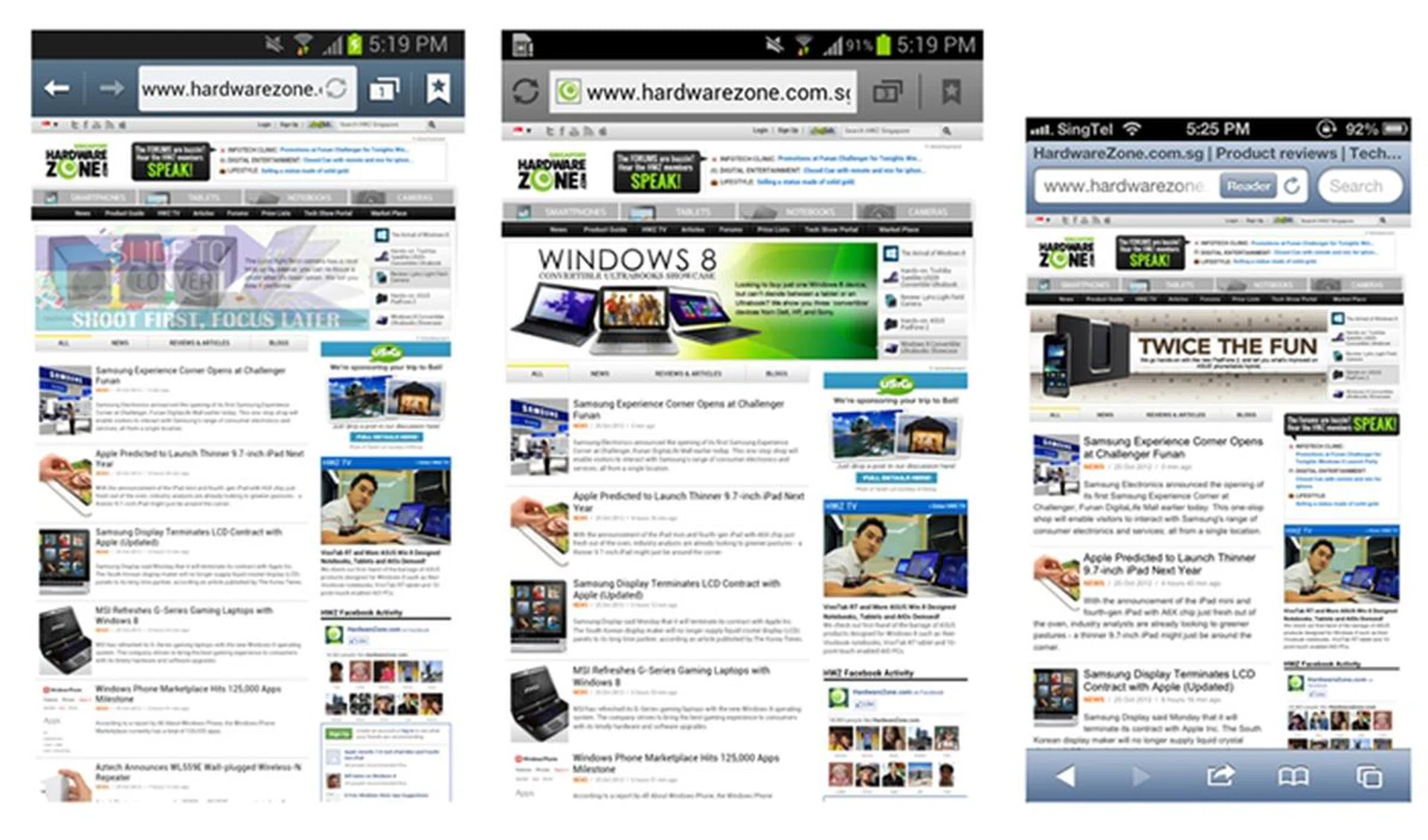
From left to right: Samsung Galaxy Note II, Galaxy Note, Apple iPhone 5.
As expected of AMOLED displays, the viewing angles are great and colors are rich, albeit over-saturated. Compared to its predecessor, the Galaxy Note II's display seems brighter and colors are richer. The magnificence of the 5.5 HD Super AMOLED display is exhibited best when watching videos and playing games, where the blacks are exceptionally deep and present great color contrast.
You won't run out of storage space considering that the Galaxy Note II comes with 16GB built-in storage. While this should suffice mainstream consumers, Samsung also throws in a microSD card slot that supports up to 64GB sized cards, bringing the storage capacity to a maximum of 80GB. Moreover, the 50GB free Dropbox storage (inclusive of 2GB) when you sign up for a free account should come in handy to backup your documents and photos on the 'cloud'.
The S Pen feels more solid than the one in the Galaxy Note, and its handwriting recognition has improved drastically. We were able to write out a message decently although the software had difficulties interpreting cursive handwriting style. In addition, the S Pen is also more responsive due to Wacom’s Electro-Magnetic Resonance (EMR) technology. We tried using the S Pen of the Galaxy Note on the Galaxy Note II and it worked albeit we found it less smooth and accurate.
Imaging Performance
Similar to the Galaxy S III, the Galaxy Note II sports an 8-megapixel rear camera which can capture images of up to 3264 x 2448 pixels and 1080p videos. It also has a front-facing 1.9-megapixel camera for video calls and taking self portraits.

The image quality is excellent; noise levels are kept to a minimum with good color reproduction. Check out the close-up shots below for further scrutiny.
 |  |
Battery Mileage (Updated as of 31st October 2012)
Our standard battery test for mobile phones includes the following parameters:
- Looping a 800 x 480-pixel video with screen brightness and volume at 100%
- Wi-Fi and Bluetooth connectivity turned on
- Constant data streaming through email and Twitter
Specifications/Device | Samsung Galaxy Note II | Samsung Galaxy S III LTE | LG Optimus Vu | HTC One XL | Samsung Galaxy Note |
Processor |
|
|
|
|
|
Display Size |
|
|
|
|
|
Display Type |
|
|
|
|
|
Display Resolution |
|
|
|
|
|
Dimensions |
|
|
|
|
|
Weight |
|
|
|
|
|
Battery |
|
|
|
|
|
Editor's note: The battery performance results seen in this section are updated as of 31st October 2012, based on the final review unit of the Samsung Galaxy Note II LTE. Overall, the battery performance improved, with the review unit of the Galaxy Note II lasting 30 minutes longer than the earlier preview edition. Therefore, the Galaxy Note registered a better power consumption figure (0.89W vs 0.93W) and Portability Index improved (0.62 vs 0.59). Even so, this doesn't change the overall outcome against the competition.
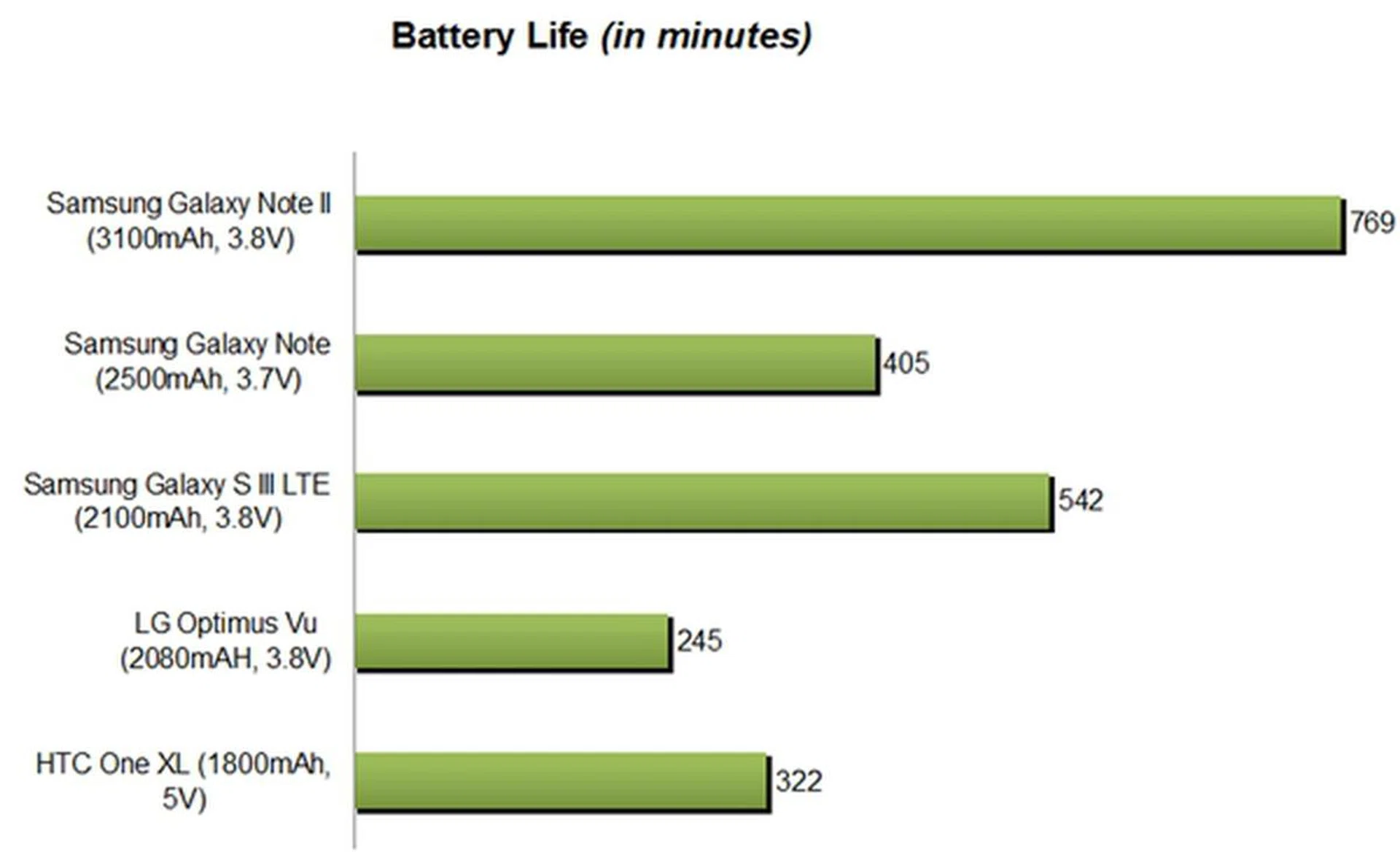
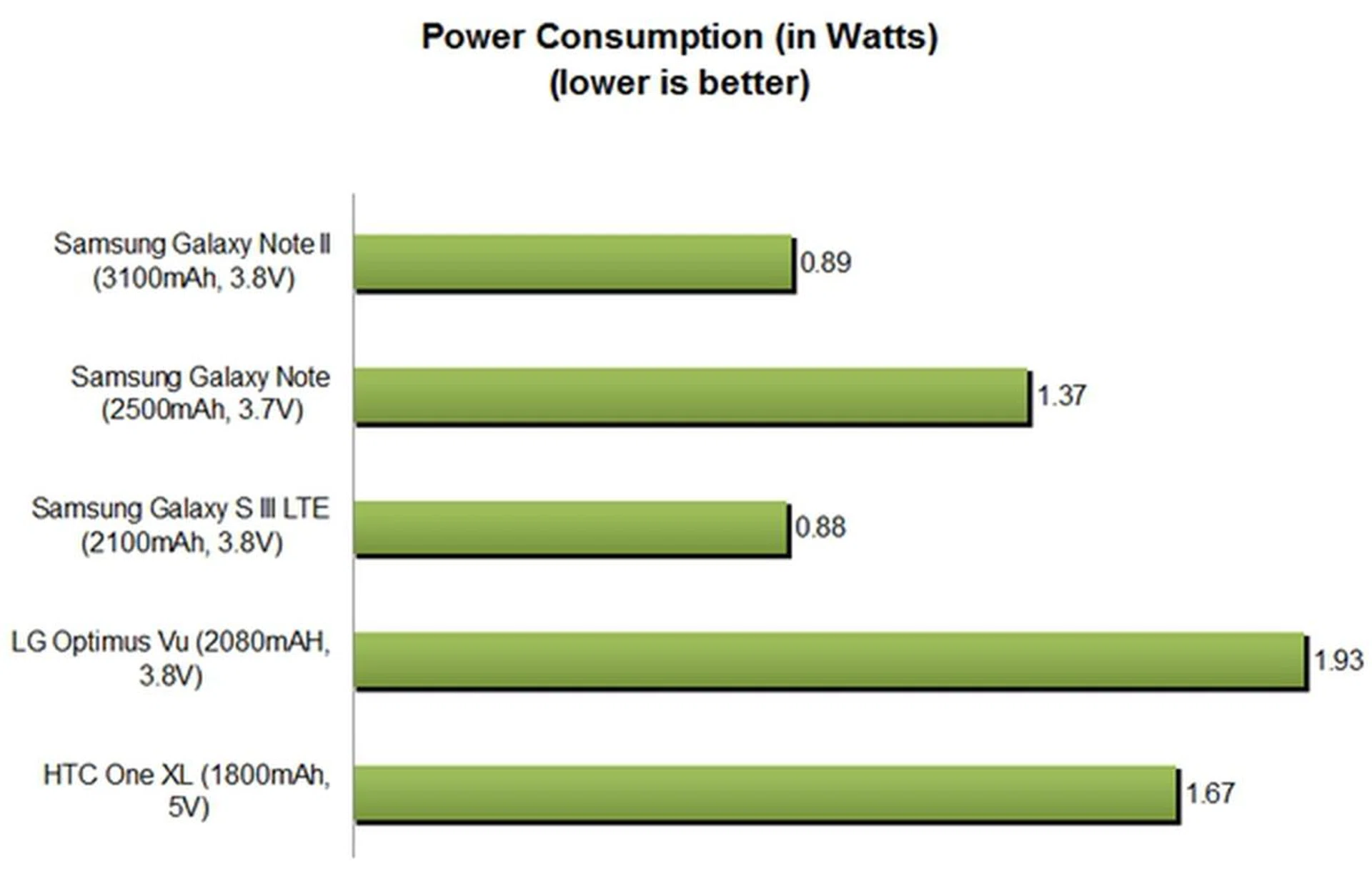
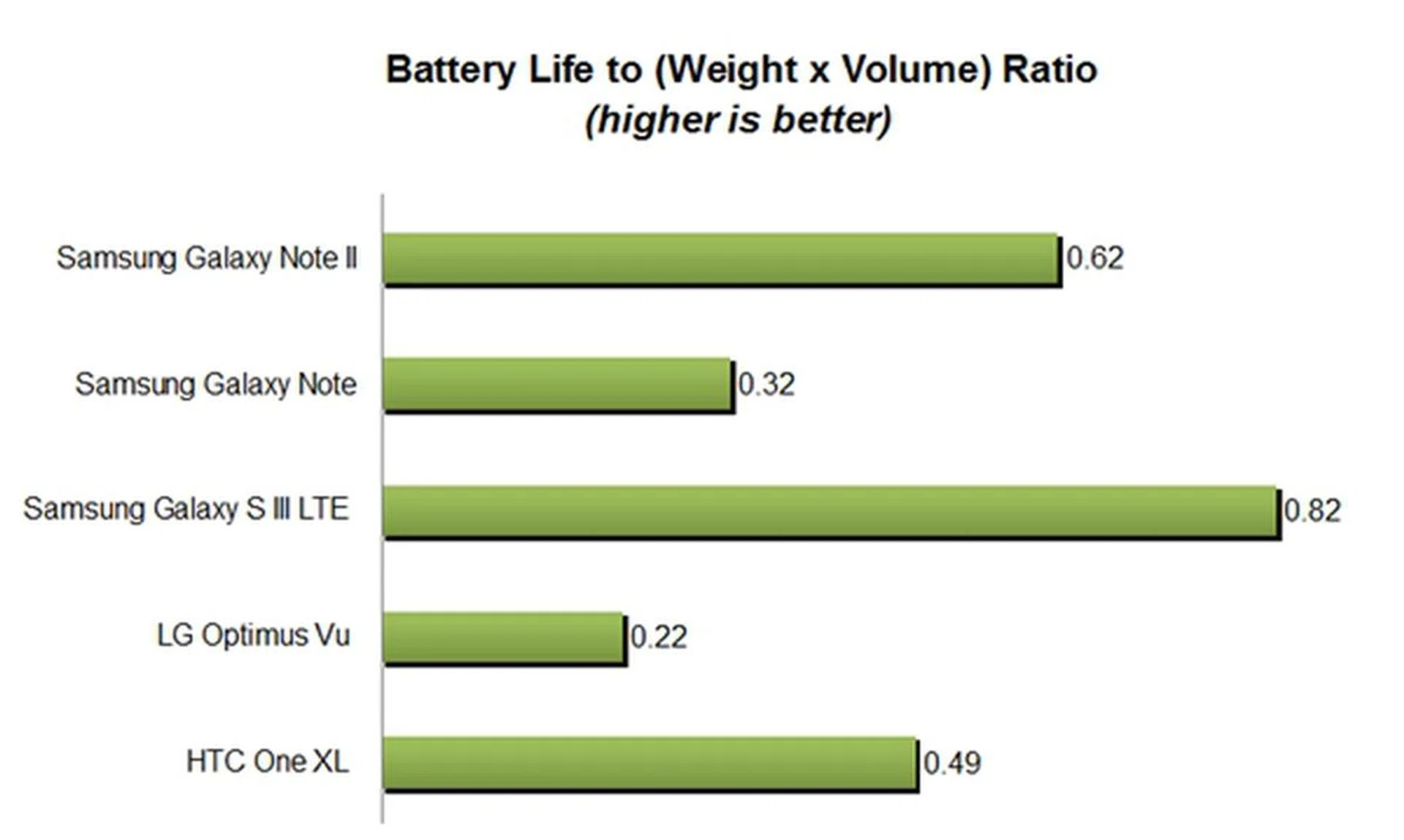
Having proven its prowess in the Quadrant benchmark, the Exynos 4 Quad processor went on to display its power efficiency in our standard battery test. Lasting a whopping 12 hours and 49 minutes, the Galaxy Note II ranks top among the phones compared.
To put things into perspective, the Galaxy Note II ranks second behind the leader, the Motorola Razr Maxx. This is quite a feat if you take into account that the Motorola Razr Maxx has a smaller 4.3-inch display and a larger 3,300mAh battery.
Ths is evident in the Power Consumption chart, where the Galaxy Note II registered a lower consumption figure than the 5.3-inch Galaxy Note, the 5-inch LG Optimus Vu and the 4.7-inch HTC. One XL. Two factors are at play here: the more power-efficient Exynos 4 Quad chipset and Jelly Bean OS appear to be contributing to the low power consumptions of both the Galaxy Note II and Galaxy S III LTE.
In the Portability Index where each device is assessed on its ability to balance battery mileage with its size and portability, the Galaxy Note II managed a rather good score despite its massive dimensions and weight. It seems that the twelve-hour battery uptime far outweighs its massive dimensions and weight.
Under normal usage conditions such as web surfing, uploading several images and messaging (though on an intensive side of things), the Galaxy Note II managed to last more than a day without difficulty. A minor but common issue we encountered with the Galaxy Note II is that its screen tends to warm up after extended periods of intensive usage. Although the heat felt wasn't as intense as that of the HTC One X, it got warm enough to catch our attention.
Conclusion
Want to know our verdict on the Samsung Galaxy Note II? Well, it can be summed up in one sentence: it is nothing short of spectacular.
The Samsung Galaxy Note II is not only a phone that does it all, it does it almost to perfection. Take its 5.5-inch HD Super AMOLED display for example. It delivers an exceptional level of multimedia experience that is unrivalled anywhere else, while a combination of efficient power management and large battery capacity ensures that it attends to your every need throughout a busy day. In terms of software innovations, Samsung continues to outdo itself with the introduction of Smart Stay, Multiple Windows, Popup Play and the S Pen.
Some may question the usability of such a device due to its massive dimensions but we think it's no longer a point of contention as the large turn outs at the launch events of the three telcos further reinforce our point. Increasingly, consumers are embracing smartphones with larger screen sizes and Samsung is well-positioned to meet that demand. That doesn't mean big screens are for everyone, but many are appreciating the immersive experience and the added flexibility a larger phone allows.
At S$998, the Samsung Galaxy Note II is highly recommended if you are looking for the best Android smartphone in the market right now. However, if the size bothers you, the Samsung Galaxy S III LTE is the next best choice since it has almost everything the Galaxy Note II has except for a few software features and obviously, the massive screen size.
Our articles may contain affiliate links. If you buy through these links, we may earn a small commission.