
Samsung ATIV Smart PC Pro - The Ultra Tablet
The Samsung ATIV Smart PC Pro, is really an Ultrabook disguised as a tablet. It's as powerful as most other Ultrabooks in the market, but also gives users the option of discarding the keyboard dock for much more portability. Is this the ultimate combo product? Find out in our review!

The Ultra Tablet
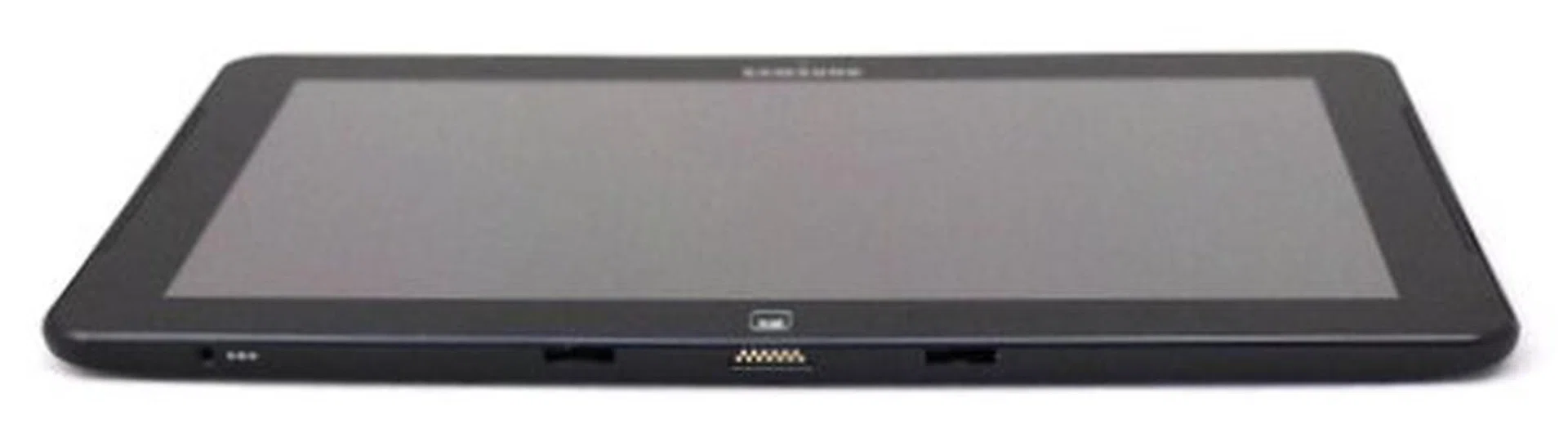
The 888g Samsung ATIV Smart PC Pro is an Ultrabook in the form of a tablet.
We first had a hands-on with the Samsung ATIV Smart PC Pro (let’s just call it the ATIV Pro) prototype Ultrabook tablet way back in August 2012, and even then it was already showing its potential. With an Intel Core i5-3317U 1.7GHz processing platform that's hiding underneath its 11.6-inch full HD screen, this is why we consider it an Ultrabook even though its keyboard is detachable. Its concept is very similar to what we’ve seen on ASUS’s Transformer Android tablets, which come with keyboard docks that enhance the machine’s functionality.
Unfortunately, unlike the other tablets with such docks, the keyboard dock of the ATIV Pro does not contain an additional battery, which is quite disappointing. It actually reminds us of the Microsoft Surface Pro, except in this case the keyboard is a substantial additional 720 grams, unlike the thin and light optional keyboards for the Microsoft Surface tablets that weight just 250 grams.
Keyboard Dock
The good thing about this form factor however, is that it allows users to just pick up the tablet and leave the additional heft (that is the keyboard dock) behind when they don’t need it. It also converts between its tablet and notebook forms quickly and painlessly. All you have to do, is to align the tablet’s slot onto the keyboard dock's magnetic connector, and it goes right in. While Samsung says that the magnets within the keyboard dock's connector subtly guide the tablet into place, in actual usage, we noticed no hint of magnets offering any assistance. Rather, the tablet's own weight and the docking slots pretty much assists this process as it locks into place with the keyboard dock.
Once in, the notebook's tablet and keyboard portions feel secure, and we could not detect any hint of looseness no matter how hard we shook the device. Credit to Samsung for paying attention to such a small but important detail to convince users of its sturdy and dependable design. The single aluminum hinge that is formed from putting the tablet and keyboard dock together is also quite rigid, keeping the 888g tablet in place between 0 (when closed) and 100 degrees (when open). Take note that the hinge design doesn't allow you to tilt the screen (or tablet) and further and that may be a limitation for some users.
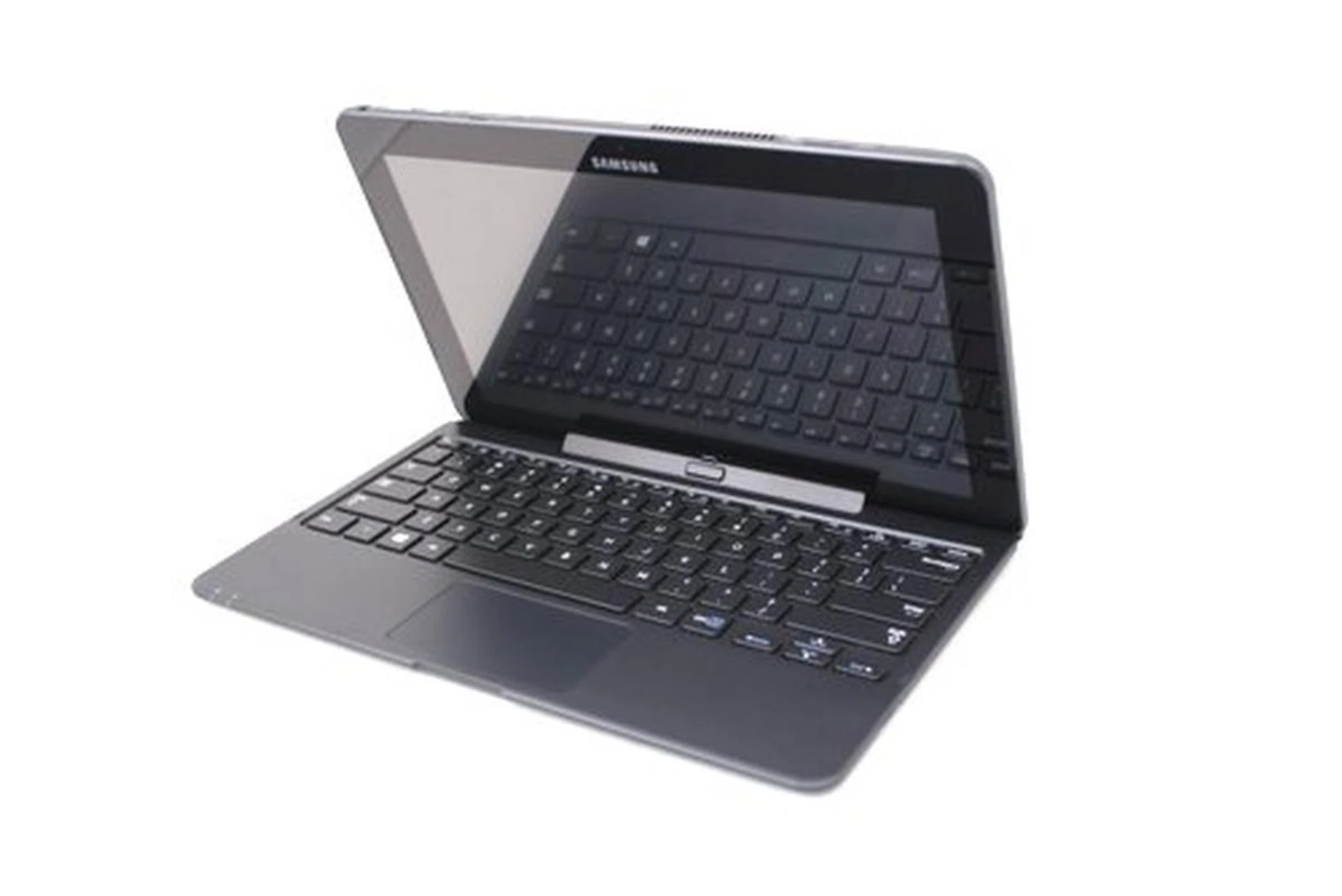
The Samsung ATIV Pro comes with a keyboard dock that's easy to attach and remove.
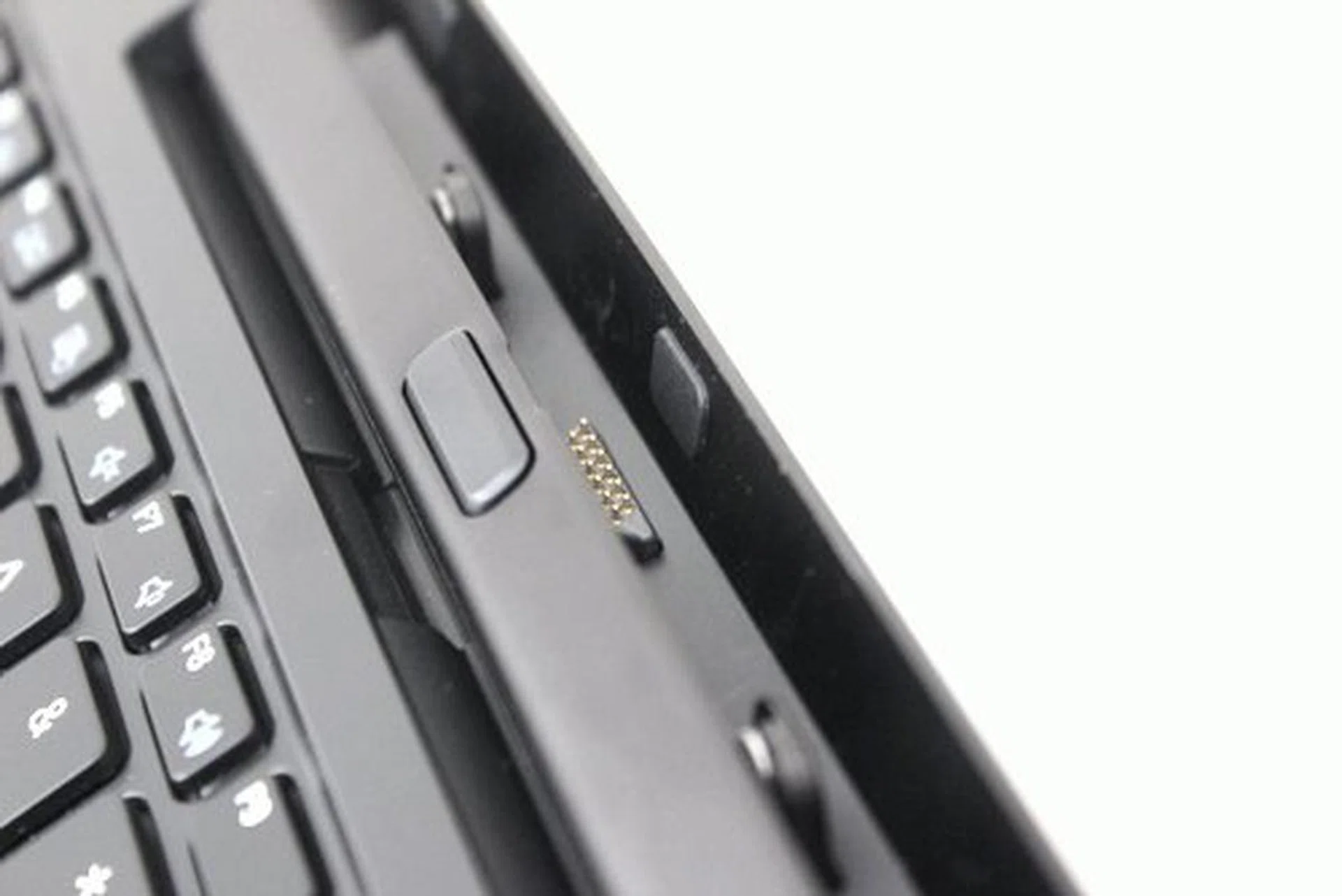
The tablet is guided into the dock by magnets so putting the tablet in and out of the dock is smooth and secure.
The release button is also smooth as butter. There’s no click that informs you if the tablet is released, but we prefer it this way. Removing the tablet was also a fairly smooth process and feels very natural.
Build Quality
With a satisfactory docking experience, we immediately expected the rest of the machine to be as sturdy and well built as the connection between tablet and dock. We weren’t disappointed -- too much. The display is protected by Gorilla Glass, which means using the ATIV Pro without a screen protector will not be a problem (though you might still want to consider one to reduce the finger print smudges).
Unfortunately, the back of the tablet isn't as tough. The machine is put together fairly well, which means there are no creaky or loose parts. However, the ATIV Pro is mostly made of plastic. Plastic helps keep the machine light, but it also introduces flex at its thin points, which is the case on the plastic back of the tablet. We would have preferred a metal alloy for the rear of the ATIV Pro, but that would also likely add on to its already expensive price tag of S$2199.
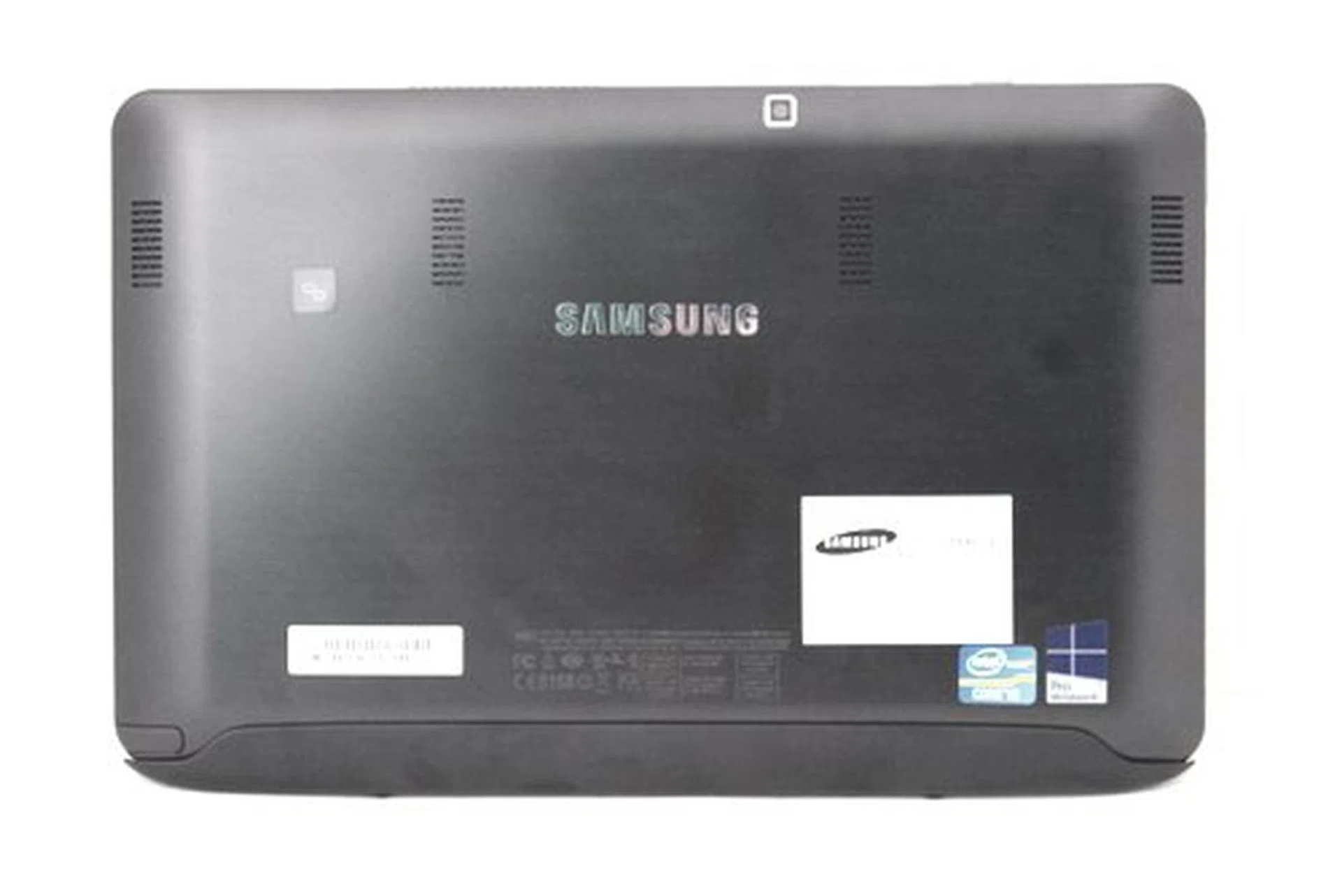
The ATIV Smart PC Pro really should have used an aluminum back that strengthens it and provides better heat dissipation. On the bright side, plastic makes the whole machine lighter (though we wouldn't say the unit is light in its current form).
Input Options
Besides the flex on the back of the display, there’s also a slight flex on the keyboard. However the buttons on the keyboard dock were an absolute dream to type on. The keys had plenty of travel (for something so thin), and were very rigid, perfect for typists who need plenty of feedback while typing.
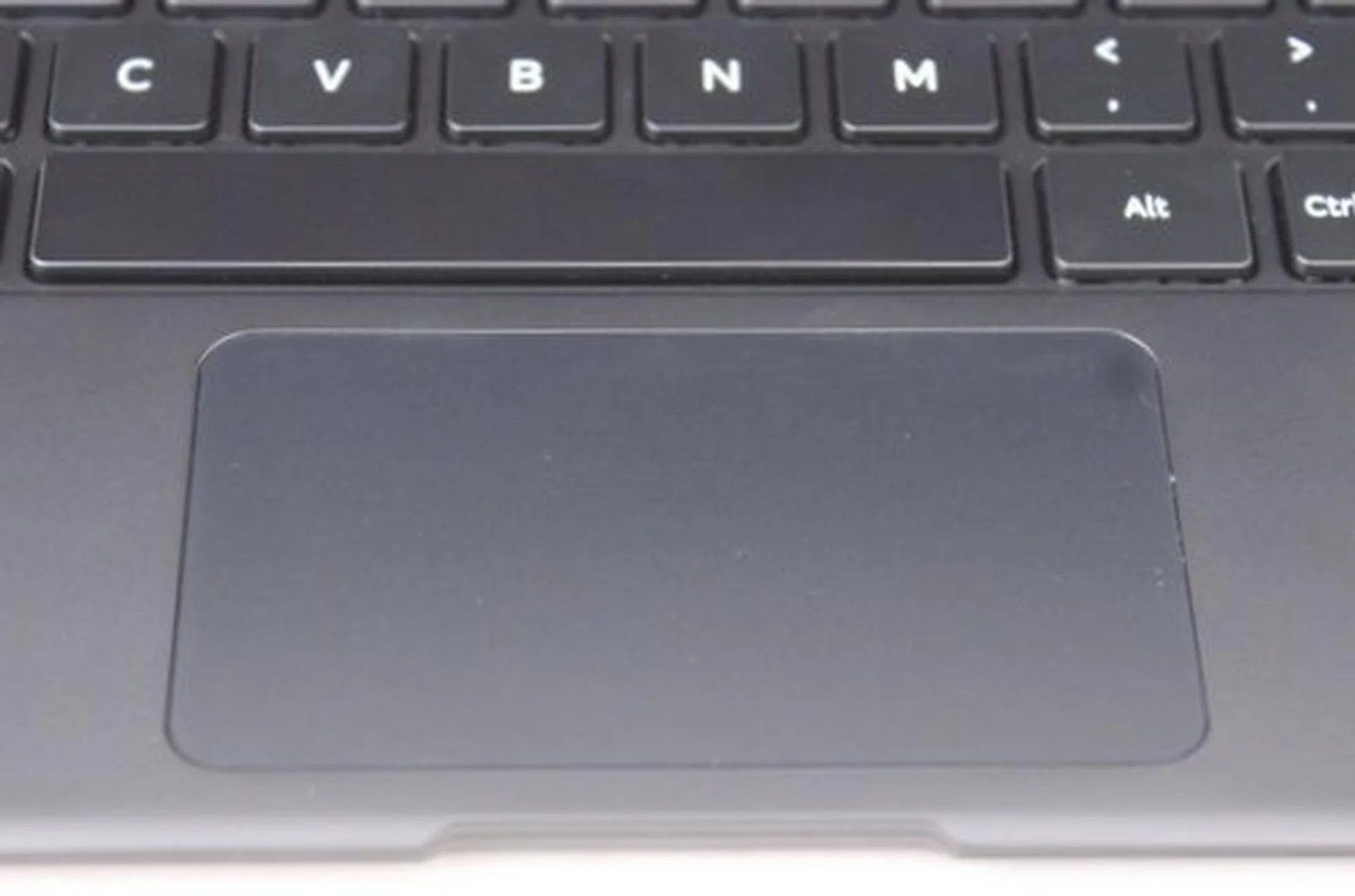
The clickable trackpad is made of plastic, and feels flimsier than clickpads made of glass. Thankfully, the ATIV Pro makes up for it with a great keyboard.
The clickpad though, isn’t as well made. Not only is it small, it’s also made of plastic so it feels flimsy compared to the glass trackpads on some of the proper Ultrabooks. Even the distribution of stiffness was also quite bad. The bottom area of the clickpad was deep and easy to click on, whereas the top area had more resistance. Folks who find the trackpad unreliable can always turn to Bluetooth mice which they can plug into one of the keyboard dock's two USB 2.0 ports. Even so, you would expect a perfectly well built product when you're paying over two grand.
Fortunately there's one more input option and it's one of the plus points of the Samsung ATIV Smart PC. Thanks to the S-Pen stylus input using Wacom Technology, it has the expected 1024 pressure levels of sensitivity for accurate note taking, drawing or just doodling. It doesn’t require battery power as it relies on electro-magnetic resonance technology from the screen that powers the pen upon contact, and as well as detect the movement of the stylus.
The S-Pen is smooth and responsive when we tried it with the native Windows Journal app. Samsung also included a proprietary S-Note app, but it uses more resources than it really should. Drawing or writing on S-Note makes the stylus feel unresponsive and slow, which really shouldn’t be the case. Thankfully there are quite a few drawing apps to take advantage of the S-Pen, like Autodesk Sketchbook Express and Fresh Paint, available in Microsoft’s Windows App Store that users can download.
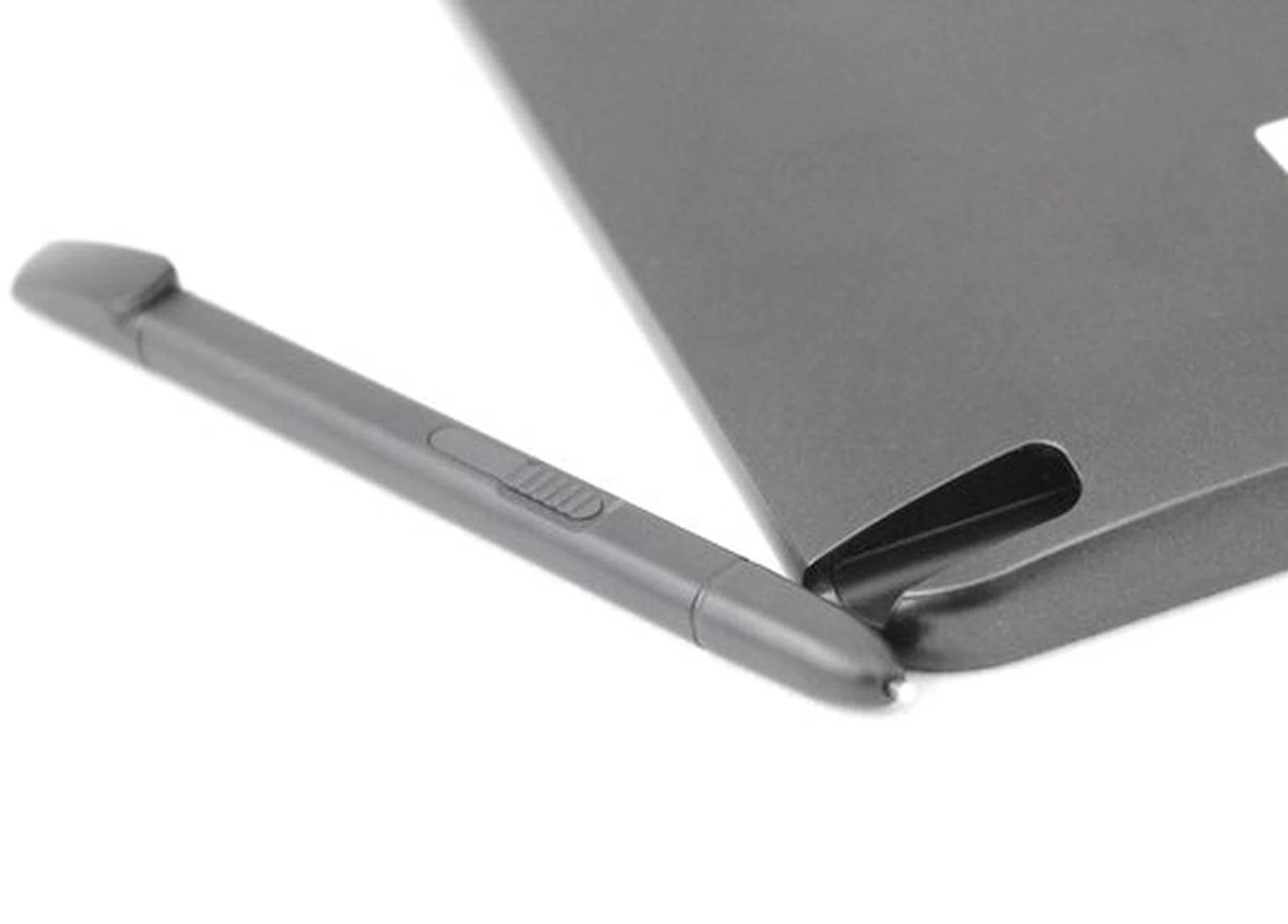
The ATIV Pro's stylus is powered by Wacom Technology and is a great additional input option for writing and drawing on the tablet.
Multimedia
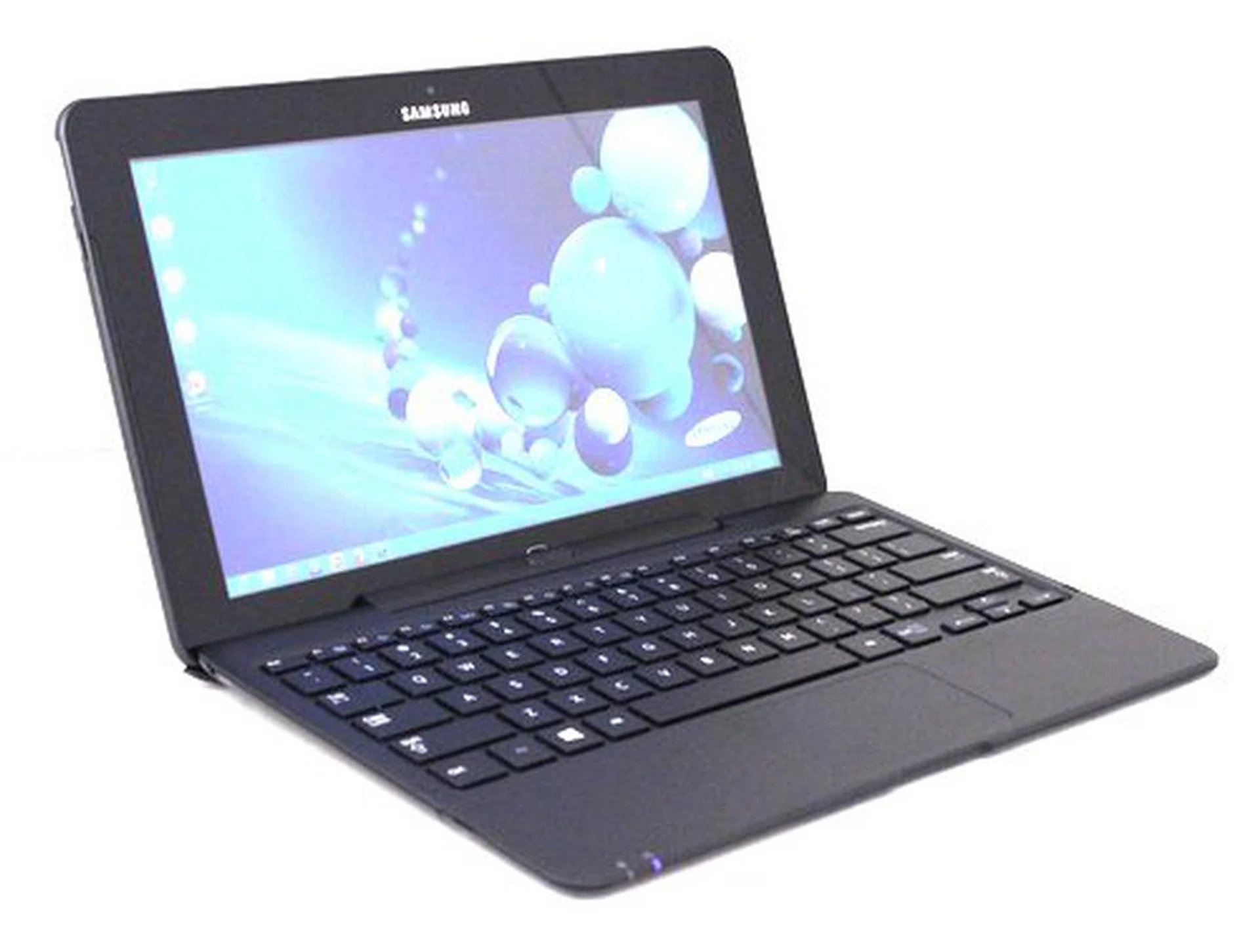
The 400nits, Full HD, IPS panel on the ATIV Pro is bright, sharp and has a wide range of viewing angles. The front-facing speakers found on the left and right of the display are also adequate for casual personal use.
The canvas upon which artists can draw on with the S-Pen, is a luxurious 400nits full HD (1920 x 1080 pixels resolution) IPS panel. We found that a full HD resolution makes icons and text appear very small in desktop mode, but images and Full HD videos look amazing. At 400nits, it's also bright enough to be used comfortably in brightly lit areas, while its IPS panel allows wide angles of viewing which is suitable when you've company.
For viewing those full HD videos, the ATIV Pro has two 0.8W speakers found on the left and right edges of the tablet (not the dock). While 0.8W seems slightly underwhelming compared to normal Ultrabooks from other manufacturers, we found the speakers on the ATIV Pro are capable of fairly loud, clear quality audio that is more than adequate for most personal usage scenarios.
Ports and Connectivity Options
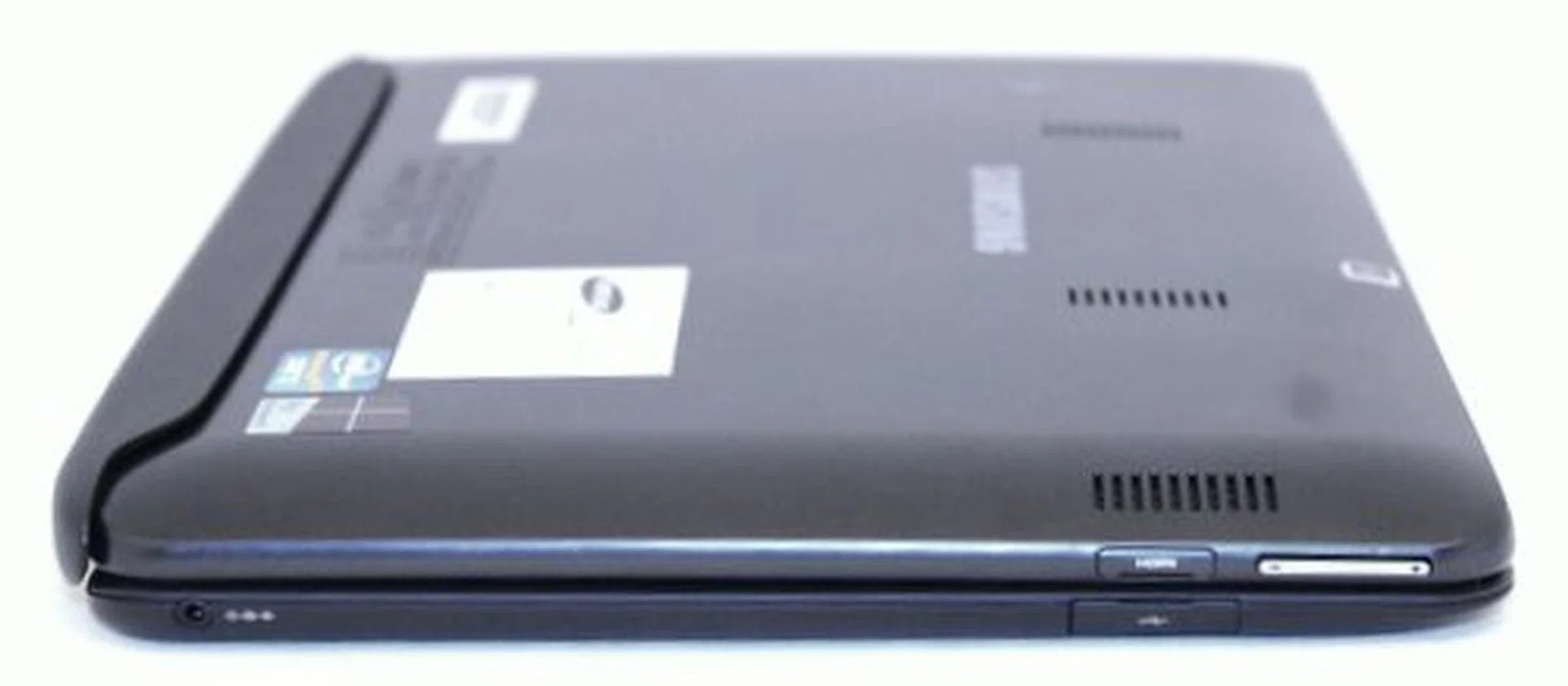
On the right side of the tablet, there's a micro-HDMI port and the volume rocker. On the keyboard dock there's a USB 2.0 port.
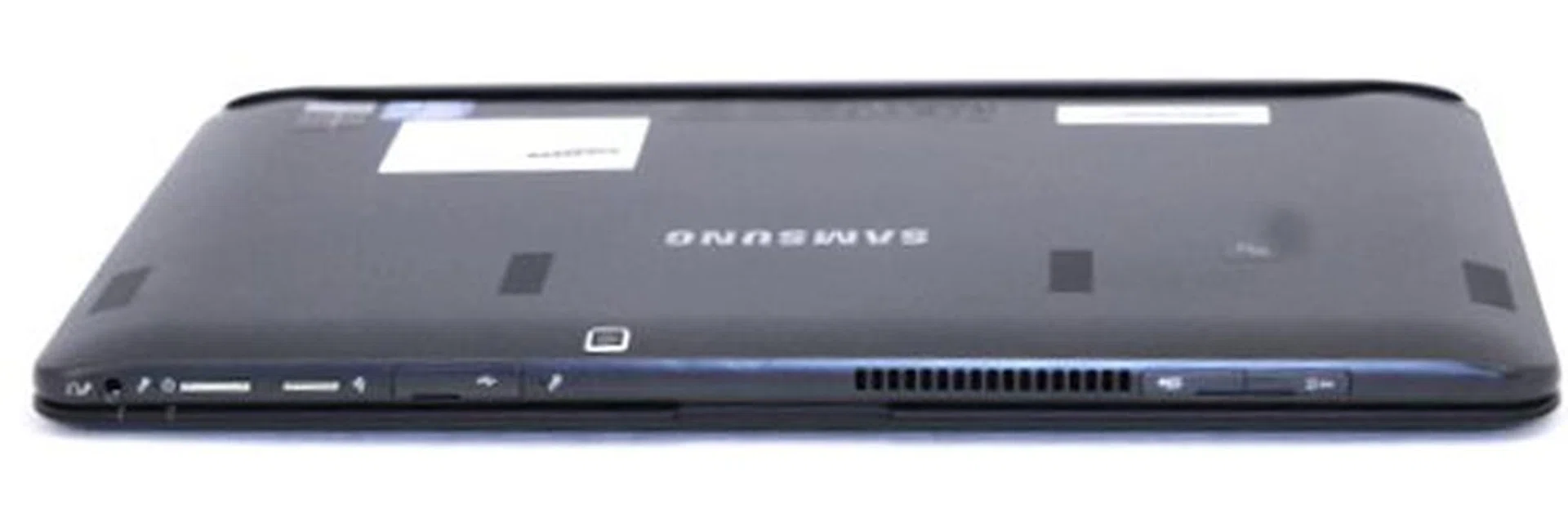
Because the ATIV Pro is also a tablet, most of the ports and buttons can be found on the top of the display. There's an audio combo jack, dual microphones, the power switch, orientation switch, USB 3.0 port, microSD card reader and a 3G SIM card slot.
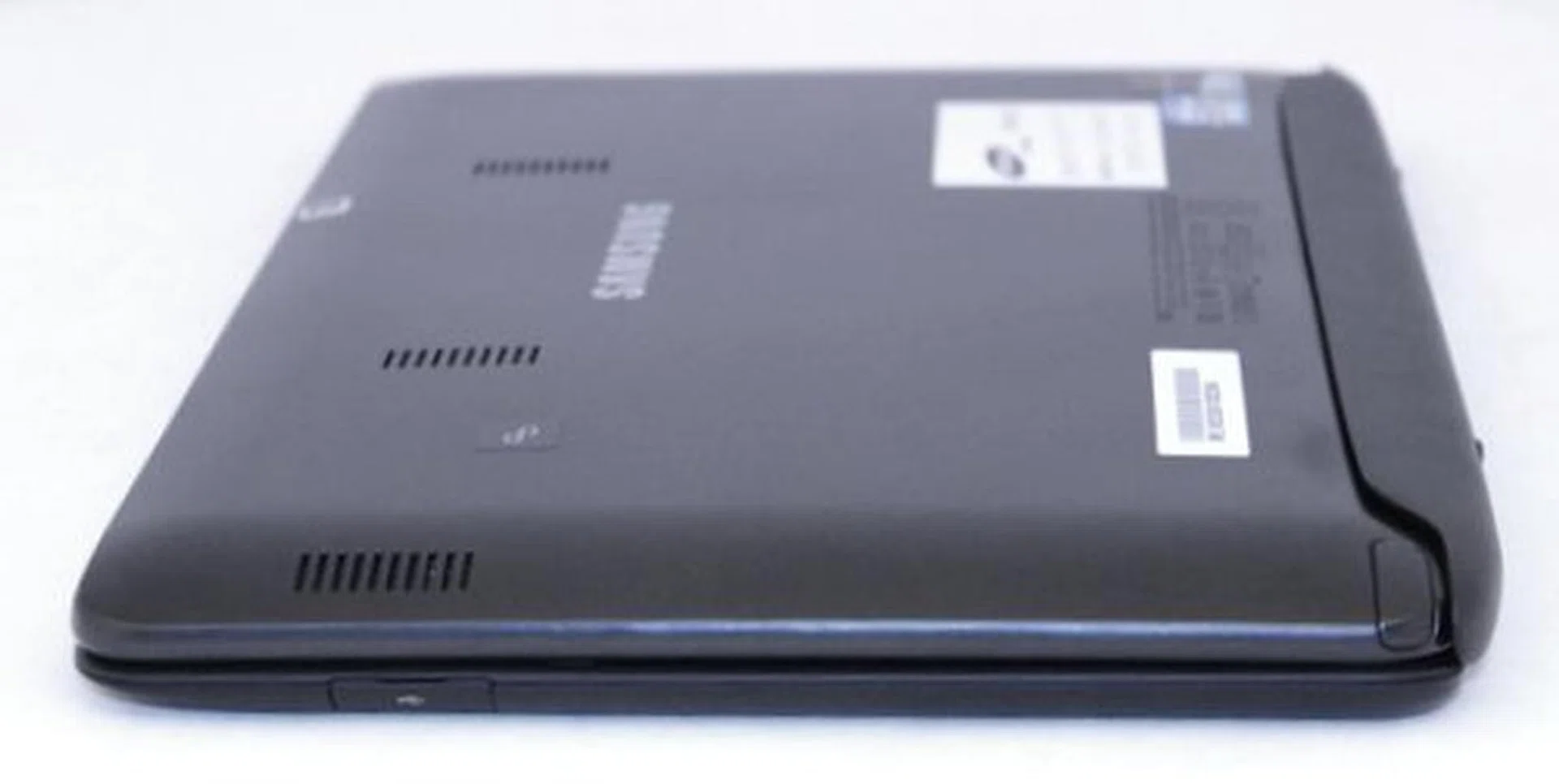
The right side of the dock houses the S-Pen, while the dock has an additional USB 2.0 port.
Performance and Benchmarking
As far as hybrid PCs go, the Samsung ATIV Smart PC Pro could very well be the most powerful hybrid PC in the Singapore market at the time of testing this product. The only comparable one would be the Microsoft Surface Pro, which isn’t available locally. In terms of specifications, the ATIV PC Pro is decked out well enough to compete with any other Ultrabook of its class.
It has an Intel consumer-ultra-low-voltage (CULV) Ivy Bridge processor, and an SSD, both of which are found on premium Ultrabooks. To provide a gauge of its performance, we’ve also gotten results from some of the best Windows 8 Ultrabooks out in the market right now. Besides the ATIV PC Pro, only the Acer Aspire S7 is not a convertible or hybrid Ultrabook.
Specifications/
Notebook | Samsung ATIV Smart PC Pro | Toshiba Satellite U920t | Sony Vaio Duo 11 | Dell XPS 12 | Acer Aspire S7 | Lenovo Ideapad Yoga |
Processor | Intel Core i5-3317U
(1.7GHz) | Intel Core i5-3317U
(1.7GHz) | Intel Core i5-3317U
(1.7GHz) | Intel Core i5-3317U
(1.7GHz) | Intel Core i5-3317U
(1.7GHz) | Intel Core i5-3317U
(1.7GHz) |
Chipset | Intel HM77 | Intel HM77 | Intel HM76 | Intel QS77 | Intel UM77 | Intel QS77 |
Memory | 4GBDDR3 | 4GB DDR3 | 4GB DDR3 | 4GBDDR3 | 4GBDDR3 | 4GB DDR3 |
Storage | 128GB SSD | 128GB SSD | 128GB SSD | 128GB SSD | 128GB SSD | 128GB SSD |
Video | Intel HD Graphics 4000 | Intel HD Graphics 4000 | Intel HD Graphics 4000 | Intel HD Graphics 4000 | Intel HD Graphics 4000 | Intel HD Graphics 4000 |
Battery | 49WHr | 37.7WHr | 36WHr | 47WHr | 35WHr | 54.7WHr |
Dimensions | 304 x 189.4 x 11.89 / 22.34mm (w/dock) | 326.5 x 213 x 19.9mm | 319.9 x 17.85 x 199 mm | 317 x 214 x 8-20mm | 323 x 224 x 11.9mm | 3329 x 223 x 16mm |
Weight | 0.89kg / 1.6kg w/dock | 1.45kg | 1.305kg | 1.54kg | 1.3kg | 1.46kg |
PCMark 7
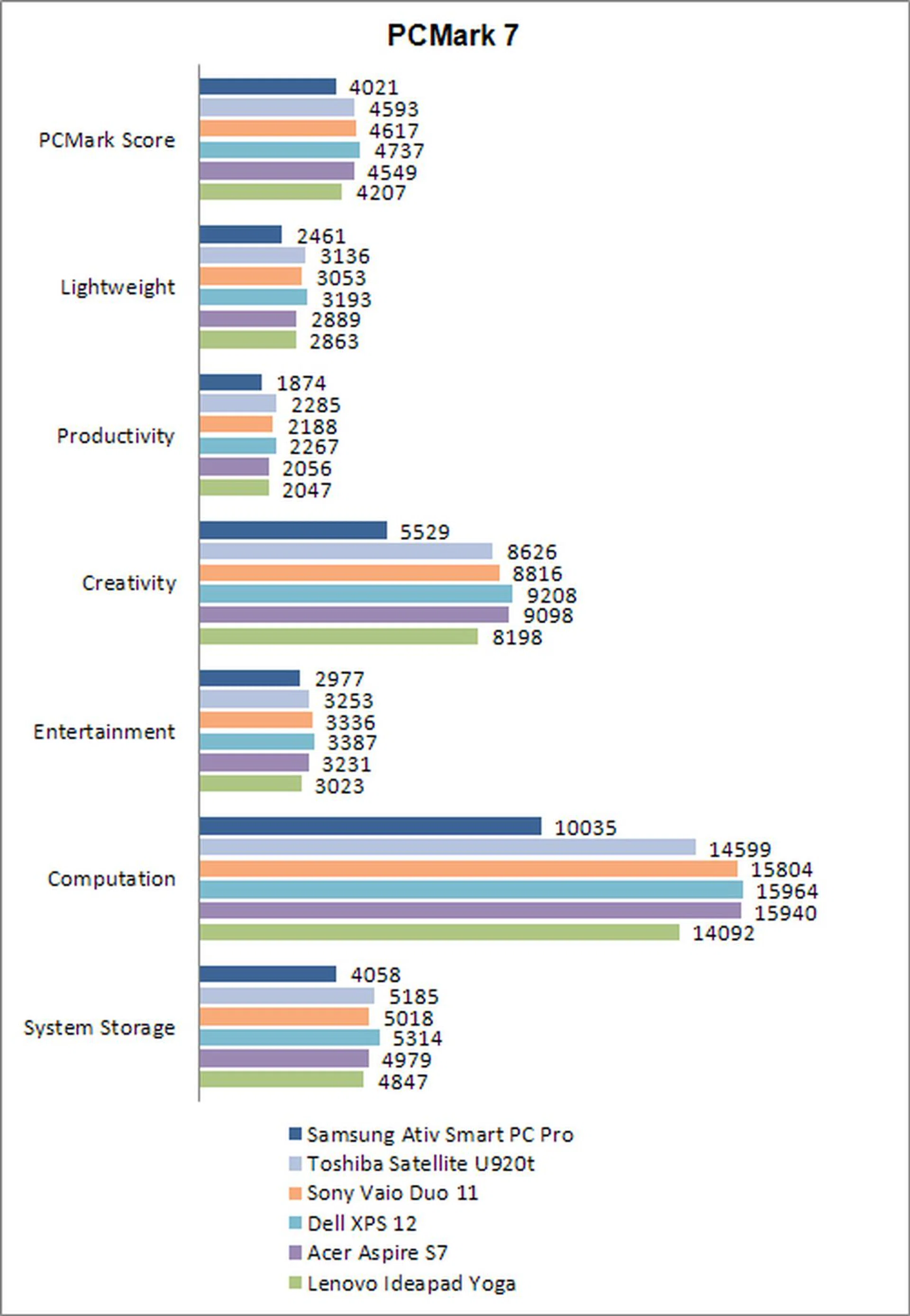
PC Mark 7 is a benchmark that tests all aspects of a machine. It stresses vital components like the CPU, GPU and storage to give a score depending on how the machine performs collectively. From the chart, you can see that there's a difference in scores between the Samsung ATIV Pro and other machines. It’s about 15% behind most of the other machines that score around the 4500 mark. It seems that the SSD within the Samsung machine isn't quite in the same ballpark as the other machines, thus pulling down the scores across the board.
Thankfully in actual usage, most users wouldn’t be able to discern the difference in performance between the tested machines unless of course you literally hold out a stop watch to time some tasks.
3DMark 11 and Far Cry 2
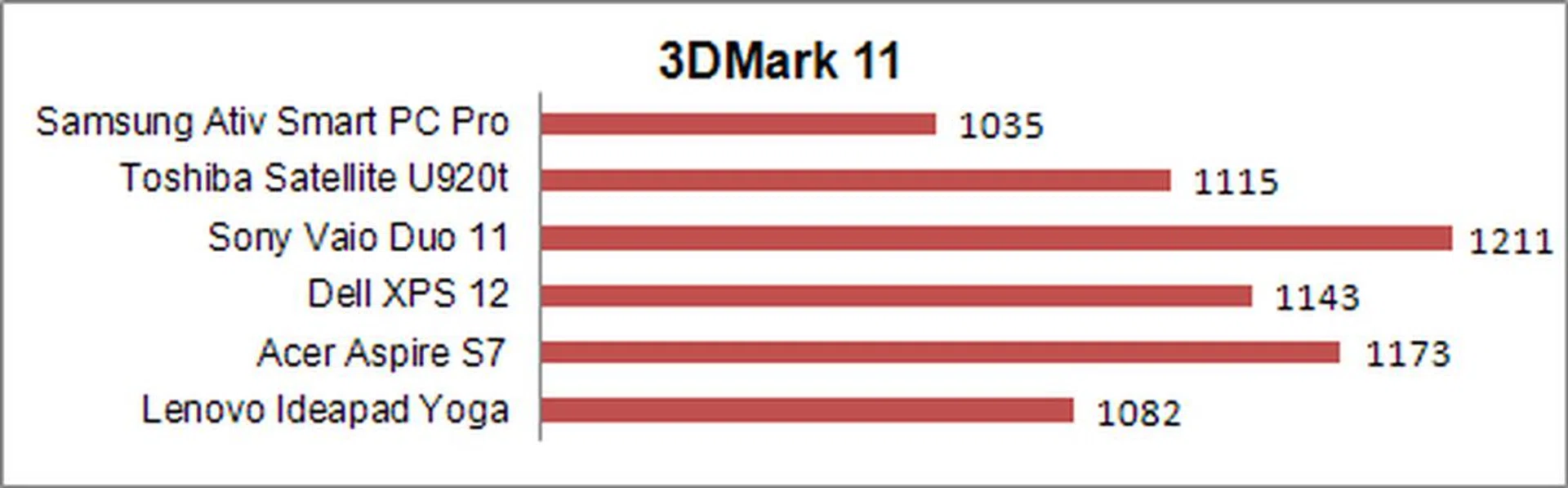
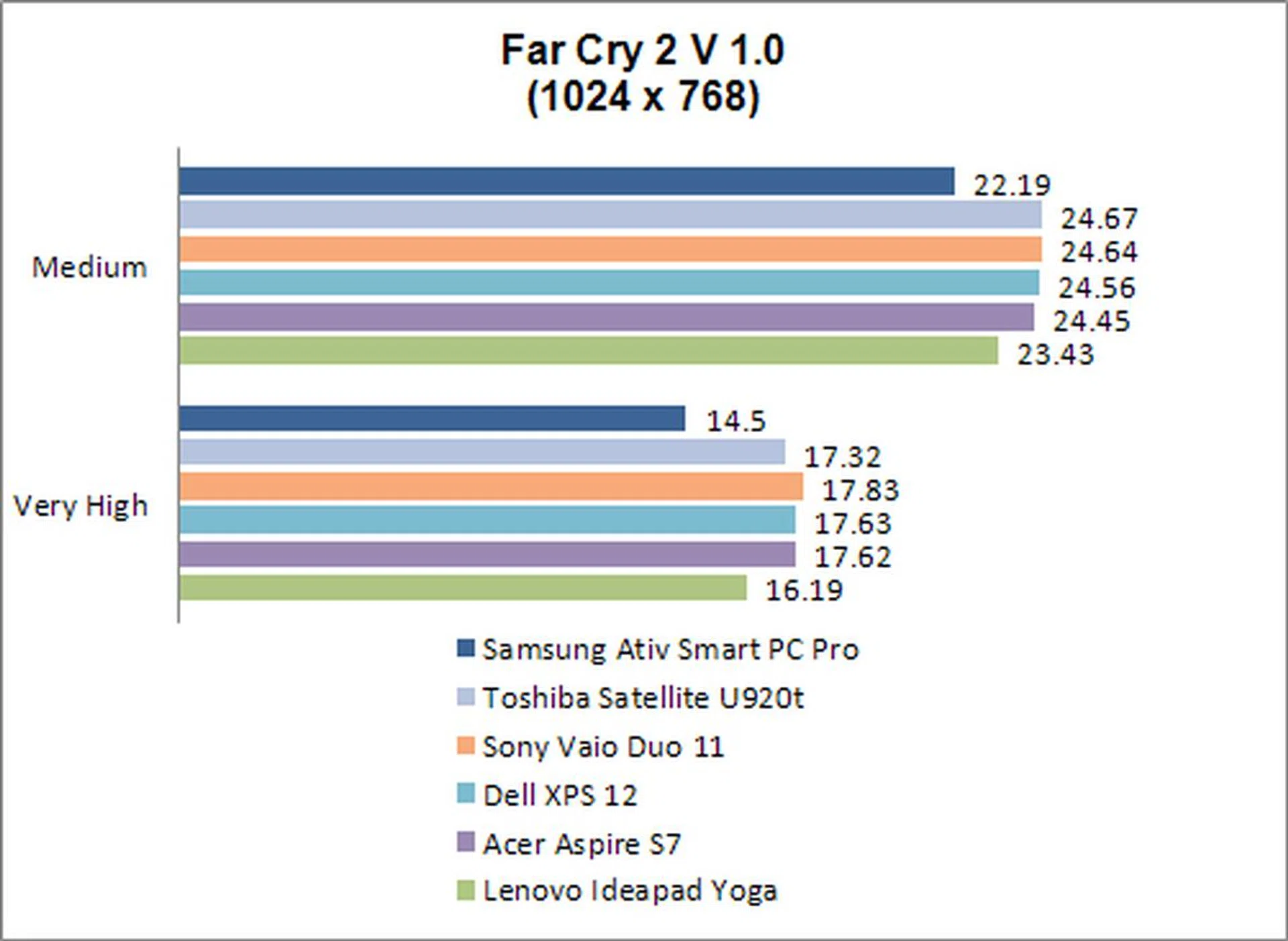
Both 3DMark 11 and Far Cry 2 are popular GPU benchmarking tools and we use them to asses the notebook/tablet's 3D rendering capabilities. Unfortunately, results mirror that of its less than flattering PC Mark 7 showing. Even for Far Cry 2, a relatively old PC game used to extract frame rates, its test outcome is about 10 to 15% worse than the expected norm.
In actual usage however, the performance differences between the ATIV Pro and other notebooks are quite insignificant, because Ultrabooks aren't meant for gaming and it shows from the results below. However, do take note that while the Samsung ATIV Smart PC Pro isn’t able to handle intensive games, its GPU is more than sufficient to tackle the daily grind of rendering operating system animations, rendering websites and basic photo editing without any problems whatsoever. The discrepancy is only pronounced when peering under the microscope such as these benchmarking tools.
Battery Life and Portability Index
Ultrabooks are named as such because they are meant to be ultra portable notebooks. To have that trait, such notebooks need to have excellent battery life, handy form factor and is light to lug around. Since the Samsung ATIV Smart PC Pro is pretty much an Ultrabook, but with the ability to detach the keyboard, we're pretty much going to compare it against other equivalent Ultrabooks.
We used Powermark (by Futuremark) to test the battery lives of each machine. This benchmark puts the notebooks through a series of tasks that mimic daily usage, like web browsing and video playing, and records the amount of time it takes to drain the battery. To ensure consistency, the machines have their aeroplane modes turned off, with screen brightness and volume set to 50%, while undergoing the benchmark.
Specifications/
Notebook | Samsung Ativ Smart PC Pro | Toshiba Satellite U920t | Sony Vaio Duo 11 | Dell XPS 12 | Acer Aspire S7 | Lenovo Ideapad Yoga |
Processor | Intel Core i5-3317U
(1.7GHz) | Intel Core i5-3317U
(1.7GHz) | Intel Core i5-3317U
(1.7GHz) | Intel Core i5-3317U
(1.7GHz) | Intel Core i5-3317U
(1.7GHz) | Intel Core i5-3317U
(1.7GHz) |
Chipset | Intel HM77 | Intel HM77 | Intel HM76 | Intel QS77 | Intel UM77 | Intel QS77 |
Memory | 4GBDDR3 | 4GB DDR3 | 4GB DDR3 | 4GBDDR3 | 4GBDDR3 | 4GB DDR3 |
Storage | 128GB SSD | 128GB SSD | 128GB SSD | 128GB SSD | 128GB SSD | 128GB SSD |
Video | Intel HD Graphics 4000 | Intel HD Graphics 4000 | Intel HD Graphics 4000 | Intel HD Graphics 4000 | Intel HD Graphics 4000 | Intel HD Graphics 4000 |
Battery | 49WHr | 37.7WHr | 36WHr | 47WHr | 35WHr | 54.7WHr |
Dimensions | 304 x 189.4 x 11.89 / 22.34mm (with dock) | 326.5 x 213 x 19.9mm | 320 x 199 x 17.85mm | 317 x 214 x 8-20mm | 323 x 224 x 11.9mm | 3329 x 223 x 16mm |
Weight | 0.89kg / 1.6kg with dock | 1.45kg | 1.305kg | 1.54kg | 1.3kg | 1.46kg |
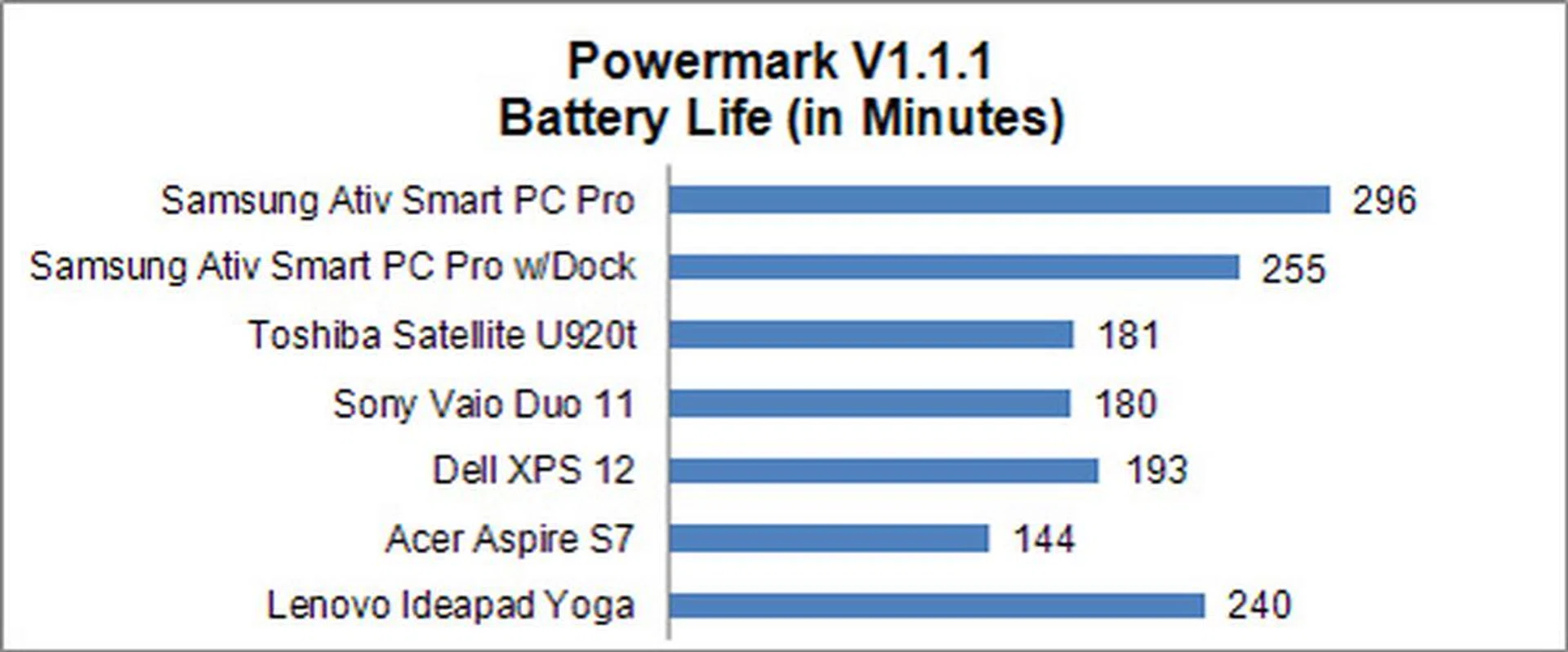
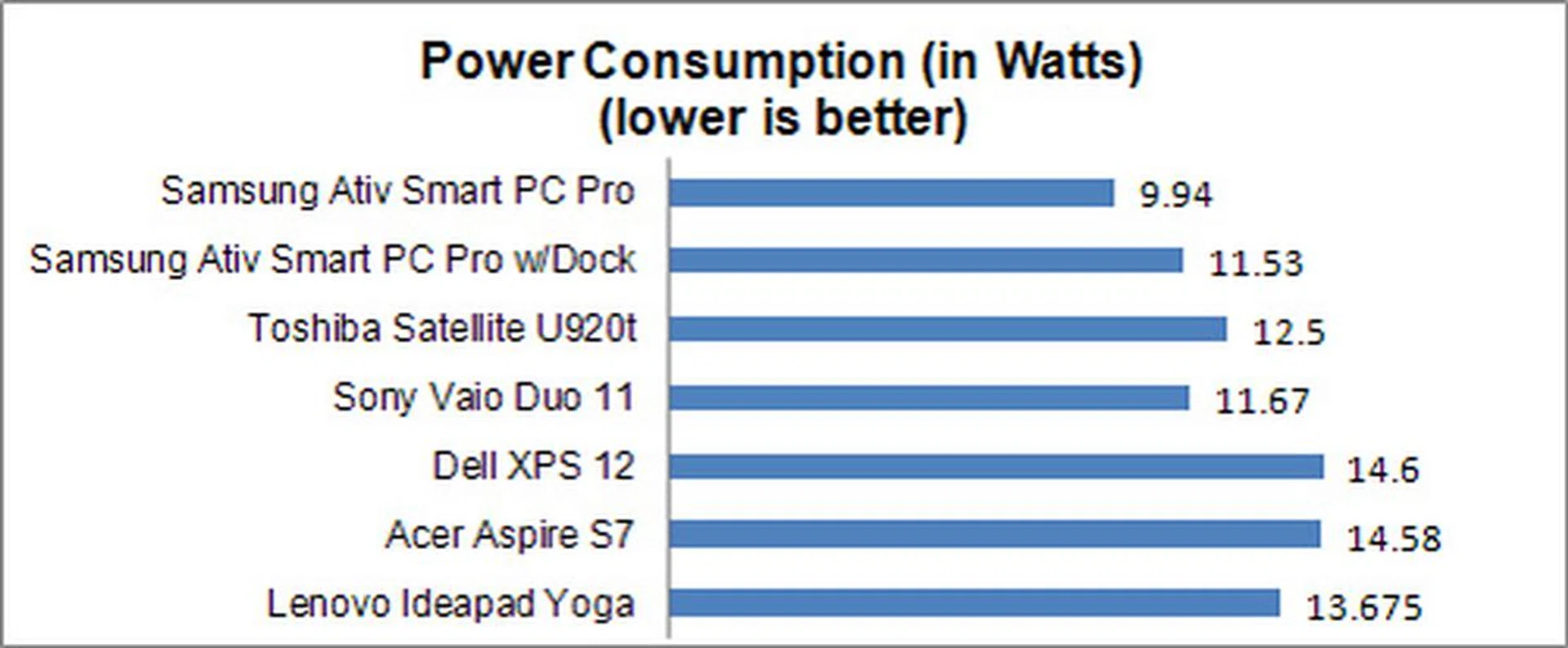
As you can see from the ATIV Pro’s battery life results, without the dock, it managed to stay alive for 296 minutes! That’s just a couple of minutes shy of 5 hours and is easily one of the best scores we’ve ever come across for an Ultrabook. Its power consumption is also pretty low, despite its very sharp and not to mention bright full HD display which technically should have drained the machine of quite a bit of power.
However, perhaps thanks to a bit of clever power and performance management, the ATIV Pro sacrifices a little bit of performance (as seen from the previous page), for loads more battery life. This, in our opinion is one of the best compromises that Ultrabooks can make, since it allows the machine to be much more portable.
However, take note that with the dock attached, the battery performance of the ATIV Pro pegs closer to a true Ultrabook. It’s still a class leader, but the dock uses up quite a bit of juice, which is necessary for powering the 2 USB ports, keyboard, trackpad and status LEDs. Even so, we would have expected less impact from having the dock.
Portability Index
Our portability index basically takes into consideration elements like battery life, volume and mass to come up with a ratio that tells you if it’s worth your while to carry a mobile product around compared to the competition. In this case, the odds are overwhelmingly in the ATIV Pro’s favor. Without the additional weight of the dock, it scores a very high 8.110.
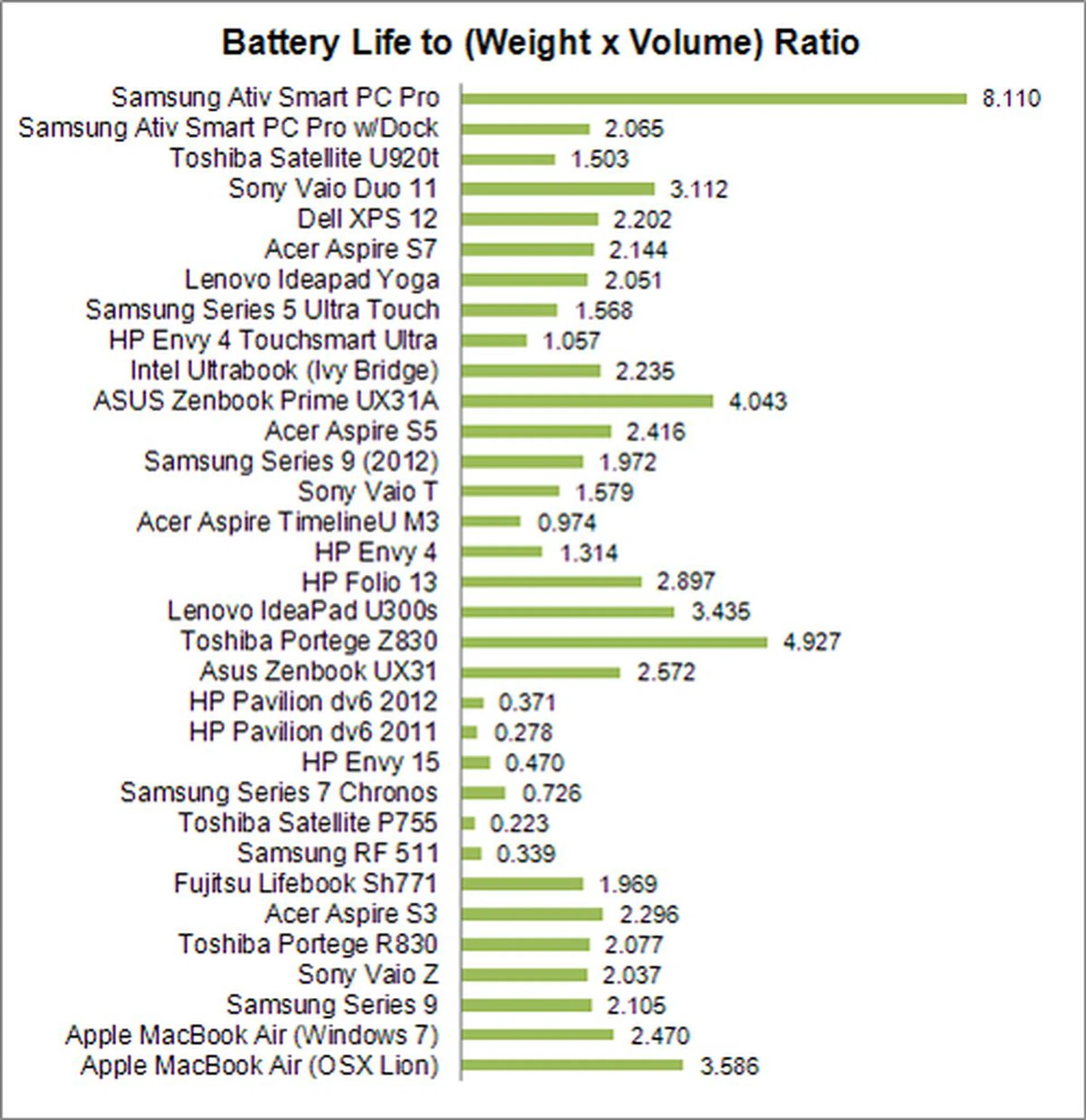
However, please note that even though it has an extremely high score, it doesn’t mean that the Smart PC Pro is 4 times more portable than say a Dell XPS 12. What's important to note is how you interpret this index. Firstly, the portability index is only comparable within products of similar form factor and size. Any differences, and the figures will naturally go up or down accordingly. In this case, the ATIV Smart PC Pro should be compared along with other slate/tablet systems that are using a similar notebook processing platform and be of somewhat similar size.
At the moment, we don't have any really appropriate comparisons since a Windows RT based Microsoft Surface registers a ratio of a 24.89 as it's far lighter and has a much higher up-time, while a Windows RT based Lenovo Yoga 11 in its full notebook form registers a ratio of 7.92. As such, for a full fledged Windows 8 running device using a notebook processing platform, the Samsung ATIV Smart PC Pro fares really well with its 8.110 ratio without its keyboard dock.
Once you factor in the dock however, the ATIV Pro has a portability index that is much more in-line with that of a regular Ultrabook. This is because the combined weight of the unit with the dock comes up to 1.6kg and it has a rather chunky profile. As such, even with its top battery life result, the mentioned characteristics pull its portability ratio figures that make it seem slightly worse than even notebooks of larger form factors, let alone those of a similar size like the Sony Vaio Duo 11.
What you should take away from the portability index is that the ATIV Pro's ability to ditch its power-sucking keyboard dock, plays a very big part in how portable the machine is. If you are going to mostly stick with the tablet form factor, but need the processing prowess of a full fledged notebook and run all sort of Windows based applications - new and old alike - the Samsung Smart PC Pro's hybrid form factor holds an advantage over the covertible Ultrabooks.
Wolf in Sheep's Clothing
The ATIV Pro is a hybrid PC, which means it becomes a true tablet when removed from its dock.
Out of all the Windows 8 Ultrabooks we’ve seen thus far, only the 11.6-inch Samsung ATIV Smart PC Pro has the ability to become a true tablet without the excess baggage of a keyboard. Together with a keyboard dock, it has a clamshell form factor that puts it firmly in the hybrid notebook category. The difference here is that it consists of two parts, unlike the the convertible machines from other manufacturers such as the Sony Vaio Duo 11 and Lenovo Yoga 11.
From our tests, we find that the 0.88kg ATIV Pro's ability to be removed from its dock improves its physical portability and battery life significantly. That's because the keyboard dock adds an additional 0.72kg, and it also uses up quite a bit of battery. On the plus side, you can always just pair it with a thin Bluetooth keyboard instead of using the dock. However, that means losing a couple of USB ports and still forking out more cash for these slim accessories (Mircosoft's version comes to mind). Take note that you cannot purchase the ATIV Pro unit without the keyboard dock.
Once you factor in the combination of the tablet and dock to form a clamshell Ultrabook, its physical dimensions (up to a chunky 22mm thick) and 1.6kg weight are however not quite appealing against the usual Ultrabooks. As such, the ATIV Pro's strengths won't appeal much if you intend to use it in the notebook form factor most of the time. Instead, potential buyers would be best served if their usage style has a good mix of tablet and notebook form factor use on the same device.
As for raw performance, its Ultrabook components helps it to keep up with competing Ultrabooks in the market, but just barely. What's interesting is its good battery life, despite its bright full HD IPS panel (rated for 400 nits at maximum brightness). Samsung has certainly tweaked this mobile device for portability and it shows in our tests.
What's special about the ATIV Pro is its stylus that slots in neatly into the side of the tablet. This stylus is powered by Wacom technology, which makes it smooth and responsive. However, we'd advise against using the Samsung proprietary S-Note app because the app is resource heavy, thus affecting the responsiveness of the stylus. Instead, we've used some of the native inking features within Windows 8 and stylus friendly apps from the Windows Store, which posed no such issues and lent an extra dimension of productivity and creativity that's not available in most other Ultrabooks or convertible Ultrabooks.
Another advantage (or useless feature, depending on who you ask), is the 5MP rear-facing camera. It’s not meant for conventional usage, but it’s good to know that it’s there when you need to take an impromptu photo while using the tablet.
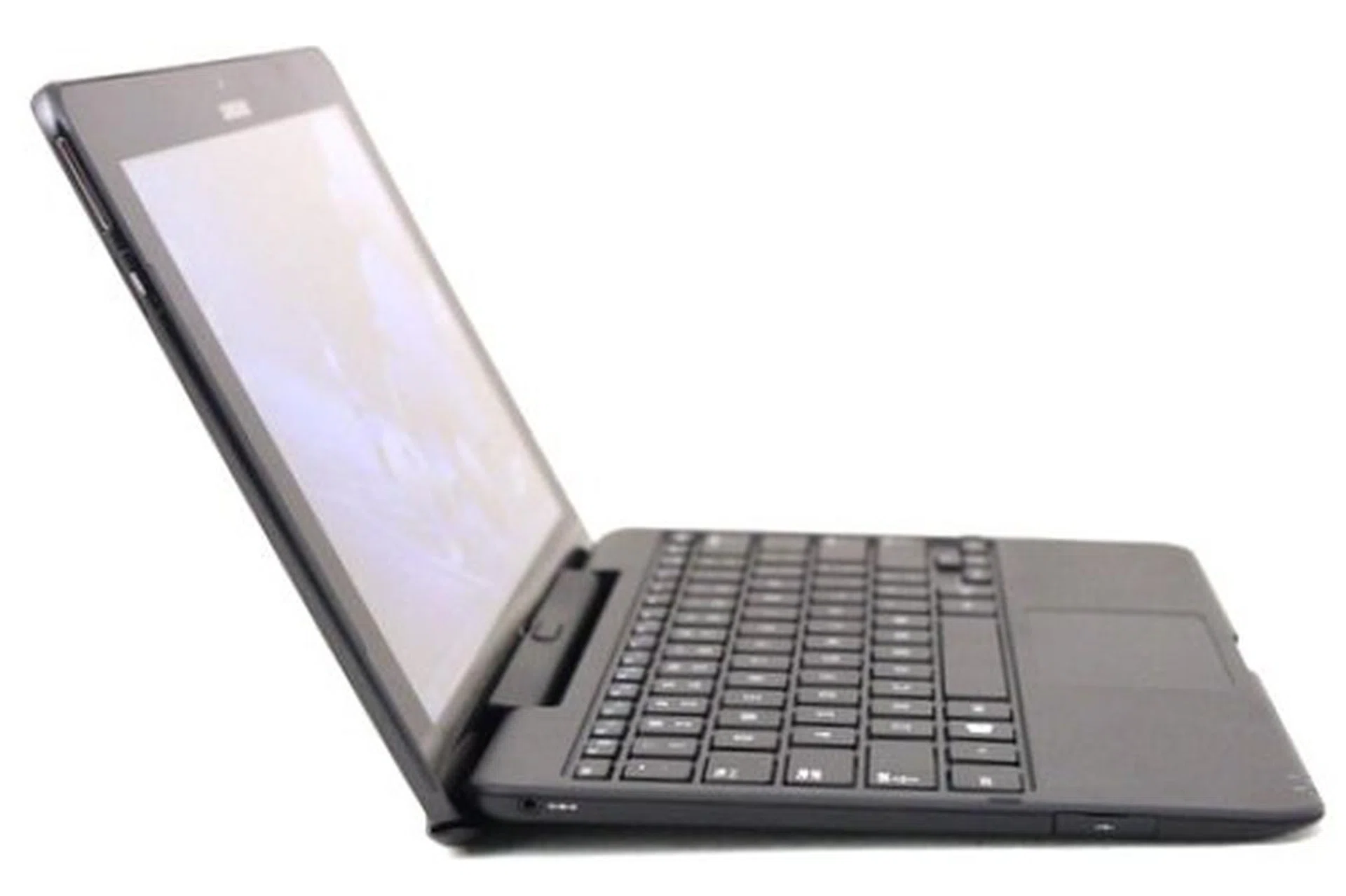
On its own, the tablet's portability is excellent. However that is hindered by the weight of the keyboard dock. It adds nothing but two USB 2.0 ports to the ATIV Pro, so it's not very useful apart from its keyboard.
The ATIV Pro is decked with premium features and is marketed as such, but unfortunately the ATIV Pro’s build quality is a little disappointing. It’s mostly made of plastic to help keep its mass in check, but it also introduces some flex on the back of the display and keyboard. The plastic clickable trackpad on the keyboard too doesn’t feel as good as the premium glass clickpads on other Ultrabooks for it feels flimsy and stiffness is unevenly spread.
Fortunately, we found the keyboard itself to be an excellent companion. Despite the slight flex on the keyboard, the chiclet keys are actually very comfortable to use. There is plenty of travel on the keys, and they offer good feedback that make typing on it is very comfortable.
We feel that for an Ultrabook, the Samsung ATIV Pro Smart PC Pro has a good arrangement between power, features and battery life. Unfortunately, its recommended retail price of S$2199 is a tad too high to be instantly appealing and with some of the mentioned downsides. If you've always wanted the portability of a tablet (albeit a slightly large one), but the processing prowess of an Ultrabook, the ATIV Pro is one of the rare few devices that offers this unique blend of features. Essentially, an Ultrabook that allows you to tear away the keyboard. Not to forget is its competent stylus input, which further makes this device stand out.
The only other machine with those specs now is the Microsoft Surface Pro which is only for sale in the USA. For other alternatives, there is always the Acer Iconia W700 which is also a tablet with Ultrabooks specs. The Iconia is more affordable at S$1498, but it doesn't come with a dock, nor a Wacom technology driven digitizer input.
Our articles may contain affiliate links. If you buy through these links, we may earn a small commission.