
MSI P35 Neo Combo (Intel P35)
The MSI P35 Neo Combo isn't your typical mainstream Intel P35 motherboard with barebone functionality. It is a full featured budget board with quad-core processor support, good overclocking capability and a hybrid DDR2/DDR3 memory design. Read all about it right here.

Introduction
With the announcement of quad-core processors, 45nm technology, DDR3 and Bearlake, Intel's initial codename for their P35 series of chipset, MSI kick-started their PC2008 campaign with a fresh range of products that features next generation technology moving into the year 2008. The MSI P35 Platinum motherboard reviewed a little more than a month ago was their flagship motherboard based on the Intel P35 chipset and featuring their Circu-Pipe cooling technology.
Since the motherboard market isn't just made up of overclockers and enthusiasts, MSI has a comprehensive lineup of their new Bearlake motherboards for the masses, all featuring their new PC2008 market branding, which incidentally is a mechanized bear claw. At the entry-level segment, we have the MSI P35 Neo and its hybrid brother, the P35 Neo Combo. In this review, we take a closer look at the P35 Neo Combo.
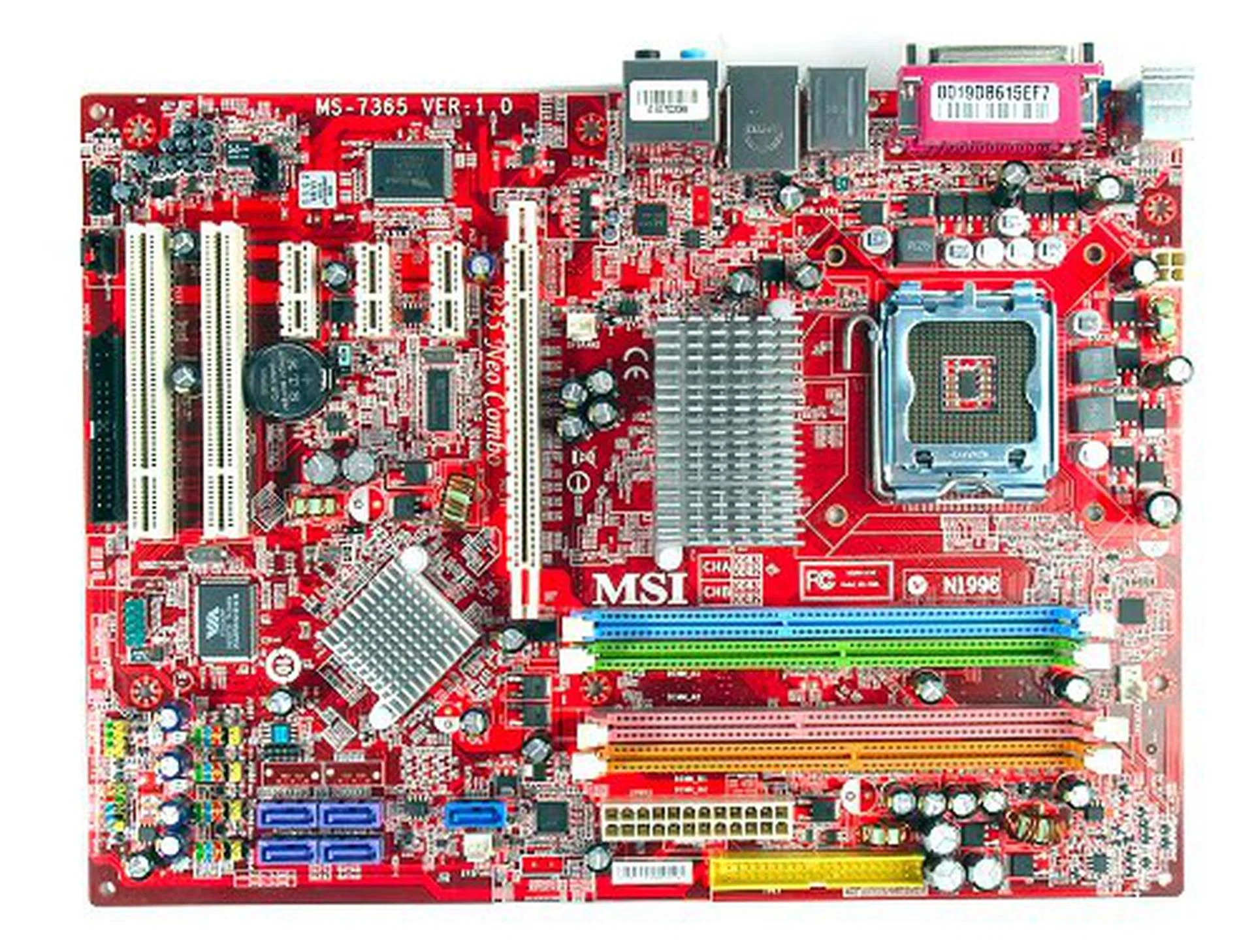
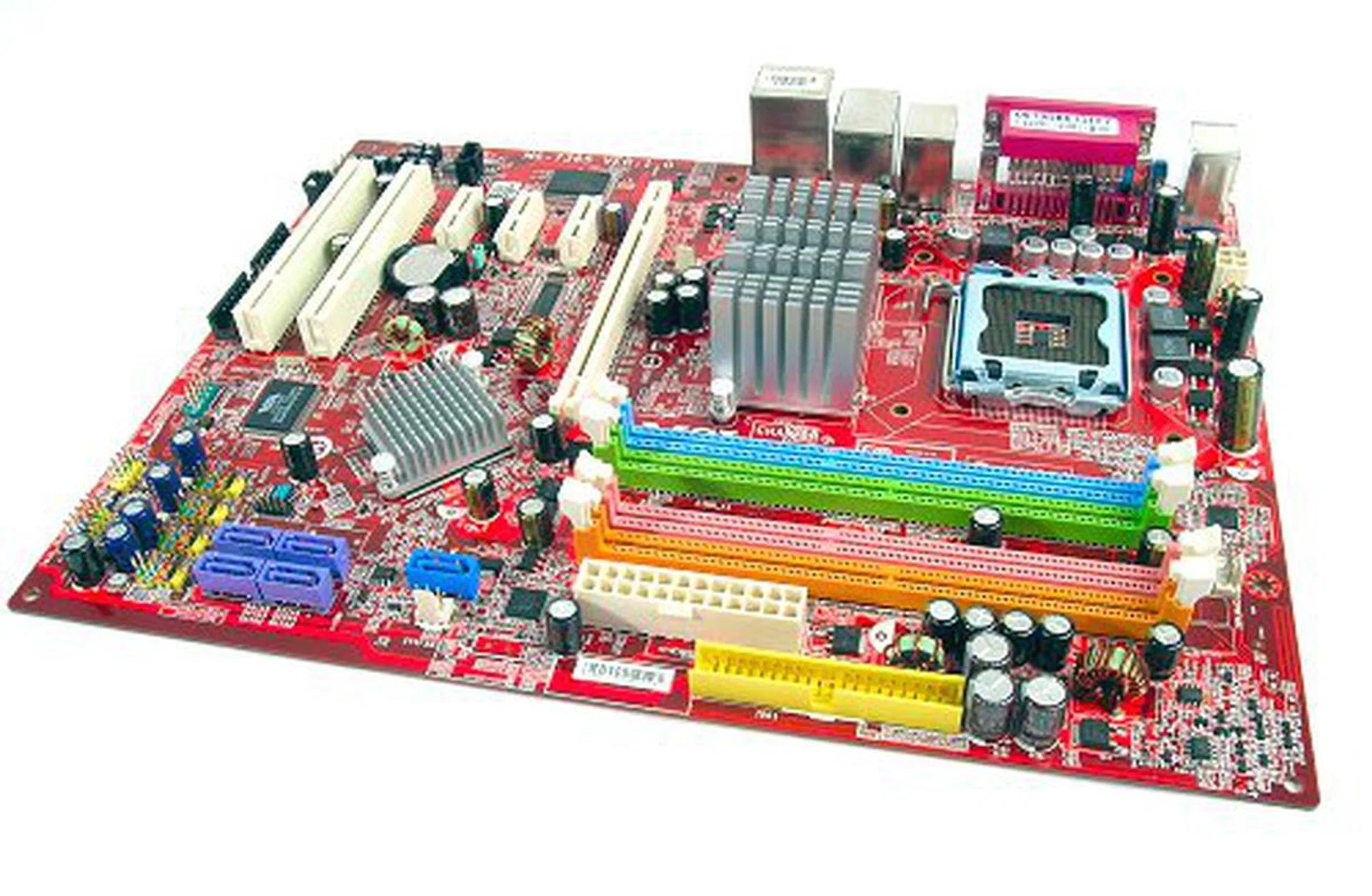
The MSI P35 Neo Combo motherboard.
The P35 Neo Combo is the mainstream entry in this lineup, with full support for Intel's upcoming 45nm processors as well as native 1333MHz FSB. With the dual memory controller of the P35 chipset, the P35 Neo Combo carries both DDR2 and DDR3 memory slots to allow for an easier transition and upgrading in the future.
As a budget board, the P35 Neo Combo comes with a small set of bundled peripherals, but surprisingly a healthy amount of connector brackets are included. Be aware however, that MSI lists the USB and FireWire bracket as 'optional', so they may not be included in the standard box in certain areas.
- 1 x SATA data cable
- 1 x SATA power converter cable
- 1 x 80-conductor Ultra ATA data cable
- 1 x floppy drive data cable
- USB 2.0 Bracket (4 ports)
- FireWire Bracket (1 port)
- I/O shield
- Driver CDs
- User's guide
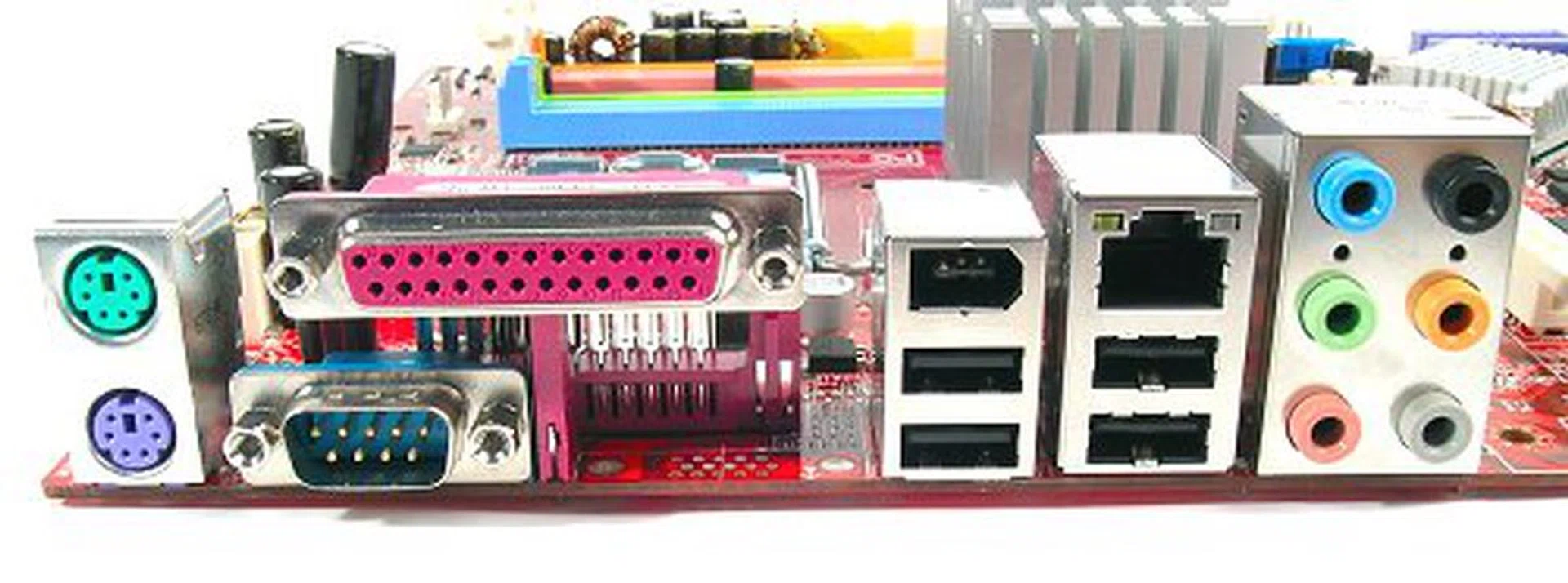
Uncluttered rear I/O panel comes with legacy PS/2, Parallel, Serial ports along with four USB 2.0, one FireWire, one RJ45 ports, and analog surround sound jacks. No S/PDIF in sight though.
Features
The MSI P35 Neo Combo features the Intel P35 chipset paired with the ICH9 Southbridge for a standard storage solution. According to MSI's website specifications, there should also be a different SKU of the Neo Combo that features the ICH9R as well, though not all models may be available in every region. Our review unit is the normal version with the IC9 only. While the Southbridge options to not limit the functionality of the P35 chipset, it will impact storage options and performance (which you will be able to see in our benchmark section later on). The difference between the ICH9 and ICH9R version of the P35 Neo Combo is the number of onboard SATA connectors (four versus six) and the availability of AHCI and RAID functions. Irrespective of the two different versions, the rest of the board's features remain exactly the same.
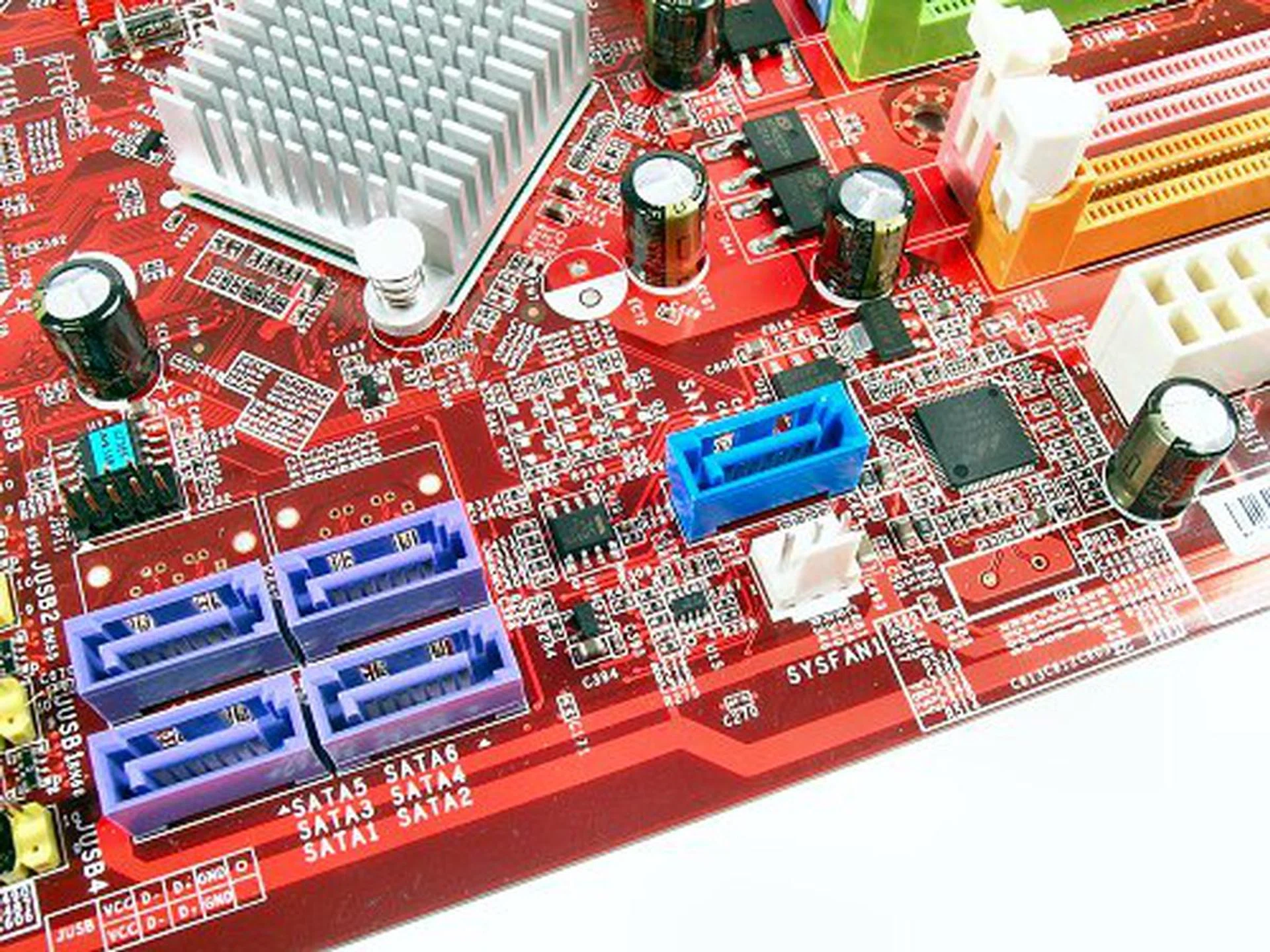
Only four SATA ports for the ICH9 Southbridge, though the board supports a full row of six in the ICH9R version.
As a standard component for boards based on newer Intel Southbridges, MSI includes a Marvell 88SE6111 SATA/IDE controller to provide the single IDE port for legacy storage device support as well as one additional SATA 3.0Gbps port. For onboard LAN connectivity, the board features one Gigabit LAN port powered by Realtek's RTL8111B PCIe controller. HD Audio on the motherboard relies on a Realtek ALC888 CODEC for 8-channel audio. Too bad the board only comes with analog connections only though.
In terms of connectivity, the board has the usual USB 2.0 ports available (12 in total) and also FireWire-400 support through VIA's 2-port VT6308P controller. MSI provides default ports along the board's rear I/O panel as well as optional bundled brackets. For a mainstream board, the P35 Neo Combo does provide a decent set of connectivity options out of the box.
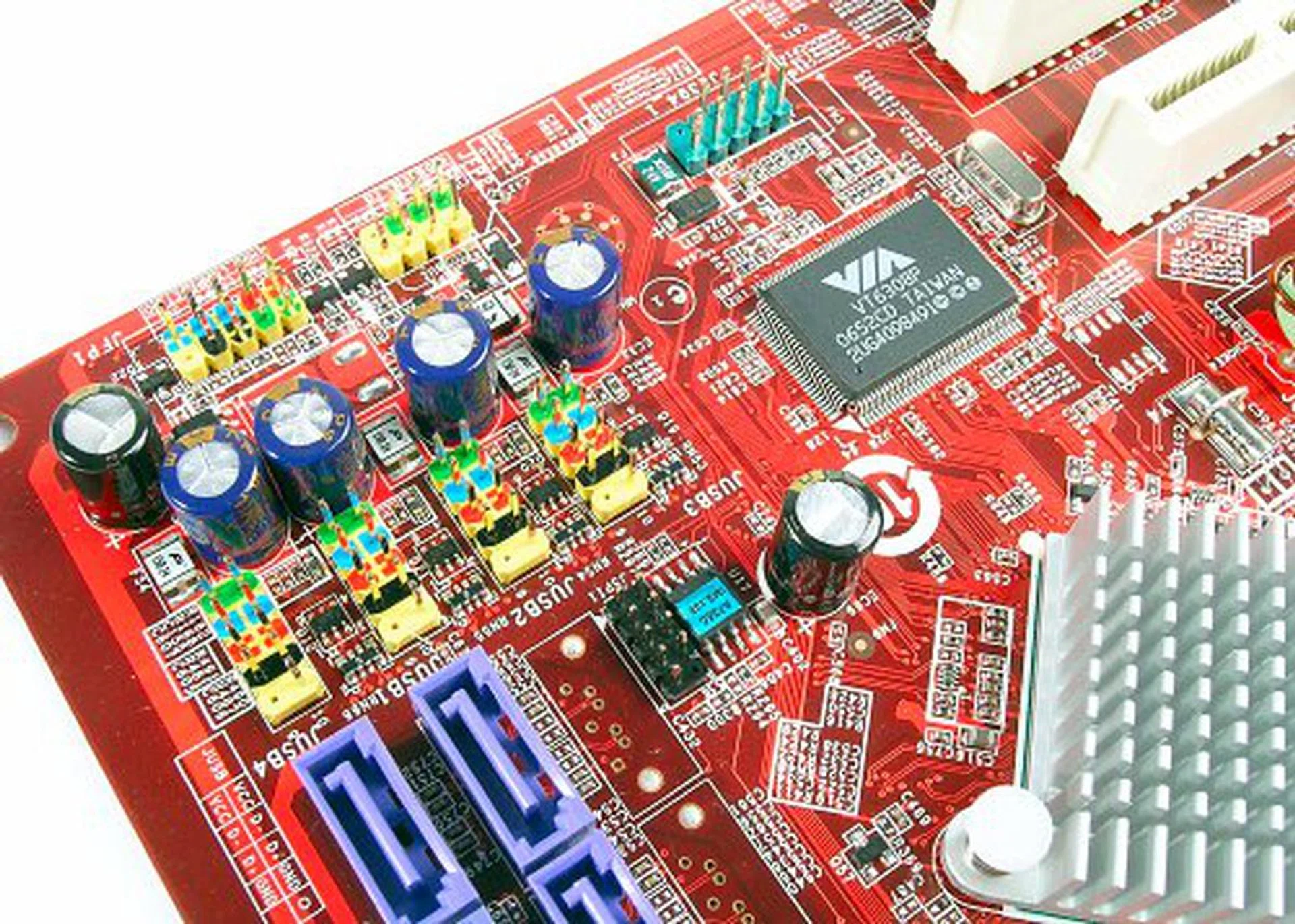
Set of headers for optional USB and FireWire connections.
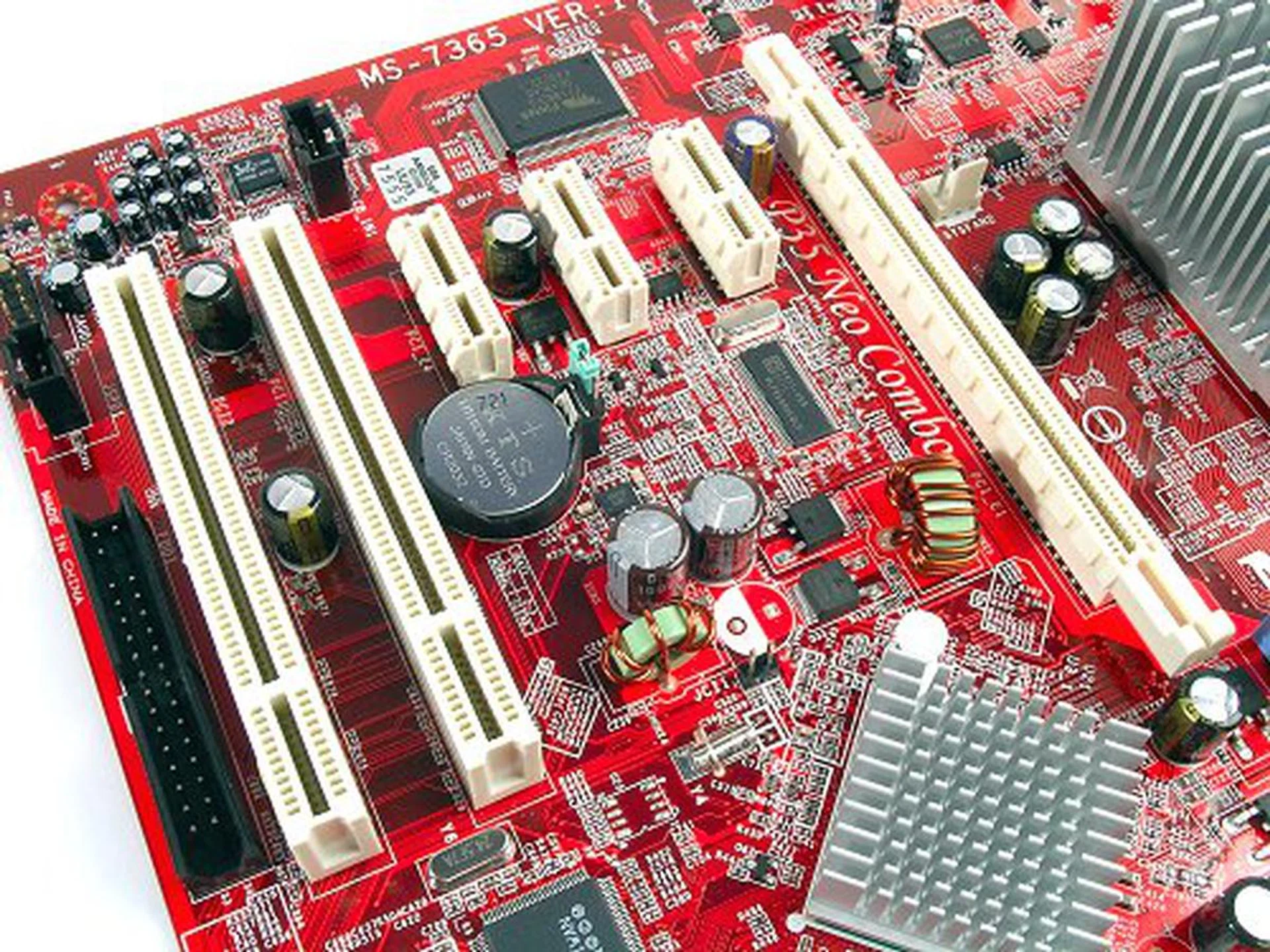
Expansion slots include two PCI, three PCIe x1 and one PCIe x16.
The main attraction of the P35 Neo Combo is actually its hybrid memory support configuration. As the Intel P35 marks the beginning of DDR3 support, we've thus far seen boards that either exclusively support DDR2 or DDR3. The P35 Neo Combo is a bridge between the two, supporting both DDR2 and DDR3 memory modules. The board comes with four DIMM slots, two 1.8V DDR2 and two 1.5V DDR3. The maximum memory configuration for either memory type is 4GB. Officially, DDR2 support only goes up to 800MHz and DDR3 to 1066MHz. However, the BIOS of the board supports a DDR2-1066 stepping and the DDR3 multipliers will enable DDR3-1333 once the board FSB has been increased to 1333MHz too. While these do not seem to be the official settings for the board, these speeds are supposed to be natively supported by the P35 chipset anyway.
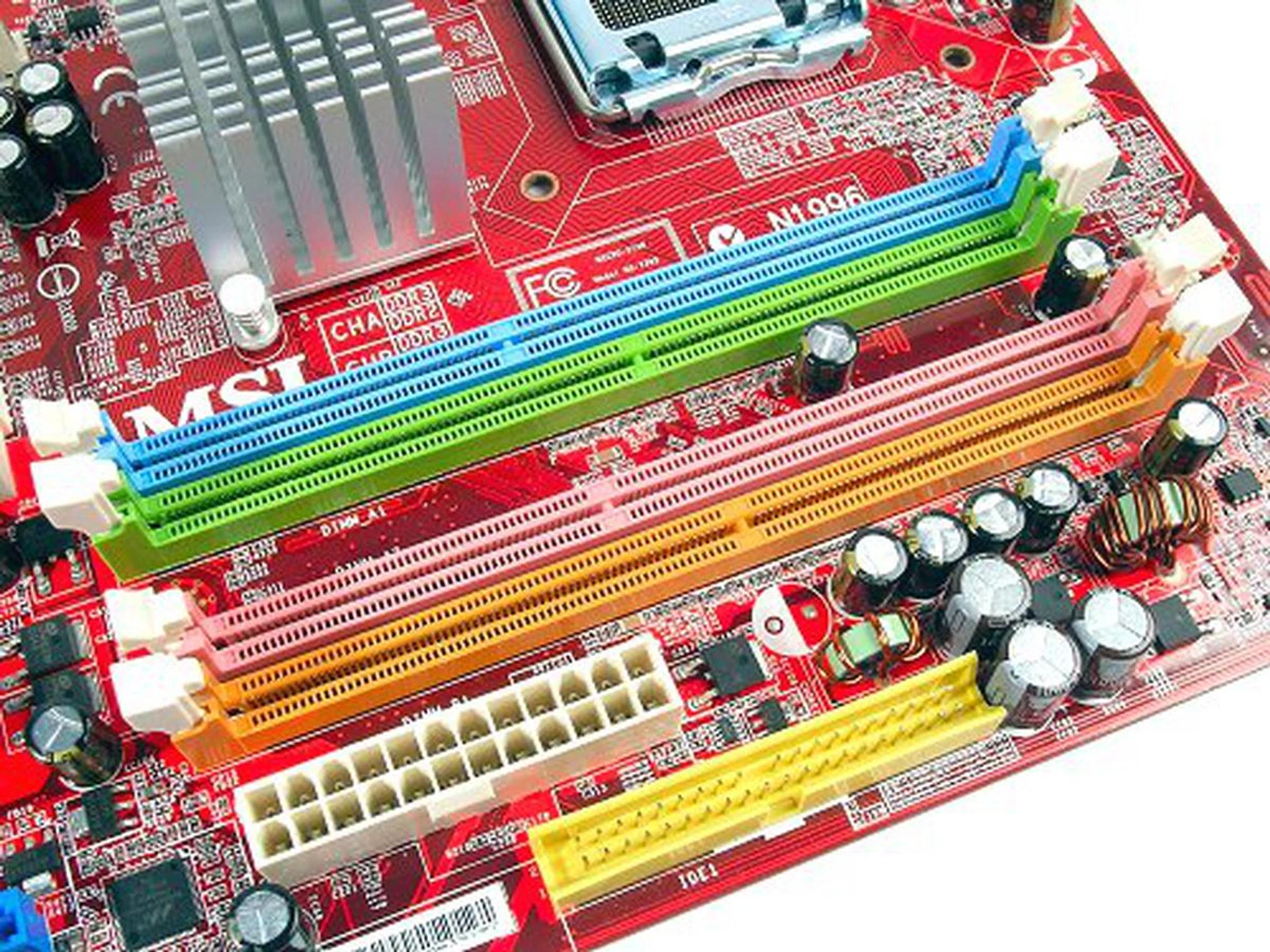
DDR2 and DDR3 dual channel DIMM slots. Notice the different notch locations.
Layout
The lower part of the board has a good layout design with most of the board's connectors and headers lined up near the bottom corner. As a single GPU motherboard, there is no need to worry too much about full sized graphics cards blocking access to any connectors. The only difficulty we can see is the additional SATA port that is located below the PCIe x16 slot. On the top half however, we feel that the CPU socket area can be tight, especially with third party coolers. The close proximity of the chipset heatsink and the tall capacitors near the retention holes can make mounting the CPU cooler a little challenging. The PCB clearance looks decent when the CPU cooler isn't mounted, but once you start installing the CPU, you will notice the squeeze.
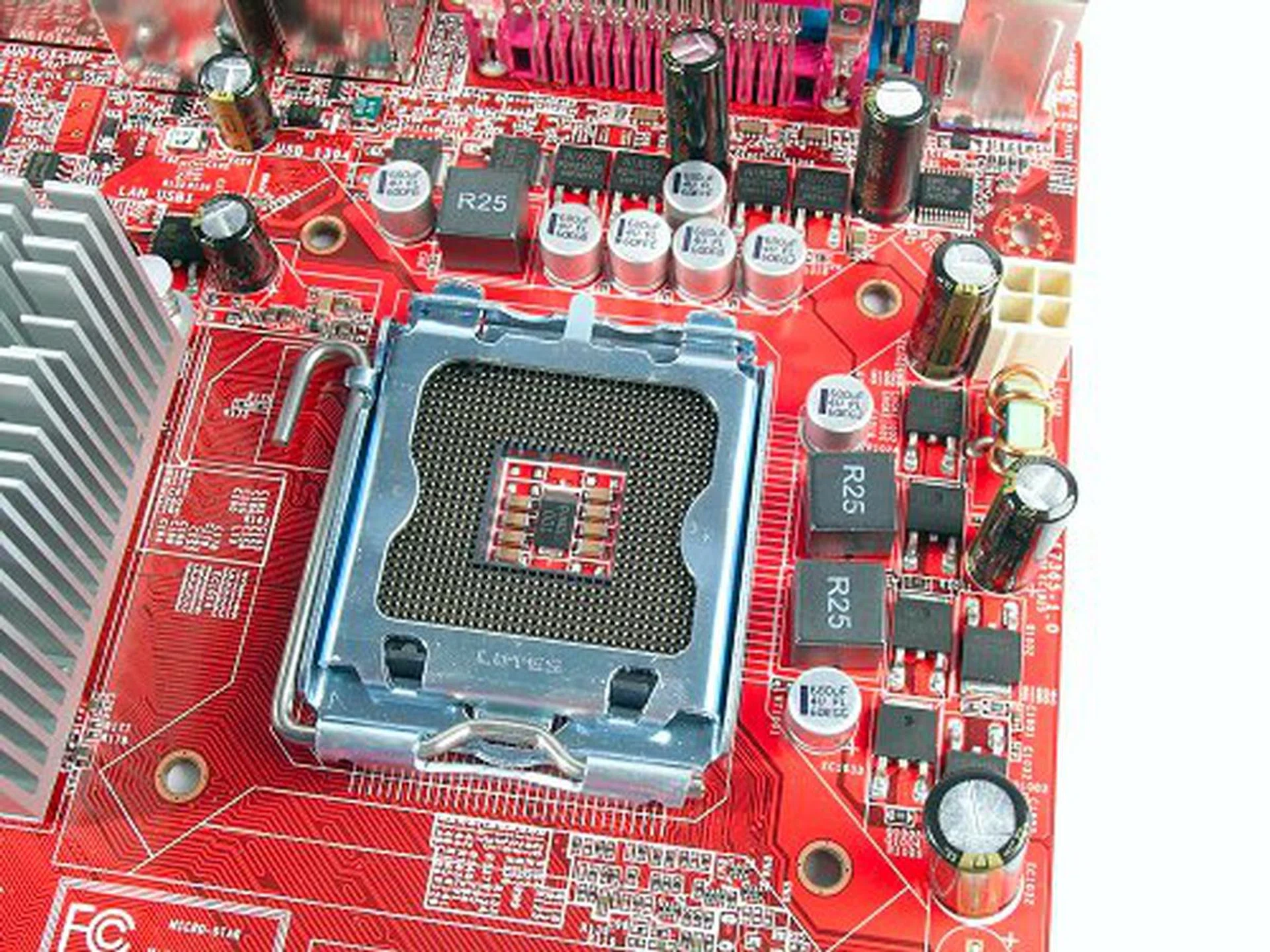
Before installation, the board seems spacious enough.
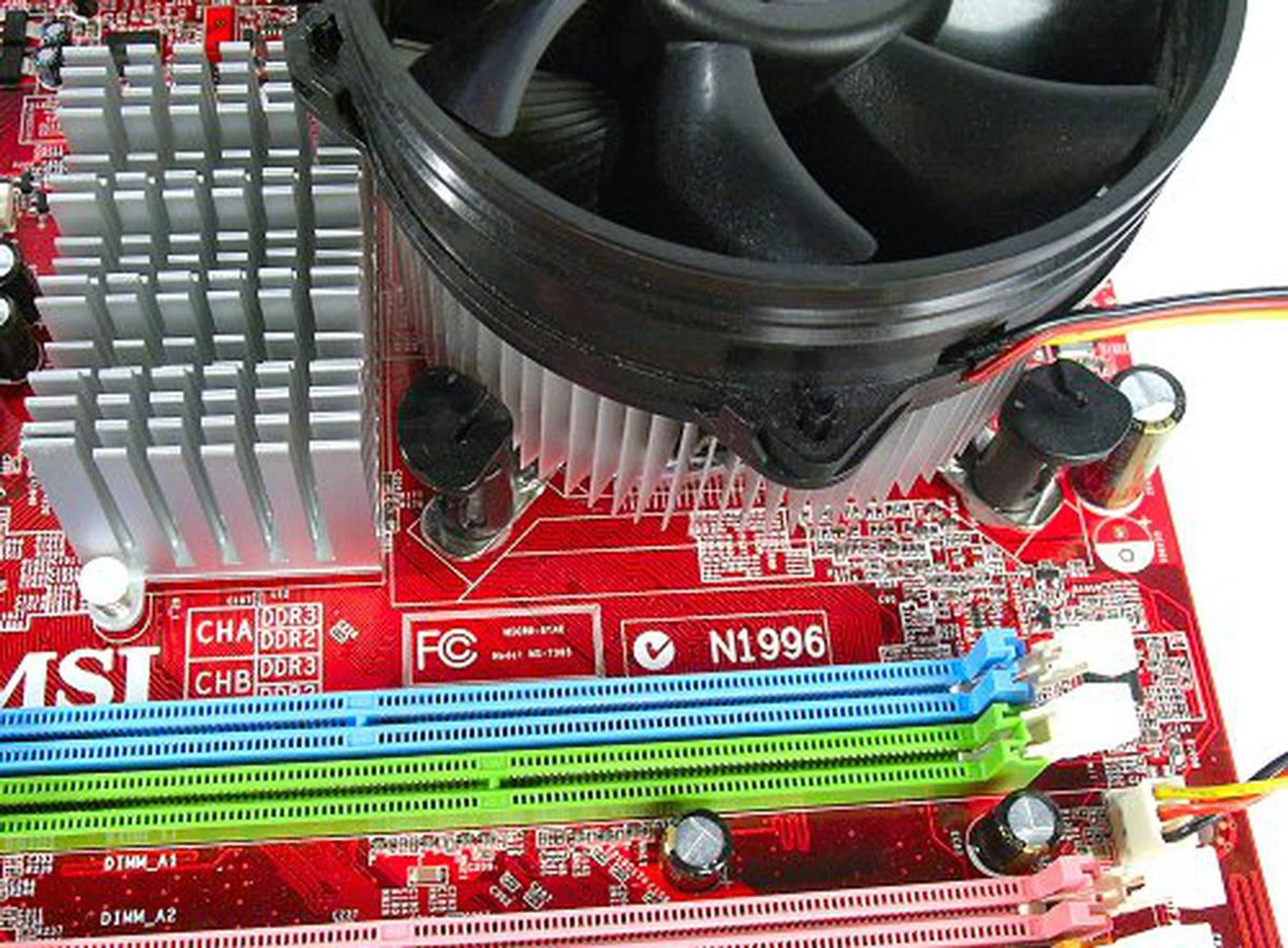
Cooler mounting and unmounting can be a tight affair.
Overclocking
- FSB Settings: 266MHz to 500MHz
- DDR2 Settings: 533/638/667/800/886/1066MHz
- DDR3 Settings: 638/800/851/1066
- PCIe Settings: 100MHz to 200MHz
- CPU Voltage Settings: +0.0125V to +0.7875V (in 0.0125V steps)
- Memory Voltage Settings: 1.80V to 2.10V (in 0.05V steps), 2.10V to 3.30V (in 0.1V steps)
- NB Voltage Settings: 1.200V to 1.600V (in 0.025V steps)
- SB I/O Voltage Settings: 1.50V to 1.80V (in 0.10V steps)
- SB Core Voltage Settings: 1.05V, 1.15V
- FSB VTT Voltage Settings: 1.200V to 1.600 (in 0.025V steps)
- D.O.T. Control: 1%, 3%, 5%, 7%, 10%, 15%,
- Multiplier Selection: Yes (unlocked CPUs only)
The BIOS settings on the P35 Neo Combo shares many similarities to that of the P35 Platinum, which is quite common actually for MSI boards in the same series. There are some slight differences with the min/max settings for most of the voltage options, but the BIOS is actually quite equipped for tweaking. FSB overclocking the P35 Neo Combo yielded the same results as the P35 Platinum, which was 1880MHz (470MHz base) on the top end. Northbridge voltage had to be increased to 1.4V to achieve this overclock, but the rest of the voltage option can be left alone.
Our initial overclocking tests were conducted using DDR2 memory, but since the P35 Neo Combo is a hybrid motherboard, we decided to test if DDR3 will make any difference in the final overclock. Although 470MHz hasn't begun to stretch the limits of DDR2 memory, DDR3 should have proven to be easier to overclock with its lower voltages and inherently higher bandwidth tolerance. We've confirmed that the board works just fine up to 1333MHz, which is supposed to be natively supported. However, the board would not allow overclocking past this point, exhibiting random lock ups, crashes and boot failures. It would seem that the DDR3 support and stability of the P35 Neo Combo isn't as well optimized just yet.

CPU-Z overclocknig screenshot. Click for full size image.
Test Setup
To benchmark the MSI P35 Neo Combo, we will compare it against its bigger brother, the P35 Platinum. We will also include some of the other Intel P35 motherboards we've tested so far including the high end ASUS P5K Deluxe as well as the budget Foxconn P35A to gauge where the board stands. Since the P35 Neo Combo supports DDR2 and DDR3, we will conduct two sets of tests for DDR2-800 as well as DDR3-1066, the two officially supported memory timings for the board. While we've separately tested DDR2 and DDR3 before, this is the first time we will see performance numbers for each memory type on the 'same' board, which should be an interesting comparison since there will essentially be no silicon or electrical differences that can be attributed to different hardware and optimization except the memory sticks themselves.
The following standard test bed configuration will be used throughout this review for all motherboards unless otherwise stated:-
- Intel Core 2 Extreme X6800 processor (2.93GHz)
- 2 x 1GB Kingston HyperX DDR2-800 @ 4-4-12 CAS 4.0
- 2 x 1GB Kingston HyperX DDR3-1066 @ 7-7-20 CAS 7.0 (MSI P35 Neo Combo DDR3 testing only)
- Seagate Barracuda 7200.10 200GB SATA hard disk drive (one single NTFS partition)
- MSI GeForce 8600 GTS 256MB - with ForceWare 158.22 drivers
- Intel INF 8.3.1.1013 and AHCI 7.5.0.1017 driver set (Intel P965 and P35 only)
- Microsoft Windows XP Professional with Service Pack 2 (and DirectX 9.0c)
Benchmarks
The following benchmarks will be run to determine the performance of the MSI P35 Neo Combo:-
- BAPco SYSmark 2004
- Futuremark PCMark05
- SPECviewperf 9.0
- Futuremark 3DMark06
- AquaMark3
Results - BAPco SYSmark 2004
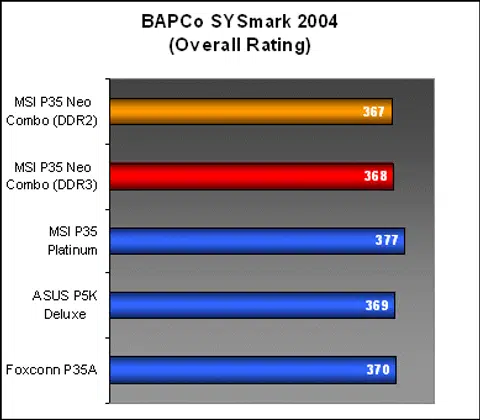
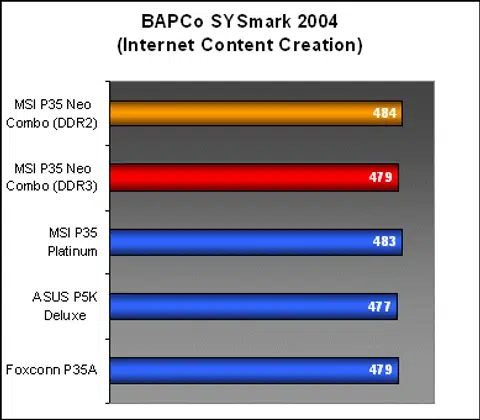
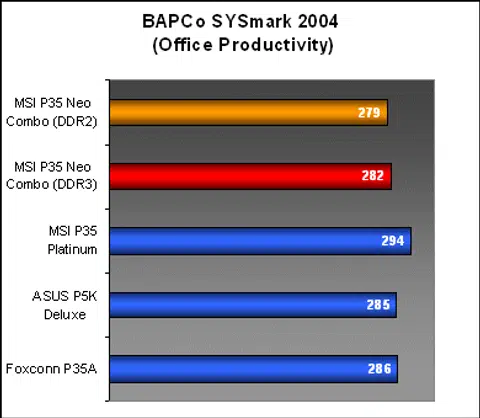
The P35 Neo Combo showed very strong Internet Content Creation results, but underscored in the Office Productivity workloads, which affected its overall scoring. What's interesting to note however, was the performance difference of DDR3 for the board, which is to say virtually none at all.
Results - Futuremark PCMark05
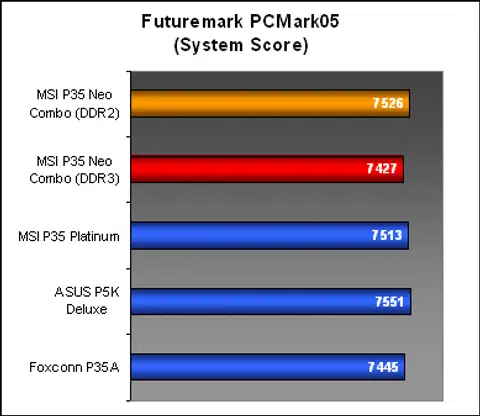
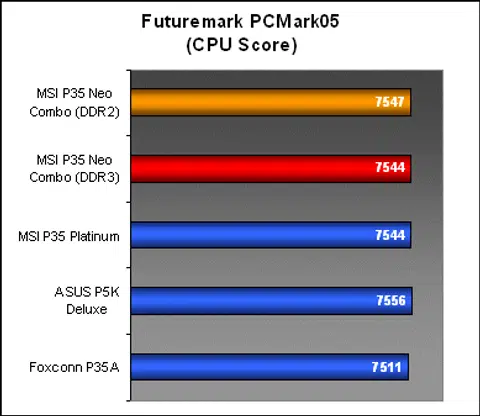
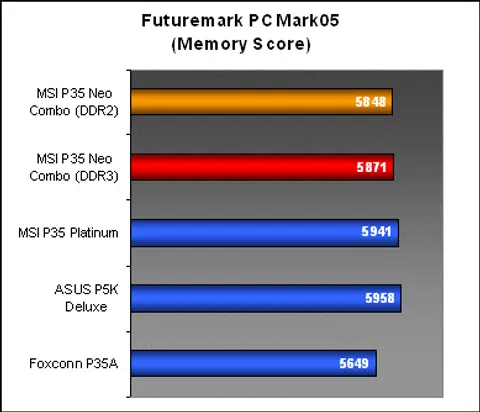
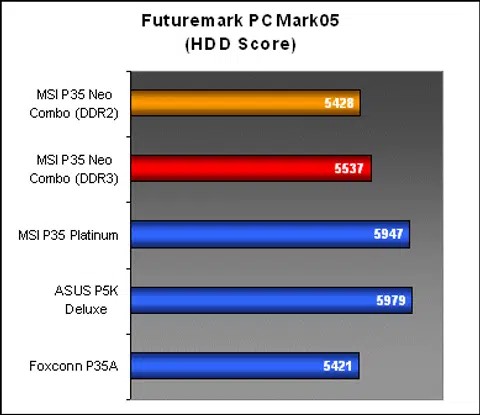
CPU performance numbers for the P35 chipset have so far been pretty consistent among the boards we've tested. Memory scores came as no surprise as well with the P35 Neo Combo performing just behind MSI's own high-end P35 Platinum and the ASUS P5K3 Deluxe. DDR3 scores for the P35 Neo Combo showed some slight gain, but not enough to clearly outperform DDR2. The standard ICH9 Southbridge on the board accounts for the low HDD results, though you will notice that the same test run with DDR3 obtained higher HDD performance.
Results - SPECviewperf 9.0
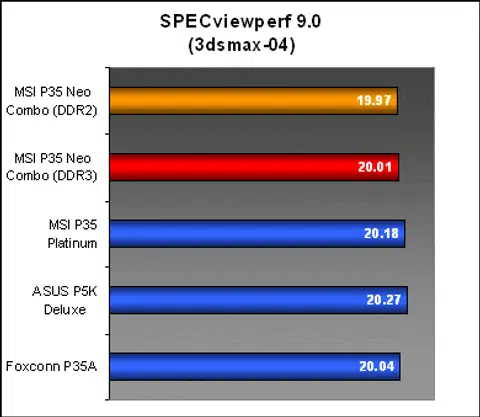
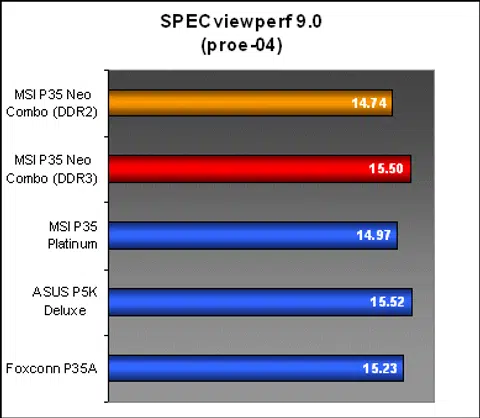
The MSI P35 Neo Combo continued to perform behind the P35 Platinum and ASUS P5K Deluxe in all workloads. We got to see some real improvements of using DDR3 in the memory intensive pro/ENGINEER tests with the P35 Neo Combo, but it was still not enough to beat the P5K Deluxe.
Results - Futuremark 3DMark06
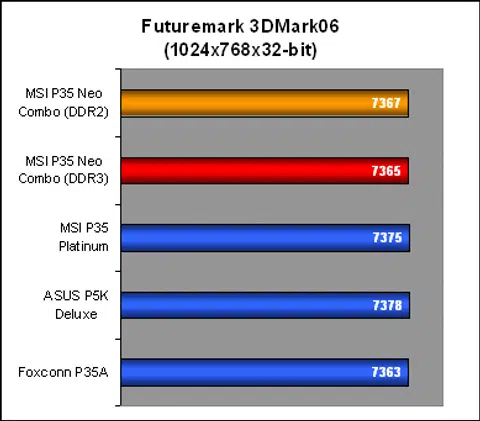
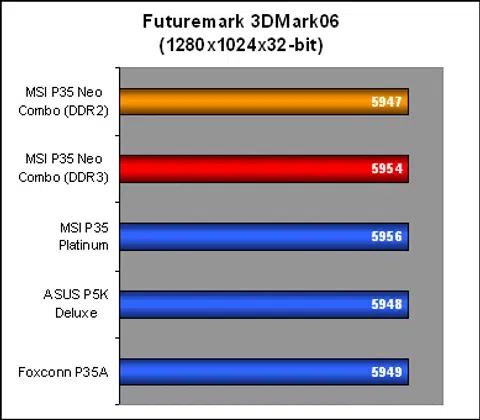
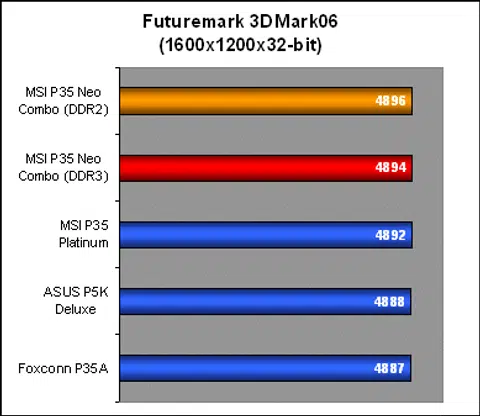
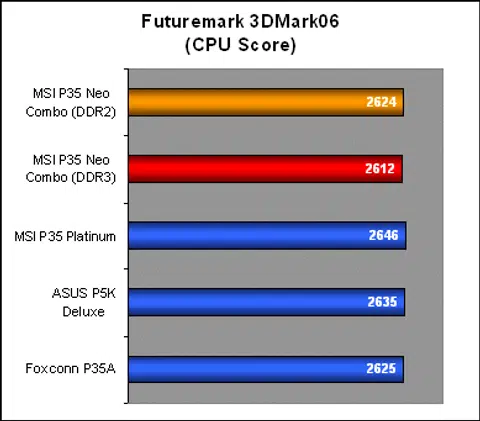
3DMark06 performance scores in every resolution were almost identical for all the P35 motherboards and there was also no discernible difference between DDR2 and DDR3 on the P35 Neo Combo. Even the CPU only tests did not manage to capture any change between board or memory configuration used.
Results - AquaMark3
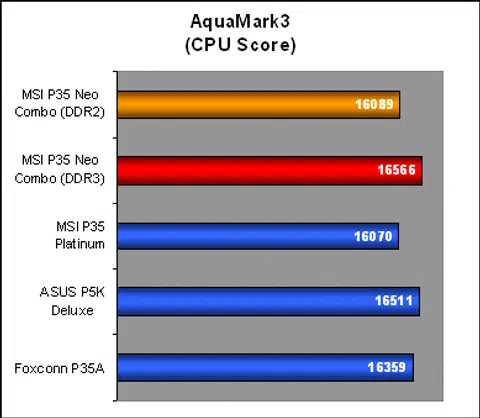
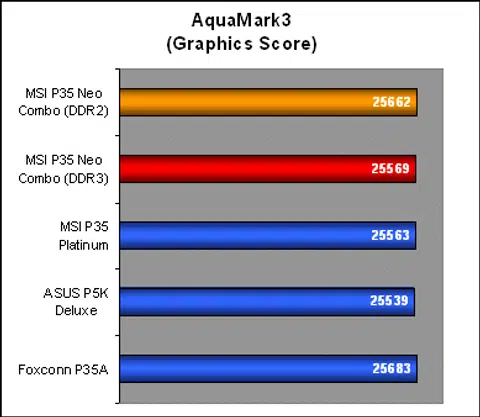
AquaMark3's CPU results for the P35 Neo Combo look very much like the memory scores we saw on SPECviewperf before. The board performed similarly to the P35 Platinum using standard DDR2, but shot up around 500 points when using DDR3. Again, the high scores from the ASUS P5K Deluxe shows us that the improvements seen can easily be achieved by DDR2 as well with a better-optimized motherboard.
Conclusion
For a mainstream motherboard, the MSI P35 Neo Combo is pretty well featured with all the necessities one would expect from any decent motherboard today. Although designed for the mainstream market, MSI does not skimp on the features and in this time of memory standards transition, some may even view hybrid DDR2/DDR3 motherboards like the P35 Neo Combo as the better value with a clear upgrade path that is not limited to current hardware.
MSI distinguishes the P35 Neo Combo from its premium range by using components such as standard electrolyte capacitors instead of the 100% solid capacitor design. This was definitely a cost saving measure on MSI's part, but in a market where consumers have already been conditioned to believe that solid capacitors deliver much better product lifespan, we can't help but think if it could dent MSI's sales, especially when some other mainstream boards already employ the full solid capacitors design despite their budget standing. Still, the "made in Japan" capacitors on the MSI P35 Combo should offer some solace. In the end, the cost savings are still passed back to the consumer, so that's another important consideration.
Performance-wise, the P35 Neo Combo seems like your standard run of the mill P35 motherboard. It fits the performance profile of the P35 chipset, but the board isn't really optimized with benchmark results that put it just below MSI's own flagship P35 Platinum. Using DDR3-1066 with the current batch of 1066MHz FSB processors can be quite underwhelming though as we did not see any improvements at all over DDR2-800. There were several cases where the DDR3 memory performance on the P35 Neo Combo outdid its own DDR2 scores, but on overall, the board failed to match up with the faster DDR2 boards used in this review.
The results obtained here corroborate well with our previous testing of DDR3 for our last article, 'Evolution of Memory Performance: A DDR3 Story'. Basically, if you're planning on upgrading your rig today just to have 'cutting edge' DDR3 memory, we can safely say that it is a waste of time. Unless you're overclocking to a 1333MHz FSB at the very least with DDR3-1333 and higher memory, you will only have boasting rights to owning expensive new memory, but not performance to match.
MSI hasn't forgotten the mainstream crowd with an easy all-rounder motherboard that supports all the latest processor and memory technologies with an equally as easy upgrade path.
With strong overclocking performance, the P35 Neo Combo does show potential of reaching such high speeds as to take advantage of what DDR3 has to offer, but sadly, our board did not want to play nice with DDR3 memory. A 470MHz FSB overclock with DDR2 memory proves that the board has plenty of mileage and suggests that it would perform even better with DDR3's improved bandwidth. However, we were unable to overclock the board at all using DDR3 past the 1333MHz FSB mark. This may very well be teething compatibility and stability issues with DDR3 implementation. Remember, DDR3 is still a new memory standard so we expect high-speed DDR3 support to improve over time. At present, there is actually no stability issues with the P35 Neo Combo that we could detect under default timings up to DDR3-1333.
Of course, even left to its default settings, the P35 Neo Combo allows you the leisure to upgrade when the next generation FSB1333 platform is ready, and that is its main selling point. MSI still needs to improve DDR3 support for the board, but the P35 Neo Combo still is a great all-rounder motherboard to have whether you're fickle minded, cautious or just want to cover all the possible ground for your next upgrade. Just remember to purchase adequate memory since the board only supports two DIMMs of any one type.
Our articles may contain affiliate links. If you buy through these links, we may earn a small commission.