

A Titan in more than just name
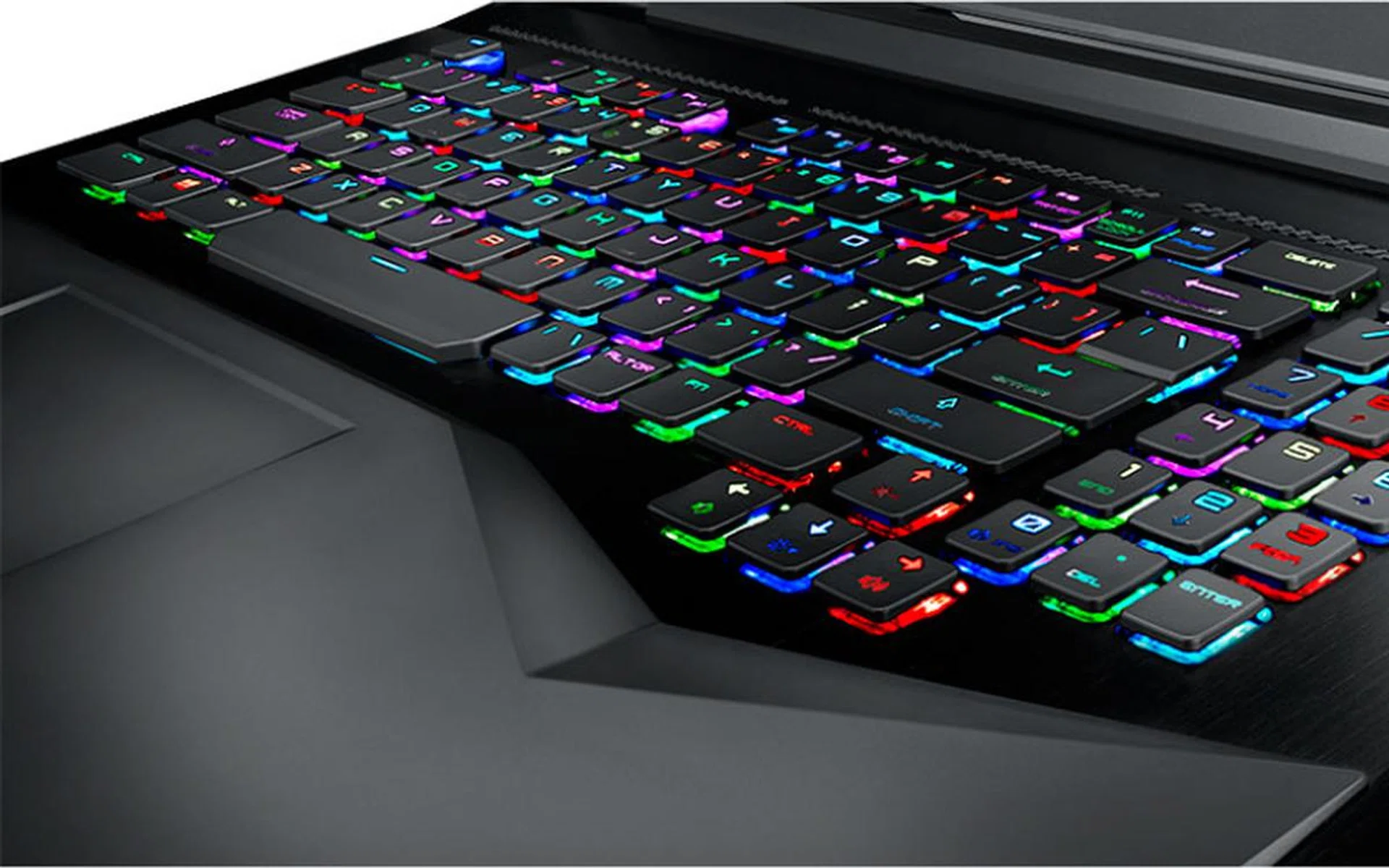
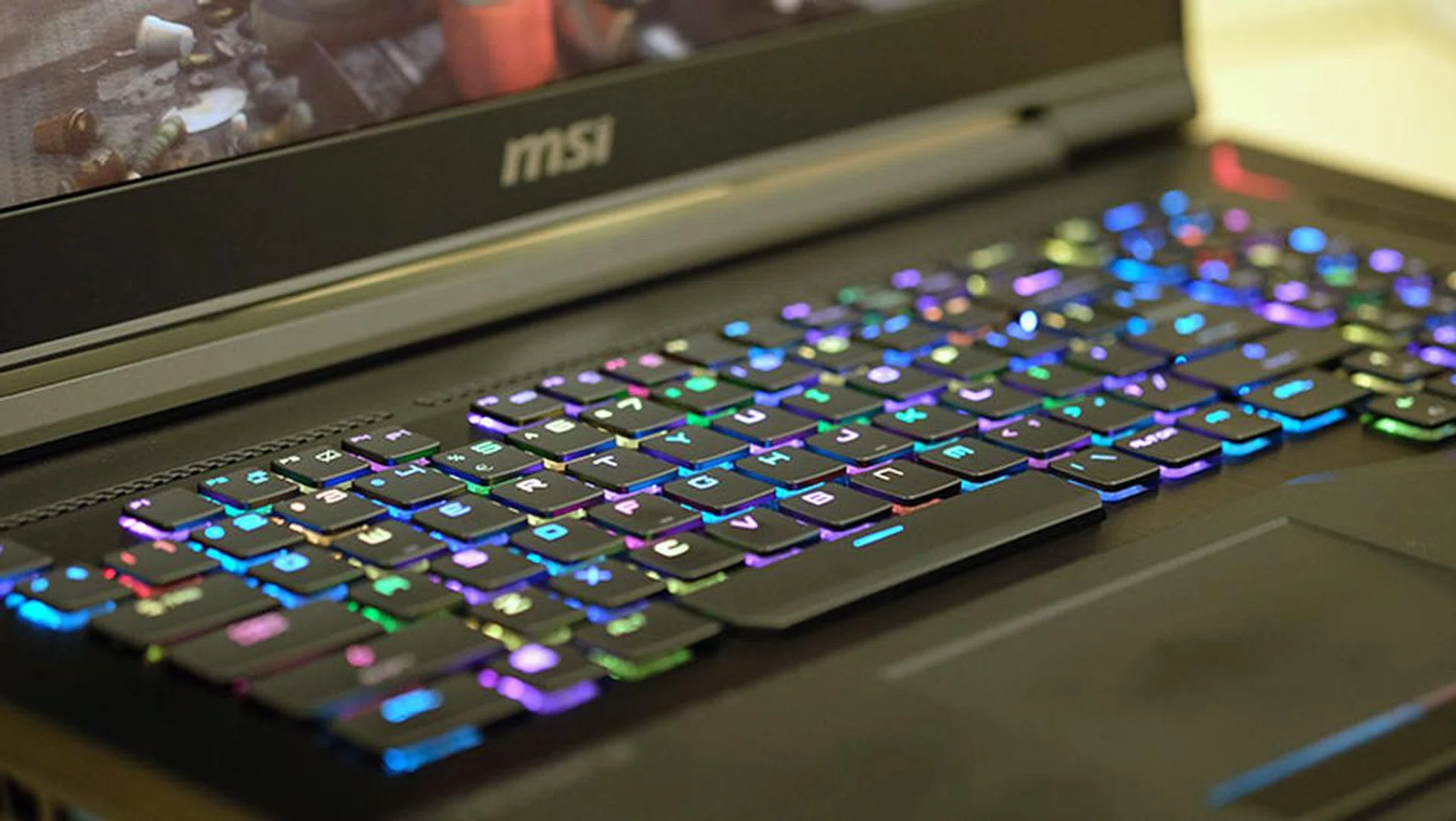
The low-profile mechanical switches and per-key RGB customizations are one of the best features of the laptop. (Image Source: MSI)
MSI’s new GT75VR 7RF Titan Pro belongs to a rarefied breed of laptops that has always seemed slightly puzzling to me. They’re huge hulking pieces of plastic and metal, with swooping lines and gaping exhaust vents that are more reminiscent of what you’d see on muscle cars.
Picking one up feels like hefting a sack of bricks, largely due to the sizeable dimensions of a chassis that holds components capable of desktop-class performance.
They also tend to cost upward of S$5,000, so they’re often pilloried for asking for more than a high-end desktop.
I’ve also often asked myself what reasons one could have to be willing to pay so much for a laptop that is so patently unportable. After all, it seems like that defeats the purpose of getting a notebook in the first place.
In the end, it seems like these laptops exist simply because they can. They’re showpieces of engineering meant to exhibit what it’s possible to cram into a laptop, and if you’ve got the cold, hard cash, you can get one for yourself for the bragging rights.
The GT75VR 7RF Titan Pro is in no way a sensible purchase. Let’s get one thing clear. This is not a smart way to spend your money (assuming of course, that you’re like the rest of us and actually have to work for a living).
But I’d be lying if I said this wasn’t fun to look at, game on, and basically show off. The laptop was designed to grab your attention, and it does that wonderfully. The mechanical keyboard bursts to life in a dazzling constellation of lights the moment you power the machine up, and you can’t help but marvel – or frown – at the extravagance of it all.
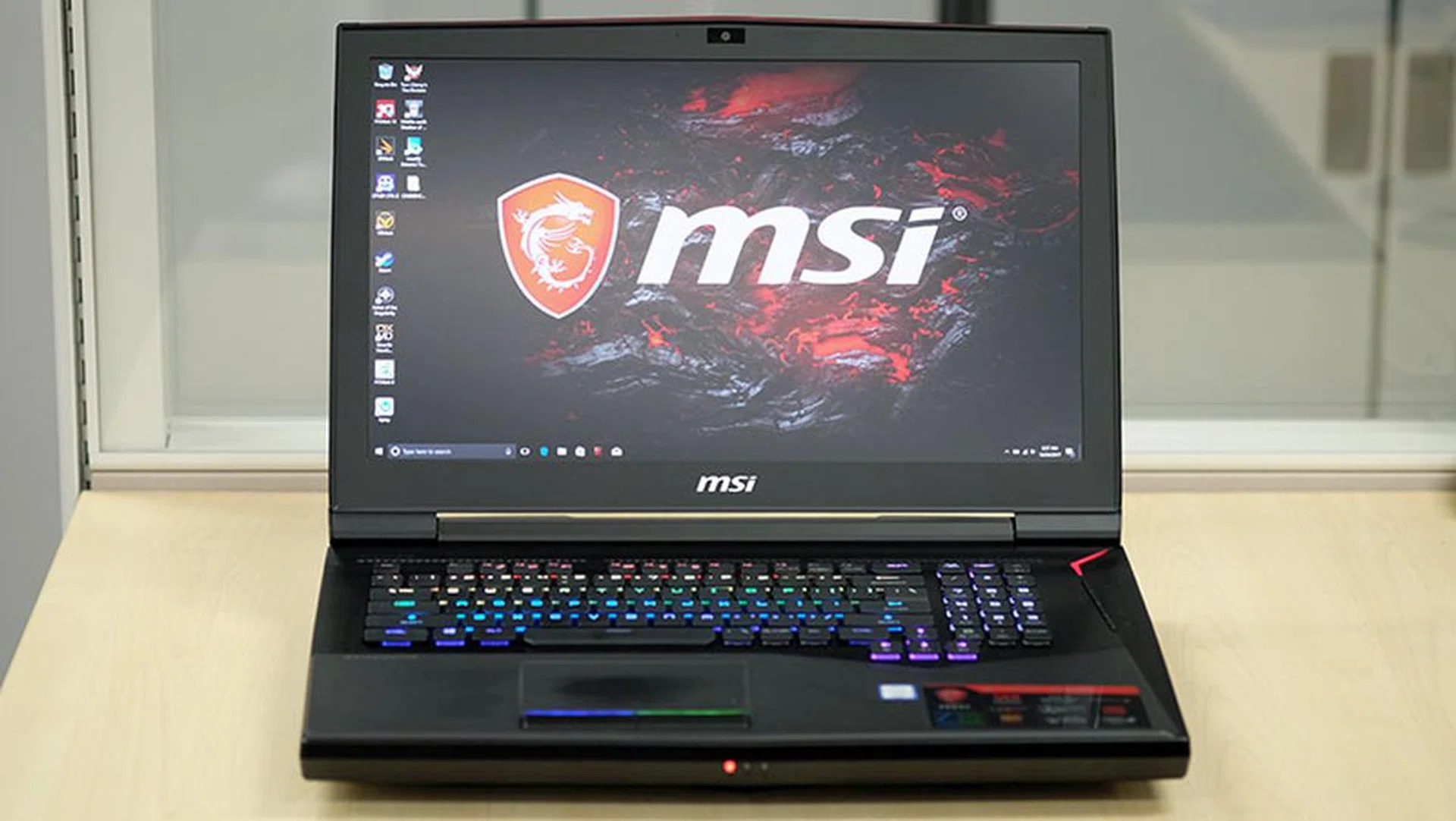
This laptop has no business going anywhere other than your desk.
Here’s an overview of the laptop’s specifications:
- 17.3-inch 1,920 x 1,080-pixel 120Hz TN display with 3ms response time
- Intel Core i7-7820HK (2.9GHz, 8MB L3 cache)
- 32GB (2x16GB) DDR4-2400 RAM
- NVIDIA GeForce GTX 1080
- 2x256GB PCIe SSDs in RAID 0 + 1TB 7,200RPM HDD
- 75Wh battery
- 428 x 314 x 31-58mm
- 4.56kg
The above configuration will cost you an eye-watering S$5,899, so it’s really for users who want a super powerful laptop that will run it all. However, there are already NVIDIA Max-Q laptops on the market that also feature a GeForce GTX 1080, and while the latter is slightly less powerful than the non-Max-Q version, it’s still more than sufficient to run all of today’s games.
A prime example would be the ASUS ROG Zephyrus GX501, which retails for less at S$4,898. It’s also a lot thinner and far more portable, which is what a laptop should be.
That said, the MSI GT75VR 7RF Titan Pro is a statement piece. It’s unabashedly bulky, maybe even deliberately so. It comes with all the ports and connectors you could want, in addition to copious amounts of performance served up by its NVIDIA GeForce GTX 1080 GPU and overclockable quad-core processor.
This laptop is blissfully impractical, and it may seem something of a travesty in a time where you can get super slim and powerful notebooks like the Gigabyte Aero 15 X and Razer Blade Pro, but leveling that criticism at it may be missing the point entirely. We share more on what's underneath its hood and its excellent performance over the next few pages right after this unboxing video:-
Every feature you need, and then some
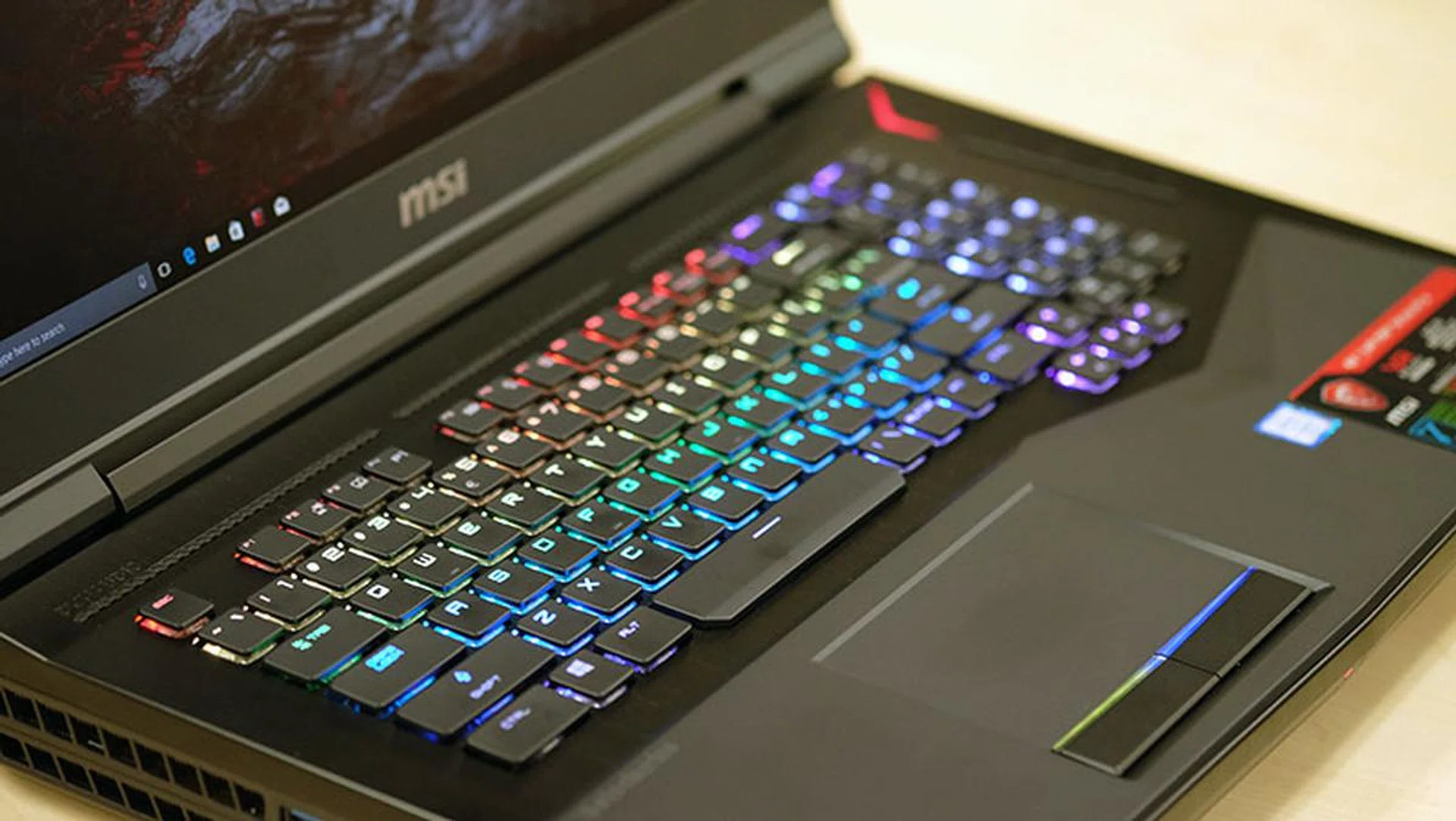
Hopefully, you like RGB LEDs.
This laptop is likely to generate extremely polarizing opinions. But whether you love it or hate it, the good part is that MSI has attempted to add in some differentiating features, instead of just making a super powerful laptop.
For starters, you get a 1,920 x 1,080-pixel display with a 120Hz refresh rate and 3ms response time. The speedy 120Hz refresh rate and NVIDIA G-Sync really give a huge boost to the overall gaming experience, and you can expect a butter-smooth and fluid feel while in game.
The TN panel purports to be able to display 94 per cent of the NTSC color space, and while I wasn’t able to properly test this, colors could still appear slightly muted, especially if you’re used to IPS displays. They also fade out a lot once you look at the screen off from a wide angle, which is typical for TN screen.
Nevertheless, the screen is more than serviceable, and color accuracy probably isn’t something you care a lot about if you’re just looking to play games.
The screen is paired with bottom-firing Dynaudio speakers that can fill a room with loud and fairly full-bodied tunes, for a laptop that is. Audio quality is definitely above average, as it should be on a laptop that costs this much.
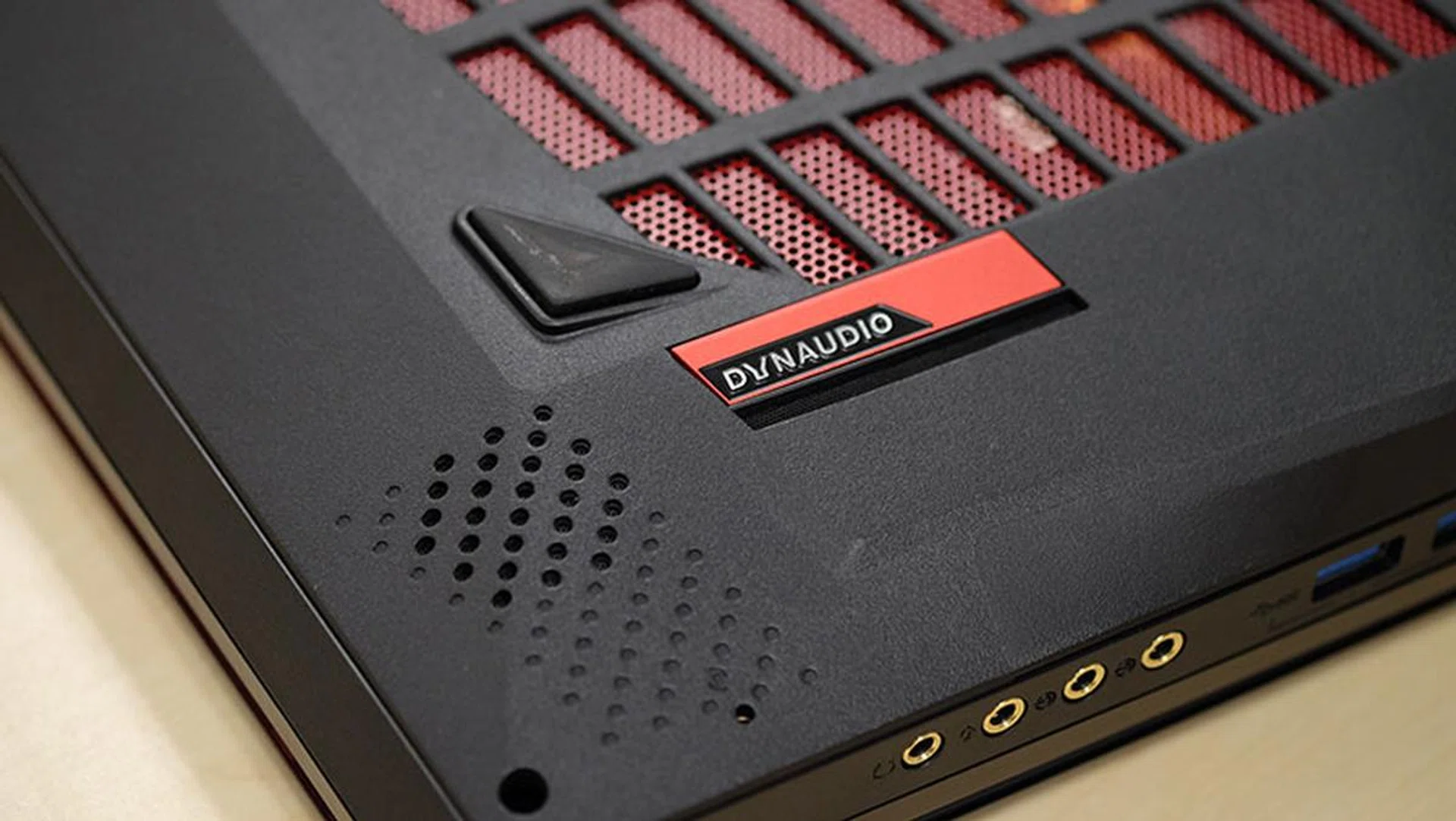
The Dynaudio speakers pump out loud and full-bodied sound for a laptop.
Another standout feature is the inclusion of Killer MultiGig software, which supports multi-gigabit Ethernet solutions. The Titan Pro uses an Aquantia AQtion 10Gbit Network Adapter, so in case you actually have a 10Gbps plan such as Viewqwest Black, you’ll be able to take full advantage of it by plugging in to the LAN jack at the back of the notebook.
This is a first for a laptop, according to MSI, and it complements the laptop’s over-the-top approach quite well.
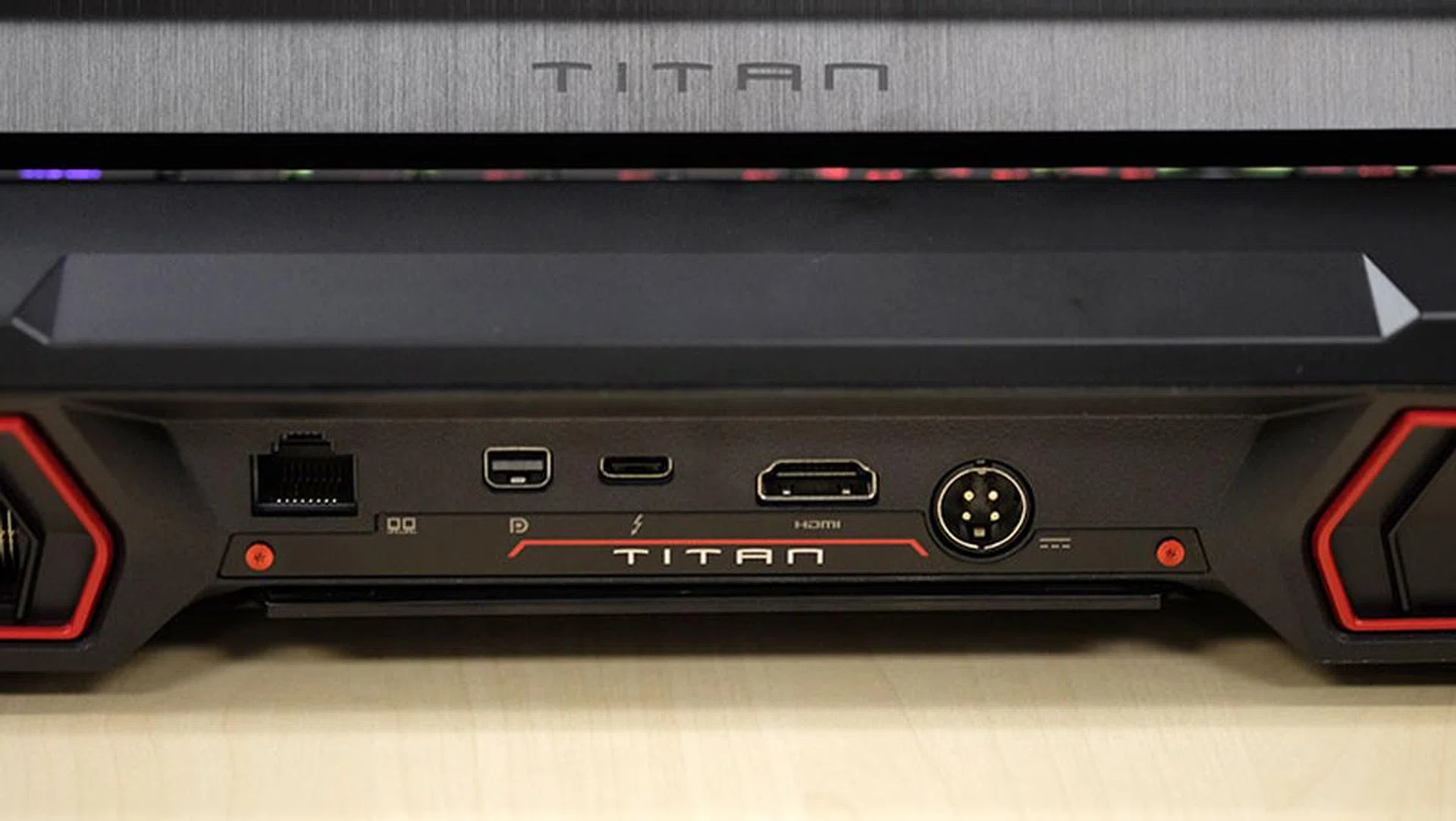
The Ethernet port at the back supports 10Gbps LAN. You'll also find a Mini DisplayPort, Thunderbolt 3, and HDMI output at the back.
Wireless connectivity is provided by the Killer Wireless-AC 1535 controller, a 2x2 module that supports MU-MIMO Wi-Fi and a maximum throughput of up to 867Mbps. MSI has always favored solutions from Killer, so hopefully you don’t have any strong feelings about the brand.
The other noteworthy feature is the SteelSeries Rapid RGB mechanical keyboard. The SteelSeries branding is no surprise, and we’ve seen that on plenty of MSI gaming notebooks in the past, but the mechanical keyboard is the real deal.
It uses low-profile Kailh switches, which boast a 1.5mm actuation distance and 3mm total travel distance. That’s only slightly shallower than Cherry’s own MX Speed Silver switches, which have a 1.2mm actuation distance and 3.4mm travel.
Having said that, the switches have a nice clicky feel to them, and you’re always pleasantly surprised by how far they travel when you take to typing. They’re also a huge step up from the so-called mechanical keys on the ASUS ROG GX800, which felt awfully shallow, so it is possible to have a good mechanical keyboard on a laptop that doesn’t look like you slapped a standalone keyboard on it (ahem).
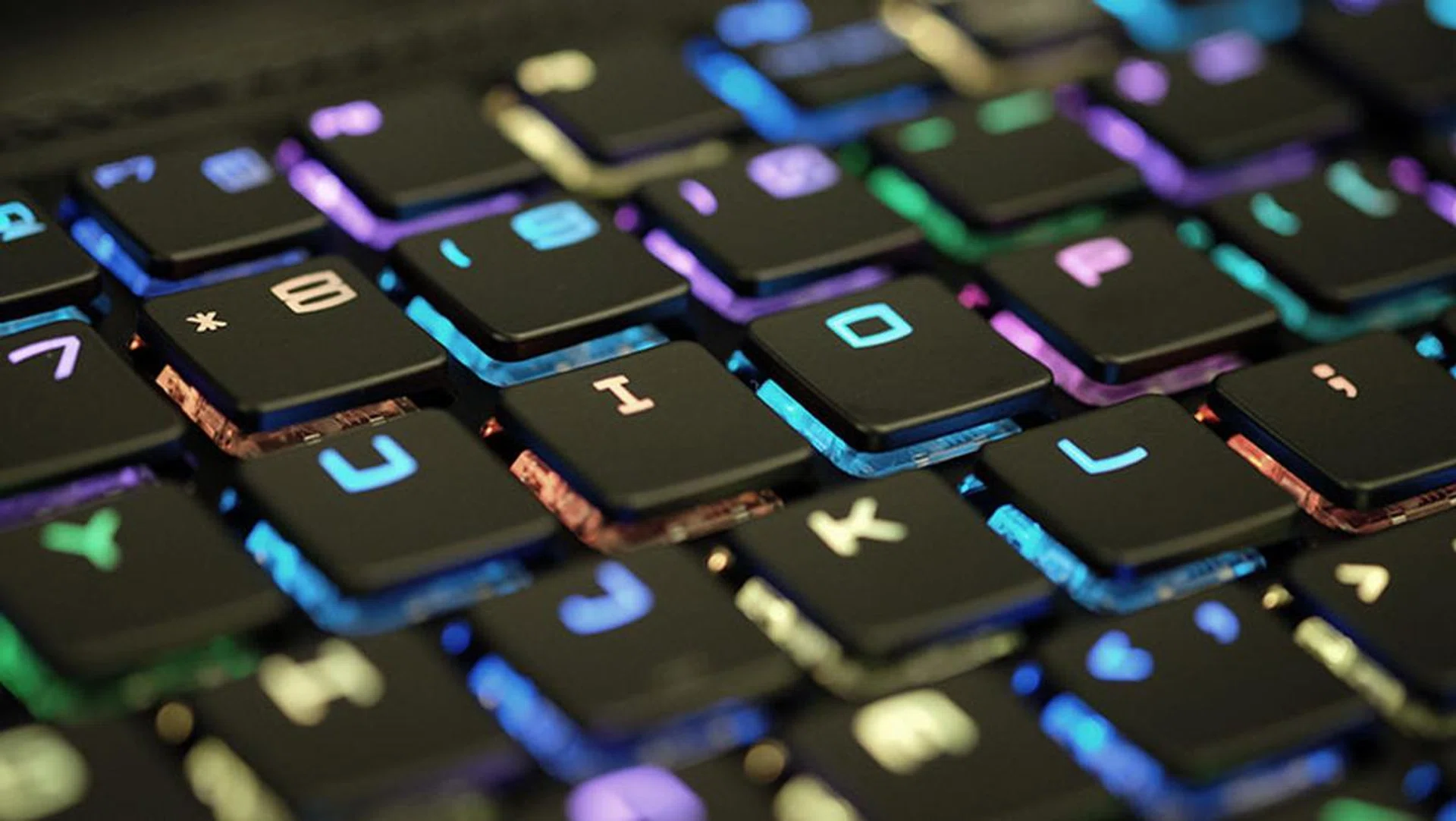
The low-profile mechanical switches feel great to type on.
Still, given how thick the Titan Pro is, there’s no excuse for not being able to cram a good keyboard in there and thankfully, MSI delivers.
The keyboard supports per-key RGB backlighting, so there are nearly limitless customization options available. A dedicated SteelSeries key on the right of the keyboard lets you toggle quickly between different lighting effects, so you don’t always have to fire up the software if you want to switch things up.
The SteelSeries Engine 3 software offers a decent amount of customization, including some fun templates such as Disco Mode, Warp Drive, and the American and Danish flags (SteelSeries is a Danish company). However, it still isn’t as intuitive or powerful as Razer’s Chroma, which remains one of the best ways of customizing the backlighting.
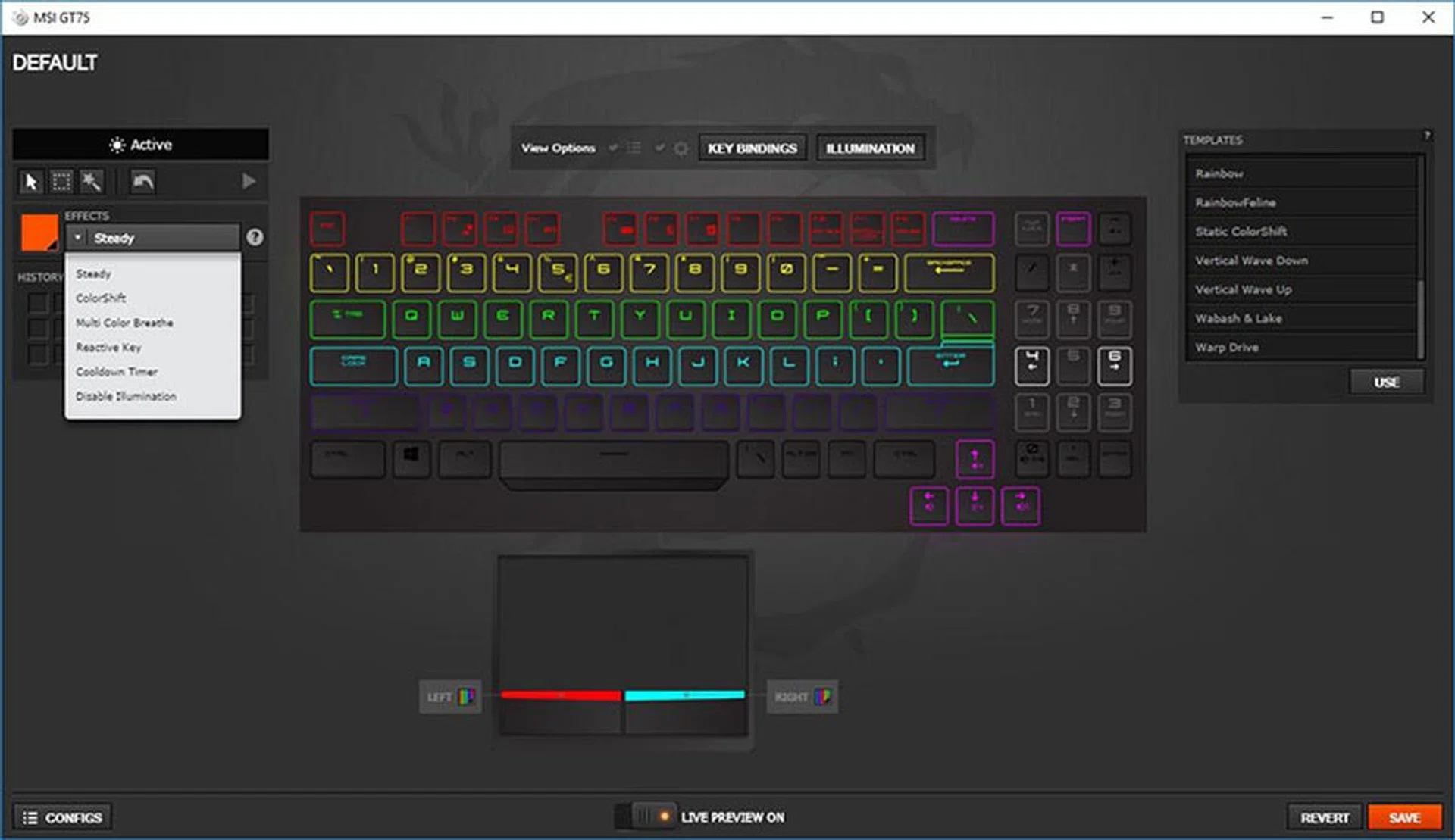
Lighting customizations are done in the SteelSeries Engine 3 software.
The trackpad feels accurate and responsive, but the left- and right-click buttons below it feel woefully mushy. That’s a pity, given how good the keyboard feels, although most users will probably be using the laptop with a gaming mouse anyway.
Other design flourishes include an elevated palm rest area with a nice soft-touch coating. The soft material feels a lot more comfortable than regular plastic, and it seems like it could help stave off the buildup of dirt and grime over time.
There’s a distinctive arrow-shaped cutout to accommodate the arrow keys, but despite how gratuitous it feels, the extra layer on top of the palm rest seems to help mitigate some of the heat from below. When measuring the temperature in the area, it was slightly cooler than what you normally see, and the palm rests felt relatively cool to touch even while the laptop was under load.
Still, it’s difficult to say whether to attribute that to palm rest design or the overall cooling system, but the Titan Pro’s sheer girth once again means that you definitely expect the best when it comes to cooling.
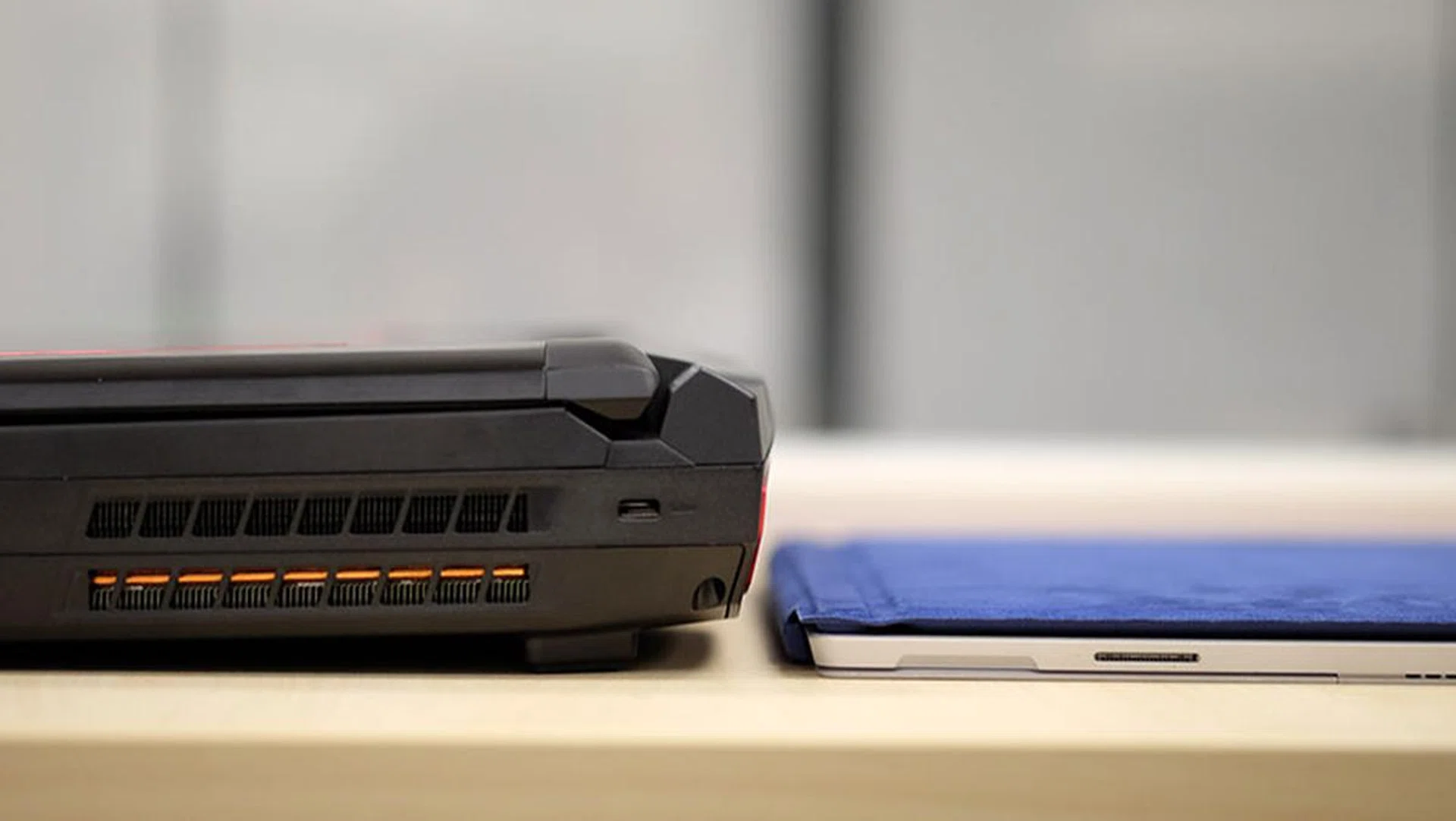
The laptop is many times thicker than the Microsoft Surface Pro 4.
Cool, but noisy
This is a laptop that measures a whopping 58mm at its thickest point, and MSI says it’s managed to cram 10 heat pipes in there to keep the important hardware running cool. Both the CPU and GPU are cooled independently, and MSI has also included two large 29-blade to pull the cool air in. There's even a dedicated heatsink for the two M.2 SSDs, which is located beside the battery pack.
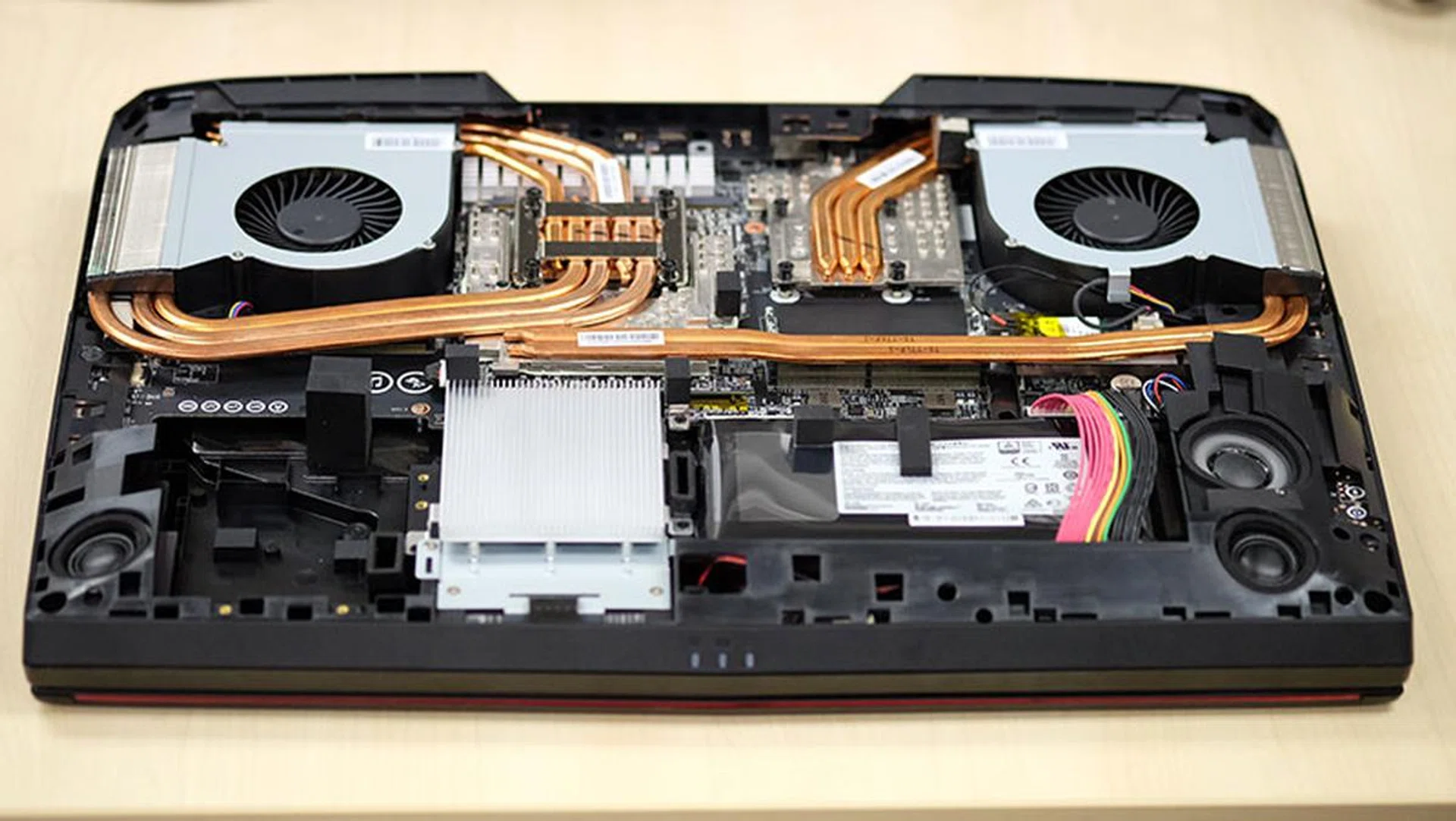
That's a lot of heat pipes.
The fans use what the company refers to as a whirlwind-blade design, which supposedly helps improve airflow and static pressure. The design is unique, and is more reminiscent of the blower-style fans you find on some graphics cards. They’re tall, with vertically-oriented blades, and they push air out four vents located at the sides and rear of the Titan Pro.
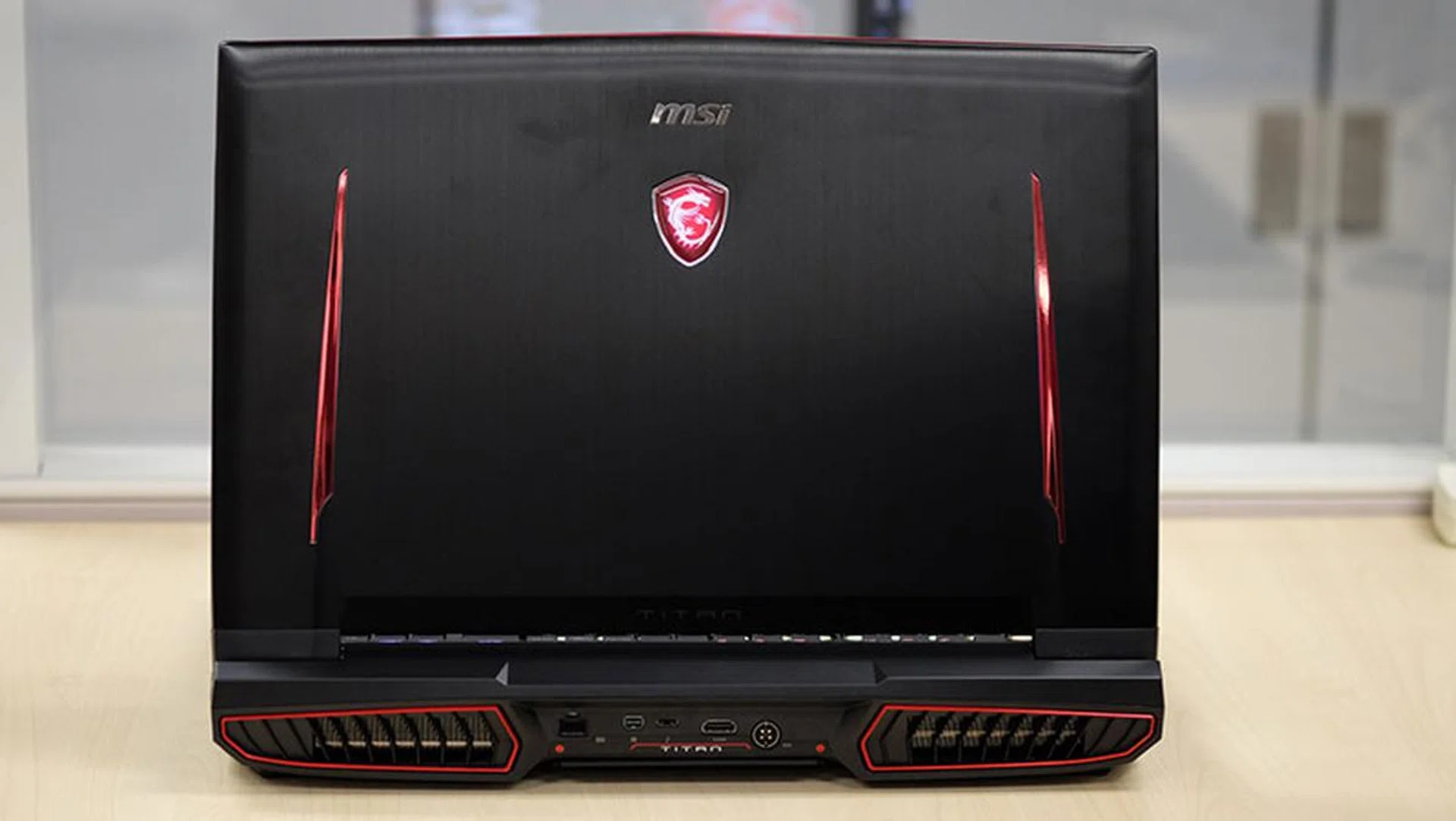
Here's a look at the two large exhaust vents at the rear.
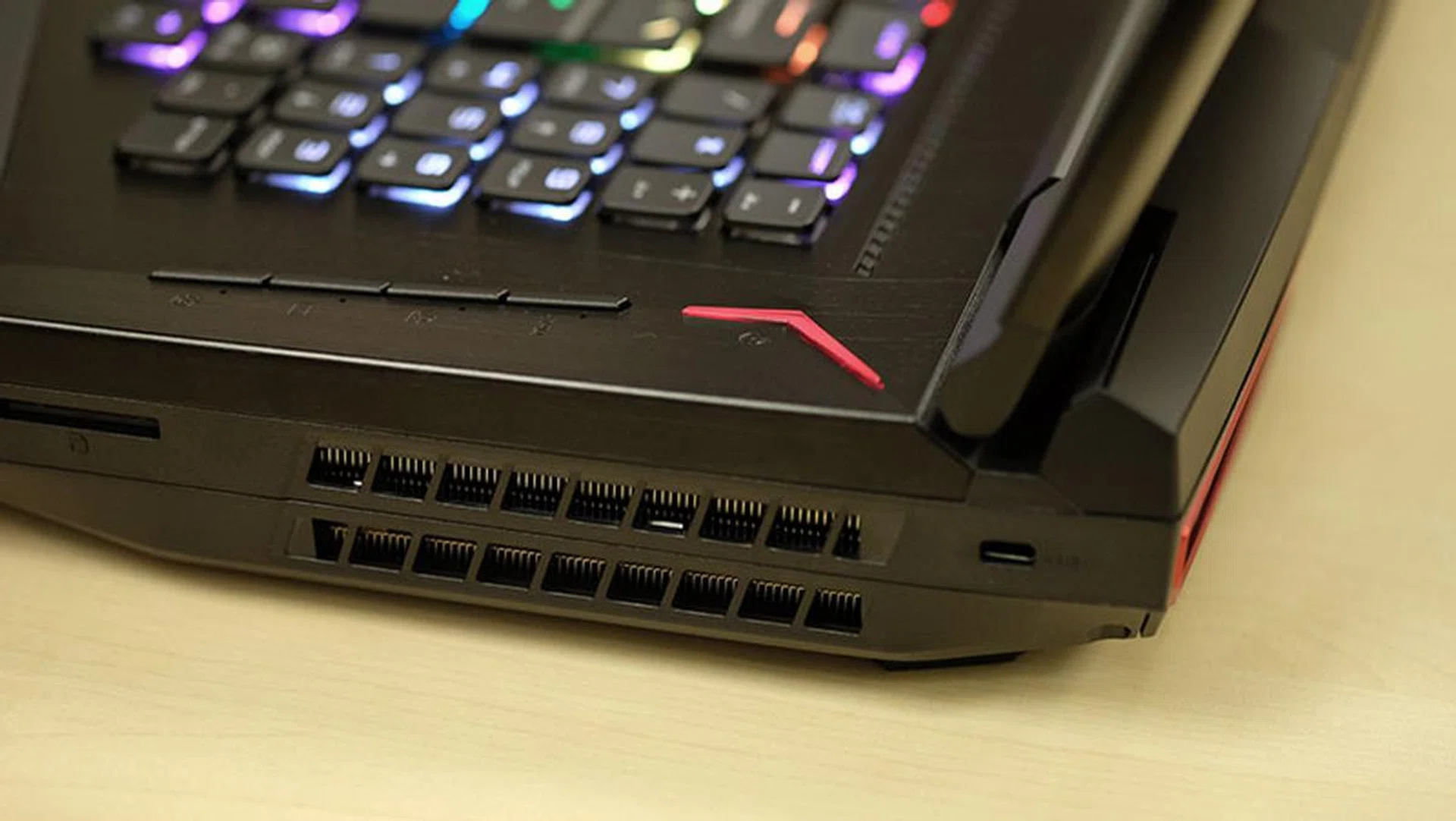
There's a vent just like this one on the other side as well.
If you still want additional cooling, you can also hit the Cooler Boost button at the side to further ramp up the fan speeds. In this mode, hot air actively gusts out of all four exhaust vents, which can be slightly disconcerting. However, it does work, and CPU and GPU temperatures dropped by around 10°C.
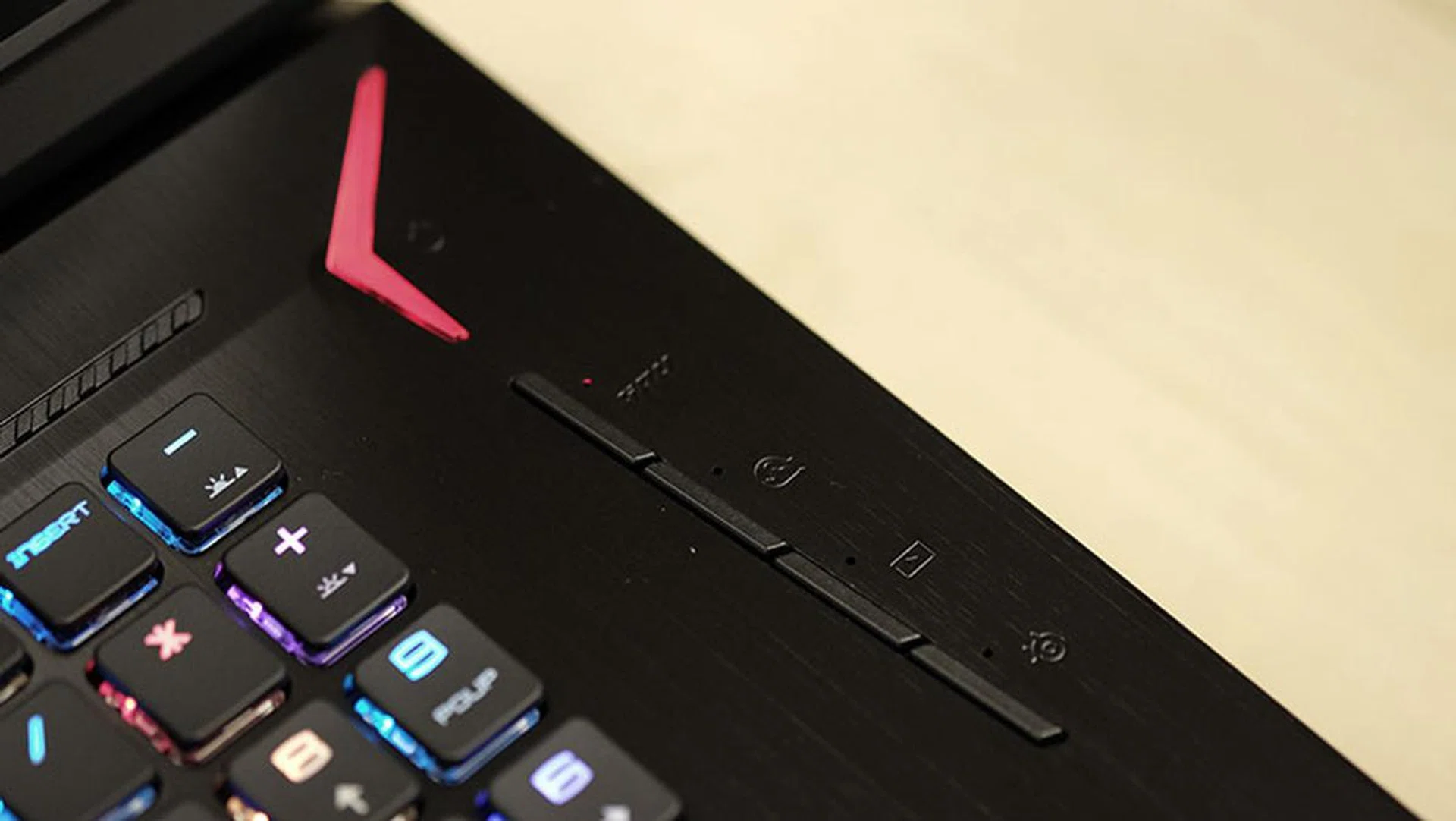
The Cooler Boost button is located on the right, alongside dedicated buttons to change the backlight pattern and launch XSplit Gamecaster.
Unfortunately, the fans are also super noisy. And I mean really, really noisy, even without the Cooler Boost function. This isn’t just some annoying background hum, and the loud, whooshing air noises make it sound like there’s a hurricane going on somewhere.
Make no mistake, if you use voice communication software like Discord to talk to your friends while gaming, they’re going to hear it, and they’re not going to like it. Furthermore, if you’re used to just leaving your microphone open, you might have no choice but to switch to push-to-talk.
Speedy storage and plenty of ports
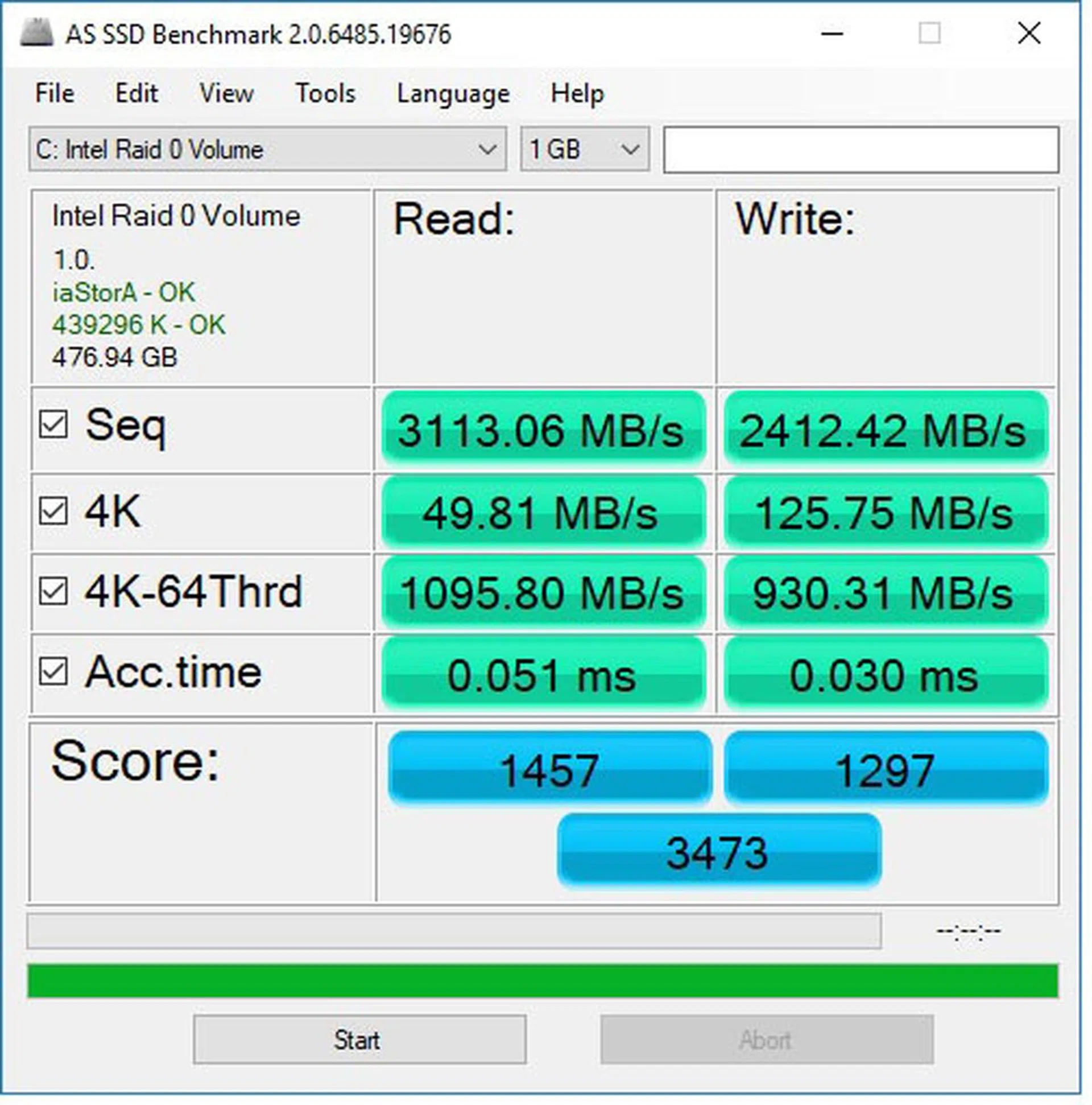
Further tying in with the narrative of extravagance is the dual 256GB PCIe M.2 SSDs in RAID 0. This configuration vastly improves sequential read and write speeds, so you can transfer large files very quickly. RAID 0 doesn’t offer any redundancy at all, so what you’re getting is just improved performance.
That said, performance is quite impressive. In addition to blazing fast sequential read and write speeds, you get good 4K read speeds, although write speeds are slightly underwhelming. On top of that, it acquited itself well in the more intensive 4k, 64 queue depth workload, with read speeds exceeding 1,000MB/s and write speeds approaching that.
Here’s a snapshot of the result from the AS SSD benchmark to give you an idea of the performance:
The 512GB of total storage space is adequate for several good-sized games, but if that’s still not enough, there’s the 1TB HDD for you to fall back on.
The Titan Pro also supports output to three external 4K displays, in case you want to just use the machine as an actual desktop replacement. It does this using a combination of the three HDMI, Mini DisplayPort 1.2, and Thunderbolt 3 outputs, but you can also continue to use the laptop’s own screen at the same time.
On top of that, there are a total of five USB 3.1 (Gen 1) Type-A ports and an SD card reader, so that pretty much covers most of the bases.
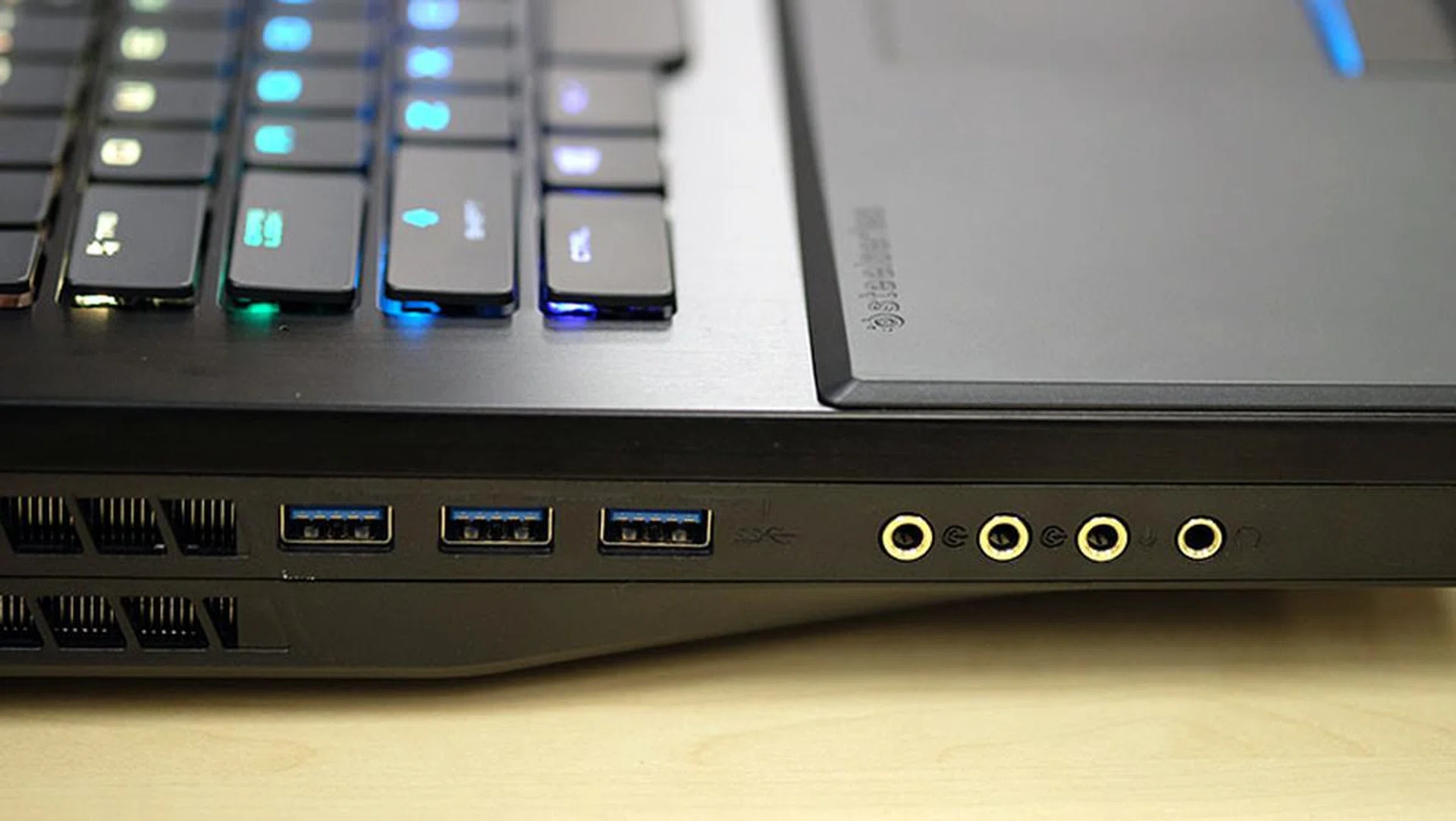
Three of the USB ports are located on the left.
Test Setup and Performance
Next, we put the GT75VR 7RF Titan Pro through our standard suite of gaming, temperature, and battery life benchmarks to assess its performance.
We used the Aftershock PRIME-15 as our main comparison, but we’ve also included figures from other non-Max-Q GeForce GTX 1070 notebooks to flesh out the results where available. Specifically, we picked the Aorus X5 v6 and Alienware 15, equipped with a Core i7-6820HK and Core i7-6700HQ respectively, to help with the comparisons. These are 6th-generation processors, but because most games are GPU-bound, their performance can be taken as an approximation of what you can expect from their current 7th-generation counterparts.
In addition, while these three notebooks aren't quite in the same class as the MSI laptop, they're the most relevant comparisons we have for now, and they'll also help give a rough idea of how much more performance you'll get by ponying up for a true desktop replacement.
Here’s a list of the benchmarks used:
- PCMark 10
- 3DMark (2013)
- VRMark
- Ashes of the Singularity
- Deus Ex: Mankind Divided
- Tom Clancy’s The Division
[hwzcompare]
[products=618770,614728,588330,588327]
[width=200]
[caption=Test notebooks compared]
[showprices=1]
[/hwzcompare]
PCMark 10 Extended
PCMark 10 Extended assesses the performance of systems in a variety of workloads, including basic computing tasks, productivity applications, digital content creation, and gaming. Compared to PCMark 8, it also adds in new test metrics, such as app startup times, which quantifies how long it takes to launch a variety of real-world apps, and a rendering and visualization workload to simulate professional graphics and engineering applications. In addition, existing workloads have been updated to reflect modern usage
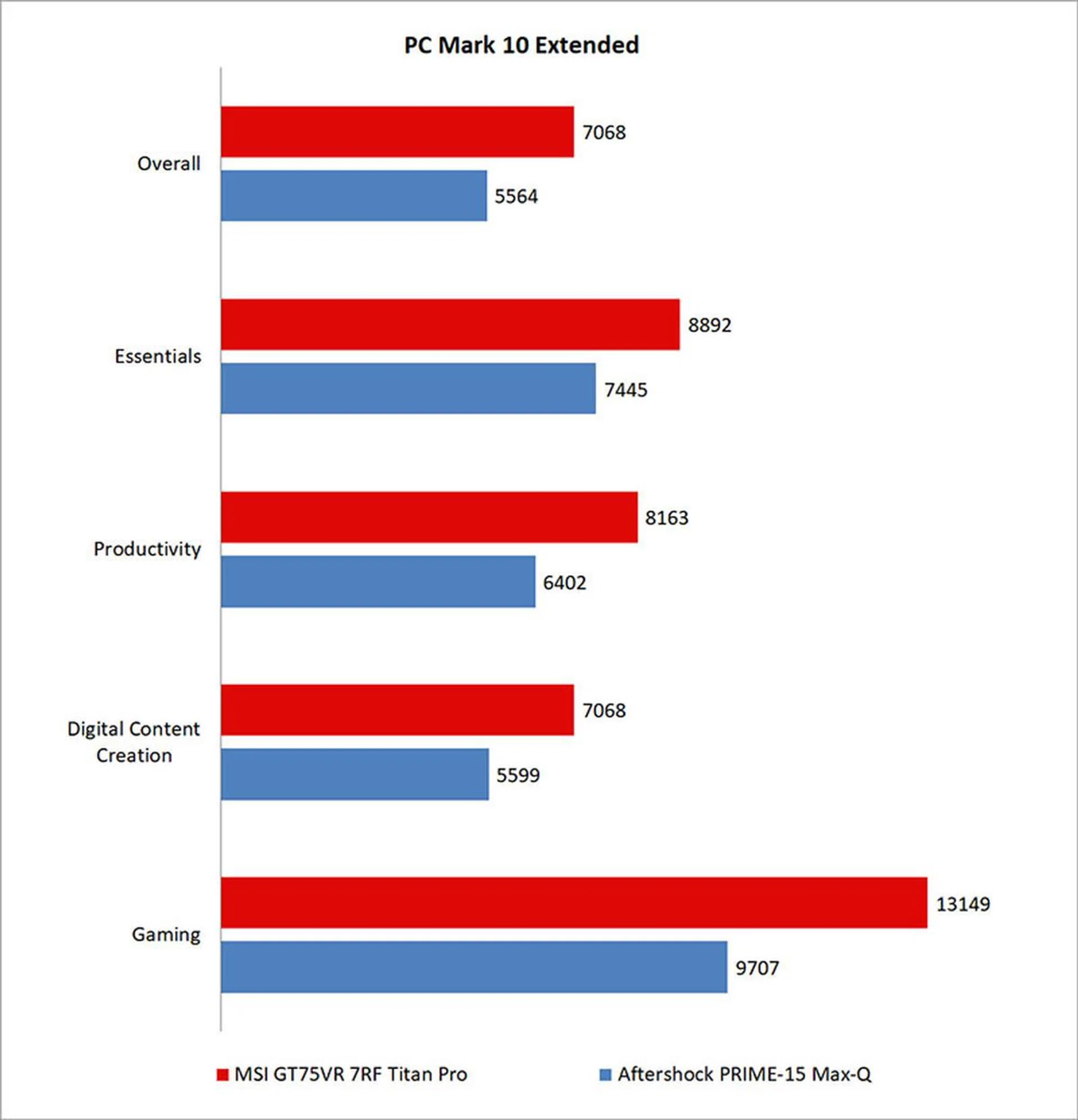
We’ve also added in a graph to reflect the low-level breakdown of scores to give an idea of performance in individual workloads.
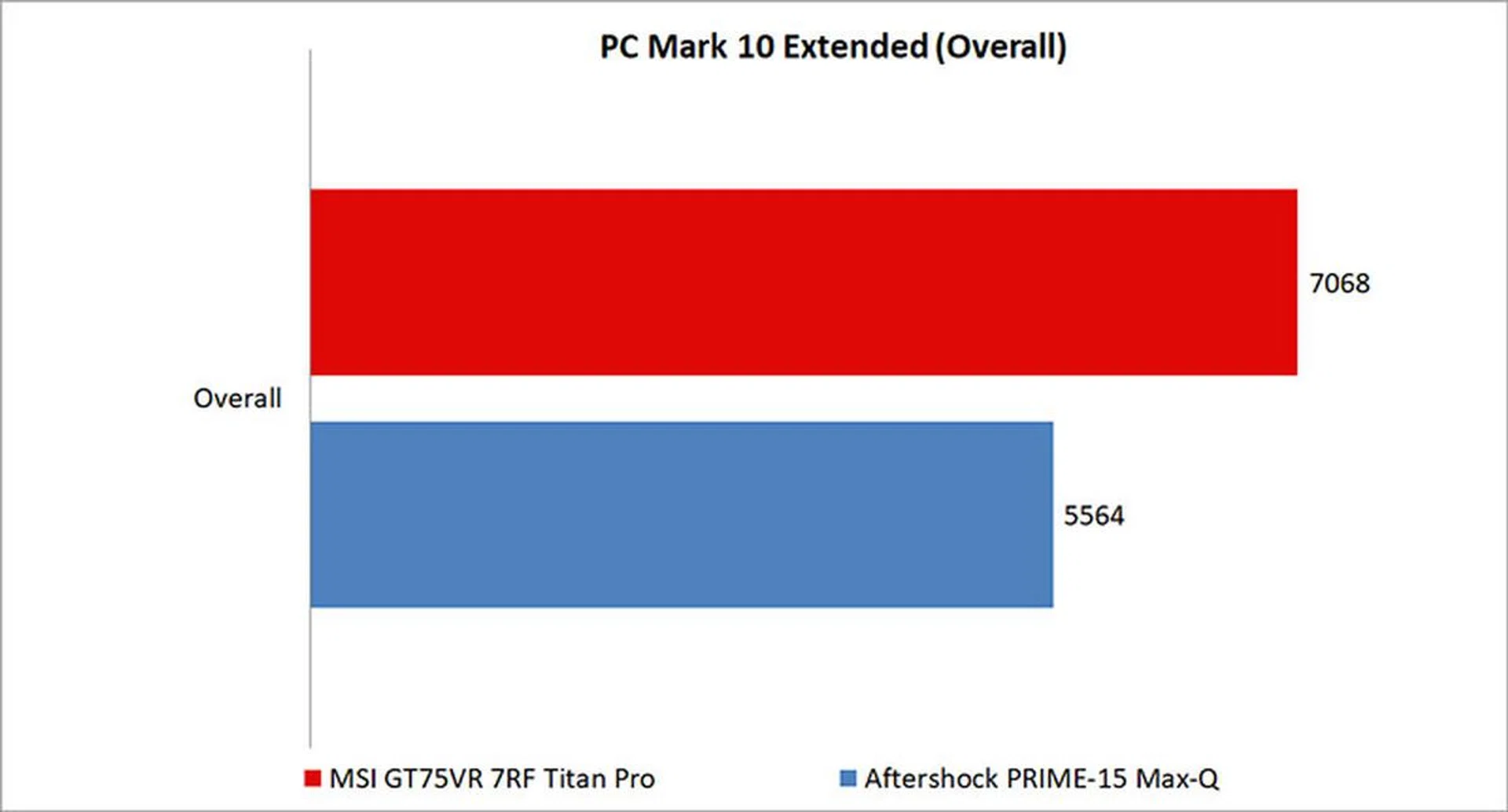
Compared to the Aftershock PRIME-15, the more powerful processor and graphics card enabled the MSI laptop to power ahead to a 27 per cent overall advantage. Some of its most commanding advantages came in the Gaming benchmark, where the GeForce GTX 1080 was able to flex its muscles.
3DMark (2013)
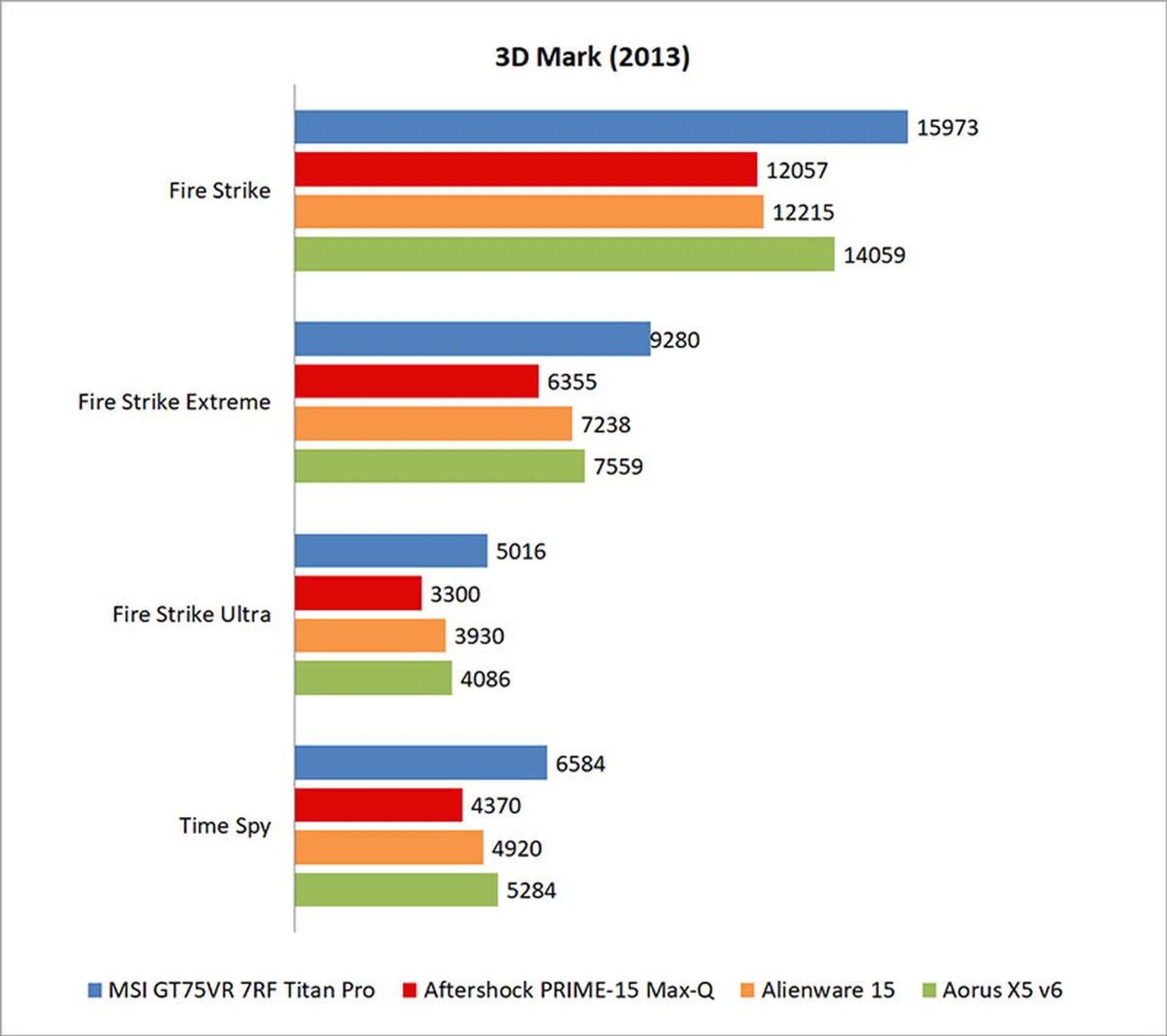
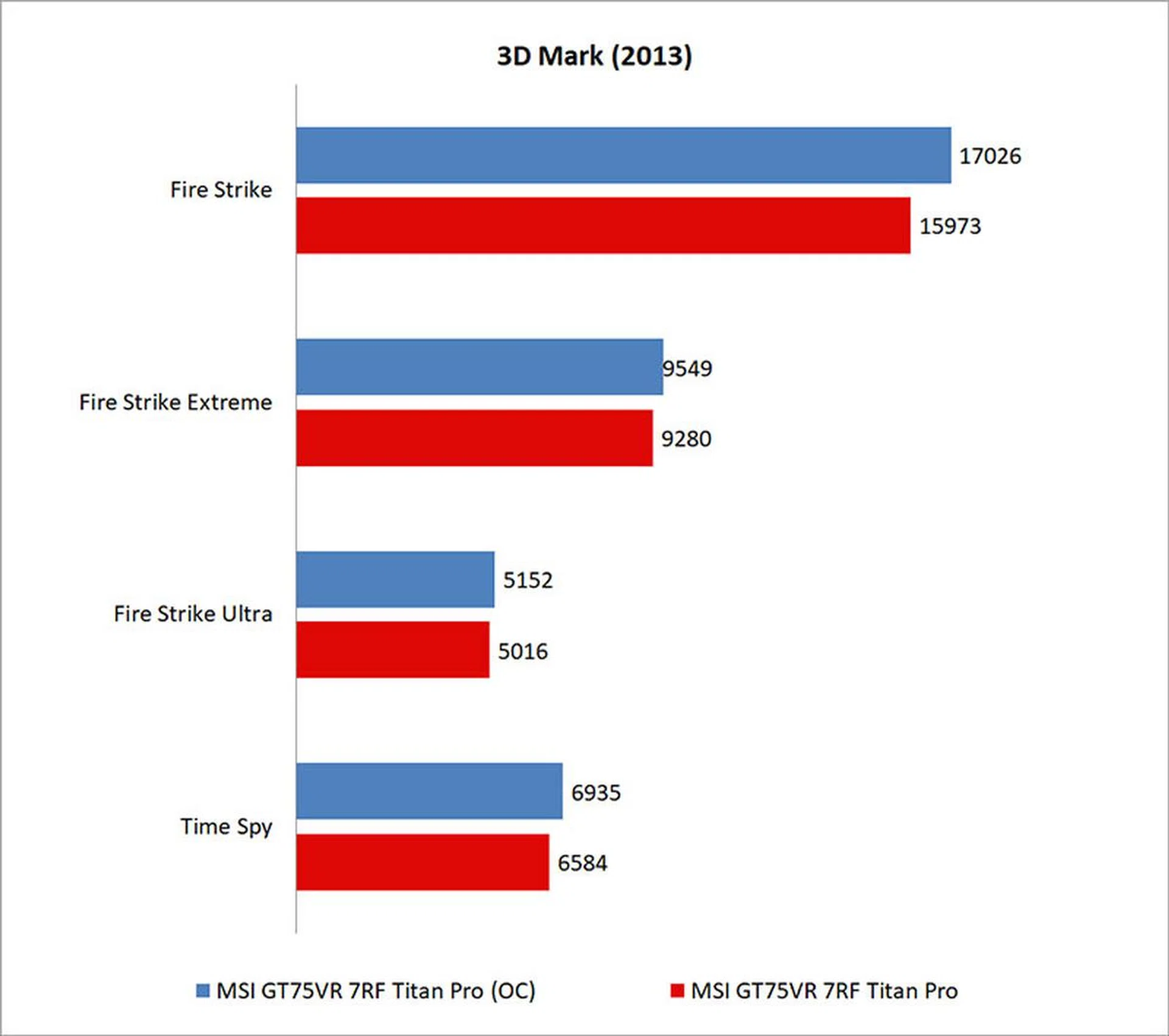
The synthetic 3DMark benchmark tests graphics and computational performance at different resolutions, starting at 1080p and going all the way up to 4K. A series of two graphics test, one physics test, and then a combined test stresses your hardware in turn to assess its performance. And because of the physics test that keeps the GPU load low while running gameplay physics simulations on the CPU, all three 3DMark Fire Strike tests scores also include an element of CPU performance.
We’ve results from more notebooks here, and the closest comparison would probably be with the Aorus X5 v6, which sports last generation’s overclockable mobile processor and a GeForce GTX 1070.
Still, MSI’s Titan Pro was just over 13 per cent quicker than the Aorus in 3DMark Fire Strike, and it bounded to a roughly 30 per cent lead over the Aftershock and Alienware laptops.
The GeForce GTX 1080 in the MSI notebook continues to serve up spades of performance, and it was a good 22 per cent faster than the Aorus laptop even in the more graphically intensive Fire Strike Ultra test.
VRMark
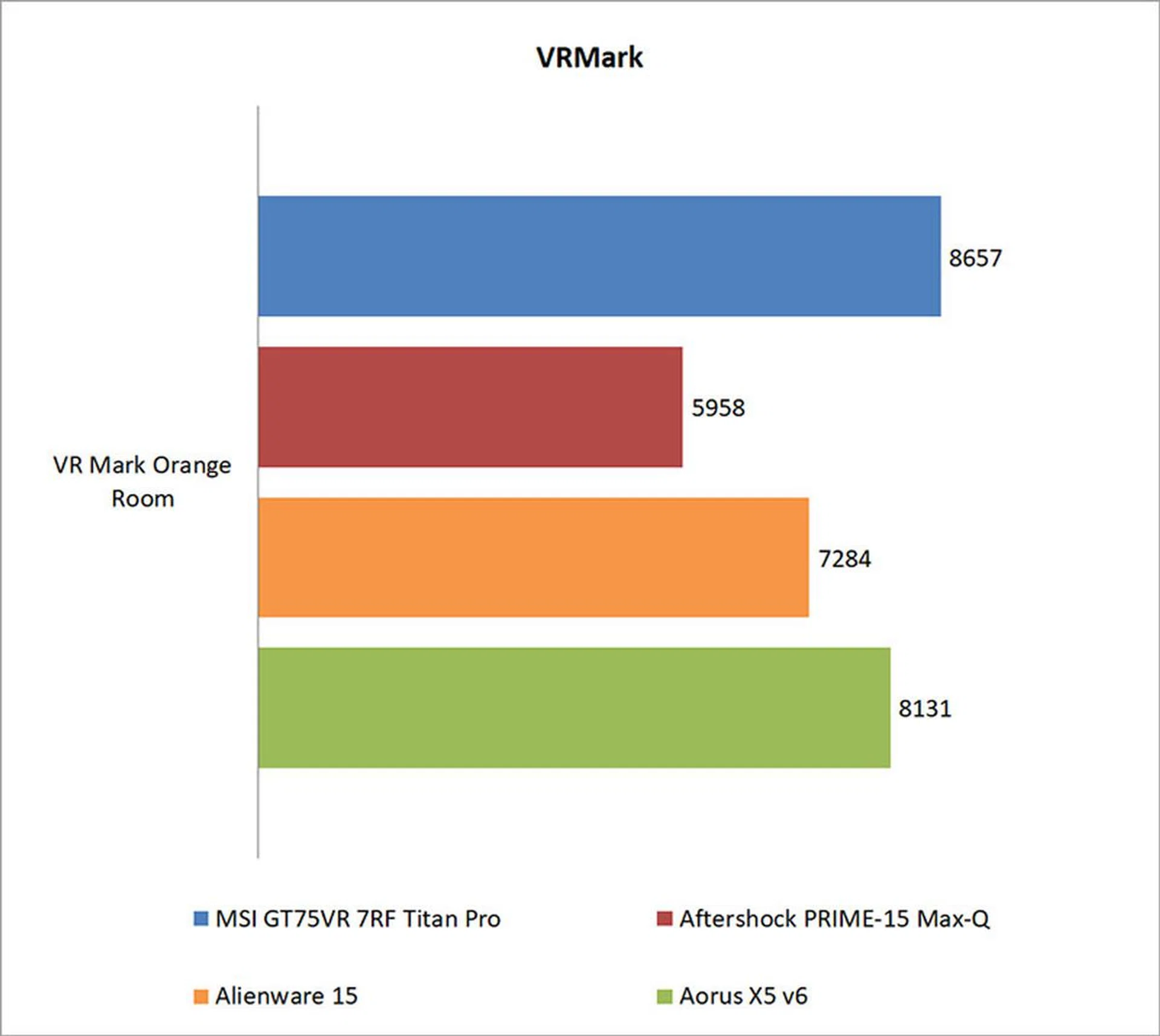
Futuremark’s new VRMark benchmark is designed to assess a PC’s ability to handle high-performance headsets like the HTC Vive and Oculus Rift. If a PC passes the Orange Room test, it is ready for the latter two systems.
All the systems here passed with flying colors, although the MSI GT75VR 7RF Titan Pro was naturally ahead of the pack. However, its lead was more modest, with approximately a 6 per cent lead over the Aorus X5 v6.
Ashes of the Singularity
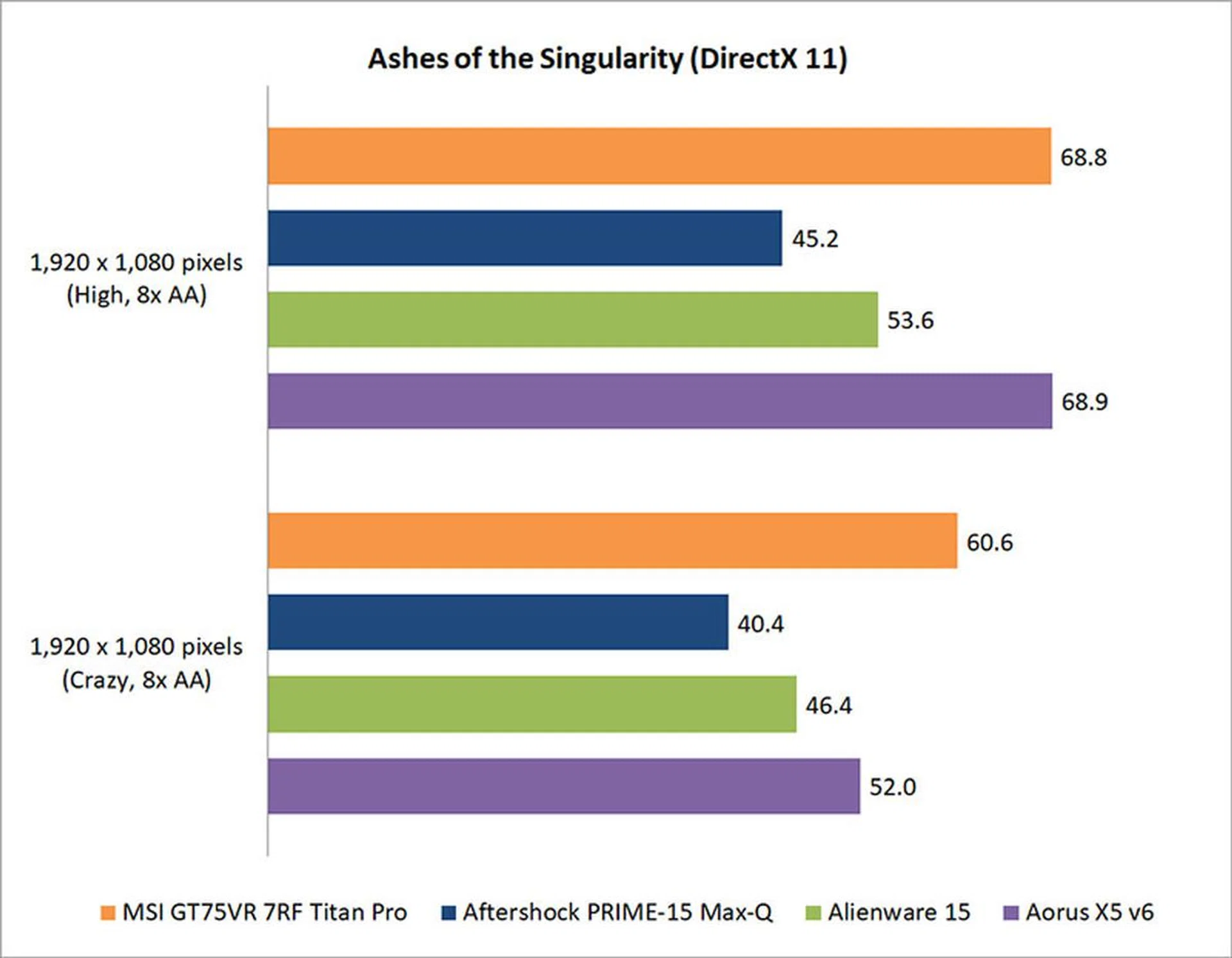
Ashes of the Singularity is one of the few CPU-bound games out there, especially at the lower resolutions and graphics settings.
This is evident when looking at the benchmarks, where both the MSI and Aorus laptops turned out nearly identical performance, despite being equipped with a GeForce GTX 1080 and 1070 respectively.
However, turning the settings up to Crazy shifts the onus onto the GPU, and the MSI trotted to a 16 per cent lead over the Aorus notebook. It was also significantly faster – just over 30 per cent – than the Alienware 15, so the GeForce GTX 1080 and Core i7-7820HK confer quite a large advantage here.
Deus Ex: Mankind Divided
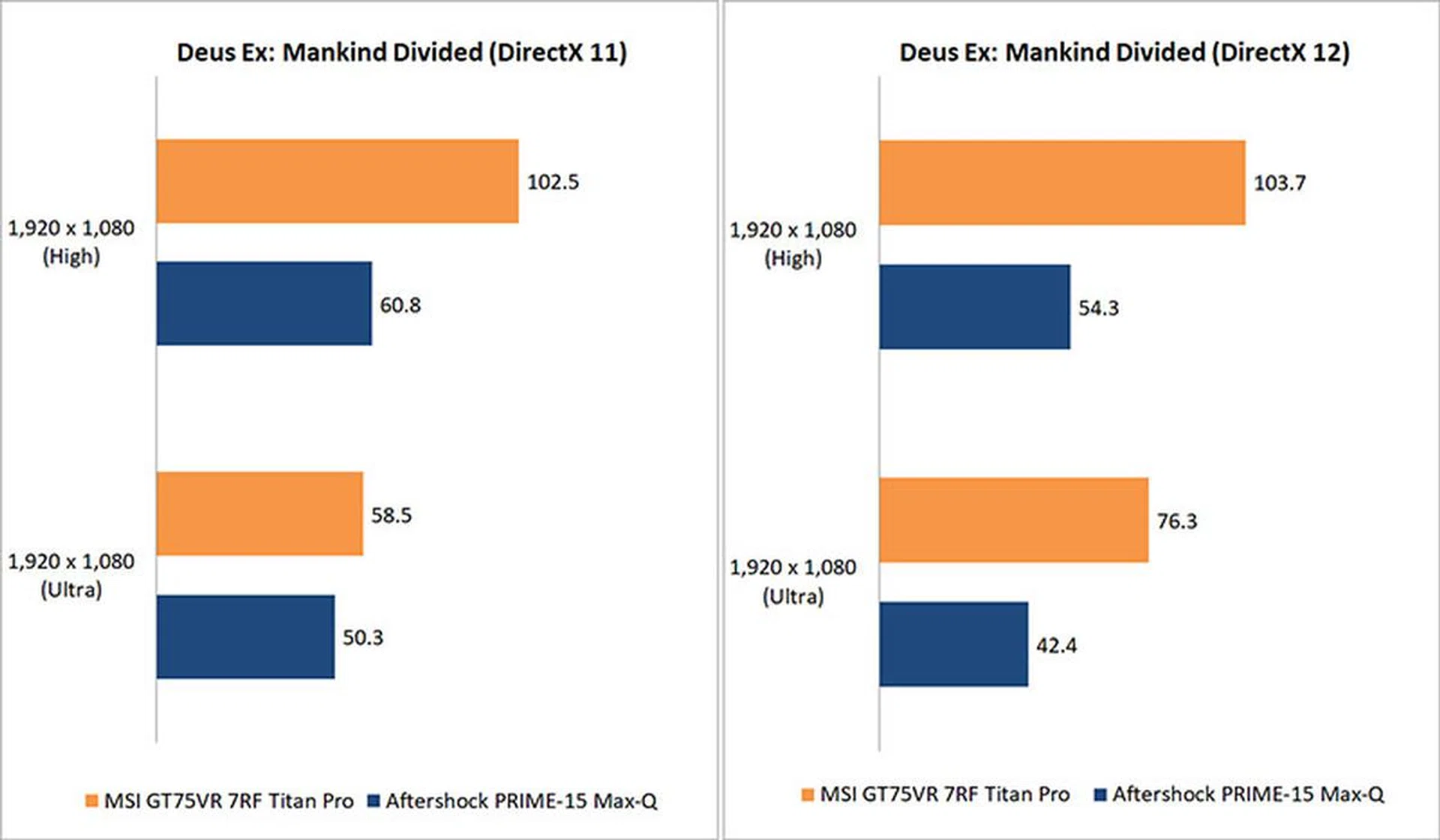
On the other hand, Mankind Divided is one of the most demanding games out there. It pushes the GPU hard, and utilizes a range of advanced graphical effects such as dynamic and volumetric lighting and cloth physics. Unfortunately, we don’t have figures from the Alienware and Aorus laptops, so there’s just have the Aftershock PRIME-15 for comparisons here.
At High settings and DirectX 11 mode, the Titan Pro was a whopping 68 per cent quicker. But that commanding lead aside, what’s interesting is that the MSI laptop actually benefited from switching to DirectX 12, whereas the Aftershock suffered. In fact, there was a 30 per cent boost at Ultra settings, which is quite a sizeable gain.
A low-level API like DirectX 12 works by reducing CPU overheads and enabling the CPU to process more draw calls per second, and it looks like the Titan Pro’s Core i7-7820HK was able to take advantage of this more effectively.
Tom Clancy’s The Division
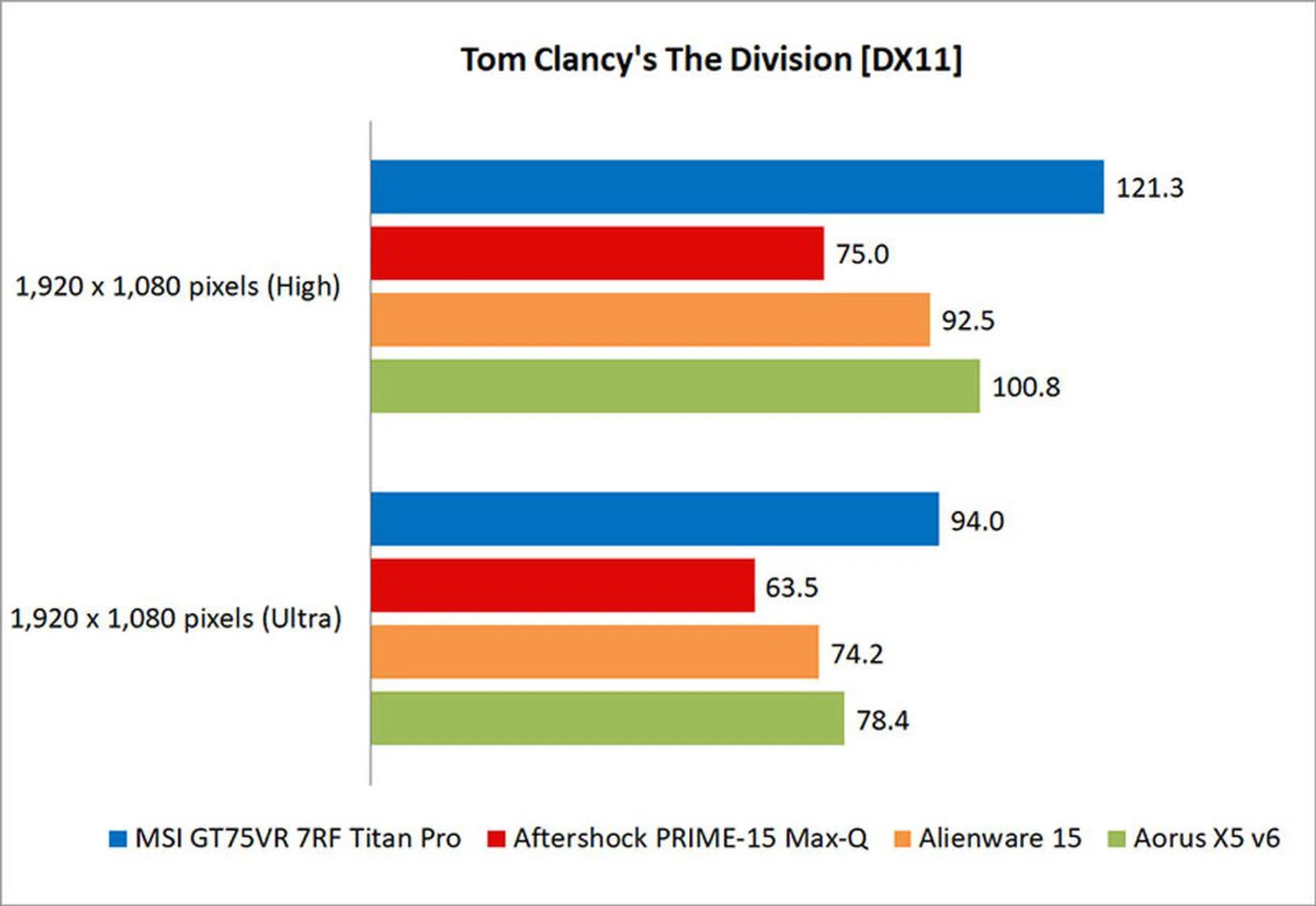
Unsurprisingly, the MSI Titan Pro again took the lead in The Division. Things can get quite hard on the GPU at Ultra settings, but the GeForce GTX 1080 handles it with ease, posting a nearly 20 per cent lead over the Aorus X5 v6.
Temperature
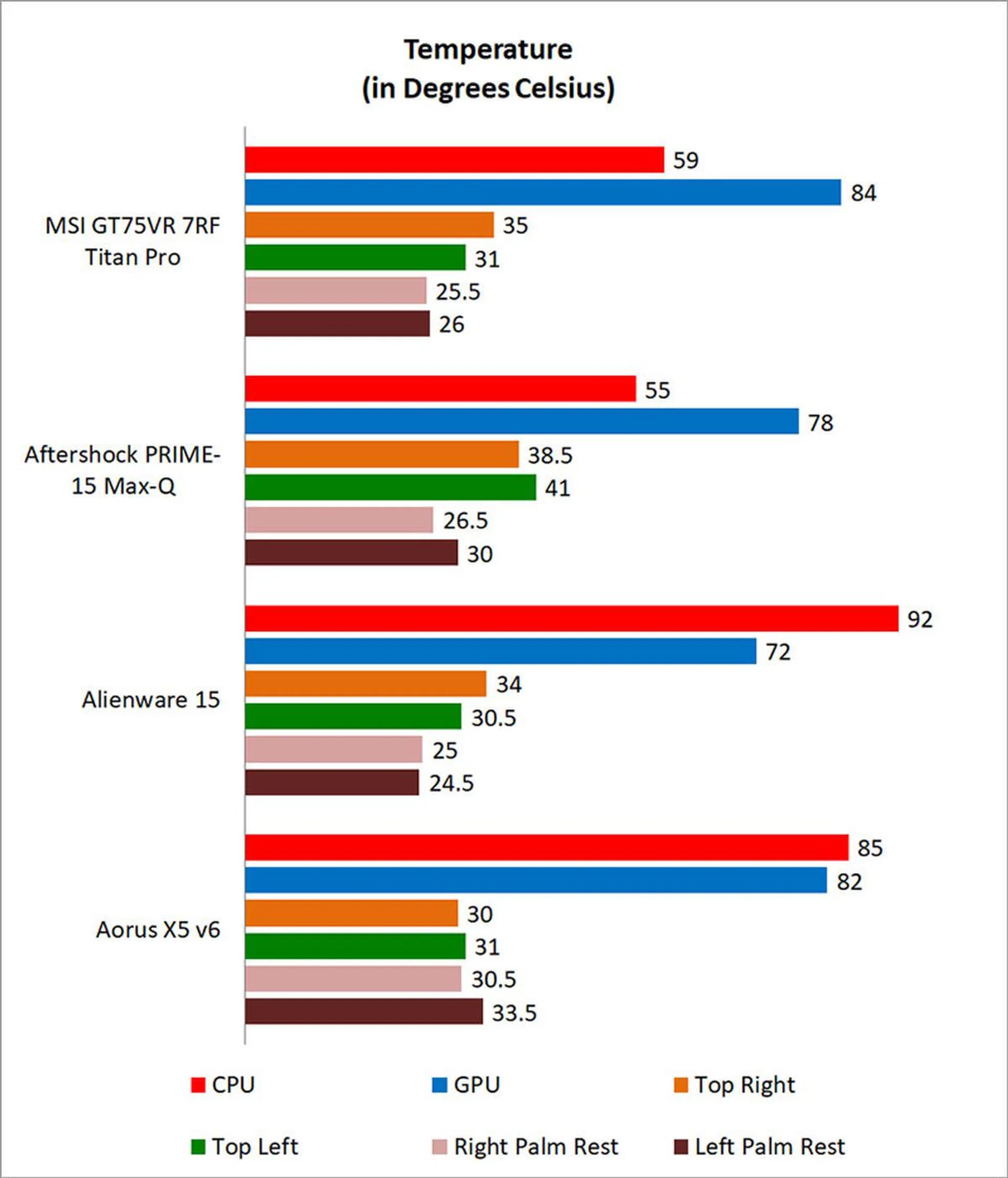
For our temperature tests, we ran 3DMark’s Fire Strike Extreme stress test for 40 loops and then recorded the highest sustained CPU and GPU temperatures. We also used an infrared thermometer to measure the temperatures at the four corners of the notebook to get an idea of how hot it’ll feel when in use.
Three out of the 10 heatpipes are dedicated to the CPU, and they do quite a good job of keeping it cool. However, the GPU runs much hotter, but it’s not out of line with what we’re used to seeing.
The good thing is that the left and right palm rests remained quite cool throughout, so the laptop shouldn’t become uncomfortably hot. That’s important over the course of long gaming sessions, but you really shouldn’t expect anything less from a notebook that is this thick and has plenty of room to implement robust cooling.
Battery life and power consumption
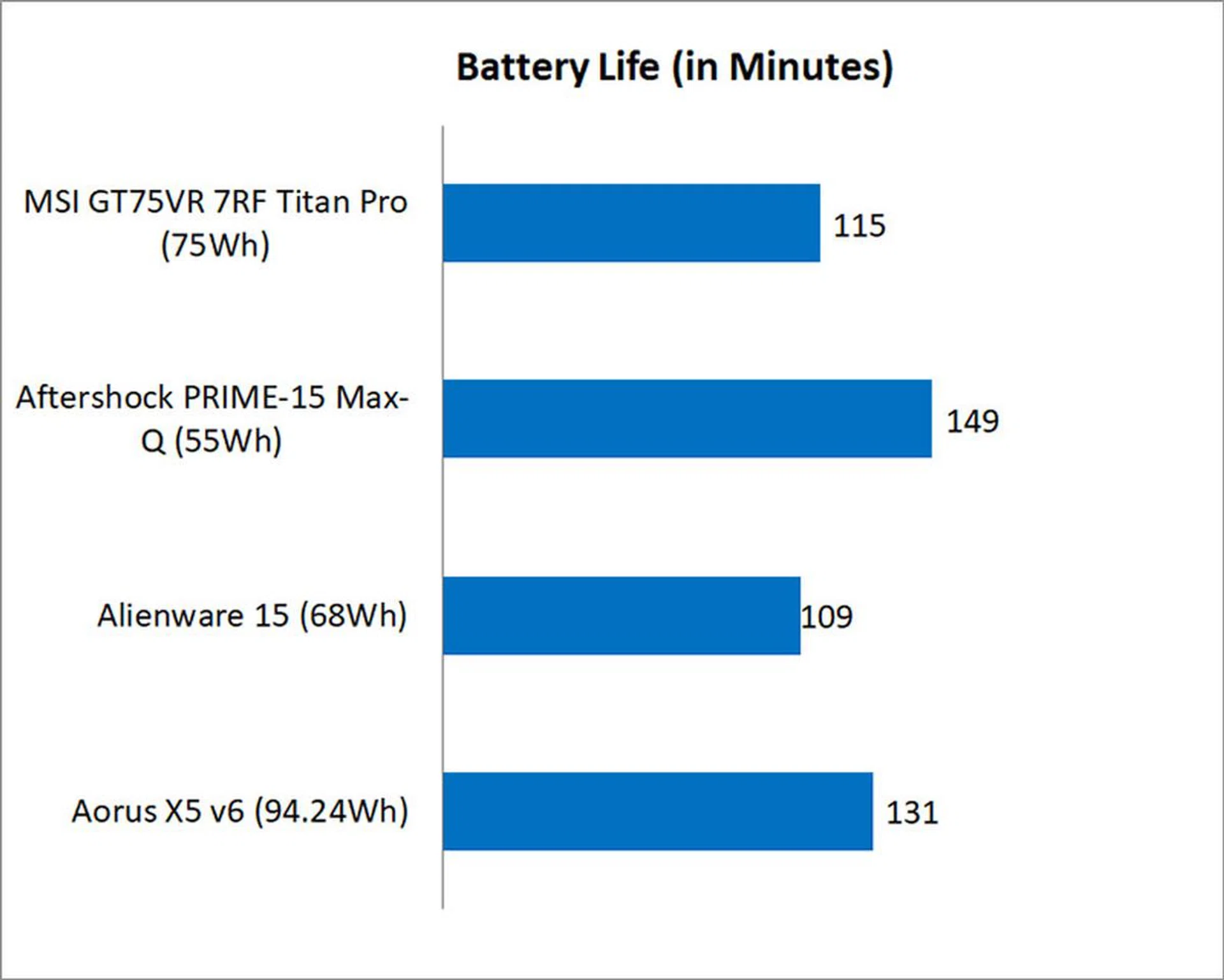
To assess the battery life, we relied on the standardized PCMark 8 Home benchmark.
MSI equipped the Titan Pro with a mid-sized 75Wh battery, and it lasted for just under two hours, which isn’t a great result. That said, it seems unreasonable to expect more from a notebook of this class, and its result wasn’t that much worse than the Aorus X5 v6, which although it runs on last generation’s processor, has a larger battery pack.
Nevertheless, it makes little sense to run the MSI GT75VR 7RF Titan Pro away from a power outlet. This laptop is meant to be tethered to the wall outlet at all times, and it is in no way a portable work machine.
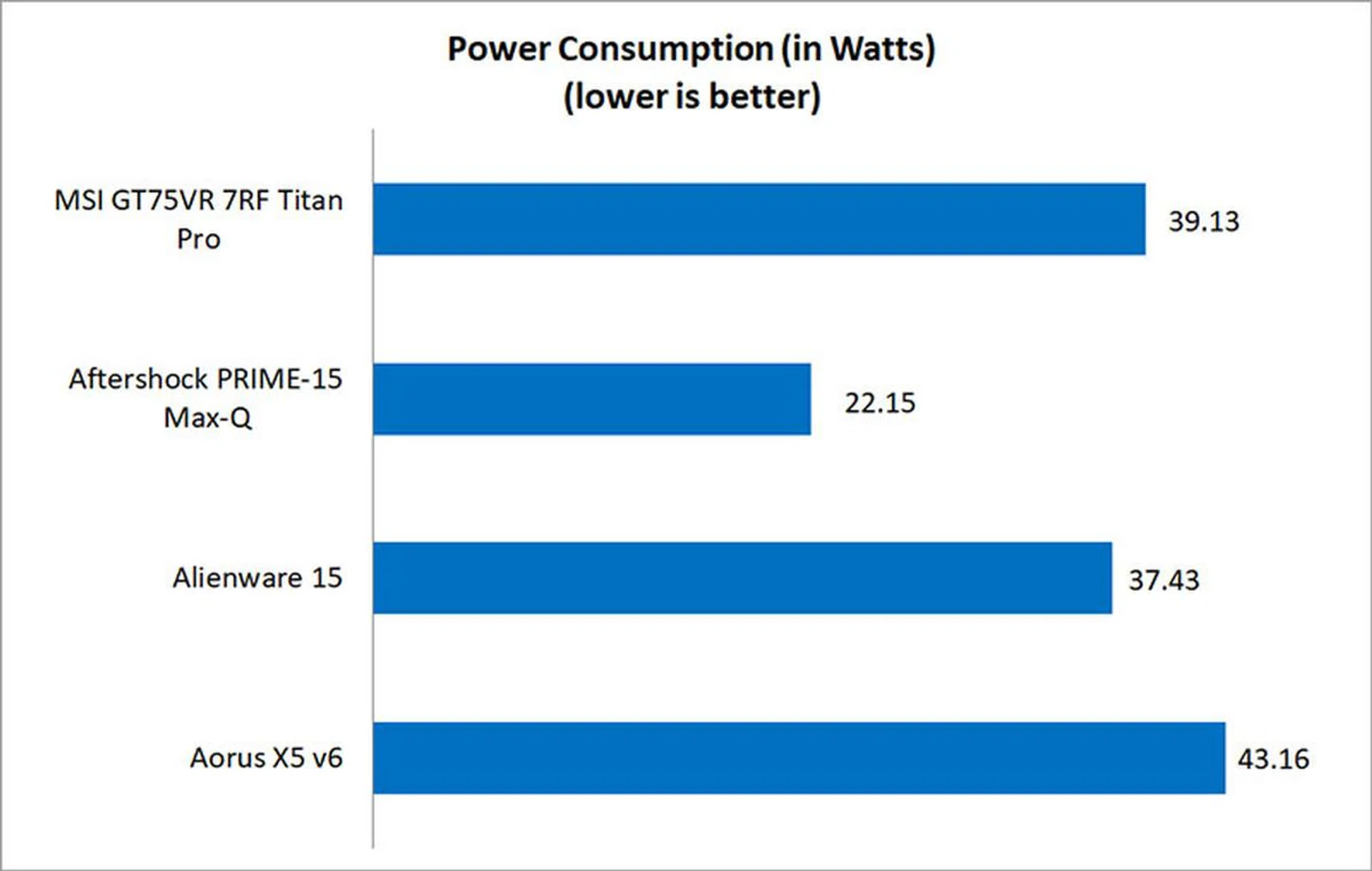
The power consumption figures say as much, and the Titan Pro guzzles quite a bit of power, although to its credit it’s still slightly more power efficient than the Aorus X5 v6.
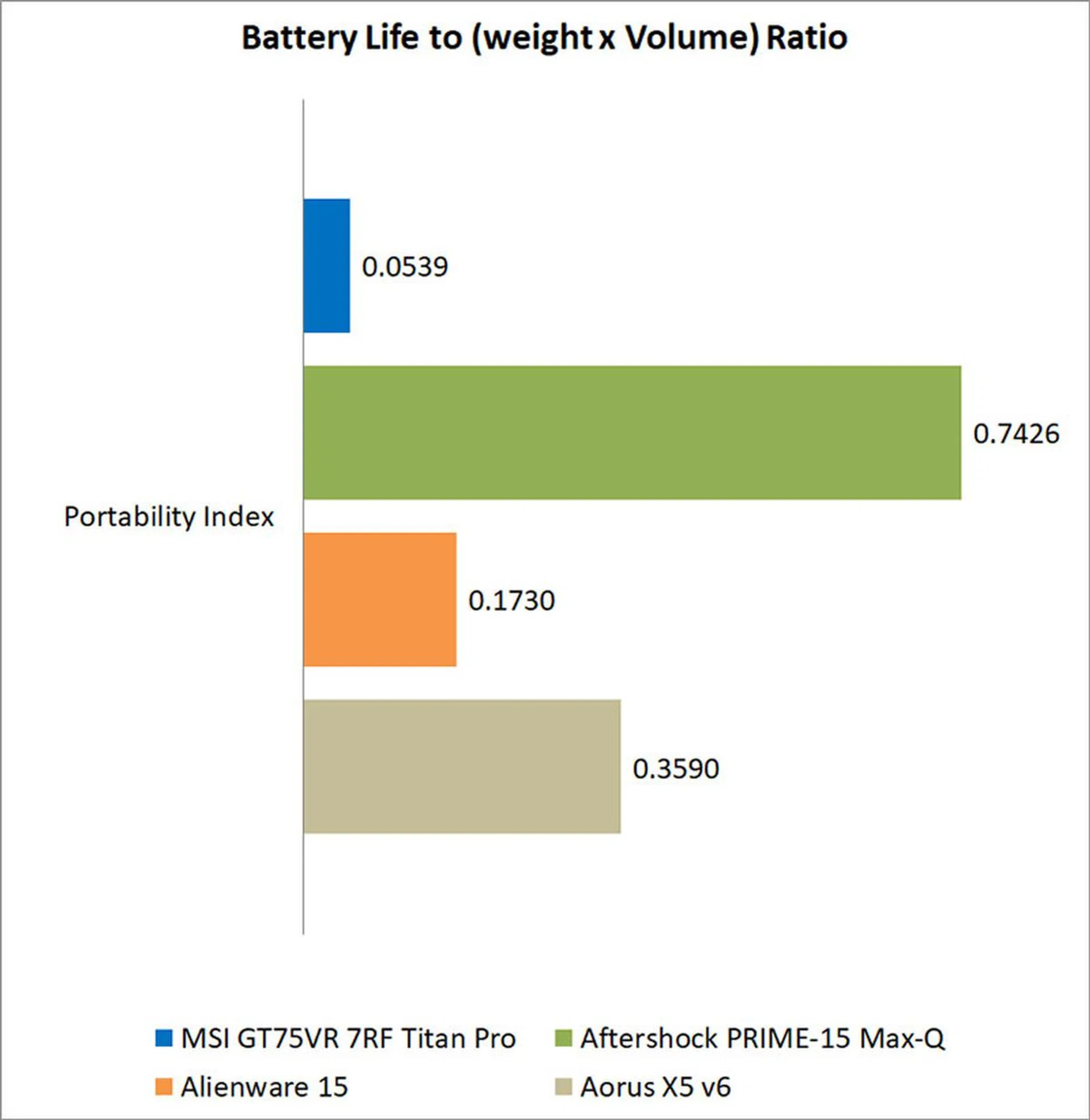
Portability index
Our portability index is an objective measure of how portable a notebook is, taking into account factors like size, weight, and battery life.
It’s probably no surprise that the MSI GT75VR 7RF Titan Pro did so poorly here, ranking last in a category of products that isn’t exactly known for being portable. It’s weight and dimensions literally drag it down from the start, and even if it somehow had great battery life, we can’t see anyone toting this around in a backpack. While the result isn't totally unexpected, it actually fared lower than most other DTR-class notebooks we've tested in the past (refer to the Portability Ratio reported across various notebooks in this older review).
Overclocking
The Intel Core i7-7820HK on the Titan Pro can be overclocked for some extra performance. MSI’s Dragon Center utility serves up some controls for overclocking both the CPU and GPU, but they’re rather rudimentary, so Intel’s Extreme Tuning Utility is ultimately a better choice.
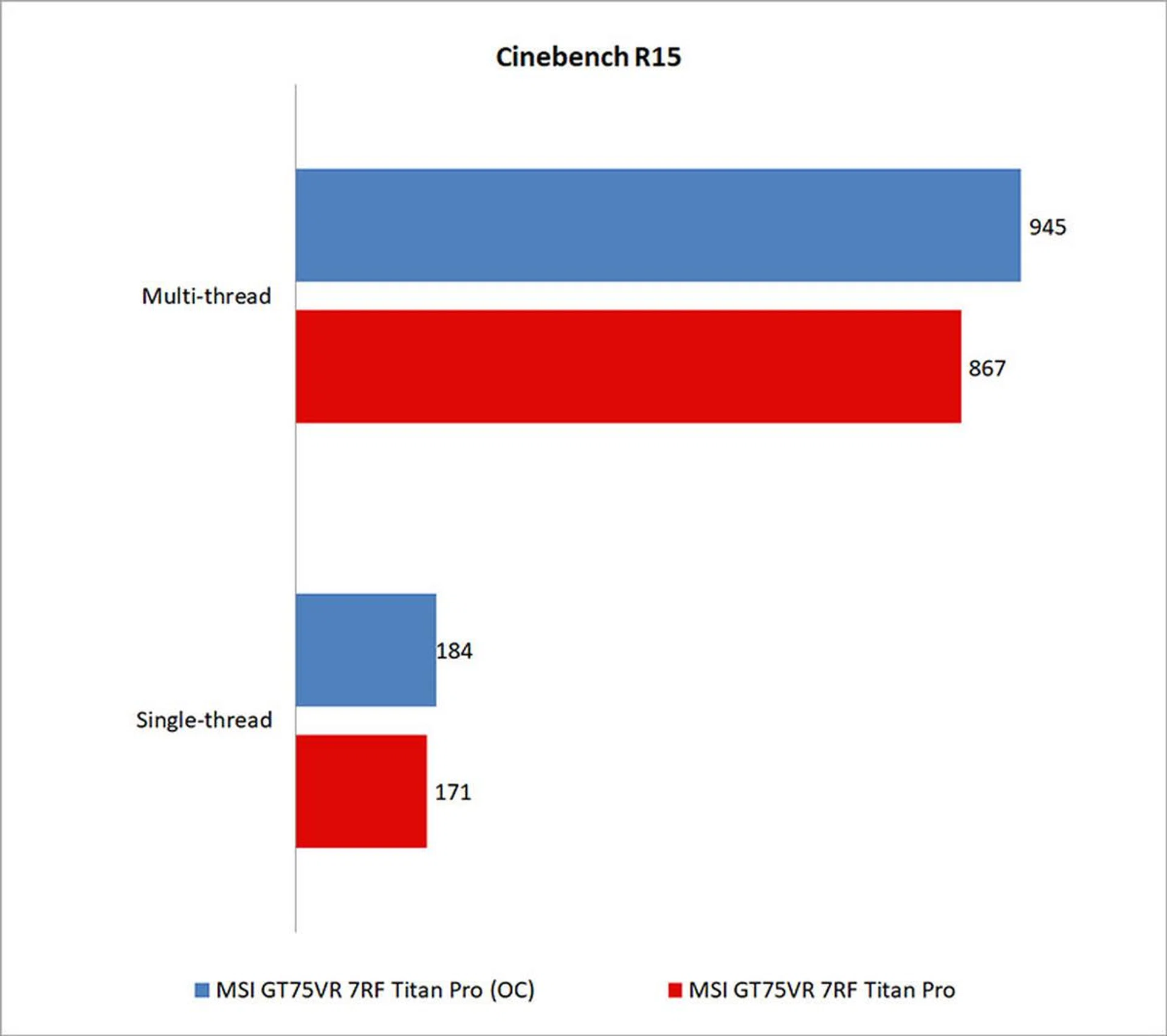
The CPU managed a top speed of 4.4GHz, which netted approximately a 9 per cent increase in Cinebench’s multi-threaded benchmark. This was done by increasing the CPU multiplier value in the Basic Tuning tab to 44, up from the default of 35.
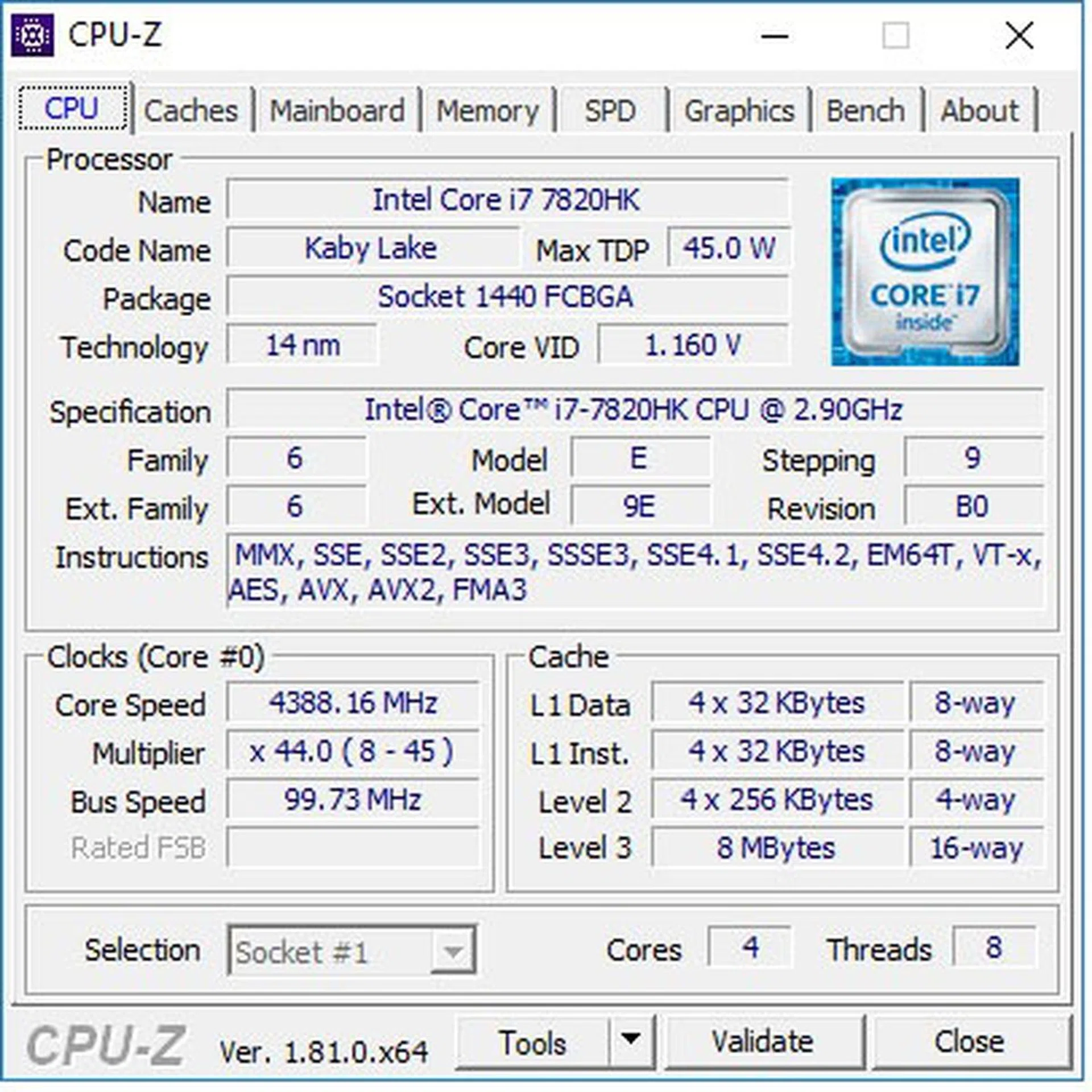
Here's a CPU-Z snapshot of the overclocked processor.
However, when all the cores are stressed, as in Cinebench, the CPU package temperature can increase to a toasty 89°C, so it’s probably best not to run with too high an overclock. In fact, since the laptop’s stock performance is more than sufficient, and most games don’t benefit that much from higher CPU clock speeds, there doesn’t seem much need to overclock, unless you really enjoy tinkering around.
On the GPU front, the GeForce GTX 1080 in the Titan Pro comes with a 1,582MHz base clock and 1,771MHz boost clock, which amounts to a small factory overclock over the respective 1,556MHz and 1,733MHz reference clocks.
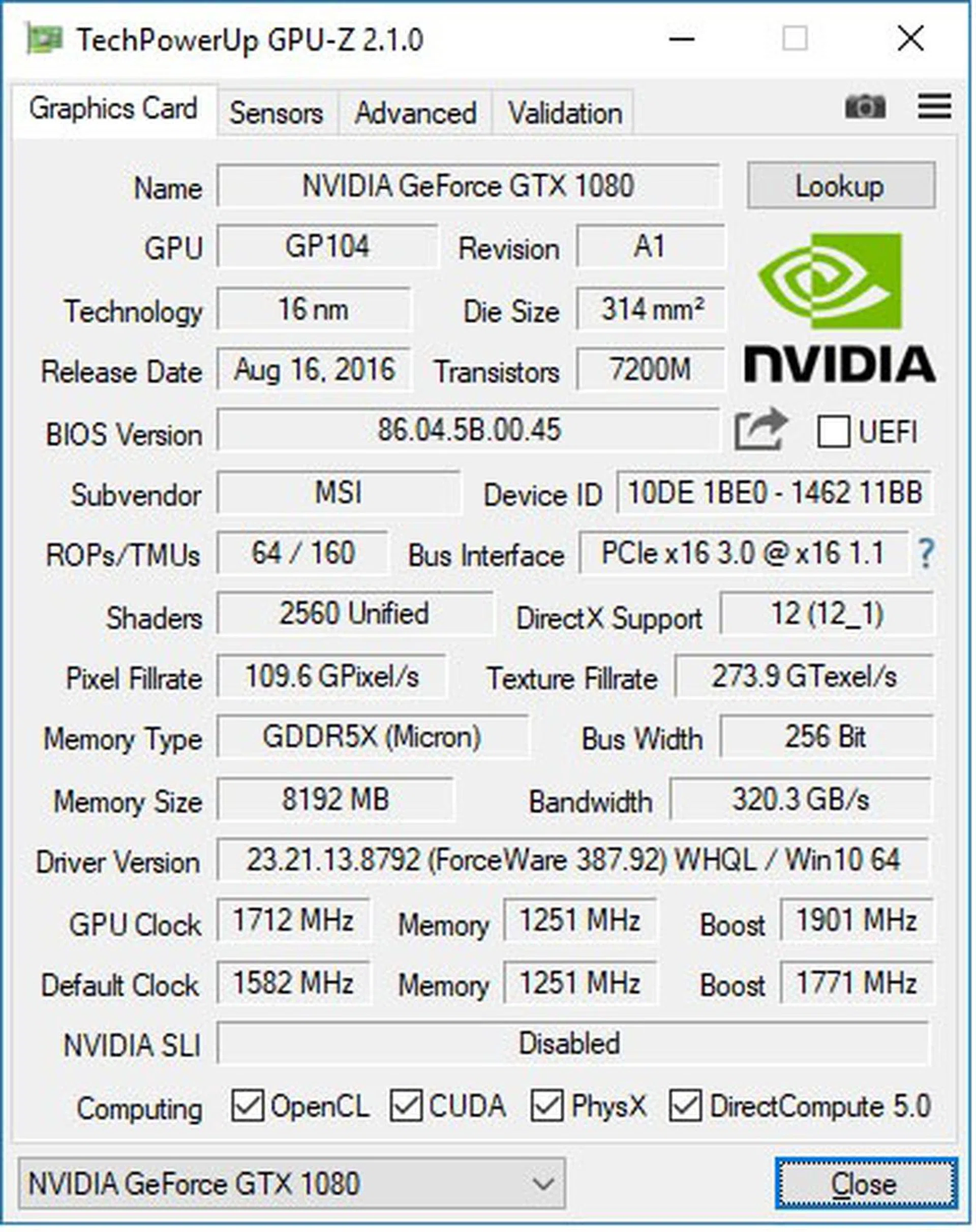
The GPU overclocked to a 1,712MHz base clock and 1,901MHz boost clock.
MSI’s Dragon Center utility worked well enough for overclocking the GPU, and it managed to take a decent 130MHz increase to the base clock to 1,712MHz. This resulted in just over a 6 per cent increase in 3DMark Fire Strike, when combined with the 4.4GHz CPU overclock.
The improvements were even smaller for the Fire Strike Extreme and Ultra benchmarks, to the tune of roughly 3 per cent. The Time Spy test showed a 5 per cent improvement, a small step up, perhaps because its more CPU intensive nature was better able to take advantage of the CPU overclock.
Overclocking is definitely a nice feature to have, but it feels more like a bonus add-on rather than a truly useful tool. Sure, you can tweak the settings to your heart’s content to squeeze out a bit more performance, but it just doesn’t feel that significant, especially with the limits of laptop cooling.
Gloriously impractical
The Titan Pro is a niche product for a small subset of users.
Today, you can pick and choose from quite a few laptops with NVIDIA’s Max-Q optimizations and a GeForce GTX 1080. There’s the ASUS ROG Zephyrus, Acer Predator Triton 700, and Aorus X5 MD, to name a handful, all of which are rather slim and light for the performance they offer.
For instance, they’re all around 20mm thick, give or take a couple of millimeters, and weigh around 2.2kg to 2.5kg.
Against this backdrop, it seems like there’s no excuse for MSI to continue to make a laptop that measures a good 58mm at its thickest point. It also weighs a backbreaking 4.565kg, nearly double some of the other GeForce GTX 1080 Max-Q laptops.
To be sure, this non-Max-Q design is more powerful than its Max-Q counterparts. There’s been no need for power optimizations, and MSI designed it with maximum performance in mind.
That’s an understandable impulse, and there’s probably a very specific niche of gamers that it’ll appeal to. Some folks don’t care for any sort of balance between power, efficiency, and performance.
They just want the raw power that comes with a gleefully over-the-top design, and the MSI GT75VR 7RF Titan Pro serves that up in spades.
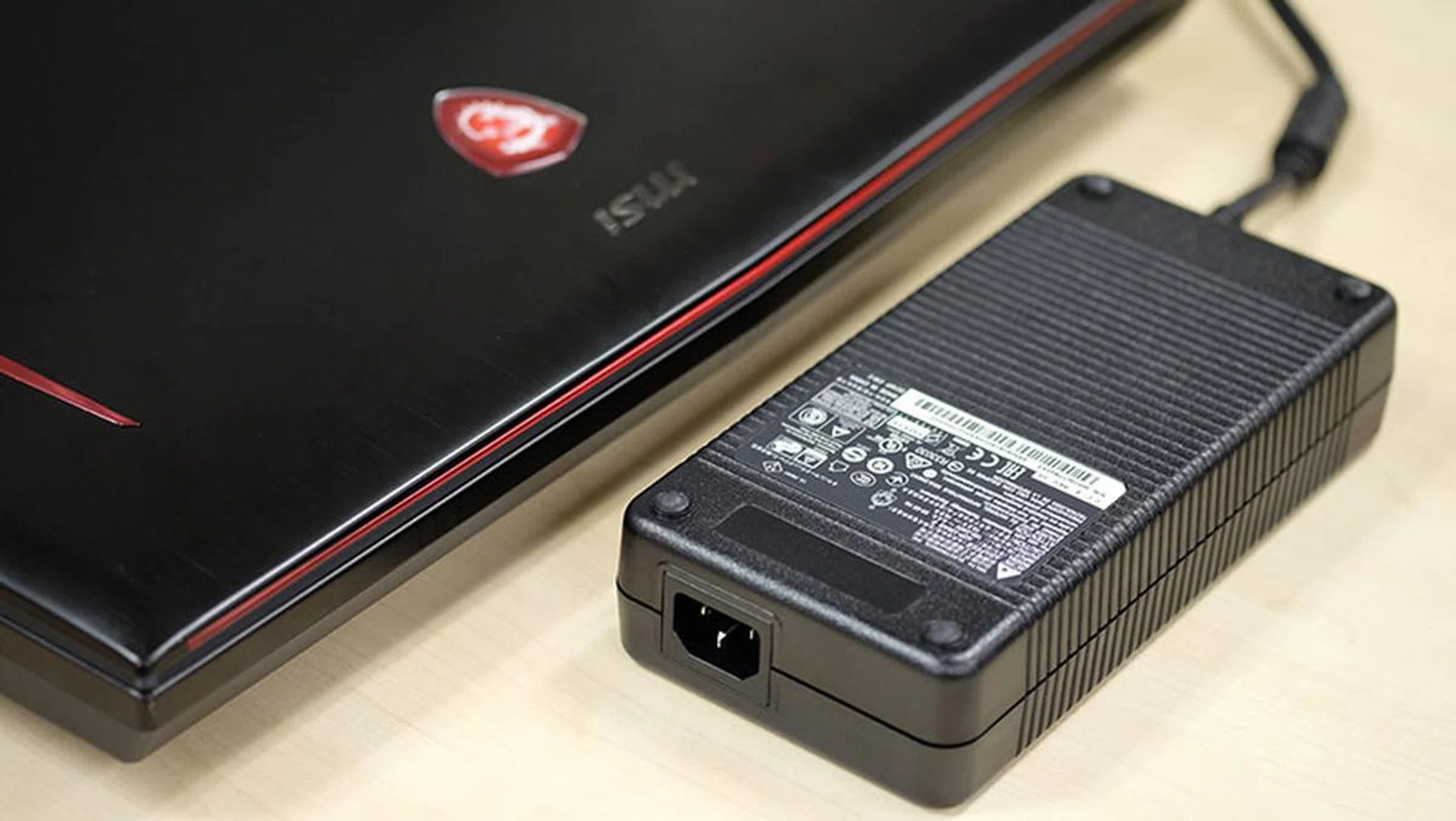
You'll have to deal with this huge power brick as well, which is the size of the adapters on some desktops.
As I said earlier, this isn’t the smartest, or even the most practical way to spend your hard-earned dollars. There are cheaper, slimmer, and lighter laptops out there that are only slightly less powerful than the Titan Pro. Some of them, like the Aorus X5 MD, even come with the same overclockable Intel Core i7-7820HK processor.
However, those are 15.6-inch laptops, whereas the Titan Pro has a 17.3-inch screen. And no matter how powerful they may be, Max-Q designs come with the unspoken implication that some sort of compromise has been made to cram a powerful GPU into a slim chassis.
Not so much on the Titan Pro. It’s got an excellent mechanical keyboard, an overclockable processor, and a daring that lets it roll all that into a gargantuan chassis without batting an eye. Compromise was probably the last thing on MSI’s mind when it made this notebook.
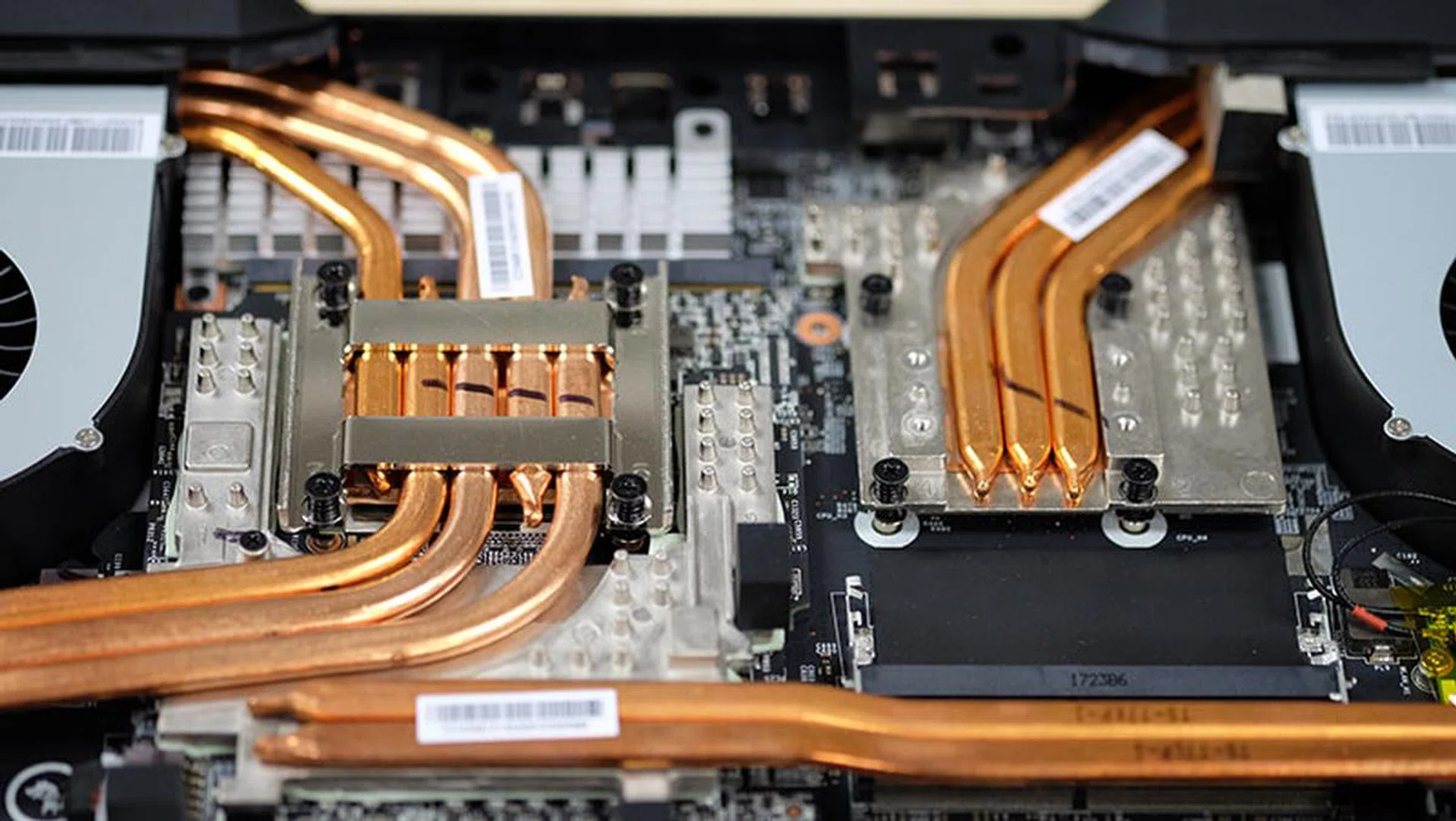
Just look at those heat pipes.
Many people would call this approach silly. That’s my first instinct as well, but I realize that there are some people who, for some reason or other, really want a powerful, zero-compromises laptop that can serve as a full-time desktop replacement.
MSI also makes a range of slim and light laptops with its GS series notebooks, so this appears a way to cover all the bases.
Whatever the case, there’s a small, niche audience for the Titan Pro. This isn’t a perfect machine – it gets super loud for instance, and the hot air blowing out from the side vents means you won’t want to use the mouse too close to the notebook – but it fills the role of desktop replacement quite nicely.
It’s also super expensive at S$5,899, but this level of performance in a laptop was never going to be cheap. However, the just-announced Aorus X9 looks set to give it a run for its money with the same Core i7-7820HK processor, 32GB of RAM, low-profile mechanical switches and – wait for it – dual NVIDIA GeForce GTX 1070s in SLI (that’s more powerful than a single GeForce GTX 1080).
The X9 is also slimmer and lighter, measuring just 29.9mm at its thickest point, nearly half that of the Titan Pro. The kicker is that it’s also cheaper at S$5,699. While we can’t speak to its cooling performance without having reviewed it, it sure looks like it’s shaping up to be a strong competitor to the Titan Pro.
MSI’s laptop sure has a tough battle to fight to win hearts and minds, squeezed as it is on all sides by powerful Max-Q laptops and competitors like the Aorus X9. But the local configuration of the X9 lacks the 120Hz display on the Titan Pro, opting instead for a 4K IPS panel.
That may turn out to be the key differentiator between the two, and it’s probably MSI’s best bet at wooing the select few looking for an insane laptop to replace their desktop. The company bucked the trend of slim and light notebooks with the Titan Pro, but even if it can get away with that for now, it’s not clear how much of an audience there will be for a niche product like that going forward.