
Motorola Atrix 2 - Game On
Bundled with a pack of ten free EA games, the Motorola Atrix 2 caters to casual gamers with its multimedia-friendly hardware features like a dual-core 1GHz processor, 1GB RAM and 4.3-inch qHD screen. We bring you the verdict on its performance in this review.

Overview & Design
Late last year, Motorola made a jump start into the Android arena with the Razr; good thing is it hasn't quite forgotten its Atrix roots, resulting in a sort of indirect successor to the Lapdock-friendly Atrix. In the interim of a possible Atrix 3 release, the slightly up-sized Android 2.3 equipped Atrix 2 sits in the middle of the portfolio.
Given that Google's massive US$12.5 billion buyout has been recently approved by US and European regulators, we should be expecting a slight shake up in terms of product design, marketing and strategy. With that said, the Atrix 2 could be one of the last "pure" Motorola handsets that we would be seeing.
If you have seen the Atrix in the flesh, you will know that the dual-core Motorola Atrix 2 bears a significant resemblance to it. The phone shares the same curved body, making it easy for users to wrap their fingers around with much ease.
Off the cuff, the handset sports a particularly uninspired black-theme and a rather chunky design that's unlikely to stand out amidst its flashier, dressed-in-aluminum counterparts. The phone is predominantly plastic, which keeps it pretty light at 147g, just 12 grams heavier than the original Atrix. For a detailed comparison between its predecessor and Atrix 2, check the table below:
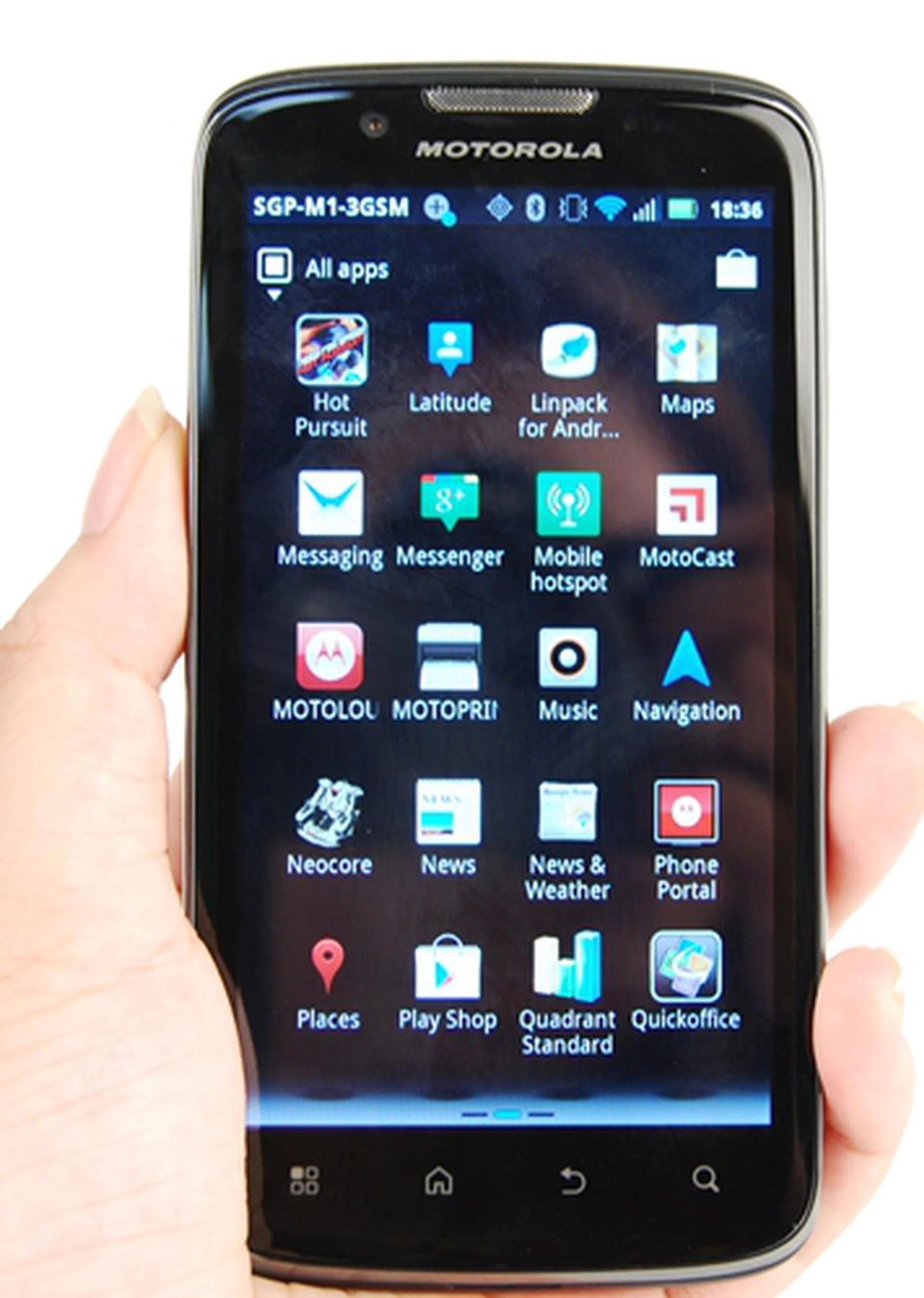
The Motorola Atrix 2 follows in the footsteps of its curved predecessor, adopting its rounded edges as well as a nondescript design.
Key Features | Motorola Atrix | Motorola Atrix 2 |
Operating System |
|
|
Processor |
|
|
Memory |
|
|
Display |
|
|
Camera |
|
|
Battery |
|
|
Dimensions |
|
|
Weight |
|
|
Like most phones, the Atrix 2's front is predominantly covered by its large touchscreen - 4.3-inch Gorilla Glass protected qHD (960 x 540 pixels) screen to be exact. As a result, fingerprint smudges are unavoidable on its front. Instead of physical buttons, the Atrix comes with four touch controls lining the bottom of the screen. These buttons are thankfully easy to press and clearly demarcated with symbols.
However, the same cannot be said of the physical buttons found on the Atrix 2. The volume controls and camera shortcut/shutter buttons on the right profile of the phone are actually raised adequately and can be differentiated enough. On actual usage, we found the buttons depress inwards too much and requires more effort to activate them. This makes it frustrating to toggle volume or snap a photo; if only those buttons were stiffer. Fortunately, the Power/Lock button on the top of the phone isn't a trouble to use.
On the left side, the Micro-USB and HDMI ports lay bare to elements from nature. On the back however, we were thrilled to find that Motorola decided to go with a plastic matte, lightly textured back cover which not only keeps it free from smudges, but also allows for a non-slip grip. Sad to say, the sides are a little too shiny (hint: fingerprint magnet) for our liking.
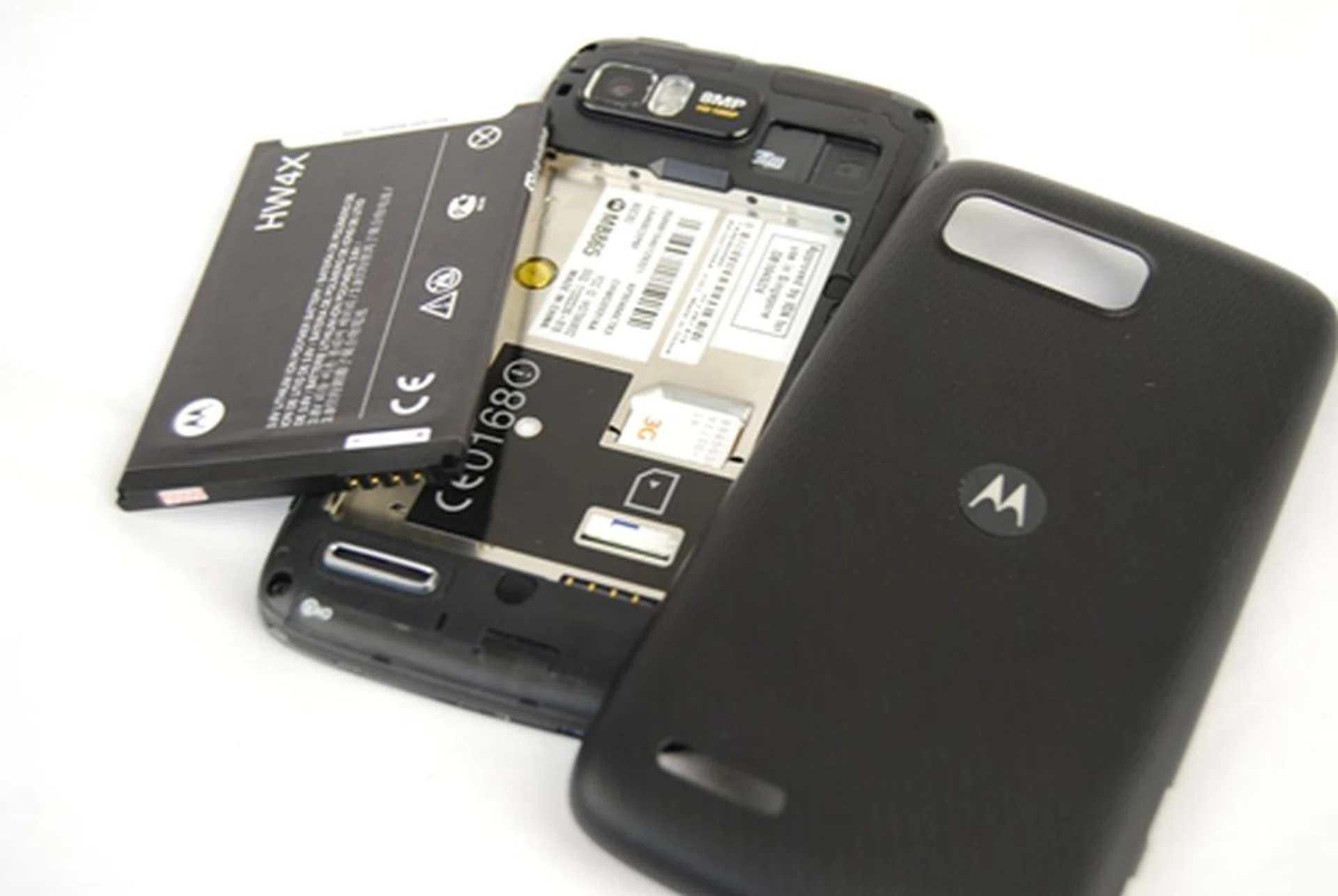
The Motorola Atrix 2 comes with microSD expandability of up to 32GB which adds a hefty amount of memory space to its measly internal storage of 4GB. The other related matter pertaining to this photo shot is that we didn't how we had to remove the battery to change the SIM card, but it's quite a norm for most phones unfortunately.
Features
If you are looking to have a taste of the latest Ice Cream Sandwich (Android 4.0) iteration, you might find yourself fairly disappointed with the Atrix 2. The smartphone comes equipped with Android 2.3 and will only get the Android 4.0 treatment from Q3 this year or later. The user interface on the Atrix 2 is identical to the one on the Razr but if you have used Motorola Android phones before, the experience is going to be pretty familiar.
The selling point of the Motorola Atrix 2 is undeniably in its tie-in with EA which gives you access to a package of ten free EA games. The games includes simple 'time-wasters' like Bejeweled, Tetris; group board games like Monopoly, The Game of Life; and even sports-themed games like FIFA 10 and Need for Speed. The addition of such titles will definitely make the phone an attractive option for those looking for entertainment on-the-go. Without further ado, here's a complete list of the free games for the smartphone alongside its corresponding price, as stated in Google Play:
|
|
Take note that Need for Speed: Hot Pursuit has already been preloaded on the Atrix 2 while the rest of the nine titles require extra steps for installation. Thankfully, the set-up - though slightly more complicated than the usual click-on-Android-Market way - is pretty simple, so users don't really have to fret about awful, time-consuming steps. There's just one small step to be done prior to that and that's to ensure that the check box for Unknown Sources has been ticked - you can find this under Settings > Applications. This is because the games are being downloaded from outside of the Google Play (formerly known as the Android Market). After that, you should be ready to enjoy the extra goodies with the phone.

Yep, ten free EA games for the taking if you purchase the Motorola Atrix 2.
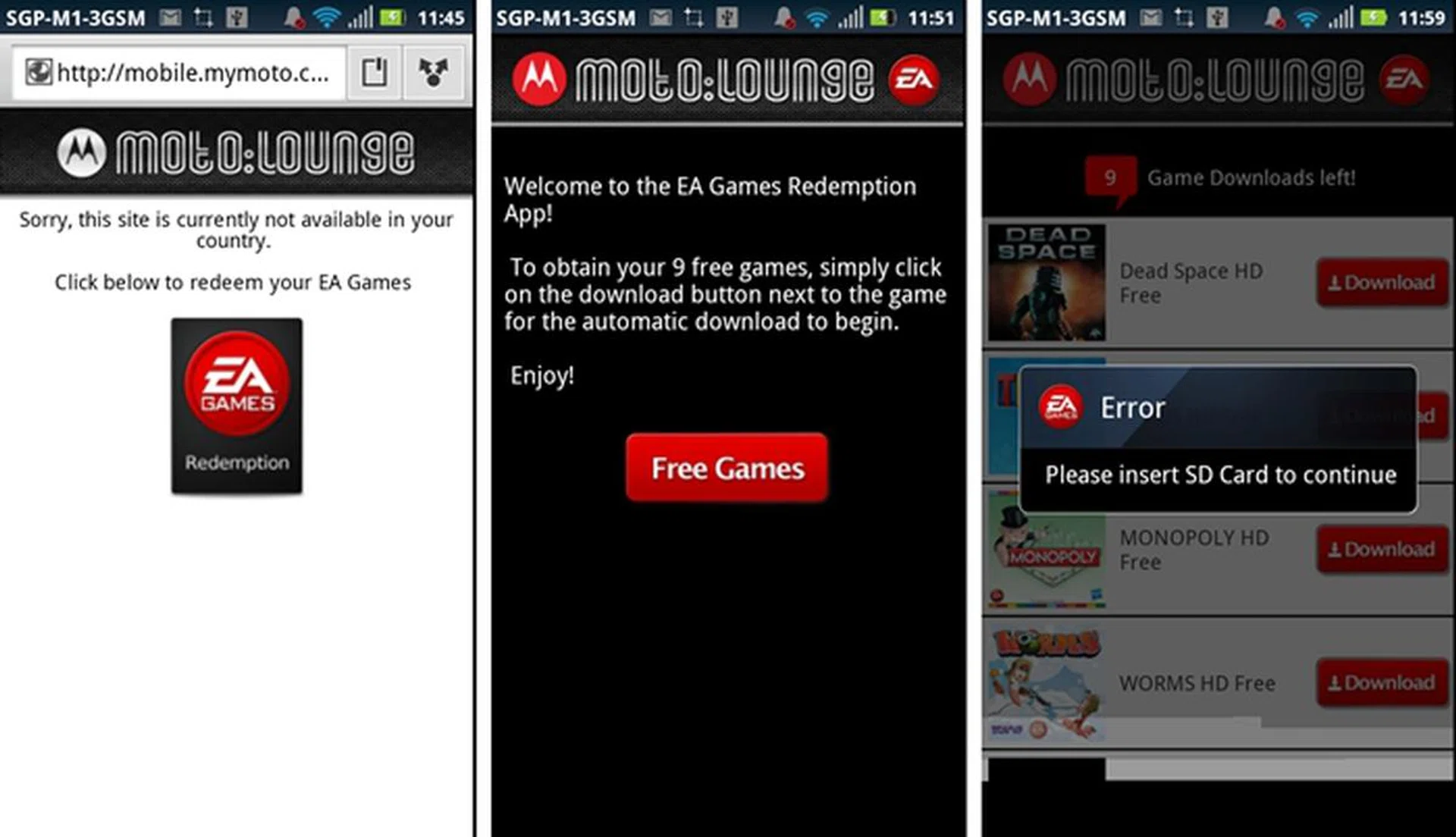
First up, do ensure that the check box for Unknown Sources has been ticked - you can find this under Settings > Applications. After that, head over to the Apps Menu and click on the MotoLounge icon. Then click on the Redemption icon to get started.
The other prominent feature on the Atrix 2 is is the recurring Motocast personal computing service. It first made its appearance on the Razr and later on the Motorola Xoom 2 tablet. This cloud service allows you to access your personal content from both the web and your smartphone straight from your computer's hard drive. Set-up is pretty straightforward and hiccup-free; simply follow the steps as instructed. Create a Motocast ID via the Motocast app on the Atrix 2, then download and install the application for your PC from www.mymotocast.com. This would of course mean your PC would have to be powered on all the time and that's something you might want to think about too before getting too happy about this feature. It's not a cloud based solution to overcome this downside.
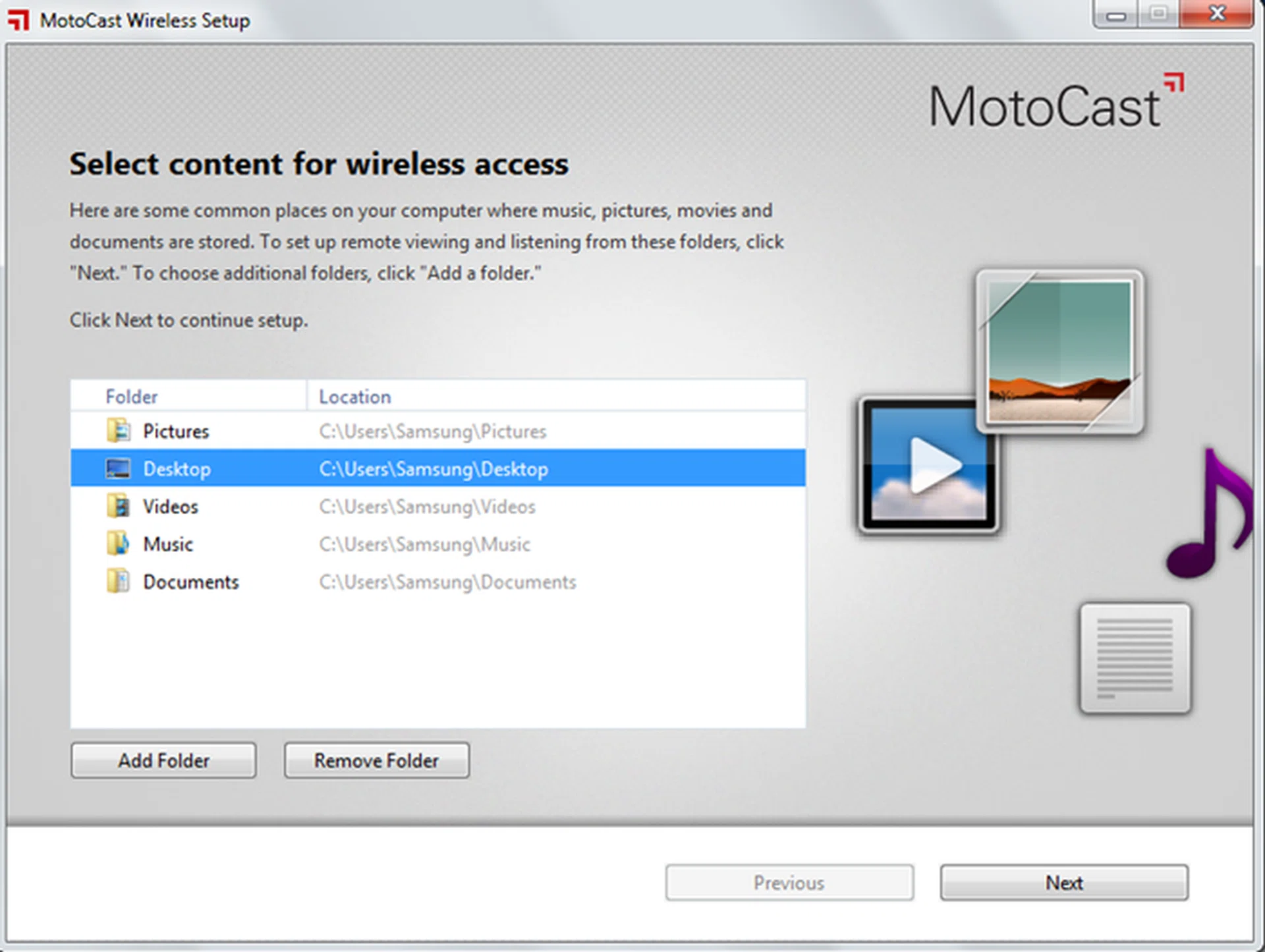
Once installed, you can kick start the procedure by typing in your ID and logging in. After that, select the folders that you require remote access from. If you can’t make up your mind, don’t fret: you can add more folders later or even change the name of your PC under Settings.
We previously complained about how there wasn't a single icon for the MotoCast app streamed content on the phone; instead, we had to access our content from three different places - Files, Gallery and Music -, resulting in a lot of unnecessary navigation to-and-fro. Thankfully, this problem is rectified on the Atrix 2 - simply tap on the Motocast app to access all files hosted on the personal cloud.
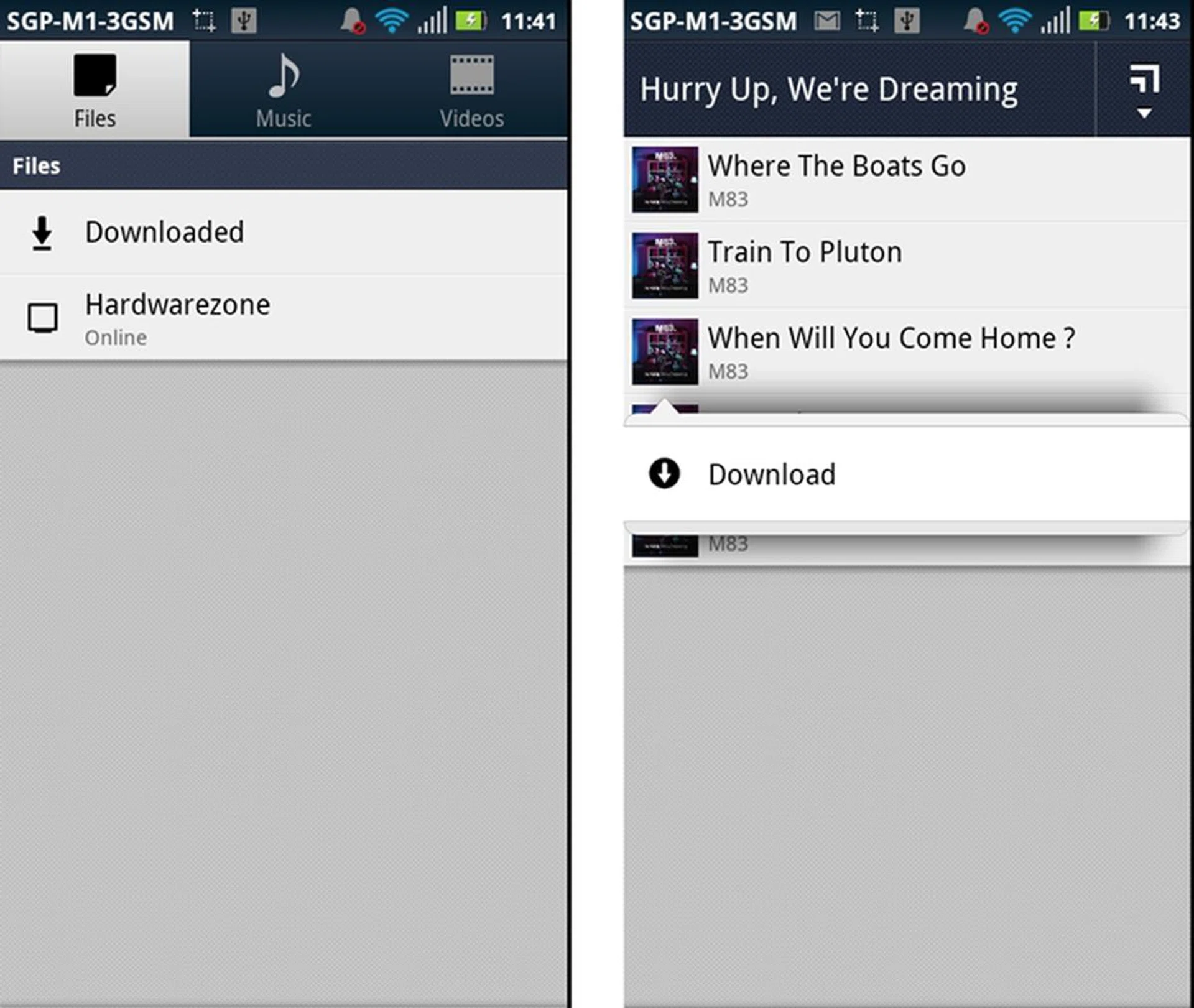
The app is divided into three sections: Files, Music and Videos. The first section houses the entire stream of content (unsorted) that has been made accessible while the other two sections contain multimedia files (sorted). To download a specific file into your phone, simply open up the menu and hit download.
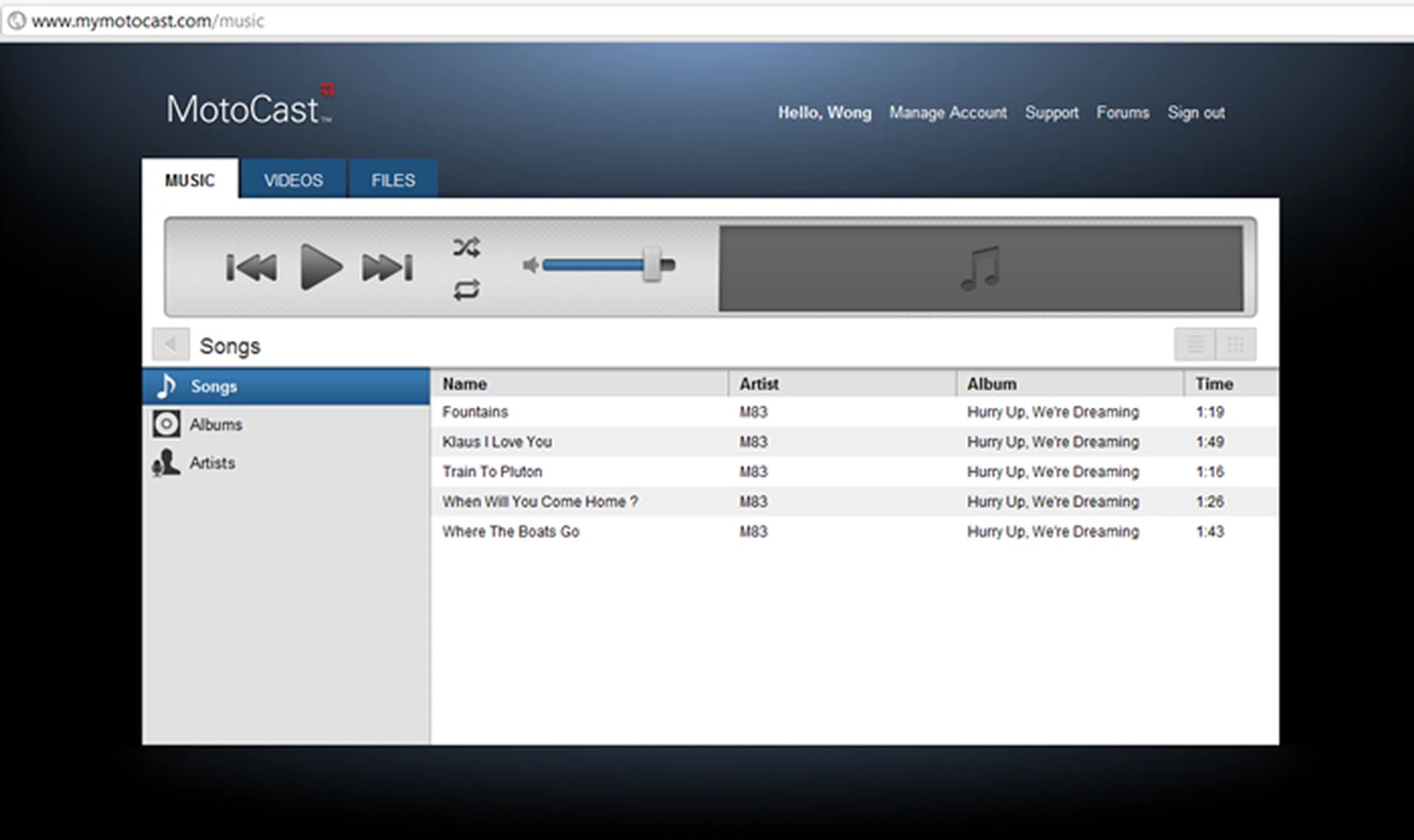
You can virtually access the content from any website when you log in with your MotoCast ID. You can choose to stream your music or videos without having to download them onto the computer that you are using. However, if you wish to have a physical copy, simply head over to the Files section and click on your desired content.
For the uninitiated, MotoCast USB is the new name for what was previously known as Motorola Media Link. Good thing is, the software is automatically installed as part of the installation for MotoCast. What exactly is MotoCast USB? The software allows users to back up and sync your Atrix 2’s media content and contacts to and from your PC. Simply connect your phone via USB to your personal computer.
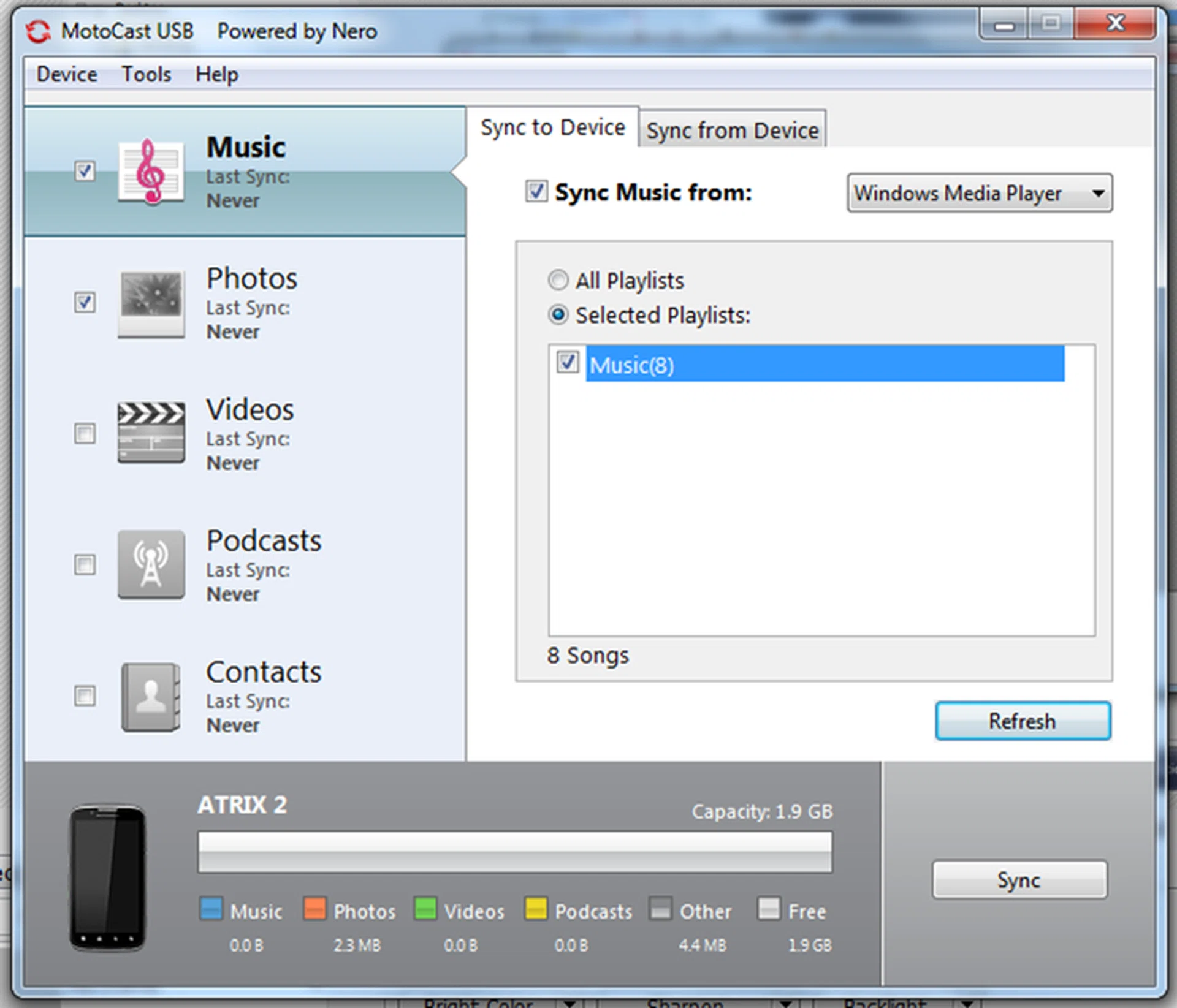
The software also allows users to sync your phone with iTunes or Windows Media Player.
Of course, the other exciting aspect of the Atrix was that it came with accessories that transform the phone into another gadget altogether. Just like its predecessor, the Atrix 2 is compatible with the Lapdock 100, an extension of sorts that transforms the handphone into a netbook. However, the Atrix isn't bundled together with the Lapdock like the Atrix was, so you have to buy it separately at S$399. At least it gives users an option and it doesn't inflate the phone's price too much like the original Atrix had to contend with.
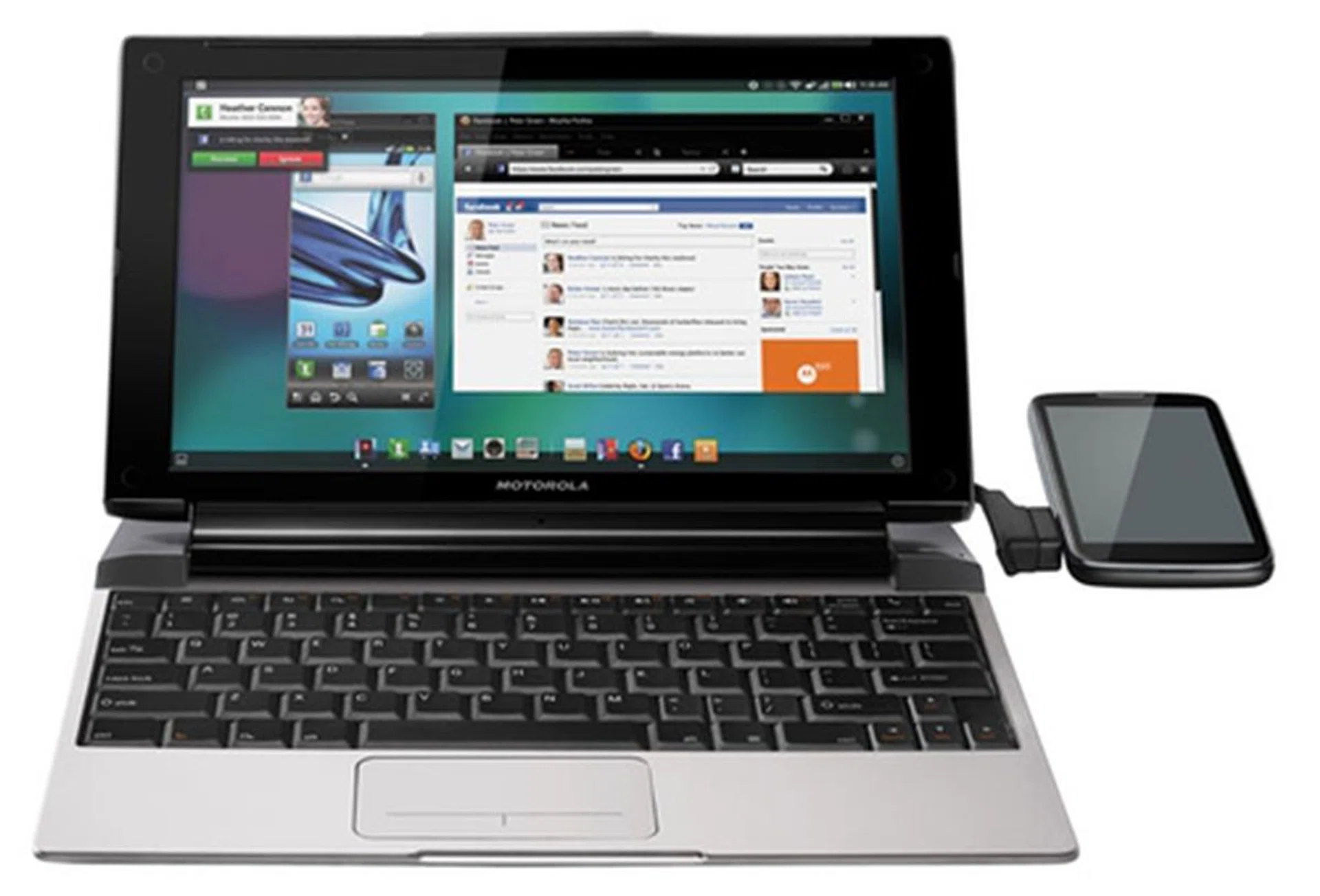
Other than the Motorola Atrix 2, the Lapdock 100 is also compatible with the Motorola Razr smartphone.
Performance
The Motorola Atrix 2 comes with a dual-core processor clocked at 1GHz, alongside a nice amount of 1GB of RAM. For now, the Atrix 2 runs on Google Android 2.3 while its Android 4.0 update would probably see the light of day later in third quarter of the year. As usual, we subject the review unit to the Quadrant benchmark, which can be found on Google Play. To gauge how it performs against the competition, we matched its scores against dual-core smartphones such as the Samsung Galaxy S II, HTC Sensation XE and Motorola Atrix.
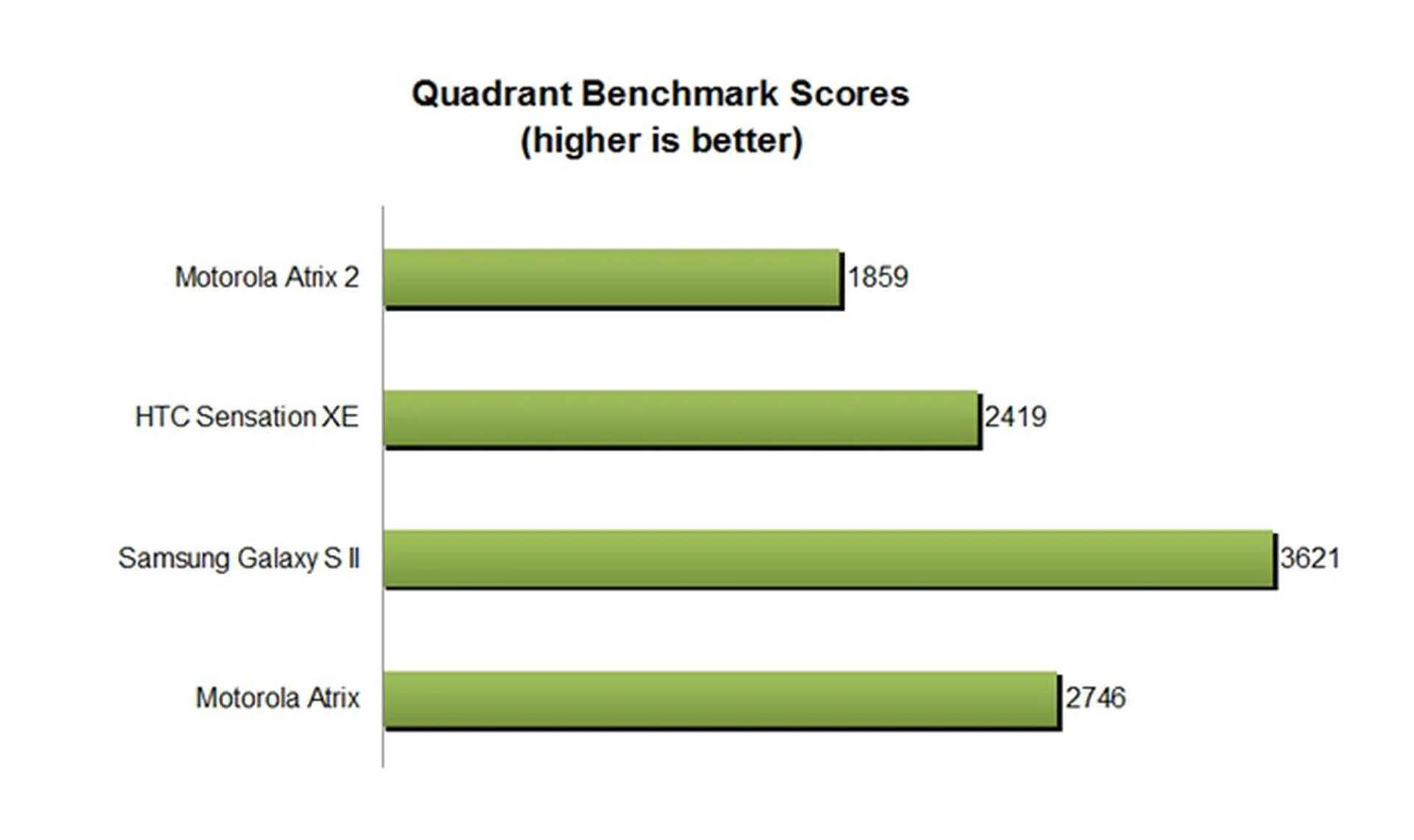
As depicted in the chart above, the Motorola Atrix fared pretty badly compared to its competitors. All phones are running on different processors: Atrix's on NVIDIA's Tegra 2 processor; Galaxy S II comes with the Samsung Exynos processor; HTC Sensation XE is equipped with the Qualcomm MSM8260 Snapdragon chip; last but not least, the Motorola Atrix 2 is packaged with the TI OMAP 4430 processor.
Clearly, the OMAP chip performed the worst in raw numbers compared to the other three chips. The difference in the Atrix 2's main processing unit over its predecessor explains why, despite close similarities in hardware specs, the old unit outperformed the newcomer by a rather large margin.
Fortunately, actual usage wasn't tied with the raw processing prowess seen in the benchmark. Overall, the Atrix 2 ran smoothly and had no problems rendering pages or running graphic-intensive apps. Having both a dual-core chipset and 1GB RAM does contribute to a lag-free performance and the experience using the phone for day-to-day use was generally positive.
Imaging Performance
The Atrix 2 comes with an 8-megapixel camera, a staple that is found on high-end smartphones. We haven't really been fond of the camera performance on Motorola devices based on their track record, but we shall leave it to the pictures to do the talking.

 |  |
The camera performance is disappointing to say the least. Colors were dull; details were noisy and fuzzy. The auto-focusing was speedy but seemed to be rather inaccurate at times. For a smartphone of its caliber, we were expecting more out of its camera - especially since it is a much sought-after feature on phones these days. Otherwise, its 4.3-inch screen is gorgeous, well-lit and clear as seen through our usual 480 x 800-pixel test video for our battery mileage runs. If we had to nitpick about the screen, color reproduction appeared to be a tad too saturated though.
Battery Mileage
Using that same 480 x 800-pixel video that we've maintained for some time now, we next ran our standard battery test. The test parameters include having the video looped under the following conditions:
- Brightness and volume at 100%
- Wi-Fi and Bluetooth connectivity turned on
- Constant data streaming through email and Twitter
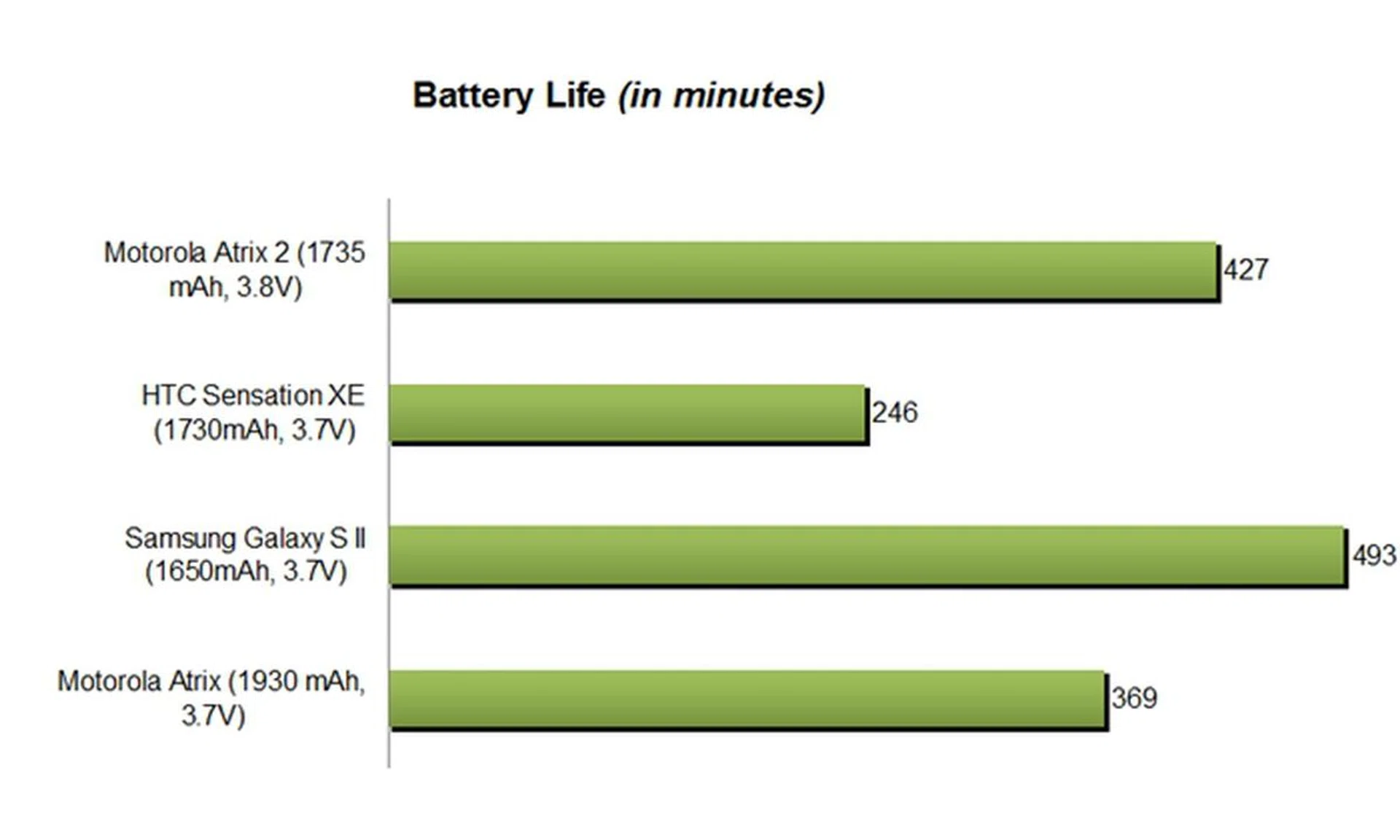
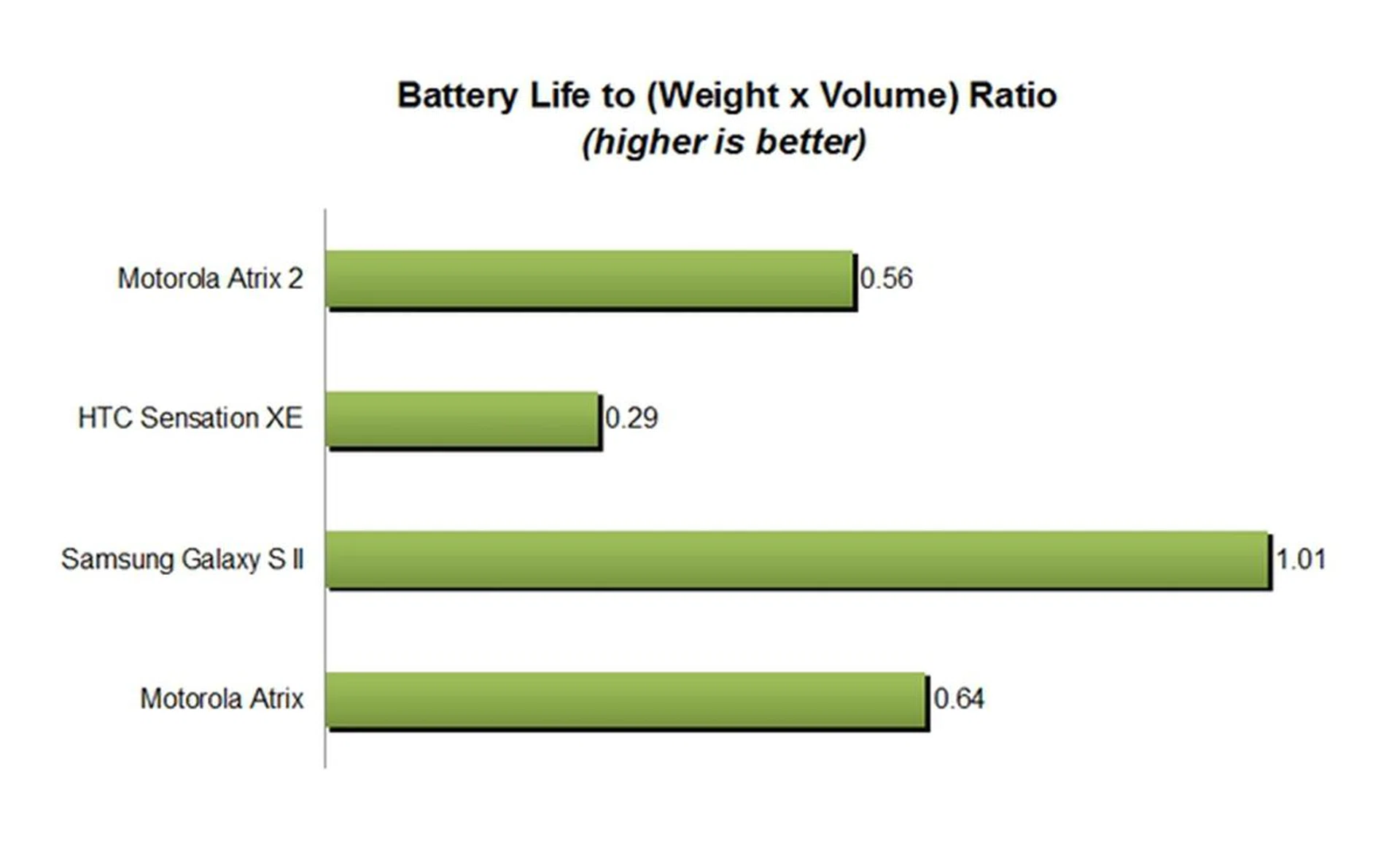
While it does pretty badly in the camera aspect, it is in the battery tests that the Atrix 2 shines. In second place after Samsung Galaxy S II, the smartphone ran for an impressive 427 minutes, 66 minutes shy of the Galaxy S II's timing. It is almost double the score of the HTC Sensation XE - possibly due to a less graphics and transition-intensive user interface. In the portability test, the Atrix 2 drops to third place due to a heavier weight of 147g as compared to its lighter Atrix sibling. However, given the notable battery life advantage and their close portability standings, the Atrix 2 comes out better overall in this area of comparison.
To give you a real-world gauge, we observed that the phone could last a whole day on a single charge, with emails and Twitter feeds pushed constantly to it. Other activities included occasional web surfing and calls.
Conclusion
If you are looking for a fashionable Motorola phone, we would suggest the Razr smartphone instead. The Atrix 2's design is frankly, pretty pedestrian and is highly unlikely to stand out like other flashier handsets currently on the market (e.g., Sony Xperia S).
However, if you are out in the market for a mid-range and affordable smartphone, the Motorola Atrix 2 is definitely one of the choices you can look at. We wouldn't say that its hardware specs are top of the line compared to the upcoming Android 4.0, quad-core powered devices but its bright 4.3-inch qHD, dual-core 1GHz and 1 GB RAM hardware specs are more than enough for daily usage and gaming. Our user experience has been largely positive on the Atrix 2, with no lags or crashes experienced.
Throw in 10 free EA games and inclusion of useful productivity apps like MotoCast and Webtop connection, you have a full-fledged all-rounder with substantial battery life to spare. However, if you need a phone that also takes good photography, you are better off looking elsewhere; the Atrix 2 doesn't excel in this aspect. Owners of the Atrix can forget about upgrading to the Atrix 2 since there are minimal improvements, specs-wise and in capabilities.
For S$699 (including GST), the Motorola Atrix 2 is an affordable option, one that is sold at SingTel, M1 and Newstead. If you know where to shop, such as checking our price guides, the phone can be had for less than S$600 at the point of writing.
Our articles may contain affiliate links. If you buy through these links, we may earn a small commission.