
Dell XPS M2010 - Mobile Entertainment PC (Centrino Duo)
Dazzling visitors at this year's CES, Dell's mobile concept PC has made the leap to reality. This powerful and extremely substantial notebook is now available in retail, though at an equally hefty price. Join us as we try to reattach our jaws after spending time with the Dell XPS M2010.

Dell's Showstopper
It's not easy being king of the hill. Despite being the largest and one of the most profitable computer manufacturers worldwide, Dell does not have the charisma of an Apple, the blue-blooded reputation of IBM or the glamour of Sony. What it does offer to consumers are attractive all-year-round discounts due to the lower costs sustained by its direct sales model and excellent supply chain management. Judging from its success, this business model works but Dell just does not inspire the same kind of brand loyalty that Apple or Sony can.
The company's recent acquisition of enthusiast oriented PC boutique firm - Alienware -may be a sign that Dell is aware of its relatively bland image and aims to broaden its appeal to this niche. However that doesn't mean that its own XPS enthusiast line of computers will be neglected to play second fiddle, for the hip quotient for a Dell product just went through the roof with the latest XPS notebook, (if a monster of a system weighing more than 8kg could still fit that description) the Dell XPS M2010. A prototype was showcased at this year's Consumer Electronic Show as a concept PC but apparently, it has crossed over from being a fancy idea to reality. And like what its marketing blurb claims, it's undoubtedly a showstopper.
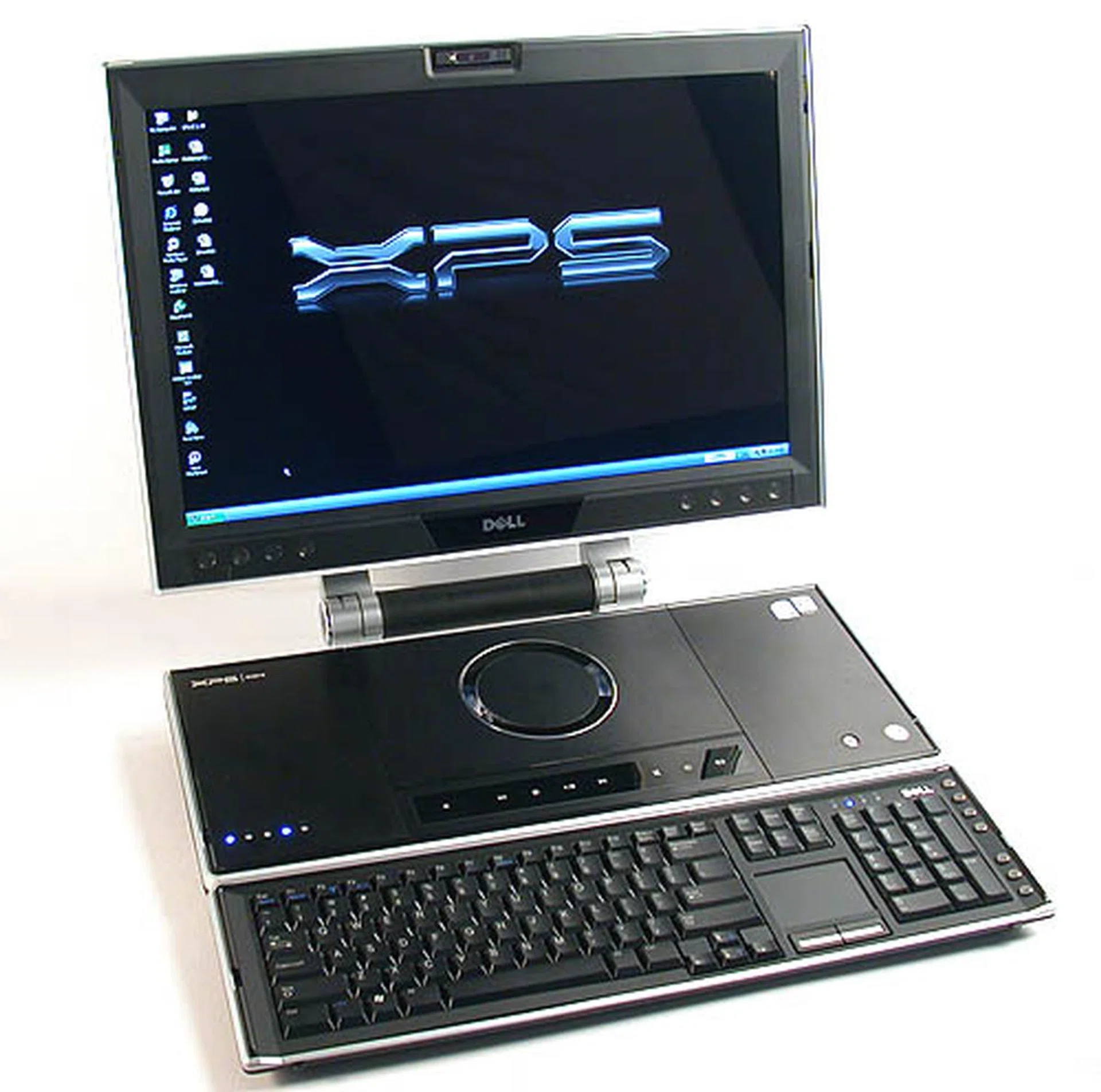
The impressively huge Dell XPS M2010 'notebook' has a magnificent 20-inch widescreen LCD display. And no, that shiny circular thing is neither the subwoofer or the drink coaster. It's actually a cool slot-in DVD drive.
Imagine a high-end performance desktop squeezed into the form factor of a notebook and you'll get the Dell XPS M2010. However, its enlarged dimensions will stretch your idea of a notebook though Dell seems to be trying to de-emphasize the notebook aspect in its marketing. Decked out with the some of the best hardware components that would put gaming rigs to shame, it is an outstanding integration of form and function that shows off the company's engineering and design prowess. It's so unlike Dell's typically faceless black boxes or their utilitarian but hardly sexy notebooks. In case you're not convinced, how would you like to own one of these?
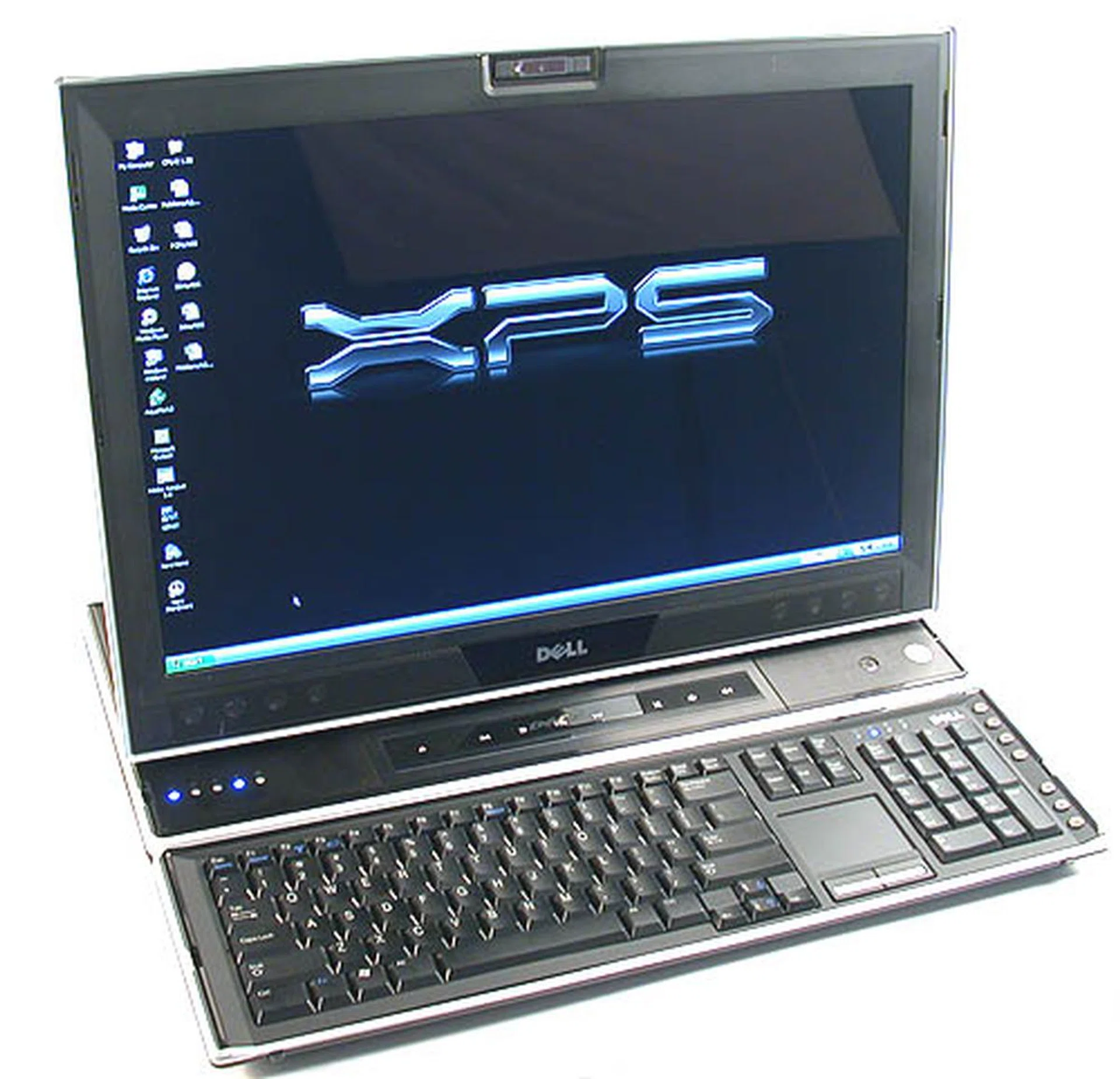
The adjustable screen can be brought forward so that it resembles your orthodox notebook. However, you won't be able to access the DVD drive then. In any case, adjusting the screen to any height or angle within its mechanical means is easy, and surprisingly feels robust too.
The Dell XPS M2010 - Part 1
Comparisons with Apple's iMac will be inevitable since the Dell XPS M2010 can be considered a desktop with integrated display rather than a notebook. But really, it's no contest against the Dell as it's in a class of its own. The 7kg iMac weighs less than the minimum 8kg that you can expect for the Dell XPS M2010. And the 8kg weight stay true only if you opt for the minimal components and exclude the rather hefty power adaptor (literally a 'brick' in terms of weight). Yes, like most Dell products, you can customize the Dell XPS M2010 to quite a large extent before purchasing, like increasing hard drive capacity (and adding a second one), along with more memory and a different grade of processor. The price tag of the resultant configuration also varies but after fiddling on Dell's website, the XPS M2010 will set you back between US$3500 to almost US$8000. As for the review unit we received, it will cost you around US$4500, according to the website.
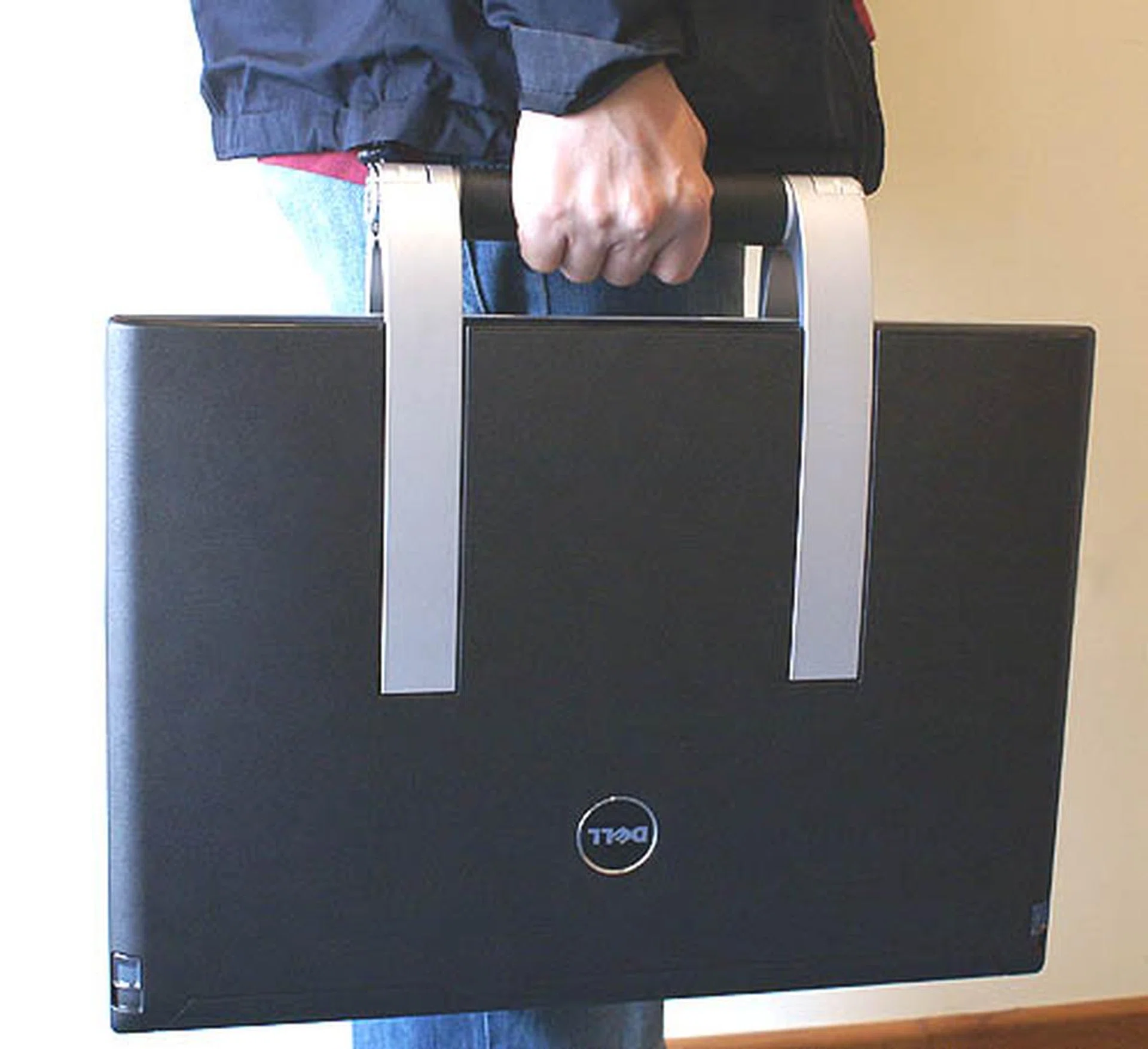
The XPS M2010 is quite huge for a laptop, due to its large display. As you may notice, the veins on the hand of our volunteer do look a bit strained from the 8kg load. At least the aluminum handle is nicely padded with leather.
What really distinguishes the Dell XPS M2010 from the iMac is its notebook form factor. Unlike the iMac, which is not meant for traveling, the Dell can be folded into an extremely large notebook that looks a bit like a giant briefcase. The black matte with gray flecks exterior does a good imitation of leather and there is a rather solid aluminum carry handle and grip integrated (which happens to double up as the display's stand). In short, the Dell XPS M2010 can be moved around like any notebook though its weight and dimensions mean that such a move would likely be a last resort. This is strictly a 'deskbook' if you will, for its excessive weight and size makes it a risky proposition to even think of placing it on your lap. Besides, although the notebook was quiet enough, it can get quite warm.
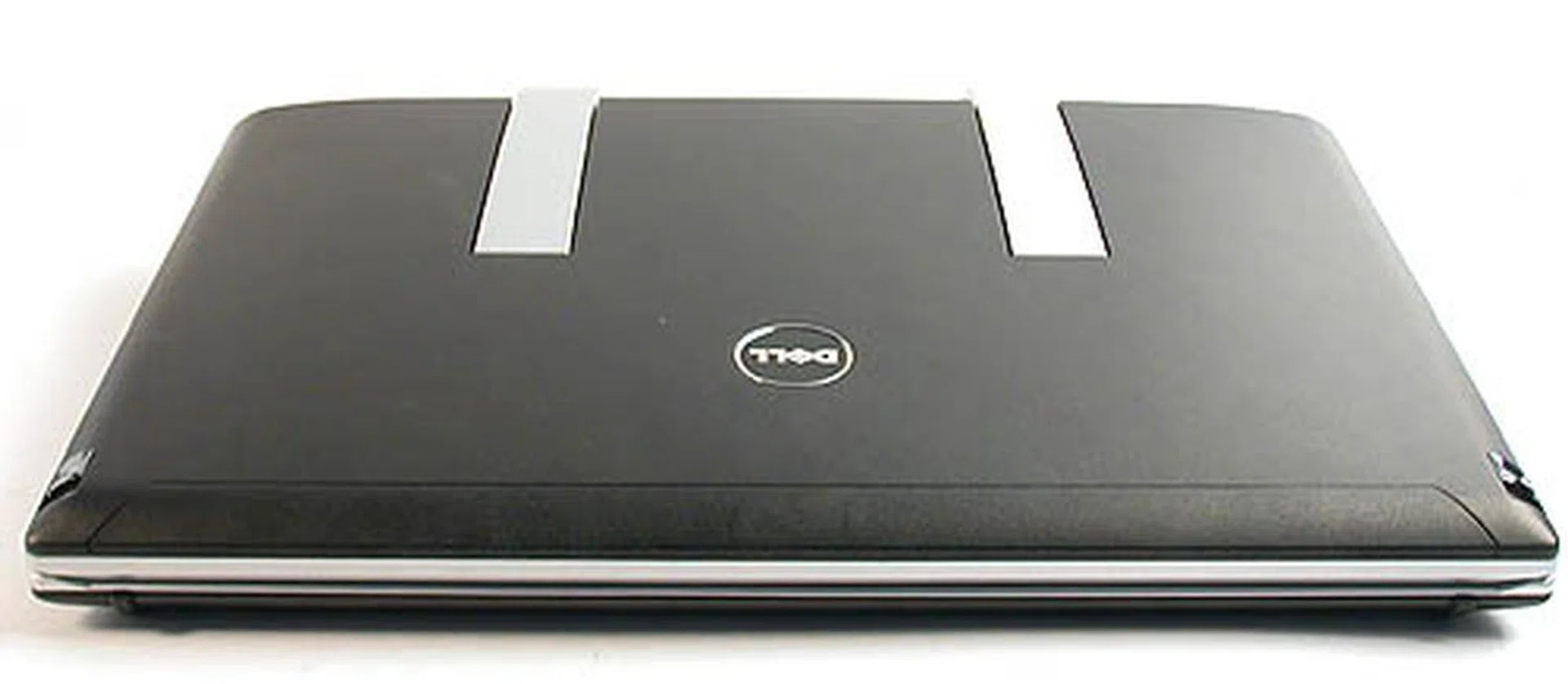
A pseudo leather look is necessary because there's probably no laptop bag for this monster.
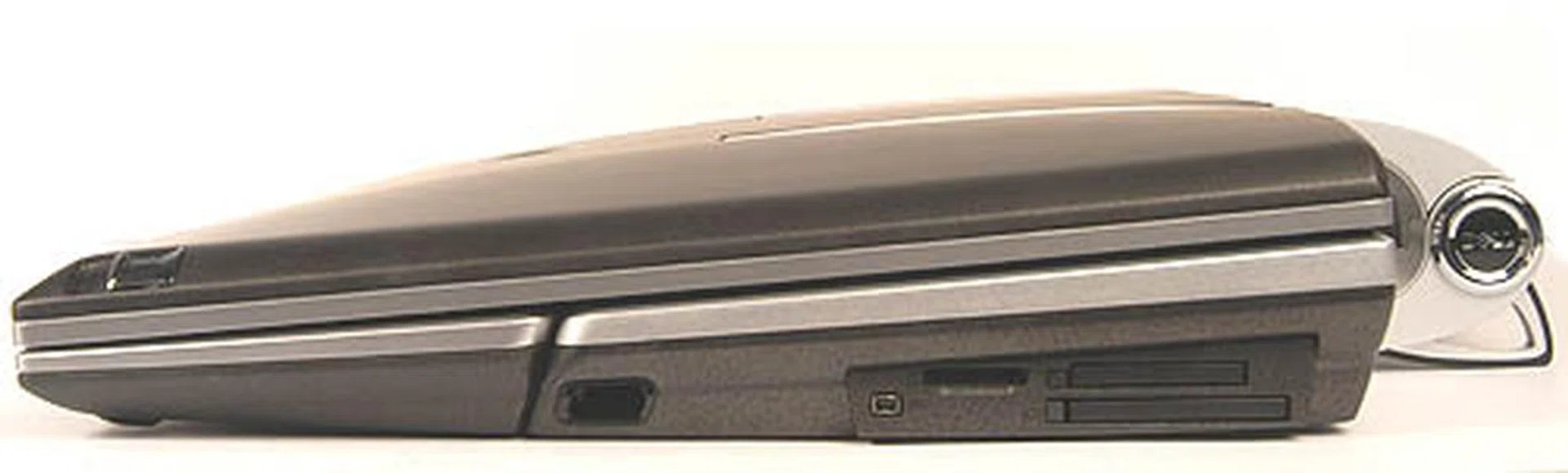
Right flank:- Here we have a FireWire port, the two multi-card readers and an ExpressCard slot.
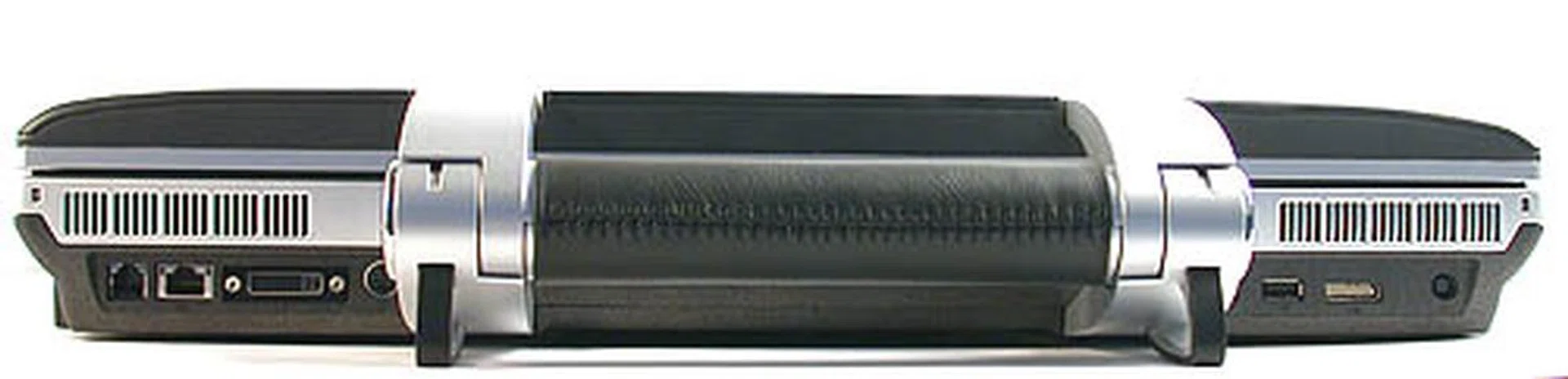
Rear (from left to right):- RJ11 modem jack, RJ45 Ethernet jack, DVI output, S-Video output, 2 USB ports, Dell's proprietary audio output (for the external audio break-out box) and DC power input.
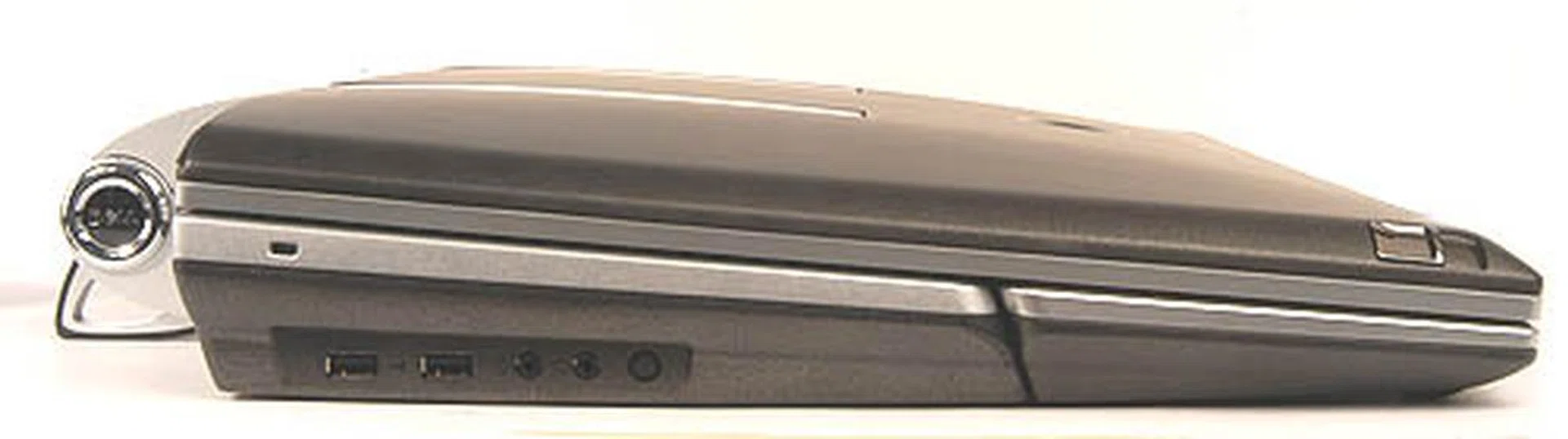
Left flank:- Here we found another 2 USB2.0 ports, the microphone and headphone jacks.
Flip open this Dell notebook and you'll be confronted by a glossy 20-inch widescreen LCD display. As some of you may know, Dell makes perfectly fine LCD monitors that are quite popular among enthusiasts and the one that we found on the XPS M2010 is a beauty with vibrant colors and crisp fonts at its native 1680 x 1050 resolution. An integrated 1.3-megapixel Logitech web camera at the top of the screen is also very convenient, especially with the Skype VoIP software already preloaded on the system. The only downside compared to a true standalone monitor is the obvious lack of controls for adjusting brightness and contrast, though we had no complaints about the default view. If you're really fussy about it, you can go to the system BIOS to tweak the brightness, but if you were to ask our opinion, the screen looks fine as it is out of the box. Furthermore, the screen can be adjusted and tilted to an unprecedented degree thanks to its stand cum carrying handle. One can adjust the height and angle of the display and even the distance from your seat. Truly, the design is praiseworthy. For an even larger viewing pleasure, you can output the display to an external monitor or television through the included DVI and S-Video outputs.
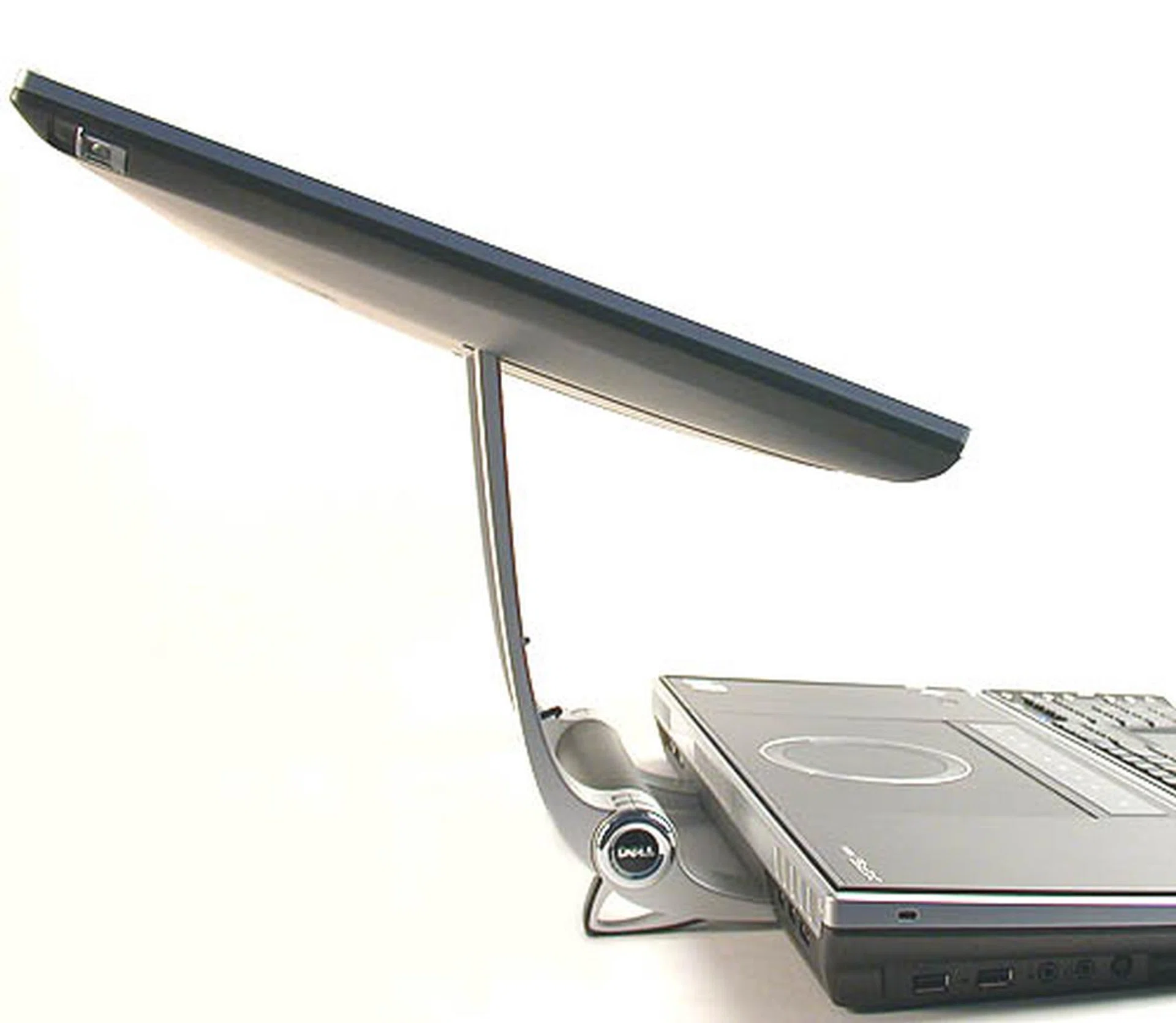
The degree of movement for the LCD display is unmatched for a notebook. If one could still call this a notebook that is, instead of hybrid desktop or deskbook.
The Dell XPS M2010 - Part 2
So what will you get for your US$4500? Firstly, the processor on the M2010 is an Intel Core Duo T2600 (2.16GHz), making it the fastest available for a Core Duo notebook at this moment. To continue with our iMac comparison, the Apple computer uses an Intel Core Duo rated at 2.0GHz, so the Dell is marginally faster. Then, there's the extremely fast ATI Radeon Mobility X1800 graphics processor with 256MB of RAM. Of course, there are already desktop replacement notebooks using NVIDIA's GeForce 7900 Go chipset with up to 512MB of memory from vendors like Eurocom but there are hardly that many of them so the Dell would still be among the top performing systems in terms of gaming.
Dual SATA hard drives in RAID configuration gets you in a tizzy? Well, that's what you'll find in the Dell XPS M2010. Again the configuration may be customized but the review set comes with a pair of 100GB Hitachi 7200RPM SATA drives pre-configured for RAID 0 - data striping for enhanced disk read/write performance. Startup and shutdown was fast enough and slightly more than 1GB of space was taken up by the preloaded Dell Restore utility for backup purposes. Our unit also came with two sticks of 1GB DDR2-667 RAM running in dual channel mode for a total of 2GB of system memory. These specifications are indeed extremely powerful even compared to a desktop and Dell has apparently spared no expenses for this dream build of a notebook. Of course the base configuration of the XPS 2010 is a little more tamed to fit its US$3,500 price tag, but it is still very well equipped nonetheless.
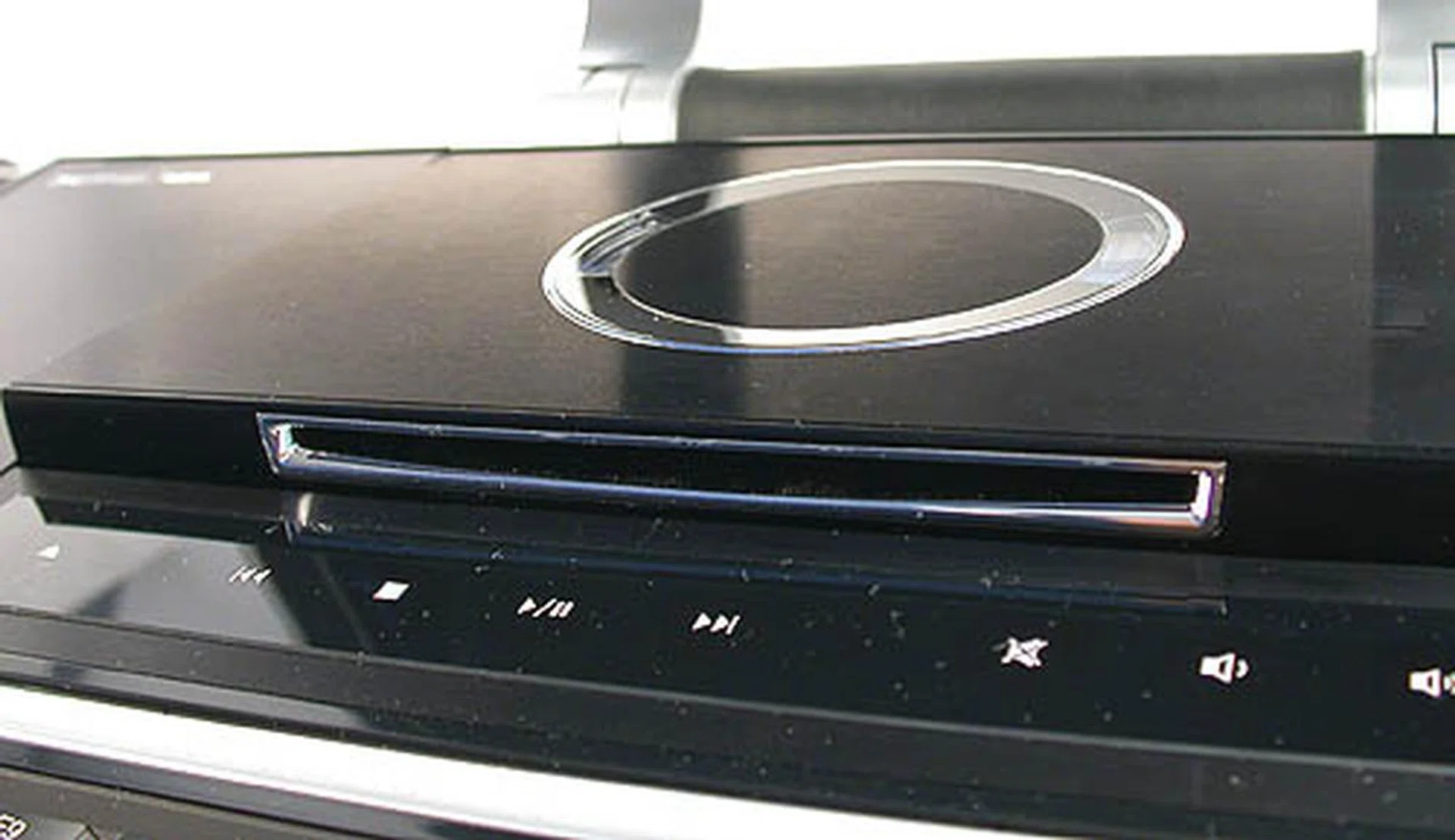
The DVD burner (Teac 8x DVD+-RW) pops out at a touch of the touchpad controls below it. It will also automatically close after a while. The controls below are very useful for playing your discs though we feel that you are more likely to use the remote control.
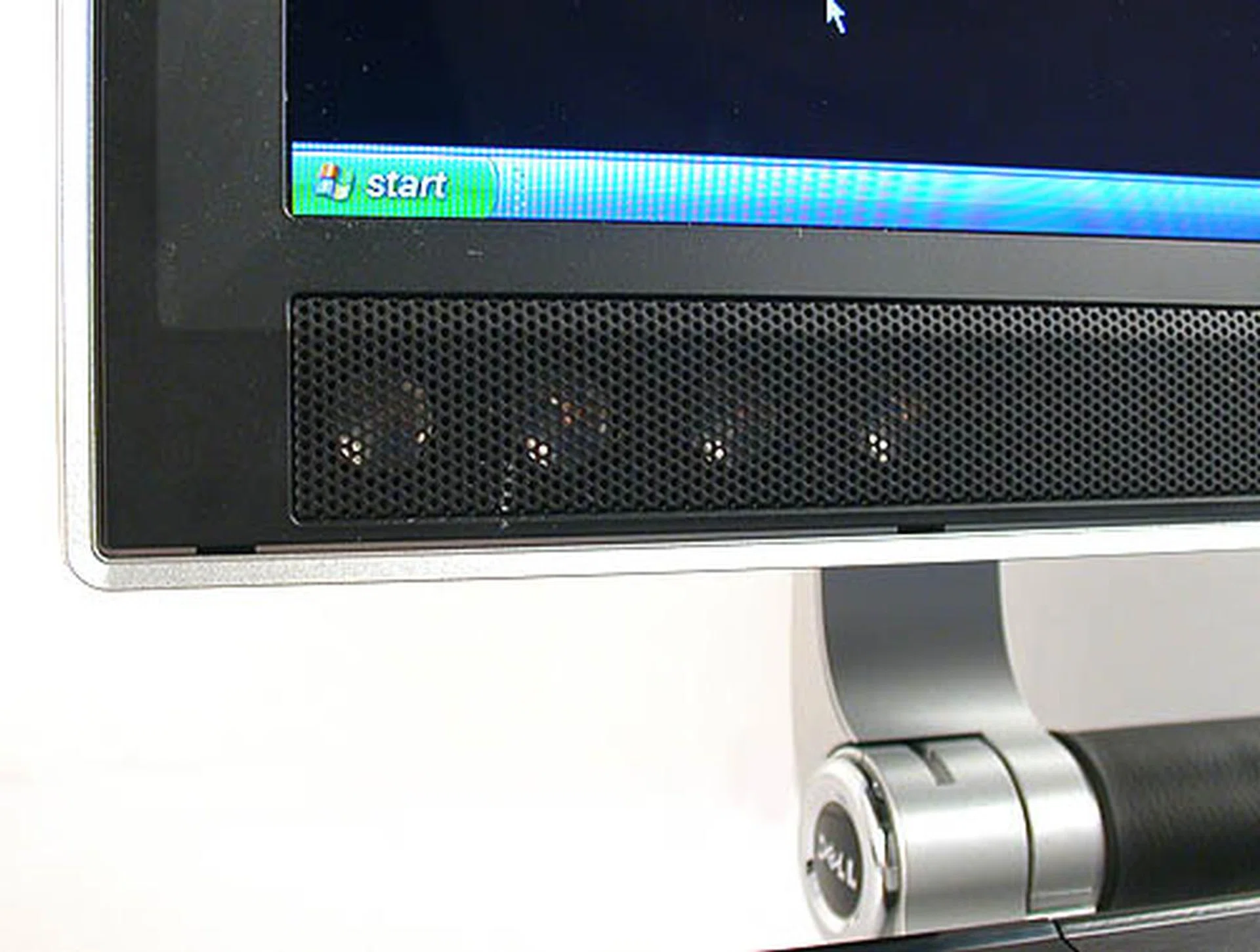
There are eight integrated speakers (micro drivers), four on each side of the display. Here's four.
With the excellent widescreen display and integrated speakers with subwoofer, the Dell XPS M2010 is eminently suited for multimedia applications and playing movies on this system is a delight (the reflective glossy screen looks fantastic for games but may put some off for movie viewing). Dell obviously recognizes the possibilities and the operating system by default is Microsoft's Windows XP Media Center Edition 2005. Together with the powerful remote control and detachable Bluetooth keyboard, one can relax on the couch while using the M2010. With its screen size, you don't have to strain one bit. Furthermore, the presence of an integrated LCD on the remote for audio playback means that you can view your songs, artists and album via the remote and select your music. We were able to navigate through Windows Media Center effortlessly with the remote and even our jaded selves were impressed by the flawless integration between the application and the remote. In short, this is an excellent system to showcase Microsoft's Media Center application.
While video and display quality was obviously top notch, audio subsystem didn't sound too refined despite the presence of eight micro drivers and a mini integrated subwoofer. While you probably won't be able to fault it for audio CD and other song formats (unless perhaps the rock genre), bass lacked punch and the high notes felt a tad too sharp for the more dynamic environment settings in DVD videos. You might think we are asking too much of it, but the fact is that there are other entertainment notebooks such as the Toshiba Qosmio which deliver stunning audio clarity, depth and volume. Hence in comparison, the Dell XPS M2010 falls short in this aspect. However for the less picky, its stunning screen helps to redeem it to a certain extent.
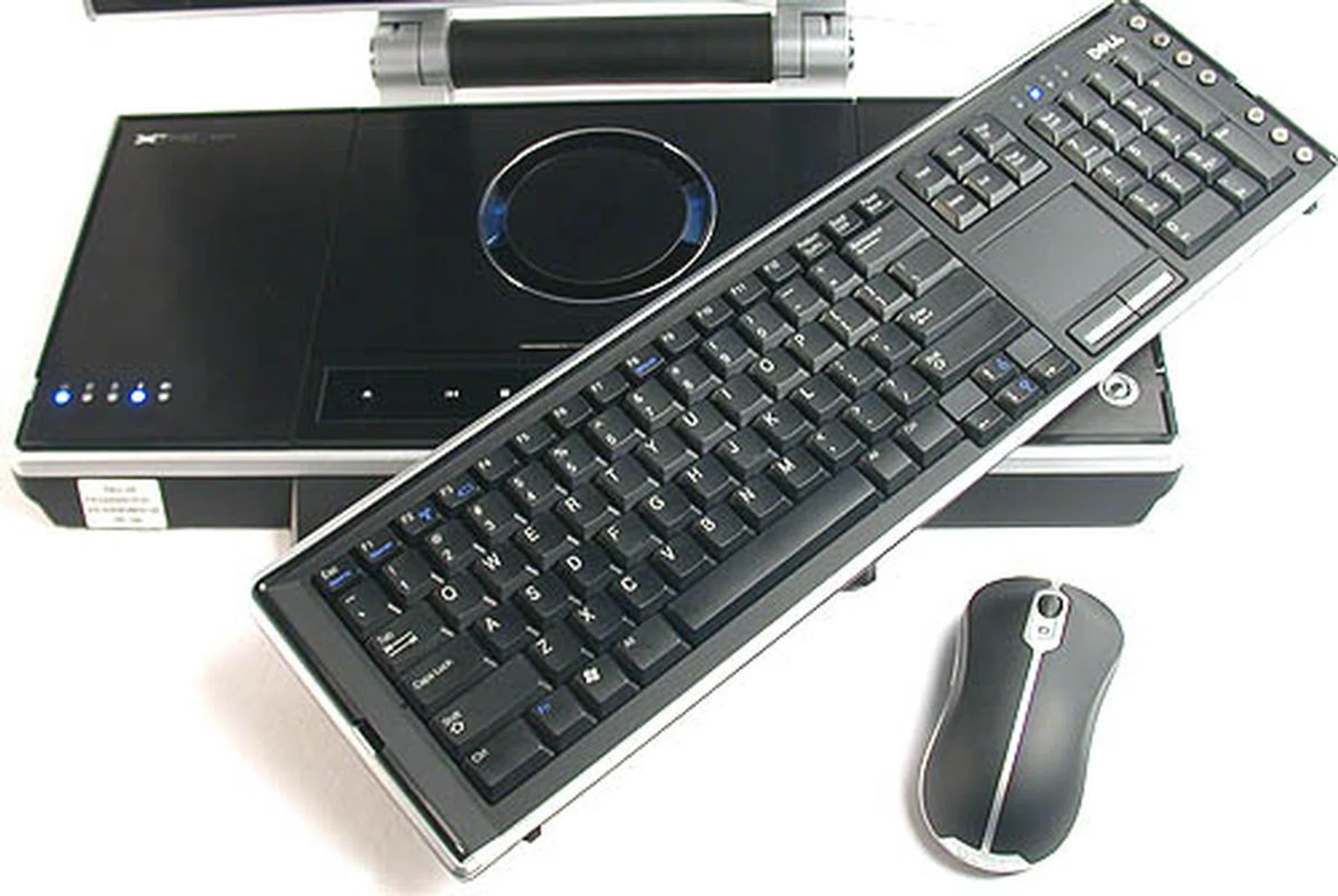
All the peripherals use Bluetooth and the wireless keyboard is attached to its dock by magnetics. We did find the design of the mouse quite uncomfortable for prolonged use. It was a bit too big for our hands and the contours didn't fit that well - probably not designed with Asian folks in mind.
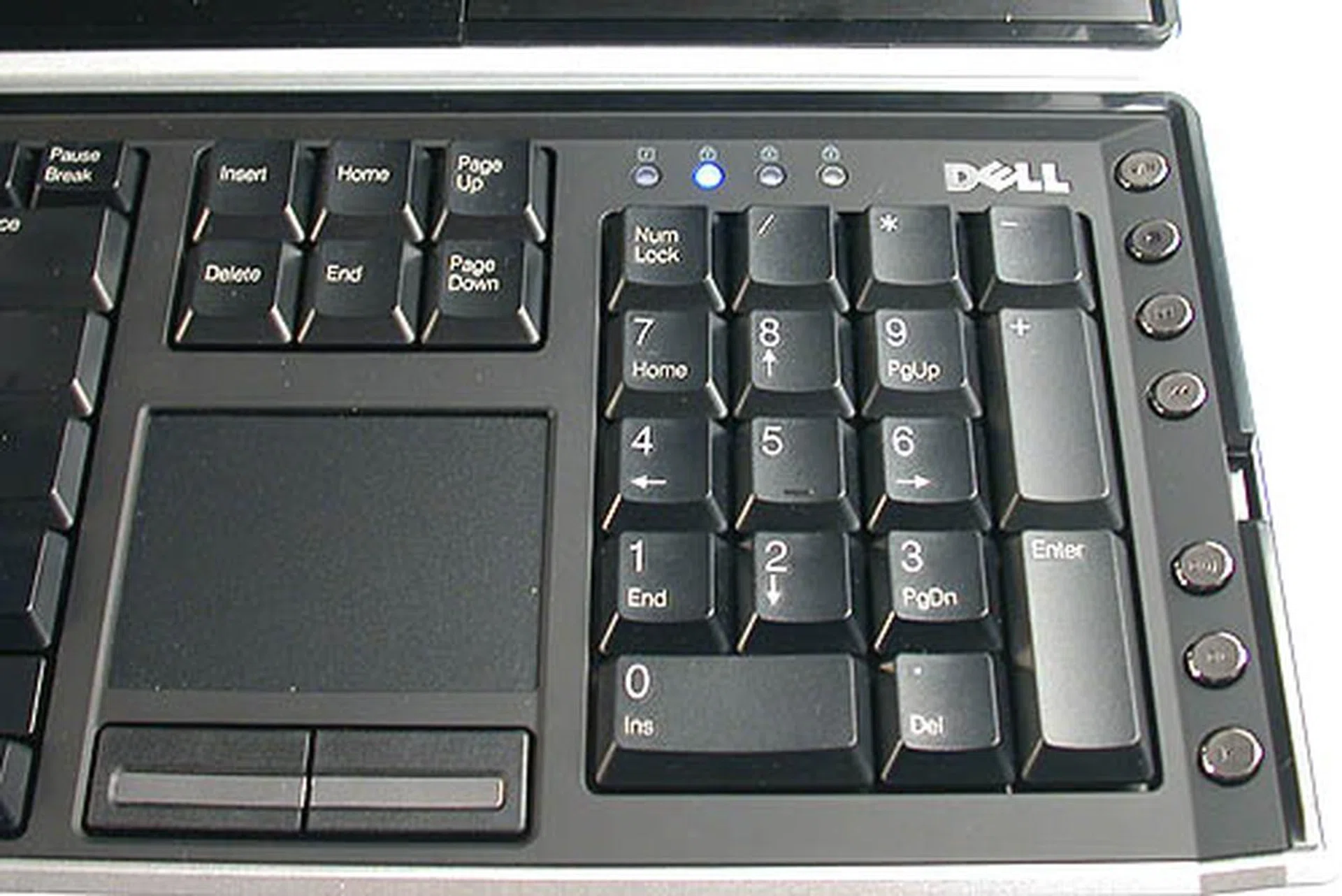
You can even do without the mouse as the full sized detachable keyboard has a touchpad to control the mouse cursor, along with the usual specialized keys for volume, play, fast forward, etc.
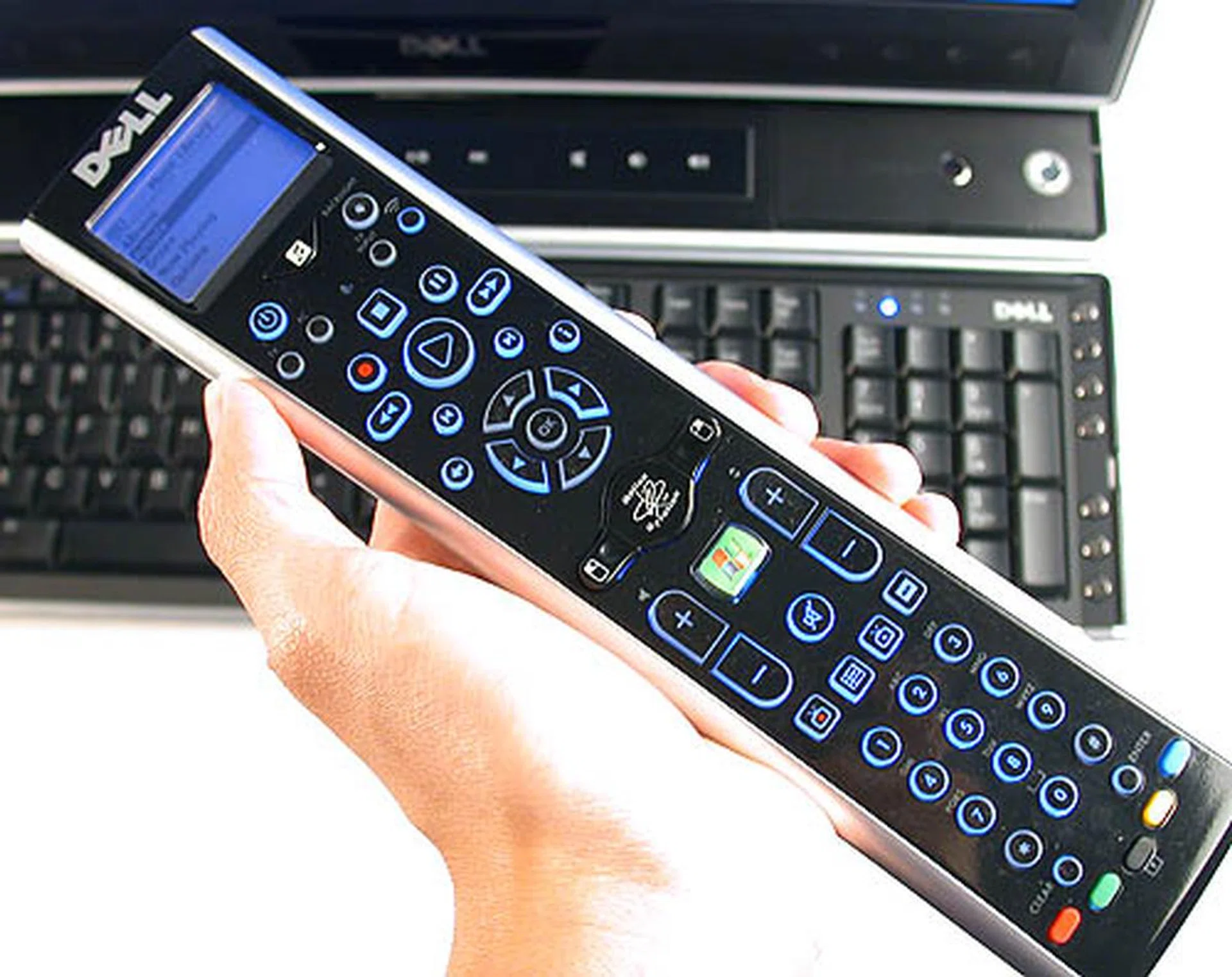
This very useful remote is geared for Microsoft's Windows XP Media Center Edition. What we liked best is its LCD screen for navigation and playback of music. Another rarely seen but innovative feature is its built-in gyroscope which emulates mouse control pretty well and works even in 3D games. Dare we say Wii Remote?
If Microsoft is not to your liking or you feel that Windows is taking too long to start up, you can alternatively play back your media files through Dell's MediaDirect software. At a touch of the button, MediaDirect (created by CyberLink) will launch almost instantly and one can access your files through this interface. With the exception of the TV, all the functions one expect from a media center application is found. The only disadvantage of doing so is that the almost all the keys on the remote will fail to work, since they are geared only for Windows Media Center. However, you could still fall back on the gyroscopic mouse on the remote and the more typical wireless keyboard and mouse combo if necessary.
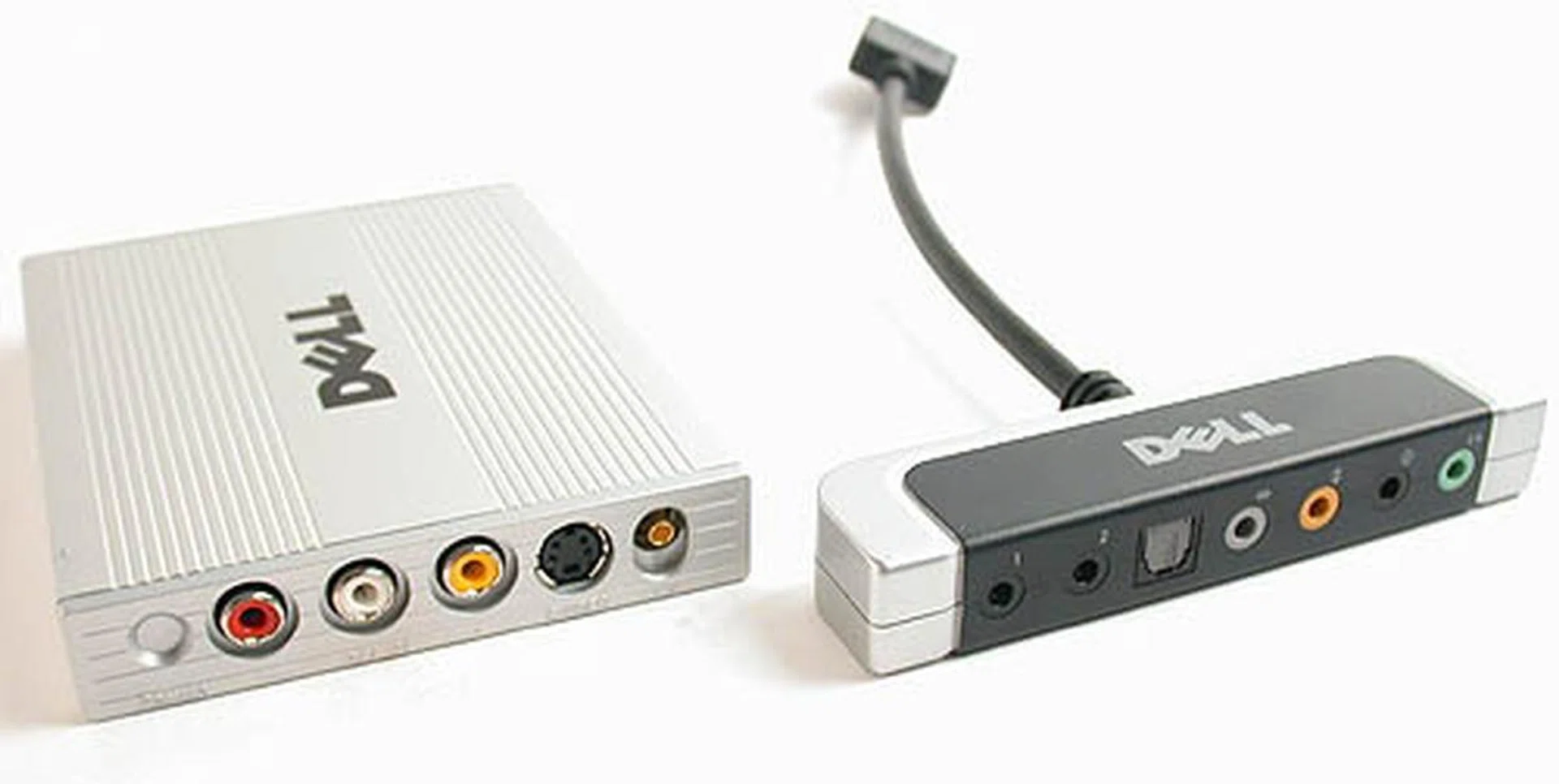
Even with its massive form factor, Dell was unable to squeeze everything in. The external modules include an audio breakout box that has all the audio outputs like S/PDIF and a USB TV tuner that allows the Dell XPS to be a de facto TV and fits with its Media Center functionality.
Benchmarks
Frankly, there are not that many notebooks boasting the specifications of the Dell XPS M2010 as most notebooks are more for work and business purposes, meaning portability and reliability takes precedence over multimedia and gaming. Of course this is not the case for this perfect example of the desktop replacement class, so we have included some gaming benchmarks together with the typical MobileMark for the XPS M2010. Looking through our older reviews, the NEC Versa S5200 comes the closest in terms of hardware to the Dell as shown in the comparison table below. The CPU is almost identical in clock speeds though the NEC pales in comparison when it comes to memory, hard drive and graphics. However, MobileMark and its office productivity emphasis should ignore the XPS M2010's inherent advantage in multimedia and games.
Specifications/Notebook | Dell XPS M2010 | NEC Versa S5200 |
Processor | Intel Core Duo T2600 2.16GHz with 2MB L2 cache | Intel Core Duo T2500 2.0GHz with 2MB L2 cache |
Chipset | Intel 945PM | Intel 945GM |
FSB | 667MHz | 667MHz |
Memory | 2 x 1,024MB DDR2 | 1,256MB DDR2 |
HDD | 2 x Hitachi 100GB SATA 7K60 (HTS72101) - 7,200RPM / 8MB Buffer | Fujitsu 80GB PATA (MHV2080BH) - 5,400RPM / 8MB Buffer |
Video | ATI Radeon Mobility X1800 | Intel GMA 950 Integrated Graphics |
System Benchmarks
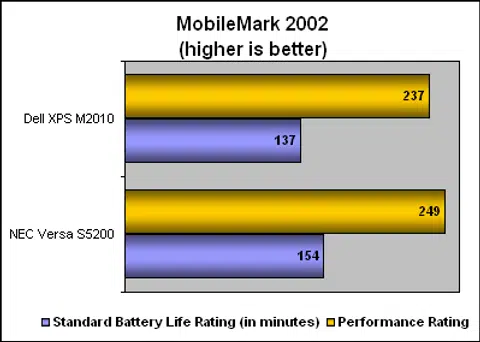
As you can see, the Dell scored slightly lower than the NEC Versa S5200. Given its seemingly superior specifications over the competition, that is quite disappointing. Remember that notebooks are not simply built by just gathering components and fitting them together. There is probably much optimization that Dell needs to do to get the scores to be on par with expectations. Meanwhile, the battery life for the Dell was also inferior though that is not too surprising considering its dual hard drives, 20-inch display and power hungry graphics processor. With normal usage, one should get around two hours of operation, just about enough for a movie. Anything more would be iffy at best. Just like a desktop, this system needs to be tethered to the power socket.
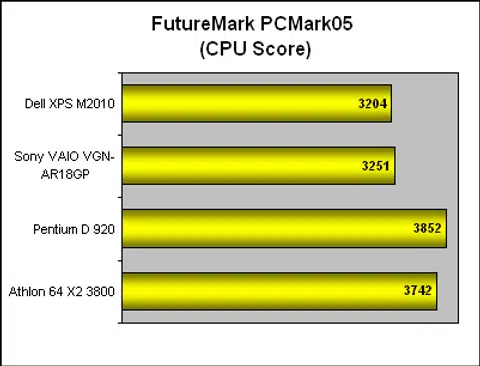
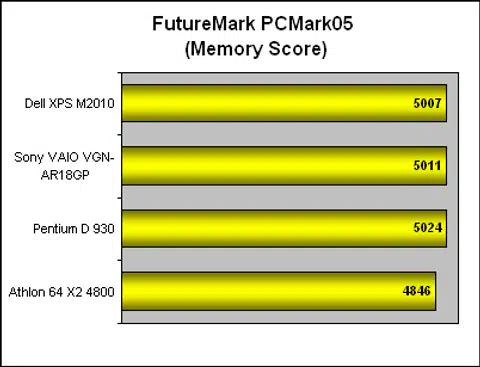
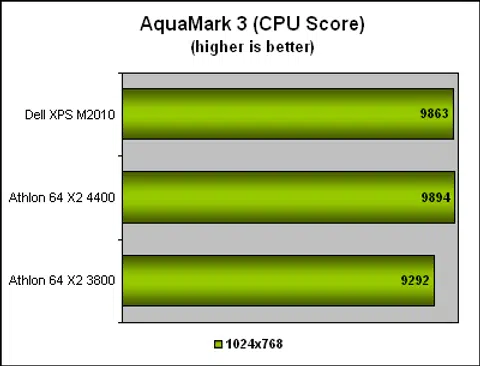
Another system related benchmark, PCMark05 also showed the Dell in less than flattering light. Compared to another similarly configured notebook in the Sony VAIO VGN-AR18GP, which also has an Intel Core Duo T2600 processor, the Dell scored slightly lower for both CPU and memory. Given that we were not too impressed with the performance of the Sony, the Dell fell into the same category of underperforming systems and we feel that there is still much more untapped potential given its hardware capabilities. The Dell XPS M2010 did better in AquaMark03 as its scores were higher compared to an Athlon 64 X2 3800+ when in PCMark05, it had been lower. We included a couple of processor oriented scores in this comparison that we've obtained from our CPU reviews since this particular unit is neither a normal notebook, nor a proper desktop system. Thus these extra comparison results will give you an idea where this deskbook stands among typical desktop systems.
Graphics Performance
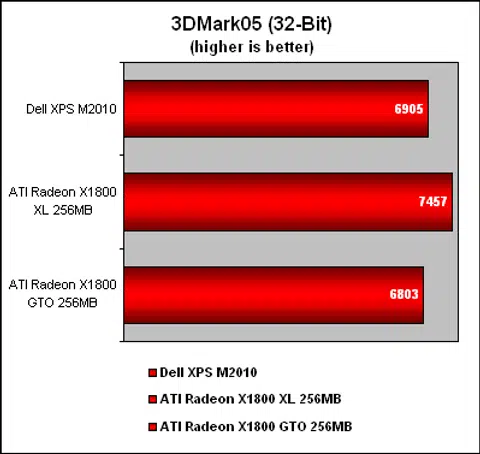
In this section, we have isolated the graphics subsystem of the Dell XPS M2010 and compared it against similar discrete graphics card of a similar class. This is only a rough approximation of where the ATI Radeon Mobility X1800 chip stands and from the performance scores, the Dell is in between the Radeon X1800 XL and Radeon X1800 GTO. Considering that the Dell also has 256MB of frame buffer and a similar core, its graphics performance is quite decent and one should face no problems running the latest games at optimal settings to take full advantage of the large widescreen display.
Battery Life to Weight Ratio
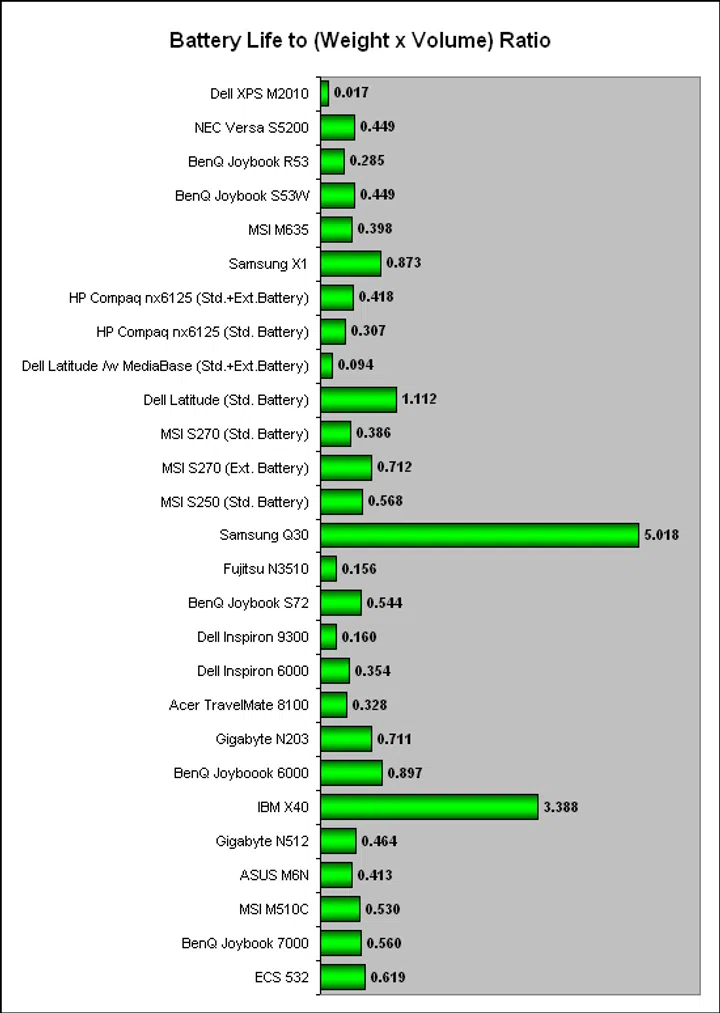
Here, we are interested to find out the 'mobility' of the Dell XPS M2010. We are sure that most readers would instantly give it the thumbs down for this criteria on learning about its 8kg weight and they would be correct in their instinctive assessment. However, we are interested in the raw scores to find out how does it compare to previous notebooks that we have tested.

This monster of a system requires quite a lot of power and the dual 6-cell 56Wh battery only lasts around 2 hours under normal usage. It does seem to recharge pretty fast however, which is quite a plus point.
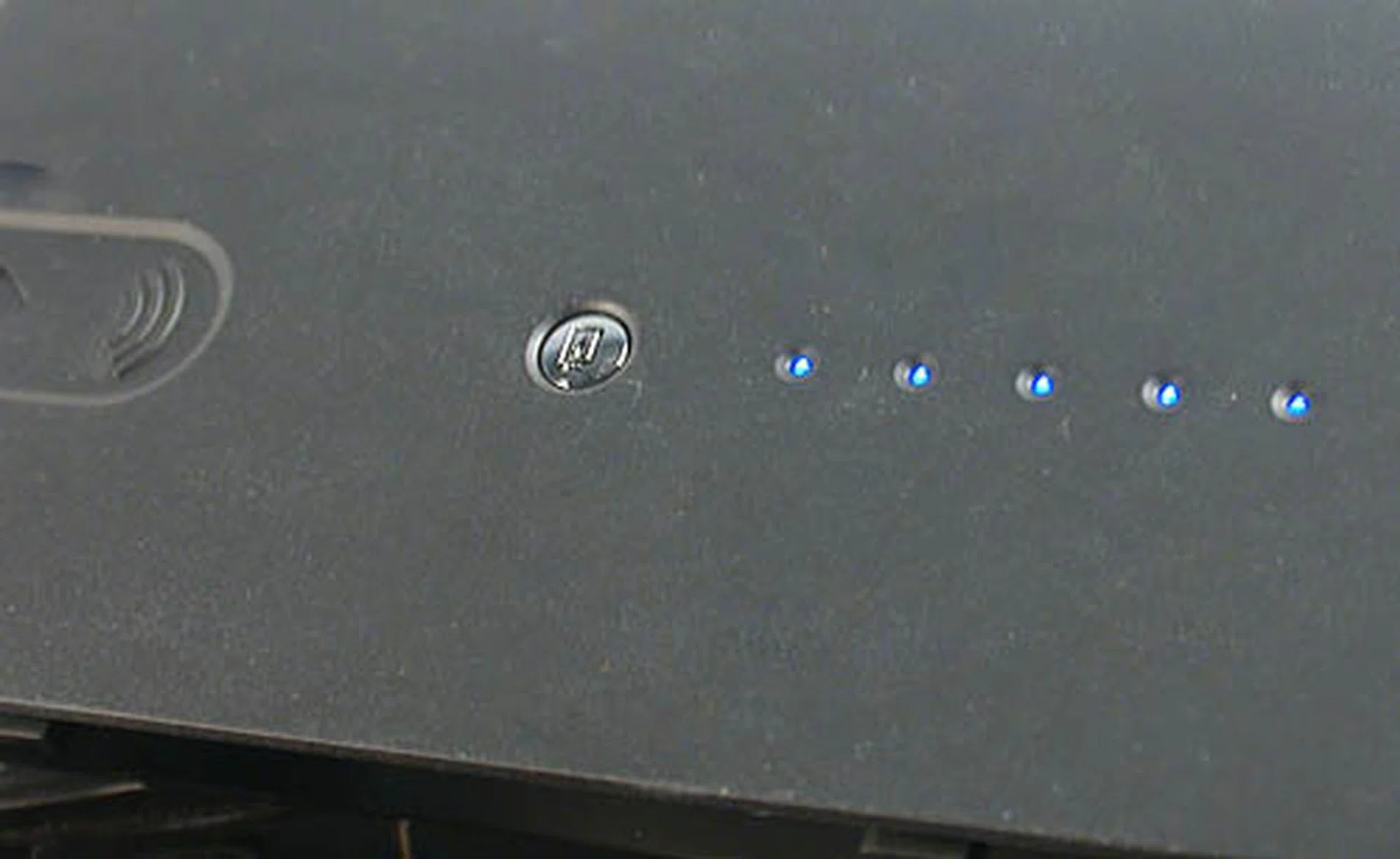
A nice touch - you can click this button on the battery pack to show how much power remains.
In order to normalize all relevant factors between notebooks of disparate sizes and weights, we used a simple measure of ratio between the battery life, volume and weight of the notebook by dividing the battery life of the notebook (as derived with MobileMark) with the product of its mass and volume. The Dell XPS M2010 scored the lowest ever from our list of more than twenty notebooks and considering the margin between it and the second lowest, it is probably very difficult to find another comparable example. This is perhaps the worst-ever portability index we've ever come across and it could very well be the only one - for now. The XPS M2010 is a desktop in everything but name and it would probably be fairer to compare it against a SFF.
Power Consumption
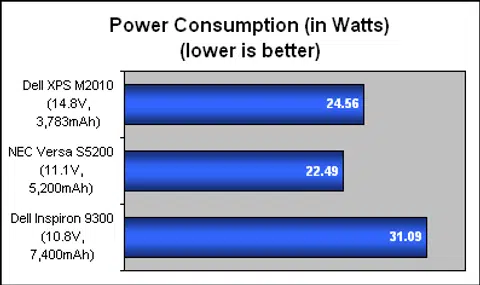
After we measured the overall power consumption of the Dell XPS M2010, it turned out that Dell has kept the power demands of this notebook relatively in check as it did much better compared to other desktop replacements like Dell's own Inspiron 9300. Pitted against other portable business notebooks like the NEC Versa S5200, the XPS M2010 consumed marginally more but that was to be expected. Overall, for its hardware specifications, the Dell XPS M2010 has fared surprisingly decent in this department.
Conclusion
From a geek point of view, the Dell XPS M2010 is one of those bright shiny toys that attract us like bright baubles are to magpies. Its list of expensive, high-end hardware will provoke fits of envy and lust while its stylish exterior will leave everyone drooling at its polish. (Of course, it won't do for one's image to leave the Windows XP installation intact so bring out the Ubuntu discs). However, with the exception of those who have made it big in the rat race, this powerful notebook is probably out of reach for the average consumer, who would flinch at the staggering price tag that starts from US$3500.
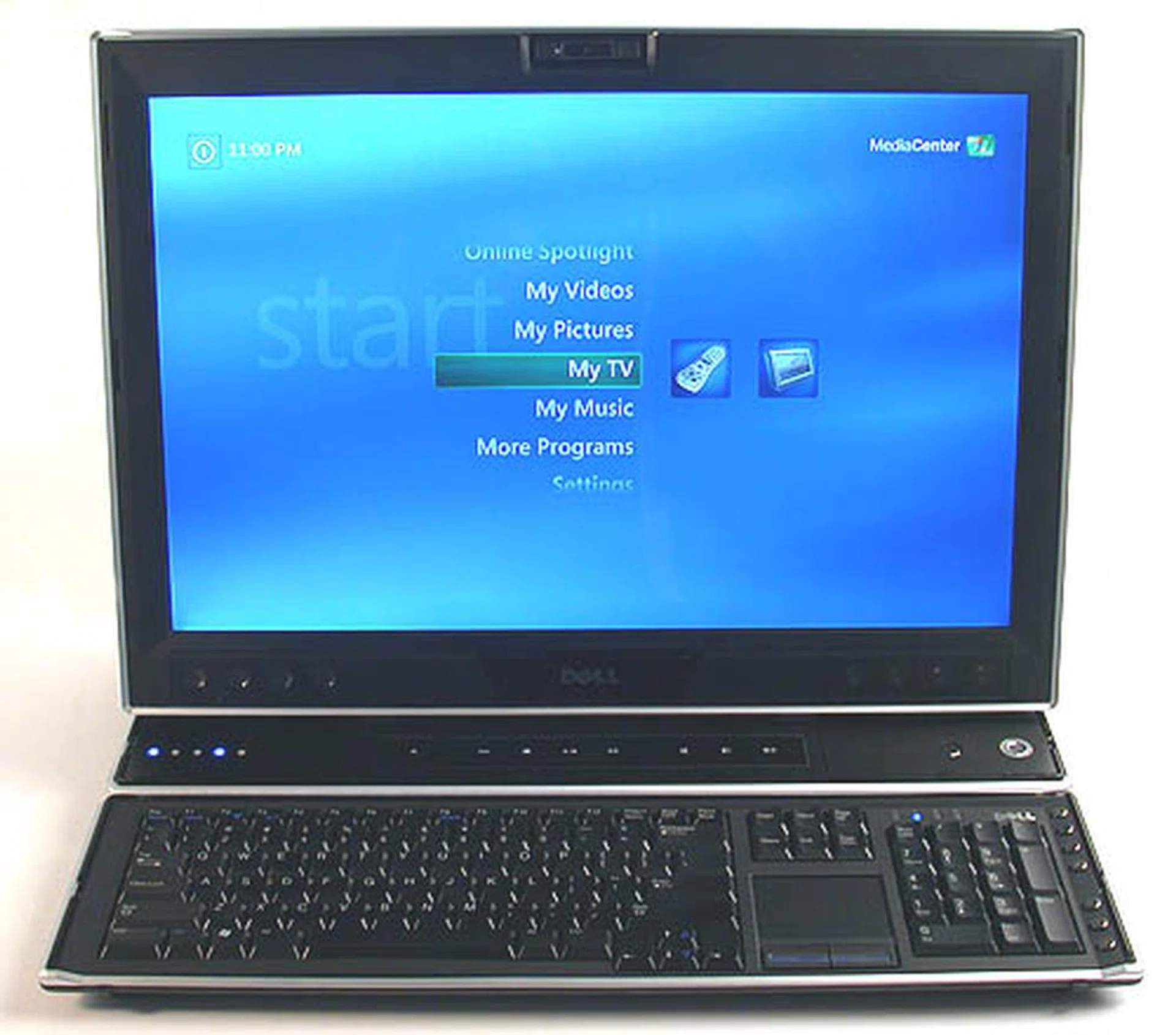
There is a very small and exclusive market for the Dell XPS M2010 as it's neither a truly portable machine nor a heavy clunky desktop. The high price also does not help. But for all that, you will definitely impress all your friends with its uniqueness.
Dell has mentioned spectacular multimedia presentations using the XPS M2010 and we are not going to contradict that. It's plain that this notebook will blow the competition away with its graphics and sound but whether you are willing to lug more than 8kg of dead, albeit stylish weight around is debatable. The possibility is there but feasible or not, we have to leave that to you. We have to admit though that Dell did come up with an elegant solution to marrying a 20-inch widescreen display to the XPS M2010. The aluminum carry handle cum 'monitor stand' is a dual-purpose innovation that looks perfect for its role. Together with the detachable magnetic Bluetooth keyboard and Windows Media Center remote with gyroscopic mouse controls, the Dell XPS M2010 is full of little moments of delight. Trust us, watching a fellow colleague's eyes go round with surprise at discovering each unexpected feature was priceless. Not to mention that the build quality of this system is of the highest quality.
We will even argue that looking at the Dell XPS M2010 as a notebook is fundamentally flawed and puts this 'notebook' in the wrong category. This is a desktop masquerading as a notebook; it may function as such if called into action but it is essentially meant to be stationary, even occupying a place in the living room, thanks to the excellent implementation of Windows XP Media Center Edition. After all, how many notebooks can boast of a 20-inch widescreen display that's almost like one of Dell's best-selling 20-inch LCD monitors. However, the price premium for the XPS M2010 becomes starker when compared to Dell's own top of the line desktop. For example, a superior desktop configuration meant for hardcore gaming, the Dell XPS 700 costs only US$3479 and that's with dual graphics cards and a similar 20-inch display. Besides, the performance of such a desktop would far exceed the XPS M2010, especially since we felt that the notebook is not fully optimized for its specifications. In other words, no matter which category one tries to fit the XPS M2010 into, it is still overwhelmingly expensive.
In fact, there's probably already a category suitable for this - luxury, designer goods. That's where this notebook belongs to, as there's unlikely to be much competition in this rarefied niche. The Dell XPS M2010 was initially a concept PC showcasing its technological and design prowess and to many consumers, that's what it will remain. It's only a reality for those who can afford it but at least they have the assurance that they will probably be one of the few who own such a unique and eye-catching system.
Our articles may contain affiliate links. If you buy through these links, we may earn a small commission.