
ASUS ROG Strix GL503 review - The Scar and Hero editions
With the new ROG Strix GL503, ASUS is switching things up a little with its mid-range line of gaming notebooks. The ROG GL503 Hero and Scar editions are really two of the same, well somewhat, notebooks targeted at MOBA and FPS gamers respectively.

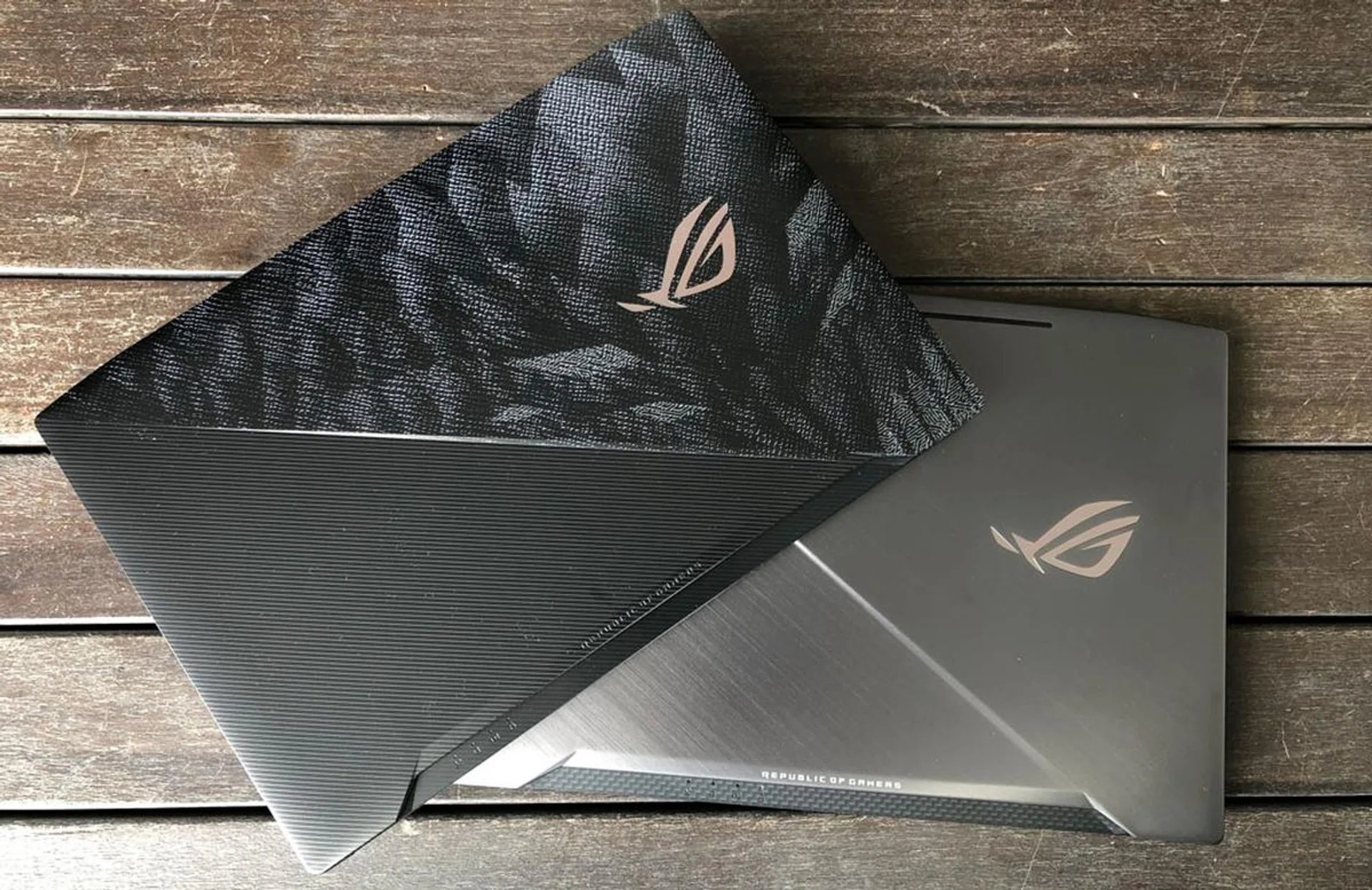
Hero Edition (Top) and Scar Edition.
The ASUS ROG brand has always been synonymous with high performance gaming, especially from their range of gaming notebooks such as the overkill ROG GX800 or the innovative ‘transformable’ ROG Zephyrus GX501. In short, you can always expect ROG to come out with a special trick or two with their notebooks that makes them popular with gamers.
With the new ROG Strix GL503, ASUS is switching things up a little with its mid-range line of gaming notebooks. The ROG GL503 Hero and Scar editions are really two of the same, well somewhat, notebooks targeted at MOBA and FPS gamers respectively, and they each feature genre-specific design to stand apart from each other.
The Hero and the Scar
The 15.6-inch GL503 Hero (GL503VM) edition laptop that we are testing features highlighted QWER keys, which corresponds to common key bindings in games like DOTA 2 and League of Legends. Crucially, it also features a 120Hz IPS display panel, so that your matches should be smooth, responsive, and fluid. The Hero is also adorned with ROG’s design signature Mayan patterns, and some gamers might prefer the fancier looking lid than that on the Scar’s.
That said, the latter isn’t by any means plain, and it comes with a gunmetal gray lid that I’d personally prefer. As a notebook designed for FPS gamers, the Scar comes with highlighted WASD keys and a 0.25mm-deep concave on these keys, which is absent from the Hero version. It may seem trivial, but the shape is supposed to help guide your fingers back into place quickly in the heat of a firefight. Our Scar test unit is the 15.6-inch (GL503VS) and comes with a 144Hz refresh rate. A 17.3-inch (GL703VM) model is available at retail too, if you prefer a larger display, but its refresh rate is limited to 120Hz.
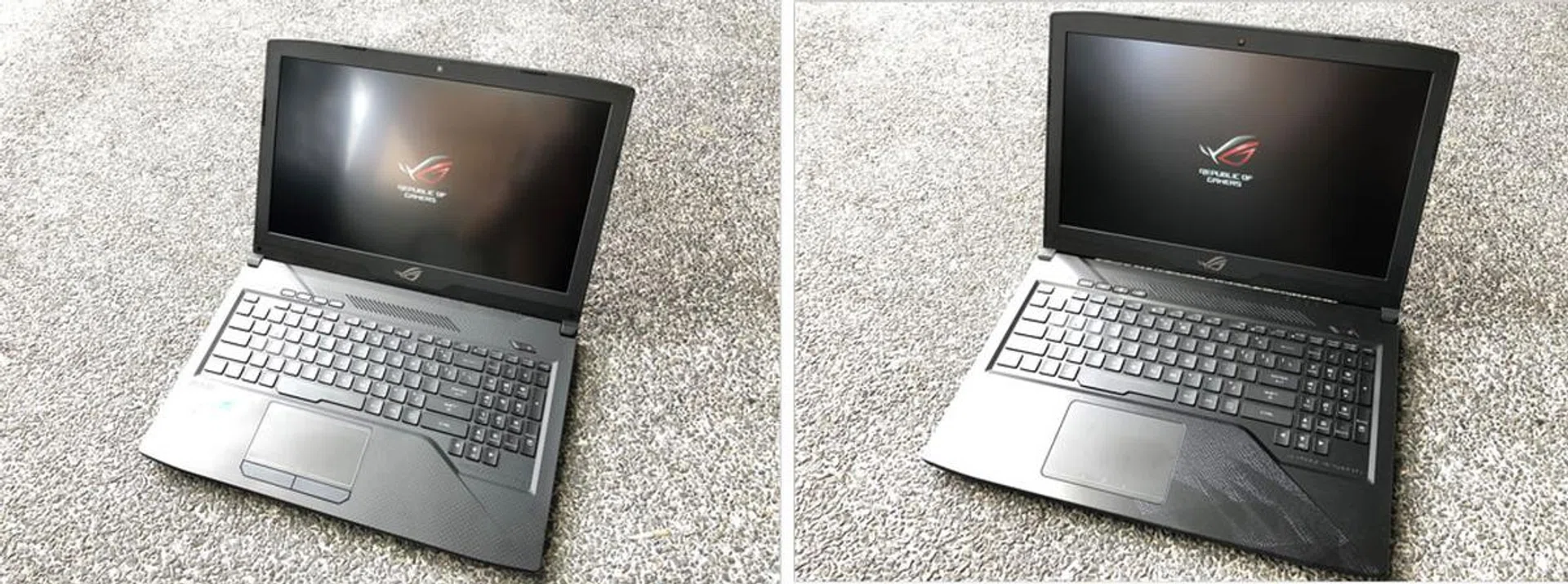
Can you spot the differences of these two GL503 laptops?
Both laptops’ 1080p screen are good, and the IPS display throws out bright, vibrant colors with good viewing angles, and made gaming with titles like DOTA 2, Counter-Strike: Global Offensive to Overwatch quite the visual treat. The matte display also made sense for gamers, as they provide lesser distractions than glossy coated ones.
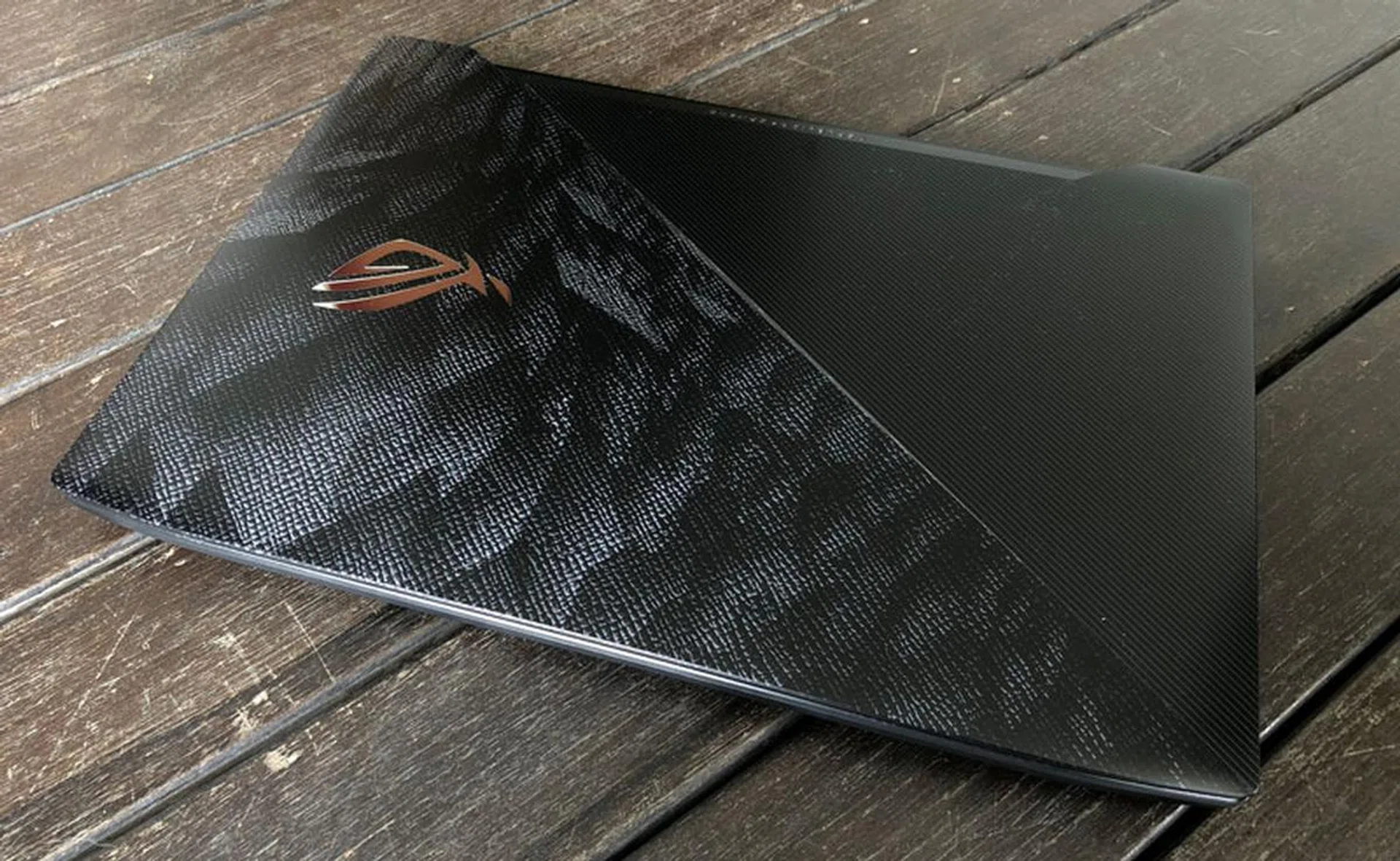
ROG Strix GL503 Hero Edition.
The dual 3.5w speakers work pretty well for a laptop too. They can go reasonably loud while maintaining good clarity, and it's difficult to expect much more from traditionally lackluster notebook speakers.
Personally, I’m not a huge fan of outrageous designs that we see in many gaming-centric laptops; with bright LEDs, sharp edges and aggressive color accents. I can appreciate that these new ROG Strix laptops are a lot tamer than most. It’s a personal opinion, of course, and some of you may still prefer a design that screams “hardcore gamer!”.
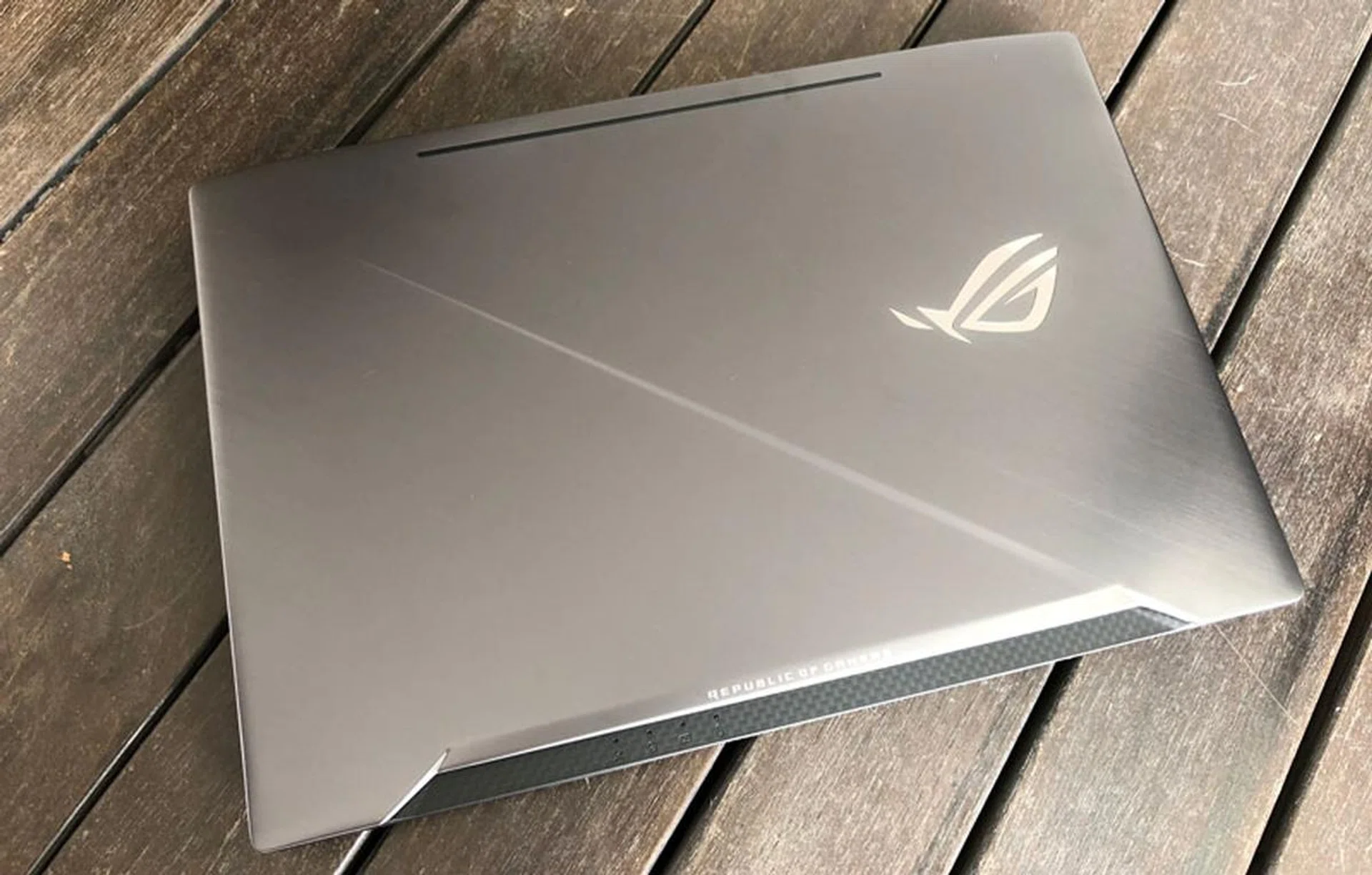
ROG Strix GL503 Scar Edition.
Finally, both the Hero and Scar notebooks that we have here are powered by an Intel Core i7-7700HQ processor and 16GB of DDR4 RAM.
The main differences between the two laptops lie in the graphics configurations. The Hero comes with an NVIDIA GeForce GTX 1060 6GB graphics unit, while the Scar comes with a more powerful NVIDIA GeForce GTX 1070 8GB. Ostensibly to better support shooter games, which are generally more visually demanding than MOBA titles. The Scar also gets a larger 256GB PCIe SSD and 1TB HDD, while the Hero settles with a smaller 128GB PCIe SSD (although it also gets a secondary 1TB HDD drive).
Here are the rest of the GL503’s Scar and Hero specifications:
- 15.6-inch 1,920 x 1,080-pixel IPS display
- Intel Core i7-7700HQ
- 16GB DDR4 RAM
- NVIDIA GeForce GTX 1070 8GB (Scar), NVIDIA GeForce GTX 1060 6GB (Hero)
- 256GB M.2 SSD (Scar), 128GB M.2 SSD (Hero)
- 1TB SeaGate FireCuda SSHD
- 38.4 x 26.2 x 2.54cm
- 2.5kg
Unsurprisingly, the Scar comes with a heavier SRP at S$3,498 while the Hero comes in at S$2,698.
So, what do we think of the laptops? Let’s find out.
Ports and Connectors
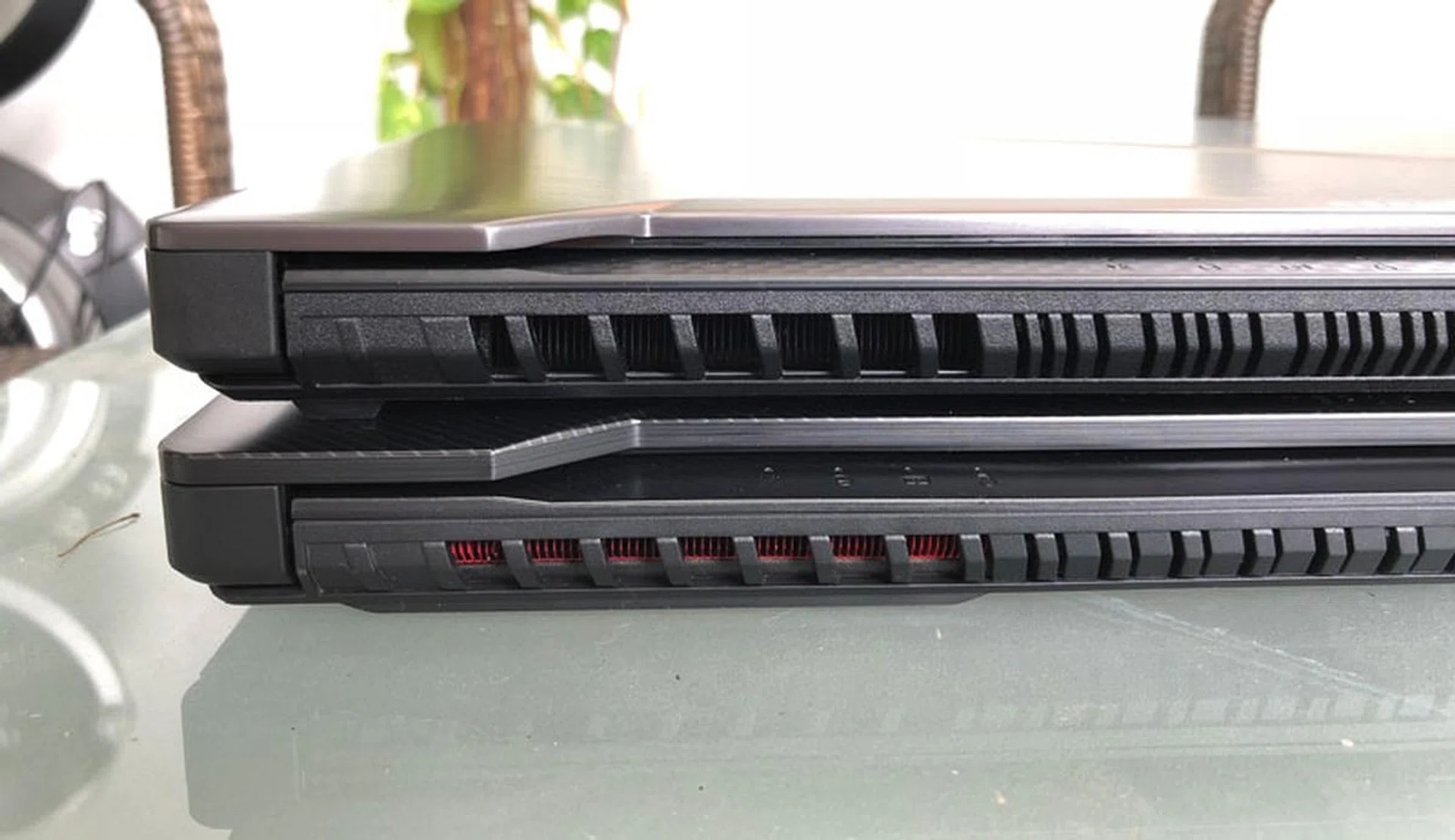
Open the lids and we’ll find that the keyboard layouts for both are pretty much identical. Both also sport the same unique thermal design, where the venting grills above the keyboards allow more intake of cool air to flow in and out from the back of the laptops. There are even intake cuts on the front edge, which seems to be a first for an ROG laptop, and will certainly be handy for gamers who aim to overclock the GPU to gain every ounce of juice from it. The fans never get excessively loud when running the laptops at full load, although it’s certainly noticeable.
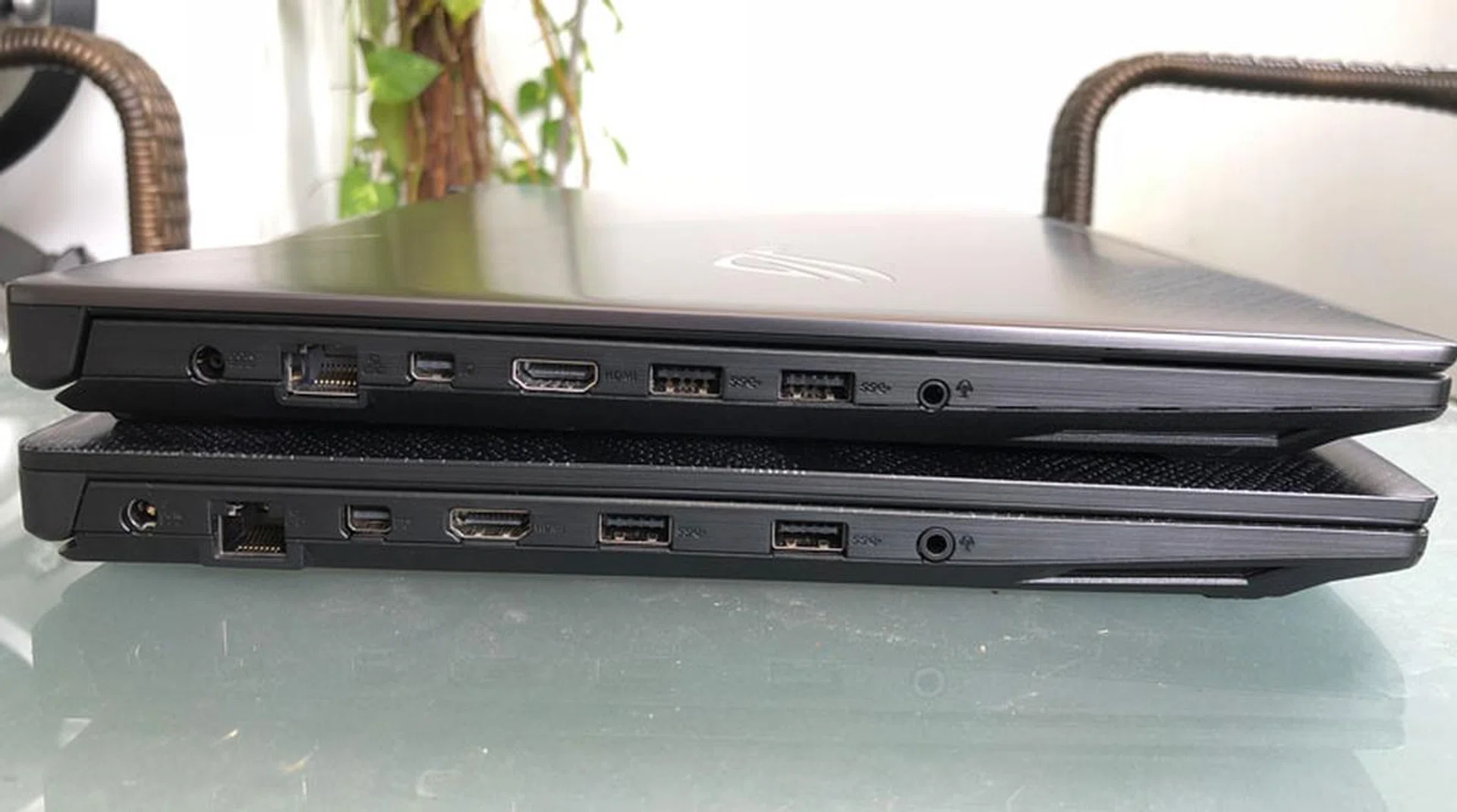
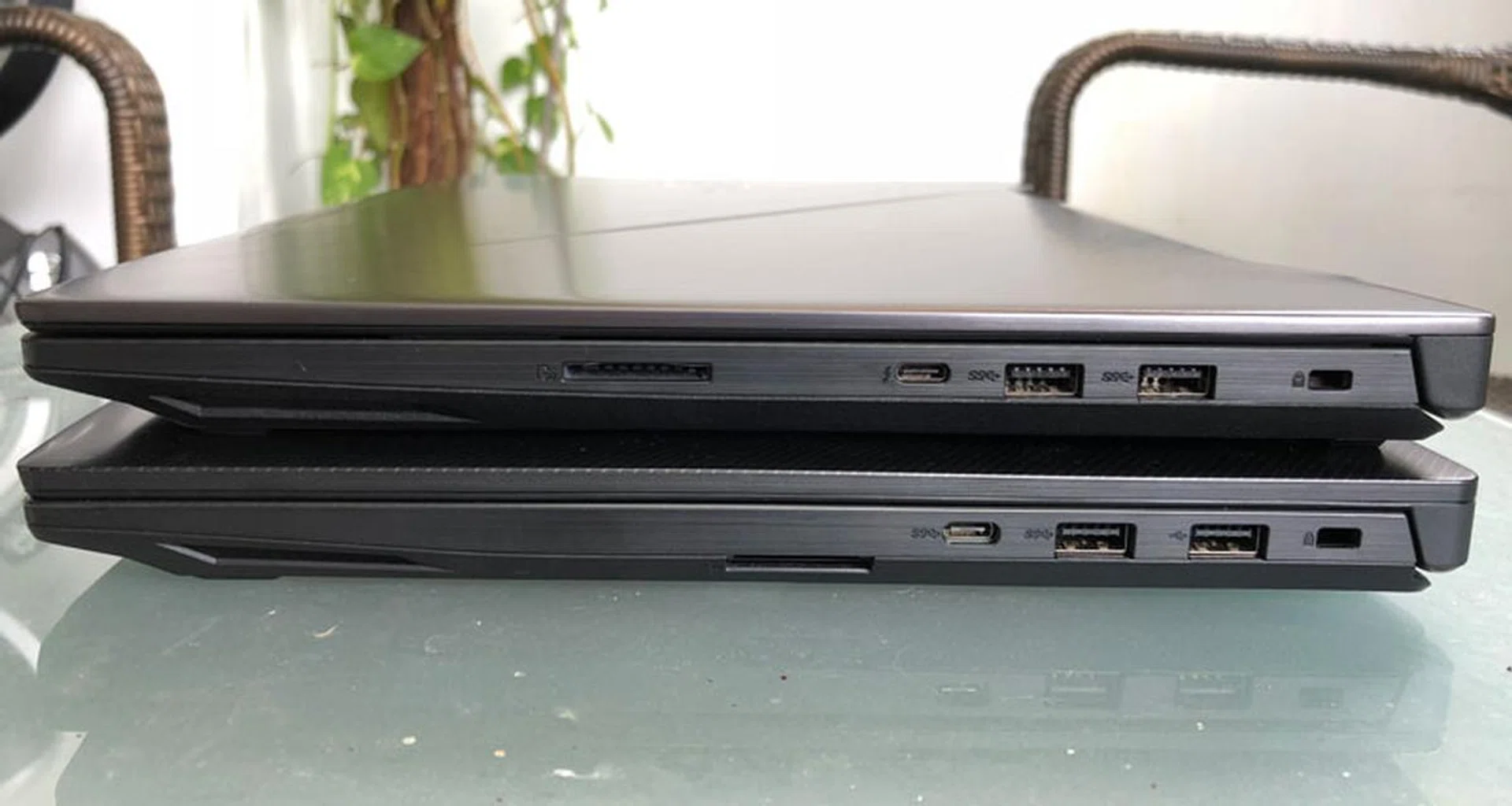
As is typical of most gaming laptops this size, ports and connectors are aplenty for both the GL503 Scar and Hero models. There is a total of four USB 3.1 ports (two on each side) and a Thunderbolt 3 (Type-C) port on the right. Very useful if you’re a streamer and needs this many ports for your external audio and video devices. Other ports and interfaces include a single HDMI 2.0 port, one Mini DisplayPort 1.2 connector, a headphone and microphone combo jack, and a 2-in-1 card reader. Finally, there’s a Gigabit Ethernet port for high speed wired connections.
Keyboard and Trackpad
Benchmarks, which we will go through in the next page, will give us a rough idea of what to expect performance-wise, but they don’t paint the entire picture. You see, a notebook’s keyboard and trackpad can make or break your gaming (or even just general productivity) experience, and is key (pun intended) to any notebook purchase decision.
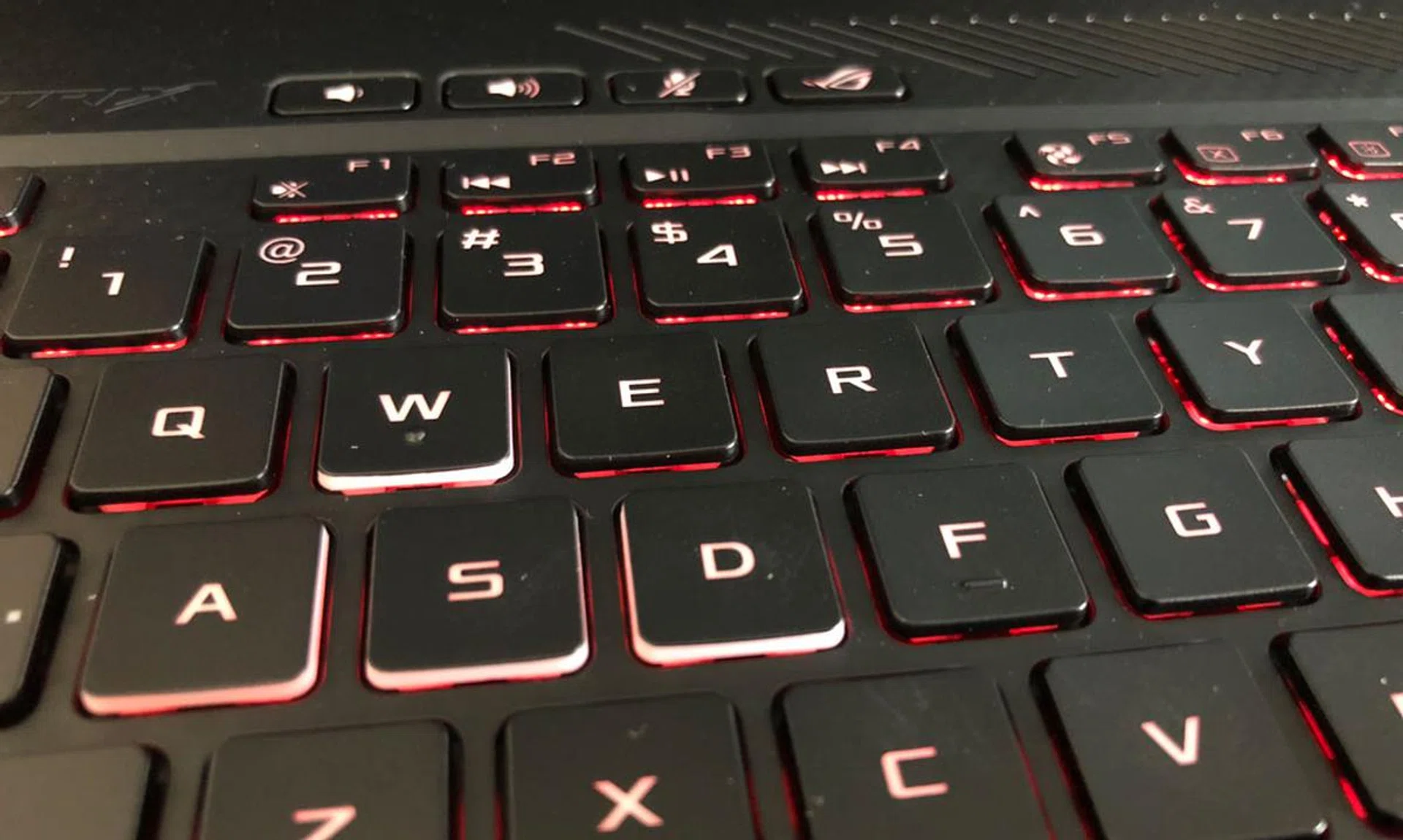
And while I wouldn't say the keyboards on the GL503 laptops are by far the best I've used, they are very decent with some appreciable tactile feedback and travel. So they do well enough for me in that regard. Since it is also a gaming laptop, the keyboard has the obligatory RGB lighting too, with four different zones that can be fully configured via the pre-installed ROG Aura Core sofware.
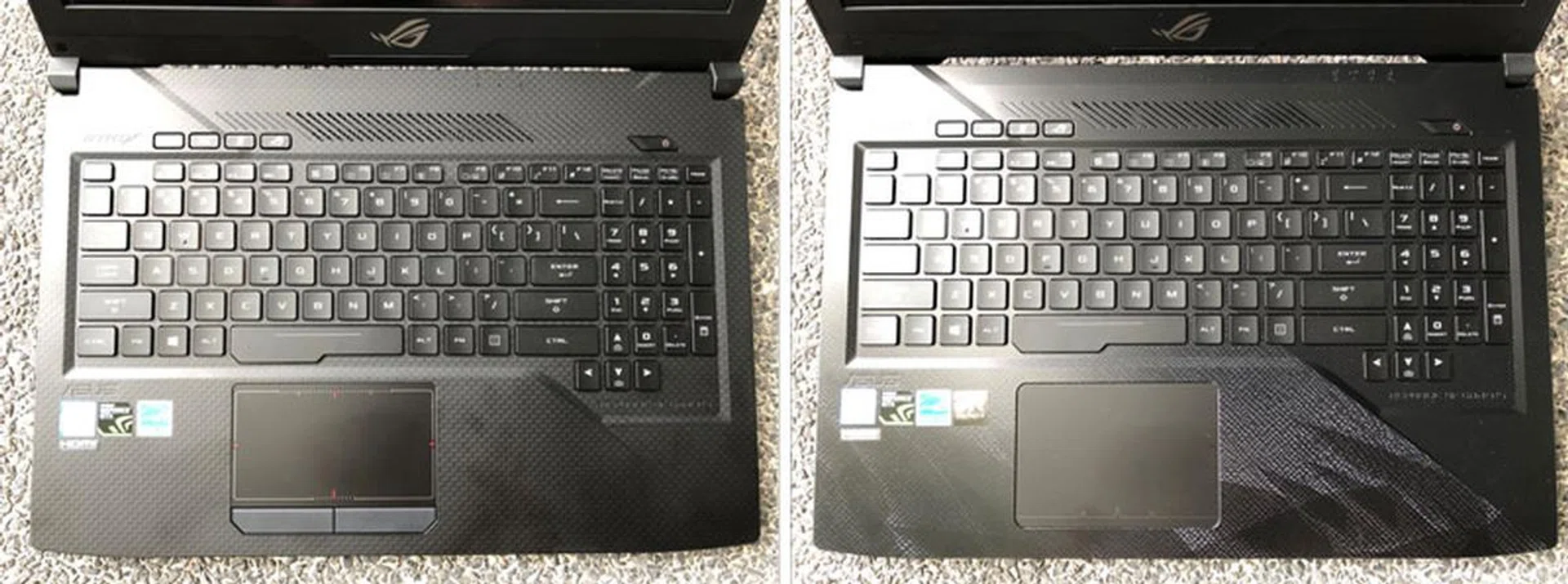
Scar Edition (Left), Hero Edition (Right).
The trackpad is also another key area where the two GL503 differs. The Scar Edition's trackpad comes with dedicated left and right buttons, while the Hero Edition comes with them integrated on the trackpad itself. The latter design mean that you do get a reasonably larger tracking surface area. After using both, I'd prefer Scar's trackpad as a matter of personal preference (I just feel better with the physical buttons). In any case, any half-serious gaming will be done with a proper mouse anyway.
Speaking of which, ASUS included a gaming mouse as part of any of the GL503 notebook package. It’s actually a pretty decent mouse too. But let’s face it – if you’re already playing games on a notebook, you’d likely have an accompanying gaming mouse to use anyway.
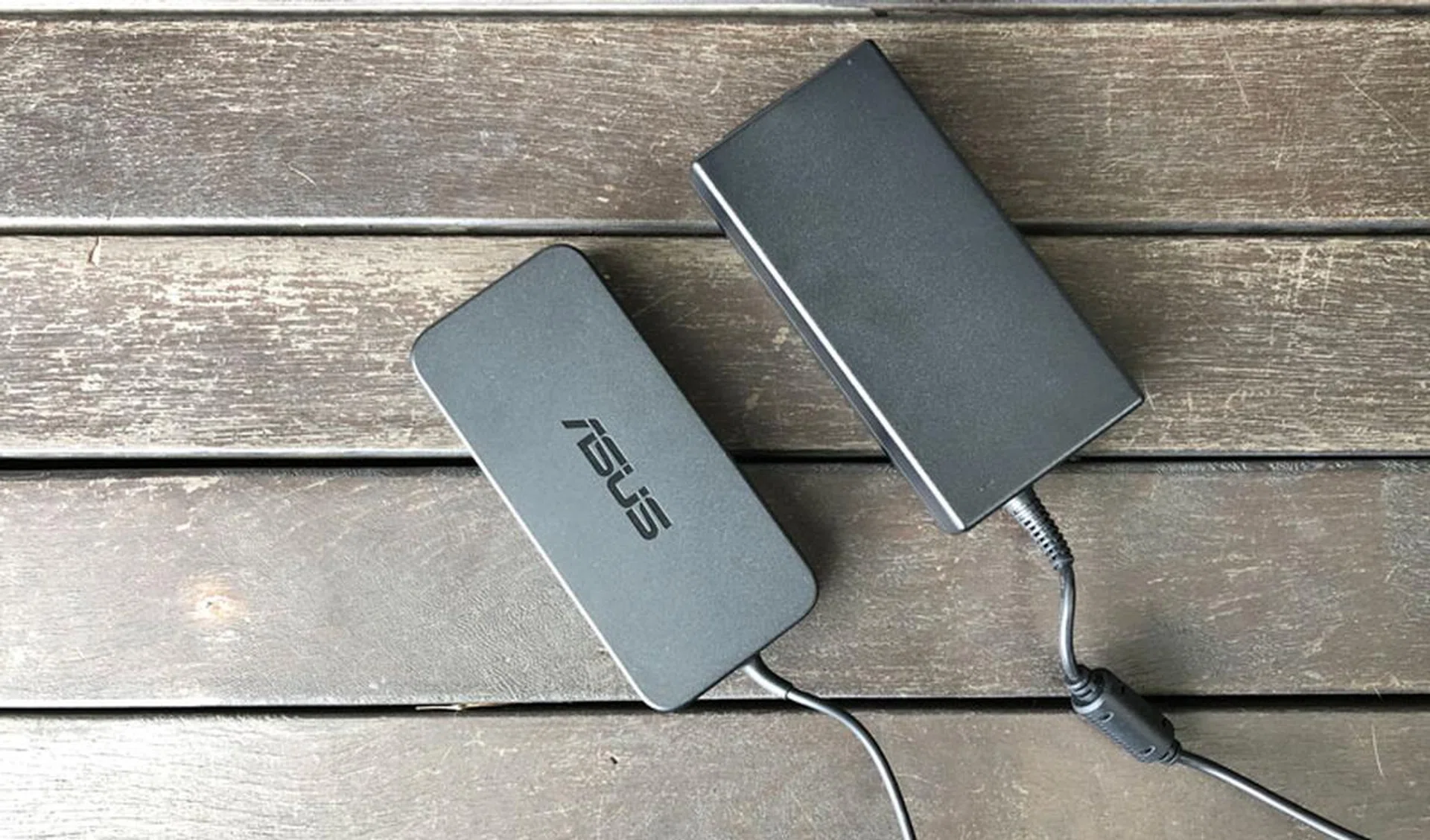
The Hero Edition uses a smaller power adaptor, while the GeForce GTX 1070 in the Scar Edition meant it requires a larger power feed.
Test setup and performance
As mentioned earlier, the GL503 Scar and Hero editions come with different specifications, and (as ASUS claims) for specific types of gaming. Unfortunately, we have updated the benchmarking tools used, and so did not manage to run some of the new ones on gaming notebooks that we have reviewed previously, since they have been returned. But I will do my best to give a context to what each benchmark results mean for both GL503 laptops.
Here’s a list of the benchmarks used:
- PCMark 10
- 3DMark 2016
- VRMark 2016
- Ashes of the Singularity
- Deus Ex: Mankind Divided
- Gears of War 4
For temperature measurements, we used the 3DMark Fire Strike Extreme Stress Test, and the battery life benchmark in PCMark 8 Home in our battery tests (PCMark 10 doesn’t yet come with a built-in battery benchmark).
PCMark 10 Extended
PCMark 10 Extended assesses the performance of systems in a variety of workloads, including basic computing tasks, productivity applications, digital content creation, and gaming. In contrast to the older PCMark 8, existing workloads have been updated to reflect modern usage.
We added the ASUS Zenbook Pro as a comparison for good measure. It’s not a gaming notebook for sure, but like both GL503s, it’s also using an Intel Core i7-7700HQ processor, 16GB of memory. For graphics, the former is using a humbler NVIDIA GeForce GTX 1050 Ti 4GB.
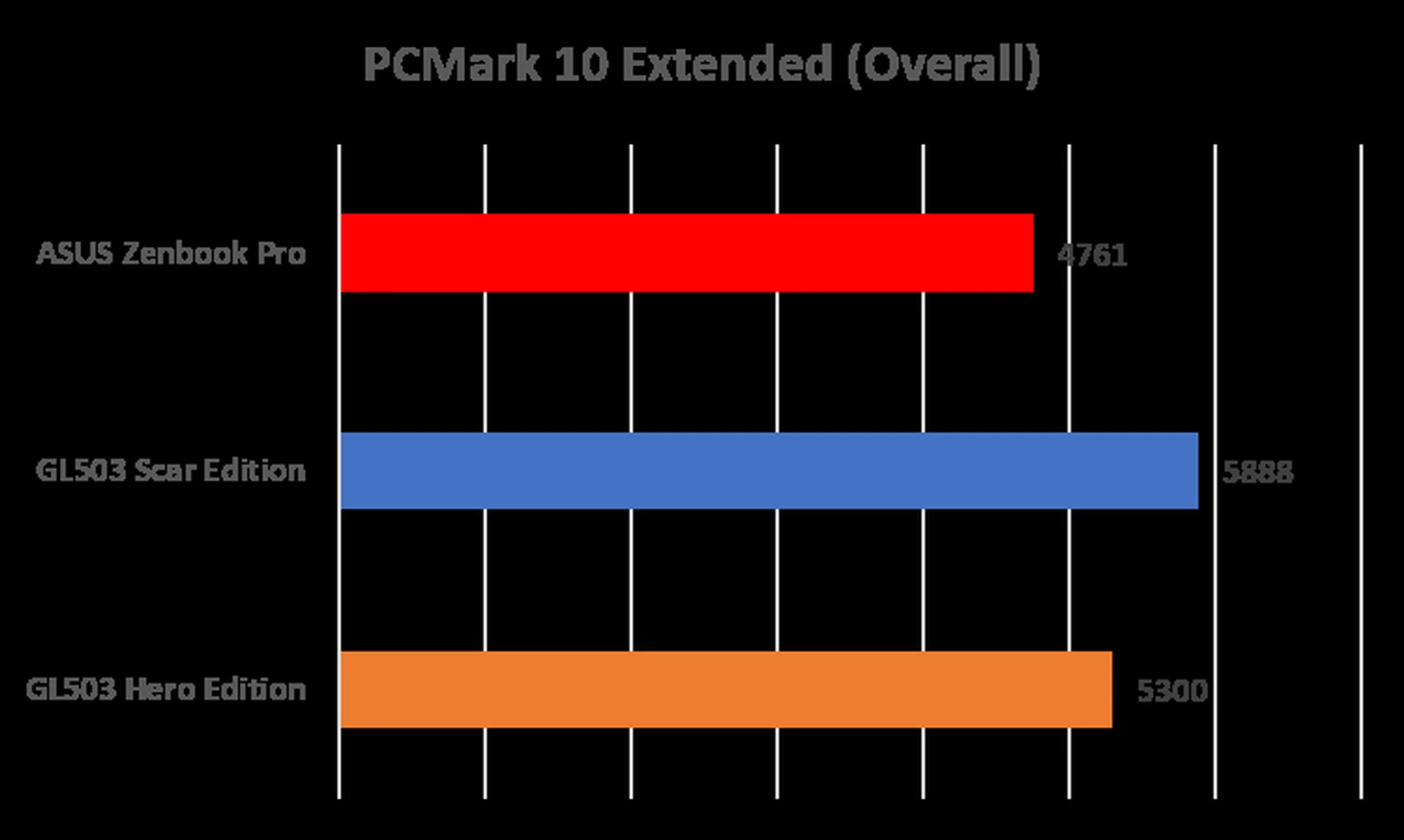
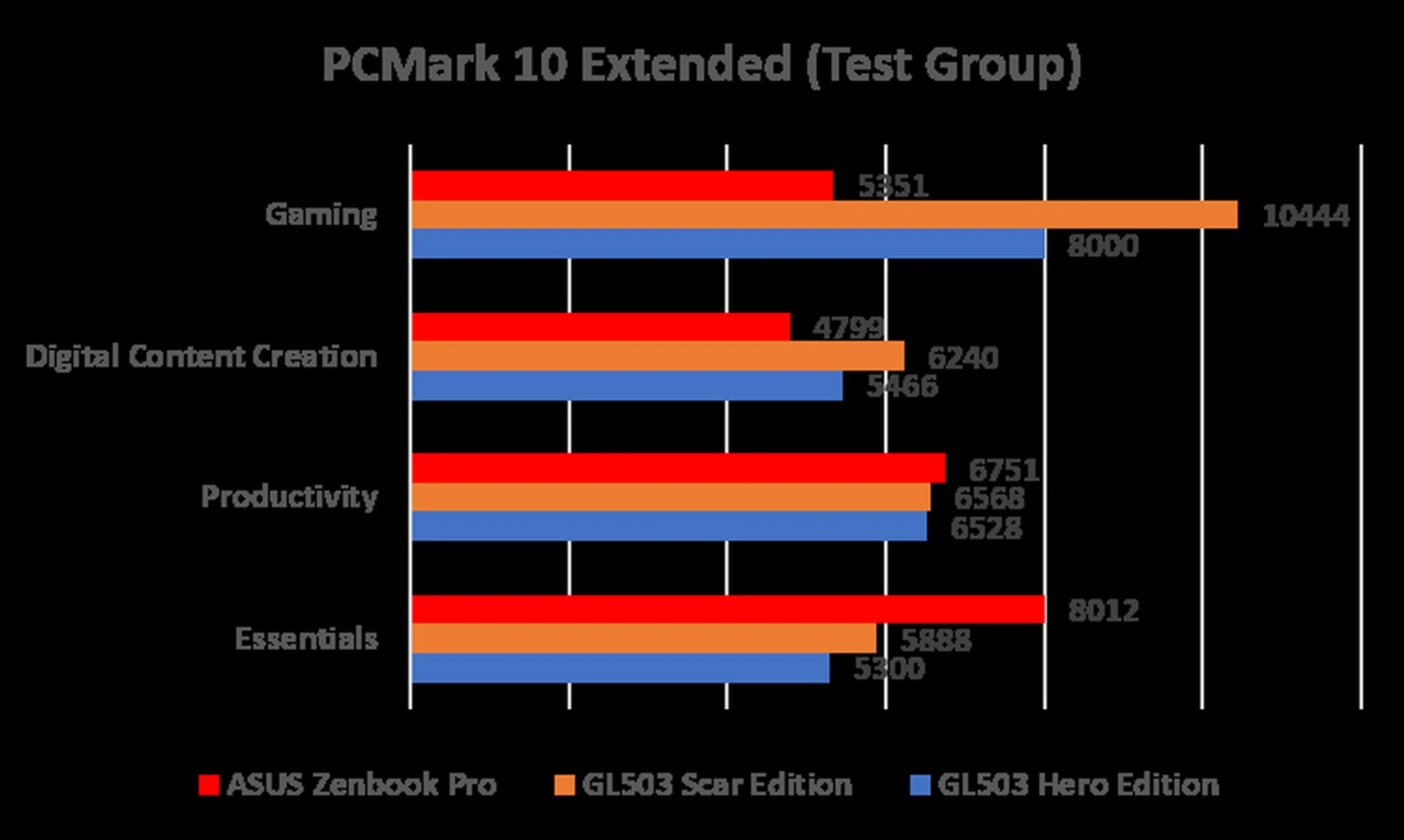
No surprisingly, the GL503 Scar Edition performed better overall, especially in the areas of Gaming and Digital Content Creation, where its superior GeForce GTX 1070 gave it the edge. It’s in the Productivity and Essentials tests where things took an interesting turn. Despite both GL503 notebooks boasting superior specifications over the Zenbook, it trails behind the latter in these two tests. A little investigation shows that this is due to the GL503’s agonizingly slow SeaGate FireCuda 1TB 5400rpm SSHD hybrid drive, where the test files were run on. It’s not necessarily a deal breaker, but worth paying a serious attention to.
3D Mark 2016
3DMark looks explicitly at gaming performance, and it puts systems through a range of graphics and computational performance tests at different resolutions, starting at 1080p and going all the way up to 4K.
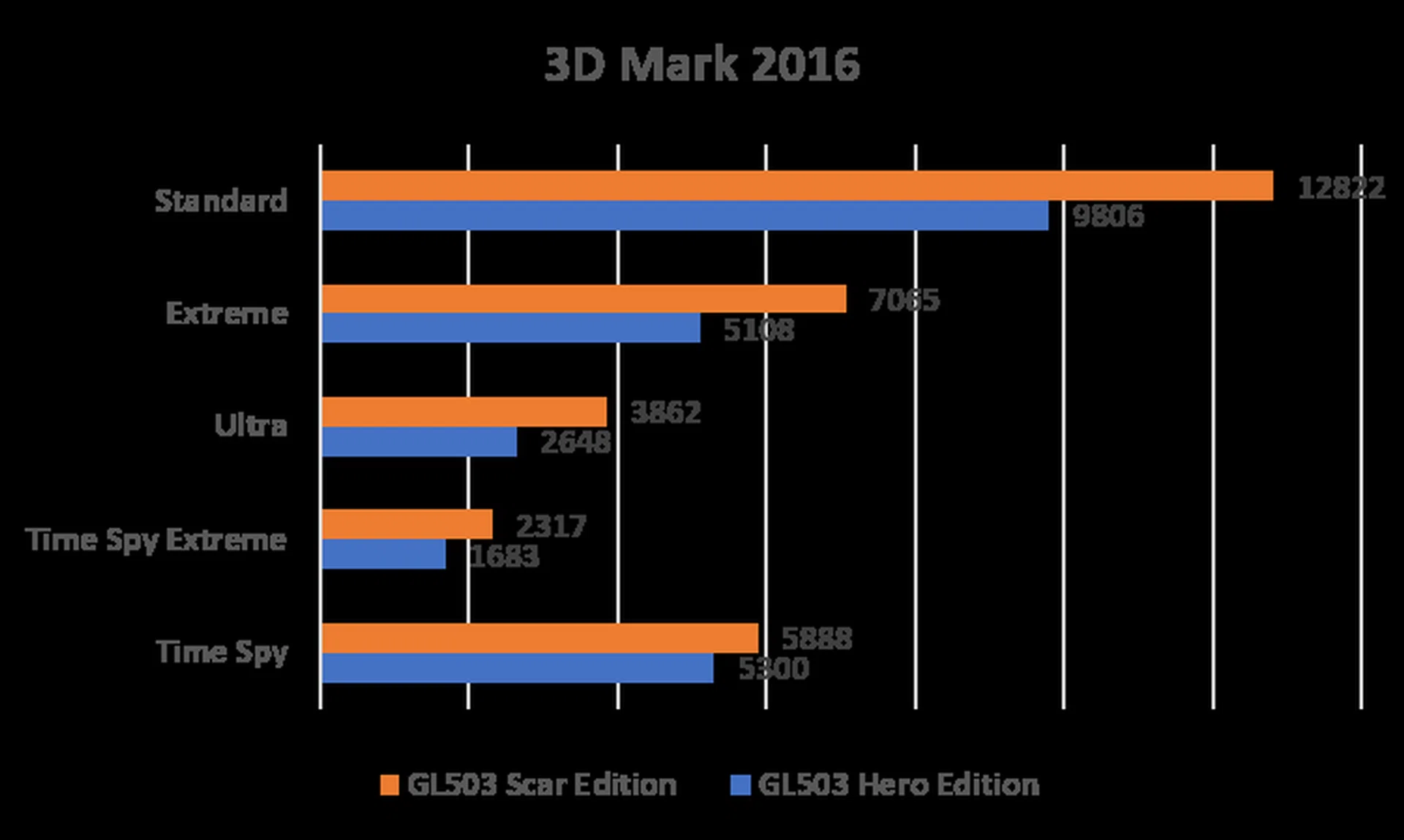
Once again, the GL503 Scar Edition pulled ahead of its Hero sibling. Again, this is to be expected, considering that it uses a far superior GPU. The key takeaway from this result is this; the GL503 is simply the better all-round gaming (and not just for FPS) notebook.
VR Mark 2016
Futuremark’s VRMark benchmark is designed to assess a PC’s ability to handle high-performance headsets like the HTC Vive and Oculus Rift. If the laptops pass the “Orange Room” test, it’s technically ready for the two most popular VR systems available today.
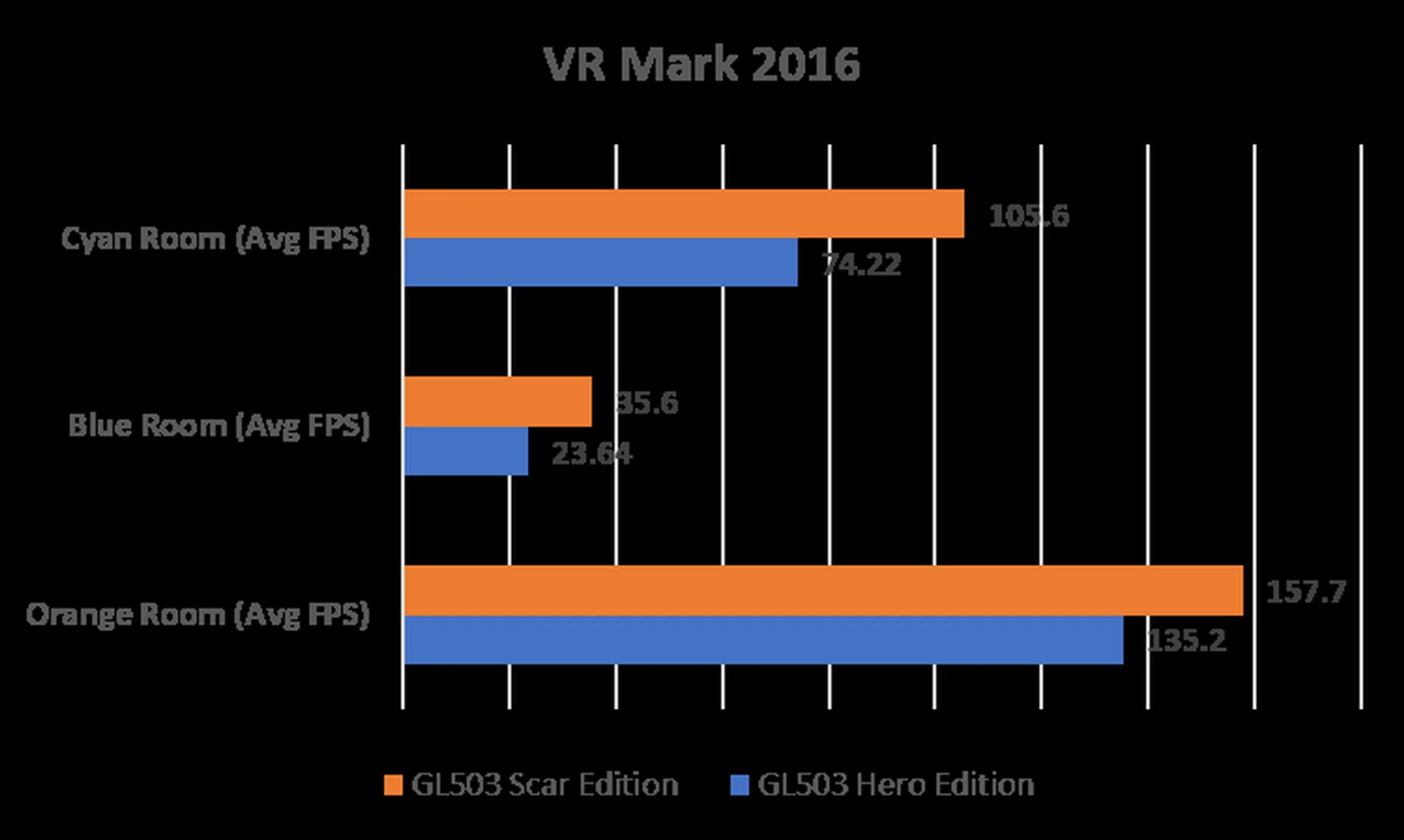
The GeForce GTX 1060 and 1070 were designed to run VR, so it’s no surprise that both notebooks passed the Orange Room test easily. The Scar Edition also did well at the Cyan Room test, which meant that it is also capable of running VR games on the HTC Vive and Oculus Rift at the highest settings.
Ashes of the Singularity
Ashes of the Singularity is a demanding DirectX 12 real-time strategy game that puts thousands of units on screen, and it’s capable of punishing even the most powerful GPUs. However, it’s also rather limited by the CPU at lower resolutions and settings.
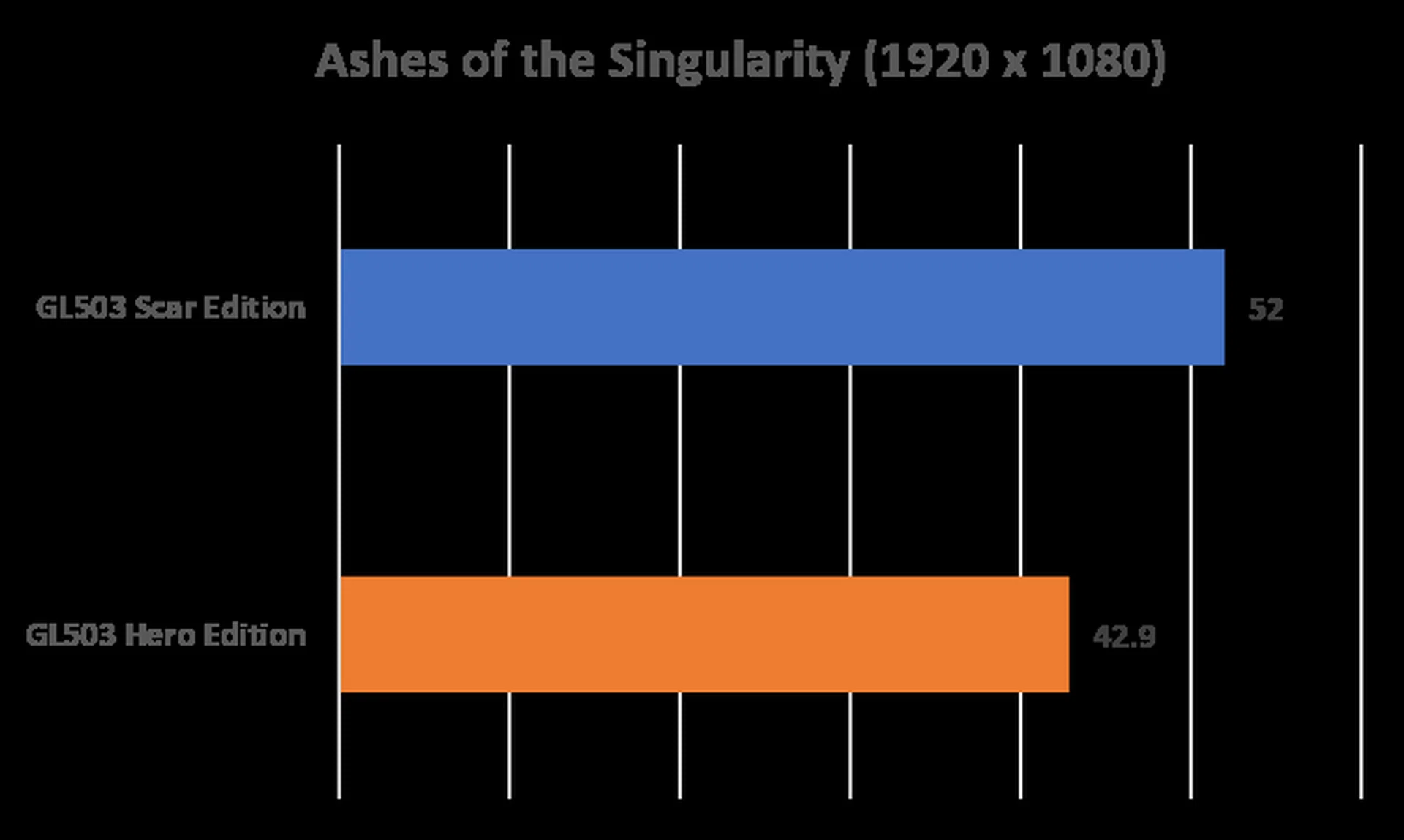
In Extreme Mode, the game is still playable at 1080p, but with hardware demanding real-time strategy games such as Ashes of the Singularity, it might be worth sacrificing some visual fidelity in exchange for higher frame-rates.
Deus Ex: Mankind Divided
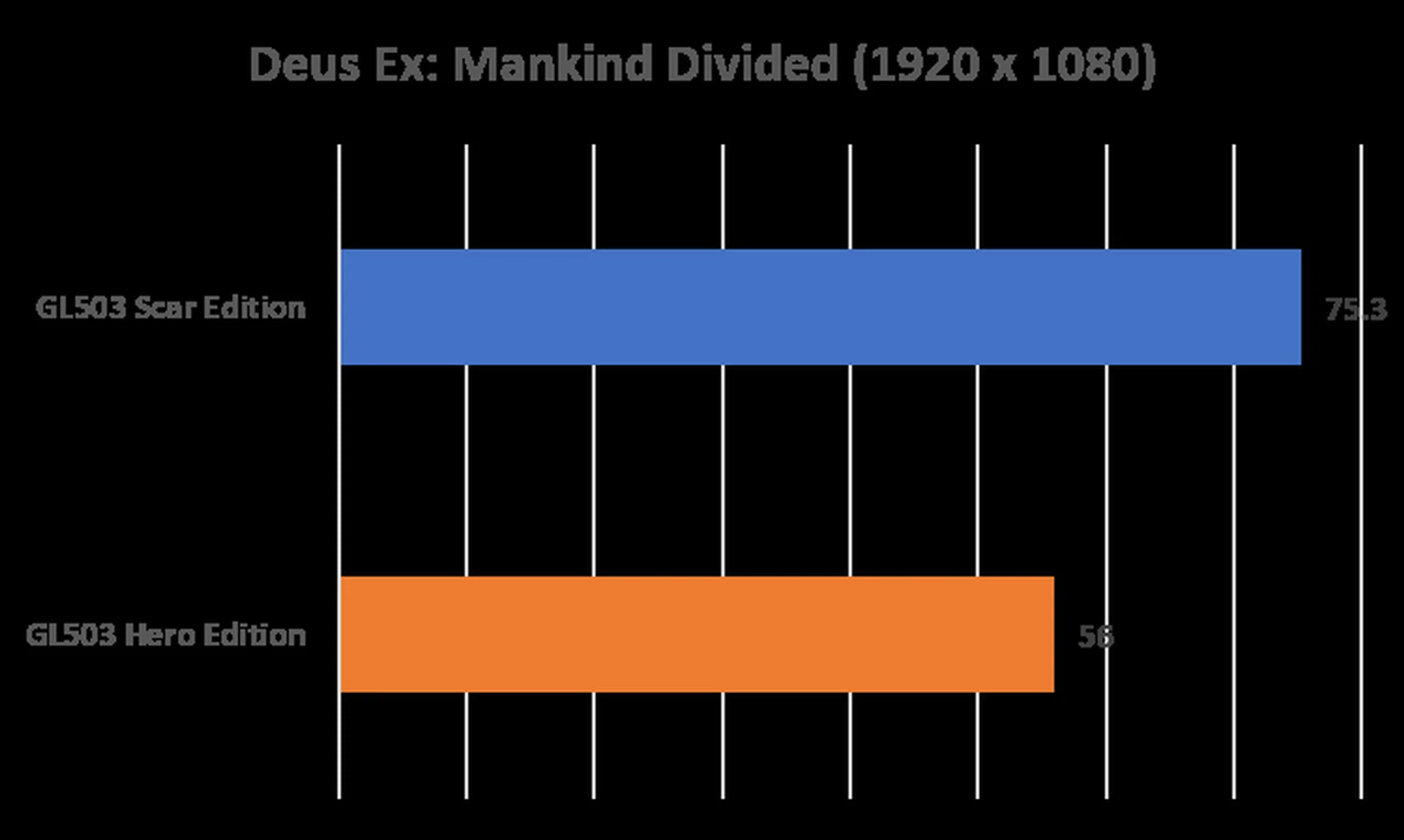
Mankind Divided is one of the most demanding titles to run today, but the good news is NVIDIA’s newest drivers have been optimized to an extend that a GeForce GTX 1060 laptop will deliver a fairly good experience even at ‘High’ graphics settings, as we can see from the frame-rates achieved below.
Gears of War 4
Gears of War 4 is another game that was built from the ground up for DirectX 12. It may not be as demanding as Deus Ex: Mankind Divided, but it still provides a good indication of how a computer performs with today’s FPS/shooter games.
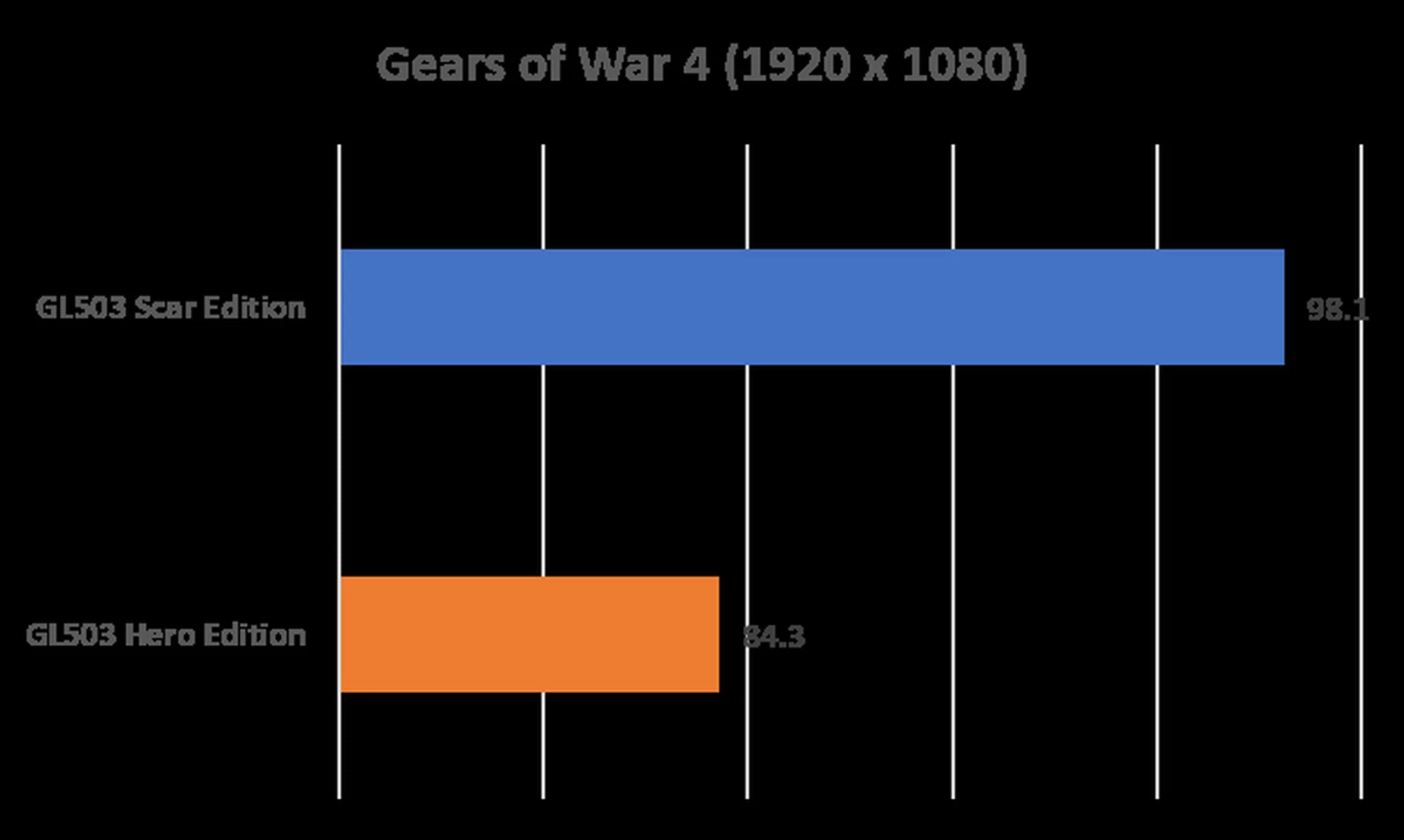
60fps is the minimum standard for a good playing experience for any FPS games, and we can see that the made-for-FPS games GL503 Scar Edition (by virtue of its GeForce GTX 1070) does live up to its challenge. If you play mostly FPS games on a laptop, the choice between these two GL503 gaming laptops is quite clear.
Temperature
We measured the external temperatures of the CPU and GPU the notebooks after looping the 3DMark Fire Strike stress test for 15 minutes. This amount of time is more than enough to get an idea of your average maximum running temperature for this workload. For this test, we can compare how the GL503s compare to some of the competition.
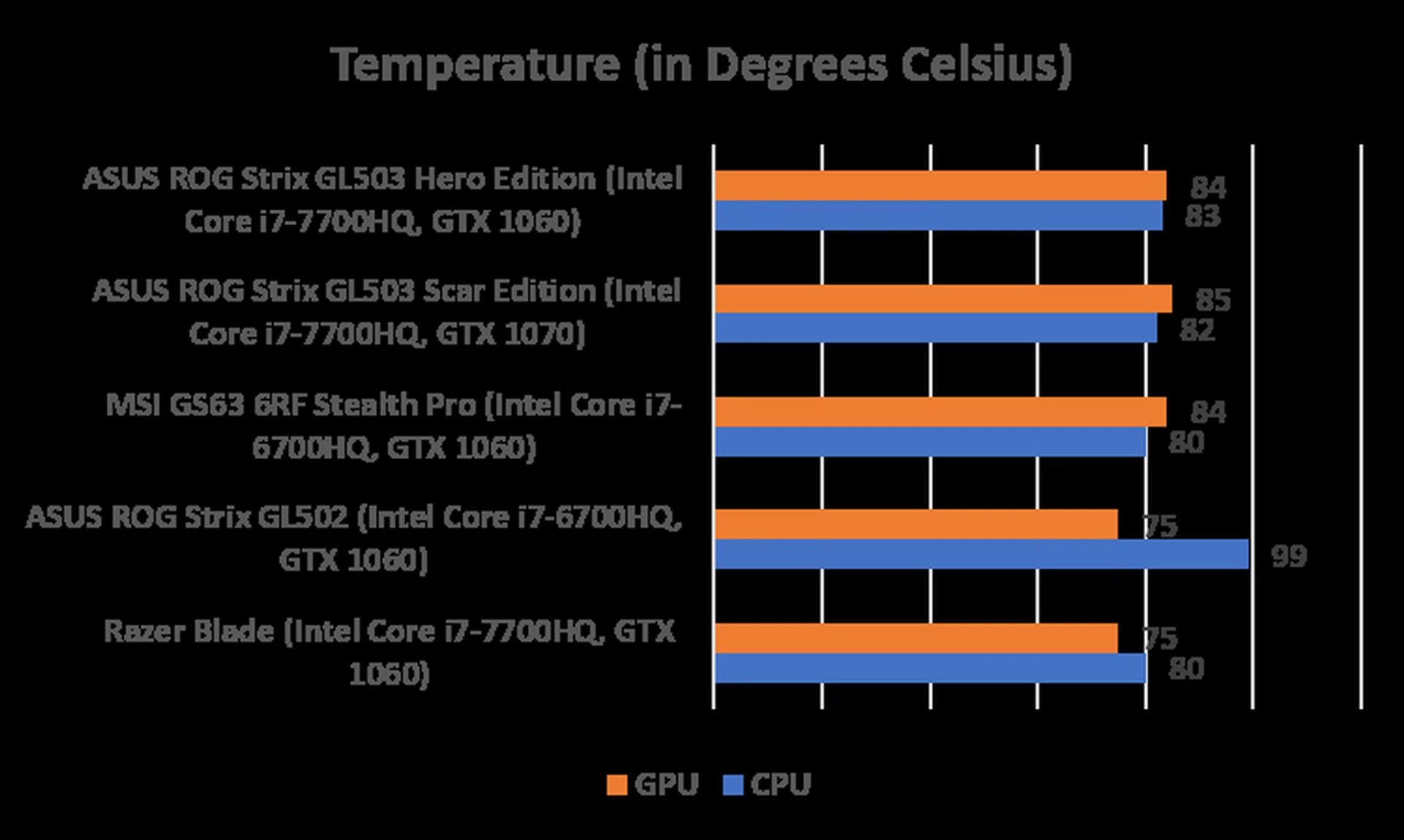
Both GL503 laptops fared quite well in our temperature tests. We can assume that the thermal efficiency controls and air cooling are working as it claims, even though it didn’t do as well as the Razer Blade in this department.
Battery Life
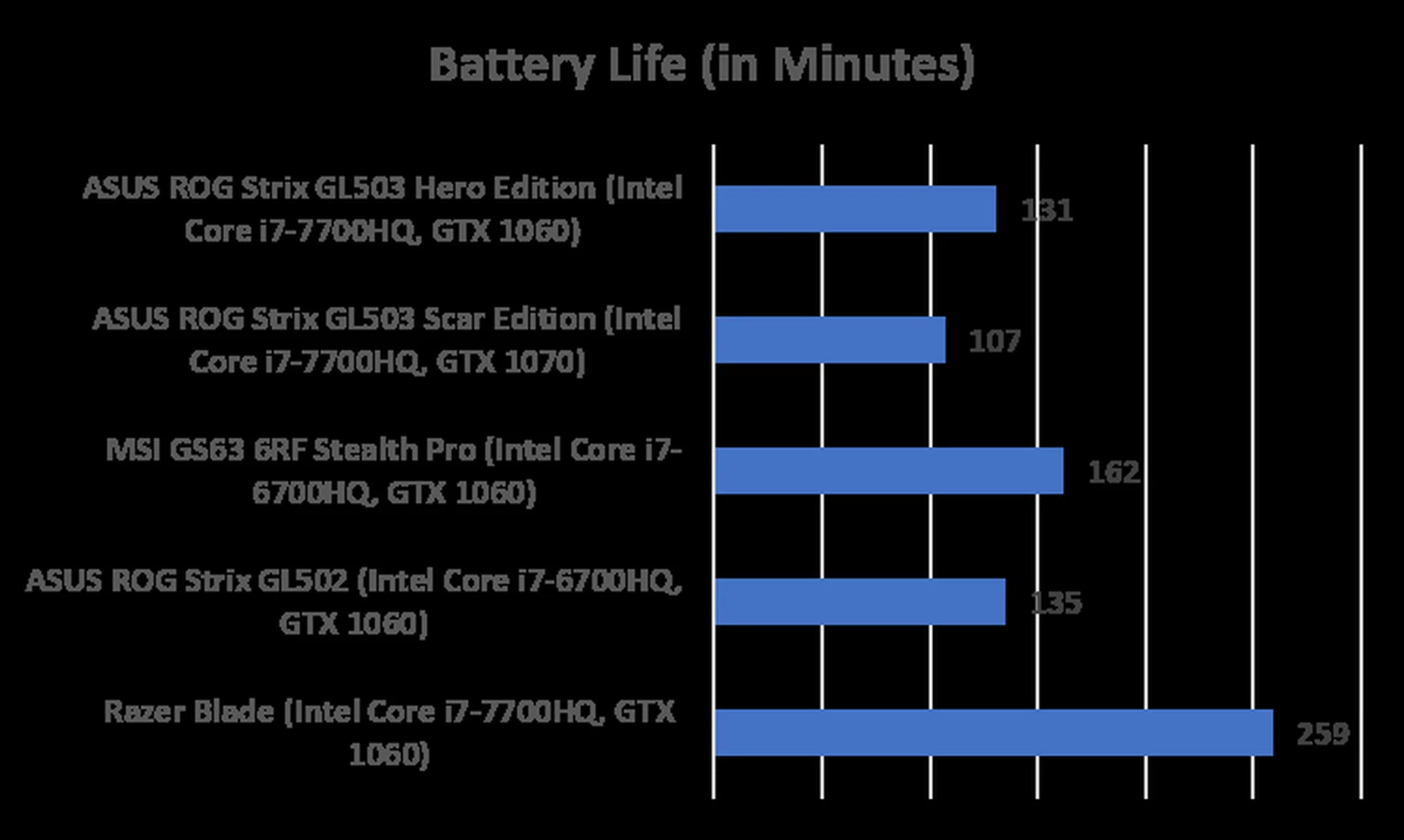
PCMark 8’s Home benchmark was used to measure battery life on all the systems below, which had their keyboard backlighting disabled and displays set at 50 per cent brightness.
The battery performance of the two GL503 laptops are disappointing, to say the least. We can cut both laptops some slacks when comparing it to the Razer Blade, since it’s running a smaller (and thus uses lesser power) 14-inch display as compared to its 15.6-inch displays. But it’s scant consolation, when we do expect it to perform much better (or in the Scar’s case, closer to) than its predecessor GL502, which is using an older 6th-gen Intel Core processor.
It’s safe to assume you’ll want to keep the laptop plugged in when playing your games. Hopefully this is an area that ASUS can improve with a firmware update. Oh, and G-Sync is automatically disabled when the laptops are running on battery.
A tale of two laptops
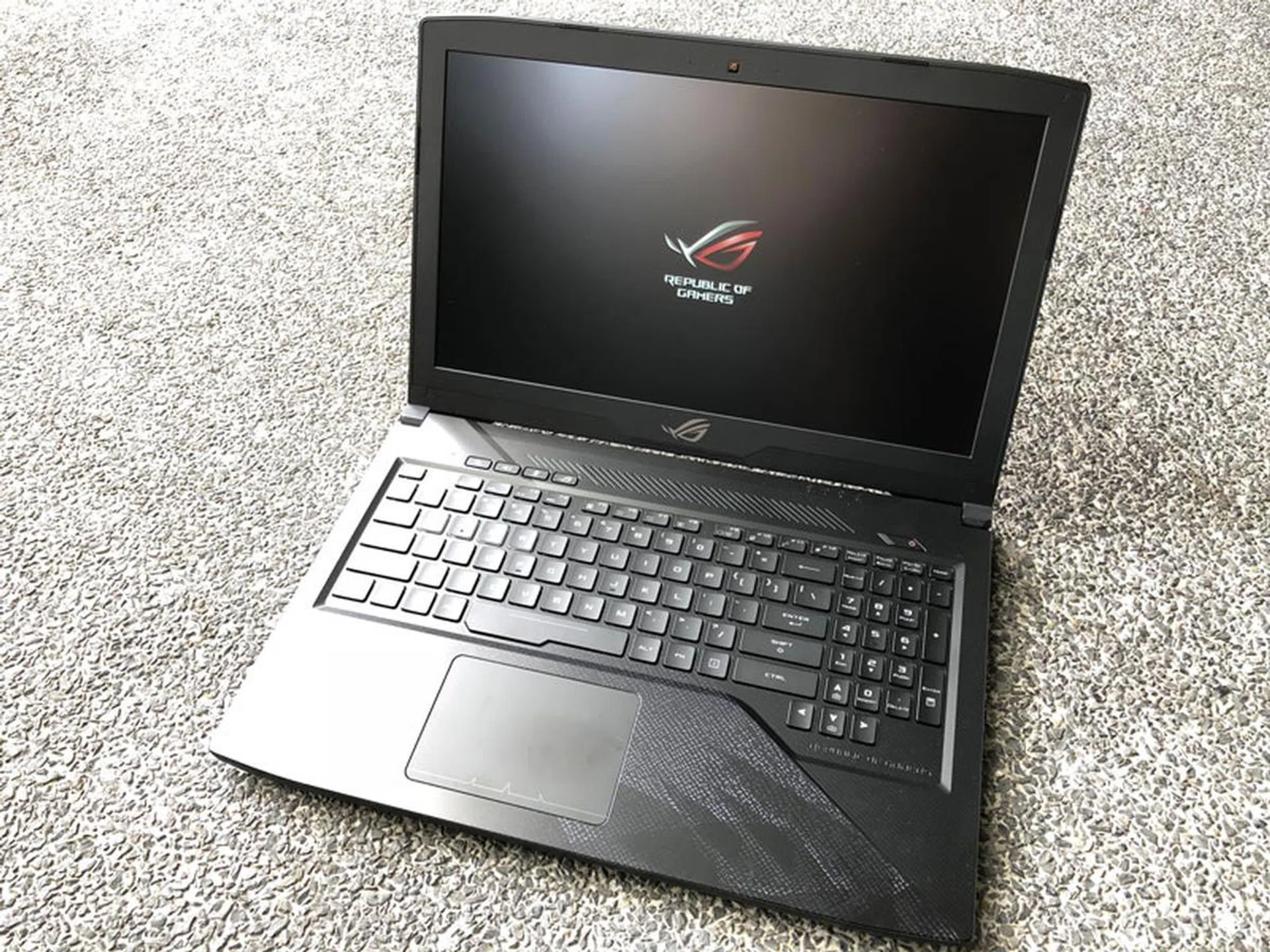
Both ROG Strix GL503 Scar and Hero Editions are well built, attractive and offers almost all the right features and traits you’d expect from a gaming-performance laptop. More importantly, it performs well while plugged into the wall.
The ROG Strix GL503 Hero Edition
They are also interesting in that despite their respective fanciful names, and despite ASUS’ pigeonholing both as either a MOBA or FPS specialist gaming laptops, in truth both can run most of today’s games well. The lower-spec Hero Edition can run a game like Counter-Strike: Global Offensive as easily as DOTA 2. Likewise, there’s no stopping you from using the more powerful GL503 Scar Edition to play League of Legends and Overwatch on it.
One of the key decision you’ll have to make when choosing either is if you’d want the more powerful GeForce GTX 1070, and thus extending your purchase’s longevity longer. You’ll also get to play more games at higher visual settings. Then there’s the 144Hz display if that matters to you, since nobody else offers such a screen right now in the 15-inch range (at this point of writing, anyway).
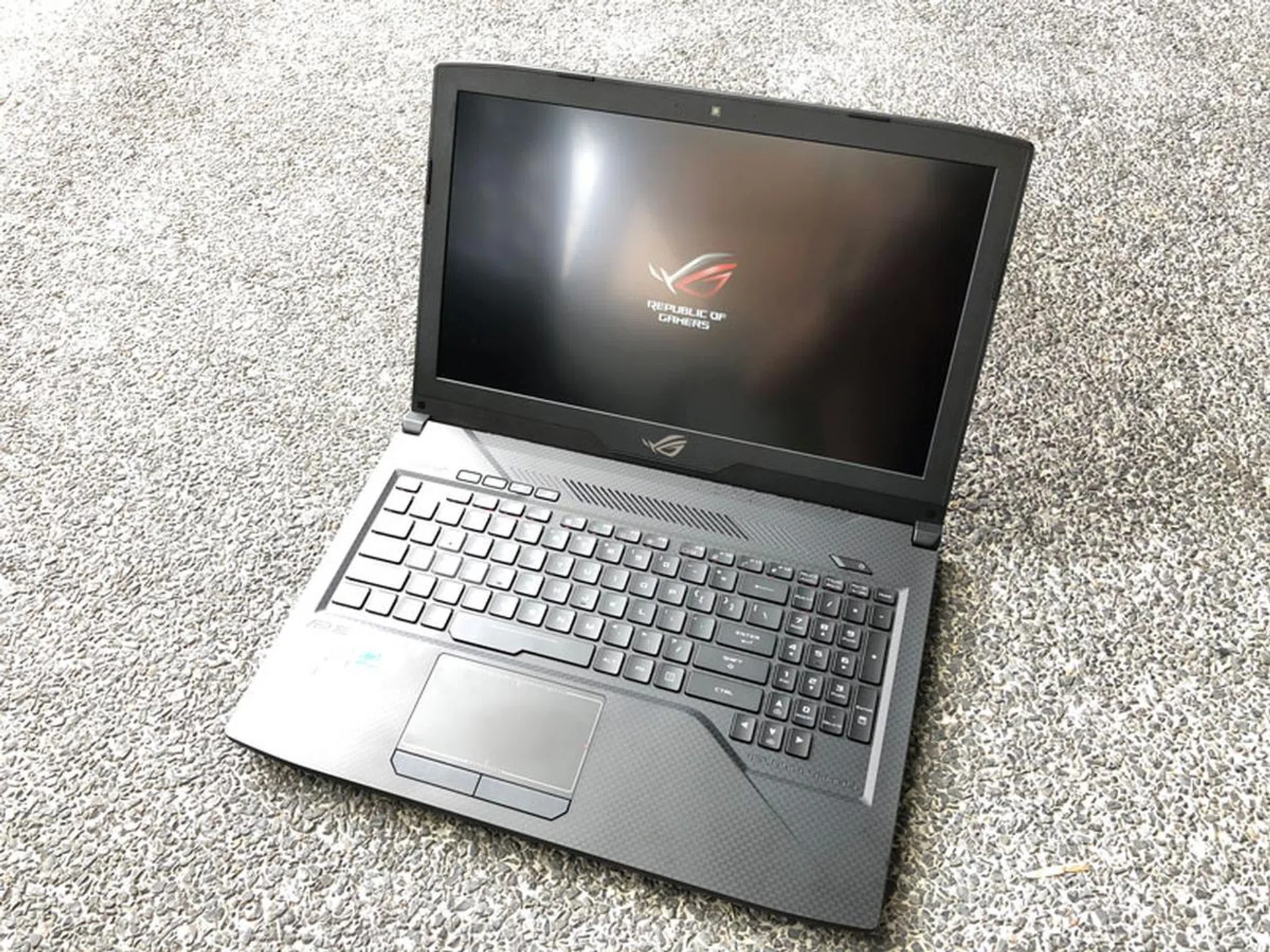
The ROG Strix GL503 Scar Edition.
Perhaps, more than the poor battery life, the one major blot in my opinion of the laptops is the agonizingly slow 1TB 5400rpm secondary hybrid drive. This poses an interesting storage limbo for future GL503 owners; install your games on the primary (and quicker) SSD, but be prepared to face limited storage space, or install them on the secondary SSHD, and put up with excruciatingly slower loading times when running games or applications. If you are considering either GL503, make sure to upgrade the secondary drive to another SSD.
All in all, the Scar Edition is a nicely balanced gaming notebook in its segment despite the issues mentioned above. But it does come at a premium at S$3,498. The alternative is the much more affordable Hero Edition (comparatively speaking) at S$2,698, and might be the better buy if you are an esports-type of gamer, where less hardware demanding games like CS:GO and DOTA 2 are what you live by and will live by for the next couple of years.
Our articles may contain affiliate links. If you buy through these links, we may earn a small commission.