
ASUS M2A-VM HDMI (AMD 690G)
The M2A-VM HDMI is a configurable solution by ASUS that can be deployed as an OEM platform or converted for home theater duty with a HDMI add-on module and AVIVO hardware decoding. This is one of the better AMD 690G motherboards in the market, but is it for you? Find out inside.

HDMI for the Masses
In our last AMD 690G motherboard review, we praised the Sapphire Pure Innovation HDMI for being a great all-in-one motherboard that was designed to appeal to both the business and entertainment crowd. If anything, Sapphire did a great job maximizing the potential of the new chipset and we learned that the small micro ATX form factor can still hold a few surprises. Of course, Sapphire isn't the only cat in town to take on the AMD 690G.
ASUS takes a break from its barrage of Intel P965 motherboard SKUs over the past few months to focus on AMD's new chipset, but unlike Sapphire, ASUS does what they do best, and that's to specialize. Instead of one board to fit every usage model, ASUS has two variants of the AMD 690G: The no-frills M2A-VM for the more business minded and the entertainment focused M2A-VM HDMI. Both boards are essentially designed on the same PCB; the only difference being that the latter features additional FireWire support as well as being bundled with additional audio and video connectors. In this review, we take a look at what the M2A-VM HDMI has to offer.
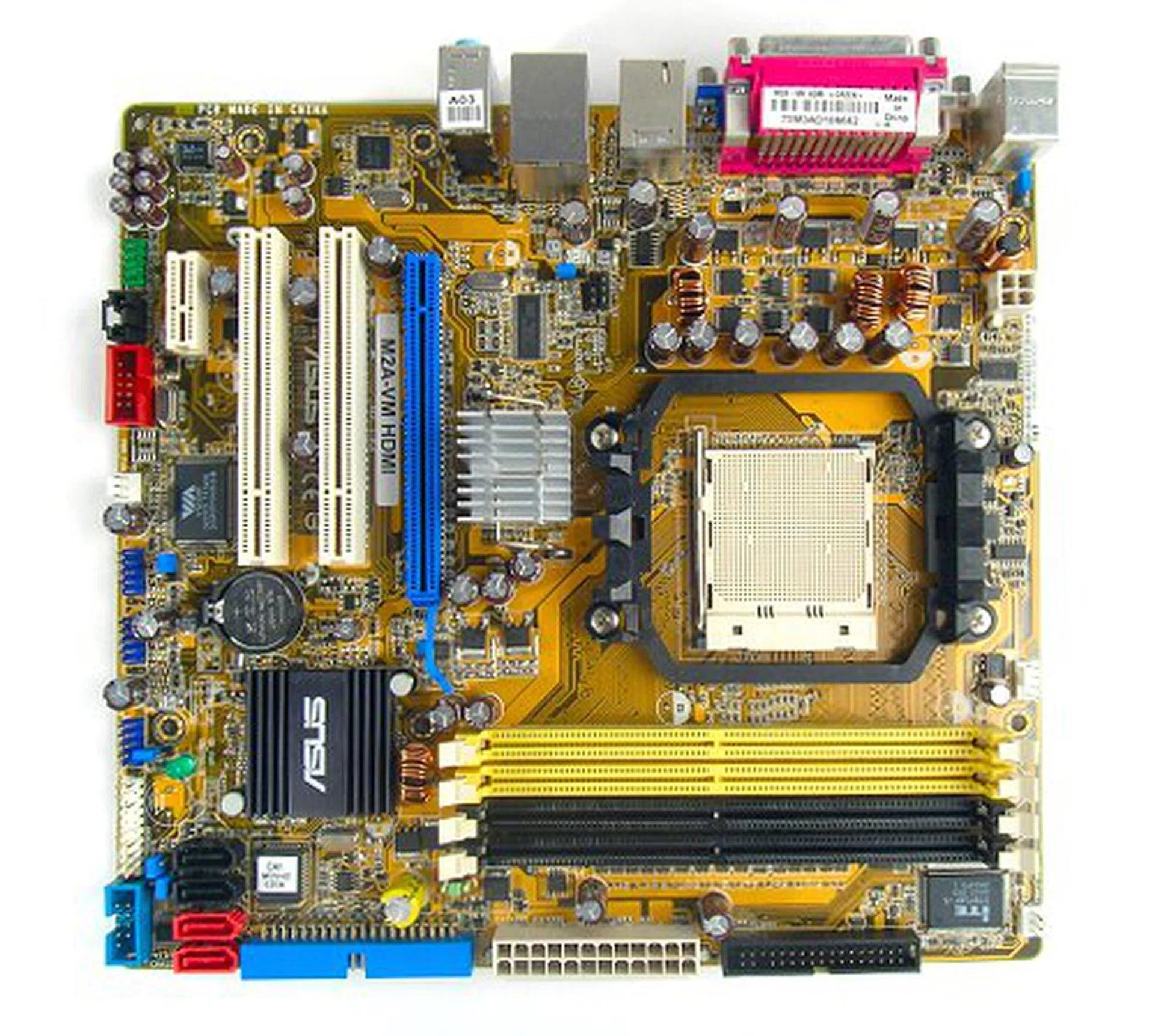
The ASUS M2A-VM HDMI motherboard.
- 2 x SATA data cables
- 1 x SATA power converter cable (dual plugs)
- 1 x 80-conductor Ultra ATA data cable
- 1 x floppy drive data cable
- HDMI and A/V add-on module
- Component video output cable
- ASUS Q-Connector kit
- I/O shield
- Driver CD
- User's guide
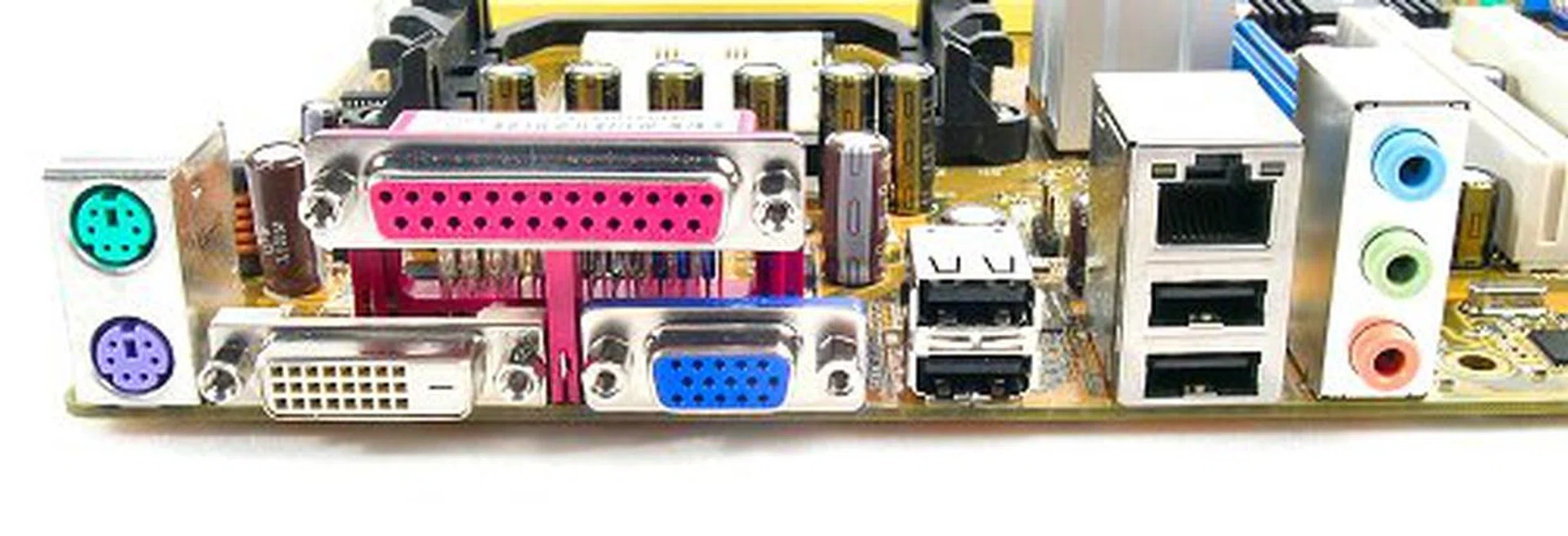
The M2A-VM HDMI comes with both a DVI and VGA port as its default video output methods. Note that there are only three analog audio jacks.
Features
As a mainstream-level motherboard, the ASUS M2A-VM HDMI is essentially a standard AMD 690G motherboard. Its main components and features do not stray from those offered by the AMD 690 Northbridge and SB600 Southbridge. This is the standard chipset combination we've seen to date and ASUS does not change the recipe here. The Radeon X1250 GPU onboard is responsible for both graphics and video processing for the board, and like any other AMD 690G motherboard, the main feature of the M2A-VM HDMI is its AVIVO technology and HD decoding capabilities. It also boasts AMD Live! technology support, and this can be activated through the BIOS.
Unlike the Sapphire Pure Innovation HDMI however, ASUS does not provide a HDMI port as a default port on the M2A-VM. Instead, the board features both a regular VGA and a DVI port only. This is unfortunately a necessity in order for ASUS to differentiate its two SKUs. As mentioned before, the standard M2A-VM will only come with the two standard connectors, while the M2A-VM HDMI model will include a separate add-on card with not only a HDMI port, but also S-Video, component and S/PDIF connections. Knowing the limitations of the Radeon X1250 GPU however, it may be a surprise that ASUS claims full 1080p support for the board's DVI and HDMI connection, but you'll have to read the fine print to see their disclaimer that video performance may not be smooth. We expect the AMD 690G to perform well up to 720p, but you'll need quite a powerful processor to offset 1080p decoding, especially if you're watching Blu-ray or HD DVD movies. Speaking of which, both the ASUS M2A-VM and M2A-VM HDMI have HDCP support, so there shouldn't be any issues regarding Blu-ray or HD DVD playback whether you're using the DVI port or HDMI module.
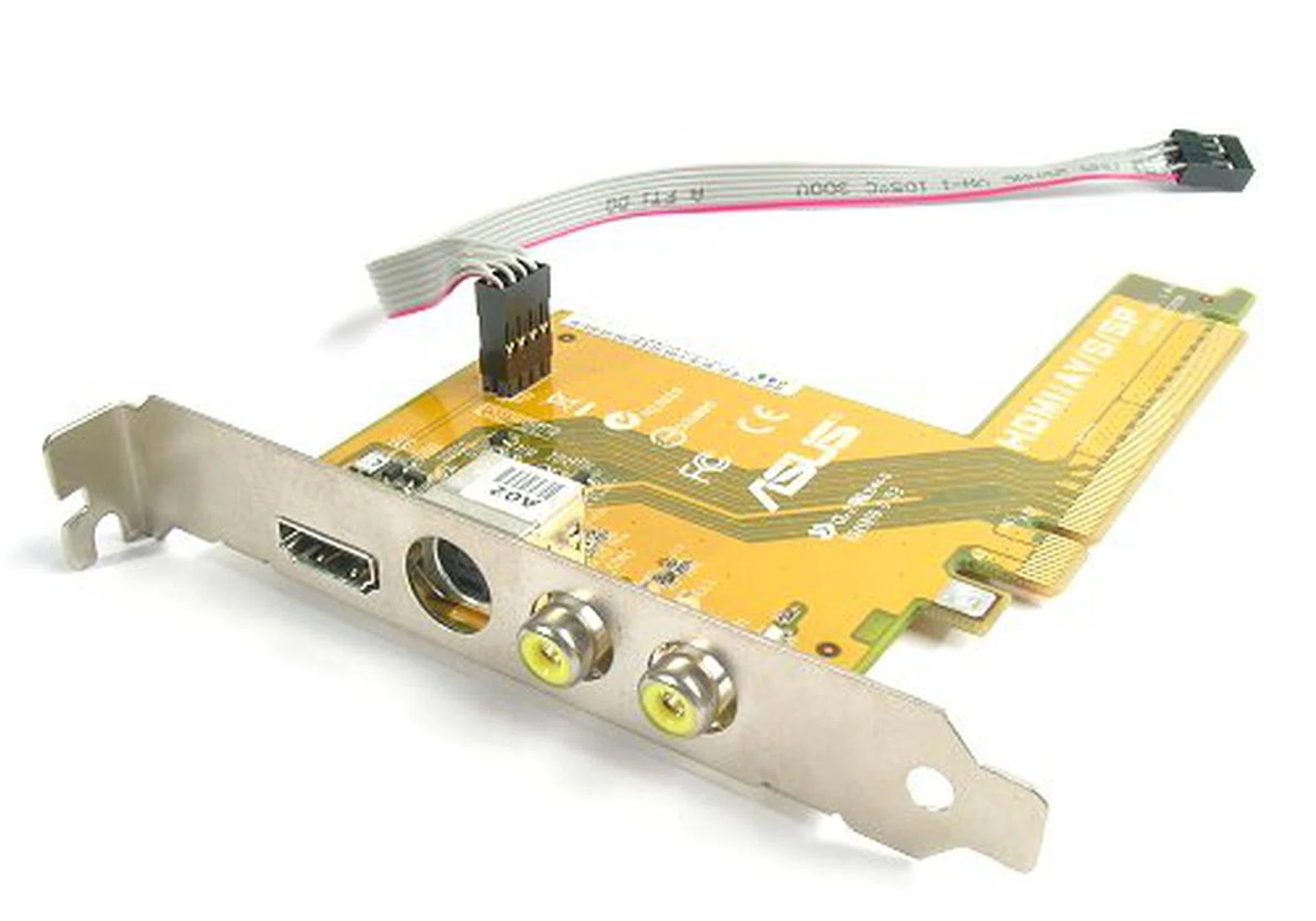
HDMI add-on module features HDMI, S-Video, Composite and S/PDIF ports. Note that using the module will lock up the only PCIe x16 slot on the motherboard.
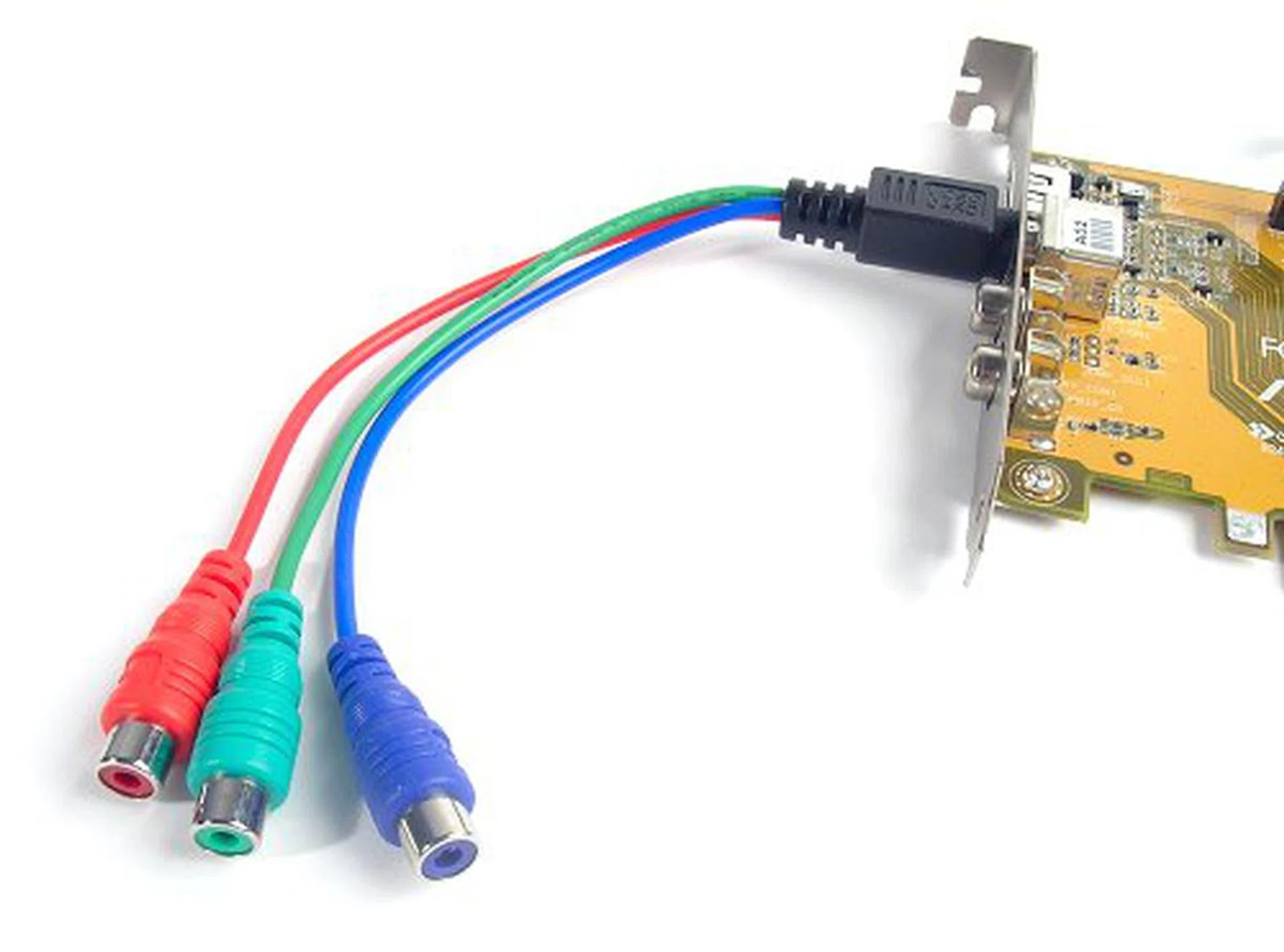
Component to S-Video converter cable included.
Audio on the M2A-VM HDMI is controlled by a Realtek ALC883 8-channel HD CODEC, the value version of the ALC882 available on the Sapphire Pure Innovation HDMI and without Dolby Digital Live! support. However, it should still be able to do the job well enough. S/PDIF interface ports on the M2A-VM HDMI will also ensure connectivity to most consumer audio equipment. Our only gripe with the audio system is that ASUS did not provide the full 8-channel analog connectors. There are only three jacks, which can support either stereo output or 6-channel through jack re-tasking. The additional HDMI module does not provide analog extensions as well, so you will only be able to achieve 8-channel through S/PDIF or HDMI if the audio sources permits.
For the rest of the board, the M2A-VM sports ten usable USB 2.0 ports and four SATA 3.0Gbps connectors with RAID and AHCI capabilities courtesy of the SB600 Southbridge. ASUS uses a PCI Express based controller for its Gigabit LAN port and as mentioned, the M2A-VM HDMI version will also include FireWire capabilities through a 2-port FireWire-400 controller.
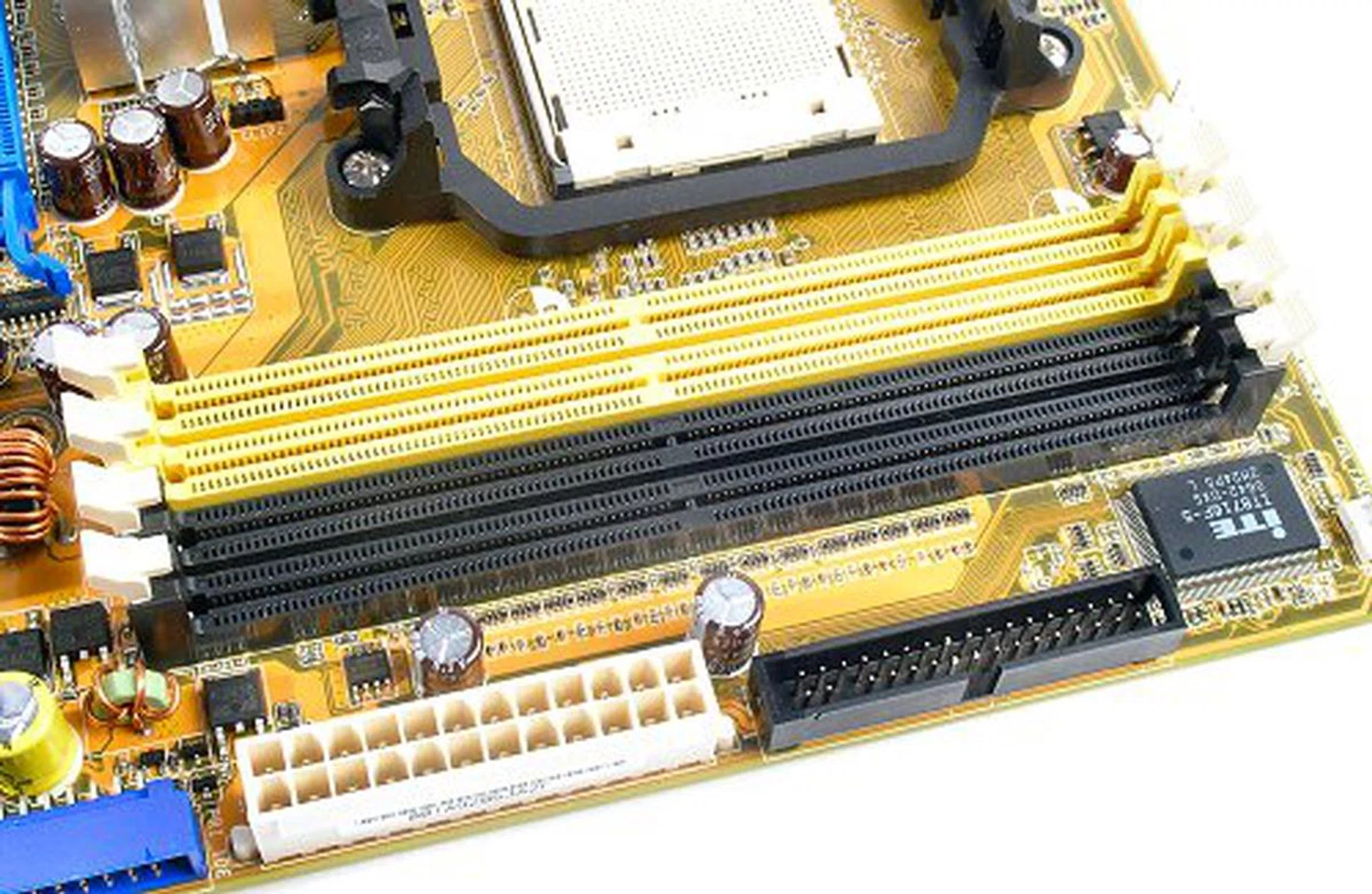
Four DIMM slots to enable full support for 8GB DDR2 memory configurations.
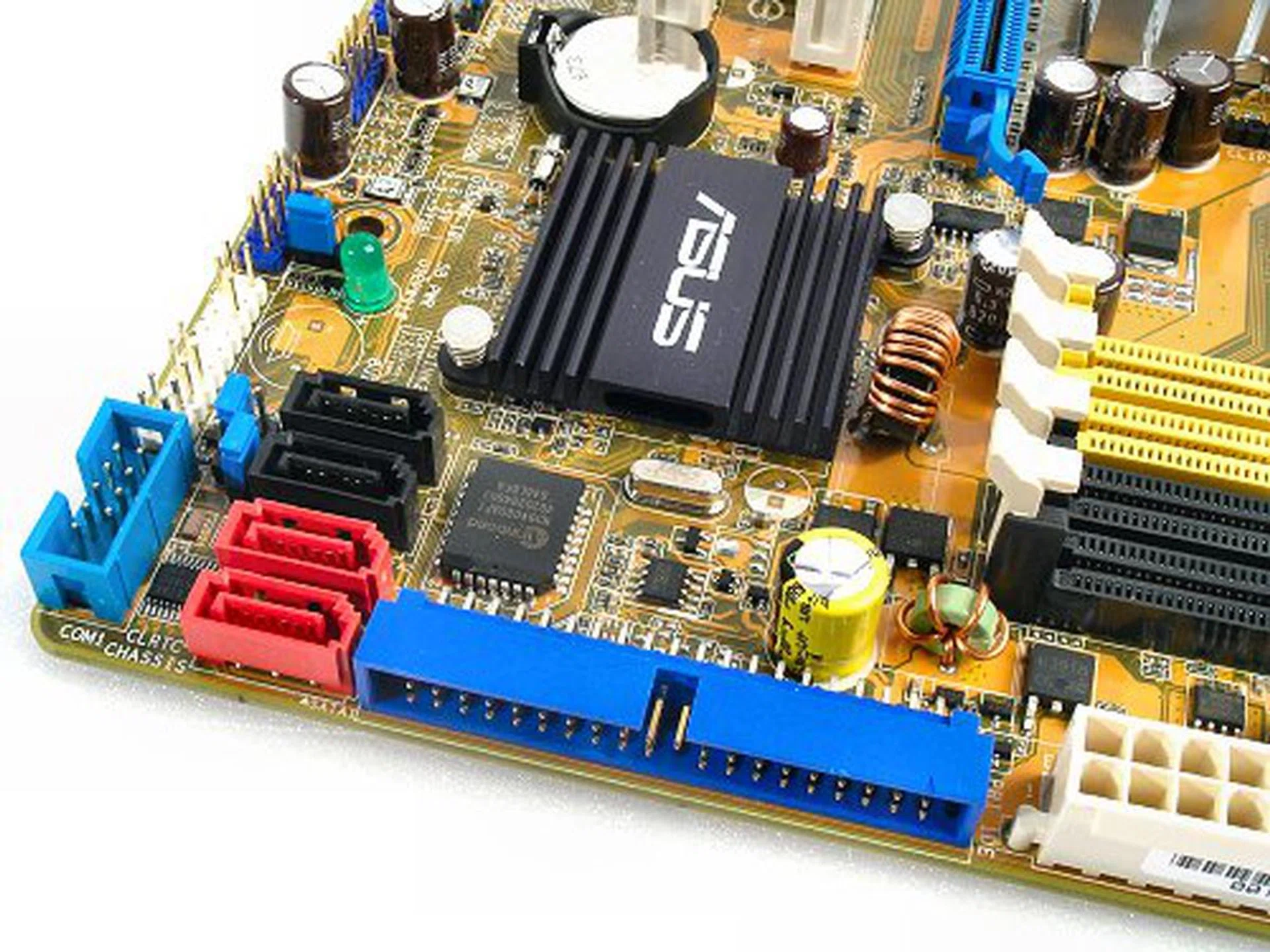
The M2A-VM HDMI has its SATA and IDE ports along the sides to avoid cable problems with large expansion cards.
Layout
Although the M2A-VM HDMI isn't one of ASUS' premium branded motherboards, much consideration has gone into its design. SATA connectors are located away from the PCIe x16 graphics slot to avoid potential cable issues. Also, its expansion slot layout ensures that you'll get to use all three types of slots if you decide to use an external graphics card instead. Lastly, we like how the board's PWM components have been spaced apart for better cooling efficiency.
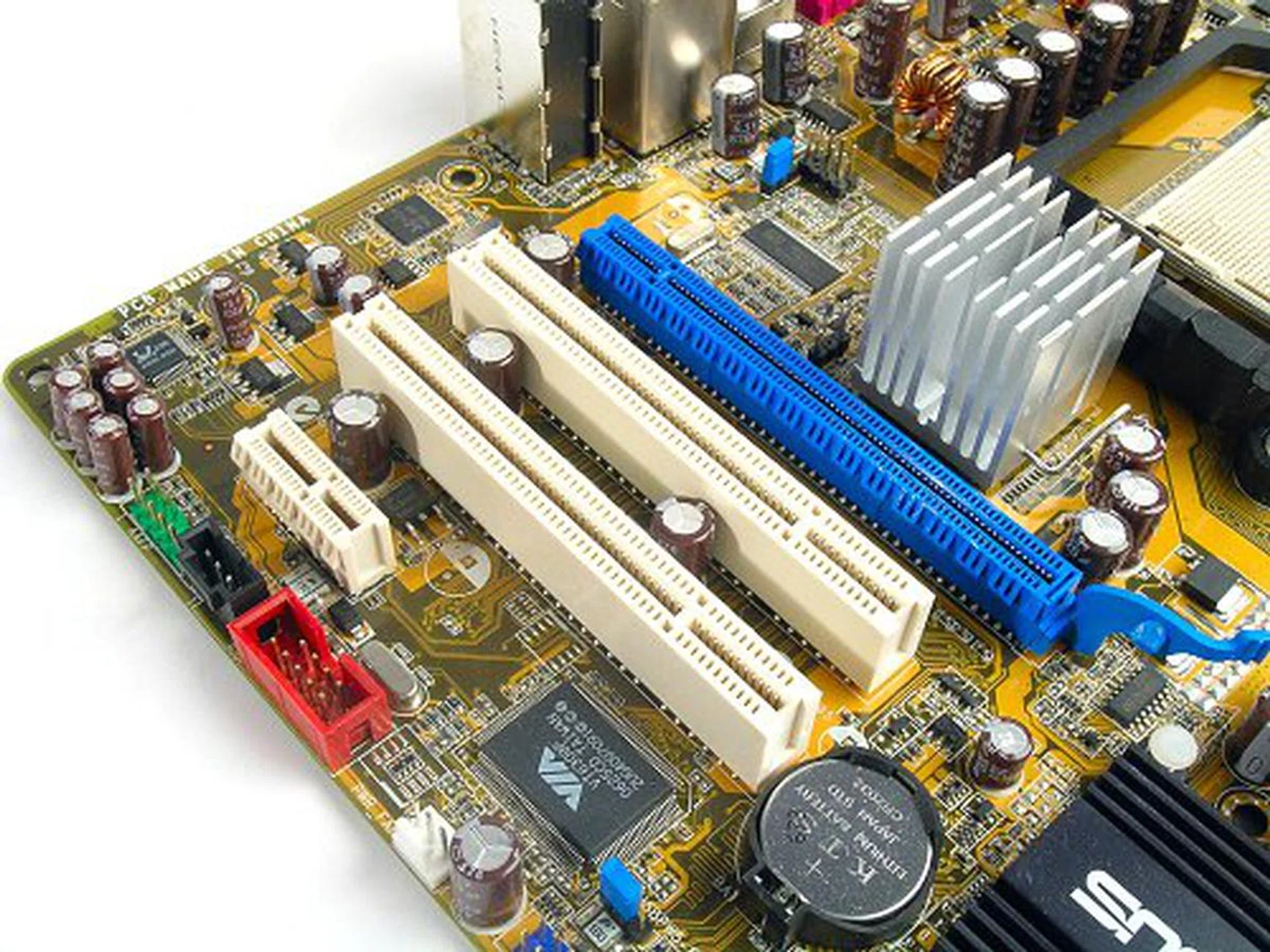
One PCIe x1, two PCI and one PCIe x16 slots make up the board's expansion capabilities.
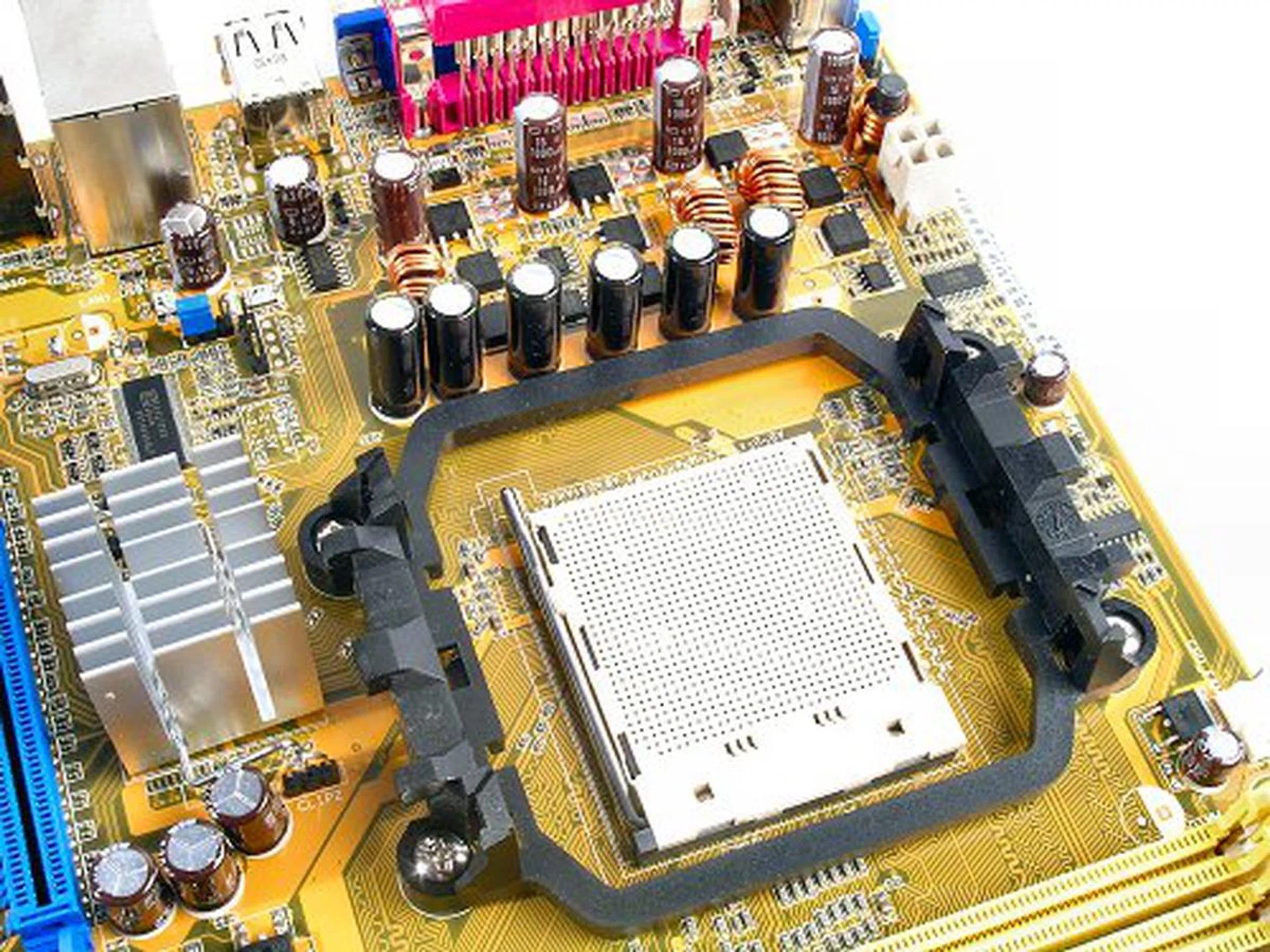
Notice the widely spaced area for the board's PWM components to facilitate better cooling. However, this design does not allow for a larger heatsink for the AMD 690G chip. The same restriction applies for CPU coolers as well.
Overclocking
- FSB Settings: 200MHz to 400MHz
- Memory Settings: DDR2-400, DDR2-533, DDR2-667, DDR2-800
- VGA Memory, UMA: 32MB, 64MB, 128MB, 256MB
- CPU Voltage Settings: 0.800V to 1.550V (in 0.025V steps)
- Memory Voltage Settings: 1.80V to 2.10V (in 0.10V steps)
- Chipset Voltage Settings: 1.20V to 1.50V (in 0.10V steps)
- Multiplier Selection: Yes (unlocked CPUs only)
The ASUS M2A-VM isn't designed to be overclockable. Its BIOS is simple and straightforward, designed to be used right out of the box, but just enough tweaks for the more advanced users to get some extra performance out of it. The board allows FSB tuning along with some small voltage tweaks for the CPU, memory and chipset. From our testing, the highest stable overclock achieved with the M2A-VM was 230MHz.
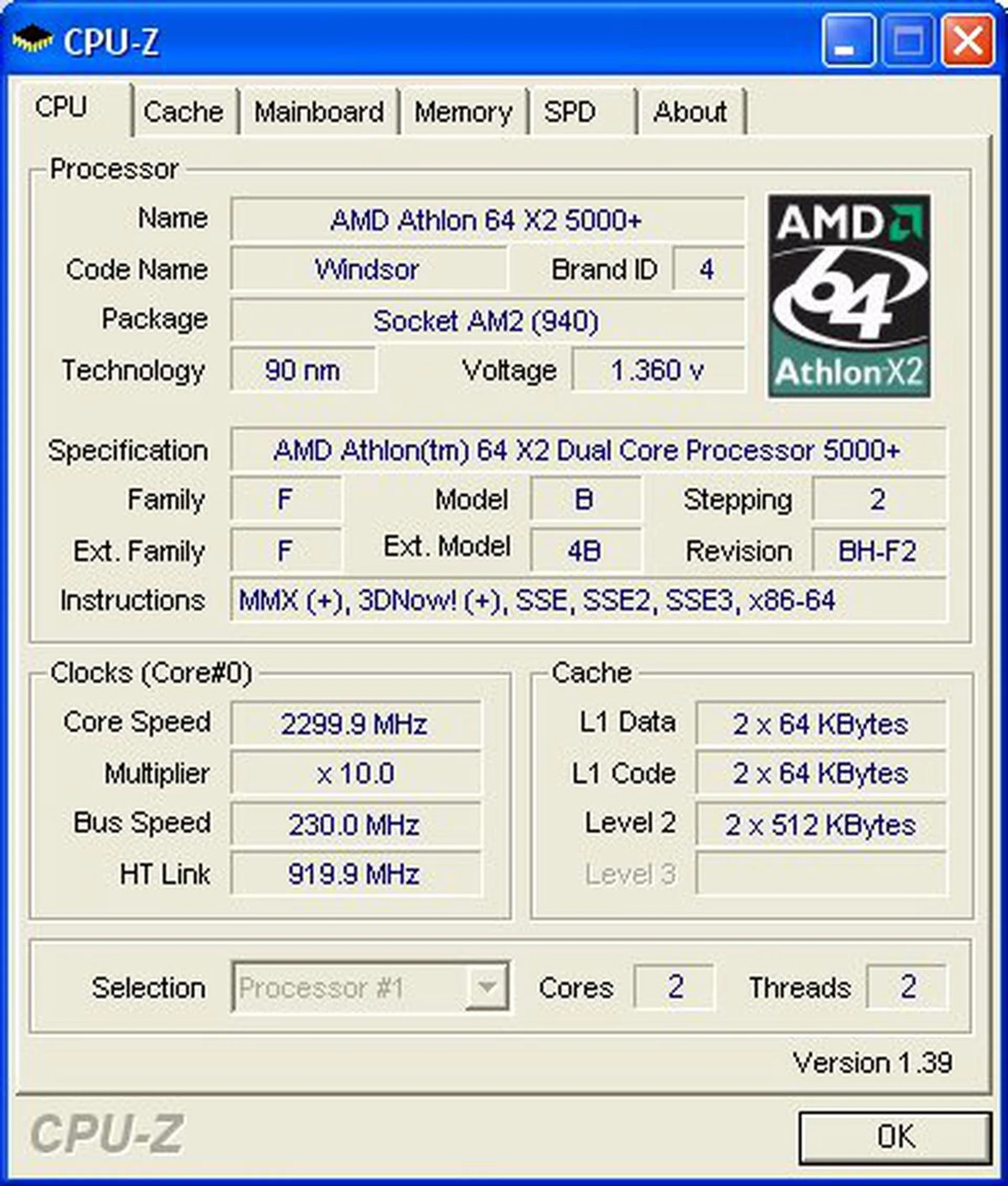
CPU-Z overclocking screenshot.
Interestingly however, there are no memory timing settings available at all. You can change the operating frequency (DDR2-667/DDR2-800/etc.), but the board is locked for SPD timings. This might possibly affect overall performance, but you will find out soon in the benchmarking section of the review next.
Test Setup
In this review, we benchmark the ASUS M2A-VM HDMI alongside the Sapphire Pure Innovation HDMI as well as the ECS RS485M-M as these boards represent its immediate competition and past predecessor. Since we've already established the performance margins of the Radeon X1250, we will conduct this review using discreet graphics to test the platform performance of the motherboards instead. We will probably revisit IGP performance at a further date, especially with NVIDIA's upcoming chipset, but not for this review.
The following list shows the test bed setup that will be used for our benchmarking:-
- AMD Athlon 64 X2 5000+ (2.6GHz, 2 x 512KB L2, Socket AM2)
- 2 x 1GB Kingston HyperX DDR2-800 @ 4-4-12 CAS 4.0*
- Seagate Barracuda 7200.7 80GB SATA hard disk drive (one single NTFS partition)
- MSI GeForce 7900 GT 256MB - with NVIDIA ForceWare 93.71
- AMD Catalyst 7.3 IGP driver set
- Microsoft Windows XP Professional with Service Pack 2 (and DirectX 9.0c)
Additional Notes
- The ECS RS485M-M motherboard became unstable using our usual 4-4-4-12 memory timings possibly due to the lack of memory voltage options. As such, the board can only be benchmarked using its default SPD timings at 5-5-5-18.
- The ASUS M2A-VM HDMI is also benchmarked using SPD timings due to the lack of timing options in the BIOS. However, CPU-Z shows that the board is running at 5-5-5-16, as opposed to 5-5-5-18 on the ECS.
Benchmarks
The following benchmarks are used to determine the performance of the ASUS M2A-VM HDMI:-
- BAPco SYSmark 2004
- Futuremark PCMark05
- SPECviewperf 9.0
- Futuremark 3DMark05
- AquaMark3
Results - BAPco SYSmark 2004
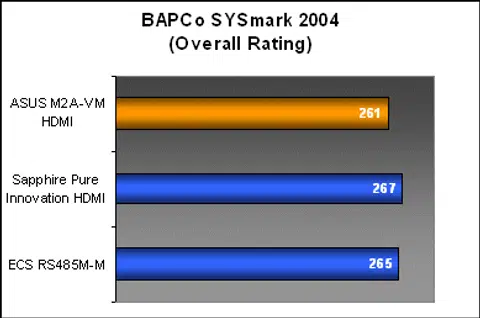
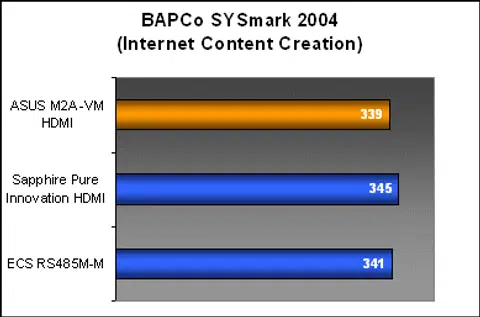
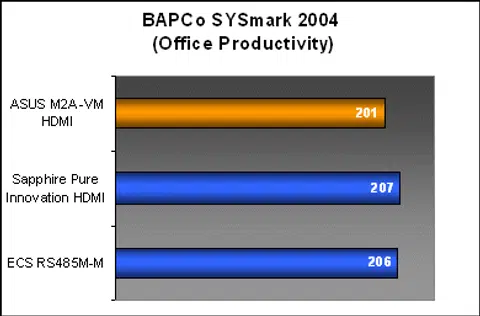
While we had already expected the ASUS M2A-VM HDMI to fare slightly below the Sapphire Pure Innovation HDMI due to its locked memory timings, it is surprising to find the ECS RS485M-M to perform almost on par with the new chipset.
Results - Futuremark PCMark05
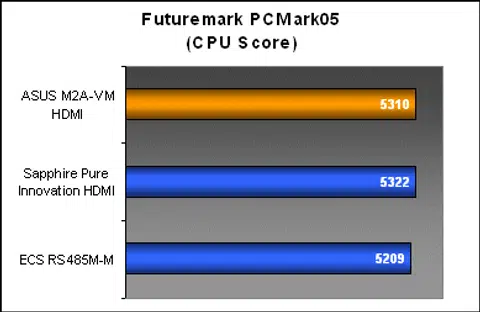
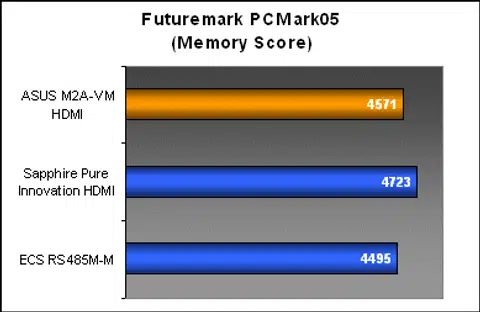
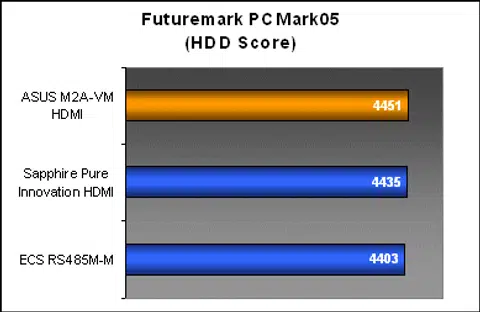
PCMark05's results on the other hand, were more favorable to the ASUS M2A-VM HDMI than SYSmark was. The board tied with the Sapphire board in the CPU subsystem performance scores, and while its memory performance fell below the Sapphire Pure Innovation HDMI, the ASUS still managed to outdo the ECS. Lastly, we see that all three boards share similar HDD performance numbers.

Results - SPECviewperf 9.0
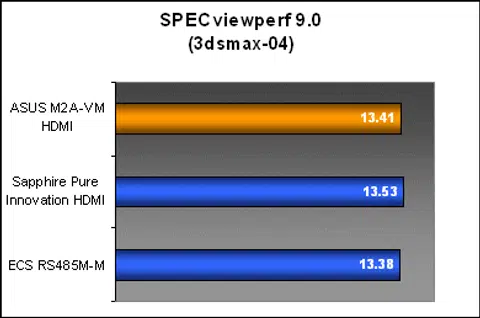
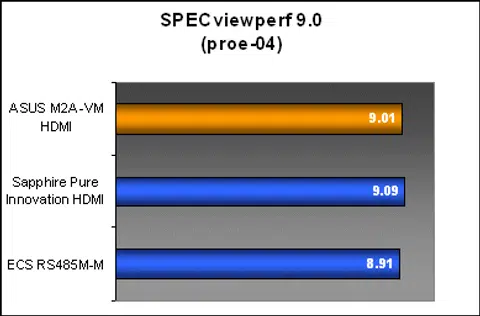
SPECviewperf is an industry standard professional OpenGL benchmark, but it also serves as our second opinion on platform performance as it is as heavily taxing on the memory subsystem as it is on graphics. The results from SPECviewperf here are more in line with what we've seen in PCMark05 before. The ASUS M2A-VM HDMI performs slightly below the Sapphire Pure Innovation HDMI due to its memory restrictions, but it holds up well in both graphics and memory subsystems in general.
Results - Futuremark 3DMark05
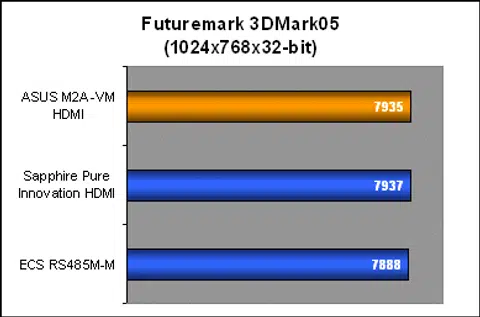
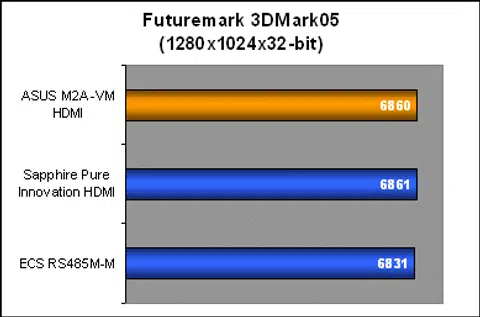
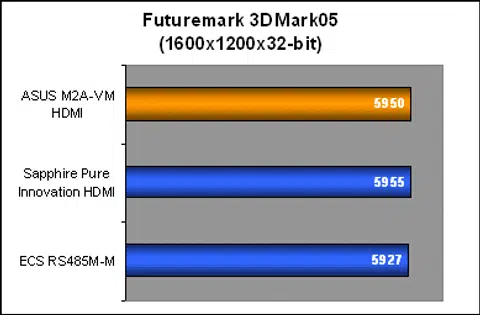
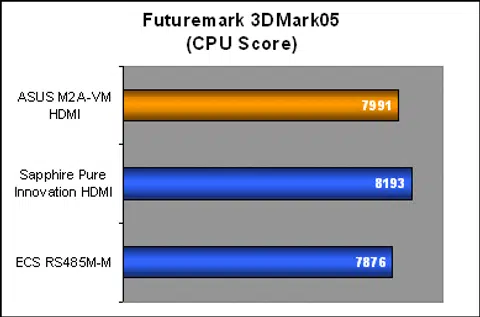
The ASUS M2A-VM HDMI performed as expected in 3DMark05 running on the GeForce 7900 GT. All three boards performed well on par with each other here, but notice the CPU performance scores. The M2A-VM HDMI was consistent with the performance trend seen in the previous benchmarks. Both the AMD 690G boards performed better than the older ECS, but it looses out slightly to the Sapphire because of its operating memory parameters again.
Results - AquaMark3
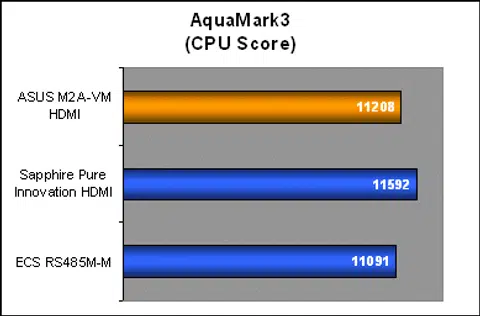
AquaMark3 scores validate the performance trend of the ASUS M2A-VM HDMI. The AMD 690G board generally outperforms the older RS485, but the ASUS was still trailing the Sapphire board in terms of platform performance.

Conclusion
In our Sapphire Pure Innovation HDMI review, we mentioned about the versatility of the AMD 690G chipset, on how its features can be configured for the home theater generation or purely for business. ASUS is one of the manufacturers we know that would make use of this and develop specific products to cater to the different sectors. However, is it worth the trouble of pushing out two product lines for a mainstream chipset such as the AMD 690G? The M2A-VM HDMI is definitely the more interesting of the two, but its single defining feature is an add-on module that would probably work on either board. Together, the connection options on the ASUS M2A-VM HDMI are able to match the Sapphire board, but connectivity comes at a premium. The regular M2A-VM retails for around US$70 today, while the M2A-VM HDMI averages about US$20 more - just for the extra HDMI module and added FireWire connectivity.
The motherboard itself is a very well packaged product, and we've come to expect no less from ASUS. They've done a great job with its design and layout, avoiding potential cable, expansion and heat problems that might arise in the smaller micro ATX form factor. The Northbridge does tend to get very warm under load however, but the board seems to take things in stride. We did not encounter any compatibility or stability issues with the M2A-VM HDMI, even under heavy benchmarking loops. While the high-end motherboard market has been evangelizing the use of newer materials such as solid capacitors and digital PWM circuitry, the M2A-VM HDMI does it the old school way, and we're quite happy that it works just as well. The only gripe we have against the M2A-VM HDMI is the lack of proper 8-channel analog audio jacks, which puts the regular PC users at a disadvantage.
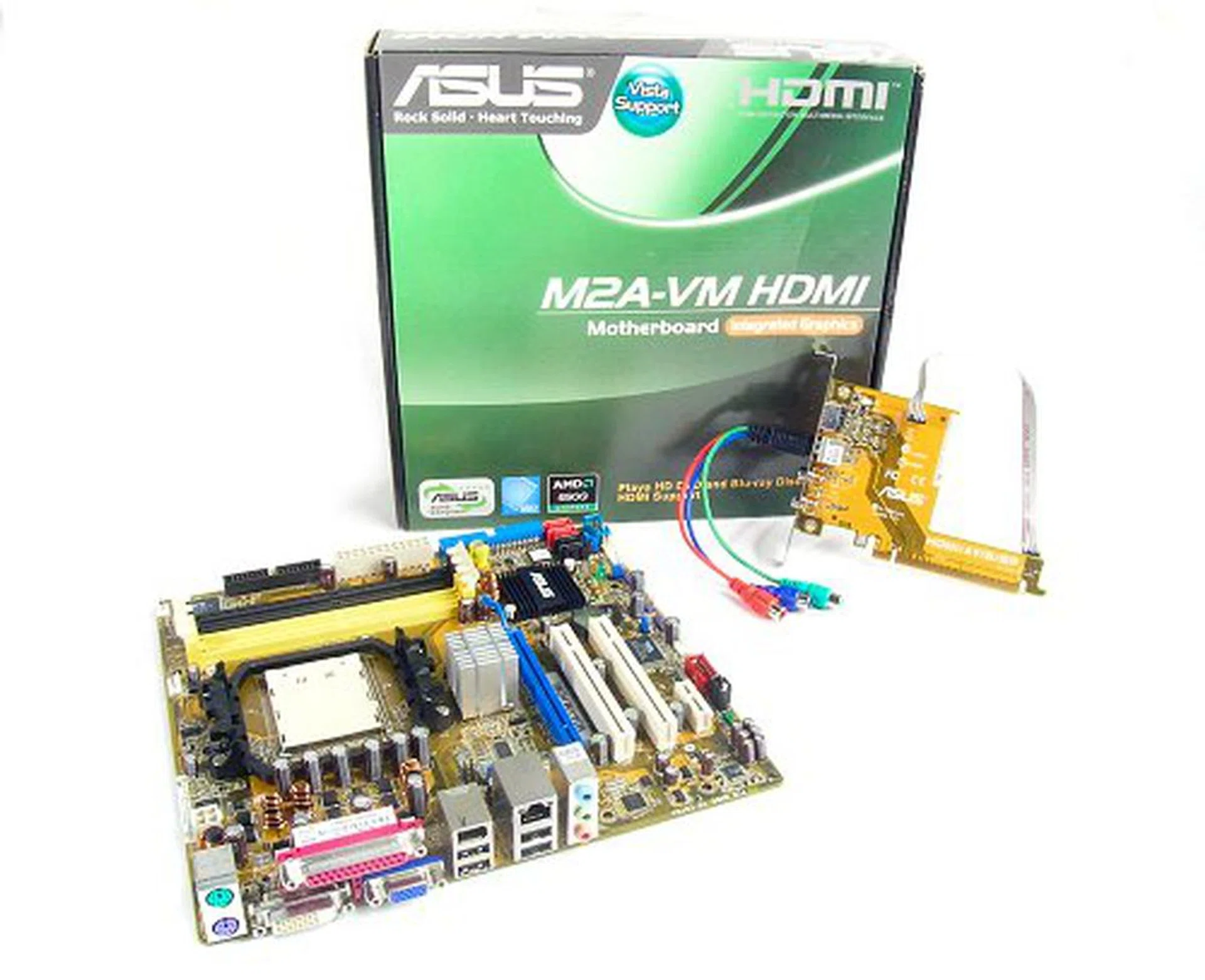
The ASUS M2A-VM HDMI sets the stage for next generation onboard video processing and standards.
We were a little disappointed at first that ASUS did not include any memory tweaking options for the board, but since performance and overclocking isn't its main attraction, we let the matter slide. At the very least, ASUS does allow some rudimentary voltage and overclocking to take place. Performance-wise, the M2A-VM HDMI managed to be consistent across our benchmarks, though the Sapphire Pure Innovation HDMI takes the top spot in every test. Of course, when you benchmark a board that is designed to run at stock configurations (ASUS M2A-VM HDMI) with one that has a comprehensive tweaking BIOS (Sapphire Pure Innovation HDMI), there will be an expected gap between the two.
Comparisons with the Sapphire Pure Innovation HDMI will likely the be topic of the day when it comes to AMD 690G motherboards and while Sapphire may have stolen the thunder from larger motherboard manufacturers, the ASUS M2A-VM HDMI is still a very well designed and well implemented motherboard for its target market as an OEM or home entertainment platform.
Our articles may contain affiliate links. If you buy through these links, we may earn a small commission.