
ASRock Z97 Anniversary motherboard – Easy to OC, but stripped to the bone
The ASRock Z97 Anniversary is touted as the ideal full ATX motherboard for the Intel Pentium G3258 Anniversary Edition processor. It also boasts of ASRock Pentium Anniversary Boost technology for easy overclocking. Devoid of any extra features, we check out how it performs with its back to basics design mantra.

ASRock Z97 Anniversary review: Stripped down to the bone
The ASRock Z97 Anniversary board exists for a very specific reason, which is to complement the Intel Pentium G3258 processor. The new Pentium processor was announced in early June this year, and it is meant to commemorate the 20th anniversary its predecessor, the original Intel Pentium from 1993. Besides its commemorative value, the Pentium G3258 CPU boasts of a unlocked CPU multiplier, which will allow overclockers to push the chip beyond its stock 3.2GHz clock speed effortlessly.

The ASRock Z97 Anniversary is touted as the ideal board for the Pentium G3258 CPU as the board features the Pentium Anniversary Boost for easy overclocking of the commemorative processor.
We shall share more of the CPU later, but first, a close-up with the ASRock board. At a glance, this full ATX motherboard appears bare as it only has one VRM heatsink that seats over a collection of NexFET MOSFETs. These same MOSFETs are are also found on the ASRock Fatal1ty Z97X Killer. There is a row of premium alloy chokes under the recess of the VRM heatsink. According to the company, the board has a 4-phase digital power delivery system. In terms of appearance, the board has a no-nonsense look, with its blue and black color scheme. Speaking of black, the board has a "sapphire black" PCB that is supposed to convey its "rock-solid" build quality - according to the marketing material. The minimalist nature doesn't come as a surprise for a board that's designed to be mated with a budget class CPU.
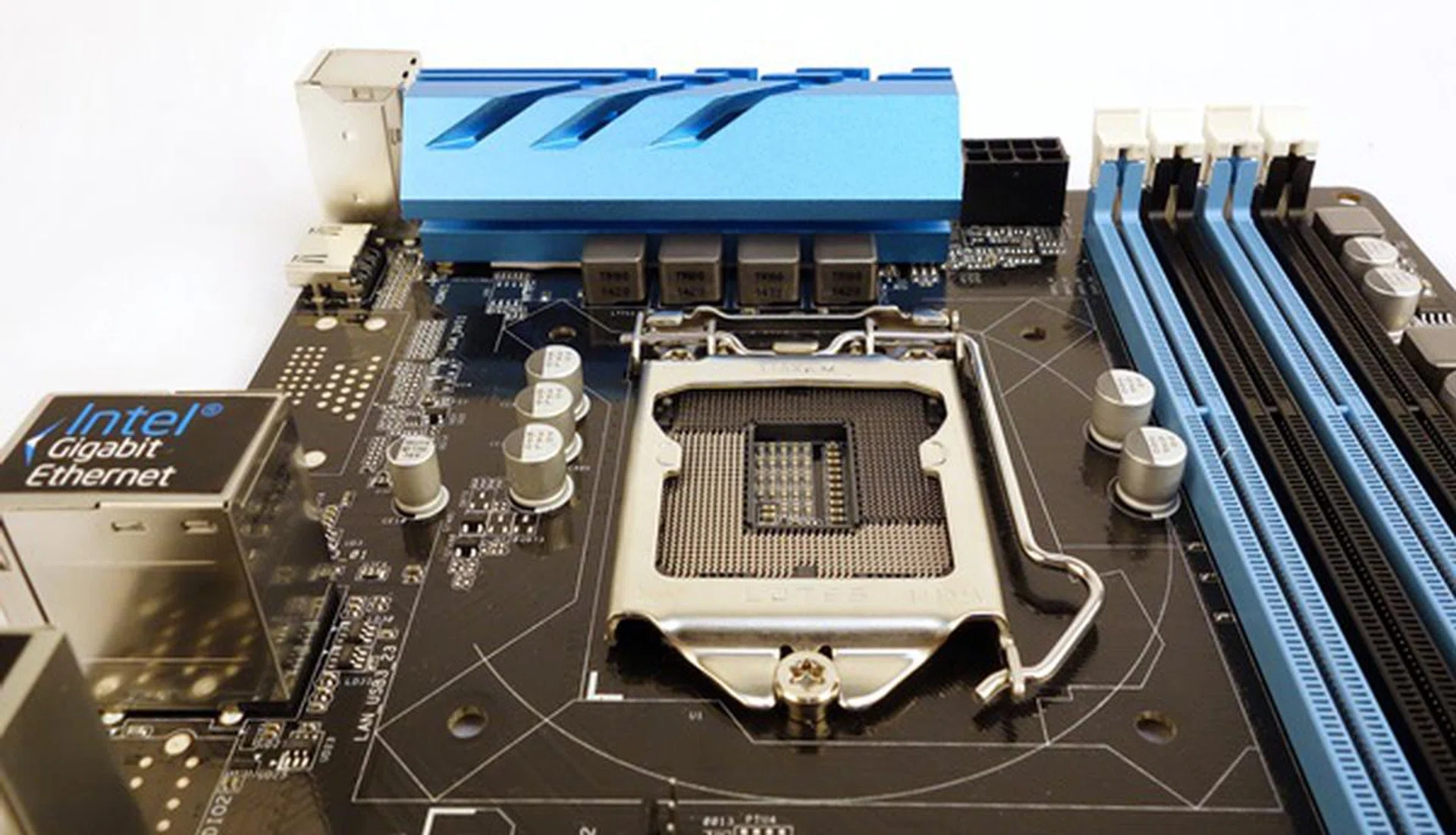
The board has a lone VRM heatsink that cools the NexFET MSOFETS of its 4-phase power delivery system.
As we move south from the board’s LGA1150 CPU socket, we see its expansion slots. There is only a single PCIe Gen 3.0 x16 slot, while the rest consist of three PCIe 2.0 x1 slots, and a pair of legacy PCI ones. If you were looking forward to building a multi-GPU system with an affordable Z97 board, you will be sorely disappointed. However, the single PEG slot is ideal to match the entry-level nature of the Pentium CPUs that it's designed to work with.

System builders looking forward to a multi-GPU setup need not apply.
The selection of headers and connectors that line the bottom of the board are also as sparse as its expansion slots. From left, there is the COM port header, a clear CMOS jumper, the chassis speaker header, and the TPM header. Even its USB 2.0 headers are bare, without the hard plastic sheath which is usually expected of boards that feature Intel Z97 chipset. There is a glaring absence of a USB 3.0 header here; instead, it is located near the DIMM slots. The last two headers are one for the Power LED, and the system panel headers.

There aren't any onboard buttons on the ASRock Z97 Anniversary.
The six SATA 6Gbps connectors of the board face upwards, similar to entry level boards, but are properly labelled. As this board is built for overclocking the Pentium Anniversary Edition chip, the DIMM slots fortunately support overclocked memory modules that have been rated to operate up to 3100MHz. Speaking of overclocking, we were surprised the board even lacks a basic collection of onboard buttons like power and reset ones. They would definitely make operating the board in an open workbench environment a cinch. In lieu of those buttons, we resorted to manually shorting the appropriate jumpers of the system panel header in order to reset or power up the board in our test bench.

There are six, clearly labelled SATA 6Gbps connectors.
The USB 3.0 header, which is conspicuously absent from the bottom edge of the board, is tucked away next to the 24-pin ATX power connector, in the vicinity of the DIMM slots. This should facilitate casings that have a short cable USB 3.0 cable connector.

The DIMM slots that support overclocked memory modules have been rated to operate up to 3100MHz.
The rear I/O ports of the board are also a muted affair. They consist of a pair of USB 2.0 ports that sit above a PS/2 keyboard and mouse combo port. The HDMI port is next to this stack. Further down, there are a total of four USB 3.0 ports, a Gigabit LAN port, and a triplet of analog audio ports.
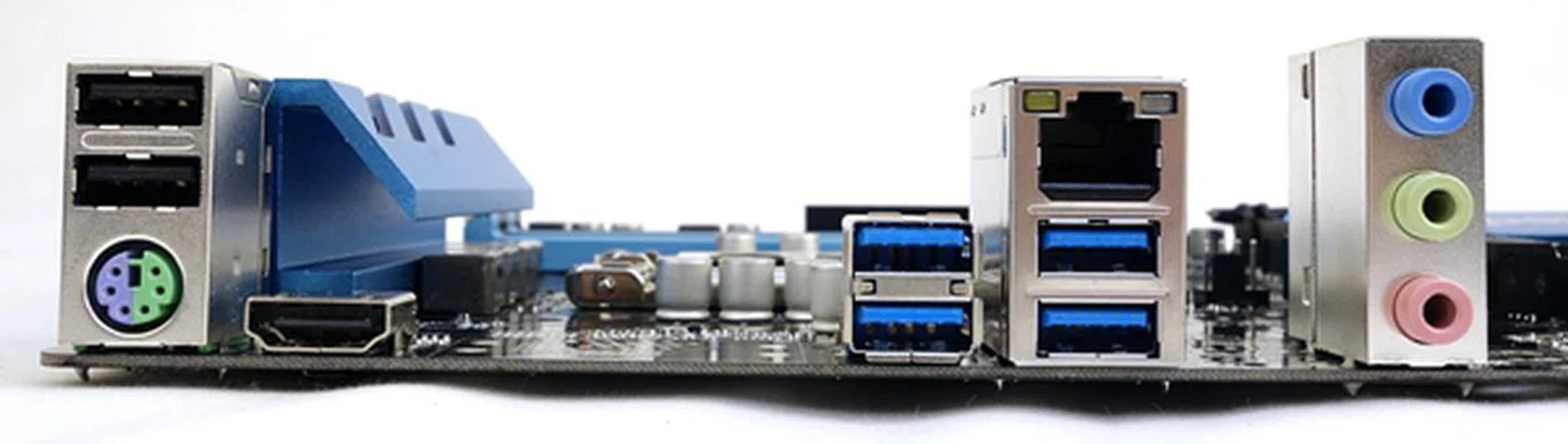
The rear I/O ports consist of a pair of USB 2.0 ports that sit above a PS/2 keyboard and mouse combo port. The HDMI port is next to this stack. There are a total of four USB 3.0 ports, a Gigabit LAN port, and a triplet of audio ports.
The onboard audio system is driven by the Realtek ALC887 audio codec, and it boasts of ELNA audio capacitors. The audio chip is capable of driving a 7.1-channel sound system, and it appears to be hampered by the lack of audio connectivity options in this current implementation. We would at least appreciate a digital audio output option in addition to the analog audio connectors. It will suffice for a strict PC-usage setting where most multimedia speakers still connect via analog connections, but beyond that, more connectivity is required. Despite expandability limitations, we hope that the cost savings are passed on to the consumers who could then make an appropriate investment in dedicated sounds cards if they so require better audio processing needs.

The board features a HD audio 7.1-channel capable Realtek ALC887 codec.
According to the local distributor of ASRock, we last heard that the board will not be made available here; hence, you will have to order one from an online retailer, and its estimated retail price is about US$120. Despite this, let us take a look at how well the ASRock Z97 Anniversary performs in the subsequent pages. In addition, we have rounded up additional components to test, in order to have a better understanding of the value proposition of the ASRock board.
Test Setup
This is the basic test configuration for the ASRock Z97 Anniversary:-
- 2 x 4GB Crucial Ballistix Elite Series DDR3-1600 (CAS 7-7-7-20 at DDR-1333MHz)
- ASUS Radeon R9 290X DirectCU II OC (AMD Catalyst 14.4)
- Western Digital Caviar Black 1TB SATA 6Gbps hard drive (one single NTFS partition)
- Windows 7 Ultimate SP1 (64-bit)
- Intel Pentium G3258 Anniversary Edition (3.2GHz) / Intel Core i7-4790K (4.0GHz)
While the main focus is to test the Pentium Anniversary CPU with the ASRock Z97 Anniversary board, we also managed to get our hands on the Intel Core i7-4790K, codenamed Devil's Canyon. We decided to swap out the new Pentium chip and operate the Devil's Canyon processor on our ASRock Z97 Anniversary test rig to see how much performance boost was garnered with the CPU upgrade.
Note 1: We set the DRAM Frequency of the board to DDR3-1333 since the Pentium G3258 AE chip officially supports this operating frequency. Also, we set the CAS timings accordingly.
Note 2: We decided to use a top-end graphics card, the ASUS R9 290X DirectCU II OC graphics card, as we would like to ascertain the gaming performance of the new Pentium chip, together with its ideal Z97 companion. The premise is to see if the ASRock Z97 Anniversary coupled with a Pentium CPU be adequate to satisfy aspiring budget PC DIY gamers. Analyzing the same platform with a speedy CPU, we can also determine if the Pentium CPU becomes a bottleneck for this group of users.
At the same time, we compared this board against the ASUS B85-Pro Gamer motherboard that is targeted at PC gamers who want to build an mid-range to entry level gaming system, without breaking the bank. The same test components, listed above, drove our ASUS B85-Pro Gamer test system. We will take a closer look at this Intel 8 series motherboard from ASUS in a separate review. For now, it will suffice to know that this board is positioned as full ATX board that is targeted at the market segment of mid-range gaming components. In terms of retail price, a search amongst online retailers revealed that the ASUS board is priced at roughly US$121, which is almost the same price as the ASRock Z97 Anniversary.
The basic test configuration for the ASUS B85-Pro Gamer, which is identical to the ASRock board listed above.
BIOS Settings
The UEFI BIOS utility of the ASRock board is well-organised due to its tabbed layout. Besides its slick GUI, the utility allowed us to tweak numerous power settings like CPU Vcore voltage to more esoteric ones like Long and Short Power Duration Limits. This is extremely useful in pushing the new Pentium processor to new heights, especially in terms of its rated clock speed.

The GUI of the board's BIOS utility is slick, and its options for tweaking system settings is detailed enough to keep power users and overclockers happy.
Speaking of overclocking, the BIOS utility has one trick up its sleeves; the option to overclock the Pentium G3258 with just the push of a button. At POST, the user can push the "P" key to gain access to the Pentium Anniversary Boost menu. There are three menu options to overclock the new Pentium processor. Naturally, we picked the last option to increase its clock speed to 4.2GHz during our overclocking tests.
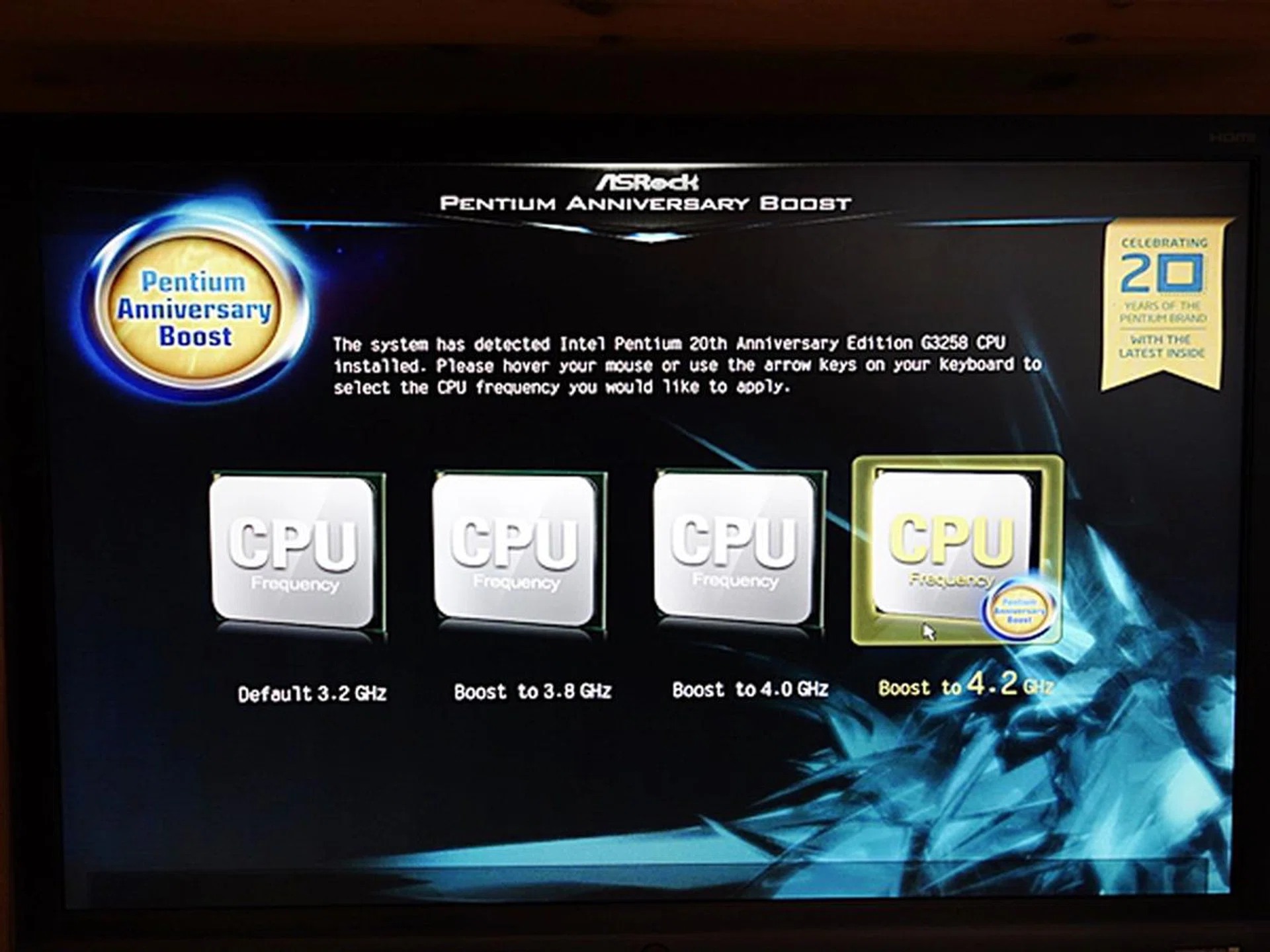
Overclocking the Pentium G3258 to a clock speed of 4,2GHz is as easy as pushing a button, and selecting a menu option!
Intel Pentium G3258 Anniversary Edition Processor
ASRock claims that overclocking the new Pentium processor will be made simple with its exclusive Pentium Anniversary Boost feature of the ASRock Z97 Anniversary. By a click of a button, the processor was be overclocked to 4.2GHz, an increment of 31% over its default clock speed of 3.2GHz. However, before you go over the moon, do note that despite the fact that the Pentium G3258 has been updated to feature the Haswell microarchitecture, it is lacking due to the following factors:-
- There isn't support for Intel HyperThreading technology.
- Small cache size that's not using Intel Smart Cache technology that would otherwise allow any core to use any amount of the total cache available from the inactive cores. This would mean more CPU cycles and penalties when trying to access contents stored in a core's cache that's required in a different execution core. A shared cache structure would have made sharing memory across execution cores a lot speedier.
- Its supported instruction set is limited in comparison to the current 4th generation Intel Core processors.
The table below compares the Pentium G3258 with two chips from the current Haswell Refresh stable; the entry-level Intel Core i3-4150 and the top-end Intel Core i7-4790K, codenamed Devil's Canyon. Full comparison can be seen here.
Processor Model | Cores / Threads | Frequency
(Base / Turbo) | DDR3 (MHz) | Integrated GPU | GPU Clock
(Base / Turbo) | TDP | Launch Price |
Intel Pentium G3258 | 2 / 2 | 3.2GHz | 1333 | Intel HD Graphics | 350MHz / 1100MHz | 53W | US$72 |
Intel Core i3-4150T | 2 / 4 | 3.0GHz | 1600 | Intel HD Graphics 4400 | 200MHz / 1150MHz | 35W | US$117 |
Intel Core i7-4790K | 4 / 8 | 4.0GHz / 4.4GHz | 1600 | Intel HD Graphics 4600 | 350MHz / 1250MHz | 88W | US$350 |
At a glance, the Pentium G3258 stands out due to its price point. According to the latest price lists of Sim Lim Square retailers, the commemorative processor is priced at S$95; while the Core i7-4790K has a price tag of S$450 and the Core i3-4150T price is estimated to be S$230. In addition, as we have mentioned earlier, the Pentium G3258 comes unlocked, with overclocking officially sanctioned!
Now that we've established what the Pentium G3258 Anniversary CPU is about, let us examine the chip's "ideal" companion, the ASRock Z97 Anniversary board and its performance.
Benchmarks
The following benchmarks were used in our testbed:-
- Futuremark 3DMark (2013)
- Hitman: Absolution
- Tomb Raider
- Thief
- Cinebench R15
- Handbrake (version 0.99)
- Blu-ray playback (CPU utilization)
Results - Gaming Performances
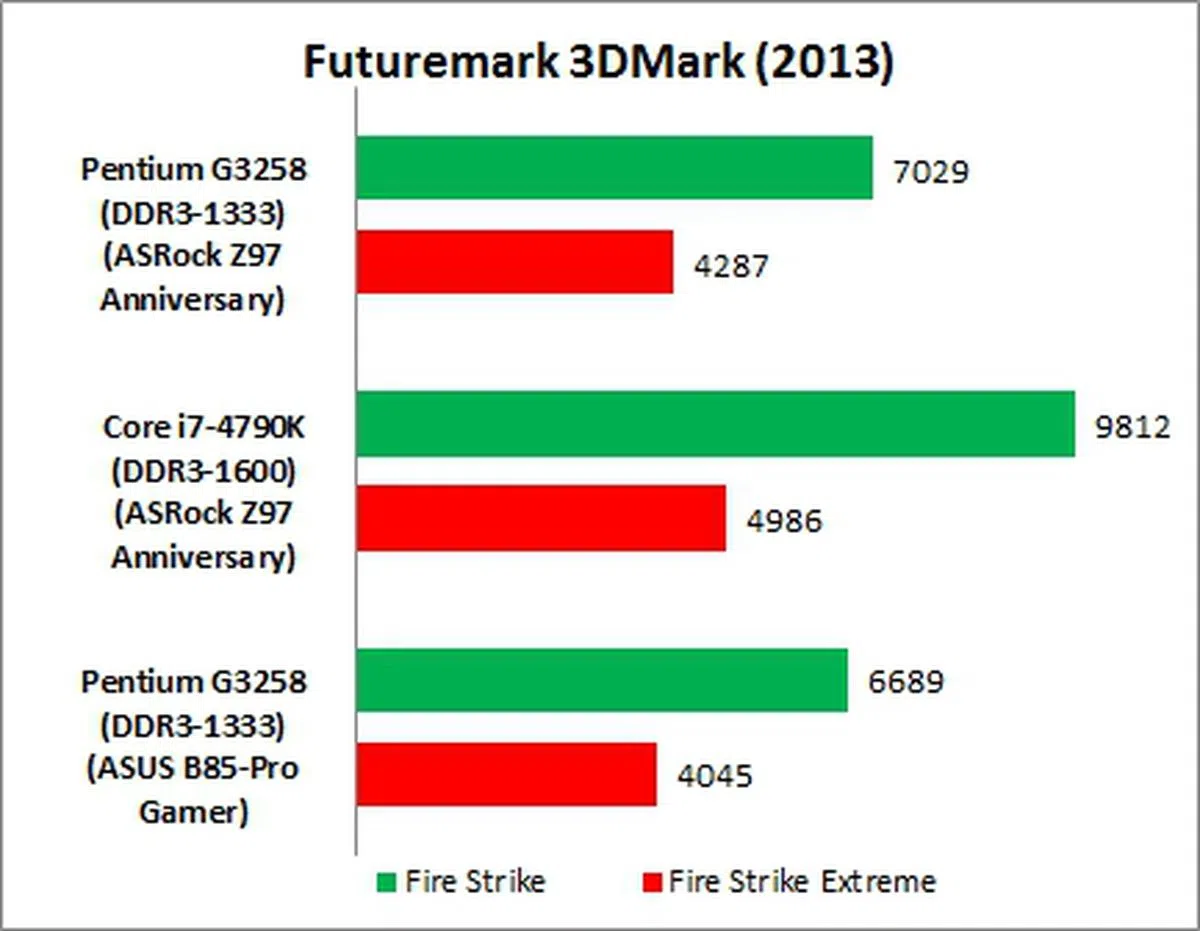
For our gaming benchmarks, it was the synthetic benchmark scores in 3DMark (2013) that benefited from the upgrade of the processor, i.e., when we swapped out the new Pentium G3258 for the highest-end Intel Core i7-4790K chip. This is especially so for the Fire Strike portion of the test scores. Since 3DMark is well known to factor in CPU and GPU performance related testing, its results will naturally sway towards whichever system that's best equipped.
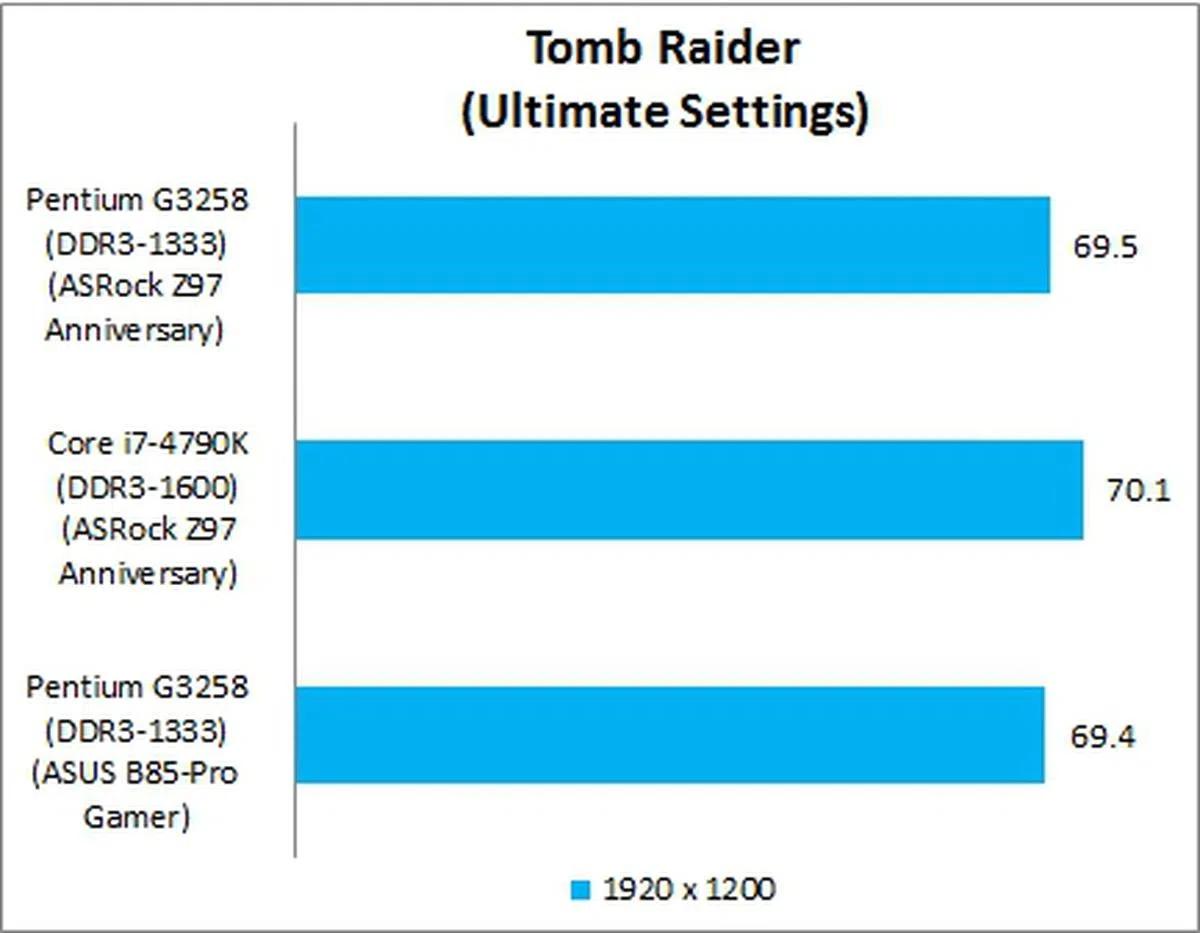
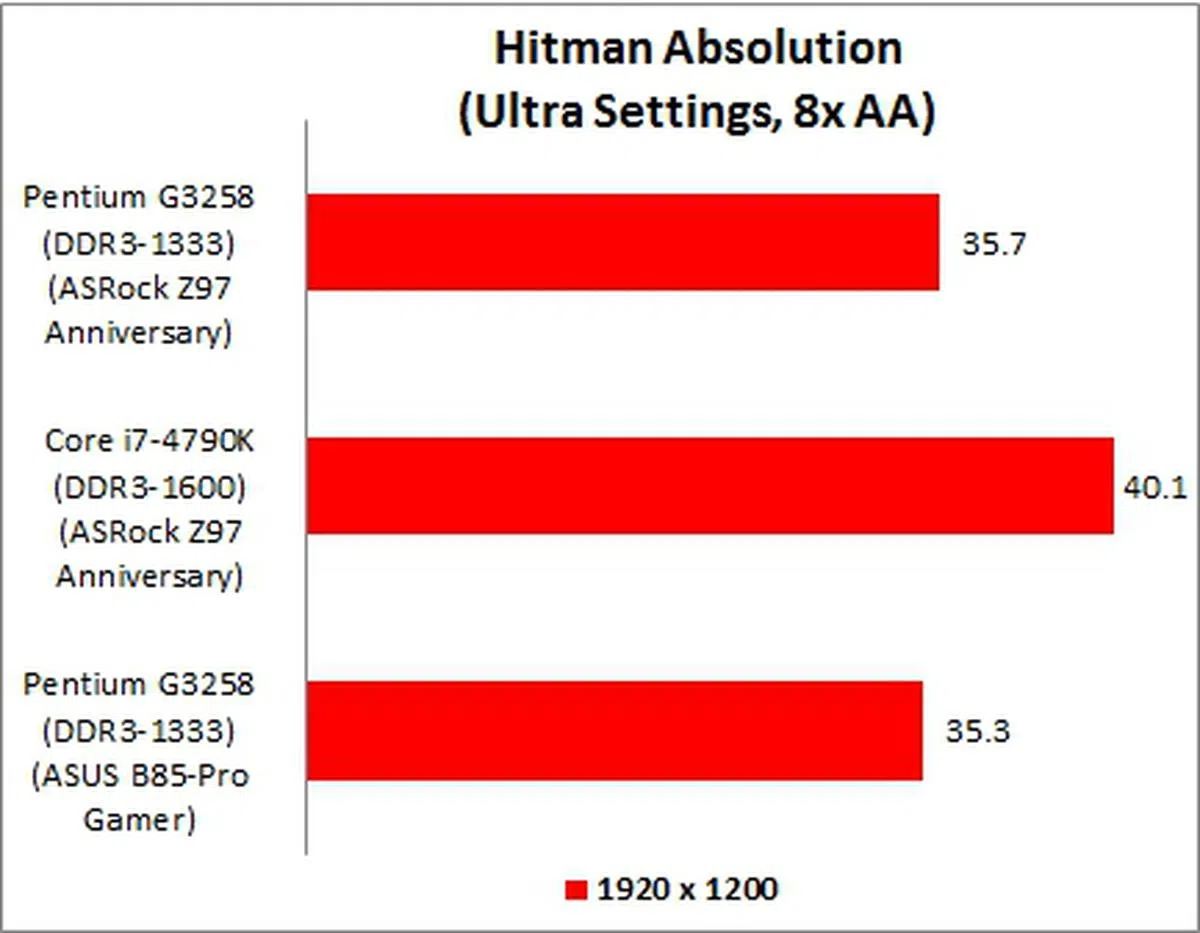
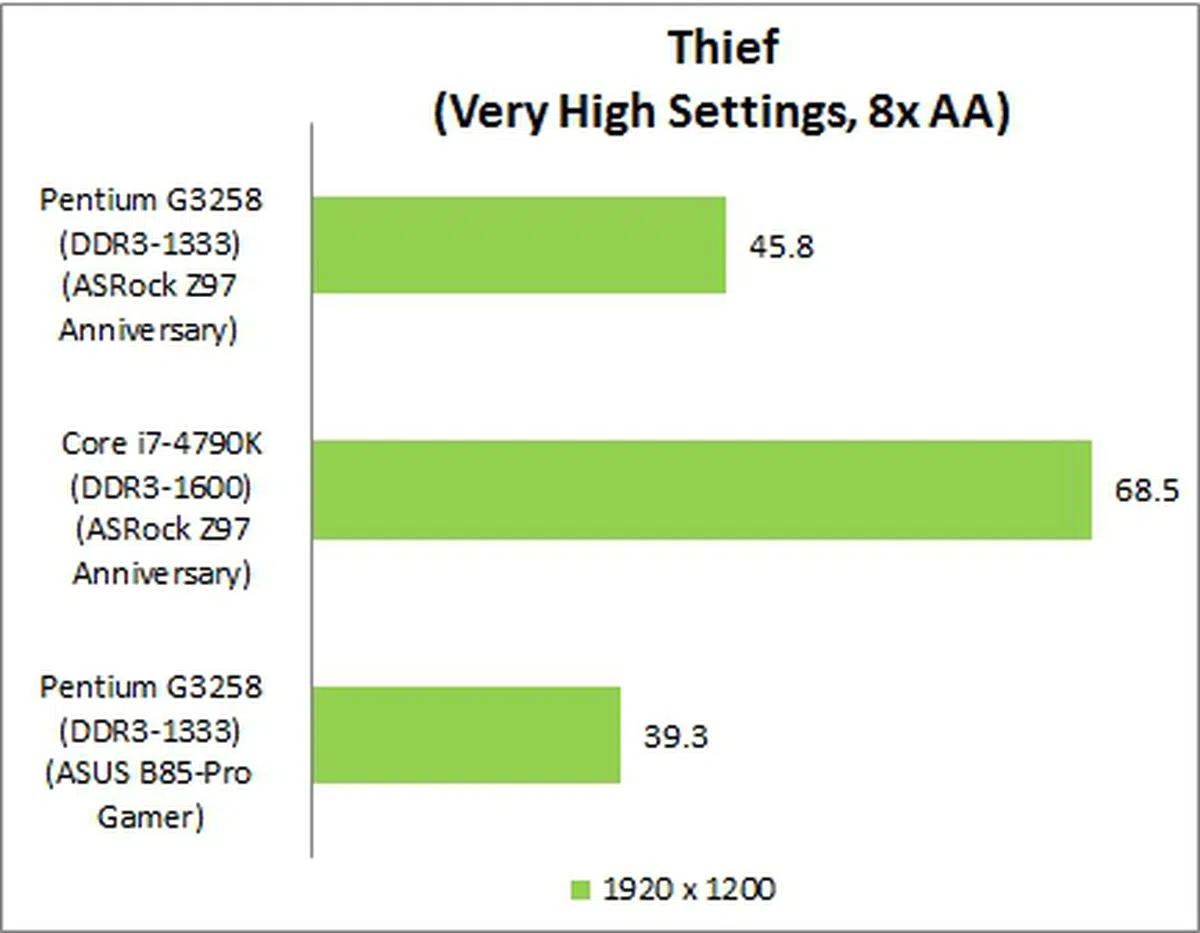
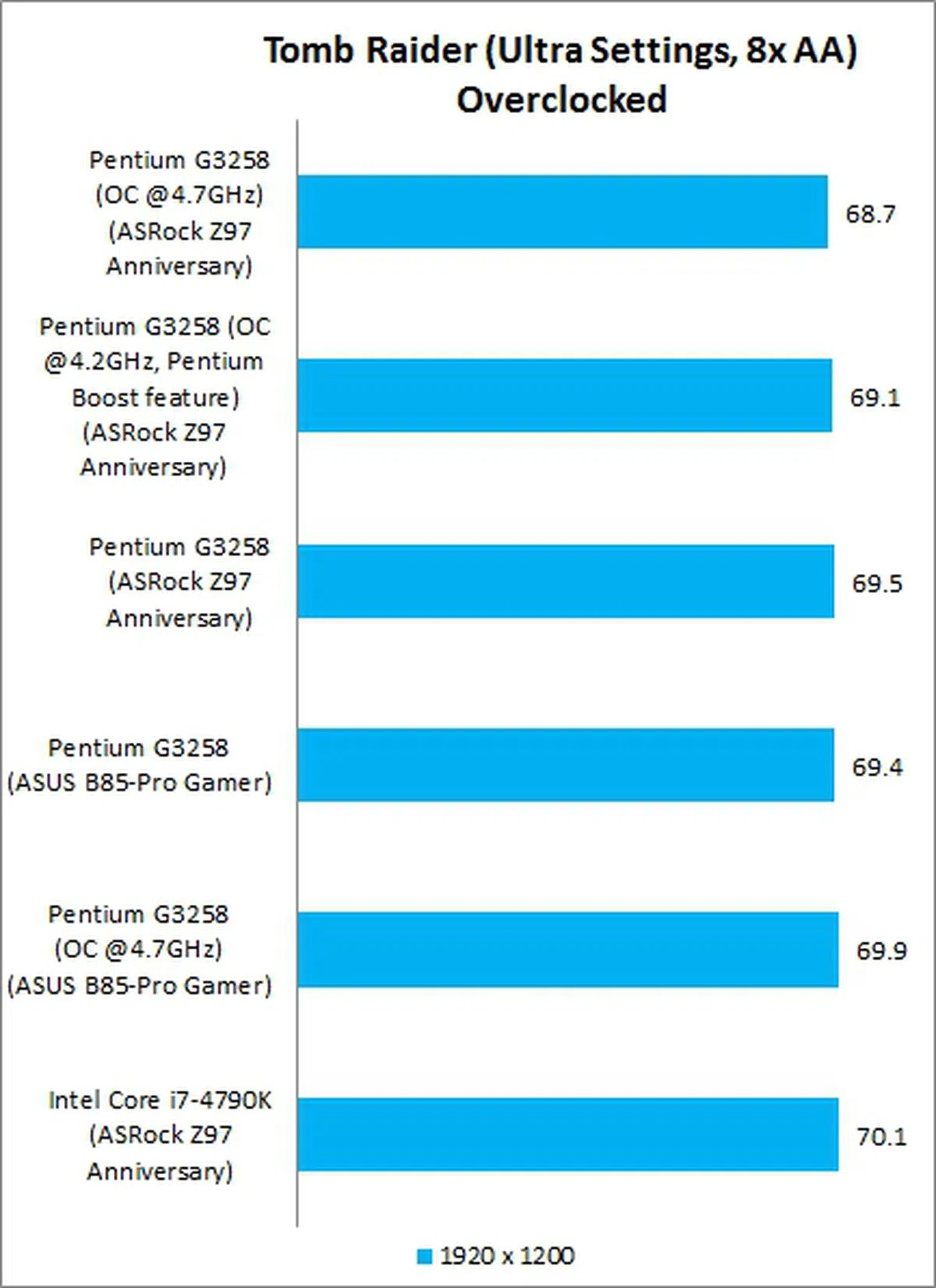
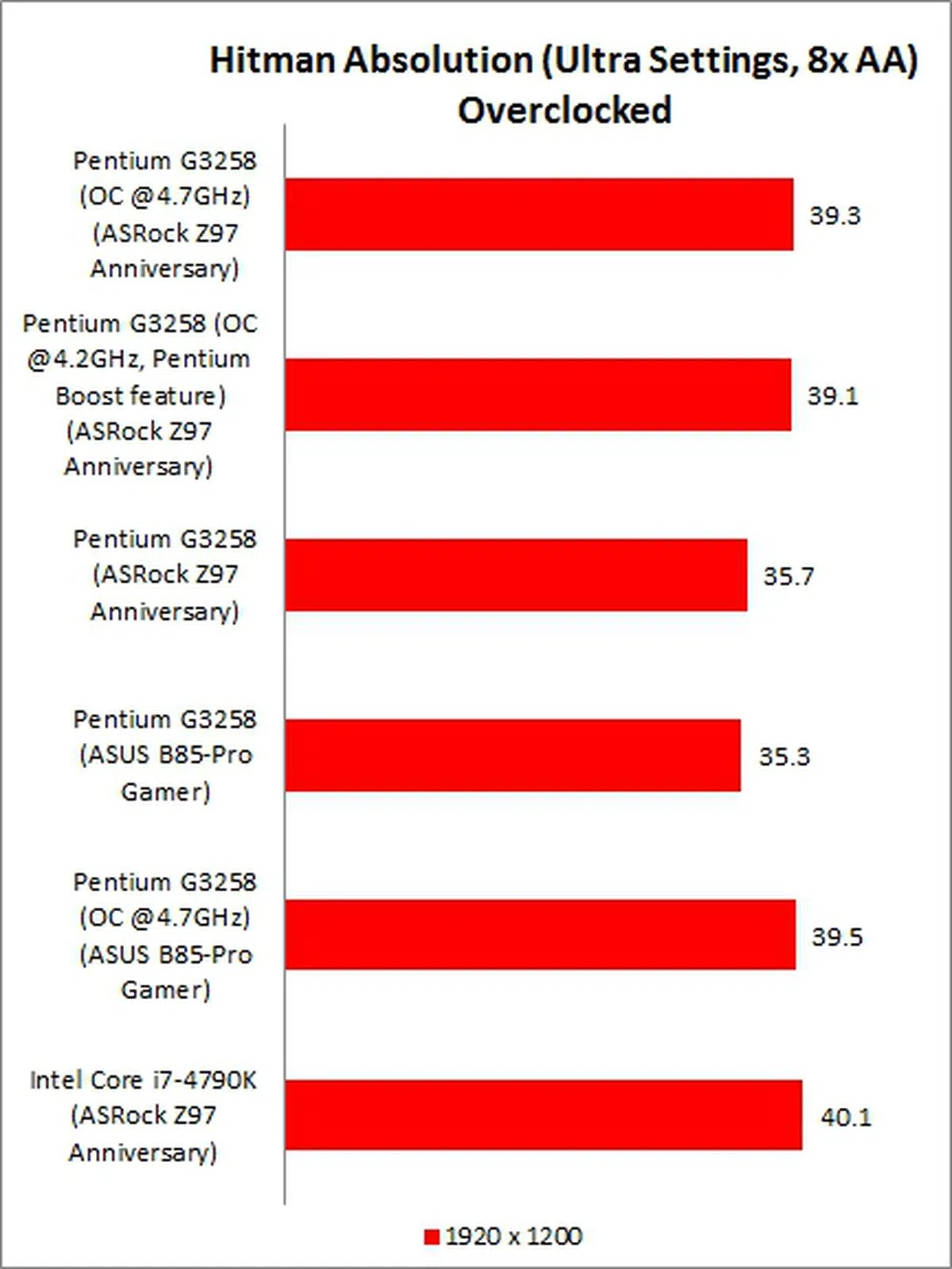
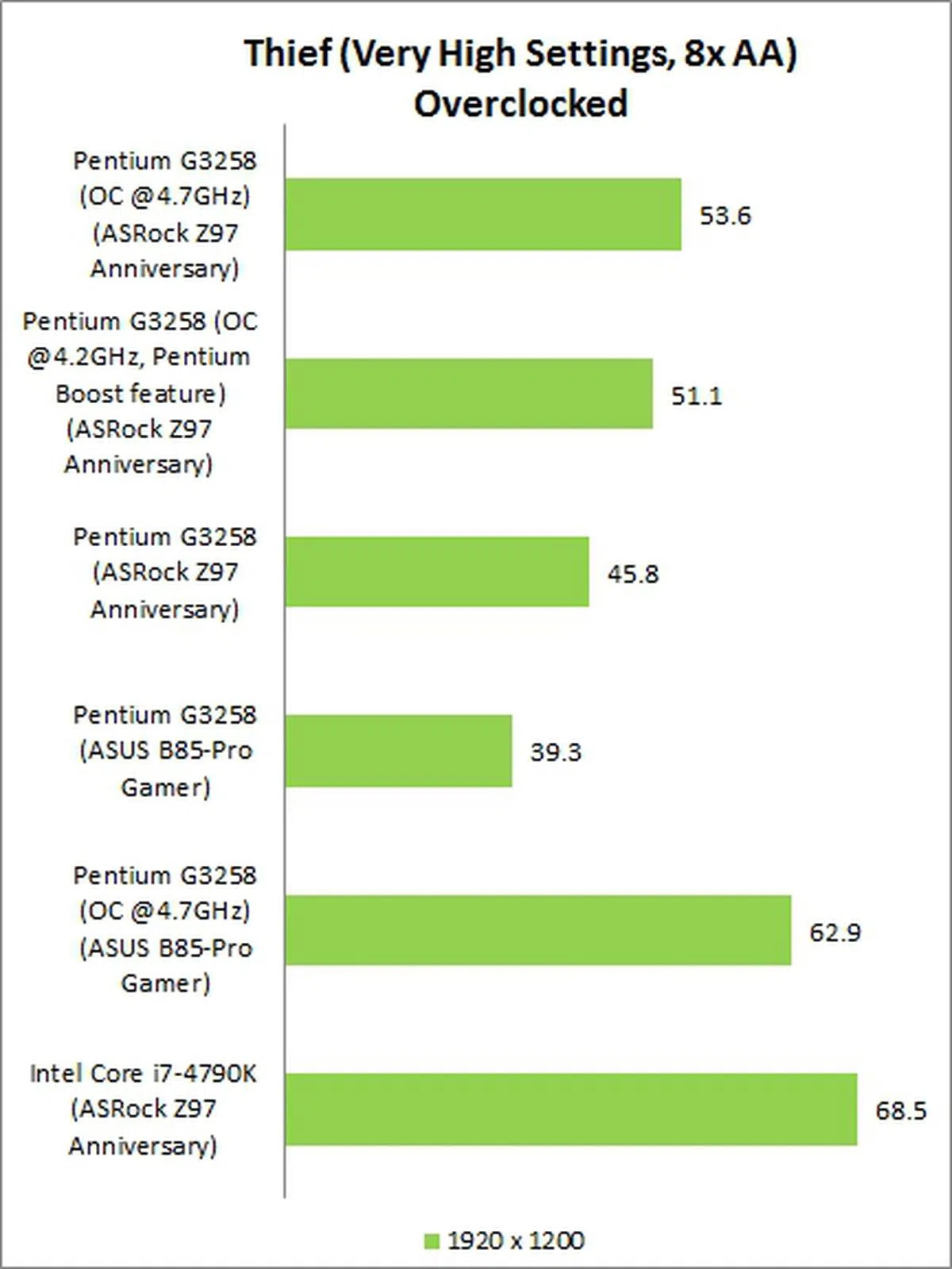
In terms of the PC game titles , it was Thief that recorded a substantial increment in the average frame rates recorded by its in-game benchmarking utility. However performance figures from Tomb Raider and Hitman Absolution hardly differed whether if you were to use the cheapest or the most expensive processors around. This proves that you don't really need a speedy CPU in all situations.
Results - CPU Performance
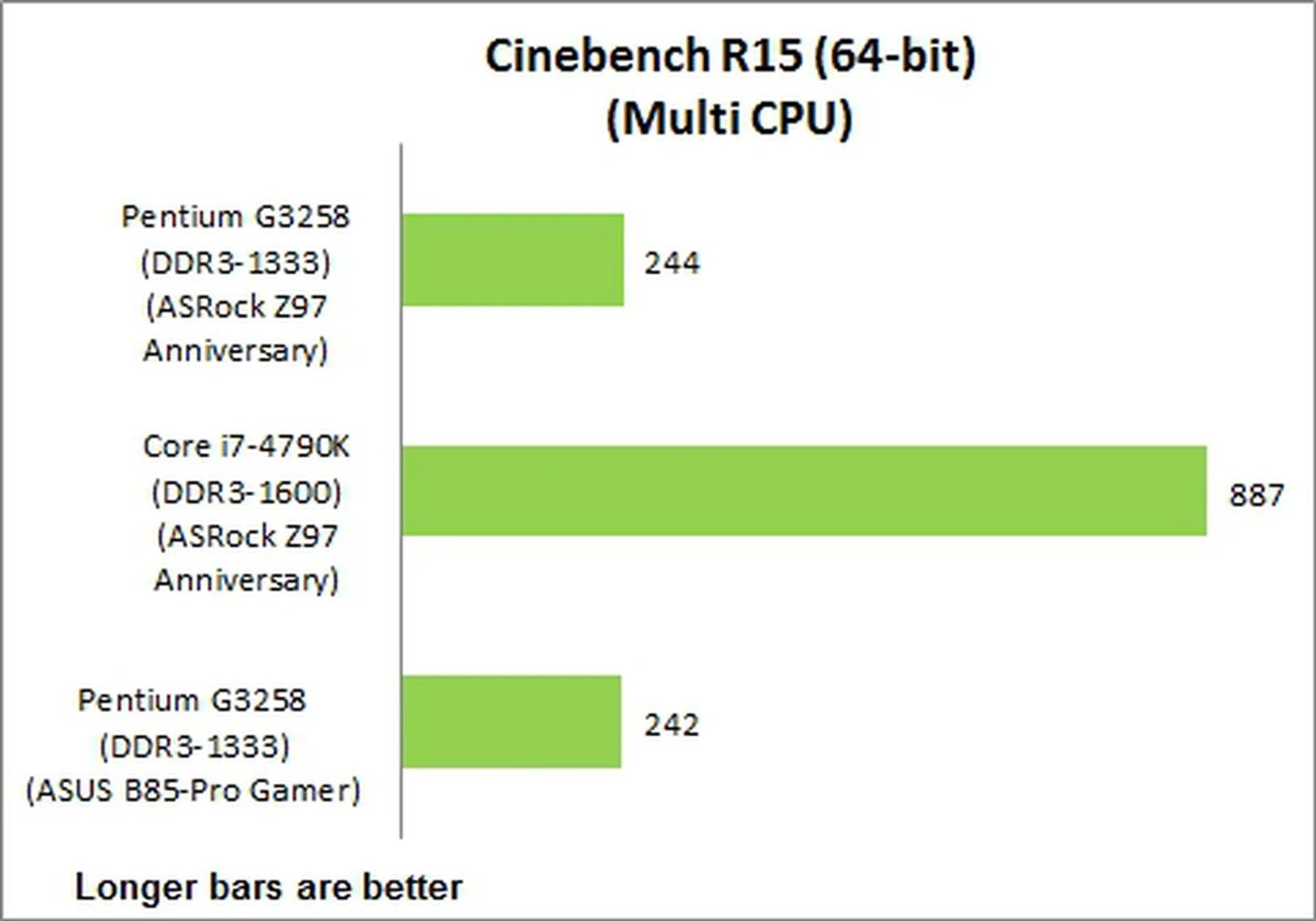
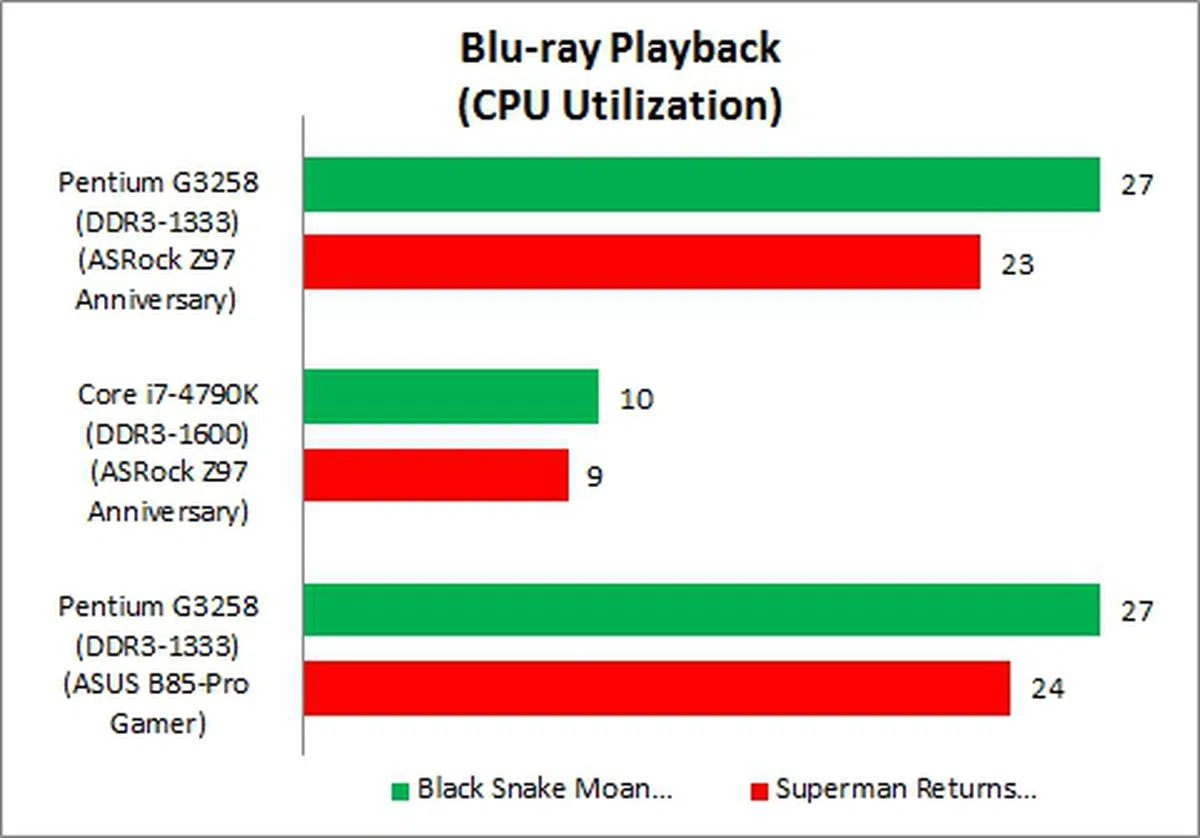
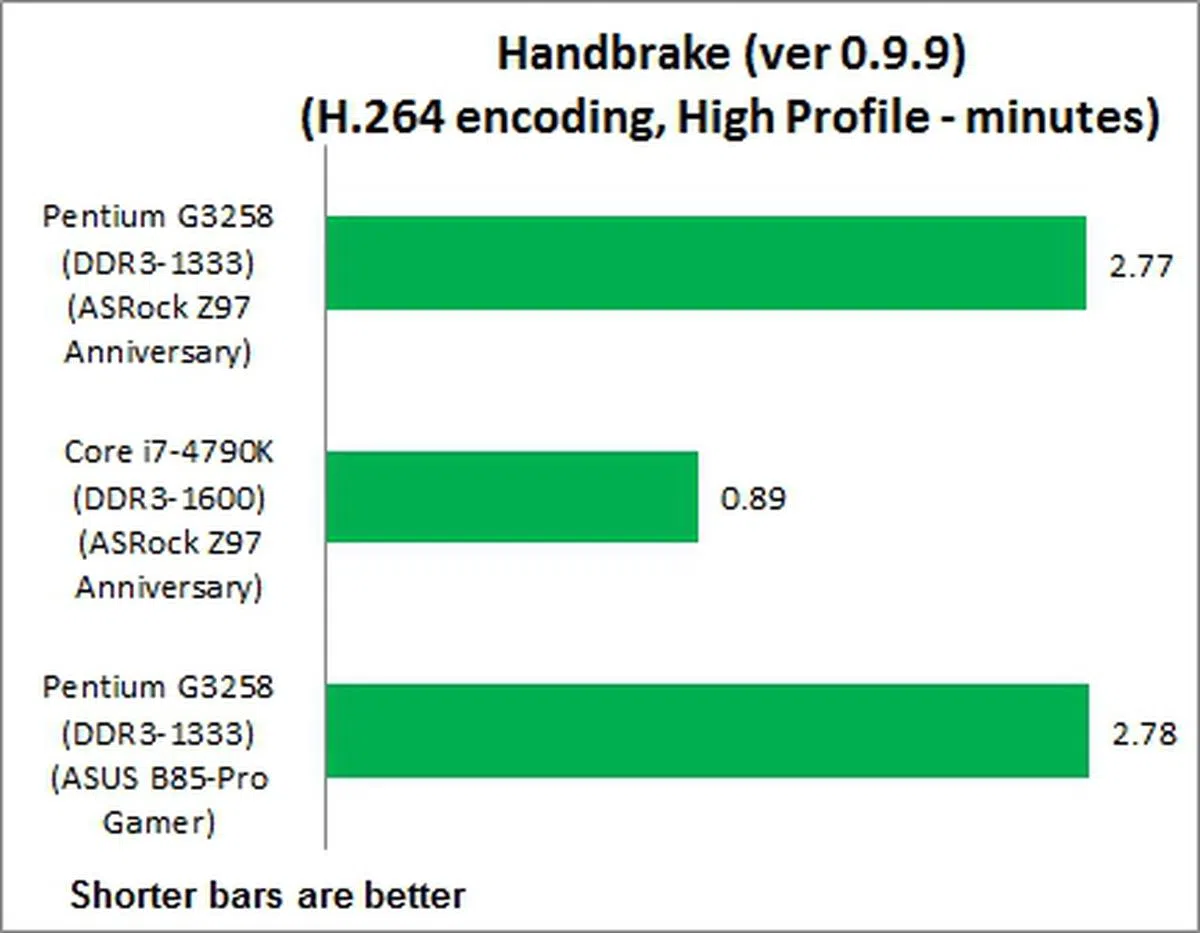
Due to the Pentium chip's lack of support for HyperThreading, the dual-core CPU fell fall behind the Devil Canyon's significantly. We note with interest that the Pentium chip's results were almost identical, be it when it was installed on the ASRock Z97 Anniversary or the ASUS B85-Pro Gamer. All of these tests scale well with CPU processing power and thus the results show that the motherboard used doesn't necessarily matter for these usage scenarios. But if you must nitpick, the ASRock Z97 Anniversary was just a hair speedier.
Results - Power Consumption
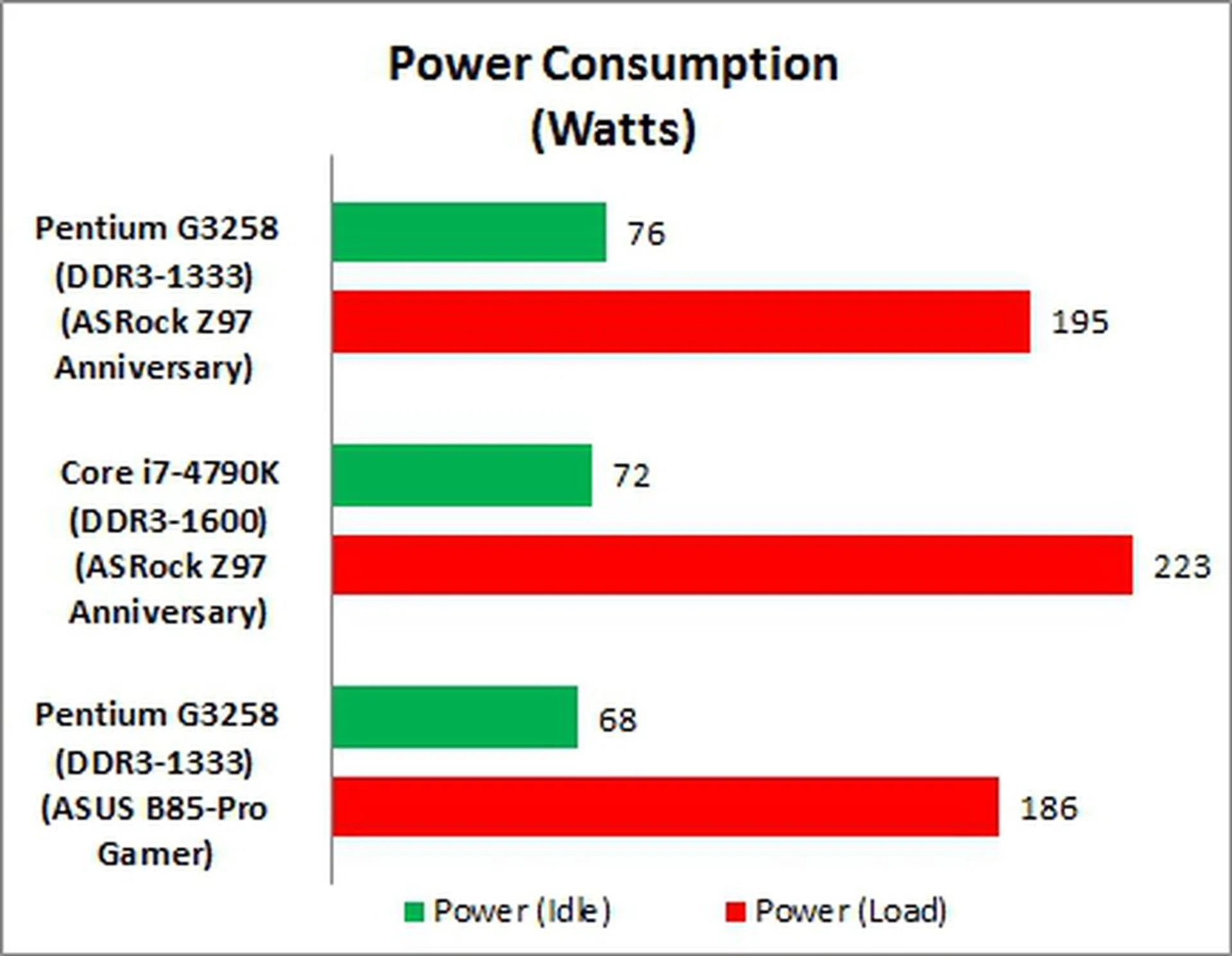
With reference to the Intel Pentium G3258 CPU, the B85-Pro Gamer test system had a slightly lower power draw than the Z97 Anniversary-based one. This may be partly attributed to the power saving features of the Intel B85 chipset that is originally meant for corporate desktops. The Intel Core i7-4790K naturally had the highest power draw in order to power up its four cores, operating at a base clock of 4.0GHz!
Results - Overclocking
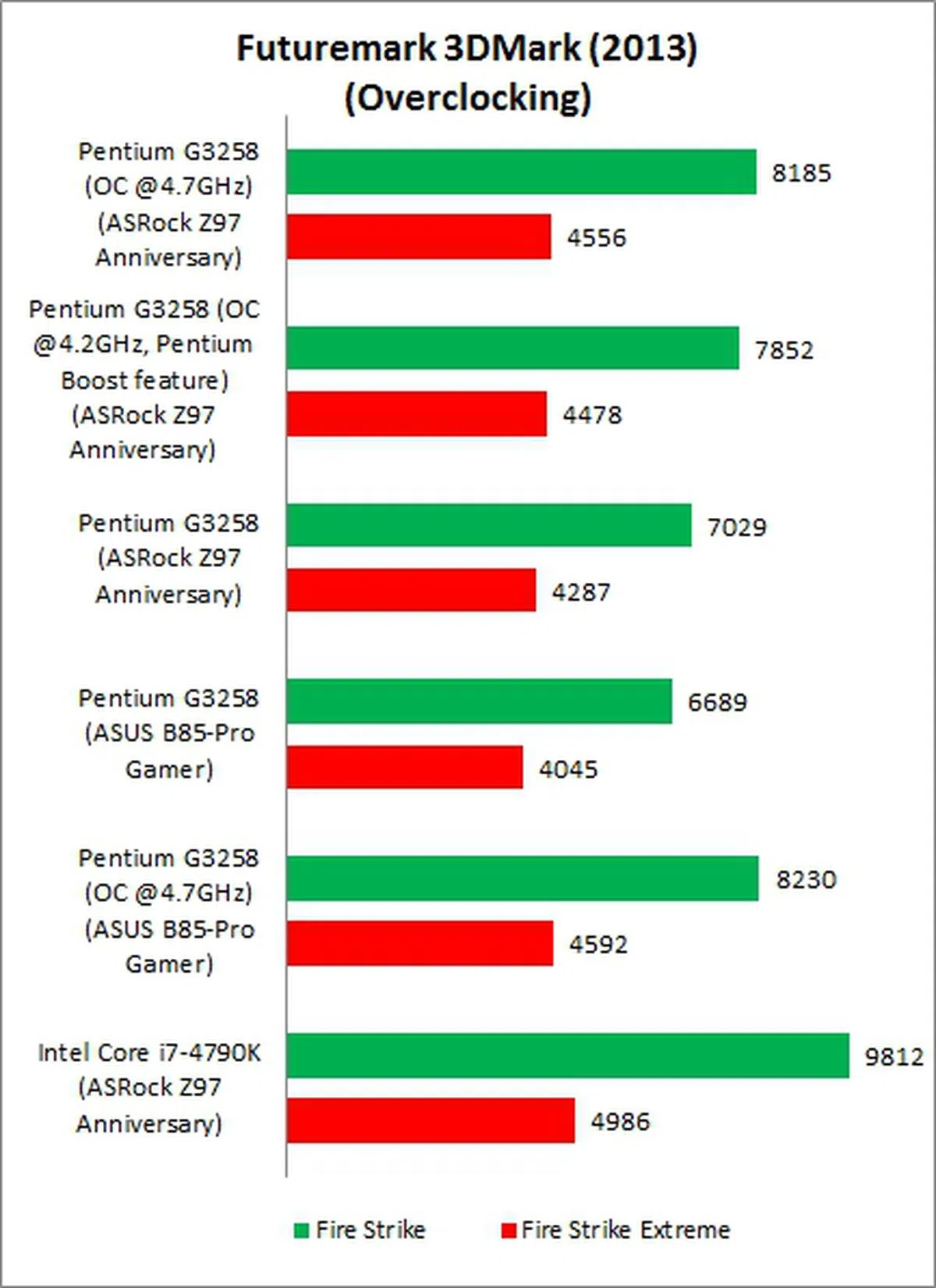
In this segment, our mission is to figure out if overclocking the Pentium G3258 Anniversary Edition chip would satisfy gamer's needs as opposed to splurging on an Intel Core i7 processor. As such we've non-overclocked and overclocked results from ASRock and ASUS boards to check against the default performance of a Core i7-4790K chip. For overclocking performance on the ASRock Z97 Anniversary board, we investigated both manual overclocking and Pentium Boost function.
Generally speaking, there is improvement in gaming experience when the Pentium G3258 chip is overclocked. This is especially so when the overclocked chip is paired with the ASUS B85-Pro Gamer test rig. We managed overclocked the chip to a clock speed of 4.7GHz on both ASUS and ASRock boards; however, it was the ASUS-based test rig that showed more significant gains. In fact, for the game titles, the ASUS rig was just barely trailing behind the Devil Canyon powered test system that featured the ASRock board.
That's not to say the ASRock Z97 Anniversary didn't overclock well as it was competitive in 3DMark 2013, Tomb Raider and Hitman Absolution. However, the ASUS B85-Pro Gamer edged it out all the time and the difference in performance was most obvious in the Thief gaming benchmark.
Conclusion
After reviewing its performance results and anemic feature set, the ASRock Z97 Anniversary is a board whose purpose seems a bit contradictory. It features the top-end Intel Z97 chipset so that overclockers and power users may install any LGA1150 unlocked processor for overclocking. At the same time, such users may be hindered by the lack of support for multi-GPU configurations for better gaming experience. In fact, we have also determined that upgrading the processor, even to a high-end Intel Core i7-4790K, will not improve gaming experience significantly in some games - especially in a single GPU environment. The main saving grace of the board is its support for the upcoming 5th generation Intel "Broadwell" processors; hence, its owner has the option to upgrade the CPU in the near future. As we had mentioned earlier, its estimated online retail price is about US$120. Therefore, it isn't a bargain when compared to the ASRock Z97 Pro4 that is available from Newegg for roughly US$110 and it crams better features for less. Unlike the Z97 Anniversary which isn't available in Singapore, the ASRock Z97 Pro4 is available locally for S$266.
What about considering boards of the same category level that cater to the budget DIY system builders? Since both the ASRock Anniversary and ASUS B85-Pro Gamer have almost the same price point (US$120, which is based on prices sourced from online retailers), we are inclined to pair the new Pentium chip with the ASUS B85-Pro Gamer board. However, some may balk at the fact the ASUS board hails from the previous generation Intel 8-series, and not to mention its humble roots as a chipset that is meant for business and productivity desktop systems. Regardless, we've shown that it can shine when put to the test, especially when overclocked. It also offers better features than the ASRock Z97 Anniversary board.
In conclusion, the ASRock Z97 Anniversary does serve its current single-minded purpose, of being a low-cost complement to the Pentium G3258 processor (even though we've pointed out there are better ASRock boards at a lower price point). The board also allowed us to achieve stable overclocks with the chip in a convenient and hassle-free manner, especially with its exclusive Pentium Anniversary Boost feature. But it is severely hampered by its lack of support for multi-GPU configurations that would promote upgradeability. Without an additional PEG slot, your only way to boost performance is to purchase a more expensive new graphics card, and discarding the previous one. If multi-GPU support was available, getting a second-hand identical graphics card at a later time frame would have been an affordable proposition to nearly double the gaming performance. The ranting doesn't just stop at this feature, but also with regards to the variety and type of expansion slots, rear I/O port options and others, which we find are just bare minimum when there are better options for the same price point.
Perhaps this board would have found more purpose if it were to be resurrected as a mATX board, which is targeted at builders looking for a small form factor gaming rig? It could have helped reduce the board's cost further.
Our articles may contain affiliate links. If you buy through these links, we may earn a small commission.